University of New Orleans University of New Orleans
ScholarWorks@UNO
ScholarWorks@UNO
University of New Orleans Theses and
Dissertations Dissertations and Theses
1-20-2006
Storing and Indexing Expressions in Database Systems
Storing and Indexing Expressions in Database Systems
Raj JampaUniversity of New Orleans
Follow this and additional works at: https://scholarworks.uno.edu/td
Recommended Citation Recommended Citation
Jampa, Raj, "Storing and Indexing Expressions in Database Systems" (2006). University of New Orleans Theses and Dissertations. 319.
https://scholarworks.uno.edu/td/319
STORING AND INDEXING EXPRESSIONS IN DATABASE SYSTEMS
A Thesis
Submitted to the Graduate Faculty of the
University of New Orleans
in partial fulfillment of the
requirements for the degree of
Masters of Science
in
The Department of Computer Science
by
Raj Kiran Jampa
B.Tech, Jawaharlal Nehru Technological University, India, 2003
Acknowledgement
I wish to express my gratitude to a number of people who became involved with this thesis, one
way or another.
I am deeply indebted to my supervisor, Dr. Nauman Chaudhry whose help, stimulating
discussions; suggestions and encouragement helped me in all the time of research for and writing
of this thesis. In addition, I would like to thank Dr. Shengru Tu and Dr. Chiu for being on my
thesis defense committee.
Finally, I would like to thank my family and friends for the continuous support and help they
Table of Contents
List of Figures ...v
List of Tables ... vi
Abstract... vii
1 Introduction...1
2 Overview of Expressions and Previous work ...3
2.1 Overview of Expressions ...3
2.1.1 Terminology and Definitions...3
2.2 Previous Study on Expressions...6
2.2.1 Storing Expressions as Table Data ...6
2.2.2 Evaluation of Expressions (EVALUATE Operator) ...7
2.2.3 Handling Expressions (Oracle Approach) ...7
2.3 Indexing Expressions (Oracle Approach) ...10
3 Approach Used in this Study ...15
3.1 Overview of Expression Handling and Storage...15
3.1.1 Expression Storage...15
3.1.2 Development of Predicate Table and Expression Table ....16
3.2 Methodology used in this work to handle and store Expressions...19
3.2.1 Storage of Expressions...19
3.2.2 Validation of incoming Expression (and Predicates)...20
3.2.3 Adding new Record in the Expression Table (and Predicate Table) ...20
3.3 Indexing Expressions: Approach used in this study ...24
3.3.1 Algorithm...25
3.3.1.1 B+-tree Search ...27
3.3.1.2 Sequential Search...32
4 Results...35
4.1 System Specifications ...36
4.2 Test Cases ...36
4.3 Discussion of Results...43
4.3.1 Equality Search ...43
4.3.2 Range Search ...44
5 Conclusion and Future work...45
5.1 Conclusion ...45
5.2 Future Work and possible Enhancements...45
References...47
List of Figures
Figure 2.1 Consumer Table... 6
Figure 2.2 Storage of Expressions as a Column in Data Table ... 10
Figure 2.3 Predicate Table in Oracle Approach... 13
Figure 4.1 Graphical Representation of Range Search (5000 rows) ... 37
Figure 4.2 Graphical Representation of Equality Search (5000 rows)…………...38
Figure 4.3 Graphical Representation of Range Search (10000 rows……….39
Figure 4.4 Graphical Representation of Equality Search (10000 rows) ... 40
Figure 4.5 Graphical Representation of Range Search (30000 rows) ... 41
List of Tables
Table 3.1 Example of Expression Table ... 17
Table 3.2 Example of Predicate Table... 18
Table 3.3 Expression Table... 21
Table 3.4 Predicate Table ... 22
Table 3.5 Updated Expression Table ... 23
Table 3.6 Updated Predicate Table... 23
Table 3.7a Predicate Table:... 25
Table 3.7b Expression Table... 26
Table 3.8a Predicate Table:... 30
Table 3.7b Expression Table... 31
Table 4.1 Test Cases ... 35
Table 4.2 System Specification... 36
Table 4.3 Range Search on Predicate Table with 5000 rows ... 37
Table 4.4 Equality Search on Predicate Table with 5000 rows ... 38
Table 4.5 Range Search on Predicate Table with 10000 rows ... 39
Table 4.6 Equality Search on Predicate Table with 10000 rows ... 40
Table 4.7 Range Search on Predicate Table with 30000 rows ... 41
Abstract
Expressions are very useful in a number of applications for describing the interest of the user in
particular data items. Examples of such application domains include publish/subscribe,
ecommerce, web site personalization. In recent work, database techniques have been utilized for
efficiently matching large number of expressions with data. These techniques include storing
expressions as data in the database and then indexing these expressions to quickly identify
expressions that match a given data item.
In this thesis a new model for expressions is presented that allows definition of richer
expressions than provided in previous work. Implementation of this expression model is then
described. The implementation includes sequential search as well as an indexing approach. The
thesis then presents an experimental performance study that shows the benefit of the indexing
Chapter 1 Introduction
Expressions are very useful to describe the interest of the user. They are used in wide range of
applications including Publish/Subscribe [5, 6], Ecommerce [7, 8], Continuous Queries [9, 10],
Web site Personalization [11].
Let us consider a simple Example [2]:
ON Car4Sale
IF (Model = ‘Taurus’ and Price < 20000)
THEN notify(‘[email protected]’)
In this content based subscription system [6], user expresses his interest in Car4Sale Event. In
this event the users interest is modeled in the Expression
“Model =’Taurus’ and Price < 20000”.
In other words, the user is looking for Taurus (Car) and the price of the Car must be less than
20000. So in this way users express their interest in a similar fashion. Every time a event of this
sort occurs, one has to search the database for each condition mentioned in the Expression, and
then display the records which qualify all the conditions in the Expression. So rather than just
querying the database every time the user expresses his interest (which would take more time), if
we capture the interest itself and store the interest of users in database, then one could get
This study explores the idea of capturing and storing the interest of users, which we call as
Expressions, as a part of RDBMS, and storing them in a certain way such that it takes less time
to get results. This study also explores previous implementation on this field, the Oracle
approach [2], and suggests a different approach to store and handle Expressions in a RDBMS.
Also in order to enhance the performance of evaluation of Expressions this study also suggests
and implements an indexing technique.
The work presented in this document attempts to improve the performance of Expression
evaluation by storing the users interest as a part of the RDBMS and indexing it in order to reduce
the time taken for the evaluation process. The rest of this thesis is organized as follows. Chapter
2 provides an overview of Expressions, nomenclature used in this study. It also mentions the
Previous work done in this area, the approach used to store and handle the Expressions. Chapter
3 describes the entire process of storing and handling the Expressions used in this thesis work
further it mentions about the indexing technique used in this study. The algorithm used for
implementation of this work is also mentioned in this chapter. Chapter 4 mentions the system
specifications in which the work was carried out, the test cases and discusses the results. Chapter
Chapter 2 Overview of Expressions and Previous work
This chapter reviews the basic terminology used in this work. It also mentions the previous work
done in this area, the approach defined by Oracle. The first section gives a brief overview of
Expressions, Predicates. The later sections discusses about the approach used by Oracle to
handle Expressions.
2.1 Overview of Expressions:
2.1.1 Terminology and Definitions:
Expressions:
In common words one can define Expression as something that expresses or communicates. In
this study it is defined as a combination of one or more values, operators, and SQL functions that
evaluate to a value. Expressions are all about patterns [1], once a pattern is described, it can be
searched or manipulated. Patterns are important for daily work; in many areas without a specific
pattern life would be much tougher.
Expressions are nothing but Boolean conditions. They evaluate to true or false depending on the
incoming data and the user’s interest. Conditional Expressions [2] are a useful way of describing
the interest of a user with respect to some expected data. One Example scenario is explained
Consider a CarSales event, a user may express interest as:
IF (Model = ‘Taurus’ and Price < 20000)
THEN notify(‘[email protected]’)
Here in the above case, users interest (Model = ‘Taurus’ and Price < 20000) constitutes
Expression. It describes the users interest. The referenced variables Model and Price form the
Evaluation Context. This study explores the idea of managing such Expressions (along with its
Evaluation Context) as data in a relational database system. The syntax of Expressions should
follow SQL-WHERE clause syntax. An Expression can reference any table, column, or function
in a database.
Few Examples of Expression is given below:
Ex1: (Model = ‘Taurus’ and Price < 15000 and Mileage < 2500)
Ex2: (Model = ‘Mustang’ and Year > 1999 and Price < 20000)
Ex3: (Price < 15000 and Color = ‘Red’)
Data-Item:
The data item constitutes of valid values for all the variables defined in the corresponding
Evaluation Context. An Expression evaluates to True if the incoming data-item meets the user’s
interest, and if the incoming data-item doesn’t meet the user’s interest then the Expression
Predicate:
A Predicate [3] is a WHERE clause that qualifies a particular set of rows within the table. For
Example a Predicate on Zipcode column of Employer table would appear something like this:
Employer . Zipcode = 70122
The above Predicate matches all the records in the Employer table where the Zipcode column
value is 70122. ‘.’ separates Tablename from Column name.
Other Examples of Predicates:
Car . Year = 2000
Consumer . Quantity > 200
Car . Price < 15000
Combining Predicates on other forms of data, like functions, in a database is just a powerful way
of expressing interest.
Operator for Evaluation of Expressions:
EVALUATE operator is introduced in SQL to evaluate an Expression for a given data-item. For
a given input data item, EVALUATE operator checks if any Expressions evaluates to True.
EVALUATE operator returns 1 if an Expression is evaluated to True for a given input data-item.
2.2 Previous Study on Expressions (Oracle Approach)
The Oracle approach proposes to store the Expressions defined for a particular Evaluation
Context in a column of a database table. Also they introduce EVALUATE operator that operates
on the column that stores the Expressions for a particular Evaluation Context.
2.2.1 Storing Expressions as Table Data
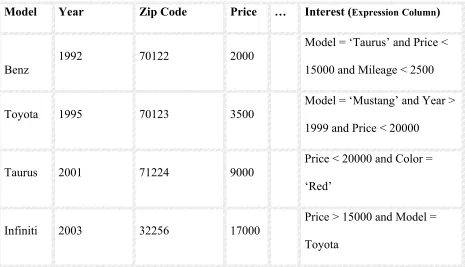
In Oracle approach, Expressions are stored in a column of a user table. Following is an Example
of User Table, which has an Expression column (Interest) that stores all the Expressions under an
Evaluation Context.
CONSUMER Table
Model Year Zip Code Price … Interest (ExpressionColumn)
Benz
1992 70122 2000
Model = ‘Taurus’ and Price <
15000 and Mileage < 2500
Toyota 1995 70123 3500 Model = ‘Mustang’ and Year >
1999 and Price < 20000
Taurus 2001 71224 9000
Price < 20000 and Color =
‘Red’
Infiniti 2003 32256 17000
Price > 15000 and Model =
Toyota
All the Expressions related to the consumer table are stored in the Interest column of the
Consumer Table. For all the Expressions, all the other columns constitute the Evaluation
Context. So only the Expressions related to the Consumer Table are present here in the
Consumer table.
2.2.2 Evaluation of Expressions (EVALUATE Operator):
In order to evaluate an Expression an EVALUATE Operator is used. The EVALUATE operator
would be evaluating to 1 if an Expression is evaluated to True, 0 if it is Evaluated to False. An
EVALUATE operator takes two arguments: the column of the conditional Expression and the
data items for the Expression.
Example using EVALUATE Operator:
Ex1: Select CID From Consumer WHERE
EVALUATE (consumer. interest,‘ Model => ‘ ‘ Mustang ‘ ‘, Price => 22000,
Mileage => 1800,Year => 2000 ‘) = 1;
2.2.3 Handling Expressions (Oracle Approach):
Expressions are stored in a column of a user table and compared, using the EVALUATE
operator, to incoming data items specified in a SQL WHERE clause or to a table of data.For an
incoming data item, every Expression is evaluated to either True or False. If the Expression and
same data range then the Expression evaluates to True, or else it evaluates to False. Expressions
that evaluate to True return 1, and those which evaluate to false return 0.
An Expression describes interest in an item of data using one or more variables, known as
elementary attributes. Elementary attributes are nothing but the columns names of the existing
data table in a RDBMS. It is also called as the Evaluation Context. A valid Expression consists
of one or more simple conditions called Predicates. The Predicates in the Expression are linked
by the logical operators AND and OR. Expressions must adhere to the SQL WHERE clause
format. It is not important that an Expression uses all the attributes in the Evaluation Context;
however, the incoming data from the incoming data item must provide a value for every attribute
in the Evaluation Context. For those attributes for which there is no data from the incoming data
item, null is accepted as the input value.
For Example, the following Expression captures the interest of a user in a Car (the data item)
with the model, price, and year as attributes.
Model = ’Taurus’ && Price = 20000 && Year = 2000
Now if the incoming data item looks like the following:
Model = ‘Taurus’ and Price = 25000
Then for the ‘Year’ attribute the EVALUATE operator assumes a null value.
Expressions are stored in a column of a user table with an Expression datatype. The values
stored in a column of this type are constrained to be Expressions. A user table can have one or
more Expression type columns. In order to display the contents of the Expressions column user
As the Expressions are stored as a regular column in the user table they can be also inserted,
updated or deleted with the help of standard SQL statements. All the Expressions stored in a user
table share a common set of attributes. This set of attributes plus any functions that are used in
the Expressions comprise the metadata for all the Expressions in a particular user table. All the
Expressions under one user table, that share a common set of attributes form an Expression set.
This metadata is referred to as the attribute set. The attribute set consists of the elementary
attribute names and their datatypes and any functions used in the Expressions. In order to insert
a new Expression or to modify an existing Expression validation is required. Validation would
be crosschecking if the new Expression or the modifications to the existing Expression comply
with the Expression metadata i.e. attribute set. So all the Expressions present under an
Expression set are bound to use the attributes and functions defined under the attribute set.
Expressions cannot contain sub queries.
The Figure below shows the storage of Expressions in Consumer Table. All the Expressions are
stored under the Interest column. CAR4SALE is the metadata for all the Expressions in that
table. The Expressions refer the column names mentioned in the metadata, also User-defined
functions and Built-in functions. The use of user function HorsePower can be seen in the third
Figure 2.2 Storage of Expressions as a Column in Data Table [2]
2.3 Indexing Expressions (Oracle Approach):
Evaluation of an Expression condition can be done in various ways. According to Oracle
approach, they store an Expression as a separate data column in a data table. They created a new
data type to store Expressions. With the help of data type, they could store the whole Expression
as a column in existing tables.
As discussed above, this approach maintains metadata of the Expressions. Each user table has a
conditional Expressions is introduced. This indexing mechanism is implemented as a new Index
type, Expression Filter, to create and maintain indexes on columns storing Expressions. When
an Expression Filter index is defined on a column storing Expressions, the EVALUATE operator
on such column uses the index. For a large set of
Expressions, the index can quickly eliminate the Expressions that are false for a given data item
and return only the Expressions that evaluate to true.
Expression Filter index can be created on a column storing Expressions and the EVALUATE
operator on such column may use the index to process the Expressions efficiently. Given a large
set of Expressions, many of them tend to have certain commonalities in their Predicates. For a
data item, these Expressions can be evaluated efficiently if the commonalities are exploited and
the processing cost is shared across multiple Predicates. For Example, given two Predicates with
a common left-hand side, say Year = 1998 and Year = 1999, in most cases, the falseness or
trueness of one Predicate can be determined based on the outcome of the other Predicate. That is,
if the Predicate Year = 1998 is true, the other Predicate Year = 1999 cannot be true for the
same value of the Year.
Similar logical relationships can be formed for Predicates having common left-hand sides with
range, not equal to and other kind of operators.
For Example,
If the Predicate Year > 1999 is true for a data item,
An Expression Filter index is defined over a set of Expressions. It exploits the logical
relationships between multiple Predicates by grouping them based on the commonality of their
left-hand side values. These left-hand sides, also called the complex attributes, are arithmetic
Expressions constituting one or more elementary attributes and user-defined functions. In the
Expression set, these left-hand sides (complex attributes) appear in the Predicates along with an
operator and a constant on the right-hand side (RHS). The Predicate table here in this approach
stores the grouping information for all the Predicates of an Expression set. Each row of the
Predicate table stores one Expression in the Expression set.
The snapshot view of the Predicate table for the Expressions stored in the INTEREST column of
Figure 2.3 Predicate Table in Oracle Approach[2]
For each predicate in an expression, its operator and the constant on the right-hand side are
stored under the corresponding columns of the predicate group. The predicates that do not fall
into one of the pre-configured groups are preserved in their original form and stored in a
VARCHAR column of the Predicate table as sparse predicates (for the above example, the
predicates on Mileage and Year fall in this category). In order to evaluate a data item for a set of
Expressions, the left hand side associated with each Predicate group is computed and its value is
compared with the corresponding constants stored in the Predicate table using appropriate
column constraints. G1 takes Predicates on ‘Model’; G2 takes Predicates on column ‘Price’ and
so on.
Chapter 3: Approach Used in this Study
This chapter describes the approach used in this study to store and evaluate Expressions of a
database. It discusses the approach used for storing Expressions of a database. The initial section
describes the storage mechanism, and the later sections describe the evaluation process. Also to
enhance evaluation process, an indexed approach was implemented which would be discussed in
the later section.
3.1 Overview of Expression Handling and Storage
3.1.1 Expression Storage
In this study a different approach of storing all the Expressions of a database is introduced and
described. Also a different approach is introduced for the evaluation of the Expressions of the
database by an indexed approach. An alternate technique is introduced for indexing the
Expressions in order to enhance the evaluation process of the Expressions.
Expressions:
Here in this study, all the Expressions present in a database are stored in a separate table of the
database. Unlike the Oracle approach, one can have Expressions that refer more than one user
database as Expression Table. Irrespective of the Evaluation Context of the Expressions, all the
Expressions of the database are stored in the Expression table. The respective information about
each Expression is stored in a separate table called the Predicate table. In other words one can
say the Evaluation Context of all the Expressions is stored in Predicate Table. Let us discuss
about the design and structure of the Predicate table and the Expression table.
3.1.2 Development of Predicate Table and Expression Table:
For the progress of the work, following two tables were created.
Expression table
Predicate table.
As discussed earlier, here all the Expressions are stored in a data table of the DBMS. This table
is the called the Expression Table. So all the Expressions pertaining to a particular Database are
stored in the Expression table itself. An Expression contains 1 or more conditional statements,
which are nothing but the Predicates. In this study all such Predicates of all the Expressions of
the Database are stored in the Predicate Table, which is discussed later in this section. The
structure of the above-mentioned two tables is discussed below.
EXPRESSION Table:
The Expression table has two columns, namely the Expression ID and Predicate ID. Expression
ID is unique id (type int) for each Expression. It acts as the primary key for the Expression table.
Predicate Id is the unique id (type int) given to each Predicate. An Expression can have one or
more than one Predicates; each Predicate is given a unique id. A Predicate can appear in more
than one Expression. If two or more Expressions have one or more equivalent Predicates then
they are given the same Predicate id.
For Example:
Let us consider the following two Expressions:
1 = Year >1996 AND model = ‘HONDA’
2 = Price < 10000 AND model =’HONDA’
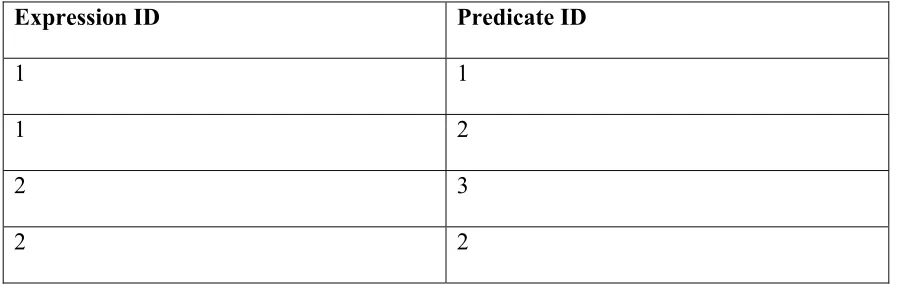
The above two Expressions have two Predicates each, 1 and 2 are the Expression IDs. As it can
be observed both of them have one common Predicate (model =’HONDA’). So the Expression
table for the above Example would look as shown below:
Following is the snapshot view of Expression Table:
Expression ID Predicate ID
1 1
1 2
2 3
2 2
Table 3.1 Example of Expression Table
Predicate Table:
-- Column Name of the referenced table
-- Operator involved and,
-- Value.
Each Predicate is split into the above mentioned various fields and then it is inserted as a row in
the Predicate table. Each Predicate is given a unique distinguishable ID called the Predicate ID,
which is the primary key of the Predicate table. The Predicate table has primary key field as the
PredicateID.
Following is a snapshot of Predicate table:
Predicate ID Table Name Column Name Operator Value
1 Cars Model = Taurus
2 Dealer Year = 1998
3 Test Color = Pink
Table 3.2 Example of Predicate Table
Differences when compared to Oracle approach:
Unlike the Oracle approach, the Expressions are not stored as a part of user tables. The storage of
Expressions no more depends on Evaluation Context of the Expression. All the Expressions
present in a database are stored in a single table, Expression Table. Storage of Expressions is
totally different when compared it with Oracle approach. The main differences when compared
to the Oracle approach are:
• This study allows expressions to be defined over multiple tables. Oracle doesn’t support
• This approach doesn’t require that predicate groups be identified for index creation. With
Oracle approach, a Database Administrator (DBA) or application developer has to do this
addition work.
3.2 Methodology used in this work to handle and store Expressions:
Each Expression has a unique id, which is called the ExpressionID (EXPID). Each Expression
when created in the RDBMS is assigned a new ExpressionID. All the Expressions present in a
Database are stored in a separate table called the Expression Table. According to this work,
each Database has one Expression table, where all the Expressions present in that Database are
stored.
The Expression Table contains ExpressionID of each and every Expression present in the
database. Each Expression has one or more Predicates in it. Each ExpressionID is mapped to the
respective PredicateID’s in the Expression table i.e. each ExpressionID shows all the Predicates
(PredicateIDs) it is associated with.
Each Predicate is also assigned a unique PredicateID in order to make them distinguishable to
other PredicateIDs. Two or more Expressions can have one or more same Predicates. Even
though Predicates repeat in various Expressions they are uniquely identified using their
PredicateID.
Validation of the incoming Expression to find out if a similar Expression already exists in
the database.
Validation of the Predicates present in the incoming Expression to find out if similar
Predicates are already present in the Predicate table.
Updating the Predicate Table by assigning appropriate PredicateIDs to the new Predicates
(which came from the incoming Expression)
Updating the Expression Table by assigning appropriate ExpressionID to the new Expression.
3.2.2 Validation of incoming Expression (and Predicates):
On arrival of a new Expression, all its Predicates present in the arriving Expression are checked
one by one with the existing Predicate Table. Each Predicate from the new Expression is taken
and checked if a similar Predicate already exists in the Predicate table, if all the Predicates from
the new Expression have a match in the Predicate Table then from the Expression Table we find
the ExpressionID of the Expression which has the exactly the same matched PredicateIDs. So
this implies that a similar Expression is already present in the Database, and hence the newly
arrived Expression wont be added again to the Expression Table as a similar Expression already
exists in the Database.
3.2.3 Adding new Record in the Expression Table (and Predicate Table):
Once the validation process is completed for the newly arrived Expression, one or more
assigned new PredicateIDs and the Predicate table is updated. Also the Expression Table is
updated with a new ExpressionID with the mappings to the new PredicateIDs.
This can be shown with the following Example:
Consider that the incoming Expression is as shown below:
Incoming New Expression:
(Car.Model = ‘Toyota’ && Car.Color =’Silver’ && Dealer.Location = ‘LA’)
Suppose the Predicate table and Expression table were as follows:
Expression Table:
ExpressionID PredicateID
1 1
1 2
2 3
3 2
3 4
4 2
4 3
4 5
5 6
5 1
Let us now have a look at the Predicate table
PredicateID TableName ColumnName Operator Value
1 Car Model = Acura
2 Insurance Period > 12
3 Dealer Name = CogginAuto
4 Bike Year < 2002
5 Car Model = Toyota
6 Bike Model = CBR
Table 3.4 Predicate Table
So the Predicates in the incoming Expression are:
Car.Model = ‘Toyota’
Car.Color =’Silver’
Dealer.Location = ‘LA’
So it clearly appears from the Predicate table that there is already a record existing for the
Predicate Car.Model=’Toyota’ in the Predicate table with PredicateID as 5. The remaining two
Predicates are not present in the Predicate table. So now with the addition of the new Expression
in the Expression table and the corresponding Predicates in the Predicate Table, the two tables
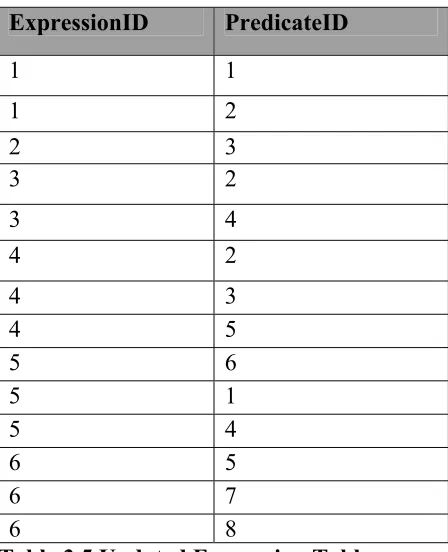
Updated Expression table:
ExpressionID PredicateID
1 1 1 2 2 3 3 2 3 4 4 2 4 3 4 5 5 6 5 1 5 4 6 5 6 7 6 8
Table 3.5 Updated Expression Table
Updated Predicate Table:
PredicateID TableName ColumnName Operator Value
1 Car Model = Acura
2 Insurance Period > 12
3 Dealer Name = CogginAuto
4 Bike Year < 2002
5 Car Model = Toyota
6 Bike Model = CBR
7 Car Color = Silver
8 Dealer Location = LA
Table 3.6 Updated Predicate Table
So this is how the Expression table and the Predicate table are updated. Unlike the Oracle
this approach doesn’t restrict Expressions on basis of attribute set or Evaluation Context and all
Expressions would be present in one table.
3.3 Indexing Expressions: Approach used in this study
As discussed above, in this approach a separate table is maintained for storing Expressions and
Predicates. So in order to quickly eliminate the Expressions that are false for a given data item
and return only the Expressions that evaluate to true we can index the Expressions. As the
Predicates of all the Expressions in the DBMS are present in the Predicate Table, so in order to
index Expressions, it would be a good choice to create an index on the Predicate table.
In this study we create a B+ Tree Index on the Predicate table in order to make the process of
evaluation of input data-item faster. In the process of evaluation of the input data-item, first we
get the Predicates that satisfy the input data-item. With B+ Tree created on the Predicate table,
the execution of this step can be made faster.
In this case, the B+ Tree consists of BPages. Page of a B+ Tree is called BPage[4]. In other
words, each node of B+ Tree is referred as BPage in this study. Each BPage is a combination of
Key-value pair. In this study in each record of the Predicate table the combination of the
TableName, ColumnName, Operator, Value act as the Key field and the PredicateID field act as
the Value for each BPage.
We use the JDBM project [4] implementation for the creation of the B+ Tree in this study.
JDBM also provides scalable data structures, such as B+Tree, to support persistence of large
Once the B+ Tree is created, depending upon the input data-item we get all the Predicates that
are true for the data-item. Once we have all the PredicateIDs that are True for the input data-item
we then Evaluate all these PredicateIDs to find out all the Expressions that evaluate to true to the
PredicateIDs that were True for the input data-item.
The algorithm used for the entire structure is shown below.
Differences when compared to Oracle approach:
The indexing technique involved in this study is B+ tree indexing, whereas in the Oracle
approach Bitmap indexing technique is used. There are no Predicate groups involved in this
study; all the Predicates are stored in Predicate Table.
3.3.1 Algorithm:
Here two tables are used, one for storing Predicates and the other is for storing Expressions. The
output of an input data-item to be evaluated would be the Expression-id’s of the Expression table
that are evaluated to True.
For Example consider the following scenario:
Example:
Predicate-id Table Column Operator Value
1 Car Name = Taurus
2 Bike Year = 1998
3 Car Price > 20000
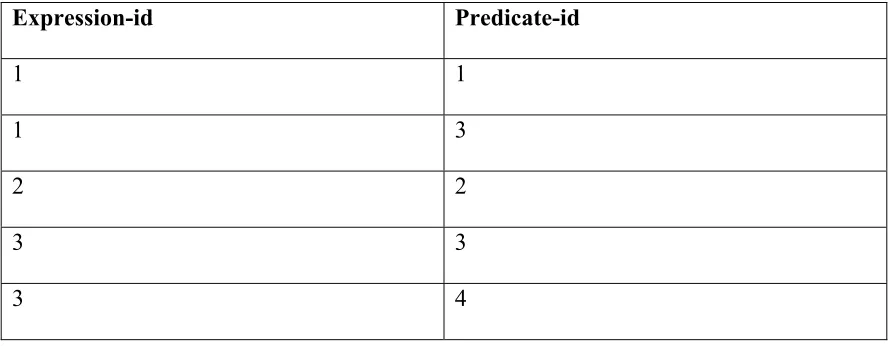
Expression-id Predicate-id
1 1
1 3
2 2
3 3
3 4
Table 3.7b Expression Table
If the user inputs the data-item to be evaluated as:
‘EVALUATE Car name = taurus && Car price = 20000’
The output of this query would be Expression-id 1. The query is evaluated in the following
manner:
The input data item is split into two data-item conditions, namely ‘Car name = taurus’, ‘Car price
= 20000’. The binary operators are stored. In this simple Example the binary operator involved
is, ‘&&’. Input data-items are evaluated using the Predicate Table. From Figure 3.7a above, it is
noted that for the first Input data-item Predicate-id 1 is evaluated to true and for the second Input
data-item Predicate-id 3 is evaluated to true.
There are two different approaches implemented to obtain the Predicate results,
• B+-tree
For the resulting Predicates the binary operator, && is applied. For this the Expression table
from Figure 3.7b is used. It is observed that Expression-id 1 would evaluate to true since it has
both the resulting Predicates.
When more than one binary operator is involved there is a slight difference that is explained
below. In general the algorithm for evaluating the query is as follows:
Algorithm:
Split the entire input data-item into a set of data-items. Store the binary operators to be applied
for the data-items. Evaluate each of the Input data-items using the Predicate table. For the
resulting Predicates, apply the binary operators and get the resulting Expression-id’s from the
Expression table.
Two approaches were implemented, B+-tree Search and Sequential Search. The difference
between these approaches is the way the input data-item is evaluated. A B+-tree index is created
on the Predicate table to make the process faster in the B+-tree Search approach. For the
Sequential approach the Predicate results are found by traversing the Predicate table sequentially.
Implementation Details:
The step-by-step implementation details are provided for both the approaches, the difference
between the two being the way the Predicates are evaluated.
Step 1: Evaluate the Predicates
1.1Get the input data-item to be evaluated.
1.2 Split the entire input data-item into individual data-items that are delimited by the binary
operators. Store the binary operators for Step 2.
1.3 For each individual input data-item:
1.3.1 Each individual input data-item is in the form: ‘tablename columnname operator
value’. Split the data-item to retrieve the tablename, columnname, operator and value.
1.3.2 If the value in the ‘value’ column is a numeric value, then go to step (1.3.2.1)
else go to step (1.3.2.2). Step (1.3.2.1) does range search, step (1.3.2.2) does normal
(equality) search.
1.3.2.1 Search in the B+-tree for the Predicates that have the tablename and
columnname of the Input data-item being evaluated and store all such
Predicate’s operator and value in a List. This List now contains the operator
and value column values, split this into different lists, one containing the
operators and the other with values. The List contains the operator and
values sorted according to the operator. Also store the corresponding
Predicate-id’s in a PredicateList. As the input data-item has operator ‘=’
then do:
Search for the current individual data-items ‘operator’ and ‘value’ in
the List and if a record is present in the List add that Predicate-id to the
result. For all the values with the ‘<’ operator in the List, find all
values that are greater than the current individual data-item’s value and
operator find all such values less than the current individual
data-item’s value and add all such Predicate-id’s to the result.
1.3.2.2 Search in the B+-tree for the tablename, columnname, operator and
value of the current individual data-item and give the corresponding
Predicate-id of the Predicate that matches the above values as the result.
1.4 After finishing step 1.3 for all the Predicates, go to step 2 to apply binary operators on
these results to get the overall result.
Step 2: Apply Binary operators
If the entire input data-item has just two individual data-items then step 2.1 else go to step 2.2.
2.1 If the query was in the form Predicate1 operator Predicate2 then the operator has to be
applied on the Predicate results. Go to step 2.1.1.
2.1.1 Search for all such Expression-id’s in the Expression table such that all the
Predicates of an Expression are from the results of the two Input Predicates and also
such that there is at least one Predicate-id from each of the Predicate’s. Output all
such Expression-id’s.
2.2 When the input data-item contains more than one operator, apply the first operator in step
2.1 for the first two individual data-items. The result of this is a set of Expression-id’s. The
second operator is applied to these Expressions-id’s and the third individual data-item’s
operator now is applied to the List and the results of the third data-item as in step 2.1. This
process continues for all the operators in the input data-item.
Example 3.3.1.1:
Input Data Item: Evaluate car color = silver && car model = acura
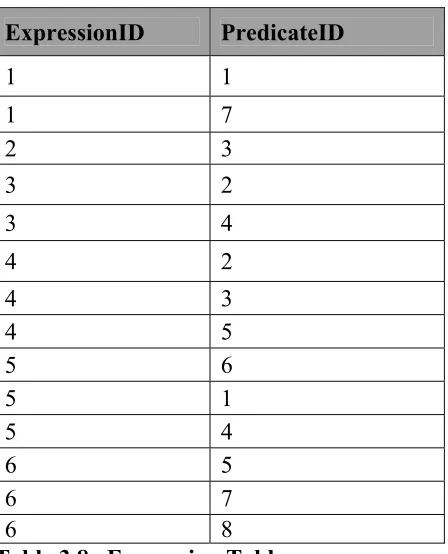
Expression Table:
ExpressionID PredicateID
1 1 1 7 2 3 3 2 3 4 4 2 4 3 4 5 5 6 5 1 5 4 6 5 6 7 6 8
Predicate Table:
PredicateID TableName ColumnName Operator Value
1 Car Model = Acura
2 Insurance Period > 12
3 Dealer Name = CogginAuto
4 Bike Year < 2002
5 Car Model = Toyota
6 Bike Model = CBR
7 Car Color = Silver
8 Dealer Location = LA
Table 3.8b Predicate Table
The flow of the algorithm for the above Expression and Predicate Table scenario is as follows:
Initially B+-tree index is created on Predicate table above.
Step 1
1.1 Data Item: car color = silver && car model = acura
1.2 Tokenize the above data item into two data items: car color = silver and car model = acura.
Store the operators: ‘&&’
1.3 This step is for the above two data items:
1. Car color = silver
2. Car model = acura
For each of the above:
Predicate value for ‘Car color = silver’ above: 7
Predicate value for ‘Car model = acura’ above: 1
Step 2
Step 1 alone is performed as only two data items.
1. Exp 1 will be the result that could be looked up in the Expression table above.
Finally the result of the above input data item is Exp 1.
3.3.1.2 Sequential Search:
Step 1: Evaluate the data-item
1.1 Get the input data-item to be evaluated.
1.2 Split the entire input data-item into individual data-items that are delimited by the binary
operators. Store the binary operators for Step 2.
1.3 For each individual data-item:
1.3.1 The data-item is in the form: ‘tablename columnname operator value’. Split
each of the individual data-item to retrieve the tablename, columnname, operator and
value.
1.3.2 If the value in the ‘value’ column is a numeric value, then go to step (1.3.2.1)
else go to step (1.3.2.2). Step (1.3.2.1) does range search, step (1.3.2.2) does normal
1.3.2.1 Search in the table sequentially reading each line, for the Predicates
that have the tablename and columnname of the Input data-item being
evaluated and store all such Predicate’s operator and value in a List. This
List now contains the operator and value column values, split this into
different lists, one containing the operators and the other with values. Also
store the corresponding Predicate-id’s in a PredicateList. As the input
data-item has operator ‘=’ then do:
Search for the current individual data-items ‘operator’ and ‘value’ in
the List and if a record is present in the List add that Predicate-id to the
result. For all the values with the ‘<’ operator in the List, find all
values that are greater than the current individual data-item’s value and
add all such Predicate-id’s to the result. For all the values with ‘>’
operator find all such values less than the current individual
data-item’s value and add all such Predicate-id’s to the result.
1.3.2.2 Search in the file sequentially for the tablename, columnname,
operator and value of the current individual data-item and give the
corresponding Predicate-id of the Predicate that matches the above values as
the result.
1.4 After finishing step 1.3 for all the individual data-items, go to step 2 to apply binary
operators on these results to get the overall result.
This step is done in the same way as explained before for B+-tree Search.
The above-mentioned Example (Example3.3.1.1) can be used for the Sequential Approach too.
The flow of the algorithm is the same except that the search in the Predicate table is performed
Chapter 4 Results
Results were calculated depending on the time taken for Evaluation of certain input data item
with a varying size of Predicate table. A comparison of both the, Sequential approach and the B+
Tree approach, was done and the time taken for the Evaluation of the input data item.
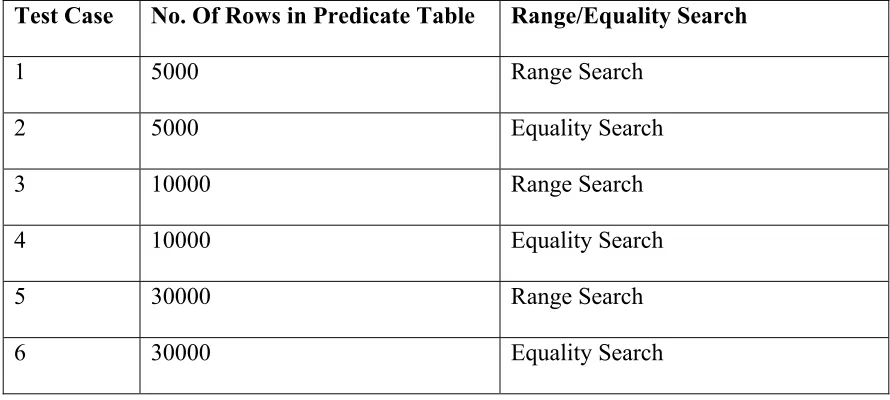
Following Test Cases were considered:
Test Case No. Of Rows in Predicate Table Range/Equality Search
1 5000 Range Search
2 5000 Equality Search
3 10000 Range Search
4 10000 Equality Search
5 30000 Range Search
6 30000 Equality Search
Table 4.1 Test Cases
Let us consider each Test Case at a time. A range search and an Equality search were performed
in each test case. In a Range search one has to find a series of records, which satisfy the given
condition. For Example if the input data item was Car year = 2000, then not only we look for a
Predicate that is exact match of the input data item but we also look for Predicates like ‘Car year
look for exact match of the input data item. So Equality Search is comparatively faster than the
Range search.
4.1 System Specifications:
Here are the system specifications used in the development and testing of this study.
OS/Configuration Windows XP, Pentium M 735,1.7GHz, 512MB RAM
Language Java 1.4.2
Editor NetBeansIDE 3.6
Reporting tool MS Excel Professional
Table 4.2 System Specifications
The time calculated in each Test Case is in milliseconds. The time calculated here is the time
taken for searching the Final Expressions. It doesn’t include other overhead times, like the time
for loading the classes etc.
4.2 Test Cases
Case1:
Number of Rows in Predicate table = 5000 and for an input data item where a range Search is
No of INPUT data items
Example INPUT String
Time Taken in B-TREE approach (ms)
Time taken in Sequential
approach (ms) % Faster 1
Car year = 2000 100 110 9.09%
2 Car year = 2000 &&
Car price = 10000 208 210 0.95%
3 Car year = 2000 && Car price = 10000 &&
Car miles = 5000 220 230 4.35%
Table 4.3 Range Search on Predicate Table with 5000 rows.
The graphical representation of the above results can be shown as following:
5000 Rows(Range Search)
0 50 100 150 200 250
1 2 3
No. of Data Items
Tim e( M illi S ecs) Sequential B-TREE
Figure 4.1 Graphical Representation of Range Search (5000 rows)
Overview:
Case 2:
Number of Rows in Predicate table = 5000 and for an input data item where an Equality Search
is done.
No of INPUT
data items Example INPUT String
Time Taken in B-TREE approach (ms)
Time taken in Sequential
approach (ms) % Faster
1 Train name = Train145 0 50 100.00%
2 Train name = Train145 && Train color = green 3 65 95.38%
3
Car name = Car460 && Car color = green &&
Car bodystyle = suv 4 90 95.56%
Table 4.4 Equality Search on Predicate Table with 5000 rows.
The graphical representation of the above results can be shown as following:
5000 Row s(Equality Search)
0 20 40 60 80 100
1 2 3
No. of Data Item s
T im e( M illi S ec s) Sequential B-TREE c
Figure 4.2 Graphical Representation of Equality Search (5000 rows)
Overview:
As it is Equality Search, so we need to search if the same Predicate is present or not. Using B
Tree approach, it directly goes to the BPage, which has that record (if at all that record is
Case 3:
Number of Rows in Predicate table = 10000 and for an input data item where a range Search is
done.
No of INPUT data
items Example INPUT String Time Taken in B-TREE approach (ms) Time taken in Sequential approach (ms) % Faster
1 Car year = 2000 105 144.2 27.18%
2 Car year = 2000 && Car price = 10000 168.8 220.4 23.41%
3
Car year = 2000 && Car price = 10000 &&
Car miles = 5000 223 282 20.92%
Table 4.5 Range Search on Predicate Table with 10000 rows.
The graphical representation of the above results can be shown as following:
10000 Rows(Range Search)
0 50 100 150 200 250 300
1 2 3
No.of Data Items
Tim e (M illiS ecs) Sequential B-TREE
Figure 4.3 Graphical Representation of Range Search (10000 rows)
Overview:
The B+ Tree approach takes lesser time than the sequential approach. Almost a 20% increase in
Case 4:
Number of Rows in Predicate table = 10000 and for an input data item where an Equality Search
is done.
No of INPUT data
items Example INPUT String
Time Taken in B-TREE approach (ms)
Time taken in Sequential
approach (ms) % Faster
1 Train name = Train145 4 54 92.59%
2 Train name = Train145 && Train color = green 8 86 90.70%
3
Car name = Car460 && Car color = green &&
Car bodystyle = suv 8 102 92.16%
Table 4.6 Equality Search on Predicate Table with 10000 rows
The graphical representation of the above results can be shown as following:
10000 Rows(Equality Search)
0 20 40 60 80 100 120
1 2 3
No. of Data Items
Tim e(Milli Se cs ) Sequential B-TREE
Figure 4.4 Graphical Representation of Equality Search (10000 rows)
Overview:
As the size of the table is now 10000, the performance of Sequential Approach becomes much
Case 5:
Number of Rows in Predicate table = 30000 and for an input data item where a Range Search is
done. No of INPUT data items Example INPUT String
Time Taken in B-TREE approach (ms)
Time taken in Sequential
approach (ms) % Faster
1 Car year = 2000 140 255 45.10%
2 Car year = 2000 && Car price = 10000 246 354 30.51%
3
Car year = 2000 && Car price = 10000 &&
Car miles = 5000 328 418 21.53%
Table 4.7 Range Search on Predicate Table with 30000 rows.
The graphical representation of the above results can be shown as following:
30000 Row s(Range Search)
0 50 100 150 200 250 300 350 400 450
1 2 3
No. of Data Item s
Time taken In MilliSecs
Sequential B-TREE
Figure 4.5 Graphical Representation of Range Search (30000 rows)
Overview:
Case 6:
Number of Rows in Predicate table = 30000 and for an input data item where a Range Search is done.
No of INPUT data
items Example INPUT String
Time Taken in B-TREE approach (ms)
Time taken in Sequential
approach (ms) % Faster
1 Train name = Train145 0 130 100.00%
2 Train name = Train145&& Train color = green 4 190 97.89%
3
Car name = Car460 && Car color = green &&
Car bodystyle = suv 6 240 97.50%
Table 4.8 Range Search on Predicate Table with 30000 rows.
The graphical representation of the above results can be shown as following:
30000 Row s (Equaity Search)
0 50 100 150 200 250 300
1 2 3
No. of Data Items
Time Taken in MilliSecs
Sequential B-TREE
Figure 4.6 Graphical Representation of Equality Search (30000 rows)
Overview:
4.3 Discussion of Results:
As we can see from all the above listed tables and graphs the B+ Tree approach performs better
when compared to the Sequential approach. This Chapter enlightens the procedure involved in
Equality search and Range Search.
NOTE:
The above results were calculated by passing a common data item several times to both the
Sequential and B+ Tree approach, and by taking an average of those runs. A different set of
results can be calculated by passing different input data items for a given Predicate table and by
taking an average of all those results.
4.3.1 Equality Search:
When considering the Equality Searches, the B+ Tree approach performs far better than the
Sequential Approach. This is because in the Sequential approach in order to find a particular
record we have to go through every record from starting until or unless we reach to that
particular record (if at all that record exists), which takes time. But when we are searching for a
particular record using the B+ Tree search, then we directly go to the BPage that has that record.
So it takes hardly any time to do this equality search process.
time taken by the B+ Tree approach doesn’t change much but the sequential approach takes more
time. So irrespective of the file size, in Equality Search, B+ Tree approach performs very well
when compared to the Sequential Approach.
4.3.2 Range Search:
By considering the results shown above it can be easily deduced that in an overall view B+ Tree
perform better the Sequential approach.
As in the B+ Tree approach, index helps to get the searching process done faster when compared
to the Sequential approach. But if the file size is less like 5000 rows then the difference can
hardly be seen. As for small tables the sequential approach is also equally faster as the number of
rows it has to search is very less, and hence the performance of both the approaches is almost the
same. But as the table size increases we can see the performance of B+ Tree approach growing
better and faster, which is because of the index. So if we can interpolate these results we can
easily find that B+ Tree performs far better, and the index helps to get the Evaluation process
Chapter 5 Conclusion and Future work
5.1 Conclusion:
Expressions are used in a range of applications like Publish/Subscribe, Content based systems
etc. as mentioned earlier in the introduction section. Use of indexing on Expressions can speed
up all these applications. In this thesis we have defined more powerful model of storing and
handling Expressions. The main differences from Oracle approach are:
• Expressions in our model can be defined over multiple tables.
• The DBA or the application developer doesn’t need to identify predicate groups.
This study also describes how data items can be evaluated using sequential search as well as
using a B+ Tree indexing technique. The thesis also includes a detail performance study and
implementation of B+ Tree indexing technique and it also portrays the increase in efficiency with
the help of B+ Tree.
5.2 Future Work and possible Enhancements:
Future work includes enhancement in the searching technique in B+tree. One could think of
enhancing the search process by reducing the number of reads to B+tree root node. A possible
enhancement in the performance can be seen if the search for Predicates is done within the sub
An interesting item for future work is to study the use of a different indexing scheme. For
example, Oracle creates a Bitmap index for indexing its expressions. Even though Oracle’s
expression model is different from the expression model used in this thesis, it will be interesting
to see how building a Bitmap index on predicates performs when compared with the B+tree
References
1.Oracle Database 10g brings regular Expressions to SQL:
http://www.oracle.com/technology/oramag/oracle/03-sep/o53sql.html. As published in Oracle Magazine Sept/Oct (2003).
2. “Managing Expressions as Data in Relational Database Systems” - Yalamanchi, Srinivasan. Oracle Corporation. (2003).
3. Oracle 9i DBA concepts:
http://www.dba-oracle.com/art_dbazine_9i_sec.htm
4. JDBM
http://jdbm.sourceforge.net/
5. Segall, B. and Arnold, D. 1997. Elvin has left the building: A publish/subscribe notification service with quenching. In Proceedings of the Australian UNIX and Open Systems User Group Conference (AUG'97).
6. Aguilera, M., Strom, R., Sturman, D., Astley, M., and Chandra, T. "Matching Events in a Content-based Subscription System". 18th ACM Symposium on Principles of Distributed Computing, 1999: 53-61.
7. Gero Mühl, Ludger Fiege, and Alejandro P. Buchmann. Evaluation of cooperation models for electronic business. In Information Systems for E-Commerce, Conference of German Society for Computer Science / EMISA, Austria, November 2000.
8.Dayal, U., Hsu, M., and Ladin, R. “Business Process Coordination: State of the Art, Trends, and Open Issues”, Proc. 27th International Conference on Very Large Databases 2001 : 3-13.
9.Chen, J., DeWitt, D. J., Tian F., and Wang,Y. “NiagaraCQ: A Scalable Continuous Query System for Internet Databases”, SIGMOD 2000 : 379-390.
10. Babu, S. and Widom, J. “Continuous Queries Over Data Streams”, SIGMOD Record, 30(3), September 2001: 109-120.
![Figure 2.2 Storage of Expressions as a Column in Data Table [2]](https://thumb-us.123doks.com/thumbv2/123dok_us/8937224.1848252/18.612.80.293.80.373/figure-storage-of-expressions-as-column-data-table.webp)
![Figure 2.3 Predicate Table in Oracle Approach[2]](https://thumb-us.123doks.com/thumbv2/123dok_us/8937224.1848252/21.612.80.435.168.374/figure-predicate-table-in-oracle-approach.webp)