Discovering Bluetooth
Michael MillerAssociate Publisher: Richard J. Staron
Contracts and Licensing Manager: Kristine O’Callaghan
Acquisitions and Developmental Editor: Chris Denny
Editor: Suzanne Goraj
Production Editor: Kylie Johnston
Technical Editor: André Paree-Huff
Book Designer:
Maureen Forys, Happenstance Type-O-Rama
Graphic Illustrator: Jeff Wilson
Electronic Publishing Specialist:
Maureen Forys, Happenstance Type-O-Rama
Proofreaders:
Nanette Duffy, Leslie E.H. Light, Nancy Riddiough
Indexer: Lynnzee Elze
Cover Designer:
Richard Miller, Calyx Design
Cover Illustrator/Photographer: Richard Miller, Calyx Design
Copyright © 2001 SYBEX Inc., 1151 Marina Village Parkway, Alameda, CA 94501. World rights reserved. No part of this publication may be stored in a retrieval system, transmitted, or reproduced in any way, including but not limited to photocopy, photograph, magnetic, or other record, without the prior agreement and written permission of the publisher.
ISBN: 0-7821-2972-2
SYBEX and the SYBEX logo are trademarks of SYBEX Inc. in the USA and other countries.
TRADEMARKS: SYBEX has attempted throughout this book to distinguish proprietary trademarks from descriptive terms by following the capitalization style used by the manufacturer.
The author and publisher have made their best efforts to prepare this book, and the content is based upon final release software whenever possible. Portions of the manuscript may be based upon pre-release versions supplied by software manufacturer(s). The author and the publisher make no representation or warranties of any kind with regard to the completeness or accuracy of the contents herein and accept no liability of any kind including but not limited to
performance, merchantability, fitness for any particular purpose, or any losses or damages of any kind caused or alleged to be caused directly or indirectly from this book.
Manufactured in the United States of America
10 9 8 7 6 5 4 3 2 1
To Dennis and Melanie Hauser (and Ben and Alec), for providing cheap accommodations whenever I visit Chicagoland—oh, and for being good family, too.
Acknowledgments
Thanks to everyone on the Sybex team who has shaped and shepherded this project, including but not limited to Chris Denny, Suzanne Goraj, Kylie Johnston, André Paree-Huff, Dick Staron, and my old friend Jordan Gold. Thanks also to Suzanne Crow of Siemens, Dave Curl of TDK Systems, Anna Dimert of Ericsson, Tania Sawa-Priatka and John Simonds of IBM, and Spencer Ward of Coltrin & Associates (for 3Com) for their assistance in providing information and product photographs for this book. Special thanks to Ron Sperano of IBM and Jeremiah Zinn of Ericsson for taking time from their busy schedules to provide the interviews in Chapter 4—interesting stuff, guys!
About the Author
Michael Miller is the author of more than three dozen best-selling technology-oriented reference books. You can contact him directly at [email protected].
Introduction
Everyone is always looking for the “next big thing”—especially in the world of technology. Emerging technologies attract interest because of their future application (how will it affect my life?), because of their potential investment value (it’s good to get in on the ground floor of something big), and, quite frankly, because they’re kind of cool.
If you get stumped anywhere in the text, you can turn to the useful reference information contained in this book’s appendixes and glossary. Here you can find a list of Bluetooth-related acronyms (and this technology is very acronym heavy!), a glossary of Bluetooth-related terms, the basic technical specifications behind the technology, and a helpful list of other Bluetooth resources that you might want to check out.
I think Bluetooth is going to be a big thing; that’s why I wrote this book. I hope that
Discovering Bluetooth provides the information you need to make up your own mind about Bluetooth—and to whet your appetite for this exciting new technology!
Part I: Discovering Bluetooth
In This Part
Chapter 1: Introducing Bluetooth Chapter 2: How Bluetooth Came to Be Chapter 3: The Bluetooth Industry
Chapter 1: Introducing Bluetooth
There’s a Bluetooth in your future. No, this isn’t the kind of blue tooth that requires expensive dental whitening. This Bluetooth is a technology that promises to eliminate most of the cables that connect your various personal computing devices—and to create new types of smart wireless communications.
This book is your guide to Bluetooth, a consumer-level overview of the technology and its possible applications. Throughout the rest of this book you’ll learn all sorts of details about Bluetooth—what it is, what it does, how it does it, and how you’ll use it. Before we get to those details, however, this chapter provides you with a general overview of the Bluetooth technology. So even if you’ve never heard of Bluetooth before, you’ll find out what all the fuss is about—and discover how and why you’ll soon be using Bluetooth technology in your daily life.
Visions of a Wireless World
The computing, communications, and consumer electronics industries have introduced many benefits to today’s consumers. Of course, they’ve also introduced many headaches, not the least of which is the necessity of connecting all these devices to each other, usually with a phalanx of cables and wires that are both annoyingly messy and mind-numbingly confusing. Wouldn’t it be great if you could connect your printer to your PC—or your PC to your PDA or your PDA to your phone line—without fumbling with the necessary cabling and worrying about whether you’re using the right type of connector?
Radios Waves and Piconets
Bluetooth does all this by embedding a small, low-powered radio-on-a-chip into a traditional electronic device. This radio—and the chip-based software associated with it—is capable of transmitting and receiving both data and voice communications from other such devices.
Bluetooth radios use a radio band (called the industrial, scientific, and medical band—or ISM, for short) between 2.4 and 2.48 gigahertz (GHz). Because the radios are incorporated into small computer chips, they have a very small form factor and can, eventually, be produced at relatively low cost. The combination of small size and low cost should help to make
Bluetooth technology ubiquitous in a variety of electronic devices—especially in those with portable applications.
Note The ISM band is unlicensed, and thus available for use at no charge. (It is also shared with other types of non-Bluetooth communications.)
When one Bluetooth device senses another Bluetooth device (within about a 30-foot range), they automatically set up a connection between themselves. This connection is called piconet, and is a kind of mini-network—a personal area network (PAN), to be specific. In a piconet, one Bluetooth device is assigned the role of master, while the other device—and any
subsequent devices, up to eight in total—is assigned the role of slave. The master device controls the communications, including any necessary transfer of data between the devices.
Since Bluetooth signals are sent via radio waves, walls and other physical barriers do not present the same problem that they do for infrared signals, which must operate within a narrow line-of-sight window. Bluetooth’s radio frequency (RF) signals can travel through most solid objects, so Bluetooth devices can be used in a small office (walls and cubicles are invisible) or from inside a contained space (such as a briefcase or shirt pocket). As long as two Bluetooth-enabled devices are no more than 30 feet apart, they’ll always be able to talk to each other.
A Bluetooth Example
Figure 1.1: Bluetooth technology can connect all your household electronics.
Each of these devices is assigned a specific electronic address by its manufacturer. In addition, each device is programmed to automatically look for other devices within a predefined range, so that all similar devices automatically recognize each other—and
automatically establish their own private piconet. This is done when each device, as it powers up, sends out a signal asking for responses from other devices within the predefined range; any responding devices are automatically added to the first device’s piconet.
Note Each type of Bluetooth device is assigned a particular range of addresses—so that all cordless phones, for example, have addresses that fall within a predefined range.
As each device in our home of the future is powered on, three separate piconets are
established. The home theater components establish one piconet, the personal computer and accessories (printer, scanner, etc.) establish a second piconet, and the cordless phone
establishes a third piconet (between the handset and the base station—both of which include Bluetooth radios). Data (and voice, in the case of the cordless phone) are then routinely exchanged between all the devices within each individual piconet—the DVD player beams a movie to the A/V receiver, the computer sends formatted data to the printer, and so on. And all this happens without any data being inadvertently sent to the wrong device or network.
Of course, some devices can be instructed to work across different piconets. In our wireless home example, let’s say that we’ve programmed the PDA to function not only with the computer piconet (automatically synchronizing key data) but also with the home theater piconet. Programmed in this fashion, the PDA can function not only as a personal digital assistant, but also as a wireless remote control unit for the home theater system, essentially bridging the two individual networks.
The Briefcase Trick This model describes how you can access e-mail while your portable PC is still in your briefcase—by transferring the messages, wirelessly, from your PC to your mobile phone.
The Forbidden Message Although this model has an ominous title (some companies prefer to call it the Flight Time With a Purpose model), it really has to do with composing e-mail messages while on the fly—literally inside an airplane, or anyplace where you don’t have a live phone or network connection—and then having them sent automatically when you land (and walk by a Bluetooth transmitter/receiver in the airport).
The Interactive Conference This model contemplates using Bluetooth wireless technology to share electronic documents, business cards, contact and scheduling information, and meeting notes with other meeting participants via their portable computers—as well as using Bluetooth technology to facilitate control of a desktop PC or data projector via a Bluetooth-enabled PDA.
The Automatic Synchronizer In this scenario (also dubbed the Hidden Computing model), data located on separate Bluetooth-enabled devices are automatically synchronized when the different devices come into radio range of each other. Thus you could synchronize the calendar or address book on your mobile phone or PDA with your desktop PC, simply by walking into your office.
The Instant Postcard Under this model, still pictures taken with a Bluetooth-enabled digital camera are automatically sent over the Internet (via a Bluetooth-enabled mobile phone) to a Bluetooth-enabled personal computer.
The Three-in-One Phone This model envisions telephone handsets that can connect to three different types of telephone services—as a cordless phone connected to the public switched telephone service (your normal phone service), as a mobile phone connected to a cellular service provider, and as a type of “walkie-talkie” connected directly to similarly equipped Bluetooth phones.
The Ultimate Headset In this scenario, Bluetooth technology is behind a separate wireless headset that enables you to engage in telephone conversations without actually holding a phone in your hand. This product could be used in the home (the headset acts in the place of a traditional phone headset) or with your mobile phone—even when your phone is stuck in your pocket or briefcase.
The PC Speaker Phone This model envisions using Bluetooth technology to create a wireless connection between your cordless headset and your personal computer, to use the PC’s built-in speaker as a speaker phone.
The reality is that Bluetooth has the potential to be one of the defining technologies of the 21st century. By taking the wires out of the currently wired worlds of computing,
communications, and consumer electronics, Bluetooth can make the real world a much more mobile, much more flexible, much more user-friendly place. If Bluetooth truly becomes the enabling technology for wireless connections and communications, expect many new and innovative applications to emerge—applications that could have the same impact on our future lives as the first computers and mobile phones had on our recent past.
Chapter 2: How Bluetooth Came to Be
There’s a story behind any new technology, and the story behind Bluetooth is especially interesting. It involves a 10th-century Viking king, a group of Dutch and Swedish engineers, and an international consortium of high-tech companies—and it came about all because someone, somewhere, wanted to eliminate the thin little cable that connected his cell phone to an accessory headset.Recognizing the Need
“It is not just a question of connecting to the other side of the globe. It is as much a question of connecting to the other side of the room.”
Those words come from Ericsson Mobile Communications, the giant Swedish phone maker, and state in fairly plain language what the Bluetooth wireless technology is all about. While Bluetooth is a global standard (meaning that the technology is the same everywhere in the world), it’s a relatively local technology—designed to connect devices no more than 30 feet (10 meters) apart.
So just how did this global standard for local communications develop?
The Mobile Phone Market Explodes
In the early 1990s, the market for mobile phones was exploding—particularly in Europe, which (unlike the U.S.) was unburdened by multiple, competing cellular standards. If you’re an American who has never been to Europe, it’s difficult to envision how pervasive mobile telephony is in that region. As an example, while just 26% of Americans had cellular phones in 1998 (according to Merrill Lynch), 48% of Swedes and 58% of Finns were talking via cellular—and many of them were completely replacing their traditional landline phones with cellular services.
When everybody and their neighbor has a cell phone, the market for mobile phone accessories also becomes quite significant. Of these accessories, particularly popular is the portable headset, a convenient accessory that makes it easier to carry on long conversations without having to hold a phone to your head for extended periods of time.
conversation totally hands-free; you still have to hold the phone in your hand while you talk on the headset.
Cutting the Cable
One of the companies that recognized the need to break the cable connection was Ericsson Mobile Communications. In 1994 Ericsson commissioned a study to investigate an alternative to the cables traditionally used to connect cellular phones with headsets and other devices. Ericsson’s research focused on developing a low-power, low-cost radio interface between mobile phones and their accessories.
Primary development of this new radio-link technology was initiated at Ericsson’s research facility in Lund, Sweden. The lead engineers for the project were Swedish-born Dr. Sven Mattisson and his Dutch colleague, Dr. Jaap Haartsen, pictured in Figure 2.1.
Figure 2.1: Bluetooth’s parents, Sven Mattisson (left) and Jaap Haartsen (right), of Ericsson. (Photos courtesy Ericsson.)
This study was part of a larger project within Ericsson that was investigating communications devices (such as PDAs) that could be connected to a cellular network via normal cellular telephones. As conceived by Ericsson’s engineers, the last link in this chain was a short-range radio link between the communications device and the phone. Ericsson called this the Multi-Communicator Link—MC Link, for short.
The project gained momentum when the engineers discovered that they could tap into a low-frequency radio band that required no licensing, and was thus available to anyone in the world who wanted to use it, at no cost. This led to the development of a small radio embedded in a computer chip—small enough to be built into mobile phones and other portable devices.
A Greater Potential
As the MC Link project progressed, Mattisson and Haartsen became aware that there were other types of applications that could benefit from the technology they were developing. Ericsson’s cheap, short-range MC Link radios could make wireless communication between all types of portable devices economically feasible. It wasn’t just about phones, they realized.
And thus the full potential of this new wireless technology was identified. What was initially conceived as a simple cable-replacement technology for cell phones and headsets was now something much broader, and much more important.
Haartsen confirmed that the broad application of the technology was almost an afterthought to the original research.
“The original intention,” Haartsen said, “was to make a wireless connection between something like an earphone or a cordless headset and the wireless phone.”
The fact that Haartsen and Mattisson were able to identify other, potentially more important, applications for the technology was a happy accident.
Creating a Standard
At the beginning of 1997, with its own engineers already working on what they were still calling the MC Link chip, Ericsson did something highly unusual—they decided to give the technology away.
The Necessity of a Global Standard
Ericsson realized that for the technology to succeed, there must be a critical mass of portable devices using their newly developed short-range radio. Unless the technology was embraced by a large number of other manufacturers, it would fail due to lack of support. In effect, Ericsson had to create a global de facto standard—before any other standards developed.
The importance of establishing an industry-wide (and cross-industry) standard cannot be overstated. In today’s consumer markets, products based on proprietary technologies rarely succeed. Consumers prefer to buy products that are based on common, if not ubiquitous, technologies. They don’t want to be stuck with an orphan that doesn’t work with similar products that their neighbors may own. Thus, if Ericsson was the only company creating products based on its own proprietary technology, they would inevitably lose in a marketplace where all their competitors embraced a different-but-common technology.
No-Charge Licensing
With this thinking in mind, Ericsson approached several manufacturers of portable electronic devices (both phones and computers) to discuss the development and the promotion of this new short-range radio technology. As the talks progressed, Ericsson discovered that they could best achieve their goals by abandoning a traditional licensing strategy and instead offering free licenses to any company that embraced the new technology.
An Ideal Mix
Ericsson continued to talk with other companies, now determined to create a consortium to develop and push the technology across a variety of business disciplines. They were searching for the right industry mix—ideally, market leaders in mobile telephony, portable computing, and digital signal processing (DSP) chip technology.
That mix was achieved in early 1998, when Ericsson formed a close working relationship with Nokia (mobile telephony), IBM and Toshiba (portable computing), and Intel (DSP chips). All of these companies (along with Ericsson, of course) were instrumental in developing various aspects of what was to become the Bluetooth wireless technology.
Developing the Specifications
On May 20th, 1998, these five companies—Ericsson, IBM, Intel, Nokia, and Toshiba—held simultaneous press conferences in London, England; San Jose, California; and Tokyo, Japan. The purpose of this global press briefing was to announce that the five companies had joined together to develop a royalty-free, open specification for wireless connectivity between computing and telecommunications devices. As revealed that day, the specification was code-named “Bluetooth” and the organization behind the specification was called the Bluetooth Special Interest Group (SIG).
The Bluetooth SIG was initially charged with monitoring the development of short-range radio technologies and creating an open global standard. This standard—the Bluetooth Specification—was to become the primary focus of the SIG for the first year-and-a-half of its existence.
(For more information about the Bluetooth SIG and the Bluetooth Specification, see Chapter 3, “The Bluetooth Industry.”)
The Need for Speed
Recognizing the importance of bringing this new technology to market on the fastest possible schedule, the Bluetooth SIG was organized into a number of topic-specific working groups. Each working group attacked a particular portion of the Specification—for example, there was a working group focused on technology profiles, and another on the radio and broadband layers of the technology.
Given the urgency of their task, most working groups met every few weeks, in locations all around the world. Most working group meetings were held at the locations of the SIG’s founding companies—Lund, Sweden (Ericsson); Research Triangle Park, North Carolina and Hawthorne, New York (IBM); Chandler, Arizona (Intel); and Tampere, Finland (Nokia). When in-person meetings couldn’t be arranged, conference calls were substituted.
Creating a brand new technology out of whole cloth—and documenting that technology in infinite detail—was a huge undertaking. For many of those assigned to the various working groups, Bluetooth became their primary job, displacing their normal company-specific duties.
The coming months would be quite busy, indeed.
An Astonishing Achievement
Thanks to the combination of intelligent organization, frequent communications, and lots of long hours from all involved, the first release of the Bluetooth Specification was completed in about 18 months—an astonishing achievement, given the scope of the project and the number of companies involved.
Thus it was on July 26th, 1999, that the Bluetooth SIG announced the release of version 1.0 of the Bluetooth Specification. At almost 1500 pages in length, the Specification detailed all the profiles and processes necessary to utilize Bluetooth wireless technology in real-world applications.
Bluetooth was now ready for prime time.
Building Interest
The release of the Bluetooth Specification was only the beginning of the Bluetooth story. Now that there were technical specifications to guide the development of Bluetooth-enabled devices, other companies started to jump on the Bluetooth bandwagon. Ericsson and the other founding members of the Bluetooth SIG announced that the Bluetooth technology and brand would be made available to other companies on a royalty-free basis—all they had to do was join the Bluetooth SIG (also free of charge) and adhere to the SIG’s guidelines and the Specification’s technical details.
Growing the SIG
The first significant expansion of the Bluetooth SIG came in December of 1999, when 3Com, Lucent Technologies, Microsoft, and Motorola joined as promoter members. This put nine large and influential companies (the five founders and the four promoters) in charge of driving acceptance of the new technology.
Beyond these nine companies, other businesses could join the SIG on either the associate or adopter level. (See Chapter 3 for more information on the different membership levels.) Within a year, the SIG’s membership rolls had climbed to more than 2000 companies,
representing a broad cross-section of the global economy. Every one of these companies had a vested interest in producing Bluetooth-enabled products and services, and in seeing the
technology succeed.
Fueling the Hype
year 2001.) Whether you read IEEE Personal Communications or watch CNN, chances are you’ve heard something about Bluetooth, the technology that was set to change the world.
Of course, some of the hype was just that—hype. If you took some of these stories at face value, you’d think that Bluetooth would single-handedly eliminate all the wires everywhere in the world, and usher in an age of super-intelligent appliances and multi-function Dick Tracy– like wrist communicators.
Dick Tracy would have to wait, however—reality was about to make its presence known.
Dealing with Reality
Now that the Specification was written, the individual member companies of the Bluetooth SIG had an even more formidable challenge—to design and build real products that utilized the Bluetooth wireless technology. Dealing with the technology in theory is one thing; making that technology work in the real world is something much different.
Since it takes time to design, prototype, test, and then manufacture any complicated new high-tech product, there was a noticeable gap between the announcement of the Bluetooth
Specification and the release of the first Bluetooth-enabled devices. In spite of all the attention from an increasingly restless press, it would be more than a year before the first Bluetooth products began to ship. Even then, very late in the year 2000, new products hit the market in mere dribs and drabs—ensuring that Bluetooth was born not with a bang, but with an
expectant whisper.
It takes time for any new technology to reach a critical mass, of course, and that time is still several years in the future for Bluetooth. Still, as more and more Bluetooth-enabled products are announced, by hundreds and hundreds of companies large and small, it is apparent that the technology is eagerly awaited, and poised to truly become the “next big thing” for the
telecommunications and computing industries. All indications are that consumers are prepared to embrace Bluetooth—as both a solution to existing problems and the catalyst for exciting new products and services. With time, Bluetooth is likely to become as ubiquitous as the computer chip, an accepted and necessary component of our high-tech society.
All of which is a fairly impressive accomplishment for what started out, back in 1994, as a simple project to eliminate one thin little cable. (Figure 2.2 shows the complete timeline of the Bluetooth project.)
King Harald’s most significant accomplishment (aside from living so long in an age when most Viking kings died young and violently) was the unification of Denmark. Thanks to King Harald’s efforts at rebuilding the churches and spreading the belief of Christianity, the
provinces of Denmark were united under a single crown.
Note One of King Harald’s lasting legacies was the creation of a monument to his late father and mother. Still preserved to this day in what has become a Christian shrine in North Jutland, the monument contains the following words, carved in stone as runic symbols: “Harald The King caused these monuments to be made to Gorm his father and Thyre his mother, the Harald who won all Denmark and Norway and made the Danes Christians.” These engravings mark the first mention of “Denmark” in recorded history.
Why Bluetooth?
Now that we’ve had our history lesson, the question still remains: Why is this new wireless technology named after a 10th-century Danish king? It’s all about King Harald’s ability to unite. Like King Harald, the Bluetooth technology unites people and enables them to talk to each other. Thus King Harald Bluetooth, the uniter, gives name to Bluetooth, the uniting technology.
(Paying respect to King Harald, the official Bluetooth logo, shown in Figure 2.3, is composed of the runic characters H and B—for Harald Bluetooth.)
Figure 2.3: The Bluetooth logo. Those are the runic characters H and B, for Harald Bluetooth.
Oh, and about King Harald’s second name. “Bluetooth” (or Blåtand, in Danish) doesn’t have anything to do with the color of his teeth. Instead, it refers to his unusually dark complexion and his very dark hair. The word “Blåtand” is apparently derived from two old Danish words, “blå,” meaning dark skinned, and “tan,” meaning great man. In the land of fair-skinned Nordic blondes, Harold’s distinct coloration apparently stood out like a… well, like a blue tooth.
Chapter 3: The Bluetooth Industry
The entire Bluetooth industry—all the companies developing products and services based on the Bluetooth wireless technology—is centralized in an industry group called the Bluetooth Special Interest Group (SIG). The Bluetooth SIG not only creates and updates the technical specifications, it also makes sure products adhere to the technical standards and promotes the Bluetooth technology to consumers all around the world.
Any examination of the Bluetooth industry, then, must begin with a closer look at the Bluetooth SIG.
The Bluetooth SIG
The Bluetooth SIG is a consortium of companies that work together to define and promote the Bluetooth wireless technology. Members of the Bluetooth SIG create the specifications behind the technology—specifications that must be adhered to by any company adopting the Bluetooth wireless technology.
The Bluetooth SIG serves as a forum for developing and enhancing the Bluetooth
Specification, provides a vehicle for interoperability testing, and functions as the primary instrument for generating market awareness and promoting the technology, worldwide. The common goal of all Bluetooth SIG members is to revolutionize connectivity for both personal and business mobile devices—by making ubiquitous the Bluetooth wireless technology.
The acceptance of the Bluetooth SIG has been immediate and universal. Today there are more than 2000 member companies, including the leading companies in a wide variety of
industries.
Note The Bluetooth SIG is not a legally incorporated business entity, nor is it a formal standards body. Rather, it is an organization, governed by legal agreements between the member companies, chartered to define and promote the Bluetooth wireless technology. It is supported by the financial contributions of the member companies.
The Companies
For any company that wants a piece of the Bluetooth market, membership in the Bluetooth SIG is a necessity. For those smaller companies (and larger ones, too), it helps that basic SIG membership is free.
To join the Bluetooth SIG, a company must fill out the membership application form at the Bluetooth SIG Web site (www.bluetooth.com/sig/membership/membership.asp). All
members of the SIG receive a royalty-free license covering all applicable intellectual property patent rights—in essence, a free license to develop products that incorporate the Bluetooth technology.
The companies in the Bluetooth SIG represent a number of different industries, including:
• Automotive
• Consumer electronics • Industrial
• Networking • Photography • Semiconductor • Telecommunications
• Test and measurement equipment
There are four primary levels of membership: founding, promoter, associate, and adopter. The founding and promoter levels are the province of the larger industry players; a new member can join at either the associate or the adopter level.
Table 3.1 details the key differences between the Bluetooth SIG’s associate and adopter memberships:
Table 3.1: Associate and Adopter Member Privileges
Activity Associate Member Adopter Member
Marketing meetings and reflector Yes No
Architecture Review Board votes, meetings, and reflector
Yes No
Regulatory meetings, reflector, and database Yes Yes
Test meetings and reflector Yes Yes
Working group chairs, meetings, and reflector Yes No
Working group drafts Yes Yes
Expert group chairs Yes No
Expert group meetings and reflector Yes Yes
Founding and promoter members have access to everything—all the groups, committees, task forces, meetings, and reflectors (communication forums for the various groups and
committees)—and have first access to all developing standards and other available information.
Founding Members
The Bluetooth SIG was formed in May of 1998 by the following five companies:
• Ericsson Mobile Communications AB • IBM Corporation
• Intel Corporation • Nokia Corporation • Toshiba Corporation
Promoter Members
In December 1999, four new companies joined the SIG’s founding members as newly-christened promoter members. These new members, all major players in the world of high tech, included:
• 3Com Corporation
• Lucent Technologies, Inc. • Microsoft Corporation • Motorola, Inc.
The charter of the promoter group (which also includes the five founding members) is nothing less than to lead the efforts of the entire Bluetooth SIG. The nine promoter companies are the leaders in their respective industries, and combine their individual skills to help drive forward the development and acceptance of the Bluetooth technology.
Associate Members
Associate memberships are available to all companies that want a higher level of participation in the Bluetooth organization than what is granted to adopter members. While not nearly as powerful as the nine promoter members, associ-ate members can participate in many promoter-level activities that are off-limits to adopter-level members.
Associate companies receive early access to the Bluetooth Specification and other Bluetooth-related information. They also receive access to the SIG’s reflectors and can become members of the Bluetooth working groups. (Working group membership is not open to adopter
members.)
In order to be accepted as an associate member, a company must have signed the Bluetooth Adopters Agreement, must be sponsored by a promoter company, and must pay an annual fee—between $5000 and $40,000 per year, based on the company’s annual revenues.
Adopter Members
Any incorporated company willing to sign the Bluetooth Adopters Agreement can join the Bluetooth SIG as an adopter member, at no cost. Adopter companies—along with all Bluetooth SIG members—qualify for a royalty-free license to develop and manufacture products based on Bluetooth wireless technology, and to use the Bluetooth brand and logo. They also gain access to the Bluetooth technical specification and related training and information—including training seminars and the annual Bluetooth Developer Conferences.
Note Some of the adopter companies in the Bluetooth SIG—those that signed the Early Adopter 1.0 contract—are known as early adopter companies.
The Structure
The initial objective of the Bluetooth SIG was to develop, as quickly as possible, an open specification for the Bluetooth wireless technology. To that end, the SIG was organized into a number of groups and committees, each focusing on a particular aspect of the Bluetooth Specification or the SIG’s administration and promotion. Figure 3.1 details the structure of the Bluetooth SIG.
Figure 3.1: Bluetooth SIG organization
These groups and committees are coordinated by a Program Management (PM) Board, which is composed of representatives from each of the SIG’s promoter companies. The PM Board is also charged with governing the overall SIG.
Management Services
The Management Services group is the administrative part of the Bluetooth SIG. In other words, this is the group that handles all the paperwork and the general day-to-day running of the organization.
Regulatory
The Regulatory group is responsible for ensuring that the Bluetooth wireless technology complies with the huge number of existing regulations present around the globe. The main Regulatory group comprises four subgroups, each focusing on a particular regulatory area:
• RF Regulations • Aviation Regulations • Security Regulations • Japan Regulations
Legal Committee
Marketing
The marketing group is responsible for promoting the Bluetooth technology, managing the use of the Bluetooth brand and logo, and helping to generate the Bluetooth usage models. When necessary, temporary marketing subgroups are formed to address specific marketing-related issues.
Qualification Review Board
The Bluetooth Qualification Review Board (BQRB) administers the Bluetooth Qualification Program, which is designed to guarantee global interoperability between Bluetooth-enabled devices—regardless of the manufacturer and the country where used.
The BQRB is composed of the Bluetooth Technical Advisory Board (BTAB), a Bluetooth Qualification Administrator (BQA), and multiple Bluetooth Qualification Bodies (BQBs).
Test and Interoperability
The Test and Interoperability group is responsible for developing product testing procedures and in ensuring interoperability between different Bluetooth-capable devices.
Architecture Review Board
The Bluetooth Architecture Review Board (BARB) oversees the various technical working groups and expert groups.
Technical Working Groups
Each working group is composed of representatives from both promoter and associate
member companies, and is responsible for defining a specific Bluetooth usage model and then generating the technical specification to implement that model. The working groups report to the Architecture Review Board.
The exact number of technical working groups is always in flux; old groups are disbanded as specifications are completed, and new groups are formed as new opportunities are identified. You can find a list of the current working groups on the Bluetooth SIG Web site, at
www.bluetooth.com/sig/sig/sig.asp.
That said, as of early 2001 there were eleven working groups focused on the 2.0 version of the Bluetooth Specification. These groups are described as follows.
Audio/Video (A/V) Working Group
The A/V Working Group is charged with developing usage models and profiles for consumer electronics equipment. Among the proposed usage models are CD-quality wireless
Car Profile Working Group
The Car Profile Working Group is targeting applications for the Bluetooth wireless
technology within the automobile environment. Potential usage models being investigated by this group include operating a mobile phone via an in-car device; exporting the interface of a portable device to an automobile; accessing the car via a remote device; determining the position of a car via a remote device; call handling between car-embedded and mobile
phones; communication between the car and its environment; and automotive diagnostics and programming. The Car Profile Working Group is chaired by Nokia and co-chaired by
Motorola.
Coexistence Working Group
The Coexistence Working Group focuses on making Bluetooth-enabled devices coexist with other devices that share the unlicensed 2.4GHz spectrum. The group works within the Bluetooth community as well as with cross-industry and other-industry groups (such as the IEEE and the HomeRF organization) to ensure that Bluetooth devices don’t interfere with other devices, and vice versa. This group works closely with the Radio 2.0 Working Group, and is chaired by Lucent Technologies.
Extended Service Discovery Profiles (ESDP) Working Group
The ESDP Working Group is charged with developing Bluetooth profiles that are mapped to other industry service discovery protocols. Their initial focus is developing a profile based on the Universal Plug and Play (UPnP) technology. This group is co-chaired by Microsoft and 3Com.
Human Interface Devices (HID) Working Group
The HID Working Group is charged with developing a Bluetooth profile for the Cordless Desktop usage model. This profile will focus on connecting all manner of interface devices (mice, keyboards, joysticks, bar code readers, and so on) with desktop and portable computer systems. This group is chaired by Microsoft.
Imaging Working Group
The Imaging Working Group is investigating the display, storage, printing, and transmitting of digital still images using the Bluetooth wireless technology. This group is chaired by Nokia.
Local Positioning (LP) Working Group
The LP Working Group focuses on developing usage models and profiles that use Bluetooth technology to pinpoint the geographic location of people and devices—focusing specifically on local (indoor) positioning. This group is co-chaired by Nokia and Microsoft.
The PAN Working Group is charged with better defining the Bluetooth Specification in regard to ad hoc IP-based networking and security. This group is co-chaired by Microsoft and Intel.
Printing Working Group
The Printing Working Group focuses on developing usage models and profiles that address using Bluetooth technology to connect PDAs, portable computers, cameras, and other devices with color and black-and-white printers. This group is chaired by Hewlett-Packard and co-chaired by Ericsson.
Radio 2.0 Working Group
The Radio 2.0 Working Group is charged with further development of the Radio 2.0
specification within the overall Bluetooth Specification. In particular, this group investigates and proposes new extensions to the existing specification—including those that would increase the transmission speed of Bluetooth-enabled devices. This group is chaired by Ericsson and co-chaired by Nokia.
UDI Working Group
The UDI Working Group is developing a protocol and profile that extends the Bluetooth Specification to work with the Unrestricted Digital Information (UDI) transfer service used in Japanese-market 3G telephone handsets. This group is chaired by Intel.
Expert Groups
The expert groups, like the technical working groups, report to the Bluetooth Architecture Review Board. Where working groups are responsible for generating technical specifications, expert groups are more visionary in nature. Each expert group focuses on potential usage models and functions for a specific industry, and then acts in an advisory function to the appropriate working groups.
The Bluetooth Specification
Perhaps the most significant accomplishment of the Bluetooth SIG has been the development of the Bluetooth Specification. This document contains the technical information required to ensure that all Bluetooth-enabled devices can communicate with each other, worldwide.
Version 1.0 of the Bluetooth Specification was released in July of 1999. This document is more than 1500 pages long, and is divided into two parts: Volume 1 (Core) and Volume 2 (Profiles).
Note You can download the entire 1500-page document (in Adobe Acrobat PDF format) from the Bluetooth SIG Web site, at
To carry the Bluetooth logo, all products must pass a rigorous test procedure, which verifies that they meet all requirements regarding the following:
• Radio link quality • Lower layer protocols • Profiles
• Information provided to end users
Bluetooth qualification is administered by the Bluetooth Qualification Review Board (BQRB). This Bluetooth Qualification Program comprises product testing by both the manufacturer and by the Bluetooth Qualification Test Facility (BQTF). The BQTF, after testing each product, issues a report to a Bluetooth Qualification Body (BQB)—a real human being!—who then approves (or disapproves) the product’s qualification. Products passing qualification then go to the BQA (Bluetooth Qualification Administrator) for official listing and certification.
Note To ease the qualification process, products that incorporate a Bluetooth component that has already been qualified are themselves exempt from the qualification process.
Figure 3.2 details the steps involved in the Bluetooth Qualification Program.
Figure 3.2: How to get a Bluetooth-enabled product qualified
The Products
After being thoroughly tested and subsequently qualified, a Bluetooth-enabled product can then officially be shipped to market—and officially carry the Bluetooth logo. Since Bluetooth technology is global, a single product could theoretically be shipped anywhere in the world.
The first Bluetooth-enabled products hit the market very late in the year 2000. Among the initial products were Bluetooth-enabled mobile phones, wireless headsets, PC cards for portable computers, and Bluetooth access points, from companies such as Siemens, Digianswer, Motorola, GN Netcom, Toshiba, Ericsson, and IBM.
For an up-to-date list of products that have passed Bluetooth qualification, see
qualweb.opengroup.org/Template.cfm?LinkQualified=QualifiedProducts. To learn more about these and other Bluetooth-enabled products, turn to Chapter 5, "Bluetooth Today."
Part II: What Bluetooth Does
In This Part
Chapter 4: Practical Uses of the Bluetooth Technology Chapter 5: Bluetooth Today
Chapter 4: Practical Uses of the Bluetooth
Technology
You know that Bluetooth is a wireless technology designed to replace cables and enable ad hoc connections between electronic devices. You know that some of the biggest names in the communications, computing, and consumer electronics industries are behind the development of Bluetooth. You even know that the Bluetooth SIG has written a 1500-page specification outlining all the technical details of the Bluetooth technology.
What you probably don’t know—or what you’re not sure of—is how Bluetooth will fit into your daily life. In other words, you have one basic question: What will Bluetooth do for you?
This chapter will answer that question.
Living with Bluetooth: Day One
The best way to examine the many practical applications of the Bluetooth wireless technology is to envision a typical day in a fully Bluetooth-enabled world. In fact, we’ll examine two days—one at home and at work, and another away from home, on the road.
Bluetooth at Home
The buzzing of your alarm clock interrupts you from a shallow sleep. You turn over, wipe the sleep from your eyes, and glance across the room at the large digital numbers that are
seemingly floating in air beside your bedroom door. It’s six o’clock, time to rise and shine.
Sliding your feet to the floor, you reach out your arm, grab a credit card–sized remote control unit, and press a button; the buzzing of the alarm goes silent. You press another button on the remote and soft music fills the room, emanating from the compact stereo system sitting on your dresser, on the other side of the room. With another push of a button the lights start to rise, and you hear the sounds of your shower turning on. When you know the water is warm enough, you step under the showerhead for the kind of pulsing hot shower that really gets you going.
your bank and debits your account for the appropriate amount. No waiting in line, no keys to fuss with—just walk by the front desk, and it all happens automatically.
Behind the Scenes
The hospitality industry is another industry that’s betting big on Bluetooth. Bluetooth-enabled wireless check-in and room assignment is easily accomplished, with custom-built software systems and strategic placement of Bluetooth access points.
Also relatively easy to accomplish is Bluetooth-enabled room access. All it takes is the assignment of a PIN (transmitted directly to your Bluetooth device) and the installation of a small Bluetooth receiver in the door, connected to an electronic locking mechanism. As long as you carry your Bluetooth device with you, you’ll never have to worry about losing your keys again.
Just as checking in can be made easy with Bluetooth, so can checking out. All you have to do is walk by a Bluetooth access point, and your personal Bluetooth device automatically
transmits all the appropriate information to the hotel’s computerized billing system. As with all other forms of Bluetooth-enabled e-payments, all debits to your bank account are done automatically, behind the scenes.
Bluetooth at the Conference
You freshen up, have a bite to eat at the hotel restaurant (billed to your room via your Bluetooth device, of course), and then head down to the hotel’s main conference room. You find a seat in the middle of the room and wait for the presentation to begin.
The presentation is interesting (or as interesting as these things get), and you decide you’d like to share it with your staff back at the home office. The speaker announces that copies of the presentation are available for downloading, so you pull out your Bluetooth phone and push a few buttons. This causes a few things to happen: First, the presenter’s PowerPoint file is transmitted to your phone, via Bluetooth. Second, your phone automatically establishes an Internet connection (via Bluetooth, of course) and e-mails a copy of the presentation file to your staff back home. You decide to send a voice message along with the file, so you speak a few words into the phone, press another button, and then put the handset back into your briefcase.
After the conference you meet the other attendees at a big cocktail party. You get a chance to chat with the guy who put on today’s presentation, and you decide to exchange business cards—which you do by pulling out your respective PDAs and beaming your vCards to each other via Bluetooth.
The party over, you decide to surprise your family with a quick digital postcard of the hotel’s impressive lobby. You connect a small digital camera attachment to your cell phone (it looks like a small ping pong ball) and snap a picture. With a press of a button, your phone
You smile as you put your cell phone back in your pocket and head back to your room. The conference was a success, and you’re ready for a good night’s sleep before you head home tomorrow.
And tomorrow, as we all know, is another day.
Behind the Scenes
Beaming data files from one Bluetooth device to another is a simple application, as
demonstrated here. What’s slightly more interesting is the fact that the data file doesn’t have to be beamed to a computer. In this example the file is beamed directly to a Bluetooth phone, which uses Bluetooth technology to establish an Internet connection and e-mail the file to another user. The file isn’t stored in the phone, it’s received and then sent back out again almost simultaneously. And, since Bluetooth can handle both data and voice transmissions, there’s nothing stopping you from adding a voice annotation to any file you transmit from your Bluetooth phone.
Another simple application is the exchange of business card data between two Bluetooth-equipped devices. In our example the devices were PDAs, but you could also store your electronic business cards (in the industry standard vCard format) on a Bluetooth phone; watch, or other device.
Sending digital photographs via Bluetooth is an interesting application. Depending on the devices at your disposal, it could be a two-, three-, or four-step procedure.
If you use a stand-alone digital camera to take your photos, you’ll need to use Bluetooth to transfer the digital pictures from your camera to your cell phone for transmittal. (Three steps: Take the picture, transmit from camera to phone, and then transmit from phone to Internet.) Alternately, you could beam the pictures to your notebook PC for a little digital touch-up and then link your PC to your cell phone to send the pictures. (Four steps: Take the picture, transmit from camera to PC, transmit from PC to phone, and then transmit from phone to Internet.)
A simpler two-step procedure can be had if you integrate a digital camera into a cell phone. This could be done via a single phone/camera device, or by plugging a modular camera unit into a standard cell phone. In either case, all you have to do now is snap the picture (step one) and then use the phone to send the picture (step two) to your designated recipients. No
intermediary device is necessary.
Bluetooth in the Real World: The Industry Speaks
This vision of a Bluetooth world was compiled from ideas put forth from a variety of sources. The most visionary of sources are the members of the Bluetooth SIG, those companies that have a vested financial interest in the success of the Bluetooth wireless technology.
The Telecom Industry’s View—from Ericsson
Ericsson, as you learned back in Chapter 2, “How Bluetooth Came to Be,” was the company that had the first vision for what later became the Bluetooth technology. I talked with
Jeremiah Zinn, head of collaboration at Ericsson CyberLab in New York, and asked him about Ericsson’s vision for Bluetooth. Here’s some of what we talked about.
Michael Miller (MM): How important is Bluetooth to Ericsson?
Jeremiah Zinn (JZ): As you know, Bluetooth came out of a wireless technology that Ericsson was looking at called MC Link, and we actually initiated Bluetooth, with the SIG. We realized that this technology had a lot of opportunity, but really, the opportunity was in a lot of the industry players coming behind it and recognizing it as a standard.
We developed a lot of the original IP [intellectual property] within Bluetooth, and really saw an opportunity for business in that. There’s obviously an opportunity in all the consumer products that we make, and those in the future will all have Bluetooth in them.
A bigger opportunity for us was the IP that came out of our development process. That’s actually our major business today. We’ve just started a new company, actually called Ericsson Technology, for technology licensing. They’re focused on just licensing the IP that we’ve created for Bluetooth. They have a bunch of different licensees, four of which are Lucent, Philips, ST Microelectronics, and Intel.
So that’s really a big focus of our business with Bluetooth. Not as much a consumer angle, but more of a hardware/manufacturing angle.
MM: So these companies are buying chips from you?
JZ: They’re actually not buying the chips, they’re buying our IP. So they’re buying our design for the radio, and then they’re manufacturing chips based on our design. In many cases they’re selling those chips to the big OEM integrators, like Sanyo and other large electronics manufacturers.
MM: How does Bluetooth fit in with the other wireless technologies—HomeRF and 802.11?
JZ: There are a lot of intersections of different networking technologies, and there’s a little bit of overlap in some.
The primary goal of Bluetooth, and the focus of Bluetooth, was that it was low power, low cost, and could connect to anything—ad hoc networking. The user cases really flow out of that. So you imagine a small chip with a low power requirement—it’s going to be used a lot more for peripherals that are connecting. We say, “Imagine anything with wires today; tomorrow won’t have any wires.”
You can imagine an access point being used for lots of different things. We have a prototype we’re putting together in our office that, when we walk up to the door with our Bluetooth phones, opens the door, for example. Or when you walk up to your laptop, and you have a Bluetooth PCMCIA card in your laptop, you can log into your account, and then log out of your account when you walk away—which is a big problem in offices that have a lot of cubicles, and people don’t want to stay logged in to their computers.
So in an office environment there are a lot of applications, especially for having access points spread all around, that are tied to the LAN, but maybe for a couple of different Bluetooth peripherals you could walk around and access the network.
You can imagine this new user case in airports, and it becomes more interesting. As you’re pulling up to the airport you get pushed a message about whether or not your flight’s on time. When you walk in and walk through, you register automatically, or it recognizes your e-ticket. Maybe when you’re about to walk on the plane, it registers your Bluetooth device to turn off, because the radio can’t be on on the plane—and when you walk out of the plane all of a sudden your Bluetooth device wakes up and sends e-mails, without you knowing it, that you have written on the plane.
There’s a lot of opportunity for processes to go on without you having to initiate them. Like connecting to an access point, sending e-mail, and then disconnecting.
MM: Do you envision that there would be access points located just at specific points, or would you cover an area with one of these things every 10 meters?
JZ: It might be a situation where you’re walking up to them, almost like kiosks. The one example people give a lot is walking up to the bus station. Instead of having to have the bus schedule, that could just appear on your phone. All this different location-specific information is definitely important. In more controlled environments, like in office environments, you may want to have a fixed network, you may want to have a wireless LAN, because it provides more pervasive access. Definitely for walk up, attach, and walk away, Bluetooth makes a lot of sense.
MM: The 10-meter range—do you see that increasing to 100 meters, or is it pretty much all going to stay at 10 meters?
JZ: I think the best uses of Bluetooth will be at the 10-meter range. There have been a lot of proposals for version two of Bluetooth that it will be higher bandwidth and have more range. I believe that you’re going to see it used mostly at the 10-meter range, mostly on small
peripherals, just because that was the original goal. There will be that opportunity for more technical capability of Bluetooth, but I think it will really shine at the 10-meter range.
There is in the 1.1 Specification for a Class 2 radio with 100 meters, but it’s a much more high-power radio.
outdoors, and then use Bluetooth for indoor positioning. The other technologies can add a little bit of accuracy when there isn’t a satellite there.
MM: So the ultimate technology might incorporate all these things, the GPS, the MPS, the— what would you call it?—the BPS, the Bluetooth positioning system. So you could get positioning on a very large scale, on a block-by-block scale, or within a building, with the Bluetooth access points.
JZ: That’s exactly the case. Ericsson, in this mobile positioning technology, this network-based technology, we’re already doing half of that. So it does positioning by where you are in relation to cell towers, and then also it assists GPS by comparing the information from cell towers with the information from satellites, to create a more granular position. So feeding Bluetooth information into that is important, as well. There’s a lot of fantastic applications for that—also a lot of thorny privacy issues.
MM: If you can identify somebody’s position within a building by floor, or by cubicle even, what’s to stop Big Brother from tracking you everyplace?
JZ: Or what’s to stop my wife when I call and tell her I’m at the office late and I’m really at the bar? [laughs] There are issues like that, ones that aren’t Big Brother issues, called social issues. That’s why we’ve really focused on the technology space, on creating a lot of different types of server-based privacy software for that.
MM: From a convenience—or an annoyance—standpoint, by adding m-commerce and e-payments to a cell phone or PDA, is this just another PIN or ID number that I have to memorize?
JZ: We’re hoping that your Bluetooth PIN will be the last PIN you have to memorize. [laughs] But I know this is a big issue for consumers. Is this going to lay another layer of intricacy on top of my life? It actually does create a lot of opportunity to have one thing, whether it be your phone or your PDA or maybe even a kind of Bluetooth “key,” that you could then use to access all the different parts of your life. I hope it doesn’t add another layer—because if it does, people might reject it. But that’s really on the shoulders of everyone implementing Bluetooth, to create a standard for that.
MM: What would keep Bluetooth from being successful?
JZ: A lot of things. [laughs] Obviously, a consumer pushback is a big issue with the
Bluetooth SIG right now, making sure that the consumer brand for Bluetooth is “easy access, anywhere, anytime.” And that that’s what that Bluetooth symbol means, and that’s why there’s a whole qualification process for Bluetooth devices. Definitely there are technology hurdles for that, in the beginning days, making sure that Bluetooth devices connect
effortlessly.
RS: No, we’re not. We have a relationship with Digianswer for our Bluetooth technology.
MM: Could you compare Bluetooth with the other wireless technologies—which one is best for which kind of use?
RS: Let’s look at the top view, where you have two different types of wireless technology— you have infrared, which is light, and RF, which is radio waves. Most top-tier notebook manufacturers have been incorporating IR—specifically FIR, which is Fast IR. It’s on all top-tier notebooks.
I’ve used it, for the longest time, for wireless networking. I would have a wireless IR device in my office that I would have my ThinkPad pointed to—and that’s the problem. The problem with IR is that it’s line of sight. So I would have to have the IR dongle positioned on my desktop in such a way that it is in line of sight with the IR transceiver that’s on my ThinkPad. A lot of times I would put my coffee mug down in the path and lose the connection to the LAN. That was one of the problems with it. They thought IR would be a good cable-replacement technology, but the line of sight was a problem.
The other problem with IR was that it was a one-to-one networking topology—only one device talking at a time. That’s a problem.
Now we have Bluetooth. Bluetooth solves both of those problems. Bluetooth’s networking topology is one-to-many, one master device talking to as many as seven slaves. So I’ve solved that problem, and I can have multiple devices connected to my ThinkPad—a PDA, a cell phone, a printer, a keyboard, a mouse, and so on.
The second problem it solves is line of sight. Bluetooth is omnidirectional, it is not line of sight. So now I can have those devices, quite literally, anywhere within my office, within a radius of about 10 meters.
So think of Bluetooth as a better IR. We think Bluetooth will, over time, supplant IR as the cable replacement technology of choice for notebooks.
MM: What about the difference in transmission speeds—is that an issue with Bluetooth?
RS: Bluetooth, nominally, is one megabit per second, but that will get faster. IR is about four megabits per second. So IR is, in fact, faster—but the two disadvantages of IR, the line of sight and the one-to-many, those two things detract from the benefit of being faster. The fact that it’s faster doesn’t make it any more attractive because of the other two usage problems.
MM: They’re show-stoppers.
RS: Yes, they are.
RS: To the extent that the back-end system pushes information down, it makes a big difference whether the receiving client is a ThinkPad, a PDA, or a cell phone. If it’s a
ThinkPad, I’m going to send it all the data I have, because the ThinkPad has a big screen, a lot of memory, a lot of processing power. I would not want to send that same amount of data to a cell phone.
What happens is, the IBM Pervasive Computing division has built something called WebSphere Everyplace Suite. What that does is provide a wireless infrastructure—it’s the middleware that sits between your server and your client devices and it does the translation for you. The server doesn’t care, then, whether it’s a ThinkPad, a WorkPad, or a cell phone, the middleware knows what’s out there and it will render the data to the proper device in the proper fashion.
That’s how that’s going to be taken care of.
MM: What specific Bluetooth applications are you personally looking forward to?
RS: One of my favorites comes from the fact that today you can buy an airline ticket with a cell phone—why not take that one next step? Not only do I buy an electronic airline ticket, why not have the boarding pass linked to it? So now I go to the airport, and the airport gates are Bluetooth-enabled. I have my Bluetooth enabled cell phone or PDA, I have my electronic boarding pass, I can quite literally walk right onto the plane, because the gate is going to interrogate my Bluetooth device to make sure I have a valid boarding pass.
Very, very doable.
Another application I think will happen, in some format, we’ll see when I want to go shopping. I might download some product codes to my Bluetooth-enabled WorkPad. Now I’m walking through a mall, the mall could have Bluetooth access points throughout, and it’s interrogating my Bluetooth device. It knows I’m in the market for a particular item, it sees a match, and it sends me a message that says, “Hey Ron, two stores on your right, there’s a Foot Locker that carries that pair of running shoes you wanted, and it’s on sale.”
Very doable.
Things like that are where I think Bluetooth can shine, because it’s both a push and pull technology.
MM: Do you see any impediments to Bluetooth becoming a success?
RS: Yeah, I do—it’s gotta work! [laughs] It has to do what it’s intended to do. It has to be easy to set up. It has to fulfill its promise. It has to be cheap.
But I’m not going to be foolish enough to tell you that it’s a foregone conclusion that it’s going to be a success. We think it will be, we are on the right track—because we’re learning from the failures of IR. I think we understand the pitfalls of IR, basically the compatibility side. We also have to make sure that the price is cheap—and that’s going to happen as Bluetooth devices become more popular.
I have a good feeling that Bluetooth is going to be successful. I mean, IBM and Toshiba have already announced product, we see customers using the stuff in pilots. If I were a betting man, I’d bet that it’s going to be successful. But I wouldn’t be so arrogant as to think that it’s a slam dunk.
Chapter 5: Bluetooth Today
In the last chapter you learned about the wonderful applications that may result from use of the Bluetooth wireless technology. But how much of this buzz is real—and how much is just wishful thinking?
This chapter lets you judge for yourself, by presenting a plethora of Bluetooth-related products that either have been officially announced or are actually available for purchase today. As you will see, there are a lot of Bluetooth products that are already ready for public consumption—no wishful thinking necessary.
Consumer Products
We’ll start by presenting those Bluetooth products that are available for purchase by average consumers, just like you and me. (Products that have to be purchased and installed by
businesses—such as Bluetooth access points and M-commerce systems—are discussed in the next major section, “Business Products and Services.”)
Note The criterion for listing in this chapter is that, as of the first quarter of 2001, a product has been announced or demonstrated (at least in prototype form) by its manufacturer. This means, of course, that it’s entirely possible that a manufacturer could announce a product and never ship it. That happens all the time in the real world; lots of products are announced but for various reasons never make it to market. That no doubt will happen with some of the products discussed in this chapter, and is not indicative of the success of Bluetooth in the marketplace.
Cards and Adapters
The initial Bluetooth products on the market were add-on products that added Bluetooth capability to existing products. This makes a world of sense; most people would rather spend $100 or so to make their existing PC or PDA or phone Bluetooth-capable, as opposed to spending hundreds or thousands of dollars more to buy a completely new device with Bluetooth capability built in.
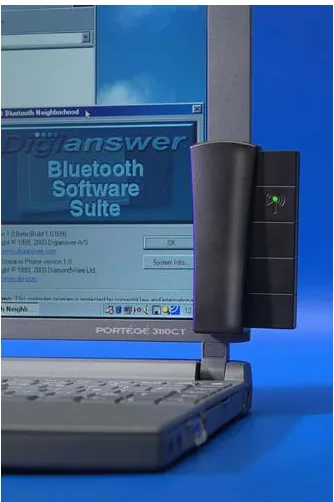
• If you have a desktop PC, your best bet is a Bluetooth USB adapter, which will plug into a USB port on the back of your PC. Your alternatives are Bluetooth serial adapters (slower than USB adapters—and you probably don’t have a free serial port, anyway) and Bluetooth dongles (which are actually very small USB adapters that hang off the back of your PC). The advantages of a USB adapter are that you probably have a free USB port on your PC (and if you don’t, you can increase USB capacity by adding a USB hub), a USB connection is relatively plug-and-play in the Windows world, and the adapter itself is relatively flexible in terms of its placement.
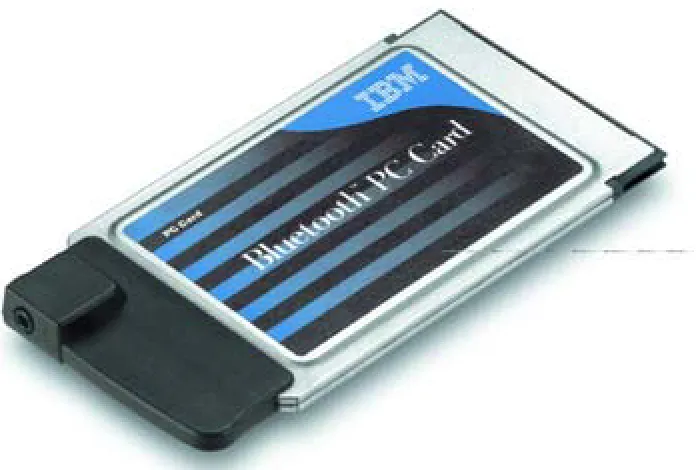
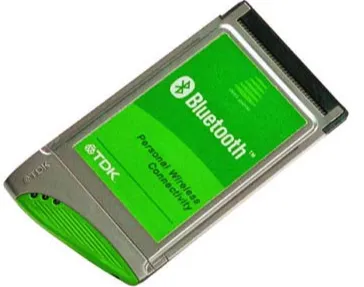
• If you have a portable PC, your best bet is a Bluetooth PC card. Your alternatives are Bluetooth USB adapters (too big and bulky for a notebook), Bluetooth dongles (smaller than USB adapters, but not as portable as PC cards), and memory card/stick adapters (a viable choice, if your notebook has a CompactFlash or Sony Memory Stick slot). The advantages of a PC card are that it’s small, it fits right into one of your notebook’s PC card slots (and thus travels along with your notebook, almost unnoticeably), and it’s relatively plug-and-play, installation-wise.
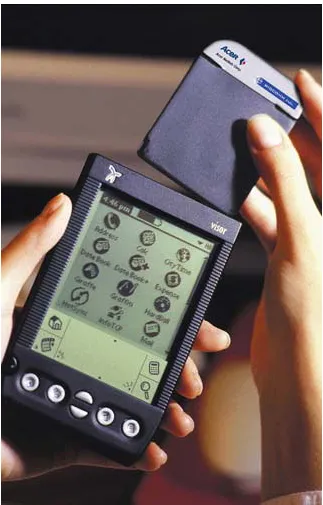
• If you have a PDA (such as a PalmPilot or a Handspring Visor), your best bet is a device-specific add-on card. If your PDA has a CompactFlash or Memory Stick slot, using a Bluetooth memory adapter is also a viable option. You may also be able to find a dongle that mates with your PDA, but the combination is extremely awkward. • If you have a printer or scanner, your only choice is a USB don