UNISYS
System V Operating
System
Programmer's
Guide
Volume 1
Unisys is a trademark of Unisys Corporation.
Priced Item
January 1988
indicated.
The names, places, and/or events used in this publication are not intended to correspond to any individual, group, or association existing, living, or otherwise. Any similarity or likeness of the names, places and/or events with the names of any individual living or otherwise, or that of any group or association is purely coincidental and unintentional.
NO WARRANTIES OF ANY NATURE ARE EXTENDED BY THIS DOCUMENT. Any product and related material disclosed herein are only furnished pursuant and subject to the terms and conditions of a duly executed Program Product License or Agreement to purchase or lease equipment. The only warranties made by Unisys, if any, with respect to the products described in this document are set forth in such License or Agreement. Unisys cannot accept any financial or other responsibility that may be the result of your use of the information in this document or software material, including direct, indirect, special or consequential damages.
You should be very careful to ensure that the use of this information and/or software material complies with the laws, rules, and regulations of the jurisdictions with respect to which it is used.
The information contained herein is subject to change without notice. Revisions may be issued to advise of such changes and/or additions.
PDP and VT100 are trademarks of Digital Equipment Corporation.
Teletype is a registered trademark of AT&T. UNIX is a registered trademark of AT&T in the USA and other countries.
Introduction
Chapter 1: Programming in a UNIX System Environment: An Overview Introduction
UNIX System Tools and Where You Can Read About Them
Three Programming Environments Summary
Chapter 2: Programming Basics Introduction
Choosing a Programming Language After Your Code Is Written
The Interface Between a Programming Language and the UNIX System
Analysis/Debugging
Program Organizing Utilities
Chapter 3: Application Programming Introduction
Application Programming Language Selection
Advanced Programming Tools
xiii
1-1
1-5
1-8
1-10
2-1
2-2 2-9
2-15
2-51
2-75
3-1
3-2
3-5
3-13
Programming Support Tools Project Control Tools liber, A Library System
Chapter 4: awk
The awk Programming Language Using awk
Input and Output Patterns
Actions
Special Features
Chapter 5: lex
An Overview of lex Programming Writing lex Programs
Running lex under the UNIX System
Chapter 6: yacc Introduction
Basic Specifications Parser Operation Ambiguity and Conflicts Precedence
Error Handling
iv PROGRAMMER'S GUIDE
3-22 3-36 3-40
4-1
4-17
4-18
4-30
4-37
4-44
5-1
5-3
5-19
6-1 6-5 6-14 6-20 6-26 6-30
The yacc Environment
Hints for Preparing Specifications Advanced Topics
Examples
Chapter 7: File and Record Locking Introduction
Terminology File Protection
Selecting Advisory or Mandatory Locking
Chapter 8: Shared Libraries Introduction
Using a Shared Library Building a Shared Library Summary
Chapter 9: Interprocess Communication Introduction
Messages Semaphores Shared Memory
6-34 6-36 6-40 6-47
7-1 7-2 7-4 7-18
8-1 8-2 8-15 8-49
9-1 9-2 9-41 9-81
Chapter 10: curses/terminfo Introduction
Overview
Working with curses Routines Working with terminfo Routines Working with the terminfo Database curses Program Examples
Chapter 11: The Common Object File Format (COFF)
Chapter 12: The Link Editor The Link Editor
Link Editor Command Language Notes and Special Considerations Syntax Diagram for Input Directives
Chapter 13: make Introduction Basic Features
Description Files and Substitutions Recursive Makefiles
Source Code Control System Filenames: the Tilde
Command Usage
vi PROGRAMMER'S GUIDE
10-1 10-3 10-9 10-65 10-71 10-84
12-1 12-4 12-23 12-34
13-1 13-3 13-7 13-12
13-18 13-22
Suggestions and Warnings Internal Rules
Chapter 14: Source Code Control System (SCCS)
Introduction
SCCS For Beginners Delta Numbering
SCCS Command Conventions SCCS Commands
SCCS Files
Chapter 15: sdb - The Symbolic Debugger Introduction
Using sdb
Chapter 16: lint Introduction Usage
lint Message Types
Chapter 17: C Language Introduction
Lexical Conventions Storage Class and Type
13-26 13-27
14-1 14-2 14-8 14-11 14-13 14-40
15-1 15-2
16-1 16-2 16-4
17-1 17-2 17-6
Operator Conversions
Expressions and Operators
Declarations
Statements
External Definitions
Scope Rules
Compiler Control Lines
Types Revisited
Constant Expressions
Portability Considerations
Syntax Summary
Appendix A: Index to Utilities
Glossary
Index
viii PROGRAMMER'S GUIDE
17-9 17-13 17-25 17-40 17-46 17-48 17-50 17-54 17-59 17-60 17-61
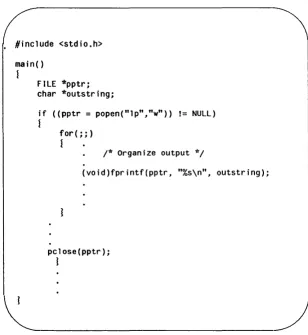
2-1: Using Command Line Arguments to Set Flags 2-17 2-2: Using argv[n] Pointers to Pass a Filename 2-18 2-3: C Language Standard I/O Subroutines 2-21
2-4: String Operations 2-23
2-5: Classifying ASCII Character-Coded Integer Values 2-25
2-6: Conversion Functions and Macros 2-26
2-7: Manual Page for gets(3S) 2-28
2-8: How gets Is Used in a Program 2-31
2-9: A Version of stdio.h 2-32
2-10: Environment and Status System Calls 2-40
2-11: Process Status 2-41
2-12: Example of fork 2-45
2-13: Example of a popen pipe 2-47
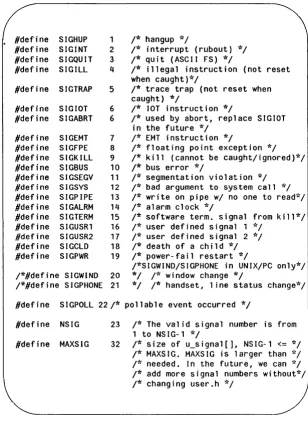
2-14: Signal Numbers Defined in lusr/include/sys/signal.h 2-49
2-15: Source Code for Sample Program 2-52
2-16: cflow Output, No Options 2-56
2-17: cflow Output, Using -r Option 2-57
2-18: cflow Output, Using -ix Option 2-58 2-19: cflow Output, Using -r and -ix Options 2-59
2-20: ctrace Output 2-61
2-21: cxref Output, Using -c Option 2-65
2-22: lint Output 2-70
2-23: prof Output 2-72
2-24: make Description File 2-76
2-25: nm Output, with -f Option 2-79
3-1: The fcntl.h Header File 3-16
4-1: awk Keywords 4-3
4-2: awk Assignment Operators 4-5
4-3: awk Arithmetic Operators 4-6
4-4: awk Relational Operators 4-6
4-5: awk Logical Operators 4-6
4-6: Operators for Matching Regular Expressions in awk 4-7 4-7: Numeric Values for String Constants 4-9 4-8: String Values for String Constants 4-10 4-9: Built-in Functions for Arithmetic and String Operations 4-11
4-10: awk String Functions 4-12
4-11: Sample Input File, countries 4-20
5-1: Creation and Use of a Lexical Analyzer with lex 5-2
8-1: a.out Files Created Using an Archive Library
and a Shared Library 8-9
8-2: Processes Using an Archive and a Shared Library 8-10 8-3: A Branch Table in a Shared Library 8-13 8-4: Imported Symbols in a Shared Library 8-35
9-1: ipc_perm Data Structure 9-6
9-2: Operation Permissions Codes 9-11
9-3: Control Commands (Flags) 9-11
9-4: msggetO System Call Example 9-15
9-5: msgctlO System Call Example 9-22
9-6: msgopO System Call Example 9-34
9-7: Operation Permissions Codes 9-49
9-8: Control Commands (Flags) 9-50
9-9: semgetO System Call Example 9-54
9-10: semctlO System Call Example 9-65
9-11: semop(2) System Call Example 9-77
9-12: Shared Memory State Information 9-84
9-13: Operation Permissions Codes 9-88
9-14: Control Commands (Flags) 9-89
9-15: shmget(2) System Call Example 9-93
9-16: shmctl(2) System Call Example 9-101
9-17: shmopO System Call Example 9-112
10-1: A Simple curses Program 10-4
10-2: A Shell Script Using terminfo Routines 10-6 10-3: The Purposes of initscrO, refresh
0 ,
and endwinOin a Program 10-11
10-4: The Relationship between stdscr and a
Terminal Screen 10-17
10-5: Multiple Windows and Pads Mapped to a
Terminal Screen 10-18
10-6: Input Option Settings for curses Programs 10-46 10-7: The Relationship Between a Window and a
Terminal Screen 10-55
10-8: Sending a Message to Several Terminals 10-64 10-9: Typical Framework of a terminfo Program 10-66
11-1: Object File Format 11-2
11-2: File Header Contents 11-4 11-3: File Header Flags (382 Computer) 11-5
11-4: File Header Declaration 11-6
11-5: Optional Header Contents (382, 385, 3815 Computers) 11-7 11-6: UNIX System Magic Numbers (382, 385,
3815 Computers) 11-8
11-7: aouthdr Declaration 11-9
11-8: Section Header Contents 11-10
11-9: Section Header Flags 11-11
11-10: Section Header Declaration 11-12
11-11: Relocation Section Contents 11-14
11-12: Relocation Types (382, 385, 3815 Computers) 11-13
11-13: Relocation Entry Declaration 11-15
11-14: Line Number Grouping 11-16
11-15: Line Number Entry Declaration 11-17
11-16: COFF Symbol Table 11-18
11-17: Special Symbols in the Symbol Table 11-19 11-18: Special Symbols (.bb and .eb) 11-20
11-19: Nested blocks 11-21
11-20: Example of the Symbol Table 11-22
11-21 : Symbols for Functions 11-22
11-22: Symbol Table Entry Format 11-23
11-23: Name Field 11-24
11-24: Storage Classes 11-25
11-25: Storage Class by Special Symbols 11-27
11-26: Restricted Storage Classes 11-27
11-27: Storage Class and Value 11-28
11-28: Section Number 11-29
11-29: Section Number and Storage Class 11-30
11-30: Fundamental Types 11-32
11-31 : Derived Types 11-32
11-32: Type Entries by Storage Class 11-34 11-33: Symbol Table Entry Declaration 11-36 11-34: Auxiliary Symbol Table Entries 11-37 11-35: Format for Auxiliary Table Entries for Sections 11-38
11-36: Tag Names Table Entries 11-39
11-37: Table Entries for End of Structures 11-39
11-38: Table Entries for Functions 11-40
11-39: Table Entries for Arrays 11-40
11-40: End of Block and Function Entries 11-41 11-41 : Format for 8eginning of 810ck and Function 11-41
11-42: Entries for Structures. Unions. and Enumerations 11-42 11-43: Auxiliary Symbol Table Entry 11-43
11-44: String Table 11-45
12-1: Operator Symbols 12-5
12-2: Syntax Diagram for Input Directives 12-34
13-1: Summary of Default Transformation Path 13-14 13-2: make Internal Rules 13-27
14-1: Evolution of an SCCS File 14-8 14-2: Tree Structure with Branch Deltas 14-8 14-3: Extended Branching Concept 14-9 14-4: Determination of New SID 14-10
15-1: Example of sdb Usage 15-14
17-1: Escape Sequences for Nongraphic Characters 17-4 17-2: AT&T 3B Computer Hardware Characteristics 17-7
System Environment: An
Over-view
Introduction The Early Days
UNIX System Philosophy Simply Stated
UNIX System Tools and Where You Can Read About Them
Tools Covered and Not Covered in this Guide The Shell as a Prototyping Tool
Three Programming Environments Single-User Programmer Application Programming Systems Programmers
Summary
UP-13689 TABLE OF CONTENTS
1-1 1-1 1-3
1-4 1-4 1-5
1-7 1-7 1-8 1-8
The 1983 Turing Award of the Association for Computing Machinery was given jointly to Ken Thompson and Dennis Ritchie, the two men who first designed and developed the UNIX operating system. The award citation said, in part:
"The success of the UNIX system stems from its tasteful selection of a few key ideas and their elegant implementation. The model of the UNIX system has led a generation of software designers to new ways of thinking about programming. The genius of the UNIX system is its framework which enables programmers to stand on the work of others." As programmers working in a UNIX system environment, why should we care what Thompson and Ritchie did? Does it have any relevance for us today?
It does because if we understand the thinking behind the sys-tem design and the atmosphere in which it flowered, it can help us become productive UNIX system programmers more quickly.
The Early Days
You may already have read about how Ken Thompson came across a DEC PDP-7 machine sitting unused in a hallway at AT&T Bell Laboratories, and how he and Dennis Ritchie and a few of their colleagues used that as the original machine for developing a new operating system that became UNIX.
The important thing to realize, however, is that what they were trying to do was fashion a pleasant computing environment for themselves. It was not, "Let's get together and build an operating system that will attract world-wide attention."
The sequence in which elements of the system fell into place is interesting. The first piece was the file system, followed quickly by its organization into a hierarchy of directories and files. The view of everything, data stores, programs, commands, directories, even devices, as files of one type or another was critical, as was the idea of a file as a one-dimensional array of bytes with no other structure implied. The cleanness and simplicity of this way of
looking at files has been a major contributing factor to a computer environment that programmers and other users have found com-fortable to work in.
The next element was the idea of processes, with one process being able to create another and communicate with it. This inno-vative way of looking at running programs as processes led easily to the practice (quintessentially UNIX) of reusing code by calling it from another process. With the addition of commands to manipu-late files and an assembler to produce executable programs, the system was essentially able to function on its own.
The next major development was the acquisition of a DEC PDP-11 and the installation of the new system on it. This has been described by Ritchie as a stroke of good luck, in that the PDP-11 was to become a hugely successful machine, its success to some extent adding momentum to the acceptance of the system that began to be known by the name of UNIX.
By 1972 the innovative idea of pipes (connecting links between processes whereby the output of one becomes the input of the next) had been incorporated into the system, the operating system had been recoded in higher level languages (first B, then C), and had been dubbed with the name UNIX (coined by Brian Ker-nighan). By this point, the "pleasant computing environment" sought by Thompson and Ritchie was a reality; but some other things were going on that had a strong influence on the character of the product then and today.
It is worth pointing out that the UNIX system came out of an atmosphere that was totally different from that in which most com-mercially successful operating systems are produced. The more typical atmosphere is that described by Tracy Kidder in The Soul of a New Machine. In that case, dozens of talented programmers worked at white heat, in an atmosphere of extremely tight security, against murderous deadlines. By contrast, the UNIX system could be said to have had about a ten year gestation period. From the beginning it attracted the interest of a growing number of brilliant specialists, many of whom found in the UNIX system an environ-ment that allowed them to pursue research and developenviron-ment interests of their own, but who in turn contributed additions to the body of tools available for succeeding ranks of UNIX program-mers.
Beginning in 1971, the system began to be used for applica-tions within AT&T Bell Laboratories, and shortly thereafter (1974) was made available at low cost and without support to colleges and universities. These versions, called research versions and identified with Arabic numbers up through 7, occasionally grew on their own and fed back to the main system additional innovative tools. The widely-used screen editor vi(1), for example, was added to the UNIX system by William Joy at the University of California, Berkeley. In 1979 acceding to commercial demand, AT&T began offering supported versions (called development versions) of the UNIX system. These are identified with Roman numerals and often have interim release numbers appended. The current develop-ment version, for example, is UNIX System V Release 3.0.
Versions of the UNIX system being offered now by AT&T are coming from an environment more closely related, perhaps, to the standard software factory. Features are being added to new releases in response to the expressed needs of the market place. The essential quality of the UNIX system, however, remains as the product of the innovative thinking of its originators and the colle-gial atmosphere in which they worked. This quality has on occa-sion been referred to as the UNIX philosophy, but what is meant is the way in which sophisticated programmers have come to work with the UNIX system.
UNIX System Philosophy Simply Stated
For as long as you are writing programs on a UNIX system you should keep this motto hanging on your wall:
* * * * * * * * * * * * * * * * * * * * *
*
*
Build on the work of others*
*
*
*
* *
* * * *
*
* *
*
* *
* * *
* * * * * *
Unlike computer environments where each new project is like starting with a blank canvas, on a UNIX system a good percentage of any programming effort is lying there in bins, and Ibins, and /usr/bins, not to mention etc, waiting to be used.
The features of the UNIX system (pipes, processes, and the file system) contribute to this reusability, as does the history of sharing and contributing that extends back to 1969. You risk missing the essential nature of the UNIX system if you don't put this to work.
UNIX
System
Tools and Where You
Can Read About Them
The term "UNIX system tools" can stand some clarification. In the narrowest sense, it means an existing piece of software used as a component in a new task. In a broader context, the term is often used to refer to elements of the UNIX system that might also be called features, utilities, programs, filters, commands,
languages, functions, and so on. It gets confusing because any of the things that might be called by one or more of these names can be, and often are, used in the narrow way as part of the solu-tion to a programming problem.
Tools Covered and Not Covered in this Guide
The Programmer's Guide is about tools used in the process of
creating programs in a UNIX system environment, so let's take a minute to talk about which tools we mean, which ones are not going to be covered in this book, and where you might find infor-mation about those not covered here. Actually, the subject of things not covered in this guide might be even more important to you than the things that are. We couldn't possibly cover every-thing you ever need to know about UNIX system tools in this one volume.
Tools not covered in this text: • the login procedure
• UNIX system editors and how to use them
• how the file system is organized and how you move around in it
• shell programming
Information about these subjects can be found in the User's Guide and a number of commercially available texts.
Tools covered here can be classified as follows:
• utilities for getting programs running
• utilities for organizing software development projects
• specialized languages
• debugging and analysis tools
• compiled language components that are not part of the language syntax, for example, standard libraries, systems calls, and functions
The Shell as a Prototyping Tool
Any time you log in to a UNIX system machine you are using the shell. The shell is the interactive command interpreter that stands between you and the UNIX system kernel, but that's only part of the story. Because of its ability to start processes, direct the flow of control, field interrupts and redirect input and output it is a full-fledged programming language. Programs that use these capabilities are known as shell procedures or shell scripts.
Much innovative use of the shell involves stringing together commands to be run under the control of a shell script. The dozens a~d dozens of commands that can be used in this way are documented in the User's Reference Manual. Time spent with the User's Reference Manual can be rewarding. Look through it when you are trying to find a command with just the right option to han-dle a knotty programming problem. The more familiar you
become with the commands described in the manual pages the more you will be able to take full advantage of the UNIX system environment.
It is not our purpose here to instruct you in shell programming. What we want to stress here is the important part that shell pro-cedures can play in developing prototypes of full-scale applica-tions. While understanding all the nuances of shell programming can be a fairly complex task, getting a shell procedure up and run-ning is far less time-consuming than writing, compiling and debug-ging compiled code.
This ability to get a program into production quickly is what makes the shell a valuable tool for program development. Shell programming allows you to "build on the work of others" to the greatest possible degree, since it allows you to piece together major components simply and efficiently. Many times even large applications can be done using shell procedures. Even if the appli-cation is initially developed as a prototype system for testing pur-poses rather than being put into production, many months of work can be saved.
With a prototype for testing, the range of possible user errors can be determined - something that is not always easy to plan out when an application is being designed. The method of dealing with strange user input can be worked out inexpensively, avoiding large re-coding problems.
A common occurrence in the UNIX system environment is to find that an available UNIX system tool can accomplish with a cou-ple of lines of instructions what might take a page and a half of compiled code. Shell procedures can intermix compiled modules and regular UNIX system commands to let you take advantage of work that has gone before.
We distinguish among three programming environments to emphasize that the information needs and the way in which UNIX system tools are used differ from one environment to another. We do not intend to imply a hierarchy of skill or experience. Highly-skilled programmers with years of experience can be found in the "single-user" category, and relative newcomers can be members of an application development or systems programming team.
Single-User Programmer
Programmers in this environment are writing programs only to ease the performance of their primary job. The resulting programs might well be added to the stock of programs available to the community in which the programmer works. This is similar to the atmosphere in which the UNIX system thrived; someone develops a useful tool and shares it with the rest of the organization. Single-user programmers may not have externally imposed requirements, or co-authors, or project management concerns. The programming task itself drives the coding very directly. One advantage of a timesharing system such as UNIX is that people with programming skills can be set free to work on their own without having to go through formal project approval channels and perhaps wait for months for a programming department to solve their problems.
Single-user programmers need to know how to: • select an appropriate language
• compile and run programs • use system libraries • analyze programs • debug programs
• keep track of program versions
Most of the information to perform these functions at the single-user level can be found in Chapter 2.
Application Programming
Programmers working in this environment are developing sys-tems for the benefit of other, non-programming users. Most large commercial computer applications still involve a team of applica-tions development programmers. They may be employees of the end-user organization or they may work for a software develop-ment firm. Some of the people working in this environdevelop-ment may be more in the project management area than working program-mers.
Information needs of people in this environment include all the topics in Chapter 2, plus additional information on:
• software control systems • file and record locking
• communication between processes • shared memory
• advanced debugging techniques
These topics are discussed in Chapter 3.
Systems Programmers
These are programmers engaged in writing software tools that are part of, or closely related to the operating system itself. The project may involve writing a new device driver, a data base management system or an enhancement to the UNIX system ker-nel. In addition to knowing their way around the operating system source code and how to make changes and enhancements to it, they need to be thoroughly familiar with all the topics covered in Chapters 2 and 3.
In this overview chapter we have described the way that the UNIX system developed and the effect that has on the way pro-grammers now work with it. We have described what is and is not to be found in the other chapters of this guide to help program-mers. We have also suggested that in many cases programming problems may be easily solved by taking advantage of the UNIX system interactive command interpreter known as the shell. Finally, we identified three programming environments in the hope that it will help orient the reader to the organization of the text in the remaining chapters.
Introduction 2-1
Choosing a Programming Language 2-2
Supported Languages in a UNIX System Environment 2-3
C Language 2-3
FORTRAN 2-4
Pascal 2-4
COBOL ~4
MffiC ~5
Assembly Language 2-5
Special Purpose Languages 2-6
awk ~6
lex 2-7
yacc 2-7
M4 2-7
bc and dc 2-7
curses 2-8
After Your Code Is Written 2-9
Compiling and Link Editing 2-10
Compiling C Programs 2-10
Compiling FORTRAN Programs 2-11
Loading and Running BASIC Programs 2-11
Compiler Diagnostic Messages 2-12
Link Editing 2-12
The Interface Between a Programming Language
and the UNIX System 2-14
Why C Is Used to Illustrate the Interface 2-14 How Arguments Are Passed to a Program 2-15
System Calls and Subroutines
Categories of System Calls and Subroutines Where the Manual Pages Can Be Found
2-18 2-18 2-27 How System Calls and Subroutines Are Used in C Prograrns27
Header Files and Libraries 2-33
Object File Libraries 2-34
Input/Output 2-35
Three Files You Always Have 2-35
Named Files 2-36
Low-level I/O and Why You Shouldn't Use It 2-38 System Calls for Environment or Status Information 2-38
Processes 2-40
system (3S) 2-41
exec (2) 2-42
fork (2) 2-42
Pipes 2-45
Error Handling 2-47
Signals and Interrupts 2-47
Analysis/Debugging 2-50
Sample Program 2-50
cflow 2-55
ctrace 2-58
cxref 2-62
lint 2-69
prof 2-70
size 2-72
strip 2-72
sdb 2-72
Program Organizing Utilities The make Command The Archive
Use of SCCS by Single-User Programmers
2-74 2-74 2-76 2-83
The information in this chapter is for anyone just learning to write programs to run in a UNIX system environment. In Chapter 1 we identified one group of UNIX system users as single-user pro-grammers. People in that category, particularly those who are not deeply interested in programming, may find this chapter (plus related reference manuals) tells them as much as they need to know about coding and running programs on a UNIX system com-puter.
Programmers whose interest does run deeper, who are part of an application development project, or who are producing pro-grams on one UNIX system computer that are being ported to another, should view this chapter as a starter package.
How do you decide which programming language to use in a given situation? One answer could be, "I always code in HAIRBOL, because that's the language I know best." Actually, in some cir-cumstances that's a legitimate answer. But assuming more than one programming language is available to you, that different pro-gramming languages have their strengths and weaknesses, and assuming that once you've learned to use one programming language it becomes relatively easy to learn to use another, you might approach the problem of language selection by asking your-self questions like the following:
• What is the nature of the task this program is to do?
Does the task call for the development of a complex algo-rithm, or is this a simple procedure that has to be done on a lot of records?
• Does the programming task have many separate parts?
Can the program be subdivided into separately compilable functions, or is it one module?
• How soon does the program have to be available?
Is it needed right now, or do I have enough time to work out the most efficient process possible?
• What is the scope of its use?
Am I the only person who will use this program, or is it going to be distributed to the whole world?
• Is there a possibility the program will be ported to other sys-tems?
• What is the life-expectancy of the program?
Is it going to be used just a few times, or will it still be going strong five years from now?
Supported Languages in a UNIX System Environment
By "supported languages" we mean those offered by AT&T for use on an AT&T 3B2 Computer running UNIX System V Release 3.0. Since these are separately purchasable items, not all of them will necessarily be installed on your machine. On the other hand, you may have languages available on your machine that came from another source and are not mentioned in this discussion. Be that as it may, in this section and the one to follow we give brief descriptions of the nature of a) six full-scale programming languages, and b) a number of special purpose languages.
C Language
C is intimately associated with the UNIX system since it was originally developed for use in recoding the UNIX system kernel. If you need to use a lot of UNIX system function calls for low-level I/O, memory or device management, or inter-process communica-tion, C language is a logical first choice. Most programs, however, don't require such direct interfaces with the operating system so the decision to choose C might better be based on one or more of the following characteristics:
• a variety of data types: character, integer, long integer, float, and double
• low level constructs (most of the UNIX system kernel is writ-ten in C)
• derived data types such as arrays, functions, pOinters, struc-tures and unions
• multi-dimensional arrays
• scaled pointers, and the ability to do pointer arithmetic • bit-wise operators
• a variety of flow-of-control statements: if, if-else, switch, while, do-while, and for
• a high degree of portability
C is a language that lends itself readily to structured program-ming. It is natural in C to think in terms of functions. The next logical step is to view each function as a separately compilable unit. This approach (coding a program in small pieces) eases the job of making changes and/or improvements. If this begins to sound like the UNIX system philosophy of building new programs from existing tools, it's not just coincidence. As you create func-tions for one program you will surely find that many can be picked up, or quickly revised, for another program.
A difficulty with C is that it takes a fairly concentrated use of the language over a period of several months to reach your full potential as a C programmer. If you are a casual programmer, you might make life easier for yourself if you choose a less demanding language.
FORTRAN
The oldest of the high-level programming languages, FOR-TRAN is still highly prized for its variety of mathematical functions. If you are writing a program for statistical analysis or other scien-tific applications, FORTRAN is a good choice. An original design objective was to produce a language with good operating effi-ciency. This has been achieved at the expense of some flexibility in the area of type definition and data abstraction. There is, for example, only a single form of the iteration statement. FORTRAN also requires using a somewhat rigid format for input of lines of source code. This shortcoming may be overcome by using one of the UNIX system tools designed to make FORTRAN more flexible.
Pascal
Originally designed as a teaching tool for block structured pro-gramming, Pascal has gained quite a wide acceptance because of its straightforward style. Pascal is highly structured and allows system level calls (characteristics it shares with C). Since the intent of the developers, however, was to produce a language to teach people about programming it is perhaps best suited to small projects. Among its inconveniences are its lack of facilities for specifying initial values for variables and limited file processing capability.
COBOL
Probably more programmers are familiar with COBOL than with any other single programming language. It is frequently used in business applications because its strengths lie in the manage-ment of input/output and in defining record layouts.
It is somewhat cumbersome to use COBOL for complex algo-rithms, but it works well in cases where many records have to be passed through a simple process; a payroll withholding tax calcula-tion, for example. It is a rather tedious language to work with because each program requires a lengthy amount of text merely to describe record layouts, processing environment and variables used in the code. The COBOL language is wordy so the compila-tion process is often quite complex. Once written and put into production, COBOL programs have a way of staying in use for years, and what might be thought of by some as wordiness comes to be considered self-documentation. The investment in program-mer time often makes them resistant to change.
BASIC
The most commonly heard comment about BASIC is that it is easy to learn. With the spread of personal microcomputers many people have learned BASIC because it is simple to produce runn-able programs in very little time. It is difficult, however, to use BASIC for large programming projects. It lacks the provision for structured flow-of-control, requires that every variable used be defined for the entire program and has no way of transferring values between functions and calling programs. Most versions of BASIC run as interpreted code rather than compiled. That makes for slower running programs. Despite its limitations, however, it is useful for getting simple procedures into operation quickly.
Assembly Language
The closest approach to machine language, assembly
language is specific to the particular computer on which your pro-gram is to run. High-level languages are translated into the assembly language for a specific processor as one step of the compilation. The most common need to work in assembly language arises when you want to do some task that is not within the scope of a high-level language. Since assembly language is
machine-specific, programs written in it are not portable.
Special Purpose Languages
In addition to the above formal programming languages, the UNIX system environment frequently offers one or more of the special purpose languages listed below.
NOTE: Since UNIX system utilities and commands are packaged in functional groupings, it is possible that not all the facilities mentioned will be available on all systems.
awk
awk (its name is an acronym constructed from the initials of its developers) scans an input file for lines that match pattern(s) described in a specification file. On finding a line that matches a pattern, awk performs actions also described in the specification. It is not uncommon that an awk program can be written in a cou-ple of lines to do functions that would take a coucou-ple of pages to describe in a programming language like FORTRAN or C. For example, consider a case where you have a set of records that consist of a key field and a second field that represents a quantity. You have sorted the records by the key field, and you now want to add the quantities for records with duplicate keys and output a file in which no keys are duplicated. The pseudo-code for such a pro-gram might look like this:
Read the first record into a hold area; Read additional records until EOF;
{
If the key matches the key of the record in the hold area, add the quantity to the quantity field of the held record; If the key does not match the key of the held record,
write the held record,
move the new record to the hold area;
}
At EOF, write out the last record from the hold area.
An awk program to accomplish this task would look like this:
I
qty[$l] += $2 JEND~ for (key in qty) print key, qty[key] J
This illustrates only one characteristic of awk; its ability to work with associative arrays. With awk, the input file does not have to be sorted, which is a requirement of the pseudo-program.
lex
lex is a lexical analyzer that can be added to C or FORTRAN programs. A lexical analyzer is interested in the vocabulary of a language rather than its grammar, which is a system of rules defin-ing the structure of a language. lex can produce C language sub-routines that recognize regular expressions specified by the user, take some action when a regular expression is recognized and pass the output stream on to the next program.
yacc
yacc (Yet Another Compiler Compiler) is a tool for describing an input language to a computer program. yaee produces a C language subroutine that parses an input stream according to rules laid down in a specification file. The yaee specification file establishes a set of grammar rules together with actions to be taken when tokens in the input match the rules. lex may be used with yaee to control the input process and pass tokens to the parser that applies the grammar rules.
M4
M4 is a macro processor that can be used as a preprocessor for assembly language, and C programs. It is described in Section
(1) of the Programmer's Reference Manual.
be and de
be enables you to use a computer terminal as you would a programmable calculator. You can edit a file of mathematical computations and call be to execute them. The be program uses dc. You can use dc directly, if you want, but it takes a little get-ting used to since it works with reverse Polish notation. That means you enter numbers into a stack followed by the operator. bc and de are described in Section (1) of the User's Reference
Manual.
curses
Actually a library of C functions, curses is included in this list because the set of functions just about amounts to a
sub-language for dealing with terminal screens. If you are writing pro-grams that include interactive user screens, you will want to become familiar with this group of functions.
In addition to all the foregoing, don't overlook the possibility of using shell procedures.
The last two steps in most compilation systems in the UNIX system environment are the assembler and the link editor. The compilation system produces assembly language code. The assembler translates that code into the machine language of the computer the program is to run on. The link editor resolves all undefined references and makes the object module executable. With most languages on the UNIX system the assembler and link editor produce files in what is known as the Common Object File Format (COFF). A common format makes it easier for utilities that depend on information in the object file to work on different machines running different versions of the UNIX system.
In the Common Object File Format an object file contains: • a file header
• optional secondary header • a table of section headers
• data corresponding to the section header(s) • relocation information
• line numbers • a symbol table • a string table
An object file is made up of sections. Usually. there are at least two: .text. and .data. Some object files contain a section called .bss. (.bss is an assembly language pseudo-op that origi-nally stood for IIblock started by symbol,lI) .bss. when present. holds uninitialized data. Options of the compilers cause different items of information to be included in the Common Object File Format. For example. compiling a program with the -9 option adds line numbers and other symbolic information that is needed for the sdb (Symbolic Debugger) command to be fully effective. You can spend many years programming without having to worry too much about the contents and organization of the Common Object File Format. so we are not going into any further depth of detail at this point. Detailed information is available in Chapter 11 of this guide.
Compiling and Link Editing
The command used for compiling depends on the language used;
• for C programs, cc both compiles and link edits
• for FORTRAN programs, f77 both compiles and link edits
Compiling C Programs
To use the C compilation system you must have your source code in a file with a filename that ends in the characters .c, as in mycode.c. The command to invoke the compiler is:
cc mycode.c
If the compilation is successful the process proceeds through the link edit stage and the result will be an executable file by the name of a.out.
Several options to the cc command are available to control its operation. The most used options are:
-c
-g
-0
causes the compilation system to suppress the link edit phase. This produces an object file
(mycode.o) that can be link edited at a later time with a cc command without the -c option. causes the compilation system to generate spe-cial information about variables and language statements used by the symbolic debugger sdb. If you are going through the stage of ·debugging your program, use this option. causes the inclusion of an additional optimiza-tion phase. This opoptimiza-tion is logically incompatible with the -g option. You would normally use -0 after the program has been debugged, to reduce the size of the object file and increase execution speed.
-p causes the compilation system to produce code that works in conjunction with the prof(1) com-mand to produce a runtime profile of where the program is spending its time. Useful in identify-ing which routines are candidates for improved code.
-ooutfile tells cc to tell the link editor to use the specified name for the executable file, rather than the default a.out.
Other options can be used with cc. Check the Programmer's
Reference Manual.
If you enter the cc command using a file name that ends in .s, the compilation system treats it as assembly language source code and bypasses all the steps ahead of the assembly step.
Compiling FORTRAN Programs
The f77 command invokes the FORTRAN compilation system. The operation of the command is similar to that of the cc com-mand, except the source code file(s) must have a .f suffix. The f77 command compiles your source code and calls in the link edi-tor to produce an executable file whose name is a.out.
The following command line options have the same meaning as they do for the cc command:
-c,
-p, -0, -g, and -ooutfileLoading and Running BASIC Programs
BASIC programs can be invoked in two ways: • With the command
basic bscpgm.b
where bscpgm.b is the name of the file that holds your BASIC statements. This tells the UNIX system to load and run the program. If the program includes a run statement naming another program, you will chain from one to the other. Variables specified in the first can be preserved for the second with the common statement.
• By setting up a shell script.
Compiler Diagnostic Messages
The C compiler generates error messages for statements that don't compile. The messages are generally quite understandable, but in common with most language compilers they sometimes point several statements beyond where the actual error occurred. For example, if you inadvertently put an extra; at the end of an if statement, a subsequent else will be flagged as a syntax error. In the case where a block of several statements follows the if, the line number of the syntax error caused by the else will start you look-ing for the error well past where it is. Unbalanced curly braces, { }, are another common producer of syntax errors.
Link Editing
The Id command invokes the link editor directly. The typical user, however, seldom invokes Id directly. A more common prac-tice is to use a language compilation control command (such as cc) that invokes Id. The link editor combines several object files into one, performs relocation, resolves external symbols, incor-porates startup routines, and supports symbol table information used by sdb. You may, of course, start with a single object file rather than several. The resulting executable module is left in a file named a.out.
Any file named on the Id command line that is not an object file (typically, a name ending in 0) is assumed to be an archive library or a file of link editor directives. The Id command has some 16 options. We are going to describe four of them. These options should be fed to the link editor by specifying them on the cc com-mand line if you are doing both jobs with the single comcom-mand, which is the usual case.
-ooutfile provides a name to be used to replace a.out as the name of the output file. Obviously, the name a.out is of only temporary usefulness. If you know the name you want use to invoke your program, you can provide it here. Of course, it may be equally convenient to do this:
mv a.out progname
-Ix
-L dir
when you want to give your program a less temporary name.
directs the link editor to search a library libx.a, where
x
is up to nine characters. ForC
pro-grams, libe.a is automatically searched if the ee command is used. The -Ix option is used to bring in libraries not normally in the search path such as libm.a, the math library. The -Ix option can occur more than once on a command line, with different values for thex.
A library is searched when its name is encountered, so the placement of the option on the command line is important. The safest place to put it is at the end of the command line. The·1x option is related to the -L option.changes the libx.a search sequence to search in the specified directory before looking in the default library directories, usually /lib or /usr/lib. This is useful if you have different ver-sions of a library and you want to point the link editor to the correct one. It works on the assumption that once a library has been found no further searching for that library is neces-sary. Because -L diverts the search for the libraries specified by ·Ix options, it must pre-cede such options on the command line. -u symname enters symname as an undefined symbol in the
symbol table. This is useful if you are loading entirely from an archive library, because initially the symbol table is empty and needs an
unresolved reference to force the loading of the first routine.
When the link editor is called through ee, a startup routine (typically /lib/ertO.o for C programs) is linked with your program. This routine calls exit(2) after execution of the main program.
The link editor accepts a file containing link editor directives. The details of the link editor command language can be found in Chapter 12.
ming Language and the UNIX
System
When a program is run in a computer it depends on the operating system for a variety of services. Some of the services such as bringing the program into main memory and starting the execution are completely transparent to the program. They are. in effect. arranged for in advance by the link editor when it marks an object module as executable. As a programmer you seldom need to be concerned about such matters.
Other services. however. such as input/output. file manage-ment. storage allocation do require work on the part of the pro-grammer. These connections between a program and the UNIX operating system are what is meant by the term UNIX
system/language interface. The topics included in this section are: • How arguments are passed to a program
• System calls and subroutines • Header files and libraries • Input/Output
• Processes
• Error Handling. Signals. and Interrupts
Why C Is Used to Illustrate the Interface
Throughout this section C programs are used to illustrate the interface between the UNIX system and programming languages because C programs make more use of the interface mechanisms than other high-level languages. What is really being covered in this section then is the UNIX systemIC Language interface. The way that other languages deal with these topics is described in the user's guides for those languages.
How Arguments Are Passed to a Program
Information or control data can be passed to a C program as arguments on the command line. When the program is run as a command, arguments on the command line are made available to the function main in two parameters, an argument count and an array of pointers to character strings. (Every C program is required to have an entry module by the name of main.) Since the argument count is always given, the program does not have to know in advance how many arguments to expect. The character strings pointed at by elements of the array of pointers contain the argument information.
The arguments are presented to the program traditionally as argc and argy, although any names you choose will work. argc is an integer that gives the count of the number of arguments. Since the command itself is considered to be the first argument, argy[O], the count is always at least one. argy is an array of pointers to character strings (arrays of characters terminated by the null character \0).
If you plan to pass runtime parameters to your program, you need to include code to deal with the information. Two possible uses of runtime parameters are:
• as control data. Use the information to set internal flags that control the operation of the program.
• to provide a variable filename to the program.
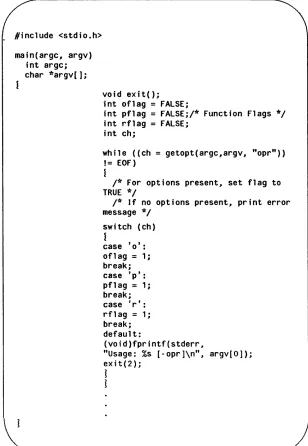
Figures 2-1 and 2-2 show program fragments that illustrate these uses.
#include <stdio.h>
main(argc, argv) int argc; char *argv[];
void exit(); int oflag
=
FALSE;int pflag
=
FALSE;/* Function Flags */ int rflag=
FALSE;int chi
while ((ch
=
getopt(argc,argv, "opr"»!= EOF)
1
/* For options present, set flag to TRUE */
/* If no options present, print error message */
switch (ch)
I
case '0': oflag
=
1; break; case 'p': pflag=
1;break; case 'r':
rfl ag = 1;
break; default:
(void)fprintf(stderr,
"Usage: %s [-opr]\n", argv[O]); ex it (2);
1
1
~
---Figure 2-1: Using Command Line Arguments to Set Flags#include <stdio.h>
main(argc, argv) int argc; char *argv[];
FILE *fopen(), *fin; void perror(), exit();
if (argc > 1)
{
if «fin
=
fopen(argv[1], "r"»==
NULL)1
/* First string (%s) is program name (argv[O]) */
/* Second string (%s) is name of file that could */
/* not be opened (argv[1]) */ (void)fprintf(stderr,
"%s: cannot open %s: " argv[O], argv[1]); perror ('''' ) ;
exit(2);
I
1
Figure 2-2: Using argv[n] Pointers to Pass a Filename
The shell, which makes arguments available to your program, considers an argument to be any non-blank characters separated by blanks or tabs. Characters enclosed in double quotes ("abc def") are passed to the program as one argument even if blanks or tabs are among the characters. It goes without saying that you are responsible for error checking and otherwise making sure the argument received is what your program expects it to be.
A third argument is also present, in addition to argc and argv. The third argument, known as envp, is an array of pointers to environment variables. You can find more information on envp in the Programmer's Reference Manual under exec(2) and
environ (5).
System Calls and Subroutines
System calls are requests from a program for an action to be performed by the UNIX system kernel. Subroutines are precoded modules used to supplement the functionality of a programming language.
Both system calls and subroutines look like functions such as those you might code for the individual parts of your program. There are, however, differences between them:
• At link edit time, the code for subroutines is copied into the object file for your program; the code invoked by a system call remains in the kernel.
• At execution time, subroutine code is executed as if it was code you had written yourself; a system function call is exe-cuted by switching from your process area to the kernel.
This means that while subroutines make your executable object file larger, runtime overhead for context switching may be less and execution may be faster.
Categories of System Calls and Subroutines
System calls divide fairly neatly into the following categories: • file access
• file and directory manipulation • process control
• environment control and status information
You can generally tell the category of a subroutine by the sec-tion of the Programmer's Reference Manual in which you find its manual page. However, the first part of Section 3 (3C and 3S) covers such a variety of subroutines it might be helpful to classify them further.
• The subroutines of sub-class 3S constitute the UNIX
systemIC Language standard
I/O,
an efficient110
buffering scheme for C.• The subroutines of sub-class 3C do a variety of tasks. They have in common the fact that their object code is stored in libc.a. They can be divided into the following categories:
string manipulation character conversion character classification environment management memory management
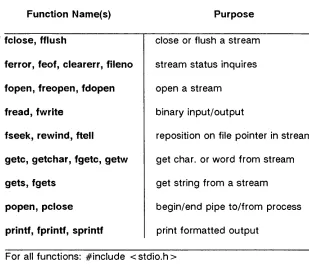
Figure 2-3 lists the functions that compose the standard
110
subroutines. Frequently, one manual page describes several related functions. In Figure 2-3 the left hand column contains the name that appears at the top of the manual page; the other names in the same row are related functions described on the same manual page.
Function Name(s) Purpose
. fclose, fflush close or flush a stream
ferror, feof, clearerr, fileno stream status inquires
fopen, freopen, fdopen open a stream
fread, fwrite binary input/output
fseek, rewind, ftell reposition on file pointer in stream
getc, getchar, fgetc, getw get char. or word from stream
gets, fgets get string from a stream
popen, pclose begin/end pipe to/from process
printf, fprintf, sprintf print formatted output
For all functions: #include < stdio.h >
The function name shown in bold gives the location in the Programmer's Reference Manual, Section 3.
Figure 2-3: C Language Standard I/O Subroutines (sheet 1 of 2)
Function Name(s) Purpose
putc, putchar, fputc, putw put char. or word on stream
puts, fputs put string on a stream
scanf, fscanf, sscanf convert formatted input
setbuf, setvbuf assign buffering to a stream
system issue command through shell
tmpfile create a temporary file
tmpnam, tempnam create name for temp. file
ungetc push char. back into input stream
vprintf, vfprintf, vsprintf print output of vargas argo list
For all functions: #include < stdio.h >
The function name shown in bold gives the location in the Programmer's Reference Manual, Section 3.
Figure 2-3: C Language Standard
I/O
Subroutines (sheet 2 of 2)Figure 2-4 lists string handling functions that are grouped under the heading string(3C) in the Programmer's Reference
Manual.
String Operations
strcat(s1, s2) append a copy of s2 to the end of s 1.
strncat(s1, s2, n) append n characters from s2 to the end of s1.
strcmp(s1, s2) compare two strings. Returns an integer less than. greater than or equal to 0 to show that s1 is lexicographically less than. greater than or equal to s2.
strncmp(s1, s2, n) compare n characters from the two strings.
strcpy(s1, s2)
Results are otherwise identical to strcmp.
copy s2 to s1. stopping after the null character (\0) has been copied.
strncpy(s1, s2, n) copy n characters from s2 to sl. s2 will be truncated if it is longer than n. or padded with null characters if it is shorter than n.
strdup(s)
strchr(s, c)
strrchr(s, c)
returns a pointer to a new string that is a dupli-cate of the string pointed to by s.
returns a pointer to the first occurrence of character c in string s. or a NULL pointer if c is not in s.
returns a pointer to the last occurrence of character c in string s. or a NULL pointer if c is not in s.
For all functions: #include < string.h >
string.h provides extern definitions of the string functions. Figure 2-4: String Operations (sheet 1 of 2)
strlen(s)
strpbrk(s1, s2)
strspn(s1, s2)
strcspn(s1, s2)
strtok(s1, s2)
String Operations
returns the number of characters in s up to the first null character.
returns a pointer to the first occurrence in s1 of any character from s2, or a NULL pointer if no character from s2 occurs in s1.
returns the length of the initial segment of s1, which consists entirely of characters from s2.
returns the length of the initial segment of s1, which consists entirely of characters not from s2.
look for occurrences of s2 within s 1.
For all functions: #include < string.h >
string.h provides extern definitions of the string functions. Figure 2-4: String Operations (sheet 2 of 2)
Figure 2-5 lists macros that classify ASCII character-coded integer values. These macros are described under the heading ctype(3C) in Section 3 of the Programmer's Reference Manual.
Classify Characters
isalpha(c) is c a letter
isupper(c) is c an upper-case letter
islower(c) is c a lower-case letter
isdigit(c) is c a digit [0-9]
isxdigit(c) is c a hexadecimal digit [0-9], [A-F] or [a-f]
isalnum(c) is c an alphanumeric (letter or digit)
isspace(c) is c a space, tab, carriage return, new-line, vertical tab
or form-feed
ispunct(c) is c a punctuation character (neither control nor
alphanumeric)
isprint(c) is c a printing character, code 040 (space) through 0176 (tilde)
isgraph(c) same as isprint except false for 040 (space)
iscntrl(c) is c a control character (less than 040) or a delete character (0177)
isascii(c) is c an ASCII character (code less than 0200)
For all functions: #include < ctype.h >
Nonzero return
= =
true; zero return= =
falseFigure 2-5: Classifying ASCII Character-Coded Integer Values
Figure 2-6 lists functions and macros that are used to convert characters, integers, or strings from one representation to another.
Function Name(s) Purpose
a641 164a convert between long integer and base-64 ASCII string
ecvt fcvt gcvt convert floating-point number to string
13tol Itol3 convert between 3-byte integer and long integer
strtod atof convert string to double-precision number
strtol atol atoi convert string to integer
conv(3C): Translate Characters
toupper lower-case to upper-case
_toupper macro version of toupper
tolower upper-case to lower-case
_ tolower macro version of tolower
toascii turn off all bits that are not part of a standard ASCII character; intended for compatibility with other systems
For all conv(3C) macros: #include < ctype.h >
Figure 2-6: Conversion Functions and Macros
Where the Manual Pages Can Be Found
System calls are listed alphabetically in Section 2 of the
Programmer's Reference Manual. Subroutines are listed in Section 3. We have described above what is in the first subsection of Sec-tion 3. The remaining subsecSec-tions of SecSec-tion 3 are:
• 3M - functions that make up the Math Library, libm • 3X - various specialized functions
• 3F - the FORTRAN intrinsic function library, IibF77 • 3N - Networking Support Utilities
How System Calls and Subroutines Are Used in C Programs Information about the proper way to use system calls and sub-routines is given on the manual page, but you have to know what you are looking for before it begins to make sense. To illustrate, a sample manual page (for gets(3S)) is shown in Figure 2-7.
NAME
gets, fgets - get a string from a stream
SYNOPSIS
#include < stdio.h >
char *gets (s) char *s;
char *fgets (s, n, stream) char *s;
int n;
FILE *stream;
DESCRIPTION
Gets reads characters from the standard input stream,
stdin, into the array pointed to by s, until a new-line char-acter is read or an end-of-file condition is encountered.
Fgets reads characters from the stream into the array pointed to by s, until n-1 characters are read, or a new-line character is read and transferred to s, or an end-of-file condition is encountered.
SEE ALSO ferror(3S) , fopen(3S), fread(3S), getc(3S), scanf(3S).
DIAGNOSTICS
If end-of-file is encountered and no characters have been read, no characters are transferred to
s
and a NULL pointer is returned. If a read error occurs a NULL pointer is returned. Otherwises
is returned.Figure 2-7: Manual Page for gets(3S)
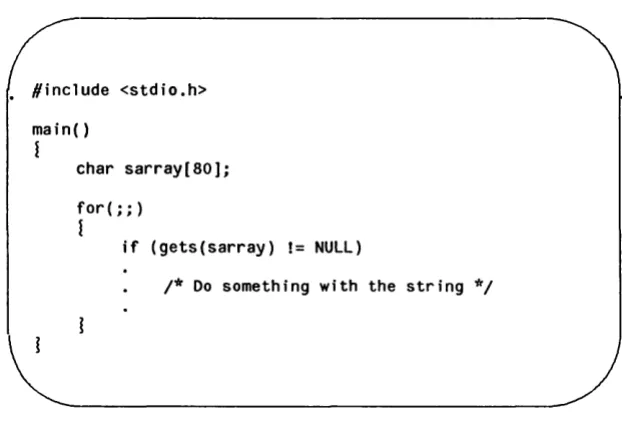
As you can see from the illustration, two related functions are described on this page: gets and fgets. Each function gets a string from a stream in a slightly different way. The DESCRIPTION section tells how each operates.
It is the SYNOPSIS section, however, that contains the critical information about how the function (or macro) is used in your pro-gram. Notice in Figure 2-7 that the first line in the SYNOPSIS is
#include
<
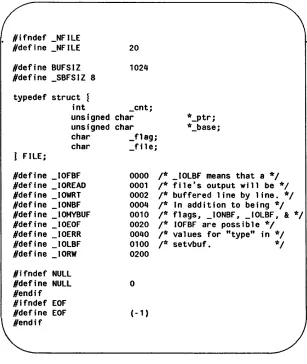
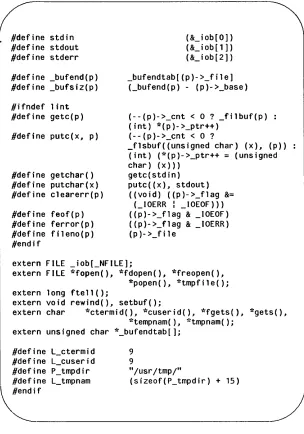
stdio.h >This means that to use gets or fgets you must bring the standard I/O header file into your program (generally right at the top of the file). There is something in stdio.h that is needed when you use the described functions. Figure 2-9 shows a version of stdio.h. Check it to see if you can understand what gets or fgets uses.
The next thing shown in the SYNOPSIS section of a manual page that documents system calls or subroutines is the formal declaration of the function. The formal declaration tells you:
• the type of object returned by the function
In our example, both gets and fgets return a character pointer.
• the object or objects the function expects to receive when called
These are the things enclosed in the parentheses of the function. gets expects a character pointer. (The DESCRIP-TION section sheds light on what the tokens of the formal declaration stand for.)
• how the function is going to treat those objects
The declaration
char *s;
in gets means that the token s enclosed in the parentheses will be considered to be a pointer to a character string. Bear in mind that in the C language, when passed as an argument, the name of an array is converted to a pointer to
the beginning of the array.
We have chosen a simple example here in gets. If you want to test yourself on something a little more complex, try working out the meaning of the elements of the fgets declaration.
While we're on the subject of fgets, there is another piece of C
esoterica that we'll explain. Notice that the third parameter in the fgets declaration is referred to as stream. A stream, in this con-text, is a file with its associated buffering. It is declared to be a pointer to a defined type FILE. Where is FILE defined? Right! In stdio.h.
To finish off this discussion of the way you use functi
![Figure 2-2: Using argv[n] Pointers to Pass a Filename](https://thumb-us.123doks.com/thumbv2/123dok_us/1144854.1143637/46.396.19.327.70.453/figure-using-argv-n-pointers-pass-filename.webp)