Edith Cowan University
Research Online
Australian Information Security Management
Conference
Security Research Centre Conferences
2006
The Reality of Risks from Consented use of USB
Devices
Marwan Al-Zarouni
Edith Cowan University
Originally published in the Proceedings of 4th Australian Information Security Management Conference, Edith Cowan University, Perth, Western Australia, 5th December, 2006
The Reality of Risks from Consented use of USB Devices
Marwan AlZarouni
School of Computer and Information Science Edith Cowan University
Abstract
Physical security is considered an integral part of information systems security. The idea that small devices pose a security threat for enterprises is well established. On the other hand, consented and supervised access to USB ports via USB flash drives is sometimes allowed. This paper will highlight the risk associated with this kind of access by devices such as IPods and USB flash drives. It will show a proof of concept USB device that runs automatically once connected to a personal computer and copies files and folders from the victim's computer to its storage and executes potentially harmful code on the computer without the user's knowledge. The paper then provides measures necessary to mitigate this type of physical attacks.
Keywords
USB Device Security, Small Digital Device Forensics, password auditing, physical computer security, USB device auditing.
INTRODUCTION
USB Flash Drives (UFD) or “USB sticks” are becoming popular means of storing and transporting data and applications. UFD sales worldwide reached $2 billion US Dollars in 2005, according to Gartner research. Gartner expects UFD sales to increase fifteen percent per year through the year 2010, driven in part by interest in "USB smart drives" carrying software or operating environments (Roush 2006). USB Flash Drives (UFD) are becoming increasingly capacious and affordable with drives at a capacity of onegigabyte selling for a rate of for $4050 US Dollars for the low end ones and $60100 US Dollars for the ones with high end components or smart features (Bowman 2006, Roush 2006). This in turn led to a rise in the level of corporate data theft by rogue employees sneaking corporate data out of the workplace on memory sticks, iPods and mobile phones (AAP 2006).
UFD THREATS TO THE CORPORATE ENVIRONMENT
The increase in capacity and affordability and the decrease in size of UFD's have made them into a security risk in a form of a covert tool for stealing data from the corporate network. The Australian Computer Crime and Security Survey found that theft or breach of confidential information accounted for the highest portion of financial losses in 2005 at an average of $2 million Australian Dollars per company (AAP 2006).
UFDs may also be used as an effective channel for transferring malicious software, pornographic materials or other illegal software or hacking tools to the corporate network. UFD transferred tools can then be used within the corporate environment to conduct corporate espionage and execute tools that may not otherwise be transferable or executable in the corporate environment.
corporate environment. Transferred files may also introduce the corporation to possible prosecution as they may be in breach of copyright laws such as pirated music files, electronic books, videos and software (Lomas 2006). Many corporations and government agencies have realized the threat of USB devices in general and UFD drives in particular and have devised policies to mitigate risks from such devices. Some went as far as banning the devices while others went even further and poured superglue into USB ports to disable them (AAP 2006, Lomas 2006).
RISKS FROM CONSENTED USE OF USB DEVICES
Consented use of USB devices means that the USB device is used under supervision of the owner or user of the computer containing the USB port. Someone might for example ask the owner if he could show him a presentation that he has stored on his USB device or transfer a document or spread sheet to the owner of the computer. The owner in this case unknowingly says yes thinking that he will supervise this operation and that nothing covert will happen. This may be true sometimes but not always. Consented use of USB devices can be a threat to both personal computers and corporate networks.
For example, a security researcher have created a proof of concept program called Slurp that resides on Apple’s iPod USBenabled device that executes covertly once the device is connected to computer’s USB port for charging reasons. The small but efficient program then searches the computer for files with certain extensions that are likely associated with businesscritical data and can theoretically download them to the iPod device at a rate of around 100MB every two minutes in a process called 'podslurping' (Usher 2006). The program does not however copy any files but rather show the user how many files it found (Geek.com 2006).
This small utility demonstrated how quickly and easily someone with privileged access via USB can steal data covertly using an iPod or any similar portable USB storage device. This utility also highlighted the fact that many people will not normally allow others to get USB access to their computers without them being present but they would happily accept someone charging their iPod devices from their computer in their presence thinking that the supervised charging process is harmless.
Call to Arms
Slurp for iPod presented a fresh perspective on USB device covert use and abuse. While its creator intended for it to be used as a scare tactic for companies to warn them about the threat of such devices it was also in effect a call to arms for disgruntle employees, hackers and data thieves alike. Covert and administratorlevel access to files with the ability to execute programs and transfer files to the relatively large size of USB storage devices with the high transfer speed of USB 2.0 presented hackers with a very lucrative endeavour. What was even more lucrative is the ability to transfer files to the target computer and the ability to change registry settings and create users on the target machines. The Pod Slurping concept made the hacking and security community think about porting the concept to USB Flash Drives more commonly known as USB Memory Sticks. The only problem was that there was no way to easily, covertly, and automatically execute programs once the device is plugged into the target computer. This is because USB storage devices are not designed to AutoRun programs unlike CDROM devices which are designed to execute autorun.ini files on CDROM media as soon as the CD is inserted in the CDROM device. Therefore being able to achieve AutoRun on USB devices was not easily achieved without installing special software beforehand on the target computer which defeats the whole concept of covertness on the target computer. This issue was later overcome with the introduction of U3 technology.
USB U3 TECHNOLOGY
written for U3 smart drives were meant to be easy to install and provided users with portability without violating any copyright laws or enduser licences.
U3’s Ability to Auto Execute Programs
One of the most important features of U3 technology was the seamless launch of applications within the USB drive. This was done by fooling the Windows operating system into thinking that the USB drive is in fact two pieces of hardware rather than one. The operating system in this case thinks that the U3 device is actually a CD ROM device and a USB storage device connected at the same time. The U3 in fact has two parts within it. The first part is a small part portion of the flash memory space containing an ISO image. The second large part is the remainder of the flash memory space which is used to store the actual applications and user data.
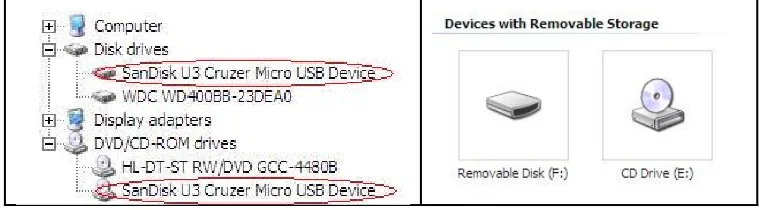
An ISO image is basically a file with an extension of (.iso). This specifically means that it is compliant with the ISO 9660 standard which defines a file system for CDROM media. Generally speaking though, the term refers to any optical disk image. An ISO image contains both data and metadata such as boot code, structures, and attributes of files. In U3 devices though, the ISO containing portion of the U3 device appears to the computer as an actual CDROM disk within a CDROM drive which is contains an autorun.inf file which is used to automatically launch the U3 application. Figure 1 shows how Windows XP sees the U3 device.
Figure 1: The two devices under device manager and as Removable Disk (F:) and CD Drive (E:)
Modifying U3
The hacking community found in U3 a way to run malicious applications automatically and have since tweaked U3 devices to make them run their applications covertly. This was done by replacing the ISO image on the original CDROM portion of the U3 drive with another specially crafted ISO CDROM image. ISO images can be created using any CDROM authoring or burning software that supports output in the ISO format. The contents of the ISO have to be relatively small in size so that the ISO file remains under the limit of 6,291,456 bytes which is the limit for CDROM portion of the U3 (McGrew 2006).
Simply overwriting the file under the Windows Operating System is not possible because the U3 is a read only CDROM device and Windows will not allow the operation to proceed. Therefore, an update feature from the manufacturers of U3 devices was utilized.
ANATOMY OF THE HACK
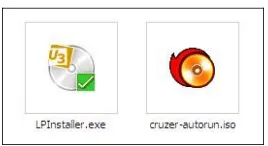
Figure 2: Contents of installation folder: Update utility “LPInstaller.exe” and modified cruzerautorun.iso
ISO File Contents
Anything can be placed in the ISO file as long as the ISO file produced remains under the limit of 6,291,456 bytes. Keeping size less than 6 Megabytes will hinder running programs directly from the CDROM portion. Therefore, all programs have to run from the flash memory portion of the USB. The CDROM portion will act as the executer and pointer to the location of those programs. To keep size minimal, the proofofconcept ISO image will contain two files, the automatically executable “autorun.inf” and the “go.vbe” file which is the file used to locate and launch the malicious code contained on the flash memory portion of the UFD. The malicious code is referred to hereafter as “the payload” portion of the USB hack or attack. Table 1 shows the source code for both files which are less than 1 Kilo Byte in size each:
Table 1: Source code for CDROM portion of the U3 hack.
autorun.inf source code:
go.vbe source code:
[Autorun]open=wscript .\go.vbe Set objFSO = CreateObject("Scripting.FileSystemObject")Set colDrives = objFSO.Drives For Each objDrive in colDrives
If objFSO.FileExists(objDrive.DriveLetter & ":\wip\cmd\go.cmd") Then strPath = objDrive.DriveLetter & ":\wip\cmd"
strcmd = """" & strPath & "\" & "go.cmd" & """"
CreateObject("Wscript.Shell").CurrentDirectory = strPath CreateObject("Wscript.Shell").Run strcmd, 0, False End If
Next
The autorun.inf file simply gets executed whenever the U3 device is connected to the computer and all it does is run a visual basic encoded script (VBScript) file: “go.vbe”. The go.vbe script then searches the computer’s drives for the following file: “go.cmd” under a specified path. For the sake of this proofofconcept the following path will be used: “\wip\cmd\”. If the file exists, it is executed by the script. Both folders in the path are hidden folders created earlier by the attacker and a batch file (go.cmd) is placed there waiting to be invoked by “go.vbe”.
The Payload
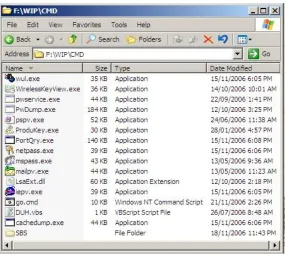
Figure 3: go.cmd and other programs invoked by it are placed in the same folder.
Batch File Construction
The batch file for this proofofconcept uses an adapted and improved version of MaxDamage’s technique mentioned on the Hak.5 website (Tobler & Kitchen 2006b). This technique was chosen for its simplicity and straight forward approach and also for the good selection of tools it provided and simple directory structure. There are many other techniques available for abusing U3 technology some of them utilize other scripting languages such as Ruby for scripting and conduct simple tasks such as copying files from target systems or gathering other information about the system such as browsing history and network connection status (King 2006, McGrew 2006, Tobler & Kitchen 2006b).
The standard Max damage batch script included the following:
•Gathering of environment variables such as computer name, logged in user name and current time.
•Enabling of Admin shares by manipulating a registry value.
•Adding an administrator account on the computer by using the “net user /add” command.
•Using the “net localgroup Administrators {username} /add” command to add the account created to the local administrators group.
•Manipulating a registry value to the “Special Accounts” user list.
•Using an executable program called PWDump to retrieve SAM file hashes (Fizzgig 2006).
•Using an executable program called ProduKey to retrieve stored product keys (Sofer 2006).
•Retrieving browser history by using VBScript: ”DUH.vbs” (Tobler & Kitchen 2006b).
•Using an executable program called Protected Storage PassView (pspv.exe) to retrieve LSA secrets from the computer including Outlook passwords, Auto Complete passwords in Internet Explorer, Password protected sites in Internet Explorer and MSN Explorer Passwords (Sofer 2006).
•The time each tool takes to execute and write to the log file. For the attack to be successful, it has to execute in a minute or less so it doesn’t raise any suspicions.
•The system resources each tool uses and its impact on the operating system may hint to the victim that something suspicious is going on.
•The size of the UFD’s flash memory. The size of the payload and copying of files have to be within the limit of the USB device so it won’t raise a “disk full” alarm.
•The probability that a certain tool will trigger an alert from an AntiVirus or AntiHacking program. Nonintrusive tools should be used as much as possible and tools that are easily identifiable by Anti Virus software should be avoided.
Therefore, the batch file used for this paper was chosen with the above points in mind. The improved batch file added many features including:
•Copying of raw SAM and SYSTEM files from the repair directory of the Windows Operating System using the xcopy command in Windows XP.
•Document copying depending on the extension and location of files xcopy command in Windows XP.
•Using an updated version of pwDump (version 1.4.2) (Fizzgig 2006).
•Using an executable program called MessenPass v1.08 (mspass.exe) to retrieve messenger program passwords from: MSN Messenger, Windows Messenger (In Windows XP), Yahoo Messenger (Versions 5.x and 6.x), Google Talk, ICQ Lite 4.x/5.x/2003, AOL Instant Messenger (only older versions, the password in newer versions of AIM cannot be recovered),AOL Instant Messenger/Netscape 7, Trillian, Miranda, and GAIM (Sofer 2006).
•Using an executable program called Mail PassView v1.37 (mailpv.exe) to retrieve stored email client passwords and other account details for the following email clients: Outlook Express, Microsoft Outlook 2000 (POP3 and SMTP Accounts only), Microsoft Outlook 2002/2003 (POP3, IMAP, HTTP and SMTP Accounts), IncrediMail, Eudora, Netscape 6 and 7, Mozilla Thunderbird, Group Mail Free, Yahoo! Mail, Hotmail/MSN mail and finally Gmail (If the password is saved by Gmail Notifier application, Google Desktop, or by Google Talk) (Sofer 2006)..
•Using an executable program called Network Password Recovery v1.03 (netpass.exe) to retrieve stored network share LAN or .NET Passport account passwords.
•Using an executable program called CacheDump to retrieve passwords cached by the Local Security Authority System Service (LSASS) and stored in the registry (Pilon 2005).
•Using an executable program called WirelessKeyView v1.00 (WirelessKeyView.exe) to recover wireless network keys stored in the computer by the 'Wireless Zero Configuration' service of Windows XP (Sofer 2006).
•Using the Microsoft Portqry.exe commandline utility to conduct local network reconnaissance (Microsoft 2006).
•Using an executable program called WinUpdatesList v1.13 (wul.exe) to extract Windows updates history (Sofer 2006).
The source code for the batch file is provided with this paper as an attachment.
Performing the Attack
1. Connect the U3 device to the target computer. Social engineering can be used here to convince the user to allow the attacker to connect his UFD to his computer. The attacker may tell the user that he would like to copy of the victim’s resume and that he can copy it to his USB device. Or he can tell the victim that he has a funny video he would like to show him.
2. Leave the USB device connected to the target computer for about 4560 seconds. The batch script will not allow the removal of the device unless it finishes executing its payload. Therefore, stalling is recommended.
3. Safely remove the U3 Drive from the “safely remove hardware” utility in Windows.
4. Take the USB device to any other computer and hold down the “Shift” key while connecting the UFD to the computer.
5. Browse to the “Removable Storage” portion of the U3 device.
6. Enable “Show hidden files and folders” option under “Tools”, “Folder Options”, “View”, “Files and Folders”, “Hidden files and folders”
7. Browse to: \Documents\logfiles
8. Open the text file starting with the computer name of the victim machine and ending with “_load.log”. 9. Also, browse the contents the folder named with the victim’s computer name to find his files there.
The Seriousness of the Threat
As demonstrated above by the amount of information and files that can be copied from the target system as well as the ability to create administrator level accounts in a very short amount of time, the attack can be devastating if performed successfully. Therefore, prevention and mitigation of such attacks is important and should be considered by both corporations and individuals alike.
MITIGATION
The success of the attack depends on many factors. They include:
•Physical and Logical access to the computer’s USB port.
•The AutoRun option of CDROM must be enabled. The default option is enabled.
•Some applications in the payload need administrator level access to work.
•Tools are subject to detection by AntiVirus and AntiHacker software.
•Awareness and education of users.
•Encryption of data and strong passwords
Physical and Logical Access Mitigation
To prevent physical access to the computer, one of these measures must be applied depending on the situation. If it is a personal computer, the USB ports can be physically cut or disconnected from within the casing of the computer. As mentioned earlier, some companies went as far as using super glue to block access to their USB ports (AAP 2006, Lomas 2006). Other aspects of physical access restriction could be access control on doors and labs where no unauthorized person will be allowed to the areas where the computers reside.
password. Case locks should also be used so that users will not be able to open the case, and reset the CMOS memory (Detwiler 2003).
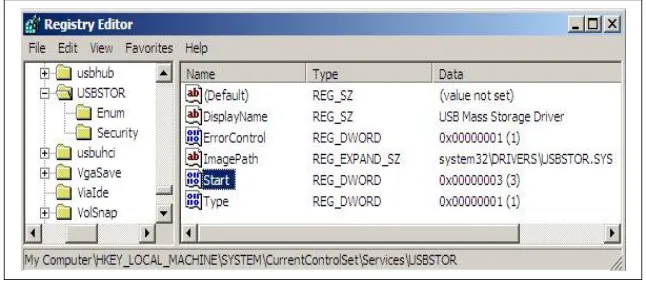
On the Operating System level, USB use can be disabled by changing the registry value “HKEY_LOCAL_MACHINE\SYSTEM\CurrentControlSet\Services\UsbStor\Start” to 4 (Disable). This can be done on a single computer using “regedit” as seen in Figure 4.
.
Figure 4: Modify the start value from 3 (manual) to 4 (disable).
Group policy can also be used to achieve the same effect on the organizational level by following some simple steps (Schmidt 2005). If blocking USB devices is an option, then one way of auditing their use can be achieved by using free third party software such as the “Safend Auditor” which runs as a nonintrusive system task and logs the types of USB devices connected to the computer, how often they are being used, and by whom. It produces a report to the administrator, who can then import the data into Excel for analysing (Safend 2006).
Disabling AutoRun
The AutoRun feature of CDROM devices is set to enable by default. To disable it, the following registry key value has to be changed: “HKEY_LOCAL_MACHINE\SYSTEM\CurrentControlSet\Services\Cdrom”. The “AutoRun” value must be changed to “0” (Disable) instead of the default value of “1” (Enable) as seen in the Figure 5..
Figure 5: Modify the AutoRun value from 1 (Enable) to 0 (disable).
Limiting Privileges
Not having administrator privileges can be considered as a damage limitation measure. Corporations should limit the privileges given to employees to limit damage from abuse and limit involuntary damage or damage from social engineering attacks. Two of the most damaging tools of this proofofconcept attack require administrator access to work. They are the creation of an administrator level user and access to the SAM and SYSTEM files.
Anti-Virus and Anti-Hacker Tools
Antivirus and antihacker tools that are behavioural based rather than signature based will be more effective in stopping this kind of attack. Table 2 shows a list of AntiVirus and AntiHacker software and their performance when it comes to the proofofconcept methodology and tools:
Product Name and Version Performance Level
AVG 7.1.407 No tools detected
BitDefender 9.5 Some tools detected and alert shown
Kaspersky v6.0 Passive blocking of some tools and a script alert
NOD32 Antivirus System v2.51.26 No tools detected
Symantec Antivirus No tools detected
McAfee Internet Security Suit 2007 Suspicious script detected and prevented from running
Table 2: Tools and their success against the UFD attack.
The table shows that half of the antivirus software failed while the other half had some degree of success. Some tools such as Kaspersky did not stop the tool from running but showed an alert for the suspicious script but did not stop it. McAfee on the other hand prompted the user and asked for action to be taken whether it is to stop the script from running or allow it to run.
Awareness and Education
Raising awareness about the dangers from allowing people to connect USB devices to users’ computers can play a big role in stopping USB based attacks. This is because these attacks rely on an account being loggedin to work. Users loggingoff from a workstation are not subject to this type of attack. Moreover, if users hold down the shit key while a USB is being connected they can not be attacked by this method. Other security related safe practices also help in defeating this kind of attack. These safe practices include not saving any passwords in browsers or email client software, and disabling autocomplete in Internet browsers.
Encryption of Data and Strong Passwords
This attack included copying of files from the user’s “my documents” folder, “my pictures” folder, and the “desktop” folder. This would have not been possible if the user’s files were encrypted. Moreover, some attack tools used password decryption to reveal the user’s passwords. If strong passwords or long passphrases we used, tools such as the pwdump would have been defeated (Tobler & Kitchen 2006b).
UFD FUTURE TRENDS
Mojopac
U3 was only the beginning though. A software development company by the name of Ringcube developed software called Mojopac that can run on any USB 2.0 device and turns it into a virtual computer. Unlike technologies such as Ceedo, U3 and Migo, which require use of specially adapted programs or a special, extra cost software adapter, Mojopac does not need any of those. In fact, the Mojopac does not need software developers to modify their code and make it “portable” (RingCube 2006). Mojopac fools the software installed on it to think that it is a real computer rather than a USB stick. It also fools the computer to thinking it is the home drive. This means that users can now carry their applications and data with them wherever they go without leaving a trace on the computers they use. This trend can present a challenge for digital forensics and security. One of the major issues with mojopac is the user’s privileges on Mojopac is always Administrator even if he is logged on the host machine as a normal user. This means that he can install and execute programs that he would not be otherwise able to under normal circumstances.
Risks to USB Devices
The hacking community have developed a payload for U3 devices called “Hacksaw” that automatically transfers and installs programs on the target’s Windows computer. These programs then retrieve documents from any USB drives that are later connected to the infected computer. What the programs then do is compress and securely email the contents of these USB devices to a prespecified email account. The hack does not require administrator privileges to run and is very hard to detect by antivirus tools because it uses programs such as Blat, Stunnel, and Gmail to achieve its goals. Automatic propagation to other USB devices is possible however was not demonstrated in the proof of concept (Tobler & Kitchen 2006a).
CONCLUSION:
The aim of this proof of concept is to raise awareness about the risk form and to USB devices in general and UFD devices in particular. UFDs are this generation’s Floppy Disks and as with traditional floppy disks, and as these devices become more popular, virus writers and malicious code writers will look at these devices as a transfer vehicle for their code. Malicious code writers always look for maximum damage with the least effort. UFD devices provide this convenience and are a prime target for abuse. Although the future seems uncertain when it comes to USB device security and forensics, simple practices such as the ones mentioned in this paper can go a long way in providing some security against UFD abuse.
REFERENCES:
AAP. (2006). Superglue used to stop data theft, URL http://www.smh.com.au/news/security/superglue-used-to-stop-data-theft/2006/07/04/1151778940369.html , Accessed 26 Oct 2006
Bowman, J. (2006). Unlocking the USB Key, URL http://www.cbc.ca/news/background/tech/usb.html, Accessed 21 Oct 2006
Detwiler, J. (2003). Disable USB ports to prevent unauthorized data transfers URL
http://articles.techrepublic.com.com/51001035_115030674.html, Accessed 11 Nov 2006,
Fizzgig. (2006). PWDump, URL http://www.foofus.net/fizzgig/pwdump/, Accessed 26 Oct 2006 Geek.com. (2006). iPod turns spy with slurp.exe, URL
http://www.geek.com/news/geeknews/2006Jan/gee20060221034887.htm, Accessed 25 Oct 2006
King, D. (2006). U3files U3 Hacking, Slurping, Grab Files, etc, URL
Lomas, N. (2006). The A to Z of Security, URL http://software.silicon.com/security/0,39024655,39164025
22,00.htm?r=1, Accessed 23 Oct 2006
McGrew, W. (2006). Hacking U3 Smart USB Drives, URL http://cse.msstate.edu/~rwm8/hackingU3/, Accessed 29 Oct 2006
Microsoft. (2006). Description of the Portqry.exe commandline utility, URL
http://support.microsoft.com/kb/310099, Accessed 10 Nov 2006
Pilon, A. (2005). CacheDump Recovering Windows Password Cache Entries, URL
http://www.securiteam.com/tools/5JP0I2KFPA.html, Accessed 26 Oct 2006
RingCube. (2006). Mojopac, URL http://www.mojopac.com, Accessed 29 Oct 2006 Roush, W. (2006). Your World on a Flash Drive, URL
http://www.technologyreview.com/read_article.aspx?id=16734&ch=infotech, Accessed 22 Oct 2006 Safend. (2006). Safend Auditor, URL http://www.safend.com/11en/Safend.aspx, Accessed 25 Oct 2006 Schmidt, H. (2005). How to disable USB sticks and limit access to USB storage devices on Windows systems,
URL http://diaryproducts.net/about/operating_systems/windows/disable_usb_sticks, Accessed 29 Oct
2006
Sofer, N. (2006). NirSoft, URL http://www.nirsoft.net/, Accessed 26 Oct 2006
Tobler, W., & Kitchen, D. (2006a). USB Hacksaw, URL http://www.hak5.org/wiki/USB_Hacksaw, Accessed 01 Nov 2006
Tobler, W., & Kitchen, D. (2006b). USB Switchblade, URL http://www.hak5.org/wiki/USB_Switchblade, Accessed 01 Nov 2006
Usher, A. (2006). Pod Slurping, URL http://www.sharpideas.net/pod_slurping.php, Accessed 12 Oct 2006.