International Journal of Research in Advent Technology (E-ISSN: 2321-9637) Special Issue
National Conference “NCPCI-2016”, 19 March 2016
Available online at www.ijrat.org
69
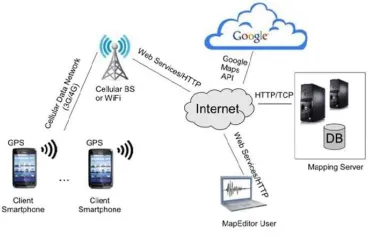
assistant application. Since Google Maps does notshow campus locations, we have to build the map data structures that describe campus locations, roads, alleys, everything needed for directions and navigation. We can use a MapEditor tool to edit and manage campus maps. These maps are stored on the server as XML files. The MapEditor tool are Adobe Map maker and Google Map maker which are used to build the map tiles and the various markers representing campus map concepts (buildings, etc.). The MapEditor tool allows fast and easy handling of
a map and its XML file. Since buildings, streets and other entities of the campus are not visible on Google Maps, this has to be done manually by the MapEditor User. The MapEditor lets the user edit a campus map superimposed on the Google Map and saves it as an XML file on the server. The main component of our architecture is the Campus Assistant smartphone app that runs on Android phones. The app user interface prompts the user to enter relevant information such as user type, campus map, and destination location. The app relies on a JSON/HTTP protocol to request an XML map file from the Mapping Server. This XML file is parsed and the map graph features are constructed. The smartphone GPS device is used to determine the user’s current location or the user can indicate a source location. If the user wants driving directions, the app will direct the user to the compatible parking lot nearest to the intended destination.
Fig. 1. Architecture Diagram
3. SYSTEM ARCHITECTURE
In the system the user has the android application installed on his smart phone. The user logs in with the valid registered credentials or registers for a new account. The user then uses the Google Maps services through the app which calls the Google APIs. The location of the user is calculated using the data through GPS of the smart phone and the location is pointed on the map. Using the searching functionality, the user can search the desired location in the campus and can enable the routing path to reach to the destination.
70
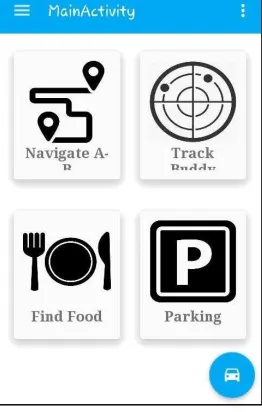
Fig.2. Screenshot of Main Activity Page4. SYSTEM FEATURES
As we have mentioned that the application has 4 features or main application as shown in Figure 2.The four features are Navigation from point A to B, Buddy Tracking, Various food spots and Parking facilities.
4.1 Navigation Feature
The smartphone GPS device is used to determine the user’s current location or the user can indicate a source location. The application will direct the user to the compatible parking lot nearest to the intended destination. It let user enter the desired destination location and then computes the shortest path between source and destination, and displays it on the user’s screen on top of Google maps. Icons identify the user’s
current location and the destination.
4.2 Buddy Tracking
This application allows you to see your buddies live on the map as they move. You can keep track of where everyone is at, and meet up or follow them. Your friends move in real time on the map and in comparison to your position. The app can run in the background unobtrusively so you can use your phone without any interruption. But this may lead to a question of privacy. This question can easily be solved by introducing request-response protocol between the buddies. A buddy can send request to his friend for the permission to track him. If he accepts his request the desirable track will be available to user else the request would be declined.
Fig. 3. List of various food places and its location
4.3 Finding Food Spots
This part of the application basically lists out all the local restaurants and other food places which can fill the hungry stomachs within the campus. With the list
of these places it shows ratings, other basic information of each food place with its location in the campus. Figure 3 shows a basic demonstration of it.
4.4 Parking Facilities
Campuses can be complicated. It may be difficult to track same roads or go to the previous location we were before. Therefore, to solve this problem parking facility is a unique feature in the application in which initially the user can save the current parking spot and later after exploring the campus can track the initial
Fig. 4. Screenshot of Parking Facility
5. USE-CASE DIAGRAM FOR SYSTEM
2
International Journal of Research in Advent Technology (E-ISSN: 2321-9637) Special Issue
National Conference “NCPCI-2016”, 19 March 2016
Available online at www.ijrat.org
71
The use-case diagram shows the functionalities of theactors participating directly or indirectly into the system.
There are basically two types of actors participating in the system. One, the navigator who will navigate and explore different sites of application using android application. The navigator is again divided into two kinds of user, i.e. Visitors and Non-Visitors. Second is the admin who will record various places like buildings, restaurants, etc. using a web admin portal. Using this portal admin can add, update and delete various sites within the campus. Admin can even add many alias names to same building as the building may be known from more than one name.
Now moving on the various functionality navigators can perform, there are mainly four main features as discussed earlier. Here a step by step functionality of each feature is described.
5.1 Find Location in Campus
By clicking on the Navigate A to B Button shown on the Main Activity Window it will show a basic Google map API with your current location inside the campus. Using the search bar above the API we can search any building listed below in the drop down panel. It also allows you to set current and destination location to see distance and route between them. This feature
72
5.2 Finding the Parking Spot
By clicking on the Parking Button shown on the Main Activity Window, the application will allow you to save the current location by pin pointing it. Later when the user wants to return to the saved location after exploring the campus he can click on the small car button present at corner of the application which will show the directions to the earlier saved location.
5.3 Tracking the friends in the campus
By clicking on the Track Buddy Button shown on the Main Activity Window, the application will allow you to send request to the friends who have already registered in the application. After sending the request, the friend will get a prompt message about the request from other user to track his/her location. If the person accepts the request, the other user can successfully see the directions to his friend else he can see that his request has been declined.
5.4 Checking Food Places in campus The various
food places present inside the campus. It shows the rating of each food place with a little description about it. It even shows on the map where that particular food place is situated.The list can be sorted according to the rating or alphabetically.
6. CONCLUSION
In this paper we presented a campus assistant application developed on an Android platform. The application provides various navigation services to users at Sinhgad campus. We also designed an admin web panel that allows authorized users to add new campus maps or update existent ones. Currently we are working on adding new features to our application, such as making this application available on various mobile phones which have operating system other than android. Expanding the application to different college campuses. We can add more features and updates according to the physical changes around the campus.
REFERENCES
[1] Mihaela Cardei, Iana Zankina, Ionut Cardei, and Daniel Raviv ,“Campus Assistant Application on an Android Platform”, Department of Computer and Electrical Engineering and Computer Science, Florida Atlantic University, IEEE paper, 2013.
[2] M. Kelly and D. Lindquist, “Campus Map”, http://campusmap.michaelkelly.org/map, 2012 [3] Android-Discover Android,
http://www.android.com/about
GPS.gov Roads and Highways, http://www.gps.gov/applications/roads/
Florida Atlantic University app for Android
[4] Google Map Maker, http://www.google.co.in/maker/