Available online: https://journals.pen2print.org/index.php/ijr/ P a g e | 631
Learning Assisted System Using Computer Assisted
Instruction (CAI)
Khin Than Nyunt
Assistant Lecturer, Information Technology Supporting and Maintenance Department,
University of Computer Studies (Mandalay), Myanmar
[email protected]
ABSTRACT
The Unified Modeling Language (UML) is a language that helps to visualize, design and document models of software systems. Students are encouraged to work in groups to learn the terminology, notation and use Unified Modeling Language and by so doing learn the task of communicating with clients and with other members of the project team. This effectively leads to the students’ understanding of main factors associated in the project’s success or failure and complexities involved in software development and project management. So, this system presents an innovative approach to teaching the Unified Modeling Language concepts which provide practical hands-on experience for the students to learn, understand and appreciate the concepts of Unified Modeling Language. This system is implemented by Microsoft Visual Studio 2008 C#.Net and Microsoft Access Database.
Keywords:
Computer Assisted Instruction (CAI); Unified Modeling Language; Microsoft Visual Studio 2008 C#; Microsoft Access Database1. INTRODUCTION
This paper is particularly concerned with exploring the area of enhanced learning in the context of UML course. This system can be considered a prototype model as a tool for the effective learning of fundamental Unified Modeling Language concept. It can be taught after a consultation session under an expert system shell with a minimum amount of classroom time. The insight gained, however, is enormous giving students hands-on-experience with an expert system conveys the essence of Artificial Intelligence (AI) in a very practical application. This system presents experiences in implementing fundamental concepts in the area of UML.UML was selected as an appropriate task for this paper due mainly to its open-ended nature, and its complexity
for novice designers. Although the traditional method of learning UML in a classroom environment may be sufficient as an introduction to the concepts of UML, students cannot gain the expertise in the domain by attending lectures only. Therefore, the existence of a computerized tutor, which would support students in gaining such design skills, would be highly useful.
2. RELATED WORKS
Having found a lot of tutorials, textbooks and resources on UML, the system does not aware of any attempt at developing an Information Technology for UML modeling [2]. However, there has been an attempt [7] at developing a collaborative learning environment for object-oriented design problems using Object Modeling Technique (OMT) [4].The learning system monitors group members’ communication patterns and problem solving actions in order to identify situations in which students effectively share new knowledge with their peers while solving object-oriented design problems [1].
In this paper, the learning system dynamically assesses a group’s interaction in the context of the constructed models, and determines when and why the students are having trouble learning the new concepts they share with each other [3]. This paper does not evaluate the OMT diagrams and an instructor or intelligent coach’s assistance is needed in mediating group knowledge sharing activities. In this regard, even though the system is effective as a collaboration tool, it would not be an effective teaching system for a group of novices with the same level of the expertise, as it could be common for a group of students to agree on the same flawed argument [2].
3. DESIGN AND IMPLEMENTATION OF THE SYSTEM
instructional strategies that uses computers convey and teach instructional material to students, as well as monitor their learning to learn the fundamental concepts of UML. To be able to present the lessons to the students, the lessons must be stored previously, in the computer system. The lessons are stored in the computer system as a series of programs or a set of data depending upon the implementation methods. The lessons are prepared by the teacher or the author. The lessons must be broken down into smaller units, interspersed with review questions and drill exercises. The sequence of the lessons must be designed properly to promote and motivate learning and retention. The student can learn from the CAI course entirely on his own, without direct supervision of the instructor.
This system is implemented by two approaches. The first approach is to write a particular program to display the specific frames and questions. The second approach of implementing the system is to develop CAI software which can handle different lessons. The software is based on a syntax which allows the teacher to directly perform the CAI processing. In this approach, the lessons are stored as data files.
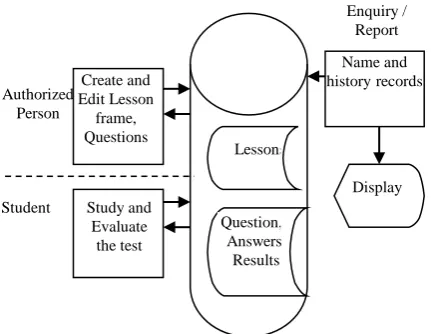
Figure 1. General Structure of the System
4. TUTORING AND STUDENT MODULES
In the portion of tutoring module, the teacher or instructor carefully define the factors affecting learning such as learning styles, subject matter, group dynamics and times etc. This module must be able to solve the complex task which is the subject of instruction according to the rules stored in the knowledge base. Knowledge base has a set of rules, a dynamic database, control strategy and solutions. Isolating student error or misconceptions is more than just determining whether a student’s solution is correct or incorrect in order to accomplish a complex task. The teacher interacts with the student and can
point out the student to discover a misconception. Moreover, administrator or teacher can add the next question types such as True/False Types, Multiple Choice Types and Fill in the Blank Types and then edit the existing question types in the database.
The student module is an overlay on the educational system, indicating the degree to which each construction in the system has been assimilated by the student. At a given point in a lesson, this system contains the UML course. The student can learn the UML course and answer the exam questions in this system. The student might have shown some assimilation of the former, but none of the later. There are two ways in which the student model can be updated. Firstly, if the student answers a question which can fit to the solution the assimilation scores or level for the student will increment. If the student incorrectly answers a question, the assimilation scores or level for the student will decrease. Basically, the lesson continues until the student has shown sufficient assimilation of each student on the learning system.
5. FOCUS ON LEARNING COURSE
In this portion, if the students are to learn desired outcomes in a reasonably effective manner, then the teacher’s fundamental task is to get students to engage in learning activities that are likely to result in their achieving these outcomes. This system is to learn the concepts of fundamental UML using the assistance of computer in classroom environment. This course includes coverage of the most effective techniques in a day, such as Use Case analysis static and dynamic system modeling, responsibility driven design using CRC, Design Patterns, using UML to document designs and much more. The focus of the course is to give a practical approach to producing high quality object-oriented software designs [6] and to provide the knowledge and experience necessary to avoid the most common risks associated with building production system.
Figure 2. Learning Form
Authorized Person
Student
Create and Edit Lesson frame, Questions
Study and Evaluate
the test
Lessons
Question, Answers,
Results
Enquiry / Report Name and historyrecords
6. EFFECTIVE LEARNING
When considering effective learning, one cannot ignore the importance of such factors as a learner’s: prior knowledge of the subject domain; level of motivation; anxiety; self-confidence; and the amount of learner control offered. However, Computer Assisted Instruction (CAI) achieves the best results with low ability students who are not emotionally or socially maladjusted but simple obtain low scores on tests. This is found to be true especially for CAI drill and practice in UML and refer to drill and tutorials and usually not simulation. Learning assistance to student seems to prefer interacting with computer because of the lack of negative feedback.
The efficiency of the system is security level and learning effect. This system has security level; the teacher/administrator must know the password. The teacher/administrator can be append, delete, edit and insert the questions and answers to the software. The student can answer the questions. If the password type is correct, the teacher/administrator can edit Modify Questions and Answers Form. If the password type is incorrect by the teacher, administrator cannot edit the software. If the teacher doesn't know the password, administrator can click the "Cancel" button to quite the password form. The system describes the student of low ability enjoyed and needed drill and practice and their achievements consequently improves as the learning effect. When the students were bored with traditional drill methods, computer drills revitalized the student’s interest. Basically, all students can benefit from the individualized instruction provided by drill programs. The student can be affected by the system with effective time and cost for distance students.
7. TESTING PROCESS OF THE SYSTEM
Figure 3. Display Answers for True/False Type Form
In this section, there has three main testing. They are True/False Question Types, Multiple Choice Question Types and Fill in the Blank Question Types. The use’s testing of “True/False Questions”
from “Tutorial” as shown in Figure 3. The system tests the question depending on the student selected question type. The administrator/ teacher use the computer control strategies and manage the instructional environment. The processes are:
test the student’s level of preparation and assign an appropriate teaching module determines the most effective learning
techniques for each individual student maintain record on student progress
Figure 3 is the True/False Question Types form. In this system, user/student can also see the answers,questions and the level of students for True/False Question Types, Fill in the Blank Question Types and Multiple Choice Question Types as shown in figure 3.
7.1. Testing Result of the Proposed System
Administrator can check the student’s question and display the level of students. There are three levels: “Poor”, “Moderate” and “Good”. The teacher/administrator can edit Modify Questions and Answers Form and test the question types. Level of individual student is defined by administrator according to the student’s performance.
Administrator can add the next user desired questions types such as True/False Type, Multiple Choice Type, and Fill in the Blank Types into the system.
7.2. Final Remarks of the Students
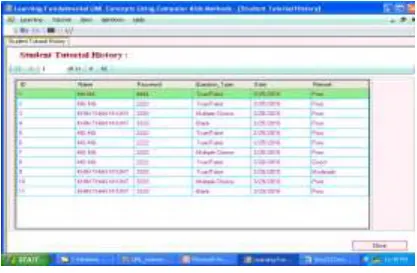
The level of individual student or final remarks is defined by administrator/teacher according to the student’s performance. User can view the history of student’s testing records such as student’s name, password, question type, testing date and remark as shown in figure 4.
8. PROPOSED SYSTEM ARCHITECTURE
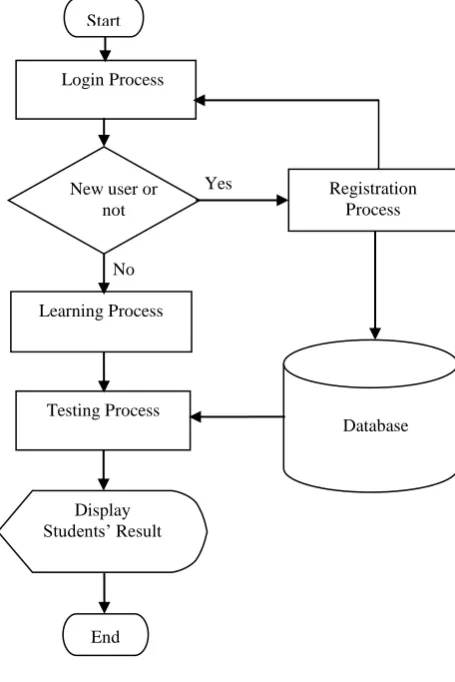
The Computer Assisted Instruction (CAI) software is designed to use a learning aid for the student. This learning system is built for two users such as authorized person/teacher and students. Each user has a specific allowance in using the system. In this system, new student need to process registration and all member student or user process login. Student can study the lessons of the UML course and can practice/test the exercises of true/ false questions, multiple choice questions and fill in the blank questions during the define time period. After that, the system will be displayed the user’s feedback remark. User can view the practice questions and answers and also view the all question and answer into the system. In this system, there are four mains proposed section. These are learning process, testing process, checking process and display process.
Figure 5. System Flow Diagram
“Login” process checks that administrator and user enter into the system according to user role and sending message. “Administrator” involves the function of system security for authorized person.
“New User” involves the function of registration for user student or member.
In the “Learning” process includes the learning function for the UML lessons. This function supports any lessons information acquired by user desire.This learning system is built for two users such as authorized person/teacher and students. Each user has a specific allowance in using the system. User or students can learn the essence of Unified Modeling Language and the detail of 4+1 view model and text repetitively from the system. After learning or practicing lessons such as True/False question types, Fill in the blank question types and Multiple Choice question types from the software, the user can test the progress.
In the “Testing” process, administrator tests the student’s questions and answers and displays the level of students. Level of individual student is defined by administrator according to the student’s performance. The user/student can view the history of student’s testing records such as student’s name, password, question type, testing date and remark.
In the "Display" process, the system shows the student's tutorial history such as ID Number, Name, Password, Question Types, Date and Remark of each student as a result.
9. CONCLUSION
Nowadays, the organizational systems are replaced with the computerized system all over the world. So these computerized system should discusses the need of its user. The development of the Computer Assisted Learning System for Fundamental UML concepts System is useful for everyone who wants to learn about the concept of UML.
This course provides to build high quality object-oriented software systems that can fulfill the requirements and can scale in both complexity and capacity, and be more easily understood, extended, and maintained. It is not necessary that the teacher does not teach repeatedly, the student can easily self-learning the lessons repeatedly when the student does not understand and self testing lifecycle. This system is also provided by UML [8] and the Unified process, the course teaches the student the Object Oriented concepts plus analysis and design techniques and guidelines for modeling complex problems. This system does not evaluate the Object Modeling Techniques diagrams. Teaching methods for this system can also be extended to design the Object Modeling Techniques diagram with many courses.
10. ACKNOWLEDGMENTS New user or
not
Learning Process
Registration Process Login Process
Yes
Testing Process
Display Students’ Result
Database Start
No
I would like to special thank Rector, U Kyaw Swar Soe and Pro-Rector, Dr. San San Tint of University of Computer Studies (Mandalay) and also especially like to thank Head of Department of Information Technology Supporting and Maintenance (ITSM), Dr. Khin Phyo Thant and Department of Administration Affair and everyone. Finally, I am grateful to my Parents and Husband, U Tint Lwin, thank you for your love, support and energy, and appreciation for this.
11. REFERENCES
[1]B. Bruegge, Dutoit A, Object-Oriented Software Engineering: Conquering Complex and Changing Systems, Prentice-Hall, 1999.
[2]D. Dina Goldin, D. David Keil, Peter Wegner, "An Interactive Viewpoint on the Role of UML", Univ. of Massachusetts / Boston.
[3]G. Rumbaugh, J. Jacobson I, Booch, The Unified Modelling language User Guide, Addison Wesley, 1999.
[4]L.B Arief, N.A Speirs, Automatic generation of distributed system simulations from UML in Modelling and Simulation, A tool for next millennium, 13-th European Simulation Multiconference, Vol.II pp 507-509, Warsaw, June 1-4,1999.
[5] Kobryn Cris, UML 2001 A Standardization Odyssey, Communications of the ACM Vol.42,No.10, pp.28-37, October 1999.
[6] Pristley, Practical object-oriented design with UML, 2000.
[7]Rational Rose Suite, Rational Rose RT and other software from Rational Software Corporation.