Gesture Based Desktop Control
Todkar Mrunal S, Shah Sarang A., Kore Kaustubh R, Babar Divyata D, Shevade Snehal B,
Prof. Gurunath G. Machhale
B.E. Student, Dept. of Computer Engineering, Sanjay Ghodawat Institute, Atigre, Hatkanangale, Kolhapur,
Maharashtra, India
Dept. of Computer Engineering, Sanjay Ghodawat Institute, Atigre, Hatkanangale, Kolhapur, Maharashtra, India
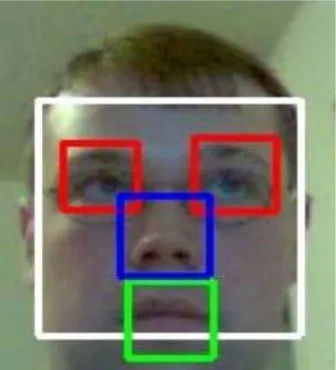
ABSTRACT: Human Computer Interface and automation is one of the prime demands of today’s age. The contribution of this new technology a type of rectangular feature for face detection is represented in a 2*3 matrix form. With this the processing time which includes capturing image, tracking image i.e. extracting eye and nose feature, setting various reference points, calculating distance between reference points, becomes significantly very short. This technology is used for an application that it is capable of swapping mouse with human face for interaction with PC. Facial features such as nose tip, eyes are traced and tracked to use their movements for performing mouse events. Co-ordinates of the nose tip in the video feed are interpreted to develop co-ordinates of the mouse on screen. The left/right blink control left/right events for click. The external device will be webcam for the video stream. Our proposed system will enable the physically disabled people to control PC operations through facial expressions which will act as mouse. By using six segmented rectangular filter and face verification through Support Vector Machine, the face structure of the user can be quickly recognized. Only the essential part of the image is been taken into consideration such as the six segments of the face with the help of the motion cue. The image of user’s face will be captured and tracked after every interval of 30sec. System automatically detects the users eye blinks and accurately measures their durations. Long blinks triggers mouse click, while short blinks are ignored.
KEYWORDS: Human Computer Interface, rectangular feature, six segments, Face Detection, Face Tracking,
I. INTRODUCTION
Human–Computer Interface (HCI) can be described as the point of communication between the human user and a computer. Commonly used input devices include the following: keyboard, computer mouse, trackball, touchpad and a touch-screen. All these devices require manual control and cannot be used by persons impaired in movement capacity. Therefore, there is a need for developing alternative methods of communication between human and computer that would be suitable for the persons with motor impairments and would give them the opportunity to become a part of the Information Society. In recent years, the development of alternative human–computer interfaces is attracting attention of researchers all over the world. Alternative means of interacting for persons who cannot speak or use their limbs (cases of hemiparesis, ALS, quadriplegia) are their only way of communication with the world and to obtain access to education or entertainment.A user friendly human–computer interface for severely movement impaired persons should fulfil several conditions: first of all, it should be non-contact and avoid specialized equipment, it should feature real-time performance, and it should run on a consumer-grade computer.
Real time which captures a movement of mouse cursor through face detection and facial features. It overcomes the existing system by avoiding the use of external hardware that caused serious eye damages. It uses a template matching method for eye extraction instead of using hardware, even as in previous system the short blinks of eyes were avoided or neglected. In this system the hard blink is only used for selecting particular file or folder. With eye detection its first aim is to capture face for the movement of mouse cursor. Then it reacts as the mouse does.
various individuals and has also shown success for individuals wearing glasses. Work on camera-based blink detection has focused on specific tasks such as human-computer interaction. Blink detection modules have been part of more general systems on eye motion analysis. Some research e orts in camera-based blink detection use infrared lighting. The advantage of an infrared system is that the pupils of the user are highlighted when exposed to infrared lighting. While infrared systems make the problem of detecting the eyes easier, the typical user does not have access to infrared lighting and there are safety concerns about long-term exposure to infrared lighting. Our system uses standard lighting with a typical USB camera that is easily available to users. Other systems use active appearance models to locate and track the eyes of the user and make assumptions about the shape, color, and lighting of the user's eyes.
Figure 1: captures a movement of mouse cursor through face detection and facial features
The templates of the users' eyes that our system automatically captures eliminate the need for us to make such assumptions. Previous interaction systems for people with disabilities interpret a user blink as a trigger for binary switch applications. By tracking and interpreting both eyes of the user (for users who are capable of winning both eyes), our system allows interaction with a computer on a level that is closer to using a traditional mouse. Our system enables users to move the mouse pointer on the screen and issue mouse-clicking commands hands-free. For individuals who are not able to control the muscles around their eyes to a degree that they can wink, the system still enables them tosimulate the left-click command of a traditional mouse. Thisis an improvement over current assistive mouse-replacement systems such as Camera Mouse,which limits the userto left-click commands by hovering over a certain locationfor a predetermined amount of time. This is counterintuitive as the lack of action on the part of the user causes a click tooccur. It can lead the system to issue a click command thatwas not intended by the user if the user is not moving themouse within the threshold of hovering time. Our system provides a more intuitive method for controlling the mouse, as it requires a specific action by the user to simulate amouse click.
II. RELATED WORK
1 Arantxa Villanueva, Rafael Cabeza, Sonia Port a “Eye Tracking System Model with Easy Calibration”, IEEE 2011 The aim of this work is to build up a mathematical model totally based in realistic variables describing elements taking part in an eye tracking system employing the well-known bright pupil technique i.e. user, camera, illumination and screen[books 2]. The model is said to be defined when the expression relating the point the user is looking at with the extracted features of the image (glint position and center of the pupil) is found. The desired model would have to be simple, realistic, accurate and easy to calibrate.
In this paper, an individual human computer interface system using eye motion is introduced. Traditionally, human computer interface uses mouse, keyboard as an input device. This paper presents hands free interface between computer and human. This technology is intended to replace the conventional computer screen pointing devices for the use of disabled. The paper presents a novel idea to control computer mouse cursor movement with human eyes it controls mouse-moving by automatically affecting the position where eyesight focuses on, and simulates mouse-click by affecting blinking action [5]. However, the proposed vision-based virtual interface controls system work on various eye movements such as eye blinking.
3M.mangaiyarkarasi and a.Geetha, “Cursor control system using facial expressions for human-computer interaction”,(IJETCSE), April 2014.
A vision based human–computer interface is presented in this paper. The interface detects eye movements and interprets them as cursor control commands [6]. The employed image processing methods include webcam for detecting the face, and template matching method based eye region detection. The Haar feature technique is used for eye feature extraction. SVM classification method is used for classifying the eye movements. The classification of eye movements such as eye open, eye close, eyeball left, and eyeball right movements are used for cursor top, bottom, left and right movement respectively.
4 Craig Hennessey, Jacob Fiset, “Long Range Eye Tracking: Bringing Eye Tracking into the Living Room”, IEEE, 2012
In this paper author present a non-contact eye tracking system that allows for freedom of viewer motion in a living room environment [1]. A pan and tilt mechanism is used to orient the eye tracker, guided by face tracking information from a wide-angle camera. The estimated point of gaze is corrected for viewer movement in realtime, avoiding the need for recalibration. The proposed technique achieves comparable accuracy to desktop systems near the calibration position of less than 1° of visual angle and accuracy of less than 2° of visual angle when the viewer moved a large distance, such as standing or sitting on the other side of the couch. The system performance achieved was more than sufficient to operate a novel, hands-free Smart TV interface.
5 Bacivarov, Ionita M., Corcoran .P, “Statistical models of appearance for eye tracking and eye-blink detection and measurement”, IEEE, 2010.
In this article, authorinvestigates the subtleties of the spatial and temporal aspects of eye blinks [2]. Conventional methods for eye blink animation generally employ temporally and spatially symmetric sequences; however, naturally occurring blinks in humans show a pronounced asymmetry on both dimensions. We present an analysis of naturally occurring blinks that was performed by tracking data from high-speed video using active appearance models. Based on this analysis, we generate a set of key-frame parameters that closely match naturally occurring blinks. Author compare the perceived naturalness of blinks that are animated based on real data to those created using textbook animation curves. The eye blinks are animated on two characters, a photorealistic model and a cartoon model, to determine the influence of character style. We find that the animated blinks generated from the human data model with fully closing eyelids are consistently perceived as more natural than those created using the various types of blink dynamics proposed in animation textbooks.
III.PROPOSEDALGORITHM
A. EYE-BLINK DETECTION ALGORITHM:
two separate connected components and, by requiring that the two connected components are located sufficiently apart, the algorithm can avoid misinterpreting these two components as two blinking eyes.
IV. SYSTEMARCHITECTURE
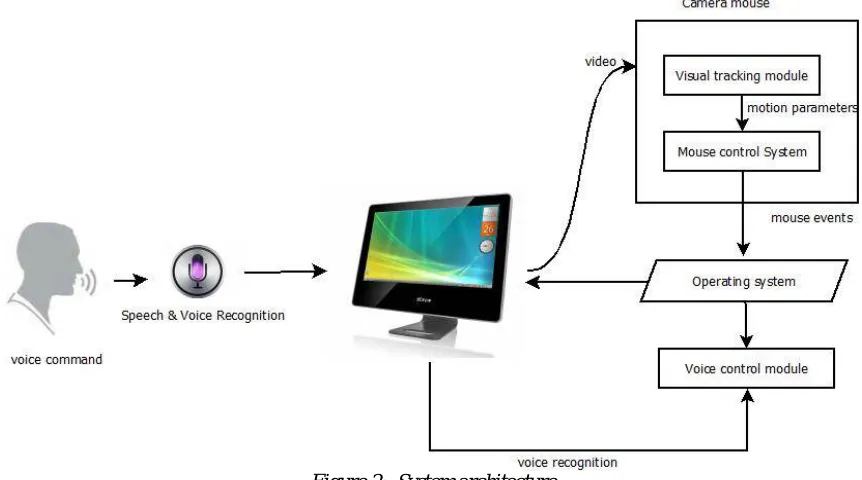
In this project, a vision-based system for detection of voluntary eye-blinks is presented, together with its implementation as a Human–Computer Interface for people with disabilities. The system, capable of processing a sequence of face images of small resolution (320 × 240 pixels) with the speed of approximately 30 fps, is built from off-the-shelf components: a consumer-grade PC or a laptop and a medium quality webcam. The proposed algorithm allows for eye-blink detection, estimation of the eye-blink duration and interpretation of a sequence of blinks in real time to control a non-intrusive human–computer interface. The detected eye-blinks are classified as short blinks (shorter than 200 ms) or long blinks (longer than 200 ms). Separate short eye-blinks are assumed to be spontaneous and are not included in the designed eye-blink code.
Figure 2: System architecture
We The tracking point located near the upper lip is used to control the location of the mouse. Movement in the image is mapped to movement of the mouse. Smoothing is applied to the sequence of mouse pointer locations, so that the mouse pointer is easier to control. The distance the pointer moves on the screen that one-pixel movement of the tracking point maps to can be adjusted to the user's preference.
This determines mouse commands with blinking of user's eyes are open or closed. This is accomplished byperforming a normalized correlation search with both templates. The temples of open eyes or closed eyes is already stored in the database as shows in figure 2. System detects user eyes and compare with stored temples and performed mouse operation.
Your computer has a brain. With a headset and microphone, you can now let your computer hear you, respond to your commands, and even speak to you to let you know what it has performed.
Basic Commands:
Start listening/Stop listening: You don't want (WSR Macros) to constantly listen to and try to interpret everything you're saying all the time, so avoid the extra tax on your system by toggling WSR Macros. Say "Start listening" whenever you want to start with voice commands, and "Stop listening" when you're finished.
What can I say? When you're getting started with our project, it's easy to forget what commands you can use to tell it what to do. The easiest and quickest way to find out is just to ask. Saying "What can I do?" will launch WSR Macros' help window with a table of both common and not-so-common commands.
Open X/Close X: WSR Macros indexes all of the programs in your start menu, so next time you want to open Firefox, you can say just that: "Open Firefox." WSR Macros will take care of the rest. Likewise, you can close applications in the same way—just say "Close Firefox" instead.
Say what you see: No, you won't ever literally say, "Say what you see." Instead, try saying words you can see in the active window. For example, browsing in Internet Explorer with WSR Macros is really impressive. See a link you want to visit? Read the link text. Want to navigate the File menu? Just say "File" to open the dropdown, and say any command therein.
Show numbers: Whether you're looking at a screen full of links, buttons, or documents, you can also access any of them without words by simply saying "Show numbers." WSR Macros will overlay numbers over every control in the window, and you can pick one by saying the number and then confirming your choice by saying, "OK."
Say what you want to type: When you're dictating, just say what you want to type. It's not always perfect, but the more you use it, the more accurate it gets. You also need to speak your punctuation, so you'll need to, for example, say "period" at the end of every sentence.
Switch to/Minimize X: Whether you want to switch, minimize, or maximize windows, just say the words and it'll be done. You can also perform an action on the currently active window by saying "Minimize this."
V. CONCLUSIONANDFUTUREWORK
System is boon for the disable people who are notable to use physical mouse properly. It will gives them a newway to interact with computer world. It opens a new era incomputer technology. It is efficient in real time applicationswhich give speed and accuracy of the system. Systems have presented a method of detecting andtracking faces in video sequences in real time which is basedon skin color detection. This method first compensates thelight in image then selects the skin tone for getting the facecandidates. Systems basic strategy for detection is fast trainingwith a Six-Segmented Rectangular filters. System haveevaluated algorithm on various images and face databases.
The images have been taken in different positions and lightingconditions.System is aimed to implement real time facedetection using SSR filter and tracking system using for facecandidate detection, a six-segmented rectangle filter isscanned over the entire input image. This approach is similarto the window - scanning technique often used in the image -based approach. However, once the bright - dark relationsbetween the six segments indicate a face candidate, eyecandidate and nose tip regions are searched in the manner ofthe feature - based approach. Then, based on the locations of apair of eye candidates and nose tip, the scale, orientation andgray levels are normalized.
REFERENCES
Book
(i). Sheikh Rafik, Manihar Ahmed, Ekta Shrivastava and Komal Prasad. “Goggle Operated Mouse for Physically Handicapped & Paralyzed People”. LAP Lambert Academic Publishing (2013-02-17).
(ii).Mohan M. Trivedi, “Simultaneous eye tracking and blink detection with interactive particle filters”, ACM , January 2010
Scholarly Journal Articles
[1]Craig Hennessey, Jacob Fiset, “Long Range Eye Tracking: Bringing Eye Tracking into the Living Room”, IEEE, 2012
[2]Bacivarov, Ionita M., Corcoran,P. , “Statistical models of appearance for eye tracking and eye-blink detection and measurement”, IEEE Transactions, August 2010
[3]Ioana Bacivarov, Mircea Ionita, Peter Corcoran, “Statistical models of appearance for eye tracking and eye blink detection and measurement”, IEEEtransactions on consumer electronics, Vol.54 , No.3, pp. 1312 1320 August 2009.
[5]Toshiyuki Masui, Koji Tsukada, and Itiro Siio, “MouseField: A Simple and Versatile Input Device for Ubiquitous Computing”, Vol. 3205, Springer (2011), p. 319-328.
[6]Akhil Gupta, Akash Rathi, Dr. Y. Radhika, “HANDS-FREE PC CONTROL” CONTROLLING OF MOUSE CURSOR USING EYE MOVEMENT, International Journal of Scientific and Research Publications, Volume2, Issue 4, April 2012
[7]Jixu Chen, Yan Tong, Wayne Grayy ,Qiang Jiz “A Robust 3D Eye Gaze Tracking System”,IEEE,2011
BIOGRAPHY
I am MrunalTodkar studying in BE at Shivaji Universtiy ,Kolhapur. I am good in Operating System & Image processing.