1
The compuTer is in The learners’
hands: are we preparing our
Teacher-Trainees enough for
The digiTal age?
FATIMAH PUTEH
inTroducTion
experience, now they are confronted with yet another challenge, that is integrating the technology in their language teaching and learning classroom.
Bringing this technology into their classrooms is not an easy and straightforward task as adopting the computer entails knowledge of using the technology and also making decisions about which part of the technology to use, what activities are best done using the technology, how much of the technology should be exposed to the students, how long should a lesson last using the technology, and many others. The list of queries could go on and on so much so that newcomers to this teaching profession will be overloaded with nothing too much worries about adopting the technology. That is why it is imperative that these newcomers to the teaching profession be well-equipped and well-trained to take up the challenge of integrating the computer technology in the teaching of language in this Digital Age. Thus, it is the job of the teacher trainers to make sure that these teacher-trainees are given the necessary exposure and skills
and enough confidence to use the technology and later to be able to
integrate this technology in their teaching practices.
The changing roles of The Teachers and learners in language learning and Teaching classrooms
Before discussing the different skills taught and exposed to the
teacher-trainees, let me first of all discuss about the changing roles
but as the facilitator to the learning and teaching process. This is so because the responsibility for imparting the knowledge is no longer shouldered by the teacher alone but shared by the learners who now have access to a multitude of resources at their disposal. The teacher is there to provide guide and assistance to the students whenever necessary, for example assisting learners with problems in understanding certain parts of a lesson accessed through the Internet or problems in using the facilities offered by the technology. The role of the teacher as a contributor of knowledge can vary from playing a minor role as proposed in the Ahmad model (Levy, 1995) to a major role as proposed in the Farrington model (Levy, 1995).
Secondly, the teacher is also seen as a writer to teaching materials and the author to the language-learning programs. Instead of using the materials available in textbooks that are almost always with outdated information as most language learning textbooks are used by several generations of students, the teachers are expected to take advantage of the enormous range of information and resources available on the Internet. This is so because the Internet is fast becoming the largest reference library in the world with information multiplying at such an enormous rate that language teachers and learners alike are spoilt for choice. Articles, texts, stories, poems, books, videos, audio clips, music – they are all only a few mouse clicks
away as long as the teachers know how to find them, utilise them and maximise their use for the benefit of their learners. What more with
the data and information constantly updated by the minute, teachers are no longer faced with the problem of using outdated data but can constantly keep abreast with the current issues. Again, in order for these to become a reality, the teacher-trainees need to be trained on how to access these materials, then to adopt and adapt these materials to suit the needs of their learners and then to make this collection of materials accessible to the learners.
The third role of a computer-using teacher is that of a user of an authoring tool. Being able to access, compile and categorise
resources into files that are accessible to the learners are not enough.
Teachers need to move a step forward by being able to utilise these
differing needs so that these files will not remain idle but are fully
utilised. To realise this goal, a language teacher should become authors to their language learning programs. A simple way of becoming authors to their language learning packages without having to learn any particular programming language, a teacher may utilise one of the authoring tools such as Toolbook or Authorware. However for the computer-savvy teachers, they may want to move yet a step further to the next role of being teacher-programmers. Taking this role demands a lot of the teachers’ time and energy of which we all know a language teacher may not have access to.
Moving on to the changing roles of the learners, learners in today’s Digital Age are no longer seen as passive receivers of information but that of taking proactive roles in participating in the learning process and being partially if not wholly responsible for their own learning. They now have access to computers be it in the classrooms, or computer rooms or even at cyber cafes. The fact remains that these learners have the technology in their hands and it is the job of the teachers to tap the skills and expertise that these students have in order that the skills and expertise they have can be fully utilised for language learning.
To realise the different roles that a language teacher may have to play in this Digital Age, the multitude of choices of facilities available to them to realise these roles, and the fact that many students today have access and some even have some knowledge and expertise of handling the computer, the teacher-trainees are exposed to both the theories and practice of adopting the facilities in their language teaching/ learning classrooms.
puTTing Theories inTo pracTice
Exposure to the many facilities available on the Web for language
learning comes in two forms: theories and practice. It was felt that
knowing the theories alone will not be sufficient to equip the
more challenging and difficult task than simply knowing about what
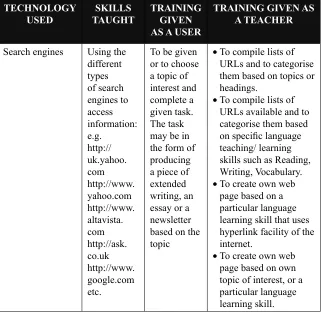
the technology has in store for them. To realize this goal, the teacher-trainees were given both training both as a user of the technology and as a teacher adopting the technology in the classroom. The following are some of the components of which the teacher-trainees have been exposed to in acquainting them to the Digital Age.
Table 1(a) Activities using search engines TechnologY used sKills TaughT Training giVen as a user
Training giVen as a Teacher
Search engines Using the
different types of search engines to access information: e.g. http:// uk.yahoo. com http://www. yahoo.com http://www. altavista. com http://ask. co.uk http://www. google.com etc.
To be given or to choose a topic of interest and complete a given task. The task may be in the form of producing a piece of extended writing, an essay or a newsletter based on the topic
To compile lists of •
URLs and to categorise them based on topics or headings.
To compile lists of •
URLs available and to categorise them based
on specific language
teaching/ learning skills such as Reading,
Writing, Vocabulary.
To create own web •
page based on a particular language learning skill that uses hyperlink facility of the internet.
To create own web •
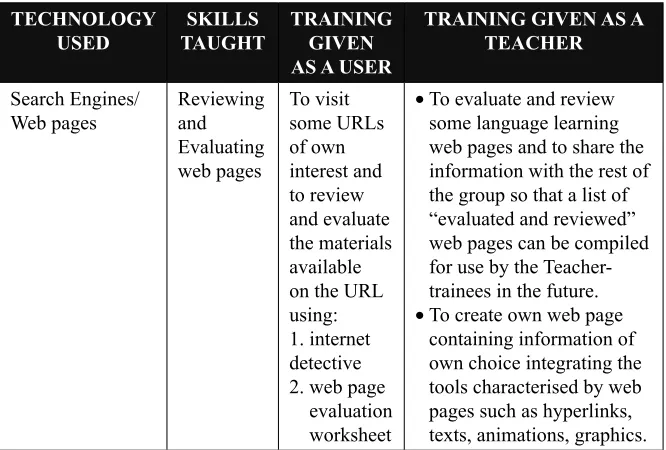
Table 1(b) Activities on reviewing and evaluating web pages TechnologY used sKills TaughT Training giVen as a user
Training giVen as a Teacher Search Engines/ Web pages Reviewing and Evaluating web pages To visit some URLs of own interest and to review and evaluate the materials available on the URL using: 1. internet detective 2. web page evaluation worksheet
To evaluate and review •
some language learning web pages and to share the information with the rest of the group so that a list of “evaluated and reviewed” web pages can be compiled for use by the Teacher-trainees in the future. To create own web page •
containing information of own choice integrating the tools characterised by web pages such as hyperlinks, texts, animations, graphics.
Table 1(c) Activities on reviewing and evaluating multimedia software TechnologY
used
sKills TaughT
Training giVen as a user
Training giVen as a
Teacher Multimedia software Reviewing and evaluating language learning software
To review and evaluate well-known and well-used multimedia softwares such as Rosetta Stone, Real English, and to compare own review and evaluation of the softwares with that done by professional reviewers.
TechnologY used sKills TaughT Training giVen as a user (some examples)
Training giVen as a
Teacher communication tools: Electronic 1. mail Sending • and receiving emails Attaching • documents to emails Opening • attached documents in an email
Required to •
use email when communicating with course-mates to discuss academic-related issues
Required to use •
the email when communicating with lecturer outside class time
To submit • assignments in soft-copy via email. To communicate • with Keypals from abroad by exchanging ideas and to completing a given assignment. communication tool: Electronic 2. discussion group Subscribing to selected discussion groups
To participate in e-discussion groups and to share ideas gained from the discussion with other teacher-trainees. The sharing of these ideas are done through E-forum
To participate in e-discussion groups and to share ideas gained from the discussion with other teacher-trainees. The sharing of these ideas are done through E-forum communication tool: E-forum 3. Participating in E-forum on topics selected by teacher-trainees or topics based on information gathered from E- Discussion group or chosen by the web master
To participate in E-forum, by giving views on issues in the discussion. Each teacher-trainee is required to pose or give his/her views on the topic at least 3 times every half of the semester.
To form own E-Forum group
based on specific
subject they study during the semester. This is to
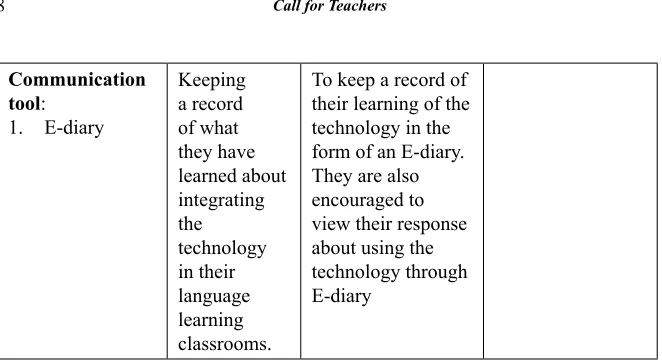
communication tool:
E-diary 1.
Keeping a record of what they have learned about integrating the technology in their language learning classrooms.
To keep a record of their learning of the technology in the form of an E-diary. They are also encouraged to view their response about using the technology through E-diary
TechnologY used
sKills TaughT
Training giVen as a user
Training giVen as a Teacher
World Wide Web • Searching
for specific
information based on a given topic Creating •
web-based worksheets.
To use the search engines to search for information based on
a specific
topic
To make use of •
information gathered and to adapt them to suit a particular group of learners. Then
to prepare specific
exercises that can give
practice on specific
language skills for the learners.
To use the same •
materials which have been adapted to teach yet another skill. To produce language •
learning activities in worksheet forms using
MS Word document
where learners are required to use MS
Word tools to improve
creaTing language eXercises on The weB
In addition to the above skills introduced to the teacher-trainees, they are also exposed to the possibility of creating their own language exercises on the web. The advantage of introducing this skill is to help these teachers become future material writers so that they do not become dependent on ready-to-use materials which most of the time are not tailor-made for their own students. By having this skill, it is hoped that these teacher-trainees will not only be able to produce their own materials but they will also be able to put into use the skills they have acquired in using the technology in their language teaching/ learning classrooms.
For creating the exercises, a web authoring package called
Hot Potatoes is introduced to the teacher-trainees. Hot Potatoes
was developed by Martin Holmes and Stewart Arneil at University
of Victoria, Canada. More information about Hot Potatoes can be obtained at: http://web.uvic.ca/hrd/halfbaked. This web-authoring
package consists of a suite of five authoring tools which enable language teachers to create their own exercises in Windows format.
The available types of exercises that Hot Potatoes are able to develop include:
Multiple choice quizzes Jumbled sentences Short answer questions
Gap-filling exercises
Crosswords
Much has been said about one of the major problems faced by users
on the web such as the slowness of accessing the Web at peak times.
If this becomes a problem especially amongst the teacher-trainees,
the chance will be that they may not even want to use the Web in their
teaching. It will be such a waste if this happens since all of us know how much information there is available on the web. Therefore, to overcome the slowness problem, teacher-trainees are also given the training of downloading web pages in advance so that these materials can be used by learners off-line.
creating exercise off-line
The web is an excellent source of authentic materials. It is fairly easy to develop meaningful exercises off-line using texts which have been carefully chosen from the web. A variety of text-reconstruction exercises for example can be created using Camsoft’s Fun With Texts
packages. All a user needs to do is find a text, copy and paste it into
Fun with Texts package and the computer will do the rest. Gap-filing
and Multiple Choice exercises can also be created off-line using Camsoft’s Gapkit package. The procedure is still as the above but with
Gapkit it gives the teacher more control over the way the exercises are presented to the students.
conclusion
and facilities available to integrate the technology in the language classroom, we have done our part to deliver the goods but whether this knowledge is put into practice, lies in the hands of our
teacher-trainees when they face the real world outside the confines of the four
walls of the language computer rooms.
reference
Geisert, P. G. & Futrell, M. K. (2002) Teachers, Computers and Curriculum. Massachusettes:Allyn and Bacon.
Jonassen, D.H., Peck, K.L. & Wilson, B. G. (1999) Learning with Technology: A Constructivist Perspective. Ohio: Prentice Hall.
Levy, M. (1997) Computer Assisted Language Learning: Context and Conceptualization. New York: Oxford University Press.