VISUALIZING THUMB DRIVE INFORMATION
FATHIN NAZEERA BINTI MOHD NAZRI
VISUALIZING THUMB DRIVE INFORMATION
FATHIN NAZEERA BINTI MOHD NAZRI
A project report submitted in partial fulfillment of the requirements for the award of the degree of Master of Computer Science (Information Security)
Faculty of Computing Universiti Teknologi Malaysia
iii
iv
ACKNOWLEDGMENT
Bismillahiramanirahim. Alhamdulillah, thank you Allah s.w.t for giving me
the strength to finally finish my study. I would like to express my heartfelt gratitude to my supervisor, Dr. Ismail Fauzi Bin Isnin for his constant support, advices and guidance. Without his encouragement and patience this research would not have been the same as presented here. Not to forget, thanks to all the lecturers for the advice.
I also want to thank my friends for their encouragement and help during my time here in UTM. They are with me when I am in need; they are my true friend indeed. Not forgetting my gratitude to Universiti Teknologi Malaysia and all its staff members for providing me with a comfortable environment and facilities to complete my study. Thank you very much Malaysia Government for sponsoring my Master study.
Last but not least, a deepest love to my beloved family for the courage and endless prayers for me. To Ayah and Mama, thanks for encourage me to continue my study. To my siblings and in-law, Tuty Irma, Zairul Aizec, Amir Azfar, Amir Ahmadi, Amir Asyraf and Nadia Ayuni thanks for always support and give good advices for me. My nephews and niece, Adam, Aidan and Sara, thanks for cheering your aunty.
v
ABSTRACT
vi
ABSTRAK
vii
TABLE OF CONTENT
CHAPTER TITLE PAGE
ABSTRACT v
ABSTRAK vi
TABLE OF CONTENT vii
LIST OF FIGURES x
LIST OF TABLES xi
LIST OF ABREVIATION xii
LIST OF APPENDICES xiv
1 INTRODUCTION
1.1 Overview 1
1.2 Problem Background 2
1.3 Problem Statement 3
1.4 Project Aim 3
1.5 Project Objective 4
1.6 Project Scope 4
1.7 Significance of Project 4
1.8 Project Organization 5
2 LITERATURE REVIEW
2.1Introduction 7
2.2Computer 7
2.2.1 Classes of Computer 8
viii
2.3.1 USB Thumb Drives 10
2.3.1.1Design and Components of USB
Thumb Drive 11
2.4 Windows 7 Operating System 13
2.4.1 Registry in Windows 7 15
2.4.1.1USB Thumb Drive Footprint in
Registry 18
2.5 Digital Forensic 20
2.6 Human-Computer Interaction 21
2.6.1 Measurement of User Satisfaction 22
2.7 Conclusion 26
3 METHODOLOGY
3.1 Introduction 27
3.2 Project Framework 27
3.2.1 Phase 1: Identification of Thumb Drive
Information 30
3.2.2 Phase 2: Propose and Design Visualization
Technique 31
3.2.3 Phase 3: Testing, Evaluation and Analysis 32
3.3 Summary 33
4 DESIGN AND IMPLEMENTATION
4.1 Introduction 34
4.2 Overview the Proposed Technique 34
4.2.1 Windows Explorer 35
4.3 Virtual Folder System 36
4.4 Developing Technique of Visualizing USB Thumb
Drive Information 38
4.5 Measuring End-User Satisfaction 43
4.6 Summary 44
5 FINDINGS AND DISCUSSION
5.1 Introduction 45
5.2 Proposed Technique on Visualizing Thumb Drive
Information 46
5.3 Analysis of Findings 50
ix
5.4.1 Element 1: Format 52
5.4.2 Element 2: Ease of Use 53
5.4.3 Element 3: Timeliness 54
5.4.4 Element 4: Satisfaction with Proposed
Technique Speed 56
5.5 Summary 57
6 CONCLUSION AND RECOMMENDATION
6.1 Introduction 58
6.2 Research Findings 58
6.3 Research Contributions 60
6.4 Future Works 60
6.5 Conclusion 61
REFERENCE 62
APPENDIX A 65
APPENDIX B 69
x
LIST OF FIGURES
FIGURE TITLE PAGE
1.1 Project Organization 5
2.1 Main Component of USB Thumb Drive
(Transcend, 2011) 11
2.2 Registry Editor 16
2.3 USB Thumb Drive Footprint in Registry 17
2.4 Information of USB Device in Registry 19
2.5 End-user Computing Satisfaction (EUCS) Instrument 22
3.1 Research Framework 30
4.1 Windows Explorer 36
4.2 Flowchart for Developing Virtual Folder 37
4.3 Physical Location of Windows Registry 38
4.4 Select Top-level Key 40
4.5 Part of Code of Creating Window Shell View 40
4.6 Part of Registration Code 43
5.1 Output of the Program Shows the Location of
Windows Registry Directory 46
5.2 Output of the Program that Shows Only Certain
Handlers are Enabled 47
5.3 Output of the Program that Shows Only HKLM Root
Key are Shown in the Virtual Windows Explorer 48 5.4 Output of the Program that Shows the USBSTOR
Subkey 49
5.5 Output of the Program that Shows the Thumb Drive
Information in Windows Registry Explorer 49 5.6 Number of Thumb Drive Information Found in
xi
LIST OF TABLES
TABLE NO TITLE PAGE
2.1 Windows 7 Editions Comparison 14
3.1 Overall of Research Plan 28
4.1 File Path and Corresponding Key in Registry Hive 39
4.2 Shell Configuration 41
5.1 Respondents’ Feedback on Element 1 52
5.2 Respondents’ Feedback on Element 2 54
5.3 Respondents’ Feedback on Element 3 55
xii
LIST OF ABBREVIATION
CD Compact Discs
CD-ROM Compact Disc Read-Only Memory
EEPROM Electrically-Erasable Programmable Read-Only Memory
EUC End-user computing
EUCS End-user computing satisfaction HCI Human-Computer Interaction
HKCC HKEY CURRENT CONFIG
HKCR HKEY CLASSES ROOT
HKCU HKEY CURRENT USER
HKEY Handle to a Key
HKLM HKEY LOCAL MACHINE
HKU HKEY USERS
ID Identity
IS Information system
LED Light Emitting Diode
MAC Media Access Control
NAND Not-AND
NSE Shell Namespace Extensions
OS Operating System
PC Personal Computer
PCB Printed Circuit Board
PnP Plug and Play
R1 Respondent 1
R2 Respondent 2
RAM Random Access Memory
xiii
ROM Read Only Memory
TV Television
UI User Interface
URL Universal Resource Locator USB Universal Serial Bus
xiv
LIST OF APPENDICES
Appendix Title Page
A Set of Questionnaire 65
B Respond from Respondent 1 69
CHAPTER 1
INTRODUCTION
1.1 Overview
In this modern world, the usage of modern technologies plays huge role in our daily lives, both for work and play. Computers machine whether it is a personal computer, laptop or tablet, as a lifestyle nowadays. Most of Malaysians has at least one of it whether at their home for leisure and entertainment use or at their work place to do their job. Computers make our life easier. With the advancement of internet, the world arguably in our finger tips. We can find millions of information, doing online shopping, watching movies, playing music ant others through the internet.
2
The variety of data and information stored in a portable memory may lead to a computer crime. Webopedia (2013) define computer crime or cybercrime is where any crime in which computer-related technology is encountered. The physical size of portable memory especially thumb drives give benefit to the criminals also known as hackers to use it to steal confidential and private data from the victim. However, most of the computer user did not noticed that every time a new devices connected to a Windows based machine, the devices left their signature in Windows registry (Harlan, 2007). That information gives the cybercrime investigator lead to the digital evidences to identify the offenders.
1.2 Problem Background
Thumb drive also known as pen drive or Universal Serial Bus (USB) drives as a storage devices that have same purposes with floppy disk or CD-ROM which are store data, back up data or transferring data from one devices to others. It is usually small in physical size and it a removable devices. Thumb drives using USB interface to connect the computer system. All the devices such as computer and tablets that have the USB interface can connect with thumb drives.
In forensic investigation, thumb drives can be used as digital evidences because it may contain or store various types of data and information that can lead to the criminals and the crime that they had done. The thumbs drives may be used to store the steal information, alteration of sensitive information, and also can be used to spreading computer viruses and worms. The information regarding thumb drives may help the forensic investigator as a lead to solve crime cases especially in digital crime cases (Bennie, 2005).
3
thumb drives such as vendor Identity (ID), product ID, Revision and serial number for each device at the windows registry (Khawla, 2010). The proposed technique will visualize all those information related to the thumb drives that had been connected to the Windows operating system.
1.3 Problem Statement
In forensic investigation, thumb drives can be used as digital evidences because it may contain or store various types of data and information that can lead to the criminals and the crime that they had done. The thumbs drives may be used to store the steal information and also can be used to spreading computer viruses and worms. Many crime cases had been solved by having the thumb drives as the digital evidence. Currently, the investigators have to search the thumb drives information in the windows registry. The information related to the thumb drives in the registry may scattered and they have to read all the entries in the registry to search to that information. It may take some times for searching the information.
1.4 Project Aim
4
1.5 Project Objective
The objectives of this project have been identified in order to complete this research. There are:
i. To study and identify information related to thumb drives from Windows registry
ii. To design a visualization technique of thumb drive information.
iii. To measure the correctness of the visualization technique and the user satisfaction of using visualization information of the thumb drive.
1.6 Project Scope
In order to complete this project, a number of scopes have been identified and determined, which are:
i. The technique is designed for visualization of thumb drive information from the windows registry.
ii. The technique is for searching information related to thumb drives that have been connected to a machine.
iii. The visualization of the thumb drives will be done on Windows based machine.
1.7 Significance of Project
5
used to them as a lead to other possible digital evidences. They did not have to search that information from each hives and keys in registry because this project may ease them to find it by visualized the information of thumb drives.
1.8 Project Organization
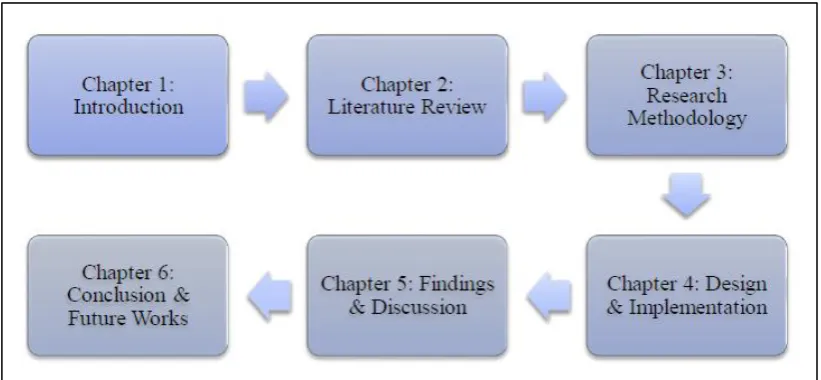
The organization of the project is illustrated as Figure 1.1 below. This project consists of six chapters. The chapters included in this project are introduction chapter, literature review chapter, research methodology chapter, design and implementation chapter, findings and discussion chapter and last but not least conclusion and future works chapter.
Figure 1.1: Project Organization
6
REFFERENCES
Bailey, J.E. and Pearson, S.W. (1983) .Development of a Tool for Measuring and Analyzing Computer User Satisfaction, Management Science, 29(5), 530-545. Baroudi, J. J., Olson, M. H. and Ives, B. (1986). An Empirical Study of the Impact of
User Involvement on System Usage and Information Satisfaction,.
Communications of the ACM, 29(3), 232-238.
Bennie, N. (2005). Forensic Analysis of a USB Flash Drive. Canberra: SANS Institute.
Benson, D.H. (1983).A Field Study of End-User Computing: Findings and Issues.
MIS Quarterly, 7(4), 35-45.
Card, S. K., Thomas, P. M., and Allen, N. (1980). The Keystroke-level Model for User Performance Time with Interactive Systems. Communications of the ACM, 23(7), 396–410.
Chin, W. W. and Lee, M. K. O. (2000). A Proposed Model and Measurement Instrument for the Formation of IS Satisfaction: The Case of End-User Computing Satisfaction. Proceedings of the Twenty-First International
Conference on Information Systems. 10-13 December. Brisbane, Australia,
553-563
Doll, W. J. and Torkzadeh, G. (1988). The Measurement of End-User Computing Satisfaction. MIS Quarterly, 12(2), 259-274. Accessed from http://www.jstor.org/stable/248851
Doll, W. J., Xia, W. and Torkzadeh, G. ( 1994). A Confirmatory Factor Analysis of the End-User Computing Satisfaction Instrument. MIS Quarterly, 18(4), 453-461. Accessed from http://www.jstor.org/stable/249524
63
Harlan, C. (2007). Windows Forensic Analysis DVD Toolkit. Burlington, MA: Syngress Publishing, Inc.
Harsh, B.,Uday, R., and Umesh, S. (2013). Operating System. K. J. Somaiya Institute of Engineering and Information Technology
Ives, B., Olson, M. H. and Baroudi, J. J. (1983). The Measurement of User Information Satisfaction. Communications of the ACM, 26(10), 785-793. Accessed from http://archive.nyu.edu/bitstream/2451/14594/1/IS-82-27.pdf Khanse, A. (2011). Where are the Windows registry files located in Windows 7 | 8.
From http://www.thewindowsclub.com/where-are-the-windows-registry-files-located-in-windows-7. Visited 29/11/2013
Khawla, A. A., Jones, A., and Martin, T. A. (2010). Forensic Analysis of the Windows 7 Registry. Proceedings of the 8th Australian Digital Forensics
Conference. 30th September. Edith Cowan University, Pert Western Australia
Lin, I. L., Woo, T. K., Chen, Y. C., Lu, T. L., and Shu, I. S. (2012). Study on Constructing Forensics Mechanism of Digital Evidence Based on Information Security Governance Using Digital Evidence Forensic System as an Example.
The International Journal of Forensic Computer Science. Vol 2, 33 – 45
Nataliya, B. S. (2004). Hacking and Cybercrime. Proceedings of the 1st Annual
Conference on Information Security Curriculum Development. ACM New York,
NY, 128 - 132
Pleas, K. (1996). Hacking the Registry. Fawcette Technical Publications.
Russinovich, M. (1999). Inside the Registry. Retrieved 20/11/2013 from http://technet.microsoft.com/en-in/library/cc750583(en-us).aspx
Softpedia, “Windows 8 Becomes the Fourth Most Popular OS in the World”
http://news.softpedia.com/news/Windows-8-Becomes-the-Fourth-Most-Popular-OS-in-the-World-349853.shtml. Access on 10/11/2013
Tanushree, R., and Aruna, J. (2012). Windows Registry Forensics: An Imperative Step in Trackig Data Theft via USB Devices. International Journal of Computer
Science and Information Technologies. Vol 3(3), 4427-4433.
The American Heritage Science Dictionary (2005) by Houghton Mifflin Company. Published by Houghton Mifflin Company.
64
Viksoe, B. (2009). Windows Registry Shell Extension. Via http://www.viksoe.dk visited 1/12/2013
Webopedia, “Cyber Crime” http://www.webopedia.com/TERM/C/cyber_crime.html visited 20/9/2013
Wikipedia, “Data Storage Device” http://en.wikipedia.org/wiki/Data_storage_device visited 30/9/2013
Wikipedia, “Digital Evidence” http://en.wikipedia.org/wiki/Digital_evidence visited 30/9/2013
Wikipedia, “Digital Forensic” http://en.wikipedia.org/wiki/Digital_forensics visited 28/9/2013
Wikipedia, “Human-computer Interaction”
http://en.wikipedia.org/wiki/Human-computer_interaction. Visited 29/12/2012
Wikipedia, “USB Flash Drive” http://en.wikipedia.org/wiki/USB_flash_drive visited 25/9/2013
Wikipedia, “Windows 7” http://en.wikipedia.org/wiki/Windows_7 visited 30/9/2013 Windows Dev Center, “IShellFolder::CreateViewObject Method”.
http://msdn.microsoft.com/en-us/library/windows/desktop/ bb775064(v=vs.85).
visited 23/11/2013
Windows7 (2009). Welcome to Windows 7. Microsoft Corporation.
Xiao, Li, and Dasgupta, S. (2002). Measurement of User Satisfaction with Web-based Information Systems: An Empirical Study. Eighth Americas Conference
on Information Systems. December 2002. 1149-1155
Xie, H., Jiang, K., Yuan, X., and Zeng, H. (2012). Forensic Analysis of Windows Registry Against Intrusion. International Journal of Network Security & Its