ISSN: 2278 – 7798 All Rights Reserved © 2014 IJSETR 2733
3D Mouse Controlling with Wrist Watch
Jayaprakash Nagaruru
V.Ravi Kumar
Manasa Nagaruru
Abstract:
Human Computer Interaction plays a key role in daily life like controlling Mouse operations, Keyboard operations and Gaming modes like Xbox. Human Computer interaction occurs in three different ways 1.Physical 2.Cognitive and 3. Affective. In our work, we are concentrated on Cognitive Mouse Pointer Controlling and Virtual Mouse Pointer Control Using RGB Technique .Cognitive Mouse Control is based on RF Communication with the help of MSP430 Transmitter inbuilt in watch and Watch as a Transmitter and USB RF CC1111 as a receiver. User can control the mouse movements and it operations by tilting the watch in 3-Axis/3-D and Fitt‟s law play‟s the key role in mouse controlling. In Cognitive Mouse control user controls the mouse action by establishing the RF Communication between user and system. It works in >1GHz frequency range and in virtual mouse is based on Image Subtraction Algorithm and user has to wear different colour sticker to control the operations.
Keywords: Human Computer Interaction, Image Processing, RF Communication, Texas MSP430, Fitt‟s law.
1. Introduction:
The User interface is a component of a computer or its software which can be visualized, heard, touched, interacted with, run and understood by the common people or users of the computer. The two main elements of the interfaces are 1.Input and 2.Output.
The Importance of the User Interfaces
The user interface design belongs to the field called human computer interaction. Human Computer interaction is a technique that deals with learning, thinking and designing as how users and computer communicates with each other. It gives an idea about how person‟s requirements are fulfilled by computer in an efficient manner. The development of new communication and display techniques leads to package known as Graphical User Interface (GUI).
The interaction design means designing interactive products to support people in their everyday and working lives. A good-design interface is very useful to its users to work easily.
Image Processing
Image processing is a general term for the wide range of techniques that exist for manipulating and modifying of images in various ways.
The RGB model:
Much of our technology for creating and displaying colour is based on empirical observation that a wide variety of colours can be obtained by mixing green, red and blue light in different proportions. For this reason red(R), green (G) and blue (B) are described as primary colours of the additive colour systems.
In a colour image conforming o the RGB model, the value of f (x, y) is a vector with three components, corresponding to R, G and B. In a normalized model, these components each vary between 0.0 and 1.0 R, G and B can be regarded as orthogonal axes defining a three-dimensional colour space. Every possible value of f (x, y) is a point in this colour cube. Other colour models are CMY model, HSI model, CMYK model.
Figure 1: RGB color mixing Fitt’s Law:
The cursor on the screen depends on the movement of the user‟s hand over a pointing device. Fitt‟s law is a predictive model of Human Computer Interaction which predicts the time required to rapidly move the target area and as is defined a function of the distance „D‟ to the moved to reach the target and the width „W‟ of the target.
Fitt‟s law is used to model the act of pointing with a hand or finger using a mouse or any other pointing device. Fitt‟s law for a movement along a single-Dimension is given by the following formula.
T=K1+K2(ID) (1)
ISSN: 2278 – 7798 All Rights Reserved © 2014 IJSETR 2734
Where,
T= Average time taken to complete the movement
K1,k2 = Constants
K1= Start/stop point of the Device K2= Inherent speed of the device D= Distance from starting point to the centre of the target
W= Width of the target measured along the axis of motion.
Literature Survey
Many methods have been developed by
several researchers for controlling the mouse movement using a real time camera. Most of them are not robust enough for real time implementation and all of them use ambiguous methods for making a click event of a mouse [5]. Pandit et al. developed hardware related approach for hand gesture recognition. This requires the user to wear data gloves with markers from which hand posture could be extracted. An approach developed by Chu-Feng Lien [6] used finger tips for mouse movement and actions. Another approach from Erdem used finger tracking for mouse control and the click was performed when the hand passed over a specified region [7]. A simpler method was developed by Park. The action of clicking of mouse was done by keeping a track of the finger tips [5]. Paul et al, used still another method to click. They used the motion of the thumb (from a „thumbs-up‟ position to a fist) to mark a clicking event thumb. Movement of the hand while making a special hand sign moved the mouse pointer [5] [7]
Outline:
Section 1 consists of Introduction and description of
Project.
Section 2 Work‟s on implementation of virtual
mouse and its Procedure.
Section 3 Work‟s on 3D Mouse Controlling and its
Procedure.
Section 4 Work‟s on Results and Discussion,
Advantages of both methods implemented.
2. IMPLEMENTATION OF VIRTUAL MOUSE IN MATLAB
Implementation of Virtual Mouse is worked out with the help of Matlab and Colour Camera. The working technique in virtual mouse is RGB colour detection technique .Because RGB had sensing power where Blue colour is used for right click and left click, Green colour is used for Scrolling and Red colour is used to detect the mouse pointer and to control it.
Steps in our Approach:
1. Capturing real time video using colour camera.
2. Processing the individual image frame. 3. Flipping of each image Frame.
4. Conversion of each frame to a grey scale image.
5. Color detection and extraction of the different colours from flipped grey scale image.
6. Tracking the mouse pointer using the coordinates.
Cursor control has been the easiest mouse function to be achieved through visual techniques. Using visual techniques, cursor control has been achieved by tracking different features and maps the changes in location to the cursor’s x, y coordinates on the screen.
Argyros et al [2] proposed a vision-based remote, non-contact mouse control interface that employed web-cameras and use hand gestures for interaction. The tracking of hands was done by detecting the color blobs. In addition to hand gestures, finger detection was integrated. The two-dimensional (2D) and three-two-dimensional (3D) trackers for hands and fingers provided the perceptual input for defining a set of gestures to control a computer’s mouse. Interestingly, in their project 2D hands gestures could involve users‟ both hands; one hand responsible for moving cursor (pointer hand) and the second hand assuming the role of a commanding hand.
Figure 2: Flow of working System.
Real-Time Video from colour camera
Converting Video into Images
Extraction of different colours from detected image
Performing different mouse operations assigned by user
ISSN: 2278 – 7798 All Rights Reserved © 2014 IJSETR 2735
Working:
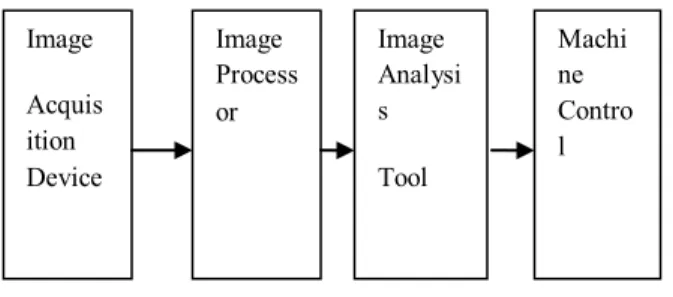
Working Procedure of Virtual Mouse is explained with the help of block diagram shown in figure 3.It Consists of Image Acquisition Device, Image Processor, Image Analysis Tool and Machine Control.
Figure 3: Block Diagram
Image Acquisition Device: It consists of a Colour Camera connected to Computer.
Processor: It consists Computer Image Analysis: It Consists of tools used to analyze the images captured from camera. Example: Matlab
Machine Control: It is a device to which we are performing our work. Example: Mouse, Keyboard.
3. Implementation of Cognitive Mouse controller in Wrist Watch
Implementation of Mouse controller in Wrist Watch module consists of Transmitter and Receiver section. Three-dimensional (3D) trackers/rotation of hand to control the mouse movements
Transmitter section:
In transmitter section it consists of Texas MSP430 Microcontroller. Where MSP stands for Multi-Signal Processing unit it mainly used for multi-functioning of controller. It mainly based on RF Communication to the fixed area with high security communication; we can call it as point-to-point communication which works up to 20 -30 feet distance depends on the locations. IAR is the software used to implement the Code.
The transmitter part is based on direct synthesis of the RF frequency. The frequency synthesizer includes a complete on-chip LC VCO and a 90◦ phase shift for generating the I and Q LO
signals to the down-conversion mixers in receive mode.
Figure 4: Transmitter Block Diagram Receiver Section:
Receiver section consists of USB/RS-232 RF receiver CC1111 which is connected to the computer. The receiver works <1GHz frequency range.
Figure 5: Block Diagram of Cognitive Mouse
The Texas Instruments CC430 family of ultralow-power microcontroller system-on-chip (SoC) with integrated RF transceiver cores consists of several devices featuring different sets of peripherals targeted for a wide range of applications. The architecture, combined with five low-power modes, is optimized to achieve extended battery life in portable measurement applications. The device features the powerful MSP430 bit RISC CPU, 16-bit registers, and constant generators that contribute to maximum code efficiency.
Sub-1-GHz Radio
The Implemented sub-1-GHz radio module is based on CC1101. The radio features a low-IF receiver. The received RF signal is amplified by a low-noise amplifier (LNA) and down-converted in
Image Process or Image Analysi s Tool Image Acquis ition Device Machi ne Contro l
Display Transmitter Accelerator Sensor Antenna user Transcei ver MSP430 Receiver CC1101 PC
ISSN: 2278 – 7798 All Rights Reserved © 2014 IJSETR 2736
quadrature to the intermediate frequency (IF). The RF access point allows wireless communication with eZ430-Chronos directly from the PC to download data, sync information, or control programs running on the PC. CC1101 is a low-cost sub-1 GHz transceiver designed for very low-power wireless applications. The circuit mainly intended for the ISM and SRD frequency bands at 433, 868, and 915 MHz CC1101 provides extensive hardware support for packet handling, data buffering, brust transmission and wake-on-radio.
4. Results and Discussions
In this section, we will show the results of above two sections 2 and 3, and discuss on the results obtained, Advantages of each model implemented.
Figure 6: Real-Time Video
Figure 6, show as the hand with colour stickers placing in front of laptop which is running matlab code, which shows as the virtual mouse initiating.
Figure 7: Colour Markers
Figure 7 shows as a user wearing colour stickers/colour markers and standing in-front of computer. With the help of colour markers detected, Red region is used for mouse pointer movement/controlling ,Blue Region is used to
perform right click and left click operations of mouse. Green region is used for scrolling of pages up/down.
Figure 8: Building GUI
Figure 8 shows as the initialization of Graphical user interface, which is required to capture video from laptop. It builds the GUI with the help of camera. After initializing the GUI it starts Video for particular number of frames. It detects the colour regions and highlights the Red, Green and Blue if they detected.
Figure9:Detected Red Colour
Figure9 shows the detected Red Region which is used for controlling the mouse pointer.
ISSN: 2278 – 7798 All Rights Reserved © 2014 IJSETR 2737
Figure 10 shows as the 3-dimensional analysis of mouse pointer movements in the MSP430 receiver section. The results are based on the watch tilt angle in 3-Axis.
Advantages: Virtual Mouse
1. Simple hardware setup
2. Easy to user‟s to handle and modify the
data.
3. Accurate Result Cognitive Mouse:
1. Security
2. Fixed Area Communication 3. Less Time to Act
4. Accurate Results 5. Conclusion and Future Scope
In this study we concluded that Mouse controlling with virtual is single tasking purpose and time factor is high in virtual mouse, whereas with watch controlling mouse is Multitask and less time to act, so best is multitasking and Time factor. In Future we are planning to control Mouse with more area more than 30 feet and remote controlling with less power consumption.
References:
1.
Bare Finger Touch Detection by the Button‟s Distortion in Projector-Camera System by Jun Hu, Guolin Li, Xiang Xie, Zhong Lv, Zhihua Wang, Senior, IEEE -20132.
ARGYROS, A. A., AND LOURAKIS, M. I. A. Vision-based interpretation of hand gestures for remote control of a computer mouse. 40–51.3.
J. David and Z. David, “A Survey of Glove-based Input,” IEEE Computer Graohics & Applications, vol. 4, January 1994, pp.30–394.
Y. Wu and T.S. Huang,” Hand modeling analysis and recognition for vision-based human computer interaction,” IEEE Signal Processing Magazine, vol. 18, May 2001, pp:51-60.5.
H. Park, “A method for controlling mouse movement using a real-time camera,” 2012.6.
C.-F. Lien, “Portable vision-based HCI - A real-time hand mouse system on handheld devices.7.
A. Erdem, E. Yardimci, Y. Atalay, and V. Cetin, “Computer vision based mouse,” A. E. Acoustics, Speech, and Signal Proceedings. (ICASS). IEEE International Conference. 2002.8.
M. V. den Bergh et al., “Combining RGB and ToF cameras for real-time 3D hand gesture interaction.”9.
www.mathworks.com10.
www.wikipedia.com11.
Smart, James R. (1998), Modern Geometries (5th ed.), Pacific Grove: Brooks/Cole, ISBN 0-534-35188-312.
Engelbart, Douglas C. (March1967),Display-Selection Techniques for Text Manipulation, IEEE Transactions on Human Factors in Electronics, pp. 5– 15, retrieved 2013-03-26
Manasa Nagaruru B.Tech in Electronics and Instrumentation (2014) from Sreevidyanikethan engineering college (SVEC) Tirupati.
N.Jayaprakash M.Tech in Wireless and Mobile Communications from MRITS (MallaReddy Institute of Technology and Science, Hyderabad, India-500100 )
V.Ravi Kumar Associate Professor in MallaReddy Institute of Technology and Science, Hyderabad.