Designing a novel virtual collaborative
environment to support collaboration in
design review meetings
Fernando, TP, Wu, KC and Bassanino, MN
Title
Designing a novel virtual collaborative environment to support
collaboration in design review meetings
Authors
Fernando, TP, Wu, KC and Bassanino, MN
Type
Article
URL
This version is available at: http://usir.salford.ac.uk/id/eprint/30235/
Published Date
2013
USIR is a digital collection of the research output of the University of Salford. Where copyright
permits, full text material held in the repository is made freely available online and can be read,
downloaded and copied for noncommercial private study or research purposes. Please check the
manuscript for any further copyright restrictions.
www.itcon.org - Journal of Information Technology in Construction - ISSN 1874-4753
ITcon Vol. 18 (2013), Terrence et al., pg. 372
DESIGNING A NOVEL VIRTUAL COLLABORATIVE ENVIRONMENT
TO SUPPORT COLLABORATION IN DESIGN REVIEW MEETINGS
REVISED: August 2013
PUBLISHED: November 2013 at http://itcon.org/2013/19 EDITOR: Robert Amor
Terrence Fernando, Prof.
School of the Built Environment, THINK lab, University of Salford, UK [email protected]
Kuo-Cheng Wu, Dr.
School of the Built Environment, THINK lab, University of Salford, UK [email protected]
May Bassanino, Dr.
School of the Built Environment, THINK lab, University of Salford, UK [email protected]
SUMMARY: Project review meetings are part of the project management process and are organised to assess progress and resolve any design conflicts to avoid delays in construction. One of the key challenges during a project review meeting is to bring the stakeholders together and use this time effectively to address design issues as quickly as possible. At present, current technology solutions based on BIM or CAD are information-centric and do not allow project teams to collectively explore the design from a range of perspectives and brainstorm ideas when design conflicts are encountered. This paper presents a system architecture that can be used to support multi-functional team collaboration more effectively during such design review meetings. The proposed architecture illustrates how information-centric BIM or CAD systems can be made human- and team-centric to enhance team communication and problem solving. An implementation of the proposed system architecture has been tested for its utility, likability and usefulness during design review meetings. The evaluation results suggest that the collaboration platform has the potential to enhance collaboration among multi-functional teams.
KEYWORDS: collaborative environment, multi-functional teams, system architecture, construction.
REFERENCE: Terrence Fernando, Kuo-Cheng Wu, May Bassanino (2013). Designing a novel virtual collaborative environment to support collaboration in design review meetings. Journal of Information Technology in Construction (ITcon), Vol. 18, pg. 372-396, http://www.itcon.org/2013/19
COPYRIGHT: © 2013 The authors. This is an open access article distributed under the terms of the Creative Commons Attribution 3.0 unported (http://creativecommons.org/licenses/by/3.0/), which
permits unrestricted use, distribution, and reproduction in any medium, provided the original work is properly cited.
1.
INTRODUCTION
Typical construction projects involve a large number of direct stakeholders (clients, professional teams, contractors) and indirect stakeholders (local authorities, sub- contractors, workers, citizens) representing a diversity of disciplines, skills, cultures and interests (Lu and Sexton, 2006, Serror et al., 2008). These stakeholders need to work together to produce the final product, requiring tremendous amount of collaboration among them. Many studies have shown that inefficient collaboration in the construction sector can lead to excessive cost and time overruns (Gu and London, 2010, Yeomans et al., 2006). Therefore in response to the ever growing pressure to complete projects on time and deliver high quality buildings, companies are increasingly adopting proactive project management where team collaboration and information management are considered as two key characteristics (Kapogiannis et al., 2010). Project management is considered to have a vital role in the construction sector ensuring that stakeholders are working together to achieve a set of objectives in terms of time, cost and quality (Gautier et al., 2009), thus project review meetings (planned and unplanned) are organised to ensure smooth execution of the project (Gautier et al., 2008b). Project meetings aim at formulating a consensus on a set of actions that need to be taken during or after the meeting. Subsequent meetings are held to resolve outstanding issues and address new ones.
One of the key challenges during a project review meeting is to bring the stakeholders together and use this time effectively to address design issues, to evaluate various design configurations and to implement proposed changes as quickly as possible. However, organising meetings involving the key stakeholders at a mutually convenient time is a challenging task due to other work commitment hence introducing delays in solving design changes or conflicts. Furthermore, if certain decisions cannot be made during such meetings due to lack of information or lack of tools and expertise to assess the implications of a design change, such decisions need to be postponed until uncertainties are resolved, requiring further meetings hence introducing further delays and cost into the project (Gautier et al., 2008a).
Current project review meetings are mainly based on static presentations, although the adoption of CAD (Computer Aided Design) and BIM (Building Information Modelling) are slowly changing such practices and visualisation technology is increasingly being used for discussing proposed design (Cooperative Research Centre for Construction Innovation, 2007). The BIM approach allows the team to bring data from a range of design disciplines and identify potential clashes during the design stage. However, little research has been conducted to explore how BIM could be used to allow project teams to collectively and interactively explore the design from a range of perspectives or to brainstorm ideas when design conflicts are encountered. As a result, the current IT tools that are used in design reviews do not possess the ability to fully deploy the team capacity to resolve design conflicts collectively and efficiently, consequently leading to excessive cost and time overruns. Advanced collaboration technology have the potential for overcoming the limitations of current tools used in design reviews to make project meetings much more productive by enhancing interaction, brainstorming, collaboration and consensus building. Furthermore such technology has the potential for creating a better understanding of the design between the stakeholders and offering them the ability to explore the design from various engineering viewpoints and identify clashes with other disciplines as well as exploring potential solutions much faster through team work. Such an approach can potentially lead to a fewer number of quality meetings that can effectively detect and resolve unforeseen problems creeping into later project cycle stages as well as leading to responding to design changes much faster (Bassanino et al., 2009).
2.
RELATED WORK
Previous research on digitally enabled co-located and distributed workspaces has shown great potential for supporting team collaboration (Heer and Agrawala, 2008, Shyamsundar and Gadh, 2002, Yao, 2010). For example, Steinicke presented a co-located interaction system for residential city planning tasks using a semi-immersive projection-based workbench (Steinicke et al., 2006). DesignWorld (Maher et al., 2006, Rosenman et al., 2006) demonstrate the concept of a collaborative platform that supports synchronous communication, collaborative 3D modelling and multidisciplinary building information sharing. It uses agent technology to maintain different views of a single multidisciplinary project and addresses the issues of multiple representations of objects, versioning, ownership and relationships between objects from different disciplines. Authors of these paper themselves have explored the development of collaborative workspaces for building construction teams through a range of EU projects such as DIVERCITY (Arayici and Sarshar, 2002, Aspin and Fernando, 2002, Fernando et al., 2001) and CoSpaces (Gautier et al., 2008a, Gautier et al., 2008c). Although each of these projects have their own research focus such as multi-user interaction, management of data models for collaboration and virtual reality interfaces, less research has been conducted to explore the system characteristics of a collaboration platform by taking a holistic view of collaboration requirements. Therefore, building on previous research, this paper attempts to define the system characteristics of a collaboration platform that can support design review meetings that promote multi-functional team interaction.
Design of a collaborative platform is a complex task that requires effective system architecture to provide a modular and reconfigurable system to support collaboration. In general, system architecture is the conceptual model that defines the structure, behaviour and views of a system. The architecture of a collaborative system can be described by types of client-server architecture and layer-based architecture (Fuh and Li, 2005, Rosenman and Wang, 2001). The client-server architecture focuses on the relationship of service provider and service requester. The layer-based architecture provides a heterogeneous platform for hosting various collaboration services. The following sections discuss the way in which these architectural approaches have been used to support collaboration.
2.1
Collaboration in the client-server architecture
Client-server architecture is a common type of networking architecture which is defined as a distributed application structure that partitions tasks or workloads between the providers of a resource or service (servers), and service requesters (clients) (Rosen et al., 2008). Client-server architecture are commonly used in ICT tools such as collaborative CAD which were developed to support multi-users in a shared CAD environment (Saad and Maher, 1996). Client-Server architectures for collaborative CAD can be classified into following two types (Li et al., 2005):
In the thin server and strong client architecture, the client sites are equipped with a communication facility and standalone CAD systems. The server only serves as an information exchanger to broadcast CAD files or only reacts to commands generated by a client to other clients during a collaborative design process. This architecture can effectively meet the requirements of CAD design for real-time interactive operations since most of the geometric computing for modelling and modification is carried out by the clients locally. However, the scalability (adding new clients) of the architecture is not easily maintained and it is difficult for it to be migrated to web application. Examples of this architecture include CollaCAD™, IX Designe™ and Tay&Roy (Tay and Roy, 2003).
2.2
Collaboration in the layer-based architecture
Layer-based architecture groups functionalities into layers (or tiers), and is originally derived from client-server architecture. Collaborative layer-based architecture can be treated both as a platform (the environment for hosting applications/services) and a framework (providing reusable tools and services) (Dustdar and Gall, 2003, Fan et al., 2008, Sarshar et al., 2004, Yao, 2010). Two key examples of research adapted layer-based architecture are presented below.
A framework for supporting Distributed and Mobile Collaboration (DMC) has been developed in the EU-project MOTION (Dustdar and Gall, 2003). This architecture defines a foundation for the flexible integration of collaborative systems (such as workflow management, groupware or business process modelling) with teamwork services that support distributed and mobile collaboration.
A DMC system consists of the following three layers:
The middleware layer provides peer-to-peer communication between peers and their software components.
The collaboration layer provides uniform access to all kinds of teamwork services. This includes basic services (authentication and access control, resource management, process composition and configuration, publish-subscribe and distributed searches) and collaboration services such as user and community management.
The application layer offers service access and configuration facilities for business-specific services such as running a design review or a production process. It includes process management to configure and instantiate particular business processes in terms of communities, processes, and workflows. Further this layer includes workspace management to assign artefacts and community spaces to project teams.
This DMC architecture enables scenarios such as information sharing and notification of availability of resources; this includes searching for experts and inviting people for synchronous communication; information retrieval about resources and their profiles (e.g. users, artefacts, processes and their meta-data), or community establishment and management.
Another architecture that uses a hybrid of grid and peer-to-peer technology, which was created to support distributed collaborative design involving multiple parties across multiple enterprises and multiple domains, is reported in (Fan et al., 2008). This architecture is based on four layers: resource layer, grid middleware layer, service layer and application layer.
The resource layer includes various distributed resources such as super computers, clusters, network resources, and distributed data storages.
The grid middleware layer provides: (a) the infrastructure to support high performance computing for distributed resources; (b) support of remote data access and meta-data index; (c) user
authentication and resource access permission; (d) virtual organization management.
The service layer provides a set of services to support varying collaborative applications in the environment, for example co-design modelling systems, simulation-based design systems, etc. The application layer provides a good interactive interface and convenient usage for accessing the
service and grid resources by users, and allows users to display results in graphics.
3.
METHODOLOGY
This research is interdisciplinary in nature since the knowledge from both the IT and the construction industry needs to be brought together with a good understanding of the human factors research. Designing IT systems for collaborative design based on teamwork is complex (Belbin, 2010) and requires a critical dependence on human social abilities to produce effective solutions. This is considered a wicked problem (Brooks, 1987) and can be addressed by Design Science Research in information systems (IS). Furthermore, in order to make sure this research addresses the true nature of collaboration challenges in construction and produce a viable solution, a closer collaboration with industry partners should be a key component of the methodology. Hence the research methodology adopted in this draws on research techniques from both Design Science in Information Systems (Henver et al., 2004) and Living Lab methodology (first promoted by MIT and subsequently by Nokia) (Eriksson et al., 2005). Design Science research methodology provides a sound research methodology when developing IT solutions for other disciplines, ensuring theoretical foundation, scientific rigour and validation. On the other hand, the Living Lab methodology utilises the end-users as the co-creators of the technology products from the beginning of research to the design, development and evaluation of the technology in a real-world setting. Such an inclusive approach enhances user engagement, user acceptance and ownership which could potentially reduce the technology cycle in development and exploitation. The following subsections discuss how both Design Science methodology and Living Lab approach was used in the overall research methodology.
Problem relevance: As presented in the introduction and related work, the importance of a collaborative platform for design review meetings within the context of project management is well understood. Meetings are considered as an important part of the project management, which requires team-centric tools to make the collaborative decision process more effective and efficient, leading to reduced time, cost and enhance quality.
Research rigour: Scientific research requires the application of rigorous methods in order to draw the research validity from the knowledge base of the past research. Rigour is typically derived from the effective use of the knowledge base such as theoretical foundations and research methodologies. This research is built on the previous research on collaborative workspaces and adopt well-tested empirical development frameworks such as The Open Group Architecture Framework (TOGAF) (Jonkers et al., 2009) and the Collaboration Oriented Architectures (COA) (The Open Group, 2008) for designing the overall software framework for the collaborative environment. TOGAF is a framework for developing the enterprise architecture while COA describes the concept for supporting the collaboration, using an architect’s view of the principal components. In order the ensure that the research captured realistic view of the collaborative design process, research was supported by an advisory group comprised of industrialists from COWI (Denmark), Construct-IT network (UK) and TA-Net (UK). Furthermore, the overall system design and evaluation was conducted through a well defined collaboration scenario constructed by the industrial partners.
Design as a search process: It was suggested that a heuristic search strategy should be employed for discovering the effective and satisfactory solution without explicitly specifying all possible solutions. In this research, the search process was achieved through scenario building to consolidate a possible future scenario and iterative prototyping and evaluation, involving end users, to incrementally enhance the relevant team-centric aspect of the overall platform.
Design as an artefact: The result of design-science research in information systems is a purposeful IT artefact created to address an important organisational problem (Henver et al., 2004). The designed system in this research is an instantiation of an IT platform to support real-time collaboration during the design review in the construction sector. The key aspects identified in the literature review and the end-user requirements for collaborative design in the construction sector are used to provide a sound basis to develop the IT system. The identified key elements such as the role of team members, application tools, shared information needs and workspace types are considered as the functional guideline for designing the IT system, as a proof of concept, to support the multi-functional collaborative design.
(open and closed), and activity recording are used as a way of capturing user feedback for evaluating the IT platform.
Research contributions: Design science research has identified that a research contribution can be found from within the areas of the design artefact, design construction knowledge (foundations) and/or design evaluation knowledge (methodologies) (Henver et al., 2004). This paper presents the contribution from the design artefact and the foundation’s point of views. The first contribution is to the area of technology infrastructure and applications within the context of real-time collaboration among design teams in the construction sector. By analysing the business requirements, necessary process improvements and typical design problems, this research contributes to the implementation of a business solution for the construction sector. The second contribution is the development of the multi-functional collaborative environment. Specifically, it contributes to the area of creating a framework for supporting real-time collaboration system development by capturing the functional requirements from various perspectives by analysing team member roles, information needs, applications and workspace types. It explains how such functional elements can be brought together in a modular fashion for supporting real-time team collaboration.
4.
BUSINESS SCENARIO
Co-located meetings are frequently organised by the construction industry during the project life cycle as part of the management of the project. These periodic meetings have the objective of identifying and resolving contentious issues arising due to “crashes” between various disciplines, hence avoiding any unforeseen problems creeping into the later stages of the project life cycle and also optimising the quality of the design as a whole (Kapogiannis et al., 2010). The objective of the co-located design workspace proposed in this paper is to enable early identification of problems and cross disciplinary discussions and decision-making. This will inevitably reduce the face-to-face meetings needed during the project life cycle and in particular at the initial phase of a construction project where these meetings are required to build social links and trust between team members. Additionally, they will enable the participants to share a common contextual understanding by enhancing in depth inter-disciplinary discussions.
In order to define the context of a typical design review meeting, a team collaboration scenario was developed. Typically a scenario is an informal narrative description of activities for specific users and tasks which is detailed enough to be able to infer and reason about system design implications. The scenario explores the context, the user needs, the requirements to help the developers and user companies to agree a common basis for developing the intended functionality. A request for a design change was used as the basis for defining the scenario since this is common in many construction projects; such requests arise due to additional requirements from the client or unforeseen problems that arise during construction.
The design review scenario starts with a meeting which is required in order to discuss the layout of a bathroom for wheel chair users in a block of flats (Gautier et al., 2008a). The addition of a separate installation shaft has impacted on the bathroom’s space which is no longer accessible by wheelchair users. Key stakeholders are invited to attend the design review meeting to solve the design problem. At the same time, the project manager sets up a collaborative meeting session and asks the key stakeholders to upload their discipline data onto a shared model space before the meeting. The shared space combines the different data layers to provide an integrated view of the current building model. When the team members arrive on the day for the meeting, they all log on to the collaborative workspace using their own laptops. These laptops allow them to view the model, interact with it and contribute efficiently to the decision making process. The project manager chairs the meeting, projects the current model onto a large VR screen and explains the current situation to the team, and the objective of the meeting is to agree a satisfactory solution.
5.
DESIGN OF THE COLLABORATIVE SYSTEM ARCHITECTURE
5.1
Conceptual System Design
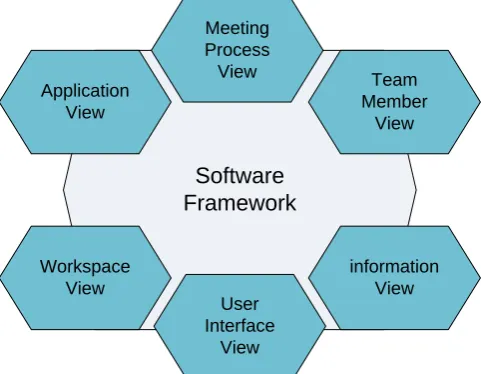
The overall conceptual view of the collaborative environment extends the views of the Collaboration Lifecycle Management proposed in the Collaboration Oriented Architecture (COA) framework (The Open Group, 2008). This COA framework has been put forward by The Open Group (OG) to allow computer scientists to describe their framework using a set of views. In this research, the conceptual system design for the futuristic collaborative design requirements is defined using the following views: Meeting Process view, Team Member view, Information view, User Interface view, Workspace view and Application view in Figure 1. These represent different perspectives or viewpoints and are discussed in detail in the following sub-sections.
Software
Framework
ApplicationView
Team Member
View
Workspace View
information View User
Interface View Meeting Process
[image:8.595.74.315.240.427.2]View
FIG. 1: The system conceptual views
5.1.1
Meeting Process View
Study problem collaboratively (Analysis phase)
Redesign and propose solutions by all collaborators
(Synthesis phase)
Validation with end user (Evaluation phase)
Solution Agreement
Approve Briefing and presentation of
problem
[image:9.595.72.368.70.338.2]Reject
FIG. 2: Meeting Process View
5.1.2
Team Member View
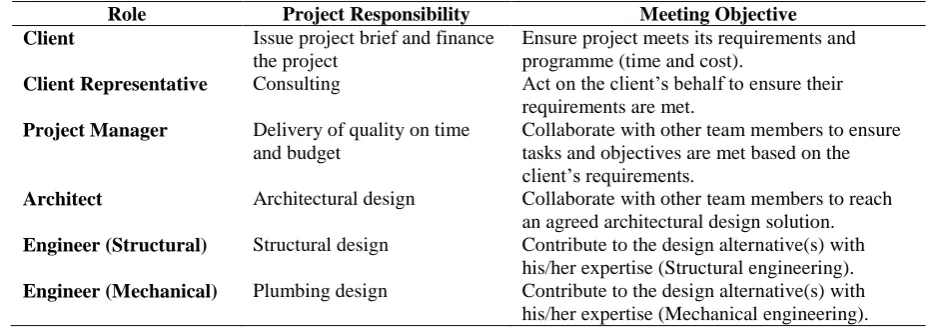
The team member view defines the team member’s profile within a collaborative process. This view takes into account the role (identity), project responsibility and meeting objective for each individual during the collaboration process (TABLE 1). Team members such as architects, engineers, clients, contractors and end users are involved in this collaboration process through a series of meeting activities ranging from presentation, analysis of design changes and errors, collective and self exploration of alternatives, technical validation and, finally, agreement.
For the co-located design review process, the architect is responsible for the architectural design. Therefore, his/her meeting objective is to collaborate with other team members to reach a sound architectural design solution. Since the mechanical engineer’s responsibility is the plumbing design, his meeting objective within the context of the chosen case study, is to provide a professional advice about the plumbing design. The end-user’s responsibility is to test the design. This way, the meeting objective of the end user during the co-located design review meeting is to test out the solution and see if it meets the end user’s requirements.
TABLE 1: A summary of the team members’ profiles including roles, project responsibilities and meeting objectives
Role Project Responsibility Meeting Objective
Client Issue project brief and finance the project
Ensure project meets its requirements and programme (time and cost).
Client Representative Consulting Act on the client’s behalf to ensure their requirements are met.
Project Manager Delivery of quality on time and budget
Collaborate with other team members to ensure tasks and objectives are met based on the client’s requirements.
Architect Architectural design Collaborate with other team members to reach an agreed architectural design solution.
Engineer (Structural) Structural design Contribute to the design alternative(s) with his/her expertise (Structural engineering).
[image:9.595.63.534.586.750.2]Engineer (Electrical) Electrical design Contribute to the design alternative(s) with his/her expertise (Electrical engineering).
Main Contractor Building construction Collaborating with other team members to ensure constructability issues are met including any changes/modifications.
End User Representative
Validate the design Hands on design alternatives to check design functionality.
5.1.3
Information View
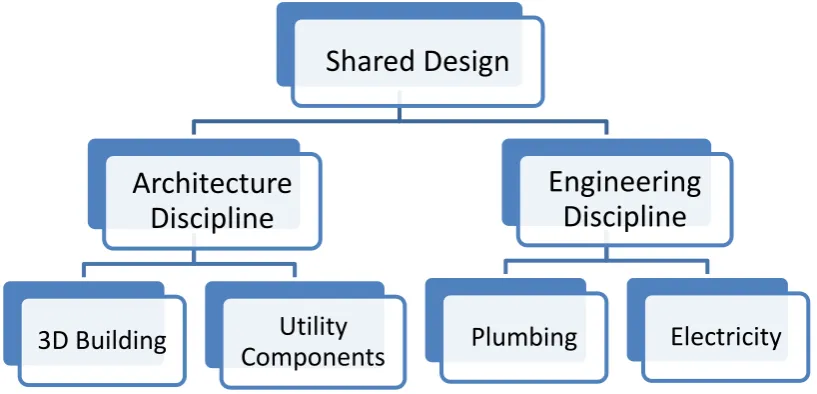
[image:10.595.95.504.362.559.2]Information view focuses on how the design data from different disciplines can be brought together and managed during collaboration. The design data for multi-functional collaboration can vary from one discipline to another. The information view defines the way for sharing the design data during the collaboration. This is achieved through the full integration of geometric data from different disciplines. In this approach the design data can be captured in an integrated data structure that maintains discipline-based data layers. This integrated data representation can be used to conduct design tasks based on the expertise within the content of a complex design. Sharing the design data through this way allows team members to perform collaborative interaction tasks such as annotation, collision detection and co-editing operations.
Figure 3 represents how various data layers for various design disciplines could be structured within the context of the chosen case study. The shared object is structured based on the functional discipline, in this case, the architecture and engineering. Within the architecture discipline, the design data can be subdivided into groups based on the design requirements, which are the bathroom and shower unit in this particular case. Engineering discipline could be further subdivided into sub-categories such as plumbing and electrical disciplines.
FIG. 3: The information view of the geometric sharing
5.1.4
User Interface View
The User Interface View defines what front-end interfaces should be included in order for users to collaborate and interact with the system. There are two interfaces identified in this paper for users to conduct the collaborative design: a collaborative engineering design interface and an immersive design exploration interface. The collaborative engineering design interface runs on a laptop and allows engineers to conduct engineering tasks such as design edits, annotation, clash detection. On the other hand, the Immersive design exploration interface should allow team members to explore and validate the design using the real-life size digital mock up. This environment can be a simple stereoscopic PowerWall with 3D interaction capabilities to explore the evolving design.
Shared Design
Architecture
Discipline
3D Building
Utility
Components
Engineering
Discipline
5.1.5
Workspace View
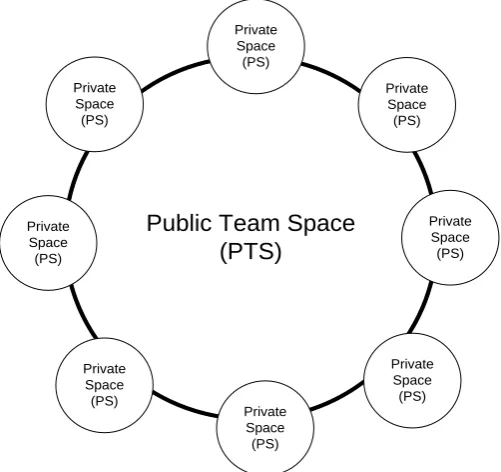
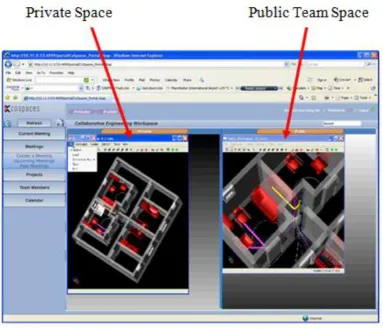
Workspace view manages the conceptual team space during the collaborative session. Two types of spaces have been envisaged in the overall system: a Public Team Space (PTS) which is accessible for everyone. However, interaction within this space is controlled by one team member at a time; Private Space (PS) on the other hand is space that can be created by each individual member within their engineering interface to explore the design at his/her own will (see Fig. 4). During the collaboration process, the PTS can facilitate team presentation and discussion while the PS can facilitate the personal exploration without distracting the team discussions taking place within the PTS. However, it is important that the system supports the information flow between the PTS and the PS, allowing team members to make a copy of the evolving design from PTS into PS to explore the design without distracting others, as well as up loading personal design ideas created within their PS onto PTS for others to review.
Text
Public Team Space
Text(PTS)
Private Space(PS)
Private Space
(PS)
Private Space
(PS)
Private Space
(PS)
Private Space
(PS)
Private Space
(PS) Private
Space (PS) Private Space
[image:11.595.82.333.231.467.2](PS)
FIG. 4: Workspace view
The system allows team members to use the PTS to present, negotiate, and conduct the various discipline tasks and to reach an agreement. The team members should also be able to open up the PS for interacting with the shared data and to conduct discipline based tasks and technical self validation without disturbing the discussions happening within the PTS (TABLE 2).
TABLE 2: Table representing the workspace view Design Process
Stages
Workspace Activities (higher level)
- Analysis phase - Synthesis phase - Evaluation phase
Public Team Space (PTS)
- Presentation, analysis of design changes and errors [for the Analysis phase]
- Collective exploration of design solutions [Synthesis phase within the PTS]
- Collective validation of the design [Evaluation phase in the PTS] - Synthesis phase
- Evaluation phase
[image:11.595.68.529.599.707.2]5.1.6
Application View
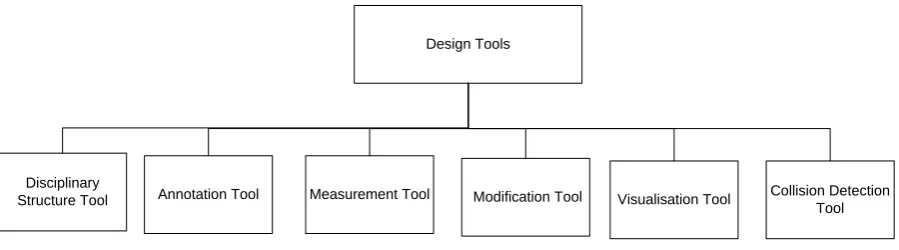
The application view identifies the tools that are required for supporting team members’ activities (higher and lower level) during the collaborative session, as illustrated in Figure 5 & Table 3. These tools should allow team members to communicate with others as well as to support the individual’s own work.
Application tools for the lower level activities in Figure 5 are: disciplinary tools, annotation tools, measurement tools, modification tools, visualisation tools and collision detection tools. The disciplinary structure tool allows users to structure the model into layers based on the disciplines. Annotation tools allow users to draw simple shapes and text for annotating the 3D object. The measurement tool allows users to perform tasks such as measuring the distance between 3D objects. Modification tools allow users to resize, reposition and delete 3D objects. Visualisation tools allow users to view the 3D model in different drawing styles and or a see-through transparent model using the cutting planes. Collision detection tools allow users to see the colliding parts while moving the 3D object around. These tools are mainly used to facilitate negotiation, discipline based tasks and the validation processes.
Design Tools
Disciplinary
[image:12.595.74.524.264.389.2]Structure Tool Annotation Tool Measurement Tool Modification Tool Visualisation Tool Collision Detection Tool
FIG. 5: The stakeholders’ interaction design tasks (lower level activities)
[image:12.595.65.521.569.708.2]As explained earlier on, a number of activities have been identified within the three main phases of the design process. These activities are comprised of higher level and lower level activities. Within the analysis phase, the higher level activities include presentation and analysis of the design changes and design errors. For these higher level activities to take place, the main lower level activities and tasks that happen are annotation and visualisation. The shared and self exploration of the design alternatives usually takes place within the synthesis phase, requires the functionalities of disciplinary structure and modification in addition to other functionalities supported in the analysis phase. The shared and self assessment of the design takes place during the evaluation phase requires the same lower level activities of disciplinary structure, measurement and collision detection. Table 3 summarises the higher and lower level activities for each team member during the design review meeting.
TABLE 3: Representation of the higher and lower level activities within each phase of the design review meeting Design process
stages
Activity (higher level) Activity (lower level)- Tasks
Analysis Presentation, analysis of design changes and errors
Annotation and Visualisation
Synthesis Shared and self exploration of design alternatives
Disciplinary structure, Annotation, Visualisation and Modification
Evaluation Shared and self validation of design alternatives
5.2
Conceptual System Design based on System Views
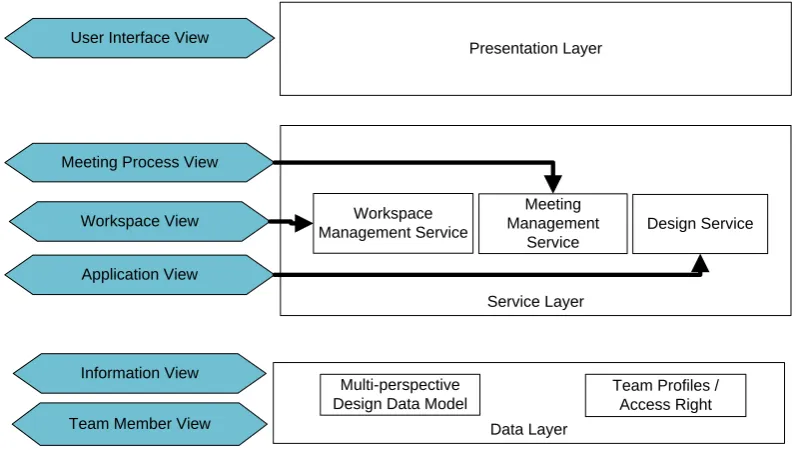
The system architecture was designed and implemented based on the six proposed conceptual views (See Fig. 6). These views were proposed to reflect the collaborative process of the multi –disciplinary team process and activities during a design review meeting. The presentation layer provides the user interfaces for team members to collaborate with others as well as to support the individual's own work (Bassanino et al., 2013). The presentation layer was designed in mind to separate the user interface/interaction from the core services in order to make the system easier to extend and incorporate new services for collaborative tasks. In order to build a high level framework that enables effective and more flexible collaborative environment, the service layer modularises the business logic of the meeting process, workspace and application (design) views. Each service has its own dedicated components for implementing the required functionality. In addition, the message passing services are interoperable for completing the collaborative tasks. Compared to the presentation layer which runs on the client sides, the services on the service layer are developed into web service in order to support distributed computing environment. Lastly, in order to provide an integrated and secured data platform for supporting the collaborative environment, the information view and team member view are grouped into the data layer. This allows the multi-perspective design data in the information view and the team profiles /access right information in the team member view to be exposed through the service layer to the presentation layer.
Data Layer Service Layer Presentation Layer
System Architecture Application View
Team Member View Workspace View User Interface View
Information View Meeting Process View
Conceptual View
Workspace Management Service
Meeting Management
Service
Design Service
Multi-perspective Design Data Model
[image:13.595.71.473.281.506.2]Team Profiles / Access Right
FIG. 6: Mapping of the conceptual view and the system architecture
5.3
System Architecture
Data Layer
Service Layer Presentation Layer Engineering
Collaboration Interface
Immersive Design Exploration Interface
Service Orchestrator
BIM Data Workspace Management Service
Meeting Management
Service Design Service
3D Model Management Service Session Management
Service Distribution Service Services Invocation Interface
Data Abstraction Interface
Team Data
High Level Services
Low Level Services
[image:14.595.79.435.88.449.2]Security / Identity Management
FIG. 7: System architecture
5.3.1
Presentation layer
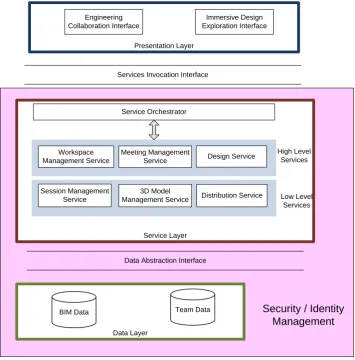
The presentation layer provides two design interfaces for supporting team members to conduct the design collaboratively: the Engineering Collaboration Interface and the Immersive Design Exploration Interface:
Engineering Collaboration Interface:
FIG. 8: Engineering collaboration Interface
Immersive Design Exploration Interface
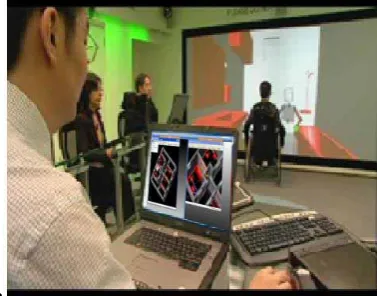
The Immersive Design Exploration Interface in Figure 9 allows the user (wheel chair user in this scenario) to validate the design using a real-life size digital mock up. The user’s movements and body gestures are captured through the motion camera. In addition to the real-life size digital mock-up, the stereoscopic visual effect provides the wheel chair user with a realistic perception of the evolving design.
a
FIG. 9: Immersive Design Exploration Interface
5.3.2
Service layer
The service layer provides the services to be consumed by the presentation layer. The services required to support team collaboration are categorised into the high level services and low level services. The high level services in the service layer provide the mapping of the three conceptual views (Meeting Process View, Workspace View and Activity View). The Workspace Management Service in the service layer plays a key role for supporting the collaboration environment. The workspace management service is designed to manage the public and private spaces among the team members. After the meeting is created and configured, team members can join the meeting and initiate a collaborative design session. The workspace management service is then responsible for managing the PTS and PS spaces (See Fig. 10). Both spaces can be minimized, maximized and resized by dragging the bar in between them.
Team Admin Space Design Space Communication Space
[image:15.595.75.264.444.592.2]FIG. 10: The PTS and PS spaces
On the other hand, the low level service is a utility-based service which encapsulates low-level technology-centric functions, such as 3D graphics, session management and network distribution services. The service layer contains a Service Orchestrator allowing the presentation layer to make requests through the Service Invocation Interface (Http, TCP/IP) to coordinate various services in order to complete specific tasks. The Service Orchestrator itself defines the process logic based on the business rules/requirements.
5.3.3
Data Layer
The data layer provides the data access service for the service layer to store and retrieve various types of information corresponding to Information View and Team Member View such as BIM data and Team Data (team profile and access right). The data layer supports abstraction access to various database systems using standard database API such as ODBC, JDBC and ADO.Net for supporting database connectivity.
5.3.4
Security and Identity Management
The Security and Identity Management provides the underlying security mechanisms applied to all of the components within the service and data layers. The data exchange between the integrated service module and the exchange of user credentials between components requires secured transmission channels. Therefore, the Security and Identity Management will deliver authentication of users, and the authorization to preserve data as well as protecting services from fraudulence access and allowing secure data transfer.
5.4
Service Inter-communication Process
5.4.1
Scenario 1
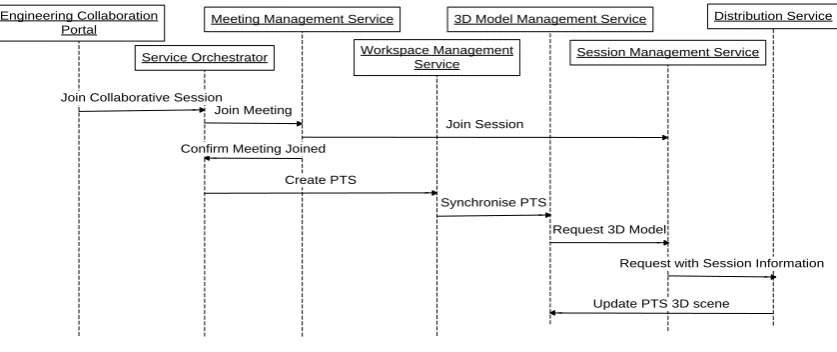
When a team member joins a collaborative session, the system will create his/her PTS and download the 3D content from the data layer for visualisation. The process flow starts with users pressing the "Join Session" UI button in the Engineering Collaboration Portal. Upon receiving this request, the Service Orchestrator delegates the messages to the Meeting Management Service for updating the session's participant list; and to the Workspace Management Service for creating the user's PTS and for the downloading of the 3D model from the BIM data using the Distribution Service and rendering it using 3D Model Management Service. The Session Management Service keeps records of which 3D models are required for the session and therefore the Distribution Service can prepare the 3D model for streaming to the participants.
Engineering Collaboration
Portal Meeting Management Service
Workspace Management Service
Session Management Service
Distribution Service
Service Orchestrator
Join Collaborative Session
Create PTS
Join Session
Request 3D Model 3D Model Management Service
Update PTS 3D scene Join Meeting
Confirm Meeting Joined
Synchronise PTS
[image:17.595.75.494.199.375.2]Request with Session Information
FIG. 11: Sequential diagram for downloading the 3D bathroom model for a newly joined participant
5.4.2
Scenario 2
Engineering Collaboration
Portal Meeting Management Service
Workspace Management Service
Session Management Service Distribution Service
Service Orchestrator
Create PS
3D Model Management Service
Create PS
Design Service
Delete bathtub and load shower unit
Delete/Load 3D objects
Update PS scenegraph
Get the PS 3D scene updated from its PTS
Update PS 3D scene to PTS
Upload 3D scene to the local PTS
Render 3D scene to the local's PTS
Get session team list Upload 3D scene to session's PTS(s)
Team list
3D scene broadcasting to the session's PTS(s) 3D Model Management Service
[image:18.595.79.551.81.393.2]Render PTS 3D scene Distribute PTS's 3D scene
FIG. 12: Sequential diagram for use of PS to present a new design concept developed by a team member to the team
6.
SYSTEM EVALUATION
Evaluation of a collaborative system can indicate whether or not it performs as it was intended and also if the individual and group performance is at an adequate or expected level. Since the purpose of this research is to create a collaboration platform which is user-centric, emphasis was given to evaluating the user acceptance in terms of its effectiveness in supporting multi-functional collaborative design.In this paper, the evaluation was limited to the collaboration within the engineering interface in order to focus on the main service modules of the system architecture. Evaluation of the immersive interface was left for future work.
The evaluation was designed to cover the following three aspects: utility, likeability and usefulness. Each aspect contained several user tasks for evaluating different issues. The utility evaluation focused on the functionalities provided in the Design Service, the Meeting Management Service and Workspace Management (including public and private workspaces). The likeability aspect covered general likeability and ease of use of the Engineering Collaboration Interface. The usefulness evaluation was planned to test the perceived business value, thus evaluating the multi-functional collaboration and business performance.
Following a pilot study to improve the system’s quality and efficiency, three evaluation sessions were organised with a total of nine participants (three in each session). Two evaluation sessions took place at the University of Salford, UK with members from Construct IT for Business (an industry-led network to promote innovation and research in ICT in the UK construction, and TANet (a university and industry network for the UK SME manufacturing sector). The third evaluation session was organised with a group of end users from COWI (consulting group in engineering, environmental sciences and economics in Denmark). The participants were selected on the basis of having some experience in collaborative working in the construction industry, BIM or virtual workspaces.
and the laptops were equipped with the specification of Intel Core 2 Duo 2.5 GHz CPU, 4GB of RAM and an Nvidia Quadro FX 1600M graphic card. A HD camcorder was used to record the sessions.
[image:19.595.74.260.253.377.2]Evaluating collaborative systems typically involves a consideration of the many complex and diverse issues which can prove to be a challenge (Xiao et al., 2000). The approach of being field-based and ethnographically oriented was adopted to study potential users carrying out real tasks in real settings, to provide a better understanding of the interaction with the collaboration environment (Suchman, 1987). As a result, the co-located use case was designed as close as possible to reflect a real life situation. It started with the stakeholders being invited to attend a co-located design review meeting where the new layout of the bathroom was presented, discussed and then validated by the end user. The tasks executed by the participants during the evaluation were based on the design review scenario presented in Section 4. The description of the use case is that a meeting was required to discuss a new layout of a bathroom for wheelchair users in a block of flats. The addition of a separate installation shaft has impacted on the bathroom space which is no longer usable by wheelchair users (See Fig. 13). The most likely solution is to replace the bath unit with an accessible-shower unit. The participants undertook the roles of architect, engineer and end user to conduct the evaluation process, with the architect performing the role of a project manager.
FIG. 13: Initial setting for the bathroom’s elements (the insufficient circulation is represented with a circle)
In the evaluation sessions, the three participants who played the designated roles during the meeting performed the following main actions:
Identify the problems within the existing bathroom:
o Architect navigates and explains the existing design in the PTS and explains the impact of the design change on the wheel-chair user.
o Following discussions and proposing alternatives, all agree to replace the existing bath with a shower unit.
o Architect requests the master control and annotates the bathtub to be deleted in the PTS. Redesign the bathroom layout:
o Architect opens his or her PS, deletes the bathtub, and loads the shower-unit model.
o Architect updates the design in the PTS. Validation of the new design layout:
Everyone takes turn to request the master control and discuss their viewpoints and check the following (each participants can make any layer visible/invisible while performing their task):
o Discussion of the bathroom’s accessibility by the end user: opens a PS and uses the measurement annotation tool to check if there is sufficient area for circulation.
o Discussion of the plumbing system by the Mechanical Engineer: opens a PS and marks up the plumbing connector to the shower unit.
Participants were asked to repeat the above steps to discuss alternative designs and layouts until they agreed on a solution.
scales to test the three aspects: utility, likeability and usefulness. All statements were marked from 1 to 5 to indicate the degree of the users’ satisfaction. An average above 4 is considered as a high value which corresponds to showing excellent satisfaction. An average between 3 and 4 is regarded as a medium value and considered as showing good satisfaction. An average between 2 and 3 is measured as a low value and therefore the features might be considered as undesirable. An average below 2 indicates that all features can be considered as ineffective.
6.1
Evaluation Results
6.1.1
Utility of the Collaborative System
The aim of the utility evaluation was to identify if the system provides the appropriate tools to support design tasks individually and collaboratively. This evaluation comprised of testing: the Design Service, the Meeting Management Service and Workspace Management (PTS and PS). The Design Service provided the functionalities to visualise and modify 3D models as well as query design properties for individual design tasks. It also provided other functionalities to support teamwork such as annotation, viewing 3D models, moving objects to detect colliding information in the 3D design model and undo actions. The results of evaluating the Design Service revealed that all participants considered these functionalities as “good” to “excellent” since they were able to support their major design activities (a mean value of 4.01 and a maximum value of 5) (see Fig. 14). However, the minimum score of 1.88 is linked to the fact that most participants already had some experience in using mainstream CAD packages such as AutoCAD and Revit and were expecting additional model editing functionality. This is evidenced from one participant’s recommendation to include a ‘copy and paste’ functionality. The prototype system does not intend to replace these CAD packages since its main functionality is to support collaboration in design review meetings. Another participant suggested adding a quick access to commands using ‘hot keys’ and including further functions to facilitate undo tasks. Such added functionalities were included in the wish list for consideration for further development. Having positive results for the Design Service functionalities is very important since such functionalities are directly used by team members to present and visualise their ideas and support discussions during the meeting.
Evaluation of the Meeting Management Service was planned to test the functionalities for supporting actions during the meeting (analysis, synthesis and validate). Participants were asked to rate tasks such as discovering design mistakes, solving design problems, improving design work and exploring more design alternatives. Figure 14 represents the statistical summaries of the Meeting Management Service evaluation with a mean value of 4.51 and a maximum of 5. Such high results clearly demonstrate that all users agreed the system is capable of supporting design meeting activities.
Evaluation of the Workspace Management covered the public team space (PTS) and the private space (PS). Testing the PTS was planned to investigate if the system can support real-time collaboration, thus allowing stakeholders to take turns and share the design with other team members. Testing the PS was designed to identify if the PS was adequate for supporting individual design exploration and whether more alternatives could be explored during the meeting by the participants. It is evidenced in Figure 14 that the Workspace Management was highly scored receiving a value greater than 4 for the 1st quartile, median and 3rd quartile, with a maximum value of 4.88 and a mean of 4.30. However, the minimum value of 2.71 was from one of the users experiencing a slow response from the network. Such a positive result is clearly strong proof that the PTS provided a real-time synchronisation together with the facility for team members to take turns for presenting their ideas during the collaboration session. In addition, features such as privacy and self exploration were considered important by the participants since they allowed the individuals to explore specific issues on their own and compare various designs using multiple private spaces during the meeting. One user commented “As an end user, it is useful to explore possible solutions without interference from other disciplines” [Construct IT member].
FIG. 14: Evaluation results on the utility of the collaborative system
6.1.2
Likeability of the Collaborative System
Evaluation of likeability consisted of a number of user tasks related to: general likeability of the whole system and ease of use of the Engineering Collaboration Interface. Figure 15 illustrates the statistical summaries of the general likeability evaluation with high results showing a value of 4 and above for both median and mean, with a minimum of 3.5 and a maximum of 5. Such results pointed out that all participants were confidant with the system, enjoyed using it and agreed that the visual quality reached an excellent satisfaction.
The set of user tasks related to evaluating the Engineering Collaboration Interface covered: ease of use, learnability and complexity of the Engineering Collaboration Interface. The outcome of these results is represented in Figure 15. In this evaluation, some users did not consider the collaborative tools were easy to use (minimum value of 1.75). One of the reasons behind this is that the system was designed with a focus on collaboration tasks rather than on common CAD functionalities which were expected by some users. The feedback also identified that even the experienced CAD users were not familiar with the concept of Private Space and therefore required some support during the evaluation.
To conclude, the overall result of the likeability evaluation confirmed that the participants enjoyed taking part in the test and found that the various functions provided in the system were very easy to use. Participants liked features such as 3D graphics, real-time results, ability to customise the plan, private space use, annotation and its intuitive nature.
6.1.3
Perceived Usefulness of the Collaborative System
The aim of the usefulness evaluation was to test the benefits of achieving multi-functional collaboration and increasing business performance. The user tasks involved in testing the multi-functional collaboration evaluated the system tools for supporting various disciplines and the user interface for incorporating external applications used for team discussion. Figure 16 represents the statistical results of the multi-functional collaboration evaluation with a mean value of 4.23 indicating that the system can support multi-functional team discussion and collaboration. The minimum value of 2.5 is explained by one user’s recommendation to improve the awareness of ‘level’ in a building to better identify the discipline based information layers.
Evaluation of the business performance was planned around: saving time, reducing cost and facilitating decision making. Figure 16 represents the statistical results of the business performance evaluation with a mean value of 4.26 and a maximum of 5 illustrating that nearly all the subjects agreed that the system was capable of supporting business performance in terms of reducing time, cost and facilitation of decision making. However, some participants suggested the addition of a digital signature and the integration of a stabilised document and project management system such as SharePoint to provide a seamless integration with the user company’s existing IT infrastructure.
To conclude, the overall result of the usefulness evaluation proved that the system was successful in supporting collaboration. With regard to how the system assisted the participants to explore more alternatives and facilitated problem solving during the design phase, one user stated: “Using the graphical construction model makes all disciplines and sectors focus on a comparable scenario and find a common solution” [end
[image:22.595.76.423.398.670.2]user-COWI]. Most importantly, in respect to multi-functional collaboration, comments such as “The team worked well together” [Construct IT member] and “The group was able to monitor any changes or modification, and was also able to exchange various ideas easily and clearly” [Construct IT member]. This highlights the participants’ positive experience of using the system collaboratively and their satisfaction with the system’s ability to support collaboration.
7.
DISCUSSION AND FUTURE WORK
This section presents a reflection on the approach used in developing the collaborative environment and on the results. This research took the design review meetings as the context and attempted to explore the nature of a technology platform that can allow stakeholders to communicate, discuss and explore solutions to design problems. It placed emphasis on the multi-disciplinary nature of the design review team that requires the management of multi-perspective data models and interaction among multiple stakeholders from different disciplines.
The state-of-the-art discussion on BIM, system architecture and collaborative environments, presented in this paper, provided insight into system approaches, technologies and previous research on collaborative workspaces that could be used as the basis for defining a sound system architecture for the collaboration environment. Furthermore, the business scenario described in the paper brought a realistic design review meeting context to position the research. The business scenario presented in this paper considered a range of stakeholder roles during a typical design review meeting, including the roles of project managers, architects, engineers and end users. It helped the researchers to articulate and present a typical meeting process, stakeholder roles and generic collaboration tasks within a typical design review meeting in the construction sector. This scenario also provided a sound basis for validating the functionality of the collaborative platform.
The conceptual architecture of the collaborative design environment was then defined using six system views: meeting process view, team member view, information view, user interface view, workspace view and application view. These six views formed the basis for defining the system requirements and designing and implementing the final system architecture of the collaboration platform which comprised three layers: presentation layer, service layer and data layer. This architecture could be considered as a “blueprint” for building a collaboration platform that comprises three layers of abstraction, together with the technology components within each layer.
Overall architecture demonstrates how the data-centric aspect of BIM could be transformed into human-centric collaborative activities through a set of interactive services. The data layer utilises the main benefits of BIM which provides an accurate geometrical representation of various building parts and multi-disciplinary data models in an integrated data environment (Cooperative Research Centre for Construction Innovation, 2007). It provides a more effective way of information sharing, and considering a product’s life cycle issues (Azhar et al., 2008, Eastman, 2011, Maj and Issa, 2007, Yan and Damian, 2008). The collaboration services provided in the Service Layer brings the power of BIM into a team space context and the user interfaces provided in the Presentation Layer make the team space visual and interactive, allowing teams to engage in collective design exploration tasks. This overcomes the data-centric nature of BIM identified by several other researchers (Grillo and Jardim-Goncalves, 2010, Plume and Mitchell, 2007) and creates a user-centric interactive design review platform. Furthermore, it provides synchronous real-time multi-user collaboration around a single shared model which has been identified by Rosenman (Rosenman et al., 2007) as an important feature. It also offers different views/representations required by each discipline (Isikdag and Underwood, 2010), allowing them to effectively contribute from their own viewpoint. The overall collaboration platform supports multi-functional team activities in design review meetings where team members can discuss, investigate and validate alternative solutions both individually in the Private Space or/and collaboratively as a team in the Public Team Space.
The evaluation results focused on three aspects: utility of the collaborative design tools, the likeability and ease of use of the system and its usefulness for collaboration support. In total ten tasks were evaluated by 9 participants who took the roles of architect, engineer and end user. The evaluation results proved that a team-centric, co-located collaboration platform can support multi-functional teams in the construction sector to assess the design and any changes during design review meetings. The evaluation results clearly demonstrated that the collaborative design tools assisted the users to study the design problem collaboratively during the analysis phase, to explore various solutions during the synthesis phase as well as to validate them with the end user until a solution was agreed. In addition to the collaborative 3D tools, the provision of both the PTS and PS enabled users to explore design solutions both collectively and individually, leading to better collaboration, enhanced design productivity and business performance.
stakeholder groups. A thorough evaluation involving all the stakeholders on a complex BIM model would help us to understand the scalability issues of the collaboration architecture for large teams.
The overall system architecture has considered the co-existence of a 2D interface for engineering tasks and a VR interface for engaging the user in assessing the overall design. Although both interfaces were implemented during this research, only the 2D interface has been utilised in this research. Further research is planned to evaluate the inter-play between the 2D interface and the VR interface and benefits during a design review meeting. Another research opportunity can be to investigate multi-touch user interfaces.
Furthermore, only the collaboration within the context of co-located meetings has been tested so far. Further research needs to be conducted to test the overall architecture within a distributed setting. The user experience can be further enhanced within a distributed setting by incorporating tele-immersive technology to create a face-to-face meeting experience among the remote users.
8.
CONCLUSION
This paper presented the investigation into, and the development of, a team-centric, human-centred collaborative environment for multi-functional teams (stakeholders) in the construction sector to come together to assess the design and/or any design changes during design review meetings. It was achieved by: identifying the key characteristics of a collaborative virtual environment that can enhance multi-functional team collaboration in the construction sector; designing and implementing a technology platform with interactive interfaces that can support multi-functional team collaboration, ensuring the interfaces are both user-centric and team-centric and, finally, capturing the reaction of end users to the proposed technical platform used for conducting collaboration design reviews. The positive evaluation results confirmed that the developed system can assist multi-functional teams to collaborate during design review meetings since the features provided in the system supported team members and enabled them to explore various alternatives during design review meetings, hence reducing time and cost.
The main contribution of this paper is the description of the detailed design and implementation of a software architecture that can support multi-functional team collaboration. This architecture has been developed by analysing various architecture views such as meeting process view, team member view, information view, user interface view, workspace view and application view. By taking a generic layered architecture as the basis, it proposes a modular software framework that combines the power of advanced visualisation, interaction technology, BIM and web services to provide a sophisticated collaboration platform. This software framework allows the co-existence of private and public design spaces that is important for creative team collaboration as well as for individual explorations.
9.
ACKNOWLEDGEMENT
This research was funded by the European Commission under contract IST-5-034245. The authors would like to thank the project’s industrial partners for their valuable contribution in identifying the current practices and challenges faced by the construction industry. In particular, the authors would like to thank members from the University of Salford, COWI (Denmark), Construct IT (UK) and TANet for taking part in the evaluation sessions and for their constructive feedback and comments to further improve the system.
10.
REFERENCES
Arayici Y. and Sarshar M. (2002). DIVERCITY: A Virtual Construction Design & Briefing Environment,
Proceedings of DMinUCE-London 2002, 3rd International Conference on Decision Making in Urban and Civil Engineering, London, UK.
Aspin R. and Fernando T. (2002). Virtual environments for the AEC sector, Proceedings of the eBusiness and eWork Conference Prague, Czech Republic.
Azhar S., Hein M. and Sketo B. (2008). Building Information Modelling: Benefits, Risks and Challenges,
Proceedings of the 44th ASC National Conference, Auburn, Alabama, USA.
Bainbridge L. and Sanderson P. (2005). Verbal protocol analysis, in: Wilson J. R. & Corlett, E. N. (eds.)
Evaluation of human work, Taylor and Francis, London, UK, 159-184.