2017 2nd International Conference on Artificial Intelligence: Techniques and Applications (AITA 2017) ISBN: 978-1-60595-491-2
Design and Implementation of Sign-in System
Based on Bluetooth Technology
Yi-qin BAO
School of Information Engineering, Nanjing Xiaozhuang University, Nanjing, China, 211171
Keywords: Automatic registration, Bluetooth Technology, JSON, Sqlite.
Abstract. Because the traditional way of signing in on class is always writing on the paper or calling one’s name, complicated and time-consuming, to update the way is a hot topic in the present, and many new technologies continue to gush, such as registration card scheme, face recognition scheme, fingerprint identification scheme. However, they always meet some challenge when applied to actual life especially in the class because they are usually expensive, not convenient enough, and most importantly they lack humanization. This paper designed a kind of automatic sign-in system based on Bluetooth technology, implementing automatic registration with the use of Bluetooth on mobile phone. As long as the students have mobile phones and take them to the class, the teacher can do roll call automatically, which is convenient, zero cost and much more people-oriented. This paper introduces the design of automatic sign-in system using Bluetooth technology, and compares it with other methods to prove that this is an innovative way.
Introduction
At present, there are a total of more than 2000 colleges and universities in China. Many of them need to analyze and manage the data of the students who are always absent, so they need to count. Therefore, the attendance in a college is very important for the quality management. Now most of the colleges and universities have no difference with the past in the way of signing in, which is still a name called and the hands up, very troublesome and time-consuming. Sometimes teachers can according to their own experience, no teacher can do it in every class in usual, which leads a lot of students to produce fluky psychology. This will undoubtedly have a certain impact on the quality of teaching. To solve this problem, it is high time to change the traditional tedious way. There are a lot of new ways such as using a credit card, face recognition, fingerprint recognition, but either inconvenient, or high cost, most importantly is not humanized, so I need a the new humanized way. Because signing-in itself is a kind of communication, and the environment is mainly limited in the range of the classroom, so we choose a short-range broadband wireless technology, Bluetooth, and it will be a kind of suitable communication scheme. As the popularity of new mobile phone and the updating of Bluetooth technology, using mobile phone to sign in via Bluetooth will be a great pattern.
Bluetooth Technology
Bluetooth technology [1], is a kind of radio technology which supports equipment with short-range (general 10m) communications. It can realize wireless information exchange between mobile phone and other equipment. Through the Bluetooth radio, it can be very convenient to get the device name, MAC address, and even the signal strength. Nowadays, the smartphones are all equipped with Bluetooth function, and have unified standard and interface.
The System Overall Structure
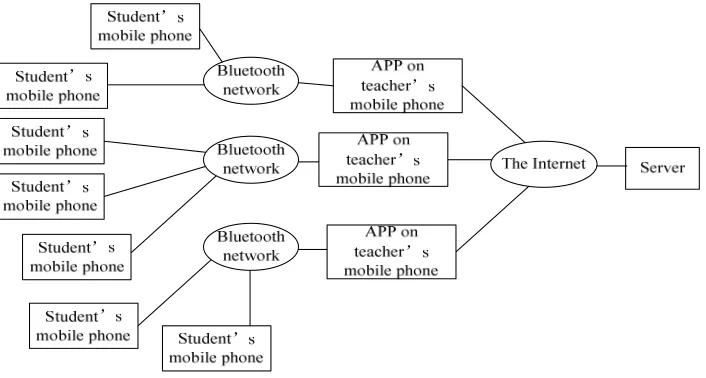
phone name (with his own name), open the Bluetooth to release the radio signals; The server is responsible for inputting and management of student information; APP is responsible for carrying interface for the teachers' mobile phone connected to the server , and the receiving and processing of Bluetooth signal. When the teacher want to call the roll, they need to download the student list from the server. Then choose class number to enter the main interface. Click start after, mobile phone to receive Bluetooth broadcast signal nearby. At the same time, students are asked to change the name of their mobile phone name and open Bluetooth. When the teacher gets one mobile phone Bluetooth broadcast, it automatically gets the name and MAC address. If there is a match between the device name and the one in the list. The corresponding field in the form will change. At the end, data can be submitted to the server when the ‘submit’ button is clicked.
Figure 1. System architecture diagram.
Design of the Server
Student Management Module
Student management module is responsible for the management of student information, not only can choose class, query, add, modify and delete student information, but can also import student information directly from XLS documents.
Interaction with the APPs
In the implementation of the interaction between server and mobile phone terminal, the main communicating method is adapting HTTP wireless communication, using a kind of lightweight data interchange format, JSON. JSON format has clear and concise hierarchical structure which makes it easy to read and write, as well as easy for machine to parse and generate. The transmission efficiency is high.
The Servlet in server receives the requests APP sends, make a series of responses, including the resolution of the JSON statement, extracting the corresponding parameters, the operation of the database, when necessary, to call JSONObject.put (Object key, Object value) method to create a JSON statement. In the system, the statement mainly includes some attributes of students returned to the mobile phone terminal.
Design of the APP
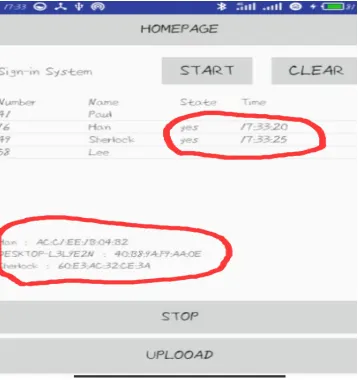
Bluetooth and changed its names to their own names. At the same time click on the "start" button. Thus the sign-in process will be completed automatically.
Figure 2. The homepage of the app.
Uri Configueration
Because the data transmission using the HTTP protocol, teachers need to set the server URI (Uniform
Resource Identifier) first, IP address and PORT number are needed. In the system, once submitted, the data will be stored in the SharedPreferences, thus there is no need to set the IP and PORT each time. The configuration interface is shown in Figure 3.
Figure 3. Configuration Interface.
Download the List
When the curriculum is started or the list is changed, the teacher need download the list of the corresponding class first. In this process, the app gets connection to the server by the URI and transfer parameters. Then it will obtain the JSON statement returned, analyze it into student objects and store them in SQLite database.
Choose Class
[image:3.612.220.394.372.539.2]Call the Roll
After entering the class interface, a table will be displayed, including student number, name, and state (initially empty) of all the students in the class. A BroadCastReceiver is set in the APP MainActivity to receive Bluetooth broadcast sent by the devices around. When receiving a Bluetooth broadcast signal, it will get the name and match it with the list of the class. If matched, a ‘yes’ will be written into the ‘State’ column. Thus, we complete ‘calling the roll’ automatically.
In the design of Bluetooth technology, the Bluetooth radio receiving equipment on the natural need to use Bluetooth devices, so we must first add Bluetooth permissions in the AndroidManifest.xml file, and then define the Bluetooth adapter access to access the native Bluetooth device. If bluetooth devices is discovered in after scanning, it will instantiate the discovered device, and use the object to get its name and other required attributes.
Bluetooth permissions settings code as follows:
<uses-permission android:name="android.permission.BLUETOOTH" />
<uses-permission android:name="android.permission.BLUETOOTH_ADMIN" /> Bluetooth adapter instantiation code as follows:
private BluetoothAdapter mBluetoothAdapter;
mBluetoothAdapter = BluetoothAdapter.getDefaultAdapter(); if(mBluetoothAdapter !=null){
if(!mBluetoothAdapter.isEnabled()){
Intent intent = new Intent(BluetoothAdapter.ACTION_REQUEST_ENABLE); startActivity(intent);
}
mBluetoothAdapter.startDiscovery(); }
else{
textview.setText("Bluetooth device is no found!"); }
if (action.equals(BluetoothDevice.ACTION_FOUND)) {
BluetoothDevice device =intent.getParcelableExtra(BluetoothDevice.EXTRA_DEVICE); mTextView.append(device.getName() + " : "+ device.getAddress()+"\n");
}
[image:4.612.217.396.540.730.2]Upload
The way of uploading in this system is to get the students list from the SQLite to generate JSON format statement and transmit it to the server by HTTP protocol. The server will modify the database according to the JSON statement in, thus complete the uploading process.
The Comparison with Several Other Ways
There are many sign-in systems at present. In addition to Bluetooth, many other techniques and
methods have also been used to sign in, for example, card signing-in based on RFID[2], mobile phone
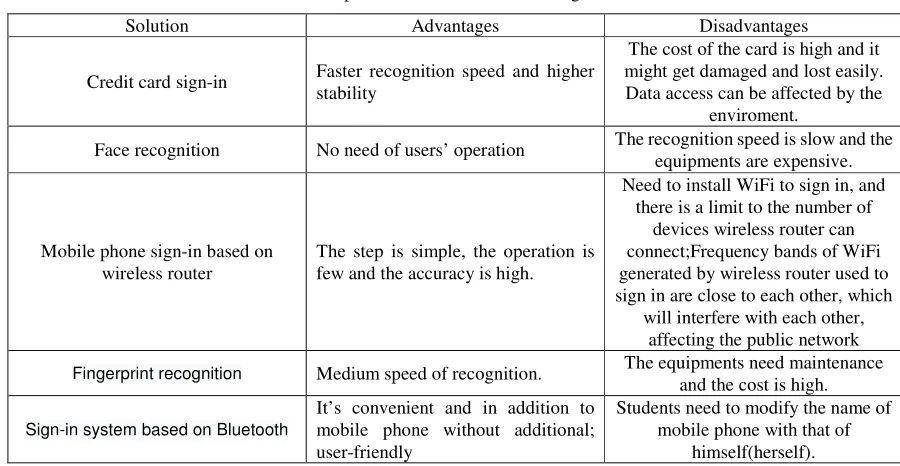
[image:5.612.78.528.257.490.2]sign-in based on wireless router[3], and even face recognition[4], speech recognition based on neural network and so on. In the selection of the plan, the users must consider many factors, cost, operability and humanization. Next, these schemes and the sign-in system based on Bluetooth is compared, as shown in Table 1, which shows the advantages of this system.
Table 1. Comparison of different kinds of sign-in modes.
Solution Advantages Disadvantages
Credit card sign-in Faster recognition speed and higher stability
The cost of the card is high and it might get damaged and lost easily. Data access can be affected by the
enviroment.
Face recognition No need of users’ operation The recognition speed is slow and the equipments are expensive.
Mobile phone sign-in based on wireless router
The step is simple, the operation is few and the accuracy is high.
Need to install WiFi to sign in, and there is a limit to the number of
devices wireless router can connect;Frequency bands of WiFi generated by wireless router used to sign in are close to each other, which
will interfere with each other, affecting the public network
Fingerprint recognition Medium speed of recognition. The equipments need maintenance and the cost is high.
Sign-in system based on Bluetooth
It’s convenient and in addition to mobile phone without additional; user-friendly
Students need to modify the name of mobile phone with that of
himself(herself).
Conclusion
This paper realizes the call sign based on Bluetooth technology and mobile Internet technology. It is a system of innovation with great advantages including clear train of thought, simple method and low cost. Due to its own factors, Bluetooth 4.0 has a range of just 10m. Sometimes the classroom is too large for the mobile phone to receive broadcast signals in time and the limitation will come into being. But with the development of Bluetooth 5.0 and the continuous progress of technology, the scope of application of Bluetooth technology will continue to expand, sign-in system based on Bluetooth will have great prospects for development.
References
[1] Chen Xi, Xu Peng, Xu Xiaolei. Development of embedded industrial control system based on Bluetooth communication technology [J]. Instrument technology and sensor, 2015 (1): 74-76.
[3] Wang Weihong, Chen Xiaoliang. Design and implementation of mobile phone system based on wireless router[J]. Journal of Zhejiang University of Technology, 2016 (6).