DEC-06-UP-DESK-UM-FP-ACTOI
DEC-06-UP-DESK-UM-FP-ACTOI
PDP- 6 PROGRAMMING MANUAL
INTRODUCTION
The Desk Calculator program improves man-machine communication by giving the computer user direct
access to basic mathematical functions within the PDP-6 subroutine library. By means of the PDP-6
multi-user station, the operator is able to enter arguments, request specific functions, and obtain resultants at
electronic speeds. No complex programming rules need be learned, and no involved operational
pro-cedures need be followed. Some familiarity with modern programming systems is helpful, however, to
real ize the full range of capabil ities inherent in Desk Calculator.
The Desk Calculator program also incorporates the macro operations programming aid. By the use of macro
operations, functions not contained in the normal repertoire can be represented by a single mnemonic
sym-bol. The macro feature also includes conditional branching capabil ities, so that subroutines requiring
testing and decision-making can be implemented.
OPERATING INFORMATION
The Desk Calculator program is brought from the system tape, stored in memory, and initial ized by the
following control statements, typed on the teletypewriter:
IJOB (Message) CORE 2 GET SYS DESK (Message) START
where the number 2 represents the core memory space requ ired by the 2, OOO-word program. The number
of significant figures required may be set by a statement of the following form:
$FN
where N is any number between
a
and 7.For example, to obtain the sine in radians of
n/4
to five significant figures, the following is typed:$F5
SIN(3.14159/4)~
The ~ character is a demand for output. The ALT MODE key is depressed to complete the input
com-mand. The program evaluates the typed expression and types the answer I so that the second I ine becomes
PDP
6
SIN(3.14159/4)~ 0.70711
Alternatively, the carriage return function could have been selected to complete the input command.
When this is done, the resultant appears on the next line.
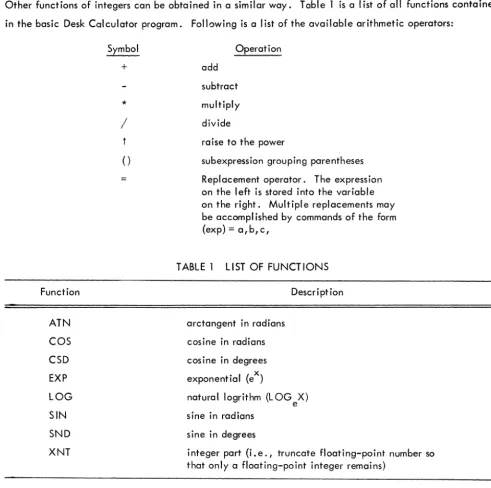
Other functions of integers can be obtained in a similar way. Table 1 is a list of all functions contained
in the basic Desk Calculator program. Following is a I ist of the available arithmetic operators:
Symbol
+
*
/
() Operation add subtract multiply divideraise to the power
subexpression grouping parentheses
Replacement operator. The expression on the left is stored into the variable on the right. Multiple replacements may be accompl ished by commands of the form (exp) = a,b,c,
TABLE 1 LIST OF FUNCTIONS
Function Description
ATN COS CSD EXP LOG SIN SND XNT
arctangent in radians
cosine in radians
cosine in degrees
exponential (ex)
natural logrithm (LOG X) e sine in radians
sine in degrees
integer part (i.e., truncate floating-point number so that only a floating-point integer remains)
2
PDP
[image:4.627.60.552.125.614.2]Pseudo- Operat ions
Pseudo-operations direct the program to perform certain util ity functions, and are so-called because of
their functional similarity to basic machine-language operations. Pseudo-operations provide for defining
macro-operations, deletion of resultants and functions, and output format specification.
A conceptual accumulator register is used that serves a purpose analogous to the hardware accumulator
register; that is, resultants are placed in the conceptual accumulator for reference or modification by
sub-sequent operations. Hence, a clear-accumulator pseudo-operation ($C) has been included to provide
for disposing of unneeded resultants.
Single-precision, floating-point arithmetic is used. By means of the $FN pseudo-operation, up to 7-place
accuracy can be specified. However, the propagation of round-off errors caused by nesting and similar
iterative procedures may in some cases cause a loss of significance in the seventh place.
Pseudo-operations are I isted in Table 2. Note that pseudo-operations always begin with the $ symbol.
TABLE 2 PSEUDO-OPERATIONS
Symbol Operation
$C $D $FN $1 $K $L $R $T
Clear the accumulator
Define macro operation
Round output to N significant figures (0.:sN.:?)
Round output to nearest integer (same as $FO)
Delete the function specified by the user. If no function is specified, delete all user functions, and set all variables to 1.0.
Output line (carriage-return followed by a line-feed). Used in macro operations.
Secondary exit from a macro-operation.
Output tab. Used in macro operations.
Variables
Variables are represented by a single letter (A-Z). Strictly speaking, variables represent memory locations,
the contents of which may vary.
F D F
3
6
Comments
Comments are delineated by quotation marks (" "). Everything between the quotes is regarded by the
program as a comment.
Macro Operations
Macro operations or "macros" enable the programmer to generate useful extensions to the normal symbolic
repertoire of Desk Calculator. Macros are defined by the $D pseudo-operation. The i character de lim its both the macro mnemonic and the instructions comprising the macro-operation. Hence, macros are
gener-ated by instructions of the form
$DMNEiINSi
where MNE is the macro name or mnemonic, and INS represents the series of instructions within the macro.
As an example, suppose we wish to obtain a macro that will furnish several functions of a variable, X.
We type the following statements to define the required macro:
$DLOP;
X ~ SND(X)!CSD(X)! SND(X)t2+CSD(X)t2~i
The ~ character causes the PDP-6 to output the expression value, followed by a tab. The~ character
causes output of the expression value, followed by a carriage return. The accumulator is deared after
either operation. The program makes a normal exit at the end of the macro.
The macro can now be called by
LOP
and the program will respond by typing the values X, SIN X, COS X, and (SIN 2 X + C052 X).
Labels Within a Macro - Labels for symbolic memory locations are one to three digits in length, and must
be followed by a colon. Labels must be the first entry on a line.
Formatting - Formatting ot the macro operation output is accomplished by the! and ~ characters
de-scribed above, and by the pseudo-operation's $L, $T, $FN, and $1, dede-scribed in Table 2. Text may be
output by enclosing the character string within quotation marks.
PDP
Arguments Within a Macro - Macros may contain up to nine arguments. Thus, calling statements will be
of the general form
where MNE is the macro mnemonic, A1 ... AN are the input arguments, and N <9. Within the macro
eac h argument is referenced by the expression # N (1:: N :: 9).
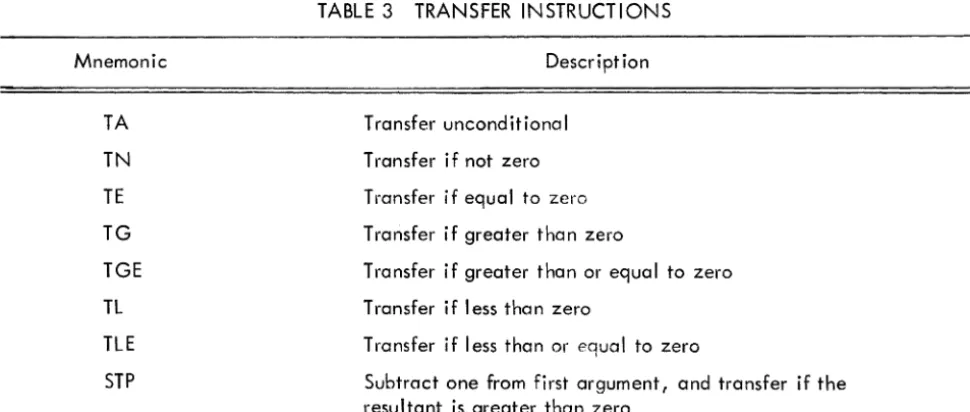
Transfers Within a Macro - Several conditional transfer instructions (Table 3) are available to facilitate
coding of functions and subroutines. Except for the T A and STP instructions, the first argument of a
con-ditional transfer instruction is an expression, and the second is a label. For TA, the only argument
re-quired is a label. For STP, the first argument is a variable, and the second is a label.
An example of a macro using a conditional transfer is as follows:
$DABS;TGE(#1, 1 )$C-#1 $R 1 :#1;
In the macro above, ABS is defined as a transfer to label 1 if the first input argument of ABS is greater
than or equal to zero (TGE instruction). If the transfer is made, the first argument is loaded into the
accumulator and a normal exit from the macro is made. If no transfer is made, the accumulator is cleared,
the first argument is complemented, and an alternate exit is selected.
TABLE 3 TRANSFER INSTRUCTIONS
Mnemonic Description
TA
TN
TE
TG
TGE
TL
TLE
STP
Transfer uncond i tiona
I
Transfer if not zero
Transfer if equal to zero
Transfer if greater than zero
Transfer if greater than or equal to zero
Transfer if less than zero
Transfer if less than or equal to zero
Subtract one from first argument, and transfer if the resultant is greater than zero
5
P D P
6
[image:7.623.63.548.419.625.2]Among the uses of macro operations is the generation of tabular lists of functions. Suppose, for example,
we wish to generate a table of sines and cosines. The general form of the calling statement would be
SYM(I, T, S)
where I is the initial value of the argument for which trigonometric functions are to be generated, T is
the terminal value, and S is the amount by which the argument is increased before each successive pair
of functions is generated. This type of calling statement may be implemented by the following macro
operation (the I ines are numbered for reference):
Line No.
l.
2.
3.
4.
5.
6.
7.
$DSYM"X SINX COSX $L
#2=Y
1 :$F1 X: $F5SND(X) ~ CSD(X) ~
X+#3=X
TGE(Y-X,l)$Li
The macro name is set in line one, and tabular heading data is generated in line two. In lines three and
four, the first two input arguments are assigned the symbolic designations X and Y. The fifth line prints
the argument X with one-place accuracy, and generates and prints the sine and cosine of X with
five-place accuracy.
The sixth I ine increments the symbol ic argument X by the value of the third input argument; the resultant
sum becomes the new argument. The seventh line effects a transfer to line 5 to compute functions for the
new argument. When X equals or exceeds Y, line 7 effects a normal exit from the macro.
Suppose that the above macro has been coded. Typing the following statement,
TAB(l 0,60, 1 0)
followed by a carriage return, causes the program to generate the following printout:
X SIN(X) COS(X) 10.0 0.17365 0.98481 20.0 0.34202 0.93969 30.0 0.50000 0.86603 40.0 0.64279 0.76604 50.0 0.76604 0.64279 60.0 0.86603 0.50000
P D P
6
6
Change Notice 1
PDP-6 Desk Calculator Programming
Manual
DEC-06-UP-DESK-UM-FP-ACT 01
To further increase the flexibility of the Desk
Calculator, the following features have been added:
1.
(single quote) will cause the accumulator
to be output, with no tab or carriage return
following.
2.
$P,$G - PUT-GET - Save and restore variables
on the pushdown list. The form is:
$PX,Y,Z
$GZ,Y,X
Note that the list in the GET is reversed from
that in PUT.
The arguments of PUT and GET must
be variables - not expressions.
There is provision
for storage of 20 variables on the list.
3.
On page 6 in the manual, in the first chart, opposite
Line No.2:
change "X SINXCOSX$L to read
mamaomo
EQUIPMENT
CORPORATION
MAYNARD,MASSACHUSETTS