N
S
Available online at: www.ijcncs.orgISSN 2308-9830
Design and Implementation an Online Location Based Services
Using Google Maps for Android Mobile
Dr. OMAR A. IBRAHIM1, KHALID J. MOHSEN2
1, 2
Computer Science Dept. College of Computer Science and mathematics Iraq, Mosul, Mosul University
E-mail: [email protected], [email protected]
ABSTRACT
People are travelling to many different places and they are unknown the directions and the route to be followed. Without knowing the directions, this may Cause to get the wrong way. To avoid this situation, many mobile applications are developed to help people to get the right directions. Unfortunately, most of this application doesn’t support many important features like add or delete some locations (hospitals, schools, restaurants, etc...) on map. This paper introduces an application for android mobile, which is implemented to provide the android mobile user to add, remove and review specific locations on the online map. The proposed applications also presents the basics navigation operations like showing directions with the optimal path between source and destination and calculating the distance and expected driving time. Google Maps APIs, Google Direction APIs, PHP, JSON and MySQL have been integrated and used in this application to obtain solutions. This application is a representation for client/server architecture, the android mobile serve as a client and the combination of PHP and MySQL database serve as a server.
Keywords: Online Mapping, Google Maps API, MySQL, PHP, Google Directions API.
1 INTRODUCTION
One of the most important uses of smartphones are Location Based Services (LBS). Location of smartphone can be easily identified due to special internally equipped chip that support the Global Positioning System (GPS). Using GPS along with Google map can help the user to discover the nearby bookshops, restaurants, etc… [1].
Most people today use mobile phone to navigate around the world. Many of users are using applications that providing directions, places or other information that are based on the current location [2].
The popularity for this type of applications (LBS) is led to develop an application in this field. Most of free software and commonly used applications do not meet the needs of the user in term of interactivity with the user. These applications either be navigation systems, find nearby places or display locations on a map. However, online map applications do not support the ability to add or delete a specified location.
This paper presents a method to build an online interactive navigation map based on Google map.
This can be done by using a centralized database MySQL that exist on a server and clients applications (in mobiles). This paper also presents a comparison between the proposed method with the most famous applications that run in the case of the Online Mode such as "Google Maps" and "Hare Maps".
2 RELATED WORK
The increasing interest in utilizing Google Maps API to implement mobile mapping services or what is known as Location Based Services (LBS). ranging from simple applications to display just a few points of interest with information windows to sophisticated map.
Keyhole Markup Language (KML), XML and Geodatabase format are overlaid with Google Maps through JavaScript code [5].
Liu and Palen study the use of Google Maps mashups in the crisis management for nine natural disasters such as earthquakes, fires, and so on using near real-time and publicly available data feeds [6]. Wayne and Suresh from the University of (West Indies) in Jamaica Programming system developed on the Android system an intelligence technique to search for nearest hotels to the user's location [7].
Vaishali and Dr.P.N Chatur development an application for Android system for navigation and traveling through area of Missouri in the United States [8].
Nyoman et al from the University of (Udayana in Indonesia) developed an online system which has the ability to help travelers to determine their locations. The implemented method of the system has been using the language of the PHP and the database MySQL [9].
Shunfu and Ting from the University (Edwardsville) in the state of Washington in the United States develop a mapping service on the Internet to view thousands of parks in U.S. states on the internet for the U.S. Department of Agriculture using Google Maps, and a database of Microsoft SQL and ASP. NET, and is applied to the major browsers such as (Chrome, Firefox, and IE) [10].
In developed application, eclipse was chosen as environment to develop the online map application for android, while MySQL database was selected as storage for places, and PHP script as API between mobile and server. In database, there is a one table created, that contains eight fields which are (id, latitude, longitude, zoom level, Name, Information, Category, Rate).
3 METHOD
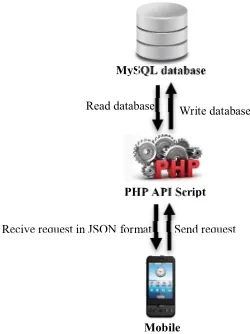
The proposed application needs an internet connection and centralized database (MySQL). This application is a representation of client / server architecture. Android phone serve as client while the server is a combination of two parts: MySQL database and PHP APIs scripts. PHP APIs scrip acts as a link between the Mobile application and the MySQL database. Figure 1 shows the structure of this application.
The main functions of PHP API is to do the following:
1- Accepting the read and write requests from the clients.
2- Run and manipulate the request to MySQL database.
3- Formatting the output as JavaScript Object Notation (JSON).
Fig. 1. structure of the application
While the database is consist of one table with eight fields. These fields are as follows: (longitude, latitude, zoom level, place name, place information, place rating and place category) for each specific location on map.
3.1 Operations that are applied on the map
The developed application presents some operations that created to make some interaction with users. These operations are:
1- Add a new location marker on the map.
2- Delete a location marker from the map.
3- Display a pre-specific location information.
4- Draw a path between two locations.
3.1.1 Add a new location marker on the map
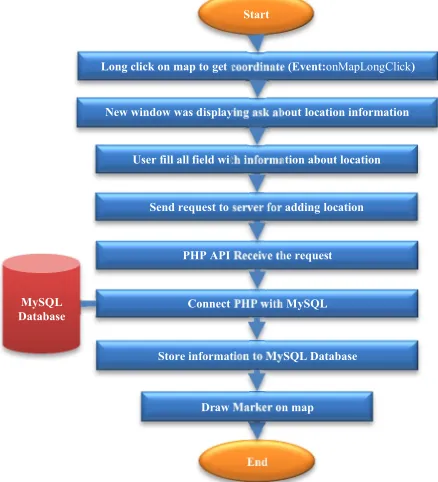
This function can start with pressing long click on the map (Event: onMapLongClick). This will bring the coordinates of the marker of location on the map. After that, a new request information window will be appeared. The user can fill out the window with the specified information. Figure 2 shows the “add location information” window. The information that inserting in database is (location name, location category, details information, location rate, location coordinate and location zoom level).
MySQL database
PHP API Script
Mobile
Write database Read database
Fig. 2. add location information window
The operation “Add a new location” can be implemented through two steps: the first step is done inside the client and using the Java language. The user enters the location information, and then send a request to the server by sending URL of PHP API page. While the second step, is done inside the server. The PHP API script receives a request to add the location received from client with its detailed information and store them in MySQL database. Finally, a new marker on the map will be set to indicate the added location. Figure 3 shows these steps.
3.1.2 delete a location marker from the map
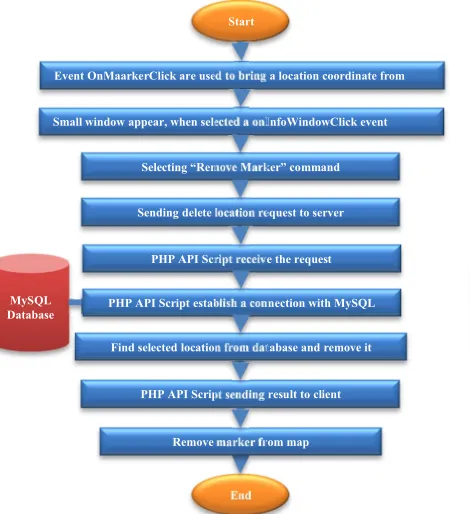
To delete a location marker from the map, the specific marker of location is selected by pressing on it (Event: onMarkerClick) to bring the coordinates of the location on the map. The name of selected location is displayed in an information window. When pressing on the information window (Event: onInfoWindowClick) a new window will be appeared having two options. Choosing the “Remove Marker” option will remove the related location information from the server as well as the location marker from the client. Show delete and display windows.
Fig. 4. Show delete and display windows
The “Remove Marker” option contains two steps: firstly, mobile sends a request to the server to delete a selected location by sending the ID of the selected location to the server. Secondly, the server (PHP API script) will receive the request and delete the related MySQL database entry. Figure5 explains delete the location from the map. Then the client delete the marker from the map.
3.1.3 display a pre-specific location information
User can see detailed information about a particular location on the map by pressing on the marker of desired location by pressing on it (Event onMarkerClick) to bring the coordinates of the location on the map. The name of selected location is displayed in an information window. When pressing on the information window (Event: onInfoWindowClick) a new window will be appeared having two options. Choosing the “Show Info” option will displaying the related location information from the database server.
User fill all field with information about location
Send request to server for adding location
Receive the request PHP API
Connect PHP with MySQL
Long click on map to get coordinate (Event:onMapLongClick)
New window was displaying ask about location information Start
End MySQL
Database
Store information to MySQL Database
Draw Marker on map
Figure4 Show “delete and display” windows. The “Show Info” option contains two steps: firstly, mobile sends a request to the server to get all information about a selected location by sending the ID of the selected location to the server. Secondly, the server (PHP API script) will receive the request and return the information from MySQL database entry to client in JSON format. Then in the client a new windows will appear to displaying obtained information about selected place from the map. Figure6 explains Displaying location information on map.
The analysis of these data being in client using JSON libraries to be displayed in the end. Detailed information about a location is displaying in a new window, Figure7 shows “display location information” window. The displayed in formation consist of (location name, location categories, location rate, and details location information). Selecting “Remove Marker” command
Sending delete location request to server
PHP API Script receive the request
PHP API Script establish a connection with MySQL Event OnMaarkerClick are used to bring a location coordinate from
Small window appear, when selected a onInfoWindowClick event
Find selected location from database and remove it Start
End MySQL
Database
PHP API Script sending result to client
Remove marker from map
Figure5: delete the location from the map
Selecting “Show Info” command
Sending show location information request to server
PHP API Script receive the request
PHP API Script establish a connection with MySQL Event OnMaarkerClick are used to bring a location coordinate from map
Small window appear, when selected a onInfoWindowClick event running
Find selected location information from database Start
End MySQL
Databas e
PHP API Script sending result to client
Show location information in new windows
Fig. 7. information showing in review windows
3.1.4 draw polyline between two places
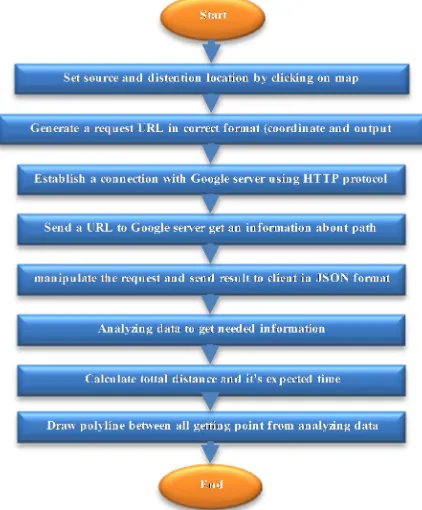
Many Users need to show the optimal path between two locations on map, Figure8 explains steps for drawing optimal path. These two locations may be between current location and the destination location as well as between any two different locations. This will be done by setting the source and destination location on map. Click on map first click to set a source location and click secondly to set a destination location (Event: onMapClick).
Inside mobile, decoding process will done to analyze received information in term of points, time, distance and routes using JSON parser and JSON libraries. After analyzing, total route are used to draw it on map and calculate its driving time and distance, Figure9 show path between two location and driving time and distance.
Fig. 9. show path between two location and driving time and distance
4 COMPARISON & RESULTS
Table 1: Comparisons between Google Maps, Sygic and This Application
Criteria HERE Google
map
This application
Add place No No Yes
Remove place
No No Yes
Place Category
No No Yes
Place Rating
No No Yes
Draw path between any two place Just from current location to target location Just from current location to target location Yes 5 CONCLUSION
This paper has demonstrated an online mapping application that was successfully developed using Google Maps API , Google Direction API, JSON, MySQL Database and PHP. These tools are open source and high reliability. This project help tourist or any user use it to add place on map or can delete place from map or review the information about any place on map, also can calculate route, duration and distance between any to point or place on map. In order to provide the user with interaction with the map, a few standard Google Maps controls are added, such as Pan and Zoom controls; Map Scale control; and Map Type control–Roadmap, Satellite and terrain. In addition, tooltips (e.g. place name) to the markers are provided.
7 REFERENCES
[1] Tanenbaum, Andrew S., 2011, Computer networks. Vol. 5. Englewood Cliffs (NY): Prentice-Hall
[2] Ibach, P., & Horbank, M. (2005). Highly available location-based services in mobile environments. In Service Availability (pp. 134-147). Springer Berlin Heidelberg.
[3] Scholefield, K.. Web based map services for scientific tourism: a case study of eighteenth and nineteenth century Edinburgh. (2008). [4] Pejic, A., S. Pletl, and B. Pejic. An Expert
System for Tourists Using Google Maps API, 7th International Symposium on Intelligent Systems and Informatics, (2009) SISY '09.
[5] Bildirici, I. O. and N. N. Ulugtekin. (2010). Web Mapping with Google Maps Mashups: Overlaying Geodata. A Special Joint
Symposium of ISPRS Technical Commission IV & AutoCarto in Conjunction with ASPRS/CaGIS 2010 Fall Specialty.
[6] Liu, S. B. and L. Palen. (2010). The New cartographers: Crisis Map Mashups and the Emergence of Neogeographic Practice, Cartography and geographic Information System, Vol. 37, No. 1, pp. 69-90.Conference, November 15-19, Orlando, Florida.
[7] Lawrence, W., & Sankaranarayanan, S. 2012. Smart Agent Learning based Hotel Search System-Android Environment. International Journal of Information Technology and Computer Science (IJITCS), 4(9), 9.
[8] Zilpe, M. V., & Chatur, P. N. 2012. iNavigate-An iNavigate-Android Based Navigation Application. International Journal of Advanced Research in Computer Science and Electronics Engineering (IJARCSEE), 1(4), pp-89.
[9] Agus S., Nyoman P. and Wira B. 2013. “Geographic Information System on Tourism Guide Using Web-Based Google Maps.” International Journal of Computer Science Issues (IJCSI) 10(2).
[10]Hu, S. and T. Dai 2013. "Online Map Application Development Using Google Maps API, SQL Database, and ASP .NET." International Journal of Information 3(3).
AUTHORPROFILES:
Omar Abdulmunem
Ibrahim Al-Dabbagh (PhD) is currently a head of computer and Internet center/ Mosul university and a lecturer at the computer science department, College of Computer Science and Mathematics at Mosul University/ Iraq. He got a Post-doctoral Research Fellow from National Advanced IPv6 Centre of Excellence (NAv6) at Universiti Sains Malaysia (USM)/ Malaysia. Dr. Omar obtained his bachelor, master, and doctorate in computer science from Mosul University in 1998, 2000, and 2006 respectively. His research area include Network protocols, Multimedia Network, Network security and mobile programming.