E-ISSN 2308-9830 (Online) / ISSN 2410-0595 (Print)
Wireless Local Area Network Security Enhancement through
Penetration Testing
Tarek Mohamed Refaat1, Tarik Kamal Abdelhamid2, Abdel-Fattah Mahmoud Mohamed3
1 Msc. Student at Assiut University, Assiut, Egypt
2, 3 Department of Electrical Eng., Faculty of Engineering, Assiut University, Assiut, Egypt
E-mail: [email protected], [email protected], [email protected]
ABSTRACT
Wireless Local Area Networks (WLANs) have become very popular due to their high data rates, cost effectiveness, flexibility and ease of use. On the other hand, they are facing major security threats due to the broadcast nature of the wireless media. WLANs with infrastructure mode are deployed as an extension to wired LANs, so it is necessary to be secured to avoid being a back door to the wired network. This paper presents a security solution for WLANs to achieve the standard network security requirements while combines the stability and low cost. The proposed solution works in two levels, namely, the frame security and the Radio Frequency (RF) security. It differs from the other solutions because it works in the two WLAN security levels. WPA/WPA2 encryption, AES, and strong 802.1x authentication are integrated into the solution to provide a high level of security. This paper has been done with real hardware in a lab environment. Finally, the strength of the proposed solution is examined with different penetration tests.
Keywords:Wireless Security, WEP, WPA, WPA2, 802.1x, WIDS, Linux system.
1 INTRODUCTION
WLANs are considered of the most popular networks technologies today. Both individuals and large companies are using them due to their advantages. WLANs popularity came from their advantages such as flexibility, mobility, easy installation and low cost relative to wired networks [1]. Despite all these advantages, there is a major problem that related to its security. While the data transmitted over wireless media can be accessed anywhere with minimal infrastructure cost, the violation of the wireless LANs security is automatically being harmful to wired LAN. Once the data is transmitted over the wireless media, then there is a chance of security attack [2].
Any network security solution has six standard security requirements, namely Confidentiality, Integrity, Availability, Authentication, Access control, and Non-repudiation [3]. WLAN security is a compound process because it depends on air as a physical layer. The Standard security requirements in WLANs have achieved on two levels, frame security level, and RF security level.
The frame security level is concerned about how to transmit packets through the air securely. This achieved by using a strong encryption and a strong authentication. The RF security level is concerned about monitoring and scanning the air for detecting the illegal hotspots and the rogue access points. There are three wireless security mechanisms for achieving these standard security requirements [4]:
1)Strong encryption is used to provide strong confidentiality and integrity for data.
2)Checksum/hash algorithms are used to provide integrity protection and authentication.
3)Strong authentication is used for strong access control and non-repudiation.
This paper presents a security solution that differs from the other solutions in the studies [5&6&7] by working in the two WLAN security levels, the frame level, and the RF level. In this solution, the above standard security requirements will be achieved by achieving the two security levels. In section 2, a review of the WLAN standard modes is presented and. a discussion of each WLAN security protocol is explained. It offers each protocol vulnerabilities and attacks on it. In section 3 the WLAN attacks are classified on the two WLAN security levels. In section 4 the proposed WLAN security solution is explained. It depends on three critical areas (Data confidentiality and Integrity), (Authentication and Access control) and (Intrusion Detection and Prevention). In section 5.1, a penetration experiment test on each WLAN security protocol (WEP, WPA, and WPA2) is performed, also, the proposed solution is tested after building it. A comparison between the WLAN security protocols of the frame level (WEP, WPA, WPA2, Cisco LEAP and the proposed solution) is set with conclusion points. In section 5.2, WIDS (Wireless Intrusion Detection System) solutions are proposed for achieving the RF level security. In section 6, the conclusion is offered.
2 WLAN BACKGROUND AND RELATED WORK
2.1 Modes of Wireless Local Area Networks
WLANs operate in two modes: Ad-hoc mode and Infrastructure mode. Ad-hoc mode is also known as point to point and consists of the wireless devices without the need for any central controller or access point (AP). In the infrastructure mode, WLANs infrastructure is expanding a wired network using wireless APs. AP is considered as a bridge between the wired and the wireless network and also acts as a central control unit in a wireless network for all wireless clients. The AP is responsible for managing the transmission and reception of wireless equipment within limited boundaries of the network. A network administrator can use APs from different vendors to increase the size of the network [8]. This paper considers the security in the infrastructure mode.
2.2 Existing WLAN security solutions
There are different security solutions for the IEEE 802.11 standard like Wired Equivalent Protocol (WEP), WPA, WPA2, and WPA2 using 802.1x servers. We explain the detail of each solution in the following:
2.2.1 WEP
WEP is the first security technique used in IEEE 802.11 standards and it provides security level for the WLANs equals to the wired LAN. WEP helps to make the communication secure and provides secret authentication scheme between the AP and the end user. WEP is implemented on initial Wi-Fi networks where the user can not access the network without the correct key [9]. WEP uses the shared key authentication method in which the user needs two things to access the WLANs, the service set identifier (SSID) and the WEP key generated by the AP.
Attacks on WEP: WEP is considered a weak technique for WLANs security since it uses RC4, a stream cipher that simply performs XOR operation on the data. The key XOR plaintext gives ciphertext, so a bit-flipping attack can make ciphertext XOR and key give the plain text easily. Another vulnerable aspect for the WEP is the use of the CRC-32 mechanism used for the integrity check. Cyclic redundancy code (CRC) is defined as a class of "checksum" algorithms that treat any message as a large binary number and then dividing it in binary without overflow by a fixed constant. The remainder is called the "checksum". Due to the nature of CRC that considered being linear, it fails to provide the required integrity protection. It is known that CRC is not cryptographically strong and not intended to be used in place of the message digest or hash functions. It uses the 24-bit long initialization vector (IV) that is clear text added to the packet, and then it is ready to be transmitted through the air where it can be exposed to an FMS attack. WEP suffers from a lack of mutual authentication and key management due to the small size of IV (24 bit), the weak authentication algorithm and the weak data encapsulation method. This paper will perform a penetration test that proves WEP has failed as a wireless security protocol due to its lack of integrity and confidentiality of data [10].
2.2.2 Wi-Fi Protected Access (WPA)/ Temporal Key Integrity Protocol (TKIP)
There is a need to develop a new solution for WLANs security that provides more security than WEP. TKIP is designed on top of WEP to fix all its known weaknesses. To increase the key ability of WEP, TKIP includes four additional algorithms [11]:
2. An IV sequencing mechanism that includes hashing, as opposed to WEP plain text transmission.
3. A per-packet key mixing function to increase cryptographic strength
4. A re-keying mechanism to provide key generation every 10,000 packets.
TKIP encryption algorithm is used to avoid the problem that may exist in WEP technique by generating a separate key for each packet instead of only one key for all packets in WEP.TKIP also solves the drawback that may exist in IVs by increasing the size of IV which will help to solve the problems by using a longer packet counter to avoid the replay protection. By doing all this, TKIP is able to solve the problems available in WEP to some extent [12].
2.2.3 WPA2 / Advanced Encryption Standard (AES):
AES is created by the American Institute of National Standards and Technology (NIST) in 2001 and it is considered as the best specification for data encryption. It based on Rijndael's cipher, which is developed by two cryptographers, Joan Daemon, and Vincent Rijmen, who submitted the proposal which evaluated by NIST during the selection process AES. WPA2 structure is different from WPA and WEP because the ingredients single key management and message integrity, CCMP, based on AES [13].
The purposes of AES (CCMP) encryption are:
1. Counter mode is used for providing data protection from unauthorized access.
2. CBC-MAC is used to provide the message integrity to the network.
AES is the strongest wireless encryption that depends on Rijndael's key schedule, it passed on many key scheduling steps [14]
1. Initial round: add round key where each byte of the state is combined with the round key using bitwise XOR.
2. Sub bytes: a non-linear substitution step where each byte is replaced with another according to a lookup table.
3. Shift rows: a transposition step where each row of the state is shifted cyclically a certain number of steps.
4. Mixing columns: a mixing operation which operates on the columns of the state, combining the four bytes in each column.
5. Add round key.
6. At final round doesn't perform a mix column operation.
WPA2 protocol with AES encryption, which performs many rounds to complex the key, is better than WEP that uses RC4 linear expected relation. WPA2 protocol with AES encryption also differs from WPA/TKIP that uses RC4 and is considered as an extension of WEP with some improvements, but the encryption of TKIP is still weak as WEP. AES encryption was implementing in MATLAB [15].
Attacks on WPA and WPA2:
Dictionary attacks and WPA handshake capture are the most popular attacks on WPA and WPA2 protocols. The attacker can simply wait for a handshake to occur or active force by one using a deauthentication attack on a target victim PC. Once the four-way handshake is captured, the attacker uses a dictionary file that has a large number of possible PSKs together with the Aircrack-ng suite. Also, some administrators use Wi-Fi protected setup (WPS) to connect users to access point, but it can be hacked and attacked by the Reaver tool (brute force attack). U.S-CERT warns of using WPS to add a new host (Vulnerability Note VU#723755). U.S-CERT said that: "The Wi-Fi Protected Setup (WPS) PIN is susceptible to a brute force attack” [16].
2.2.4 WPA2 using 802.1x servers
Many companies recommend using WPA2 using 802.1x security protocol to overcome the dictionary and WPA handshake capture attacks on WPA/WPA2 protocols. This protocol combines the WPA2, which depends on AES encryption, with any strong authentication server. Many of these protocols enhance EAP authentication with stronger protocols such as LEAP (Lightweight EAP), EAP-FAST, EAP-TLS (Transport Layer Security) or EAP-PEAP (Protected EAP), to mitigate the dictionary attack [17].
3 ATTACKS ON WLAN SECURITY
the frame level. Table.1 summarizes the important wireless attacks at the frame level.
Table 1: The Frame level Wireless attacks
Attack
Description
Security Element
Man in the middle attack (MITM)
If data are unprotected, hackers can intercept data.
Confidentiality
Integrity
Dictionary attack
Programs that try large passwords to get the correct
one.
Authentication
Access control
Bit-flipping
A cryptanalytic attack that can be used against any encrypted data.
Integrity
Handshake stole
The attacker uses the role of the authorized client to steal the handshake between access point and client.
Authentication
Unauthorized client access
If a network has a weak user
authentication, it is very easy for a hacker to achieve access
and take information.
Access control
There are many attacks on the RF level.Table.2 summarizes the important wireless attacks at the RF level.
Table 2: The RF level Wireless attacks
Attack
Description
Security
Element
DoS (Denial of
Service)
Congesting a network resource with more requests.
Availability
Rogue Access Points
An unauthorized access point that has been connected to the wired network, which can provide malicious or unauthorized users with open access to the LAN.
Availability
IP Spoofing
If the hacker has a rogue access point with enabled DHCP, it can effect on the main DHCP in the network.
Availability
4 THE PROPOSED WLAN SECURITY
SOLUTION
In this section, the proposed solution for WLAN security is discussed. It requires working in three critical wireless security areas [18]. Namely,
Data confidentiality and Integrity Authentication and Access control Intrusion Detection and Prevention
Figure 1 demonstrates the frame security level consists of the two areas: (Data confidentiality and Integrity) and (Authentication and Access control). The RF security level consists of the Intrusion Detection and Prevention area.
4.1 The Frame Level Security
The frame security areas are discussed in the following.
4.1.1 Data confidentiality and Integrity
Confidentiality represents the data protection while being transmitted over the wireless channel. Confidentiality achieved through the use strong encryption and different kinds of the algorithm to encode data at the transmitter and decode it at the receiver. Integrity is achieved by adding checksums or redundant data that can be used to guarantee error free decryption. WEP protocol uses RC4 which can be exposed to a bit-flipping attack that damages the integrity of data frames [10]. WPA2/AES provides the strongest wireless encryption [19].
4.1.2 Authentication and Access control
WLANs security protocols use WPA handshake as challenge handshake authentication protocol. It can be hacked by a man in the middle attack. WPA/TKIP and WPA2/AES protocols participate in using WPA handshake as Authentication protocol. This is not enough for Authentication process [20]. Dictionary attacks and WPA handshake capture are the most popular attacks on WPA and WPA2 protocols. The attacker can simply wait for a handshake to occur or active force by one using a deauthentication attack on a target victim PC. To overcome some drawbacks of the existing authentication scheme, IEEE has suggested an alternative authentication scheme based on the IEEE 802.1x model [21]. Practically, two modes can be assigned to the WPA/WPA2
1) Personal mode: pre-shared key password is provided.
2) Enterprise mode: username and password are provided.
IEEE 802.1x Protocol
IEEE 802.1x is based on the Extensible Authentication Protocol (EAP) and it offers the choice of several methods to protect authentication exchanges. Practically, authentication methods based on the IETF's, known as Transport Layer Security (TLS) standard, can satisfy strict encryption and authentication requirements. Three TLS based protocols have been developed for use
with the EAP and are suitable for deployments with wireless LANs [21], namely
1) EAP -Transport Layer Security (EAP-TLS) 2) Tunneled Transport Layer Security (TTLS) 3) Protected EAP (PEAP)
Dictionary Attack on Vulnerable Cisco LEAP
Cisco LEAP (Lightweight EAP) uses the same password as Windows, which may offer the side benefit of being able to access any other resources which rely on the windows password and use Microsoft CHAP (MSCHAP). It does not use a SALT in its NT hashes and uses a weak 2 byte DES key and sends usernames in clear text. Further threats are possible if the victim uses the same password for other applications. As with most password-based authentication algorithms, Cisco LEAP is vulnerable to dictionary attacks [22]. One requirement for this attack to occur is that the attacker captures the authentication while it is occurring.
By default, a client will re-authenticate every 30 minutes, but for the impatient attacker, as LEAP offers the option of ending a victim’s connection so that they must re-authenticate. This is accomplished by sending an EAPOL-Logoff packet. The client will then need to re-authenticate, allowing the attacker to observe the entire process and capture the relevant information.
Cisco recommends users to move to other EAP methods, such as FAST, TLS or EAP-PEAP, to mitigate the dictionary attack [23]. This paper performs the enterprise mode of IEEE 802.1x security on strong and free authentication protocol that depends on the Linux RADIUS EAP-TLS server. The Linux system is used here because it is free, strong and open source system.
Free RADIUS Server (The proposed Authentication server)
However, Free RADIUS operates on UNIX and thus it does not work on Windows. Free RADIUS lacks a Graphical User Interface (GUI) so everything is done through command line. It is considered as one of the strongest authentication servers and has the important advantage of being free [25].
4.2 The RF Security Level
The RF Security Level has achieved by building one or the two systems:
1) Wireless Intrusion Detection System (Wireless IDS)
2) Wireless Intrusion Prevention System (Wireless IPS)
Wireless IDS/IPS: Intrusion detection and prevention is done on the RF level. It involves scanning radio to detect rogue access points or ad hoc networks to regulate access to the network. It must be able to identify and remove the threats, but allows the neighboring WLANs to co-exist while preventing [26].
5. WLAN SECURITY EXPERIMENTS AND RESULTS
In this section, we build the proposed solution that divides to to frame and RF security levels; also, we perform practical experiments and conclude the results on the Frame security and the RF security. Penetration tests are used to examine the security strength of each WLAN protocol. Backtrack software is used as attacking software for testing the WLAN. Open source Linux software is used for building Free RADIUS authentication server (the frame security), also, it is used for building Snort IDS server (the RF security) that connected to the wireless LAN.
5.1 The Frame Security Experiments
The WLAN lab test consists of a host that it is connected to the target AP. It acts the role of victim and another host which is the attacker that try to steal the connection of the victim PC with backtrack software. Both the victim PC and the attacker are connected to the same wireless LAN There are three experiments on the frame security level are performed as following:
5.1.1 Experiment 1: Testing the WEP protocol
This test proves that the wireless network is
vulnerable if WEP is used with a key that depends on IV. The IV is a 24-bit field which is transmitted in a clear-text as a part of a message and is used as a part of the secret key to generate a pseudo-random number sequence. The sequence is XORed with the data to produce ciphertext that represents encrypted data, so a bit-flipping attack can make ciphertext XOR and key give the plain text easily [27&28], as shown in Fig.2.
Fig.2. The WEP attack process [29]
The duration of generating random repeated IVs is calculated [29] by equation (1):
(1)
Assume that an average frame length of 1500 bytes and a data transfer rate of 11Mbps, we obtain IV repetition duration of [29]:
(2) It means 305 minutes at most to crack the WEP key.
Practical Steps:
Table 3: The Backtrack system steps
Command
Description
Airmon-ng
Check
the
connectivity
of
connected devices.
Airmon-ng start wlan0
Start the wireless
card
wlan0
to
operate
in
monitoring mode.
Airodump-ng mon0
Show the available
access points in the
range
and
its
channels and its
connected clients.
Mac changer –m
Change the Mac
address of the card.
Airodump-ng –c 6
bssid A0F3C1600497
-w lab1 mon0
Capture
target
access point data
that its channel is 6
and store data in
lab1 doc.
Aireplay-ng -1 0 mon0
A0F3C1600497
–h
940c6d88de4a –x 1024
Associate
the
wireless card to
access the target
access point.
Increase data collection packets by the following command:
root@ bt: ~# aireplay-ng -3 -b A0F3C1600497 mon0
In this step, additional data has been injected to increase traffic on the wireless network. The aireplay-ng command should be run in the separate window to inject the packets in the network. Finally, when the number of captured data up to 20,000, it can crack the WEP key easily with the following command, see Fig.3,
root@bt: ~# aircrack-ng lab01.cap
Fig.3. The crack WEP key
Results:
As demonstrated above, WEP cracking can be accomplished within few minutes after capturing 20k data packets. Experiment 1 takes 11 minutes to crack the WEP key. WEP protocol cannot provide the required data confidentiality for the wireless system. Also, RC4 encryption of WEP does not give the required data integrity because it achieves a linear known constant relation (CRC) [10&28]. The CRC-32 ICV is a linear function of the message. An attacker can easily make the victim’s wireless access point decrypt packets for him. This is simply done by capturing an encrypted packet stream, modifying the destination address of each packet to be the attacker’s IP address, fixing up the CRC-32, and retransmitting the packets over the air to the access point. The access point will decrypt the packets and forward them to the attacker [28]. IV and ICV based attacks are independent of the key size; even with huge key sizes, the attack takes the same amount of effort.
5.1.2 Experiment 2: Testing the WPA/TKIP and WPA2/AES protocols
(The common Authentication vulnerability)
Fig. 4. A Man in the middle attack [29]
This test proves that in general WPA and WPA2 protocols pre-shared key is not fully secure because it is a key between 8~63 characters. If a weak short key is used, it can be easily broken and the network is being vulnerable. As shown in Fig.4, a man in the middle attack can steal the WPA handshake between the access point and the active victim PC. A Man in the middle attack cannot work fully, but it is dangerous in the case of using a common pre-shared key [29].
Practical steps
then after successful handshaking between the attacker PC and the target access point, it is easy to crack the weak pre-shared key by dictionary attacks [30].
To perform the successful attack on the WPA/WPA2, repeat the steps in experiment 1, see Table.3 Airmon-ng command that put the wireless card in monitor mode and airodump-ng command which collects the authenticated handshake data then applies the aireplay-ng command that uses for de-authentication of client and provides the
handshake once handshake was done, applies the Finally command, run the aircrack-ng command to
perform the dictionary attack on given data. An additional step is performed for capturing the active victim PC handshake and establishes a handshake between attacker PC and target access point. The following command and WPA handshake capture are shown in Fig. 5.
root@bt: ~# aireplay-ng -0 3 –a A0F3C1600497 –c E0CA94E6A440 mon0
Fig.5 The WPA handshake capture process
Finally, cracking the WPA key by dictionary attack mainly depends on the passwords database. It searches for the pre-shared key using passwords database file. This file can download from any password cracking website. The file size can be up to 3giga bytes. Common and weak passwords are exposing the network to this kind of attack that used the following command. As shown in Fig.6, the pre-shared key found after 8 hours.
root@bt:~#aircrack-ng –w /root/Desktop/darkc0de.lst WPA.cap
Fig.6. The dictionary attack to get the WPA key
Results:
WPA handshake is a common vulnerability between the WPA/TKIP and the WPA2/AES protocols. WPA handshake is not enough to authenticate users on the WLAN. It exposes the WLAN to dictionary attacks. Experiment 2 takes 8 hours to crack the pre-shared key. The dictionary attack can take some hours/days to get the pre-shared keys. Firstly, the attacker steals the WPA handshake by a man in the middle attack, and then cracks the WPA key by dictionary attack depends on the passwords database.
From experiment 2, AES differs from TKIP which is an extension to RC4 encryption used in the WEP protocol in that AES presents a new methodology in the encryption which provides the strongest confidentiality and integrity of the data packets [14&20]. PSK is more secure and strong if it uses the long passwords (weak pre-shared keys are vulnerable to dictionary attacks).
5.1.3 Experiment 3: The proposed solution for the frame security level: Testing WPA2/AES protocol connected with a standalone Free RADIUS authentication server
Fig.7. The Authentication server methodology [21]
Practical Steps
Free RADIUS server has been built using Linux system commands. PHPMyAdmin database is used for creating users and group. After building server, we attack it using a backtrack system. This test has been done on VMware machine. The authentication server building can be summarized in the following main steps.
The Main Stepsof Free RADIUS server building
1- Install Ubuntu server.
2-Configure the NIC on Network (VLAN). 3-Install a Gnome desktop on the Server. 4-Install the Free RADIUS
5-Install PHPMyAdmin database.
6-Adjust the configuration Files in (/etc directory).
7-Create groups and users in PHPMyAdmin database.
8-Start Free RADIUS with users and groups. 9-Debug RADIUS server to check that no errors happen.
10-Login to the access point and enter the secret key and binding it with a Free RADIUS server. 11-Authenticate users to access point with authentication server credentials.
Fig.8 shows the Free RADIUS server debugging after installation it to check that no errors in it.
Fig.8. Debug Free RADIUS server after installation
Fig.9. Creating PHPMyAdmin Database on the server
Fig.9 shows creating PHPMyAdmin database (groups and usernames) and connecting it to the authentication server.
Finally, bind the access point with the authentication Server by Radius password (that falls in the same network), as shown in Fig.10.
Fig.10. Binding the access point with the Free RADIUS server
Results:
5.1.4 Concluded Results for the Frame Security Experiments
In this section, we set a comparison between the WLAN security protocols that used in the previous lab tests. This comparison gets which protocol will achieve the standard security requirements. The
results of the previous tests have been concluded in Table 4. For each protocol, the italic font shows a fail point, the underline shows a fair point, and the bold font shows a strong point.
Table 4: The concluded Results of Frame security level
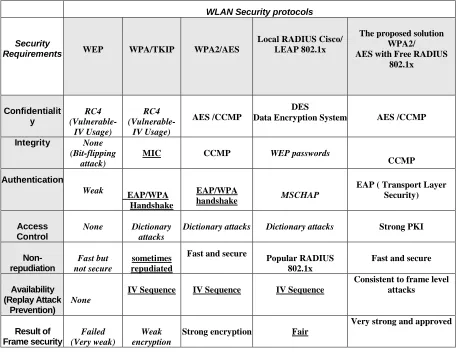
Table.4 demonstrates the Frame security level results; it can be summarized in these points:
1. WEP protocol failed as a wireless security protocol because it had vulnerabilities in confidentiality, integrity, and weak authentication. It accomplished the WEP cracking in 11 minutes as shown in experiment 1. The maximum time to crack WEP protocol is 305 minutes, see equation (1).WEP is repudiated because it is not a secure protocol although it is fast [28].
2. WPA/TKIP uses the same methodology of WEP encryption, RC4 encryption, it has vulnerabilities in confidentiality, also, it uses a WPA handshake (weak authentication) that can
expose the WLAN to hacking by aircrack-ng tools. WPA/TKIP is sometimes repudiated if weak pre-shared keys are used [12].
3. WPA2/AES produces a new methodology encryption CCMP. Also, it uses the same encryption, CCMP, for integrity. Up to now, no tools or software can break this strong encryption [13].
4. The commonvulnerability in WPA/TKIP and WPA2/AES protocols is the authentication problem. Dictionary attacks and WPA handshake capture are the most popular attacks on it. It captures the WPA handshake and then a dictionary attack on the pre-shared key in hours. Experiment 2 takes 8 hours to capture
WLAN Security protocols
The proposed solution WPA2/ AES with Free RADIUS
802.1x Local RADIUS Cisco/
LEAP 802.1x WPA2/AES
WPA/TKIP WEP
Security Requirements
AES /CCMP DES
Data Encryption System AES /CCMP
RC4 (Vulnerable-
IV Usage) RC4
(Vulnerable- IV Usage)
Confidentialit y
CCMP
WEP passwords
CCMP MIC
None (Bit-flipping
attack)
Integrity
EAP ( Transport Layer Security)
MSCHAP
EAP/WPA handshake EAP/WPA
Handshake
Weak
Authentication
Strong PKI
Dictionary attacks Dictionary attacks
Dictionary attacks None
Access Control
Fast and secure Popular RADIUS
802.1x Fast and secure
sometimes repudiated
Fast but not secure
Non-repudiation
Consistent to frame level attacks
IV Sequence IV Sequence
IV Sequence
None
Availability (Replay Attack
Prevention)
Very strong and approved Fair
Strong encryption
Weak encryption Failed
(Very weak)
WPA handshake and to perform a dictionary attack on the pre-shared Key.
5. When Asleap tool is born, Cisco recommends users to move to other EAP methods, such as EAP-FAST, EAP-TLS or EAP-PEAP. This tool exploits the authentication passwords of Cisco/LEAP protocol because it uses the
MSCHAP (Microsoft Challenge
Authentication). The same usernames and passwords for Windows account used in the authentication process. It exposes the WLAN to the danger of hacking so that we went to Linux server to enhance the authentication problem.
6. Although Cisco warns their customers from using LEAP, it is popular from Cisco vendor shop spreading.
7. The proposed solution trends to use Linux software that has many advantages of stability and is free. Free RADIUS server can solve the problem of authentication founded in WPA2/AES protocol. It combines AES encryption algorithm that guarantees the data confidentiality and integrity area with Free RADIUS authentication server that guarantees the authentication and access control area. Free RADIUS server forwards users to EAP-TLS as Cisco recommendation [22].
8. To achieve the availability (important security requirement) it divides into the two WLAN security levels the frame level and the RF level.
9. WPA2/AES with free RADIUS offers the availability for the frame level security; it stands tough against the aircrack-ng attacking tools with no response, as shown in experiment 3.
10. To be effective, this paper presents the Intrusion Detection and Prevention area for achieving the RF security level (The WLANs Second Level), see Fig.1. It will be discussed in the next section.
5.2 The RF Security Experiments
In this section, we build a free stable Wireless Intrusion Detection System (WIDS) for monitoring the radio spectrum for the presence of unauthorized rogue access points and illegal hotspots. To achieve
the availability of the RF level, we must build WIDS that detects the attacks as denial of services and rogue access points [31].
The proposed WIDS:
This paper proposes building a WIDS by using sniffer programs. It discovers the whole air range. As shown in Fig.11, any fake rogue access point or illegal hotspot installed on the network can be detected by sniffer programs. By knowing the illegal hotspot information, the network administrator can block the MAC address of that threat on its wired network switch (Intrusion Prevention System).
Fig.11. The proposed WIDS methodology
This research offers ways to build free and stable WIDS software as shown in the following:
5.2.1Open source free WIDS
The simplest way to monitor the RF signal and set up a free wireless IDS is to use the same open source scanning tools the hackers use. These scanning tools can be divided into active and passive such as Kismet, air snort and Net-stumbler and Wire-shark or T-shark. To be effective, the IDS must run online and in real time. Offline, or after-the-event-IDS, is useful for audit trail, but will not prevent an attack from taking place. Open source tools for wireless intrusion detection have become accepted because they are vendor independent [31]. By knowing the MAC address of illegal hotspot that threatens the network security, the network administrator can block it on its wired network.
5.2.1.1 Kismet
computer. Additionally, Linux server commands are needed to build a wireless intrusion detection system. Table.5 shows the kismet configuration main steps.
Table: 5.The main steps of WIDS
Step Description
#iwconfig Know the Wireless
cards
#apt-get install kismet Install kismet server
/etc/kismet/kismet.conf
Configure a kismet files to /etc/kismet/
directory Source=wireless_source,
wireless_network_interface, optional_description
Set the Kismet configuration file
# Kismet Launch Kismet
Results:
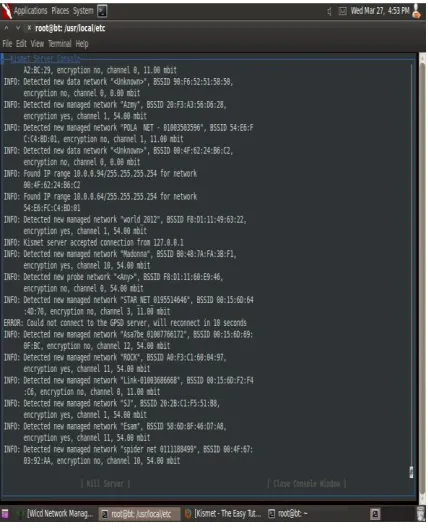
As shown in Fig. 12, Kismet sniffer is used for detecting the illegal access points and its information. It gets the Mac addresses and the connected users. Fig.13 shows the Mac address of the rogue access point or the illegal hotspot (90f6.5251.5850) in the RF range. It can be blocked by applying the blacklist following commands on the wired network switch (Intrusion Prevention System).
On HP switch: Lockout-mac 90f6.5251.5850 On Cisco switch: deny host 90f6.5251.5850
Fig. 12.The surroundings access points and its Mac addresses
Fig.13.The surrounding access points and its connected user
5.2.1.2 Wire-shark and T-shark
Fig. 14. Wire shark uses in monitor user applications and their destination
Fig. 15. T-shark uses in monitor user applications and their destination
Results:
Fig.14 shows the Wireshark built as a WIDS and that sniffs on the user’s applications. It monitors their protocols to ensure that no attack comes from the connected users as ping sweep protocol or DHCP spoofing attack. As shown in Fig.15, the T-shark is used as a sniffer on the user's destination URLs. Any attempt from any unauthorized user can be detected on the WLAN, and then the user IP address on the wired network will be blocked.
5.2.2 Open Source Server
We build two Open Source Servers, as following:
5.2.2.1 Snort IDS server
Wireless networks play a role of extension of a wired network. A server can be built to detect all alerts on a network as Snort IDS. Snort IDS monitor all traffics on a wired and wireless network from inside and report the alerts. It logs the packets coming across the network. Snort IDS is a lightweightopen source server has built on a Linux system. To make Snort IDS effective and reliable, it works on a small network so that it operates on one VLAN [34]. Table.6 shows the main steps of building snort IDS.
Table 6: The main steps of Snort Server
Step Description
http://www.ubuntu.com
Download Ubuntu server 10.04 or 9.04 and install it. vi /etc/network/interfaces Configure NIC on
the network
apt-get install snort-mysql
Install Snort with Mysql database.
Mysql -u root –p Configure MySQL file
vim /etc/snort/snort. Conf
Configure Snort after installing base, adobe, apache and BARNYARD (snort. conf, adobe, barnyard2. conf)
vi /etc/apache2/apache2.conf Configure apache vim /etc/snort/barnyard2.conf
vim/var/log/snort/barnyard.waldo Configure barnyard
http://localhost/base, Login to your local host
Monitoring a flow of alerts of TCP and UDP
Results:
The snort IDS gets the output flow of attackers IP addresses. It represents an IDS system for the whole network.
Fig. 16.The Snort IDS output
5.2.2.2 Airdrop-ng rule
Airdrop-ng is a rule on Backtrack system that used in WLAN attacking techniques [31&35].It similar to an existing solution such as aireplayng -0 (deauthentication attack). It is proposed to use airdrop to drop the illegal access points. Airdrop-ng rules are broken down into three fields: action, AP, and clients.
{d/any/any} this rule means to deny all Access points with their clients.
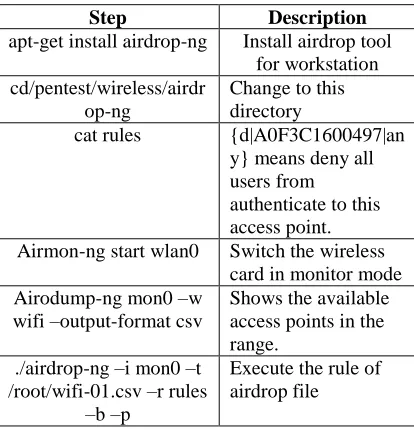
Commands as airmon-ng are used for checking attached device and airodump-ng for showing the available access points in the range. Table.7 shows the airdrop configuration main steps. Fig.17 shows the airdrop rule {action| access point| clients}.
Table: 7. The Main steps of Airdrop WIPS
Step Description
apt-get install airdrop-ng Install airdrop tool for workstation cd/pentest/wireless/airdr
op-ng
Change to this directory
cat rules {d|A0F3C1600497|an
y} means deny all users from authenticate to this access point. Airmon-ng start wlan0 Switch the wireless
card in monitor mode Airodump-ng mon0 –w
wifi –output-format csv
Shows the available access points in the range.
./airdrop-ng –i mon0 –t /root/wifi-01.csv –r rules
–b –p
Execute the rule of airdrop file
Fig. 17. The airdrop WIPS output
Results
Airdrop is used as WIPS (Wireless Intrusion Prevention System) to drop the illegal hotspots and rogue access points. Illegal hotspot MAC address (A0F3.C160.0497) has been detected by airodump-ng step. Then it has been blocked by executiairodump-ng the python rule {d| A0F3C1600497|any}, see Table.7. This rule denies all users from connecting to the illegal hotspot with MAC address A0F3C1600497.
5.2.3 Wireless Distribution Service
Huge networks must be divided to many VLANs to isolate the important places that have important data such as DMZ and employee VLAN, from the guest, public places VLAN and outside VLAN [36]. WDS protects the network from the hacking and attacking whether the attack is intended as hacking tools or unintended as viruses and Trojans. It is recommended to divide the network to VLANs (Virtual LAN).DMZ (Demilitarized zone) VLAN that has servers work in this VLAN and it must be the securest VLAN in the network, VLAN for employees that have access to servers and VLAN for public places that contain all kinds of authorized and unauthorized people. WDS puts different policies for each VLAN for authentication and access control.
6 CONCLUSION
the frame level and the RF level. The proposed solution incorporates AES encryption, in conjunction with 802.1x authentication Free RADIUS server, provides a required frame security level for WLANs. It achieves the standard security requirements because AES offers the standard confidentiality and integrity and free RADIUS server offers the required authentication, access control, and non-repudiation. To achieve the full availability, the RF security level must be achieved. Detecting and preventing attackers are the best solution to achieve the RF security level. WIDS software detects the rogue access points and illegal hotspots. There are many kinds of WIDS software as kismet, airdrop and snort IDS. Also, WDS protects the network from hacking, whether intended or not intended as viruses and Trojans. Granting different privileges to the users in VLANs, isolating VLANs help with ease putting security policies and control users.
7 REFERENCES
[1] Cisco Systems, Security Policy for Cisco Wireless LAN Controllers.USA, 2013. [2] M. J. Khan, “WLAN security”, International
journal and Technology research, vol.1, no 2, December 2012.
[3] Dr. G. Padmavathi “Wireless security survey,” International Journal of Computer Science Information Security, vol. 4, no (1 & 2), 2009.
[4] J. Ma, Z. Ma and C. Wang, Security Access in Wireless Local Area Networks. 2009.
[5] R. B. Adhao, WIDS Using Flow-Based Approach. 2014.
[6] J. M. WEBER, Experimentation in intrusion and detection on wireless local area networks. 2010.
[7] A. Memon, A. H. Raza and S. Iqbal, Wireless Local Area Network Security. 2010.
[8] U.S Robotics, “Wireless LAN Networking White Paper,” in IEEE Computer Society, 2009.
[9] S. Sukhija, and S. Gupta, “Comparison of WEP Mechanism, WPA, and RSN Security Protocols, International Journal of Emerging Technology and Advanced Engineering, vol. 2, no. 1, Jan. 2012.
[10]H. Kong, Wireless Networking Security. Dec 2010.
[11]M. Halvorsen and O. Haugen, Cryptanalysis of IEEE 802.11i TKIP. 2009.
[12]H. Haas, WLAN security. 2004, pp. 1-10.
[13]J. James and A. Parkway, (2003).CCMP AES
Encryption.[Online].Available: http://www.vocal.com/data_sheets/CCMP.pdf
[14]Wikipedia/AES.[Online].Available:
http://wiki/free source/Advanced Encryption Standard
[15]Matlab projects. [Online].Available: http://nevonprojects.com/ aes-source-code-inmatlab/
[16]US-CERT [Online]. Available:
http://phys.org/news/2011-12-us-cert-wi-fi-hole-brute.html
[17]M. Gast, “TTLS and PEAP Comparison,” Interop net Labs, vol.9, 2009.
[18]Siemens company, “WLAN security today: WLAN is more secure than wired network”, July2008.
[19]M. Dworkin, (January 2010).NIST Special Publication.[Online].Available:
http://csrc.nist.gov/publications/nistpubs/800-38E/nist-sp-800-38E.pdf
[20]K. H. Baek, S. W. Smith, and D. Kotz. A
Survey of WPA and 802.11i RSN
Authentication Protocols. Nov 2004.
[21]IEEE 802.1x. [Online].Available: https://en.wikipedia.org/wiki/IEEE_802.1x
[22]T. Whitley, “ASLEAP to Exploit
Vulnerabilities in Cisco LEAP”, 2008.
[23]L. Han, a Threat Analysis of the Extensible Authentication Protocol. April 2006.
[24]wiki.freeradius. [Online].Available: http://wiki.freeradius.org/guide/WPA-HOWTO [25]J. Urpi “FreeRADIUS for small and
medium-sized companies”: AMK Logistic Systems, 2012.
[26]K. Hutchison, Wireless Intrusion Detection Systems. SANS Institute, 2004.
[27]J. Wiley and S. Ltd, a Practical Guide for Network Managers, LAN Administrators, and the Home Office User.2003.
[28]G. Lehembre, Wi-Fi security: WEP, WPA, and WPA2. [Online] Available: 9.org/ http://www.hakin9.org/ hakin9_wifi_EN.pdf [29]K. Beaver and P. T. Davis, The Wireless
Network Hacks and Modes for Dummies. December 2004.
[30] A.John, Mastering Wireless penetration testing for highly secured Environment. 2012.
[31]Inexpensive Wireless IDS. [Online] Available: http://www.sans.org/reading
/whitepapers/WLANS
[32]The Easy Tutorial kismet configuration. [Online].Available:
[33]The Wireshark Network Analyzer. [Online].Available:
http://www.wireshark.org/docs [34]The snort IDS configuration.
[Online].Available:
http://www.snort.com/snort [35]Aircrack-ng. [Online].Available:
http://www.aircrack-ng.org/
![Fig.1. The proposed WLAN solution [18]](https://thumb-us.123doks.com/thumbv2/123dok_us/1328625.1641078/4.612.327.510.523.667/fig-the-proposed-wlan-solution.webp)
![Fig. 4. A Man in the middle attack [29]](https://thumb-us.123doks.com/thumbv2/123dok_us/1328625.1641078/7.612.84.300.109.427/fig-man-middle-attack.webp)