Mobile Cloud Application Models Facilitated by the
CPA
†
Michael J. O’Sullivan* and Dan Grigoras
Department of Computer Science, Western Gateway Building, University College Cork, Cork, Ireland
Abstract
This paper describes implementations of three mobile cloud applications, file synchronisation, intensive data processing, and group-based collaboration, using the Context Aware Mobile Cloud Services middleware, and the Cloud Personal Assistant. Both are part of the same mobile cloud project, actively developed and currently at the second version. We describe recent changes to the middleware, along with our experimental results of the three application models. We discuss challenges faced during the development of the middleware and their implications. The paper includes performance analysis of the CPA support for applications in respect to existing solutions where appropriate, and highlights the advantages of these applications with use-cases.
Keywords: mobile cloud, applications, services, user experience
*Corresponding author. Email: [email protected]
1. Introduction
Mobile cloud computing is a paradigm that strives to deliver demanding and complex new applications to mobile devices from the cloud. Such applications cannot execute on mobile devices because of the limited resources available, such as battery capacity, processing power, and storage. By moving the execution of complex tasks from the mobile device and into the cloud, demanding applications can be executed on the infrastructure; results of task execution can be delivered to the mobile device when complete. Mobile cloud computing can also be considered as the use of cloud-based applications and services from mobile devices, which provide beneficial functionality and information to the user of the device. Cloud services and applications deliver functionality to mobile devices either through an application (“app”) installed on the device, or through the installed web _________________________________
†This paper is an extension of [28]. We introduce our group-based collaboration application model. Section 3.3 was added to introduce the model, section 4.3 was added to discuss the implementation, and section 5.3 was added to discuss our implementation result. The abstract, introduction, and conclusions have been updated to reflect the added model accordingly.
browser. The use of cloud resources from mobile devices has resulted in new computing models being made available to mobile users.
Various applications synchronise user files across each mobile device owned so that they are accessible from each of them. Changes to a file on one device can be reflected on all other devices. Dropbox [1] is one example of this model: cloud storage is provided to store the user’s files, and each mobile device can retrieve the files from Dropbox using an installed app. Similar services include Google Drive [2] and Microsoft SkyDrive [3]. Another example is Apple iCloud [4], which pushes content purchased from the iTunes store onto each of the user’s “iDevices”, or, additionally, the user can play media files from the cloud, without storing them on the mobile device. Many users also have social networking accounts such as Facebook [5] and Twitter [6], and upload media files to these services as a form of cloud storage. One resulting benefit is that the limited storage space on the mobile device is saved. However, all of these services work in isolation. If a user has accounts with several of these providers, all files must be synchronised and maintained separately. The user must upload files from the mobile device to each service individually using different applications, which costs time, money, and energy.
Received on 10 October 2014, accepted on 04 January 2014, published on 17 February 2015
Copyright © 2015 Michael J. O’Sullivan and Dan Grigoras, licensed to ICST. This is an open access article distributed under the terms of the CreativeCommonsAttribution licence (http://creativecommons.org/licenses/by/3.0/), which permits unlimited use, distribution and reproduction in any medium so long as the original work is properly cited.
doi: 10.4108/sis.2.4.e6
The mobile cloud can also be seen as a platform for demanding computations. Mobile applications with computations that cannot be performed on a mobile device due to their resource requirements can be offloaded onto the cloud for execution, with results returned to the mobile device. Examples of this approach include cloudlets [7], which use virtual machines running on local infrastructure near the mobile device to execute user applications; virtual machine output is displayed on the mobile device. Application partitioning [8] uses a graph model to break-up a mobile application into components; these are distributed to nearby computing nodes for execution. Code offload techniques [9, 10] execute object-oriented application code in the cloud. The results of the execution, such as any modified state of objects, are returned to the mobile application.
Execution of computationally long-running and resource-intensive operations, such as large dataset processing and mathematical calculations, can also execute on the cloud, with results returned to the mobile device. As a result, applications do not utilise excess battery power and processing capacity of the mobile device. The application is also not at risk of interruptions, such as being killed in low-memory scenarios or accidental shutdowns.
In many enterprises such as in the office environment of a business, academic institution, or hospital, collaboration of members of different departments or teams is crucial in order to complete work made up of several different tasks. Due to time constraints of daily schedules, or in cases where team members are located in various locations worldwide, it can be difficult to come together for meetings to assign/oversee work. However, all users have their mobile devices with them to communicate back to the team. There are web-based and mobile applications available for task or project management, but these often involve users having to find time to manage and set their own work and task progress within these solutions.
We have implemented these services and scenarios as additional application models of our mobile cloud middleware solution. Our active work is on a project known as the Cloud Personal Assistant (CPA), which we introduced in a previous work [11]. It forms the backbone of the mobile cloud middleware we are developing, known as Context Aware Mobile Cloud Services (CAMCS), also introduced in a previous work [12]. Each user of CAMCS is provided with their own instance of a CPA, which can perform tasks assigned to it by the user. The CPA of a user completes tasks by making use of mobile cloud services. These tasks are described using a thin client application installed on the user’s mobile device, before being sent to CAMCS, which forwards them to the CPA of the user. In our current work with CAMCS, we have examined how to use a CPA to enhance two of the application models we have described - synchronisation of files and data intensive processing. We have also examined how the CPA can be used to complete group-based tasks.
This paper provides several contributions. First, we present the implementation of a file synchronisation application model among service providers using the CPA.
The aim of this model is to remove the shortcomings of the traditional applications, which work in isolation. By utilising the CPA for uploading user files to cloud storage, our results show evident time savings when compared with using individual apps, along with corresponding energy savings.
Secondly, we present our implementation of an intensive data processing application model with the CPA, on an XML dataset. We compare execution time of cloud-based data processing with the CPA, against local processing on the mobile device, and present benefits provided by the CPA. Our results show faster or comparable processing performance on the cloud infrastructure when compared with local execution.
Finally, we present a group-based collaborative functionality model that has been added to CAMCS, which supports groups that CPAs can join upon request by their users. Once joined to a group, milestones, which make up group tasks, can be assigned automatically to the CPAs of group members based on their role within a group, requiring no manual intervention aside from the task creation. This can bring benefits to the mobile enterprise where arranging meetings of people can be difficult due to the natural mobility and displacement of staff.
For each application model, we discuss the appropriate implementation challenges, and lessons learned.
The remainder of this paper is structured as follows. Section Two describes the aim of the CAMCS middleware and the CPA along with its current development state. Section Three describes our implementation of the file synchronisation, data processing, and group-based collaboration application models with the CPA. Section Four presents the implementation challenges faced. Section Five contains the results of our experimental implementations. Section Six includes the related work, and the conclusions are presented in Section Seven.
2. CAMCS and the CPA
The CAMCS middleware is a mobile cloud solution hosted on cloud servers. Cloud-based servers provide computing resources for consumers, which include hardware resources (CPU time, memory, storage, networking capacity), developer resources (application platforms, tools and APIs), and software resources (user software with graphical user interfaces, normally accessed through a web browser). For mobile cloud, we leverage the resources offered in the cloud so that resources not available on the mobile device can be used from cloud servers - in other words, the cloud resources are delivered to the mobile device as services. This normally requires the mobile device to have a continuous, high-quality network connection to these cloud servers.
significance on the user experience of mobile cloud applications. In addition, the use of the software is seamless for the end-user (part of the general public with no IT experience), and it intelligently responds to the state of the user and the mobile device. The thin client application, which is installed on a mobile device to communicate with CAMCS, embraces this philosophy, whereas other approaches to mobile cloud do not consider the user experience in their solution. The user experience aspect of CAMCS is very important for the implementation of the file synchronisation and data processing models; the difficulties discussed in implementing mobile cloud solutions have a detrimental impact on both.
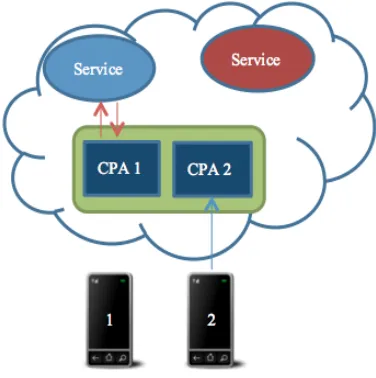
The CPA is the backbone of CAMCS. It is an active assistant that performs tasks for the user with mobile cloud services, and represents the user and their tasks in the cloud. The CPA uses a discovery service to find cloud services for performing tasks set by the user. Once a user uploads a task from the thin client on the mobile device, discovery takes place to find an appropriate service. Once found, the CPA contacts the service with user-provided parameters, and waits for the result from the service. When the result is produced, the CPA stores it until the user is ready to receive it on their mobile device. If the user became disconnected during this time, the execution and result of the task are safely unaffected in the cloud. As the task execution has been completely offloaded, the mobile device is free for other work - see Figure 1.
Since the publication of our previous works, the CAMCS and CPA have undergone further development. The CPA is now a component of the CAMCS middleware; in our previous work the CPA was a standalone middleware [11]. The discovery service is no longer built into the CPA - it is now a component of CAMCS, provided to CPAs. The discovery service will take input from a context processor component [12], which is also part of CAMCS, with the aim of using context to enhance the quality and functionality of services discovered, by finding services relevant to the user’s current situation.
The most significant architectural change from our first version is the replacement of a MySQL database for storing information with MongoDB, a NoSQL database. MongoDB uses a document store for data - all information is stored in individual documents. This makes querying for data an easier task. The data itself is stored in JavaScript Object Notation (JSON) format. To contrast with the first version of the CPA, there were separate MySQL database tables for user information (name, email address, password), CPA information (references to current and previous tasks), and task information (name, WSDL file location, result). To provide this information to our Java-based CAMCS middleware, cross-referencing using ID numbers or join queries across multiple tables was required to bring related information into the result set.
3. Application Models
We now introduce the three application models described in
Figure 1. The mobile cloud provides computing
services to mobile clients. Here, mobile devices 1 and 2 have their own instances of a CPA within the CAMCS middleware, which work with mobile cloud services to complete tasks, and deliver the results to the mobile devices.
this paper, which have been implemented as new features of CAMCS with the CPA, along with their advantages compared with existing solutions.
3.1 File Storage/Synchronisation
The first application model added to the CPA allows the user to send files from their mobile device to different cloud service providers. The widespread use of mobile devices as enablers for users to store and share files/content on cloud-based and social networks was the primary motivation for this feature. On the mobile thin client, the user can add their details (username/password) for different service provider accounts. File synchronisation involves several steps:
(i) Service Provider Authorisation for CAMCS
This involves selecting from a list of supported service providers, and authenticating with the selected provider, to give CAMCS access to the account.
(ii) Service OAuth Key Storage with CAMCS
Once the user has authenticated on the mobile device, the authentication keys used to access the accounts on the users behalf are sent from the thin client to CAMCS in the cloud.
(iii) File Selection for Upload
providers such as Dropbox or Google Drive for any type of file. If at least one of the selected files is an image or video, it will also provide the option to upload to Facebook - Facebook only supports upload of image and video files.
(iv) File Upload to CPA and Service Providers
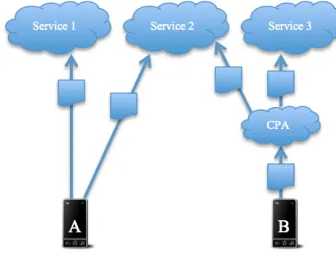
After the user has selected the accounts to upload to, the files are sent to CAMCS in the cloud, using a RESTful web service. Once CAMCS receives the files, they are passed to the user’s CPA, which will then send the files to the selected accounts - see Figure 2.
The advantage of such a feature is that if, for example, the user, possibly a company representative, wants to upload files such as promotional material to multiple social networks such as Facebook and Google+ to reach all possible consumers, they no longer have to spend resources such as time, money, and energy on their mobile devices, uploading to each service provider one-by-one. Previous solutions in this regard upload files to each provider individually from the mobile device, using up the described resources during the upload to each provider. Taking advantage of this feature offered by CAMCS, users only have to upload the file once to the CPA, which takes care of sending the files to the different providers; the resources are only used once for a single upload operation. If the user has client software for the providers on their desktop PC’s, laptops, or mobile devices, the files will be synchronised to them via a push operation. As a result, the current implementation does not feature a download synchronisation to the mobile device as files may be duplicated, wasting more resources. Evaluation, along with the implementation for this application will be discussed in the next section.
3.2 Data Processing
One fundamental aspect of the CPA is that it can carry out work for the user asynchronously. The user can specify the details of some task to be completed on the thin client, at which point the mobile device disconnects from CAMCS, and the work continues, with the results saved for when the user is ready to receive them.
One area where this may be particularly useful is intensive data processing, especially if it is expected to take a large amount of time. As mobile devices have increased the mobility of office/lab staff, having access to such an application while on the move can be helpful, and the cloud approach can work with large and complex datasets that a mobile device may not be able to efficiently process.
In our previous work [11], we implemented a solution where the CPA would perform database queries on relational databases running on Amazon RDS. The CPA would wait for the query to be executed and save the result set for the user. This was difficult to implement, due to the nature of the different types the query could take, and the simplicity of the form-based user interface not being intuitive for the novice end-user to specify what was required. For this work, another direction was taken; rather
Figure 2. Rather than wasting resources uploading a
file twice to two different services individually (device A), the user uploads the file once to the CPA (device B), which then sends the file to each of the user’s service accounts.
than taking data from relational databases and setting up the required authentication and connections, we decided to perform some processing on scientific data. A scientist could set a task to carry out some data processing on sets of experimental results, and get the result later.
In the absence of scientific datasets and software programs for various fields, XML datasets were used. The Computer Science and Engineering Department of the University of Washington offers freely available datasets on their website [13]. These range from data on protein sequences, to data from NASA on star systems. Many of these datasets were large in size; one dataset called Mondial, which contains information on different countries around the world, compiled from the CIA world factbook, was chosen because of its smaller size. We developed a RESTful web service, as a separate application deployment from CAMCS that could carry out statistical calculations on this data. To enable this, the Apache Commons Math library [14] was included in this service.
The flow of this work is as follows:
(i) Offload of Data Processing Task to CAMCS
The thin client is used to specify the location of the XML data by URL, and to specify the type of processing that is required from a list (in this case, statistical). The data is sent to CAMCS, which hands them over to the user’s CPA, where the task data is examined.
(ii) Data Processing Begins at Service
on population data for all cities in the countries part of the dataset).
(iii) Data Processing Result Call-Back to CAMCS
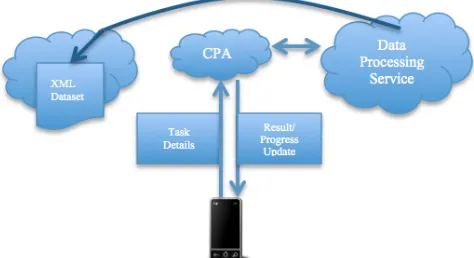
When finished, the service will call-back to CAMCS with the result data, which the user can fetch on their mobile device using the thin client, when they are ready. CAMCS finally marks the user’s data processing task as complete - see Figure 3.
Another feature is that the CPA can provide real-time status updates on the progress of the data processing. The mobile thin client contains a record of the offloaded processing task, and when they open it, the CPA feeds status updates to the thin client.
Of note is a difference between how we implemented our statistics web service compared to the database service in our previous work. The statistics service is a RESTful web service. In our previous work, the RDS service was a SOAP-based web service. One of the difficulties encountered with the SOAP-based RDS service, was that for long running quires, the Apache CXF software used at the CPA to contact the web service, would time out while waiting for the result. Apache CXF includes an asynchronous call mechanism to overcome this. However, the REST-based approach, even though it is easier to use over HTTP than SOAP, does not feature an asynchronous web service call. To avoid time outs, we implemented the call-back feature.
Advantages to this approach include the useful aspect that the web service will have libraries available to it that may not be present on the mobile device. As mentioned previously, we used the Apache Commons Math [14] library to calculate the statistics. Other scientific libraries available include JScience [15], which were also included but were not used. It would not be trivial to calculate such statistics if done on the mobile device without these libraries.
Other advantages include the fact that the user does not need to wait for a specific piece of client software to complete the data processing, which may be prone to interruptions. The user can set the task with the CPA using the thin client and go on to do other work, or leave the office for the night and turn off the local equipment, which may have otherwise been left on and used for the processing task. The user can check in with the CPA on the go with the thin client for progress updates when required.
There are difficulties and limitations in this approach that will be evaluated in the next section.
3.3 Group-Based Collaboration
As described in Section 2, the fundamental premise of CAMCS is that users will offload tasks they require to be completed from the thin client running on the mobile device to their CPA running within CAMCS. CAMCS will then assist the CPA in discovering appropriate cloud services, capable of executing the task. Another desirable goal is that CPAs should be able to communicate and work together. By
Figure 3. The user sends the data processing details,
including the URL of the XML dataset, to the CPA. The CPA then contacts the cloud data processing service with the details, which begins the processing. The result is sent back to the CPA. The user can also receive progress updates.
doing so, a CPA can share data and discovered cloud services with the CPAs of other users. This will be beneficial for CPAs where users have similar interests, or who work on related tasks. A group of friends may have CPAs which work together to suggest activities of mutual enjoyment to their users. Shared interests that the CPAs are aware of will drive this functionality. To support collaboration, the notion of groups, has been added to CAMCS. This will allow CPAs collaborating together to complete shared tasks to the benefit of their users. Any CAMCS user can create a group, and other users are then able to join these groups. Several components are modified or introduced for this model:
(i) Group Tasks and Milestones
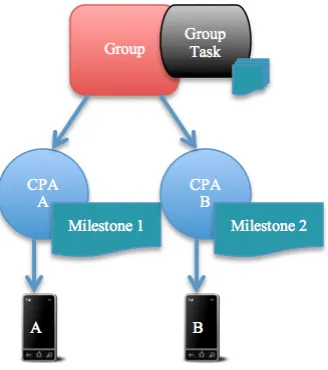
To support the concept of a task that can be shared among the CPAs of the group members, we introduced a new type of task, a “group” task. We now therefore have a distinction between an “individual” task, and a “group” task. Individual tasks correspond to the original single-user tasks. A group task is made up of many milestones. Currently, a milestone is an individual task. A milestone can be assigned to a CPA within the group, who will then be responsible for executing the milestone individually – see Figure 4.
(ii) CPA Roles
Figure 4. A group within the CAMCS middleware receives a group task. The group task has several milestones, two of which, have been assigned to two different CPAs. Details of each are sent to the user’s mobile devices.
(iii) Milestone Pre-Requisites and Execution
Each milestone has a deadline for completion, along with pre-requisite milestones, which must be completed before a given milestone can begin execution. When a milestone has completed, it sends a message to the group to inform it that it has completed, and any milestones waiting on its completion, can now be assigned to a CPA within the group and begin execution.
Regarding milestone execution, this can be as simple as corresponding to an activity that the user who owns the CPA responsible for the milestone completion should carry out. Additionally, the CPA, like with individual tasks, can use cloud services to complete the milestone. In regards to a setting such as an academic institution, or a business enterprise, these services could exist in the form of internal private cloud services, that work on and with existing company infrastructures, such as databases, file storage/sharing, or workflow jobs.
The advantage of such a model provided by CAMCS to CPAs, is that it allows users to have tasks scheduled for them depending on their role within the group. This will allow users the flexibility to carry on working, without having to arrange to meet in person or by video conferencing to assign tasks or check on task progress; this can be difficult depending on where in the world users are working from, or daily timetables/schedules. Many existing web-based project management tools exist, but our approach will result in task data optimised to the user’s role, and will be delivered directly to the users’ mobile through their CPAs. It does not require user intervention, aside from initial task creation.
If required, and of benefit, the CPA can inform the user through the thin client of the progress of a milestone. Also, if the milestone requires the use of cloud services, the CPA
can also interact with the user, by requesting additional information. For example, consider a group task requiring the gathering of reports on common causes of calls to a technical support group from the telephone operators. The CPA working on the milestone of an individual operator may ask their owner if it should include calls that required the operator to visit the troubled employee in the office. It might also ask the user which time-range it should gather data for, or should it exclude calls that were passed to another operator.
This will be of great benefit to companies and groups who require mobile enterprise for organising and coordinating work among employees who may be scattered in various locations worldwide, or who may be out-of-office visiting clients. Such employees will have access to their CPA and group milestones through the thin client on their mobile device.
4. Implementation Challenges and
Evaluation
During implementation of the application models, several challenges and difficulties to the approaches that have been discussed were identified, as well as areas for improvement in API design for mobile devices. We now evaluate the work with respect to these issues for each application model.
4.1. File Synchronisation
OAuth Authentication
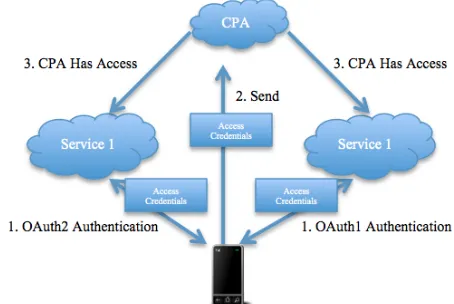
In order to access the accounts of the different cloud service providers, the user must authorise CAMCS to access their service account by first authenticating themselves, and granting permission for the required operations. For all of the service providers we worked with for CAMCS, OAuth [16] is the security access scheme employed. At development time, Facebook and Google used OAuth version 2, and Twitter and Dropbox used OAuth version 1 (by the time this paper was written, Twitter provided OAuth 2 support). In both versions of OAuth, the application requesting access to the user account with the service provider is given access credentials in the form of an access token/key/secret. With OAuth 1, a second access token/key/secret, sometimes called a “value”, is also provided. When an application requires access to the user’s account, they present the access token (and the value in the case of OAuth 1) with the request, and if the credentials are valid, the application is granted access. The main benefit of this approach is that the application that wishes to use the service provider on behalf of the user does not need to know and store the user’s username and password for that service.
obtained in each case. When the user wishes to allow CAMCS and their CPA access to their service provider account, in Android, they are redirected from the mobile application to the website of the service provider through a WebView, presenting the application key. The user logs in with his/her own username and password. The user is then given a choice to grant access to the application for various operations (sometimes called “scopes”). Once the user has granted access, the mobile application is called back with the access key (and the value in the case of OAuth 1). These are then stored on the mobile device for future use.
The difficulty for CAMCS is that the mobile device does not require or use the access credentials. The CPA operating in the cloud is the entity that will be working with the service providers; therefore the CPA needs to be provided with the access credentials.
If CAMCS were a web application accessed from the desktop PC browser, the web application would receive the call-back and store the credentials. In this case, the credentials would be sent straight to the CPA. This however would not be optimal for the user experience. Asking the user to leave the mobile thin client, and open a corresponding website with a browser for CAMCS to perform the authentication would defeat the purpose of being a mobile thin client application.
To overcome this, we implemented a RESTful web service on CAMCS. When the user has authenticated with the service provider on the thin client, the access credentials are sent from the thin client to CAMCS to be stored with their user account. The CPA can then access the credentials stored with the user’s account details on CAMCS, to carry out operations with the service providers - see Figure 5.
Service Provider APIs
This difficulty also relates to authentication with the service providers.
To implement the authentication flow, the Spring Android project was used, which uses components of the Spring Social project. They simplify the work required for authentication with service providers. The developers of Spring Social have only implemented official support for Facebook and Twitter authentications using OAuth. There are several community driven projects for other providers, such as Dropbox and Google. None of these community driven projects have been ported to the mobile platform, and their implementation remains solely focused for use with Spring Social on web applications. These could be ported to be compatible with the Spring Android components, but this requires some development effort.
Rather than doing this, we decided to use the Android APIs available from Dropbox and Google. This involves downloading JAR files from the different service providers, packaging the thin client with them, and using them in the code to carry out the authentication flows. Ultimately, we ended up having several JAR files; those for Spring Android, Spring Social, Spring Social Facebook, Spring Social Twitter, Dropbox, and Google Play services. The file sizes of these start to build up quickly. Moreover, all of
Figure 5. To get the access credentials to where they
are needed with the CPA, the user must authenticate for each service on the mobile device (normally through a WebView). The keys are then sent to CAMCS using a RESTful web service. The CPA can then access each service on the user’s behalf.
these services transfer data in JSON format, but these JAR files often contain different versions of JSON parsers, which all do the same thing, taking up even more space while doing so. One cannot set each of the APIs to use a single JSON parser of choice and remove the rest - see Figure 6. All of the service providers authenticate using OAuth tokens, but each provider seems to implement the authentication flow differently, rather than using some standard. Spring Social aims at resolving this, but as described, only supports Facebook and Twitter, relying on community projects for other implementations, which have not been readily ported to Spring Android.
Figure 6. Screenshot from the Eclipse IDE of the required JAR files for the Android thin client for each service provider. Duplicated functionality can be seen; jackson JAR files are for JSON parsing, the json-simple JAR is required by another file but contains the same parsing functionality as Jackson.
Synchronisation from Service to Device
The current implementation does not implement a download mechanism to synchronise files from the various cloud services to the mobile devices. Many service providers already implement a push mechanism; this will automatically send a file uploaded to the provider, down to all the other devices that use a native application. On the mobile device, this would be a waste of resources if files were downloaded more than once both from the CPA and the native application.
If this were to be implemented, it would require a means for the CPA to be aware of when the user uploaded a file to the service from other sources, such as a web browser. This could be achieved by polling, but this introduces extra traffic to the service provider, which would be wasteful if no new files or updates have been added to the service provider since the last poll. A better solution would be an event notification API, which could alert interested parties, such as the CPA, when a new file has been added or of any update to existing files. This requires the service provider to implement such an API. As an example, Dropbox provides the sync API, which allows notifications to be sent after events such as new files being added occur. However, the API currently only exists for native Android and iOS implementations; the ability needed here is to inform a third party on the user’s behalf, in this case the CPA, so that it is aware of the file state at the service providers.
4.2. Data Processing
Service Extensibility
The main question facing the development of the data processing is how to expand its operation, and make it easier to invoke. As it stands, our statistics service will only work
with an XML dataset that shares the same schema as that of the Mondial XML dataset we developed it against (or any specific dataset we specifically develop a service for). The statistical service we developed for the Mondial dataset has to parse the XML dataset, and expects to find certain tags and attributes that can be used for calculations. While there may be other datasets representing similar data (for example, ethnic population data on European countries) that uses the same markup, it is still a fragile service.
It may be prudent if a scientist who has data to process could easily specify their own calculations that they are interested in performing to a service, so that it could readily work with different XML schemas. These could be uploaded to the CPA from the mobile device and be sent to the processing service. The calculations would have to specify what data to work with, and what calculations should be performed on it. Ideally, the user should be able to express the desired calculation on the thin client interface. This may be achievable with cooperation from those who develop software specifically for data processing of large formatted data. If this were not the case, as it is now, a different service would have to be developed for each different XML schema, limiting the scale of the data processing service.
Discovery of Data Processing Services
Currently, the data processing service runs in another web application, separated from CAMCS. This is because different service providers will provide their own services for processing different types of data; it is not something that the CPA can do itself at present. In this situation, services that can perform different processing on data need to be known to CAMCS. A service must be able to describe exactly what it does, what data it expects, and how it will return the results. In addition, CAMCS needs to be able to compare the dataset and instructions passed by the user, with these external services to find what service will match the request.
At the moment, locations and types of services are hardcoded onto CAMCS, so that it knows where to find a specific set of services that carry out specific calculations on defined datasets. Clearly, a discovery solution would be of use here, which is part of our future work. In addition to describing common service attributes such as message formats and endpoints, the required data for the calculations (such as specifying which mathematical calculations to perform on which specific data in the XML document) must also be described as part of the discovery process.
4.3 Group-Based Collaboration
Collaboration Manager
If CPAs are to collaborate, they need to become aware of the existence of other CPAs. While any CPA could be made aware of any other CPA, possibly based on a real-life “friends” model, for the purposes of this work, we have restricted this existence to groups. Only CPAs in the same group can communicate with each other. However, as a group may contain many CPAs, it is not practical for each CPA in a group to know about every other CPA in a group either. For this purpose, we have introduced the Collaboration Manager.
The Collaboration Manager facilitates communication between two CPAs. Each group has an instance of a collaboration manager. A CPA knows which groups it is a member of; therefore it knows how to find the collaboration manager for a given group. If a CPA needs to discover another CPA based on a role or similar milestone, they consult the collaboration manager. In our current implementation however, each milestone is assigned to each CPA individually and they are solely responsible for executing it. As a result, a CPA does not need to consult directly with another CPA for milestone completion.
Currently, the collaboration manager is used for milestone assignment to CPAs. When the group leader starts a new group task, the collaboration manager will assign the first milestone to a CPA who has a matching role within the group. When a CPA is given a milestone, it records which group the milestone belongs to. When it has completed the task, possibly using cloud services, or their user has completed the physical work, the CPA calls back to the collaboration manager, to indicate the milestone is complete. At this time, if appropriate (see next subsection), the collaboration manager will assign the next milestone to be completed to a CPA with a corresponding role. It should be noted, that for a group task, several milestones can be assigned to CPAs and be in a state of execution at one time; when we state that the collaboration manager assigns the next milestone, this applies to the next milestone that had to wait until the current milestone was completed. Assignment of a milestone will start execution.
Milestone Structure
As milestones may have deadlines and pre-requisites required before they can start execution, careful consideration had to be given as to how milestones are structured.
A group task can be thought of as a graphical representation of a tree, G = (V, E), where G represents the task, V is the set of milestones that make up the task, and E is the set of pre-requisites of milestones. One milestone is designated the first milestone. Each milestone may have one or more child milestones in the graph (the first milestone must have at least one child milestone), or possibly no child milestone. Each milestone (except the first) may have multiple parent milestones in the graph – see Figure 7. Each parent milestone is a pre-requite milestone in the graph (represented by an edge in E), and all pre-requisites must be
Figure 7. A graph G = (V, E) representing a tree of
milestones for a group task, where V is the set of milestones and E is the set of milestone pre-requisites. 1 is the first milestone; it has two child milestones, 2 and 3. 2 and 3 have 1 as a pre-requisite parent milestone. All pre-requisite milestones must be completed before a milestone can start; before 5 can start, 3 and 4 must be completed. Milestones such as 2 and 3 can execute in parallel when 1 has completed.
completed before the current milestone can be assigned to a CPA and executed.
The difficulty in implementing this in code stems from the MongoDB database embedded document structure. If all milestones have object references to each other milestone, we would have many cyclic references. As a result, each milestone, as an instance of an individual task, is given a task ID, and each milestone stores the IDs of their pre-requite milestones. Each milestone also stores the IDs of each child milestone that should be started once it has been completed. This resembles a double-linked-list structure.
The collaboration manager uses all this information when assigning tasks to CPAs. Given a complete milestone, it will check each of the pre-requisite milestones for completion, and if all are completed, it will assign all the child milestones that should be started once the current milestone has completed.
Milestone results, as with other task results in CAMCS after being completed, are pushed to the mobile device of the user with Google Cloud Messaging. When the milestone has completed, the milestone uses the group ID to contact the collaboration manager; if it was a physical milestone that the user has completed in person, the mobile thin client is used to contact the collaboration manager of the group to inform the group of milestone completion.
5. Results
was used to demonstrate the group-based collaboration functionality.
5.1 File Synchronisation
To evaluate the file synchronisation performance, over five different runs, the time to upload a PNG image file of size 112KB was measured - see Table 1.
Specifically, we measured: the time taken to upload the image to the CPA from the mobile device, and the time for the CPA to upload the image to Facebook and Dropbox. The mobile device used was a Samsung Galaxy S3, connected to the Vodafone Ireland operator. The mobile – CPA upload took place on a HSDPA+ cellular network connection. The CAMCS middleware was running on an Apache Tomcat version six servlet container on the cloud server. The cloud server is located within University College Cork, Ireland, and features a 1.7GHz CPU and 2GB RAM. The timing data was collected from logging statements placed in the code. The upload of the image file to Dropbox and Facebook from the CPA took place in sequential order. If we had utilised threads to do this concurrently, the total time would have been smaller, the mobile to CPA communication time plus the maximum of the server upload times.
To compare this with the performance of uploading with the individual Android apps, we measured over five runs the time to upload the same image with the native Facebook and Dropbox Apps with the HSDPA+ connection. This timing data was obtained with a stopwatch, from the time the upload (or equivalent) button was pressed on each app, to the time when the notification that the upload was completed appeared. The timing is less accurate as a result, but the greater duration is still clear - see Table 2. Clearly it takes even more time, and as a result, energy and money, since the user has to upload the image twice using two different apps, whereas with the CPA the user only has to do this once.
In Table 1, the only time the user has to spend waiting on their mobile device to finish upload are the times for the Mobile – CPA communication in column two. Therefore, the total time for the images to reach the service providers from the mobile device in column 5 is not the total time the user has to spend waiting for upload on their mobile device. Contrast this with the total result in Table 2. The user has to manually upload with the applications for each individual provider, so the total time in the fourth column is the total time the user must spend waiting for uploads to complete, greater in all cases than the wait time with the CPA model.
5.2 Data Processing
The data processing service was deployed in the same Apache Tomcat six servlet container and cloud server as CAMCS. The XML parser used was XMLPULL [17]. For a comparison test, we implemented a small Android application with a service, which would carry out the same XML parsing as the server. The Android XML parser is the aforementioned XMLPULL parser we used on the server, so
Table 1. The time in seconds over 5 runs to upload a
112KB image from the mobile device to the CPA, and subsequently from the CPA to Facebook and Dropbox.
Run Mobile – CPA (s)
Facebook (s)
Dropbox (s)
Total (s)
1 2.255 2.749 1.621 6.625
2 4.395 3.25 1.523 9.168
3 1.935 2.011 1.533 5.479
4 2.63 2.094 2.671 7.395
5 1.25 2.106 1.584 4.94
Table 2. The time in seconds over 5 runs to upload a
112KB image to Facebook and Android using the individual native apps.
Run Facebook
App (s)
Dropbox App (s)
Total (s)
1 15.0 4.1 20.1
2 5.1 2.6 7.7
3 6.9 3.7 10.6
4 7.0 3.3 10.3
5 6.9 5.2 12.1
the comparison is fair in this regard of implementation. For the cloud service, we used the XPP3/MXP1 implementation [18] of the XMLPULL parser, as we believe this to be the same implementation found on the Android platform, due to the same package structure (the other implementations have a different package structure to the version found on Android).
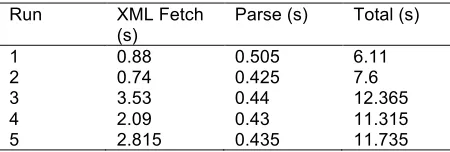
Before the tests were run, Tomcat was restarted. We measured the time with logging statements in the code to fetch the XML file, the time to parse the XML, and finally, the total time over five runs – see Table 3. The total time includes the time for preparing the XML parser, converting the XML file to a String for the parser, and the calculation of the statistics. The majority of the time is spent on conversion of the XML to a String. The parse time decreases with each parse after the first. Another test was carried out by restarting the server again, and the same trend of decreasing parse time was repeated after an initial longer time for the first run. The larger the dataset in size, the larger the number of XML nodes that will need to be parsed, which will take up more of the limited memory if done on the mobile device. This will also take more time, and more energy from the battery.
Table 3. The XML fetch and parse times in seconds over 5 runs for the data processing cloud service along with the total time.
Run XML Fetch
(s)
Parse (s) Total (s)
1 0.969 1.114 4.585
2 0.387 0.676 3.777
3 0.604 0.43 4.119
4 0.384 0.084 3.37
5 0.359 0.038 2.354
Table 4. The XML fetch and parse times in seconds
over 5 runs for the data processing Android test application along with the total time.
Run XML Fetch
(s)
Parse (s) Total (s)
1 0.88 0.505 6.11
2 0.74 0.425 7.6
3 3.53 0.44 12.365
4 2.09 0.43 11.315
5 2.815 0.435 11.735
the cloud service. Surprisingly, this means that the first two runs of the parse on the cloud server were actually slower than the mobile device. We believe this to be an implementation detail of either the Java Virtual Machine running on the cloud server, or the Tomcat servlet container. Both implementations use a Java InputStream for the fetch. The bytes from the stream are then read and converted into a String for the parser input. However, when the Android client fetched the XML dataset, it also brought along formatting characters, specifically, newline characters (\n) and whitespace. This interfered with the tokeniser of the XML parser, and they had to be removed from the String (using a String replace method) before the XML string was passed to the parser. This removal operation took around four seconds each time, and is the biggest contributor to the total time on the Android device. As a result, the total time was always longer on the Android test application, even for the two runs where the parsing operation was quicker than the cloud service. This removal process did not need to be performed on the cloud service; no newline or whitespace characters were fetched in the InputStream.
Once the work is complete, the call-back is made to CAMCS, which forwards the result to the user’s CPA. The CPA then uses Google Cloud Messaging to inform the user that the result is ready, and they can then view the result in the thin client application.
With the cloud service, the mobile user does not need to upload data from the mobile device over the network connection once the data URL is specified. No energy is used up on the mobile device for the parse, and the parse is unaffected by interruptions on the device. The device is also free to complete other work.
5.3 Group-Based Collaboration
To evaluate the group-based task application model of CAMCS, we decided to model groups based on teams and departments within a company which can use mobile enterprise to assign and coordinate tasks and corresponding milestones within their teams. Departments may include the IT department, sales, quality assurance, or management. Each department in a company will have members who are responsible for different kinds of work. In the sales group for example, there may exist a secretary who prepares sales reports from company orders in databases, and a sales representative who takes orders from customers and places them into the system.
Consider a group task. The lead member of the sales team may require a document prepared which details the sales for the past year. This will require two milestones: (1) the sales representative must gather the required sales data from their database, and (2) the secretary must then prepare the report using this data. For this task, it could be completed in two ways. Either the sales representative could gather the data by his/herself, and then physically hand it to the secretary to type the report. Or, the collaboration manager for the group could assign the sales database task to the CPA of the sales representative, who has a role in the group as a SALES_REP. The CPA can then use a private cloud service within the company to extract the required information for the sales from the database. Once this milestone has been completed, the collaboration manager will be notified, and will assign the report preparation task to the secretary’s CPA, which has the SECRETARY role. This CPA can then use a document preparation service to prepare the report with a given format and template, when provided with the data.
In our tests, the collaboration manager has been implemented, and successfully assigned given milestones for such group tasks. In our previous work [11], we developed and evaluated some sample services for database operations that could be deployed to the private cloud of a company. Our implementation also has other enabled features: by considering the deadline, the CPA reminds the user through the thin client of work they must complete for any approaching deadlines. A CPA, which represents a user who is currently busy with a set maximum number of tasks, will also look for another CPA within the group who has a role that supports completion of the milestone.
6. Related Work
sent to the mobile device. The work also tries to combine services by a mashup mechanism, feeding the result of one service as an input to another. The user must know something about the SOAP/REST nature of the service beforehand, and know where to find the WSDL file. Our system will be based on service discovery so the technicalities of the service are hidden (service type, WSDL locations).
Another work by Flores et al [20] provides a middleware, which can plug in adapters to make requests to different web services. The request for a service is sent to the cloud middleware, which will then substitute an appropriate adapter to make the service call. It is not known how the developer of a mobile application calls the middleware and specifies their request. The approach is limited by the adapter solution, where different adapters may have to be developed for each service. As our approach aims to use a discovery service, we believe our approach to be more scalable, and we will provide an interface for mobile app developers to request services from CAMCS. Akherf et al [21] developed a mobile cloud middleware, which they state will eventually support both data processing and storage applications, but at the moment, only focuses on adapting web services to consumption by mobile devices, similar to CAMCS, and the other middleware projects described here.
In comparing our work with these mobile cloud middleware projects, CAMCS aims to provide a range of services to the user that take advantage of cloud-based infrastructure and services, rather than just a middleware for a single purpose. CAMCS will be extensible so extra functionality can be plugged in, as we have done with the application models presented in this paper. In common with these works, we adopt RESTful architecture to provide mobile cloud services to mobile devices, by means of the CPA in the case of CAMCS. In work by Christensen [22], it is proposed that RESTful architectures are a practical means to deliver applications and services to mobile devices, when considering data exchange requirements and constraints.
In terms of file synchronisation, most mobile applications for this purpose, such as Dropbox [1], Google Drive [2], and Microsoft SkyDrive [3], all work in isolation, and do not provide support for uploading to multiple services. Our approach has no such limitation, as CAMCS works with multiple services, and as described, this approach will save time, money, and energy by uploading files to the CPA once, rather than uploading to each service provider separately.
Research in the area of mobile cloud for storage purposes mainly examines methods and protocols for secure and privacy-preserving data and file storage in the cloud. Awad et al [23] proposed an encryption scheme for storing files in the cloud from mobile devices; this scheme also permits for a confidential fuzzy-based keyword search of stored content by the user. In work by Zhou and Huang [24], what is known as a Privacy Preserving Cipher Policy Attribute-Based Encryption method is developed to protect data gathered from sensing devices within smartphones. As part of their solution, they also develop an Attribute Based Data Storage system, as an access control mechanism to the
sensing data stored in the cloud. Their solution has a focus on moving the complexity of encryption and decryption operations from the mobile device and into the cloud, for energy efficiency. Ren et al [25] developed several schemes for providing secure storage of files from mobile devices on cloud servers, where there may exist one or more distributed cloud servers, that may or may not be trusted. In our work, we rely on the existing security mechanisms of the third party cloud storage providers.
In regards to data processing, some cloud-based solutions to data processing are available. Chen et al [26] developed a “k out of n computing” solution to perform both data processing and storage with remote services for mobile cloud, with a view to achieving energy efficiency and reliability objectives. In particular, their framework can adapt to network topology changes. Huang et al [27] developed a secure data processing framework for the mobile cloud, known as MobiCloud, to provide processing on data collected from mobile devices, such as location data. They develop a proof-of-concept application called FocusDrive, to disable and enable text messaging facilities on the mobile devices of young drivers while on the move, based on the speed of the device, the location of the device, and traffic conditions at the user’s location.
For group collaboration, there are several web-based project management websites and mobile applications which support productivity with task lists and goal planning, but we are not aware of any cloud-based middleware which can support group-based task assignment and collaboration for mobile devices.
7. Conclusions
In this paper, we presented how the Context Aware Mobile Cloud Services (CAMCS) middleware, with the Cloud Personal Assistant (CPA) can be used to implement three mobile cloud applications models, namely file synchronisation, data processing, and group-based task collaboration. We presented the current development state of CAMCS, along with some of the changes to support these applications. The implementation of these applications, and benefits of the CPA approach with CAMCS, was described. We then went on to evaluate and discuss the challenges faced while implementing these functionalities. For the file synchronisation, these include OAuth security implementation issues and heterogeneous APIs for different service providers. For data processing, they include scalability and calculation specifications. For group-based collaboration, this includes how each CPA can be aware of each other and how tasks are structured and assigned.
We presented timing results for file synchronisation and data processing. For the file synchronisation, the timing results showed fast performance over the cellular network. When contrasted with uploading files individually using native Android apps, the time-savings were evident.
operation on our Android testing application.
For the group-based collaboration, we modelled groups on departments within a company, where department members would work together to complete group tasks. User CPAs joined these groups and were assigned tasks based on their roles within the groups, corresponding to the role of the user within the department.
We highlighted how effective CAMCS can be as an enabler of these three applications, compared to existing approaches. For file synchronisation, the CPA can save resources such as time, energy, and money, by quickly performing the synchronisation with different service providers; resources need not be wasted uploading files multiple times to different service providers from the mobile device. For data processing, heavy processing work can be offloaded to the CPA, so as not to use up the hardware resources of the mobile device. This can eliminate the need for dedicated software running on the mobile or desktop that needs to be left running for long periods of time, with progress updates available on the move. Network disconnections or dead batteries will not interrupt the application after the initial data upload to the CPA. For group-based collaboration, the collaboration manager of the groups can assign tasks to the CPAs of users within groups, based on their role within the group. These tasks are delivered directly to the mobile device, and do not require each user to logon and manage their work on existing project management software. Once the task has been created, the CPAs and the group collaboration can take-over this work asynchronously without user intervention. This will support the needs of the mobile enterprise, which need to be able to assign and coordinate task milestones to their employees wherever they are located, if arranging meetings is difficult.
In our future work we will continue with implementation of the CAMCS middleware and the CPA, which will involve adding context processing, and subsequently service discovery. We will also be exploring how CAMCS and the CPA can be used to facilitate real-time applications that may have low-latency requirements. In addition, we will be looking at the development and implementation of cloud-based services; both public services for individual tasks, and private cloud services, which could be used for completing milestones for group tasks. We intend to extend the functionality of the groups so that CPAs can exchange files and data with each other, and we will be looking at what other features these groups can offer to enterprises.
The challenges we highlighted in this paper such as authentication, API design, and lack of data standards for processing, will be of crucial importance going forward as mobile cloud development increases, and mobile client software adopts the paradigm.
Acknowledgment
The PhD research of Michael J. O’Sullivan is funded by the Embark Initiative of the Irish Research Council. The authors
wish to thank the anonymous reviewers for their suggestions on improving the quality of the paper.
References
[1] Dropbox. https://www.dropbox.com/. [2] Google Drive. https://drive.google.com/. [3] Microsoft SkyDrive. https://skydrive.live.com/. [4] Apple iCloud. https://www.icloud.com/. [5] Facebook. http://www.facebook.com/. [6] Twitter. https://twitter.com/.
[7] SATYANARAYANAN, M., BAHL, P., CACERES, R., DAVIES, N. (2009) The Case for VM-Based Cloudlets in Mobile Computing. IEEE Pervasive Computing8(4), 14-23. [8] GIURGIU, I., RIVA, O., JURIC, D., KRIVULEV, I.,
ALONSO, G. (2009) Calling the cloud: Enabling mobile phones as interfaces to cloud applications. Middleware, 83-102.
[9] CUERVO, E., BALASUBRAMANIAN, A., CHO, D. -K., WOLMAN, A., SAROIU, S., CHANDRA, R., ET AL. (2010) MAUI: making smartphones last longer with code offload. In Proceedings of the 8th International Conference on Mobile Systems, Applications, and Services, San Francisco, California, USA, June 15-18 (ACM), 49-62. [10] CHUN, B. -G., IHM, S., MANIATIS, P., NAIK, M., PATTI,
A. (2011) CloneCloud: elastic execution between mobile device and cloud. In Proceedings of the Sixth Conference on Computer Systems, Salzburg, Austria, April 10-13 (ACM), 301-314.
[11] O’SULLIVAN, M. J. and GRIGORAS, D. (2013) The Cloud Personal Assistant for Providing Services to Mobile Clients. In Proceedings of IEEE 7th International Symposium on Service Oriented System Engineering (SOSE), Redwood City, California, USA, March 25-28 (IEEE), 478-485.
[12] O’SULLIVAN, M. J. and GRIGORAS, D. (2013) User Experience of Mobile Cloud Applications – Current State and Future Directions. In Proceedings of the 12th International Symposium on Parallel and Distributed Computing (ISPDC), Bucharest, Romania, 27-30 June (IEEE), 85-92.
[13] XMLData Repository, Department of Computer Science and Engineering, University of Washington. http://www.cs.washington.edu/research/xmldatasets.
[14] Apache Commons Math Library.
http://commons.apache.org/proper/commons-math/. [15] JScience Library. http://jscience.org/.
[16] OAuth. http://oauth.net/.
[17] XMLPULL Parser. http://www.xmlpull.org/index.shtml. [18] XPP3/MXP1 XMLPULL Parser Implementation.
http://www.extreme.indiana.edu/xgws/xsoap/xpp/mxp1/. [19] WANG, Q. and DETERS, R. (2009) SOA's Last
Mile-Connecting Smartphones to the Service Cloud. In Proceedings Of The 2009 IEEE International Conference on Cloud Computing (CLOUD ‘09), Bangalore, India, 21-25 September(IEEE), 80-87.
[20] FLORES, H., SRIRAMA, S. N., PANIAGUA, C. (2011) A generic middleware framework for handling process intensive hybrid cloud services from mobiles. In Proceedings of the 9th International Conference on Advances in Mobile Computing and Multimedia, Ho Chi Minh City, Vietnam, 5-7 December (ACM), 87-94.
on Multimedia Computing and Systems (ICMCS),Marrakech, Morocco, 14-16 April (IEEE), 1189-1194.
[22] CHRISTENSEN, H. (2009) Using RESTful web-services and cloud computing to create next generation mobile applications. In Proceedings of the 24th ACM SIGPLAN Conference Companion on Object Oriented Programming
Systems Languages and Applications (OOPSLA '09),
Orlando, Florida, USA, 25-29October (ACM), 627-634. [23] AWAD, A., MATTHEWS, A., LEE, B. (2014) Secure cloud
storage and search scheme for mobile devices. In Proceedings of the 17th IEEEMediterranean Electrotechnical
Conference (MELECON), Beirut, Lebanon, 13-16 April (IEEE),144-150.
[24] ZHOU, Z. and HUANG, D. (2012) Efficient and secure data storage operations for mobile cloud computing. In Proceedings of the 8th International Conference on Network
and Service Management (CNSM) and 2012 Workshop on Systems Virtualization Management (SVM), Las Vegas, Nevada, USA, 22-26 October (IEEE),37-45.
[25] REN, W., YU, L., GAO, R., XIONG, F. (2011) Lightweight and compromise resilient storage outsourcing with distributed secure accessibility in mobile cloud computing. Tsinghua Science and Technology16(5), 520-528.
[26] CHEN, C. -A., WON, M., STOLERU, R., XIE, G. G., (2014) Energy-Efficient Fault-Tolerant Data Storage & Processing in Mobile Cloud. IEEE Transactions on Cloud Computing
PP(99), 1.
[27] HUANG, D., ZHOU, Z., XU, L., XING, T., ZHONG, Y. (2011) Secure data processing framework for mobile cloud computing. In Proceedings of IEEE Conference on Computer
Communications Workshops (INFOCOM WKSHPS),
Shanghai, People’s Republic of China, 10-15 April (IEEE), 614-618.
[28] O’SULLIVAN, M. J. and GRIGORAS, D. (2013) Application Models Facilitated by the CPA. In Proceedings of the 6th International Conference on MOBILe Wireless
MiddleWARE, Operating Systems, and Applications