© 2018 IJSRSET | Volume 4 | Issue 7 | Print ISSN: 2395-1990 | Online ISSN : 2394-4099 Themed Section : Engineering and Technology
Portable Secured Data Transfer between two USB’s Without
using PC
C. Niharika1, Rohit Sharma1, E. Narayana1,A. Bharath Kumar1, R. Surender Reddy2
1B.Tech 4th Year Students of ECE, Lords Institute of Engineering & Technology, Hyderabad, Telangana, India 2Assistant Professor, Department of ECE, Lords Institute of Engineering & Technology, Hyderabad, Telangana,
India
ABSTRACT
In the digital world the popularity and use of the Universal Serial Bus (USB) storage device is very vast. But USB needs a host usually a PC to initiate and mediate communications between two USB storage devices or USB sticks. It is not always possible to carry such a large size device to the particular location. So the system is designed which is more compact to carry anywhere. In this project, the file is selected from one USB device and transferred to another USB device using TFT LCD with display which provides „copy paste‟ or „cut paste‟ or „copy all‟ or „paste all‟ option. Also „delete‟ option is available to delete the selected file and „cancel‟ option is to cancel the operation. The Raspberry pi consist four in-built USB ports and is controlled through an ARM11 processor. This will eliminate the need of host computer and also saves power. This system is much cost less. Keywords: USB‟s, Raspberry pi, TFT LCD, Battery, USB Camera.
I.
INTRODUCTION
Now a day in the fastest digital world USB devices have become the popular choice for all as a portable device to carry the digital data. USB devices maximize the capacity and the speed of data transfer from a place to other. But the disadvantage of these devices is being a portable device, to copy or move data from one USB device to other is impossible without the host such as computer or laptop. Even though the computer or laptop is available then there is some time required to boot it up properly, then any one is able to transfer the data between USB devices. If data transfer is the only purpose for doing this then it seems very time consumable and wastage of power, since number of background applications start running when PC or laptop turns on. So to provide a solution to this problem a system has been designed which can transfer data between USB devices with low power consumption.
In this system host controller is used along with an ARM11 processor. Raspberry pi is used to provide the platform to allow the controller to host the USB devices. Raspberry pi consist four USB ports and this port is controlled through a ARM11 PROCESSOR. The user can see the files in the USB device or different transfer options on TFT LCD and control the various operations using keypad. When there is data transferring between the USB devices the blinking rate of LEDs is high and when there is no traffic then LEDs stop blinking. There are some existing systems similar to this proposed system.
matrix keyboard is used in this system which is developed by Gawali and Kale, it is uneasy to use as compared to touch screen [4]. The system developed by SubhashSuman uses friendly Arm board which is not a battery operated that means not portable [3]. Thus the objective of the proposed system is to develop the system which has no limitation of the USB device storage capacity. To interface the touch screen for the purpose of action control instead of matrix keyboard for the ease to operate. To maintain the data transfer rate such that it is nearly equal to the data transfer rate using PC.
II.
FUNCTIONING OF USB STICKS
USB(UNIVERSAL SERIAL BUS) stick has four tracks and each track has a specific function. Which is described in the below table.
Table 1. Track function for USB device Track
No.
Track Name
Function Description 1 Vcc +5V
2 D+ Data reception 3 D- Data Transmission 4 GND Ground
From the above table, it is clear that there are two separate lines for transmission and reception of the data because USB connector based interfaces are susceptible to noise and hence the signal is sent in a differential form through data+ and data - pins. Remaining two lines or tracks are used for power supply.
Data transfer is done serially.USB offers low speed (1.5 Mbit/s), full speed (12 Mbit/s) and high speed (up to 480Mbit/s) transfer rates that can support a variety of USB peripherals. But data transfer with high speed is not practical because some USB protocol overhead and bus utilization,which create a difference in an actual and maximum throughput. The actual and maximum throughput may vary
depending on the type of transfer, maximum packet size, time reserved for control transfers, the overhead due to signaling imposed bit stuffing etc.
All USB devices support FAT file system i.e. FAT 32 for transmission of the file. FAT (File Allocation Table) is computer file system architecture. It is, however, supported for compatibility reasons by nearly all currently developed operating systems for personal computers and many mobile and embedded devices, and so a well-suited format for data ex-change between computers and devices.
III.
IMPLEMENTATIONDETAILS
Figure 1. Block diagram of the project
A.POWER SUPPLY:
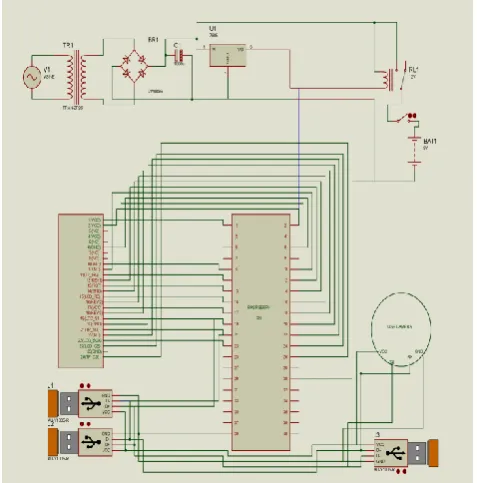
The power supply section is the section which provide +5V for the components to work. IC LM7805 is used for providing a constant power of +5V.
Figure 2. Circuit Diagram of Power Supply
to the level of the desired dc output. A diode rectifier then provides a full- wave rectified voltage that is initially filtered by a simple capacitor filter to produce a dc voltage.
B. Raspberry Pi 3:
It is a portable controller (a small type of computer) which is applicable with various different components like wifi, display another peripherals device.It requires 10 memory cards to store data.
Figure 3. Raspberry Pi 3
It runs a free open source Linux operating system,plugs in to any TV,can power 3d graphics, and connects to internet, very small and very cheap.
C.TFT LCD:
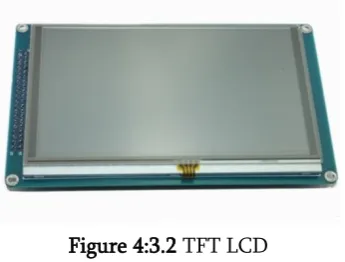
Frequently, a C program must interact with the outside world using input and output devices that communicate directly with a user. For display purpose we interface a LCD display to Raspberry pi. Generally most common LCDs connected to the Raspberry pi are TFT Touch shield displays. TFT technology each pixel is controlled by transistors. We are using 320x240,320 rows and 240 columns So it is convenient to us to know what is currentlyrunning in the system. It displays the start and completes the transfer process.
Figure 4:3.2 TFT LCD
D.SECURITY:
The safety of important software or documents against criminal activity such as Terrorism, Theft or Espionage. We are using three types of security conditions.
1. When project kit is on it ask password for usage of device.
2. When we insert the USB/PENDRIVE, it asks the password before the pen drive is read.
3. When we share any file it ask the password.
E.BATTERY:
Battery backup is for Automatic handover of power supply if power failure happens .It will Charge when power supply is available. To have uninterrupted power supply. To avoid loss of data because of power failure.
F. USB CAMERA:
A webcam is a video camera that feeds or streams its image in real time to or through a computer to a computernetwork. When "captured" by the computer, the video stream may be saved, viewed or sent on to other networks via systems such as the internet, and emailed as an attachment. When sent to a remote location, the video stream may be saved, viewed or on sent there. Unlike an IPcamera (which connects using Ethernet or Wi-Fi), a webcam is generally connected by a USB cable, or similar cable, or built into computer hardware, such as laptops.
IV.
DATA TRANSFER RATE
While transferring the data, very important factor for consideration is nothing but data transfer rate. The data transfer rate is depending on type of USB as well as the speed of the processor. The crystal oscillator plays important role in deciding the speed of the processor. In this project, DMA transfer facility of ARM is used to transfer the data from one USB device to another and hence RAM size of ARM CORTEX-A53 does not affect to the data transfer rate. But it helps to connect high capacity storage device to the system. The designed system supports full speed (10MB) data transfer rate.
V.
DETAILED WORKING
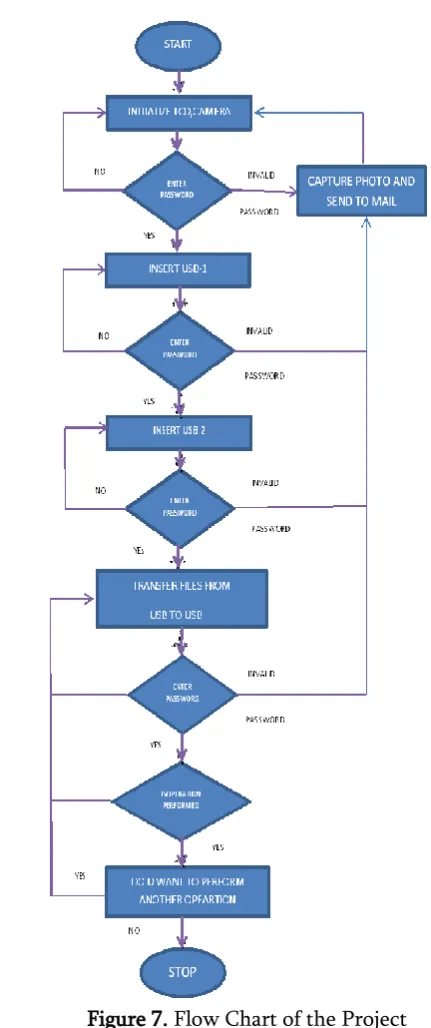
When system turns on, it will ask password to run the System. Processorasks to connect master USB device (drive A) to read USB it will ask Password. After connecting drive A, the USB Processor detects that device as it has ability to detect the USB device which will be connected to its USB ports. When master USB device is detected, system asks to Connect slave USB device (drive B) again it will ask Password and it also get detected by the Processor. When both USB devices are connected and detected then a Processor reads the files from master USB device (drive A) through USB Port and displays it on the LCD. If there are more files present in the USB device then to see that files there is optionavailable to move the page upward or downward . By selecting option using touch screen, user can see all the files present in the master USB device with its extensions (e.g. abc.doc, xyz.pdf, music.avi etc). To select the file to transfer in another USB device, select the line File on which line the file is present which is to be transferred. For example, if the file which is user want to transfer in the another USB device is present on second row of the LCD then select option „2‟ by using touch screen because the file manager 2 holds the file which is present on the second row of the LCD.
After selection of the file the TFT LCD displays the menus „Copy ‟, „ paste‟, „Delete‟ ,„Copy all‟, and „paste all‟ on the same LCD. For the transfer of the selected file to the slave USB device user can choose either „Copy paste‟ or „cut paste‟ or „copy all‟ or „paste all‟ option using touchscreen. If user wants to delete the file then third option is „Delete‟ and to cancel the operation user has to select fourth option „Cancel‟ by using touch screen. Once the operation is selected the ARM Processor performs theordered operation and showing again the files from the master device on the LCD for the next file transfer. If user want to continue with next data transfer then by selecting the file again the operation can be continued otherwise the user can turn off the device. We are using USB web camera as our one of the security .Through our camera we can easily know that Which person is stolen our information .when any known person type the wrong password/invalid password at any time may be when device on /sharing file//inserting USB .through the camera it capture the image and send to our email id .In email we can check the image of an unknown personThough which we can secure our file/document/any important information we can secure by this camera. The camera is connected at the USB port of raspberry pi .the camera is only input to the Raspberrypi.
VI.
FLOW CHART
The work flow of the system is shown in the following flow chart
Figure 7. Flow Chart of the Project
VII.
SOFTWARE DESCRIPTION:
1. LINUX
Linux was originally developed as a free operating system for Intel x86-based personal computers. It has since been ported to more computer hardware platforms than any other operating system. It is a leading operating system on servers and other big
iron systems such as mainframe computers and supercomputers. Linux supports a vast variety of hardware devices, probably more than any other os. Linux supports a huge variety of applications and networking protocols. Linux is scalable, from small consumer-oriented devices to large, heavy-iron, carrier-class switches and routers. Linux can be deployed without the royalties required by traditional proprietary embedded operating systems. Linux has attracted a huge number of active developers, enabling rapid support of new hardware architectures, platforms, and devices.
2. PYTHON
Python is an interpreter, interactive, object-oriented programming language. Python is a widely-used high level programming language. Its elegant syntax allows you to clearly define application behavior using fewer lines of code than would be required in other languages like VB. It supports multiple programming paradigms including imperative, functional and object oriented styles, allowing a wide range of tasks to be performed.
3. PUTTY
PuTTY is a free and open-source terminal emulator, serial console and network file transfer application. It supports several network protocols, including SCP, SSH, Telnet, rlogin, and raw socket connection. It can also connect to a serial port. The name "PuTTY" has no official meaning.PuTTY was originally written for Microsoft Windows, but it has been ported to various other operating systems. Official ports are available for some Unix-like platforms, with work-in-progress ports to Classic Mac OS and macOS, and unofficial ports have been contributed to platforms such as Symbian, Windows Mobile and Windows Phone.
VIII.
RESULTS
different file type are transferred and time required for the transfer is noted down.
Table 1
Data size Transfer time Transfer Time
(Using PC)
(Withou
t Using PC) using the Designed System
Video (930 3 Minutes 3.5 Minutes MB)
Text file (82.6 1 Second 2 Second KB)
PDF document 0.5 Second 1.5 Second (1.23 MB)
Images (1.15 1 Sec 1 Second MB)
Images (1.21 7 Minutes 30 About 8 GB) Seconds Minutes
pptx file 0.5 second 1 seconds (1.42MB)
MS word file 1 second 1 seconds (2.23MB)
By observing above table, we can say that the time required for transferring the file by using PC and without using PC i.e. using the designed system in nearly equal due to different processing speed. There is no more time difference as the full speed transfer rate of both the system is same i.e. 12 Mbps
The below image explains when the kit is switched ON and it will display to enter the password to access the operation.
Figure 8. Kit in ON condition
Figure 9. Operation to be performed
The above image shows that the when two USB‟s are connected and the operation should be performed like copying, deleting, pasting, copying all the files, pasting all the files etc.
Figure 10. Invalid password entered
Figure 11. Image capture in camera
The above figure shows that the image is captured when the password is entered in the process.
By observing above results and discussion, it can be concluded that, the designed system “Portable Secured Data transfer between two USB‟s” works as good as PC for the data transfer. As there is no more time difference between times, required to transfer the data using PC and time required to transfer the data using designed system nothing but without using PC. The designed system provides different options to transfer the data like „cut paste‟ and „copy paste‟. It also provides one more option „delete‟ which allows us to delete the file without transfer. Some other advantages includes power saving, time saving, easily portable and handy. And the important advantage is the virus if it ispresent in one USB device does not affect to the filespresent in another USB device. It shows the file name with extension (e.g. .pdf, .jpg, .pptx, .docx, etc.) This helps to select the file for the transfer. But one disadvantage is that we can only transfer the file, but cannot read the file or open the file.Mainly the important advantage is Secure the data can‟t theft from system.
X.
FUTURE SCOPE
1. It can transfer the data from pen drive to systems.
2. We can handle the data of pen drive by making folders or deleting them using the display and scroll keys.
3. We can implement the project for reading, editing any data by installing the software‟s which supports for opening the document like ms word, notepad, etc.
4. It can also be implemented to provide security for data transfer with the help of Ethernet.
XI.
REFERENCES
[1]. Tiwari and Motghare "Flash drive to ash drive datatransfer" International Refereed Journal of Engineeringand Science (IRJES) ISSN (Online)
2319-183X,(Print)2319-1821Volume 2, Issue 3(March 2013),PP.17-23
[2]. Gawali, KetanPandurang Kale, Mahesh Sanjay Gund,Ganesh BalasahebGarware. "Communication In USBsFor Data Transfer" International Journal of Engineering and Advanced Technology(IJEAT) ISSN:2249 8958, Volume-2, Issue-4, April 2013
[3]. Subhash S and Shinde A. A. "Data Transfer Between two USB Disk Without use of Computer".International Journal of Emerging Technology and Advanced Engineering, 2013; 3:595-598
[4]. Gawali V S and Agarkar A M. "Pen Drive to Pen Driveand Mobile Data Transfer Using ARM". IOSR Journalof Electronics and Communication Engineering,:43-47
[5]. K. B. Tripathy, A. Sharma, P. Goyal, A. Sharma and V. Upmanu "A Concept Of Data Transfer Via Bluetooth In Pen Drive", Journal of Global Research inComputer Science, 4(4), 2013. [6]. D. Juriasinghani and T. Krishna Dev,
"Embedded System for USB Wi-Fi Bridge", International Journal
[7]. www.raspberry.org.
[8].
www.usb.orgBIOGRAPHY
R. Surender Reddy having 6 years of Teaching Experience, field of interest is Digital signal processing and VLSI system Design. Presently working as Assistant Professor in Department of Electronics and Communication Engineering, LORDS Institute of Engineering and Technology,Hyderabad.
C. Niharikapresently pursuing B.Tech Final Year in Lords Institute of Engineering and Technology, Hyderabad, Telangana India.
Rohit Sharma presently pursuing B.Tech Final Year in Lords Institute of Engineering and Technology, Hyderabad, Telangana India.