International Journal of Applied Information Systems (IJAIS) – ISSN : 2249-0868 Foundation of Computer Science FCS, New York, USA
Volume 8– No.6, April 2015 – www.ijais.org
Automated Attendance using Android Devices
Brian James
Mendonca
Student Xavier Institute of
Engineering, Mahim, Mumbai.
Gavin D’mello
Student Xavier Institute of
Engineering, Mahim, Mumbai.
Rachel D’souza
Student Xavier Institute of
Engineering, Mahim, Mumbai.
Jyotsna More
Professor (Guide) Xavier Institute of
Engineering, Mahim,Mumbai
ABSTRACT
The automated attendance android application is aimed at providing a new, quick and easy way of registering attendance. It tries to reduce the nuances of the traditional or manual process of marking attendance in which the teacher has to call out the roll number of every student in the class and mark his/her attendance after he/she has acknowledged or responded to it. An online system has been developed which aims to reduce the duration of the entire attendance taking process and reduce proxies entirely. It also includes an offline feature which is kept as a contingency plan if the online feature cannot function normally due to some technical difficulty and it has the same ground rules as the generic process. Teachers will no longer have to carry any sheet or register to mark student’s attendance. Teachers can generate the defaulters list by retrieving the data from the database stored online and hence the entire process will require less or no paper at all.
General Terms
Android, web services, automation.
Keywords
Android, attendance, Teacher’s personal digital assistant, attendance tracker, dynamic timetable.
1.
INTRODUCTION
The generic way of taking attendance is the conventional method of roll calls with occasional proxies. The process tends to be very long and cumbersome when the number of students is very large. The android application takes in mind all these parameters and tries to ease this activity for the teachers. One can also use other technologies like RFID, Bluetooth and biometric systems [1] [2] [3]. These systems come with an intended cost and an added cost of installation. Apps are pretty avid these days and can be installed and used inexpensively.
1.1
Problem Statement
The manual process is very tedious and hard to keep a track of. The task is very mundane. Also it doesn’t allow freedom from proxies. Other systems like RFID and biometric systems can be applied to help the cause but these only increase the cost as they require regular maintenance and again proxies cannot be stopped or completely eliminated [1] [6]. The Bluetooth system
is quite easy to implement but is useful solution when the no people in the classroom is down to single digits [3]. The application isn’t scalable to the most. Perfect attendance marking requires concentration and even the smallest of lapses can help proxies happen. Concentration lapses are natural and also the students sometimes forget to call out their names. This is again irritating for the teacher to revisit the page after a long lecture to mark the attendance of the students who ‘forget’. The new system introduced will solve the problem to a greater extent.
2.
PREVIOUS WORK
Countless systems have been developed in schools and industries to keep a track of the attendance. These systems are good but they are plagued with performance and scalability problems. The following systems are implemented in chronological order.
2.1
Biometric System
These systems usually take a unique element of the anatomy and use it for good effect for example iris, palm, fingerprints etc. These systems are perfect for high profile security agencies and are the need of the hour but these systems cannot be used in educational institutions and factories. The data keeps scaling up and the system needs to be maintained and refreshed for further use. The attendance system using android devices provides a cheaper solution compared to the biometric systems [2] [4]. The iris recognition system is another useful system and isn’t susceptible to proxies but the main drawback being injuries to the eye [4]. A contingency plan could include storing data about both the eyes which would increase the amount of storage resources required in an organization. The same goes for face recognition which assures uniqueness but has the same drawbacks [5].
2.2 Bluetooth System
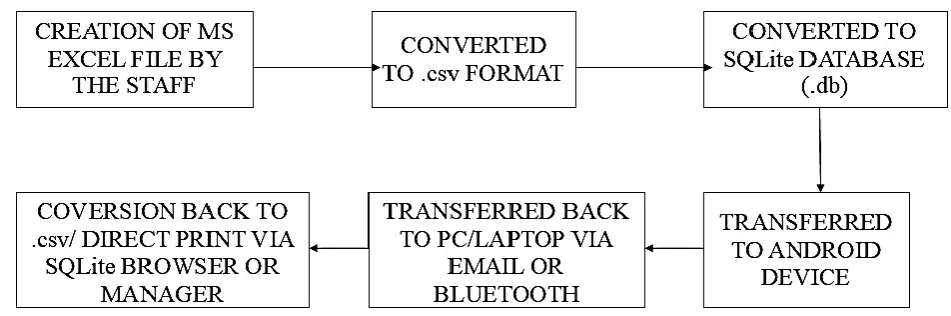
Fig 1: Block diagram of offline implementation
2.3
RFID System
The RFID systems are more popular. Students are given RFID cards along with their Identity cards. These cards need to put in the RFID reader before the student enters the classroom. Systems like these require permanent supervision because students can sense two cards leading to a proxy and also improper usage can harm the RFID reader [6]. It also requires maintenance [1].
3.
PROPOSED METHOD
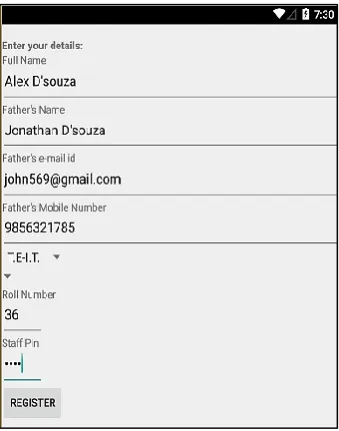
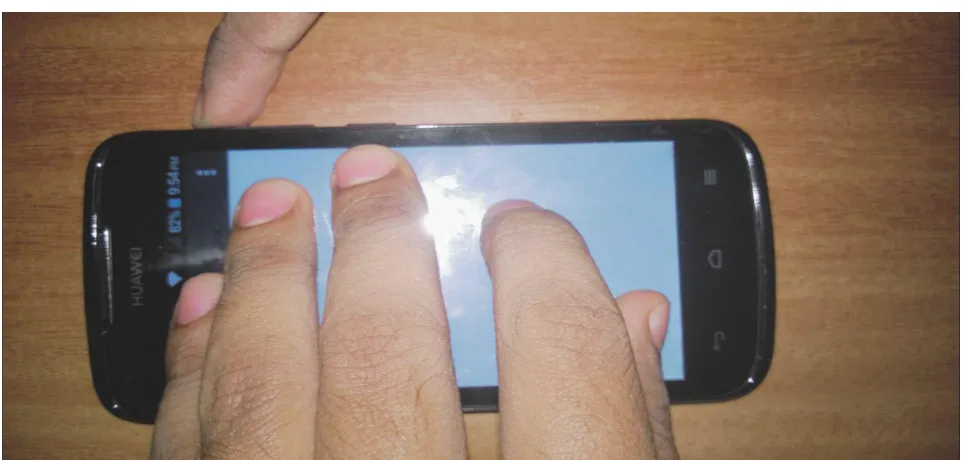
In the online system, the student will first have to register himself/herself on the app. The information will be routed from the Apache Server to the database. The student will be given a pin and the student can register themselves with the pin. The IMEI of the cell phone will be taken during registration and stored in the MYSQL database or SQLite 3 [9]. The students will not be allowed to register again if they have already registered. The student can then log into the app. The teacher will provide the student with a code. This code ensures that the students present in the class will only be able to mark their attendance and not the one’s waiting outside the class or absent. The code has a short time limit which prevents students from passing the code via messaging apps to their friends who are absent. The student has to enter the code and proceed. The student then has to perform an activity which is more like an active captcha. This is done for two purposes. First, to avoid interactions with the bots and secondly to avoid proxies. The student will get his attendance after performing the activity. This will be a five touch activity in which the student will put his five fingers on the android screen for some amount of time. The students will then be prompted to press the volume key. This will ensure that student uses only one phone and there are no proxies.
People who fail to perform this task can get their attendance by the offline utility available with the teacher. Students who haven’t brought their cell phone can register their attendance through a friend’s cellphone after taking prior permission from the teacher. So the students will have to use the following
home grown algorithm to get their attendance:- 1) Give his/her credentials in the registration form. 2) Enter the code provided by the teacher
3) Complete the pointer verification
Also given that the given biometric system can be implemented in the app, they do not give 100% reliability and hence the usage of an approach to increase the reliability and potency with a complete software approach.
3.1
Implementation Methodology
The first table will have all the information of the students. The information will include name, parent’s email, and student’s email, roll no etc. The other tables will have the some parts of the information which will be available in the first table. Basically they will be normalized tables.
3.2
Software Requirements
The application is designed to have backward compatibility with the lower APIs. It will work on the following devices.
Android 5.0,5.1
Android 4.0,4.1,4.2,4.3,4.4 Android 3
Android 2.3,2.2,2.1
3.3
Hardware Requirements
International Journal of Applied Information Systems (IJAIS) – ISSN : 2249-0868 Foundation of Computer Science FCS, New York, USA
Volume 8– No.6, April 2015 – www.ijais.org
Fig 2: Block diagram of online implementation
4.
EXPERIMENTAL RESULTS
The screenshots of the system are as follows. It includes all the working modules and all the activities mentioned in theory. Offline results are as follows:-
Fig 3: Attendance mode selection screen for teacher
Fig 5: Final database view in offline mode
results:-Fig 7: Code setting activity for the teacher and a similar screen is displayed to students for code matching.
Fig 8: Code processed on the server
Fig 9: Registration result in the database
International Journal of Applied Information Systems (IJAIS) – ISSN : 2249-0868 Foundation of Computer Science FCS, New York, USA
Volume 8– No.6, April 2015 – www.ijais.org
Fig 11:Attendance result in database
Fig 12:Activity for marking someone for manually verified attendance
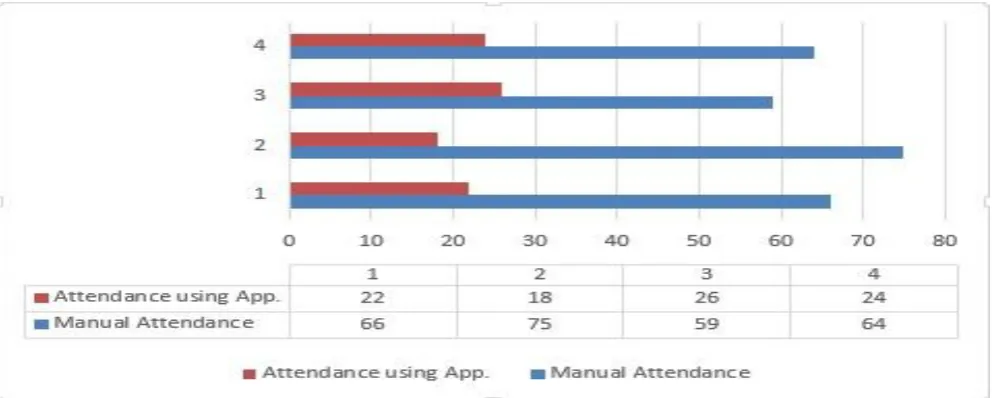
Fig 16: Graph to contrast between manual and the proposed system
5.
CONCLUSION AND FUTURE WORK
The conclusion and future work of the project is as follows:-
5.1
Conclusion
Therefore, the offline attendance system using an android device is a very effective tool which can be used to a great extent. The system is portable and can be easily installed and used on any mobile phone running Android OS. Using this application proxies are completely avoided with a pure software approach. The student will authenticate himself with the five pointer touch activity. The activity will take up most of the student’s time. The student will spend his time authenticating himself and in the bargain will not be on reach for others. Also, as this is a pure software approach the cost
will be kept down considerably. It will reduce the time, effort and resources such as paper for
both the parties involved in the process. Also, it will eliminate the tedious work of the teachers of maintaining different attendance sheet for different classes and different subjects. The system will also avoid number of proxies in a class as the teacher will have constant eye contact with the class.
5.2
Future Work
The system can be further enhanced and several other functionalities can be added by implementing online method. In offline method teachers will still have to call out roll numbers for marking the presence of a student, this drawback will be solved in the online implementation. The online method will basically act as a teacher’s PDA and student’s attendance assistant
6.
ACKNOWLEDGMENTS
Our thanks to our teacher Prof. (Mrs.) Jyotsna More who has encouraged us towards creating this document and also the in and out support given for the same by other faculty members from our college.
7.
REFERENCES
[1] Unnati A.Patel and Dr. Sawminarayan Priya R. 2014. “Development of a Student Attendance Management
System Using RFID and Face Recognition: A Review”, International Journal of Advance Research in Computer Science and Management Studies, Volume 2, Issue 8, August 2014; Online ISSN: 2321-7782.
[2] Seema Rao and Prof.K.J.Satoa, “An Attendance Monitoring System Using Biometrics Authentication”, International Journal of Advanced Research in Computer Science and Software Engineering, Volume 3, Issue 4, April 2013, ISSN: 2277 128X.
[3] Vishal Bhalla, Tapodhan Singla, Ankit Gahlot and Vijay Gupta. “Bluetooth Based Attendance Management System ”, "Bluetooth Based Attendance Management System”, International Journal of Innovations in Engineering and Technology, Vol. 3 Issue 1 October 2013; ISSN: 2319 – 1058.
[4] Seifedine Kadry and Khaled Smaili. “A Design And Implementation Of A wireless Iris Recognition Attendance Management System ”, Information Technology And Control, 2007, Vol.36, No.3; ISSN 1392 – 124X.
[5] Nirmalya Kar, Mrinal Kanti Debbarma, Ashim Saha, and Dwijen Rudra Pal. “Study of Implementing Automated Attendance System Using Face Recognition Technique” International Journal of Computer and Communication Engineering, Vol. 1, No. 2, July 2012
[6] Arulogun O. T., Olatunbosun A., Fakolujo O. A., and Olaniyi O. M, “RFID Based Students Attendance Management System ” International Journal of Scientific & Engineering Research”, Volume 4, Issue 2, February-2013; ISSN 2229-5518.
[7] Gabriel Fielding. Android tutorial webpage [Online] Available at: http://www.androidhive.info.
[8] Android development [Online] Available at: http://www.developers.android.com.