Web Server Management: Running Apache 2.2 under
Linux
Bob Dowling
University of Cambridge Computing Service
[email protected]
Jon Warbrick
University of Cambridge Computing Service
[email protected]
Web Server Management: Running Apache 2.2 under Linux by Bob Dowling and Jon Warbrick
Installation:This course will first illustrate how to load the Apache package on a Linux server. The course uses a SUSE Linux Enterprise Server version 10 (SLES 10) system. This section of the course is Linux specific, and to a large extent SLES specific.
Configuration:The course will then demonstrate how to configure the web serverfrom the ground up. The course does not teach tweaking of the default configuration but rather the writing of a configuration from scratch. The configuration will be suitable for a system running multiple virtual hosts. This part of the course applies to Apache on any platform.
These notes, and supporting material such as copies of the configuration files used in the course, are available athttp://www-uxsup.csx.cam.ac.uk/~jw35/courses/apache/Questions from
web-server administrators in the University about running Apache, or other web matters, can be sent to <[email protected]>.
Chapter 1. Installing the software
In this chapter we will install the Apache web server package, and the packages on which it depends, and we’ll briefly review the changes that doing so makes to the system. The details of this chapter are SLES-specific, but the general approach applies to any Linux system.
Installing the packages
We need to install the Apache package if we have not done so already. To do this we will have to be root. We either log in as root orsuto root. If yousuplease be sure to use the-option to get the right environment.
$ /bin/su -Password: password
#
SLES’s Apache package is called apache2. SLES comes with various tools which can install and update packages, includingrpm,yast2, andrug. We will userug, which can fetch packages, install them and resolve package interdependencies. We assume that the system is already configured with details of a suitable installation source.
# rug install apache2 Resolving Dependencies...
The following packages will be installed: apache2 2.2.3-16.2 (SLES10-Updates) apache2-prefork 2.2.3-16.2 (SLES10-Updates) apache2-prefork-2.2.3-16.2.i586[SLES10-Updates] needed by apache2-2.2.3-16.2.i586[SLES10-Updates] libapr1 1.2.2-13.2 (http://bes.csi.cam.ac.uk/install/SLES10-i386?ali... libapr1-1.2.2-13.2.i586[SUSE-Linux-Enterprise-Server-i386-10-0-200... libapr-util1 1.2.2-13.2 (http://bes.csi.cam.ac.uk/install/SLES10-i38... libapr-util1-1.2.2-13.2.i586[SUSE-Linux-Enterprise-Server-i386-10-... Proceed with transaction? (y/N) y
Downloading Packages... Transaction...
Transaction Finished
What happened here? Firstrugselected the most recent version of the apache2 pack-age, and then it identified additional packages that will be needed by the one we explicitly asked it to install, so-called ’dependencies’. One of these, apache2-prefork, provides one particular flavour of the actual web server. Following confirmation from us,rugthen downloaded and installed .
If we had access to the necessary package files, perhaps from a shared server or be-cause we had already downloaded them, then we could have simply installed them using therpm. However if we did that we’d have been responsible for selecting the most recent version of each package, and also for identifying and resolving the de-pendency issues.
Chapter 1. Installing the software
Changes made to the system
We should quickly examine some of the changes have been made to the system by the installation of these packages. Between then, apache2 and apache2-prefork packages have installed a web server (in/usr/sbin/) but they have also installed files in other
locations.
Locations added or changed by the installation:
• /etc/apache2/: this is where Apache expects to find its configuration files. Many
of the files installed here are part of SLES’s custom system for managing Apache, which we won’t be using. Howeverhttpd.confwill be important because it con-tains Apache’s main configuration. We’ll be doing lots of work on this file.
• /etc/init.d/apache2: is the script run at system startup, and other times, to start
and stop the Apache server
• /etc/logrotate.d/apache2: a configuration file to manage log file rotation. We’ll come back to this later.
• /usr/lib/apache2/and/usr/lib/apache2-prefork/: much of Apache’s
func-tionality is implemented as a series of plug-inmodules. Much of this course will be devoted to what they can do and how to get them to do it. Each one exists as a library file and they are stored in this directory.
• /usr/share/apache2/: various resources that Apache can be configured to use
are stored in these directories.
• /var/log/apache2/: this (empty) directory is created as a place to store the log files that the web server will write as it works. Anapache2subdirectory is used because there will typically be more than one log file in use at any time. This sub-directory holds them together. We will discuss log files in detail inChapter 7. In addition, the directory /srv/wwwwas created by the base SLES install and pro-vides the default location for files served by the web server. In particular, thehtdocs
subdirectory, which is initially empty, is the basic website. Anything put here will ap-pear on the website. Seethe Section calledQuick and Dirty Web Serverfor how to get a web site up and running as quickly as possible. Other subdirectories of/srv/www
support software that we won’t be covering in this course.
Note that the/srv/wwwdirectory tree is owned by root. Any changes to the website as the system currently stands need to be done by root
Programs included with the web server
• /usr/sbin/ab2: This a stress-tester for the web server. Please do not stress-test people’s servers without their permission.
• /usr/sbin/htdbm2, /usr/sbin/htdigest2, /usr/sbin/htpasswd2:
These manipulate user and password information for web
access controls. We will see htpasswd2 and htdigest2 later in the Section calledAccess control by client identityin Chapter 10 but we will not be considering the other commands in this course.
• /usr/sbin/logresolve2: If a log file contains IP addresses rather than DNS names for clients then this program will run through the log file and write out a copy with host names replacing IP addresses. Because it caches resolved addresses it does this rather efficiently. We will be covering log files (and why they might have IP addresses rather than host names) inChapter 7.
• /usr/sbin/apache2ctl: This is the script that is provided by the Apache team to
simplify turning on and off the service. However, to keep the startup and shut-down of the server consistent with the rest of the system the standard startup scripts don’t use this for the main work.
Chapter 1. Installing the software • /usr/sbin/rotatelogs2: This is an Apache utility providing for rotating log files.
However, it is not used by a SLES system because there is a system-wide log rota-tion facility which is used instead for consistency with the rest of the system. This will be considered in detail inthe Section calledLog rotationin Chapter 7.
• /usr/sbin/suexec2: This is ahelper program for Apache that lets the server run
external programs (e.g. CGI programs) as a different user than the user running the web service itself. As we will not be covering CGI programming in this course we will not be making any use of this program. As it is a setuid root program, you may want to remove it if you don’t need it.
• /usr/sbin/apxs2: This is a tool for building
Apache modules from source. We will use this in
the Section calledUniversity of Cambridge ’Raven’ authenticationin Chapter 10 when we build a module to let our server use the University’s Raven authentication service.
The ’2’ on the end of the names of these programs is a feature of SLES’s packag-ing of Apache - it would allow Apache 1 and Apache 2 packages to coexist on the same server. In many other installations the commands will not have the additional ’2’. They may also be in different locations, for example some may be in/usr/bin/
rather than/usr/sbin/.
Quick and Dirty Web Server
The majority of this course concerns the (re)configuration of the web server. How-ever, we should briefly describe what a system administrator should do if he or she is happy with the default (which is not a bad set of defaults, by the way).
If the system administrator is happy to do all the changes to the web site as root then nothingmore needs to be done other than turning on the web server.
To enable the web server (so that it gets started at system boot) the system adminis-trator needs to use thechkconfigcommand.
# chkconfig --list apache2
apache2 0:off 1:off 2:off 3:off 4:off 5:off 6:off # chkconfig apache2 on
# chkconfig --list apache2
apache2 0:off 1:off 2:on 3:on 4:on 5:on 6:off
The next time the system is rebooted, the web server will be started. If you don’t want to wait until a reboot, or don’t want to reboot, then it can be manually started by running the script that would be run at boot time.
# /etc/init.d/apache2 start
Starting httpd2 (prefork) done
If you take this easy approach then you need to know the following few facts. • If the server’s DNS name is server then any file placed in
/srv/www/htdocs/some/path/here/file.html will be presented as URL
http://server/some/path/here/file.html.
• Two log files will be maintained in the directory /var/log/apache2 called access_log and error_log. These will be rotated weekly or when their size reaches 4MB, and up to 99 old log files will be kept providing they are less than a year old.
You can make life much simpler for yourself (as the system administrator) if you cre-ate a group of users who are allowed to edit the document tree/srv/www/htdocs/. We cover the steps needed to achieve this later in the course.
Chapter 1. Installing the software
Apache documentation
Apache comes with a large amount of documentation which many people seem to ignore! SLES provides a copy of the manual for the appropriate version of Apache in the package apache2-manual. If you install this package and use the quick and dirty approach above then a copy of the manual is available athttp://server/manual/
# rug install apache2-doc Resolving Dependencies...
The following packages will be installed: apache2-doc 2.2.3-16.2 (SLES10-Updates) Downloading Packages...
Transaction... Transaction Finished
If you don’t have local access to a copy of the manual, current versions can always be found from the Apache Documentation Project (http://httpd.apache.org/docs-project/).
Chapter 2. The site’s design
This chapter will describe the design of a web site that we will set as our goal for this course and discuss a small amount of theory.
Site description:
We will describe the web site that we want to create. This will be a website with a number of modern features. In particular we will demand the facility to run multiple virtual hosts (that is, different websites running off the same server).
Virtual hosting:
There will be a brief diversion while we describe exactly how virtual hosting is pos-sible. There are a variety of different ways to achieve this goal.
The server we want
We are going to describe the server in the terms that a manager would use to describe it: rather vague. This is an excuse for this course to introduce new features one at a time.
Sites:
We are told that the server must serve two web sites. One, www.dept.cam.ac.uk, for a main department site and one, prg.dept.cam.ac.uk, for Department’s ’Prevarica-tion Research Group’; the corresponding web pages will be under the control of two different groups of users.
Facilities:
The “usual facilities” should be provided. This is too vague a specification in reality, but it is typically all the average manager will ever ask for. In this course we will assume that this means index pages, automatic directory listing, user home pages and access controls. To illustrate how to create tied-down servers we will also design the server to be thisand no more.
Logging:
Logs should be kept for as long as possible. We will have to consider the DPA impli-cations of this part of the specification.
One server, multiple ’virtual’ hosts
There are (at least) three different ways that a single web server, and a single copy of Apache, can host more than one web site. The important issue here is how Apache can work out which site is relevant for each request.
Multiple ports:
A web server can listen on more than the default TCP port (number 80) and offer dif-ferent web sites on each port. To identify a non-standard port, its number must follow the server name in the URL: http://www.dept.cam.ac.uk:port/some/path/here/. Apache uses the port number of the incoming query to distinguish between web sites. Beware that from some environments, particularly those behind firewalls or on wireless networks, it may be difficult or impossible to access web servers running on non-default ports.
Chapter 2. The site’s design Multiple addresses:
A single system can have more than one IP address and each can have a different web site attached to it. This leads to different server names appearing in standard URLs (i.e. there’s no :portelement in the URL) but the server names correspond to different IP addresses of the system and correspond to different web sites. Apache uses the destination IP address on the incoming query to distinguish web sites. Nowadays this approach is not encouraged because IP addresses are in short supply.
Multiple aliases
Also known as name-based virtual hosting, this is the most common form of virtual hosting. The server only has a single IP address, but different names in the DNS cor-respond to that address. So www.dept.cam.ac.uk and prg.dept.cam.ac.uk both map on to the same IP address and therefore the same server. This raises the question of how the web server can distinguish requests to the two different web sites.
Structures of HTTP queries and responses
To answer this question, we need to consider, briefly, the nature of a web request. Exactly what gets sent to a server when a URL is requested? (And for that matter, what gets sent back?)
Here’s an example of what might get sent:
GET /index.html HTTP/1.1 Host: www.dept.cam.ac.uk
User-Agent: Mozilla/5.0 (X11; U; Linux i686; en-GB; rv:1.8.1.1) ... Accept: text/xml,application/xml,application/xhtml+xml,text/html;... Accept-Language: en-gb,en;q=0.5 Accept-Encoding: gzip,deflate Accept-Charset: ISO-8859-1,utf-8;q=0.7,*;q=0.7 Keep-Alive: 300 Connection: keep-alive
To understand name-based virtual hosting consider just the first two lines. TheGET request only includes to the local element of the URL. The second line specifies the host name that is being asked for it.
HTTP Query Structure
GET
The first line declares that this is a request from a client that wishes to read in-formation from the server.GETis the most common HTTP method.
/index.html
The second term in the first line is thelocalelement of the URL requested. Note that the leading part of the URL containing the server name has been stripped out.
HTTP/1.1
The final element declares that the query is couched in the language of version 1.1 of the HTTP standard.
Host: www.dept.cam.ac.uk
The second line indicates which server the query was addressed to. It is this element of the query that allows a web server to distinguish between web sites
Chapter 2. The site’s design based purely on their names, regardless of the port number(s) or IP address(es) used.
User-Agent: Mozilla/5.0 (X11; U; Linux i686; en-GB; rv:1.8.1.1) Gecko/20060601 Firefox/2.0.0.1 (Ubuntu-edgy)
This optional line identifies the browser. Some servers vary the output according to this header, but you should remember that it is a hintand can be trivially changed on many browsers.
In this caseMozillaidentifies the browser as one of the Netscape/Mozilla fam-ily and5.0ties it down to a version of Mozilla. Other information allows us to identify that it is a browser is running under Linux on an Intel platform, that it was built for theen-GBlocale, and indicates the version numbers of the various
components.
Accept: text/xml,application/xml,application/xhtml+xml,text/html; q=0.9,text/plain;q=0.8,image/png,*/*;q=0.5
This specifies the formats the browser can accept and how keen it is on them. Servers can be configured to negotiate various different formats of response de-pending on these parameters.
text/xml,application/xml,application/xhtml+xml means that the browser is happy to accept MIME content types text/xml, application/xml, or application/xhtml+xml; otherwise it will accept text/html but the qualifier q=0.9 means that, given a choice, the browser would prefer to receive one of the earlier types (default q=1.0) than text/html. text/plain means that it can accept plain text too. The qualifier q=0.8 makes this less preferred than anything else. The browser has a general preference for image/png. Finally it will accept any format (*/*) but is not keen on them (q=0.5).
We will meet MIME content types again inChapter 4.
Accept-Language: en-gb,en;q=0.7,es;q=0.3
Just as it is possible to negotiate formats it is possible to negotiate languages. A page might appear in more than one language and the browser specifies what languages it can cope with and how desirable they are. One of the authors of this document is learning Spanish and has Spanish as a third choice in the language selections after British English and any other sort of English.
Accept-Encoding: gzip, deflate
Just as there was negotiation over MIME content type there can also be nego-tiation over MIME transfer encoding. This is a mechanism for the server and browser to agree on a way to (typically) compress the data stream prior to trans-fer.
Accept-Charset: ISO-8859-1,utf-8;q=0.7,*;q=0.7
The final topic for negotiation is the character set of any text that will be sent. In this case, ISO Latin 1 is preferred, with UTF-8 and indeed everything else coming second.
Connection: keep-alive
This tells the server that it need not close the network connection after sending back the response to the query as other requests may be sent down the same con-nection. As setting up and tearing down connections are expensive operations this is a major efficiency boost.
Keep-Alive: 300
This instructs the server to keep the connection alive for 300 seconds in case there are any more requests. After 300 seconds of idleness the server will drop
Chapter 2. The site’s design the connection.
For the record, here is the response. To make the example work, I’ve installed a trivial
index.htmlweb page. We will use this later. HTTP/1.x 200 OK
Date: Wed, 21 Feb 2007 17:53:35 GMT Server: Apache/2.2.3 (Linux/SUSE)
Last-Modified: Wed, 21 Feb 2007 17:53:33 GMT Etag: "1c0e43-132-3caa4140"
Accept-Ranges: bytes Content-Length: 306
Keep-Alive: timeout=15, max=100 Connection: Keep-Alive
Content-Type: text/html
<!DOCTYPE html PUBLIC "-//W3C//DTD XHTML 1.0 Transitional//EN" "http://www.w3.org/TR/xhtml1/DTD/xhtml1-transitional.dtd"> <html xmlns="http://www.w3.org/1999/xhtml" lang="en">
<head>
<title>The DEPT web site</title> </head><body>
<h1>Welcome to DEPT</h1>
<p>This is the DEPT web site.</p> </body>
</html> </html>
Chapter 3. Getting started
Clean slate:
Rather than modify the existing default configuration file, we are going to delete it and start from scratch. We will start by removing the existing configuration script. This may seem dramatic but this course seeks to explainevery single lineof the con-figuration file that will finally be written. After we delete the file we will note that the web server won’t start.
Simplest configuration:
The aim of this section is to give us enough configuration so that the server will at least start, even if it won’t do anything useful.
One more line
We will add one more line to the most basic configuration file we can have to turn off many defaults so we can see them explicitly when we need them.
The least we can get away with
Deleting the configuration file is easy. Go on, you know you’ve always wanted to do it! What’s the worst that could happen?
# rm /etc/apache2/httpd.conf
The web server will not start now. First it will complain about not having a configu-ration file. Perhaps we should have kept a backup...
# /etc/init.d/apache2 start
/apache2/httpd.conf: No such file or directory The command line was:
/usr/sbin/httpd2-prefork -f /etc/apache2/httpd.conf failed
Next, we will create an empty configuration file and see that that just changes the error message.
# touch /etc/apache2/httpd.conf # /etc/init.d/apache2 start
Starting httpd2 (prefork) no listening sockets available, shutting down Unable to open logs
startproc: exit status of parent of /usr/sbin/httpd2-prefork: 1 failed
It must be admitted that as error messages go, “no listening sockets available, shut-ting down” is a fairly obscure way of saying “you’ve not told me what to do”. Actu-ally it means, “you’ve not told me to listen for any incoming requests so I might as well quit now”.
We will start by detailing an absolutely minimal configuration file that gets the server launched but nothing else.
Listen 80
The command to tell the server to listen for connections is Listen. This takes one argument, specifying which interface and port to listen on. The default port assigned to web services by the Internet authorities is port 80. Quoting just a port number
Chapter 3. Getting started
means to listen on that port number oneveryIP-enabled interface. Simply to launch the web server this should be all we need!
# /etc/init.d/apache2 start
Starting httpd2 (prefork) failed
Unfortunately, the launched web server then immediately shuts down. By default, the web server logs error messages in an error long file. In SLES, as in many Linux distributions, this will be/var/log/apache2/error_log. We can look in there for clues as to what we need next.
[Wed Feb 21 15:54:58 2007] [alert] (2)No such file or directory: getpwuid: couldn’t determine user name from uid 4294967295, you probably need to modify the User directive
What does this error message mean? It means that the web server needs to know who to run as. A standard SLES install comes pre-configured with a user wwwrun and a group www for the web server. We need to tell it to use them. This is done with the UserandGroupcommands in the configuration file.
User wwwrun Group www
While we are at it, we add one “unnecessary” line which has the effect of turning off various settings which default to being on. We do this for two reasons. The first is didactic; we want to meet these options explicitly when they become relevant rather than relying on defaults. The second is our decision to provide what was specified and no more. This line will turn off everything and we must explicitly turn on what we want.
Listen 80 User wwwrun Group www Options None
And if we start the web server now, with this four line configuration file, it launches just fine and stays running.
# /etc/init.d/apache2 start
Starting httpd2 (prefork) done
# tail -1 /var/log/apache2/error_log
[Wed Feb 21 16:31:46 2007] [notice] Apache/2.2.3 (Linux/SUSE) configured --resuming normal operations
# ps -ef | grep apache2
root 6377 1 0 16:31 ? 00:00:00 /usr/sbin/httpd2-prefork ... wwwrun 6378 6377 0 16:31 ? 00:00:00 /usr/sbin/httpd2-prefork ... wwwrun 6379 6377 0 16:31 ? 00:00:00 /usr/sbin/httpd2-prefork ... wwwrun 6380 6377 0 16:31 ? 00:00:00 /usr/sbin/httpd2-prefork ... wwwrun 6381 6377 0 16:31 ? 00:00:00 /usr/sbin/httpd2-prefork ... wwwrun 6382 6377 0 16:31 ? 00:00:00 /usr/sbin/httpd2-prefork ... root 6392 3260 0 16:34 pts/0 00:00:00 grep apache2
But, as the figure shows, it’s not a single daemon that gets launched. There aresixof them. The first column of thepsoutput gives the owner of the process and the second gives the process ID orPID. One of the server processes is owned by user root and the others by user wwwrun. That root-owned process is the parent process of all the other processes. What happens is that the startup script that we manually invoked launched the parent, root-owned process (PID 6377). It in turn launched five child processes owned by wwwrun (PIDs 6378 - 6392).
Chapter 3. Getting started Why? Well, the idea is that the parent process does not service any request at all. Its sole purpose is to keep an eye on the child processes. If one of them dies for any reason the parent decides whether or not to replace it. (If they have all been idle for the past 48 hours it may decide that four processes are plenty.) If they are all kept too busy the parent may choose to start up some more processes to share the load. The set of child processes is called theserver pool and is the traditional mechanism that Apache has always used to provide rapid responses. This way of working is called thepre-forked model.
There are other models, or MPMs (Multi-Processing Modules) as the Apache documen-tation calls them, other than pre-forked but SLES has this enabled by default and it is what we will use throughout the course.
At the moment, the server has nothing to serve. Every attempt to request a page from it results in a 404, not found error. If we look in the error log file,
/var/log/apache2/error_logwe will see the error message:
[Wed Feb 21 16:39:34 2007] [error] [client 131.111.10.33] File does not exist: /srv/www/htdocs/index.html
which at least looks promising.
Syntax summary: Getting launched
ListenThis specifies the network interface the server should listen on. If only a port is specified then it will listen on every active network address. (Typically the system’s own network address and the loopback address.)
User
This specifies the system user ID that the server process should run as. This user was created by the SLES system install.
Chapter 3. Getting started Group
This specifies the system group ID that the server process should run as. This group was created by the SLES system install.
Options
This command sets various parameters in the configuration. We will meet these through the course as we turn them on.
Virtual hosts
However, as we are planning on hosting two web sites we ought to be thinking about two locations, one for each value of the Host: header. We should also think about what to do with requests that have neither www.dept.cam.ac.uk nor prg.dept.cam.ac.uk as the Host: header’s value.
Use valid DNS names
The names used for the virtual hosts cannot just be made up. They must be registered in the DNS for the IP address of the server being used. Typically there will be a “real” name for the server (given by the DNS A record) and a number of aliases for the web sites (given by DNS CNAME records).
We shall create two subdirectories,WWWandPRG, of /srv/wwwfor the two websites. We will also create two groups, www-admin and prg-admin, which will contain the people entitled to update the sites.
Setting up and using theWWWandPRGdirectories. 1. Creating the groups
# groupadd -r www-admin # groupadd -r prg-admin
The-roption ongroupaddsets up asystemgroup. These are no different from user groups in reality, but SLES assigns them from a different range of numeric IDs to keep them apart.
2. Setting up the directories
Next we have to create/srv/www/WWWand/srv/www/PRGand set them up so that these newly created groups have sway over them. After creating the directories we need to do a number of things.
• We must change the group of the directories. It starts out controlled by the root group.
• We must change the permissions so that this group can add things.
• We must set the permissions so that anything created in the directory alsois controlled by the webadmin group.
The change of group is done with thechgrpcommand and the two changes of permissions can be done with a single use of thechmodcommand.
# mkdir /srv/www/WWW # chgrp www-admin /srv/www/WWW # chmod g+ws /srv/www/WWW # mkdir /srv/www/PRG # chgrp prg-admin /srv/www/PRG # chmod g+ws /srv/www/PRG
Chapter 3. Getting started We will add the users alice and bob to the www-admin group and alice only to the prg-admin group.
You can directly edit the file /etc/groupto add users to the group line. They
should be comma-separated with no spaces and no trailing comma.
www-admin:!:106:alice,bob prg-admin:!:107:alice
Alternatively, we can use theusermodcommand to change the groups that the users are in. The-Goption sets a user’s groups.
Warning
usermod’s-Goption sets the user’s groups. It does not add to them. You must quote all the user’s groups. Any groups the user was previously in that are not quoted will be lost by the user.
Suppose alice is in group alpha already. Then to add her to www-admin and prg-admin we must state that she is in all the groups.
# usermod -G alpha,www-admin,prg-admin alice
If bob is in no other group, then the command used is easier.
# usermod -G www-admin bob
Note: The users will have to log in again to pick up the groups they have been added to.
To let us know we have reached the right directory we will put a file,index.htmlin
each directory identifying it.
<!DOCTYPE html PUBLIC "-//W3C//DTD XHTML 1.0 Transitional//EN" "http://www.w3.org/TR/xhtml1/DTD/xhtml1-transitional.dtd"> <html xmlns="http://www.w3.org/1999/xhtml" lang="en">
<head>
<title>The DEPT web site</title> </head><body>
<h1>Welcome to DEPT</h1>
<p>This is the DEPT web site.</p> </body>
</html>
Now we must tell the web server to use these two directories appropriately. For this we use theNameVirtualHostandVirtualHostcommands.
NameVirtualHost * <VirtualHost *> ServerName www.dept.cam.ac.uk DocumentRoot /srv/www/WWW </VirtualHost> <VirtualHost *> ServerName prg.dept.cam.ac.uk DocumentRoot /srv/www/PRG </VirtualHost>
To set up a named-based virtual host we add a section like the one shown in the figure above to the configuration file. Two such sections should be added, one for www and one for prg. So what does it mean?
Chapter 3. Getting started
Syntax summary: Virtual hosts
NameVirtualHostinterfaceThis instructs the web server to run name-based virtual hosts oninterface. If the specified interface is*then all available interfaces are used.
<VirtualHostinterface>
The VirtualHost section describes a single virtual host. Everything from the <VirtualHostinterface>to</VirtualHost>sets parameters for a single virtual host. Parameters set outside theVirtualHostsection normally provide default values for all virtual hosts. The interface specified must match one previously set up for named-based virtual hosting by aNameVirtualHostcommand. ServerName
This sets the name of the server for the virtual host. If a query’s Host: header matchs this then the virtual host block will be applied.
DocumentRoot
This command specifies where the server should look for its documents for the particular virtual host. This is where we get to split up our various hosts into different directories.
What happens if a query’s Host: header doesn’t match the server name of any Virtu-alHostblock? Apache treats the firstVirtualHostblock in the configuration file as the default VirtualHost and will use this if nothing else matches. It can be a good idea to set Apache up with a ’dummy’ first virtual host block that does nothing except display an error message saying that it’s been impossible to work out which site a request was intended for.
Reloading the configuration
Apache needs to be told to re-read its configuration file before it will take account of changes, but it is not necessary to completely stop and restart our web server after each change. A rather faster mechanism is to cause it to reread its file to note changes. This can be done by using thereloadoption on the startup script.
# /etc/init.d/apache2 reload
Reload httpd2 (graceful restart) done
We are now running one web server supporting two web sites. However, if we re-quest theindex.htmlpage from www.dept.cam.ac.uk then we get the source of the homepage and not the HTML rendering of it. We still have work to do.
Chapter 3. Getting started
Before we find out why, for completeness we should cover the assorted options that can be passed to the startup script beyond thestart,restartandreloadoptions
we have met already.
Options to the startup script
/etc/init.d/apache2start
Starts the web server.
stop
Stops the web server.
restart
Stops and starts the web server.
try-restart
stop the web server and if this succeeds (i.e. if it was running before), start it again.
status
Indicates whether or not the web server is running.
full-server-status
Dump a full status screen; requireslynxorw3m reloadorgraceful
Causes a running web server to reread its configuration file(s) and to reopen its log files.
Chapter 3. Getting started help
Not much help!
configtest
Does not launch a web sever but forces it to parse the configuration file for syn-tactic validity.
Chapter 4. Supporting MIME types
MIME types:
We will start with a very brief discussion about whatMIME typesare and in partic-ular whatMIME content typesare. We will also see how they are associated with file suffixes in a particular system configuration file.
Modules:
We will then introduce the concept of themoduleand, in particular, the module that allows the web server to interpret MIME types.
The
Content-Type:
header
Let’s take another look at the headers that get sent back by a fully configured web server.
HTTP/1.x 200 OK
Date: Wed, 21 Feb 2007 17:53:35 GMT Server: Apache/2.2.3 (Linux/SUSE)
Last-Modified: Wed, 21 Feb 2007 17:53:33 GMT Etag: "1c0e43-132-3caa4140"
Accept-Ranges: bytes Content-Length: 306
Keep-Alive: timeout=15, max=100 Connection: Keep-Alive
Content-Type: text/html
In particular note theContent-Type:header. This identifies the document served as being of MIME content type text/html. This informs the browser that the document should be parsed as HTML rather than as plain text. This identification of content type is an important feature of HTTP that was lacking in many earlier transfer proto-cols.
Now let’s look at the headers coming from our server as it currently stands.
HTTP/1.x 200 OK
Date: Wed, 21 Feb 2007 17:49:42 GMT Server: Apache/2.2.3 (Linux/SUSE)
Last-Modified: Wed, 21 Feb 2007 17:34:30 GMT Etag: "1c0e41-132-f8897580"
Accept-Ranges: bytes Content-Length: 306
Keep-Alive: timeout=5, max=100 Connection: Keep-Alive
Content-Type: text/plain
The principal difference is that the Content-Type: header now reads text/plain.
MIME types on a SLES system
So, how does the system associate MIME content types with files? There are two ways.
Chapter 4. Supporting MIME types Content analysis
The first is to look in the file’s content and deduce the MIME content type from the content.
You can see this mechanism in action with thefilecommand. This command can give a “human readable” description of a file’s content type or, with the-ioption, it can give a MIME content type.
$ file course.pdf
course.pdf: PDF document, version 1.2 $ file course.ps
course.ps: PostScript document text conforming at level 2.0 $ file -i course.ps
course.ps: application/postscript $ file -i course.pdf
course.pdf: application/pdf
The file/usr/share/misc/magicis used to store the information about how to map
from content to MIME type. The file/usr/share/misc/magic.mimeis used for the more verbose descriptions.
File name analysis
The other approach is to use the file name. In particular it is traditional that files should have particular suffices according to their MIME content types. This is the most commonly used approach.
This approach is taken by other utilities than just the web server and there is a system wide file giving the correspondence between file names and MIME content types. This file is /etc/mime.typeswhich is part of the SLES base system (as part of the aaa-base package). application/msword doc application/pdf pdf application/postscript ai eps ps application/rtf rtf application/x-bzip2 bz2 application/x-dvi dvi application/xml audio/mpeg mpga mp2 mp3 image/png png model/vrml wrl vrml text/html html htm text/plain asc txt
video/mpeg mpeg mpg mpe
video/quicktime qt mov
Apache is capable of both modes of operation. We will use the latter as it is more common. This is for historical reasons and is not a reflection on the relative values of the two mechanisms.
Loading and using the MIME module
Modules:All the various elements of web server functionality are split out intomodules. These are shared libraries that the web server loads when instructed to by its configuration file. In turn, the presence of a module causes new commands to be available in the configuration file corresponding to the newly available functionality.
Chapter 4. Supporting MIME types We start by adding lines to the configuration file to load the module and identify the file containing the filename to type mapping.
LoadModule mime_module /usr/lib/apache2/mod_mime.so TypesConfig /etc/mime.types
TheLoadModulecommand takestwoarguments. The second is the filename of the shared library that it needs. It’s normally possible to quote the pathname of the mod-ule relative to Apache’sServerRoot, often/etc/apache2. But SLES’s Apache is built with an un-helpfulServerRootof/srv/wwwso we have to use absolute pathnames
here. The first argument is the name of the module within that file. Normally you need to consult the documentation to determine what a module’s name is.
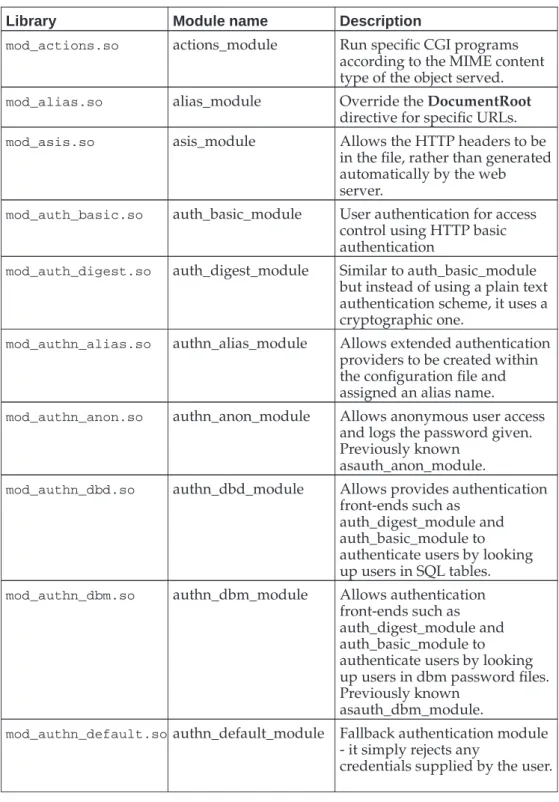
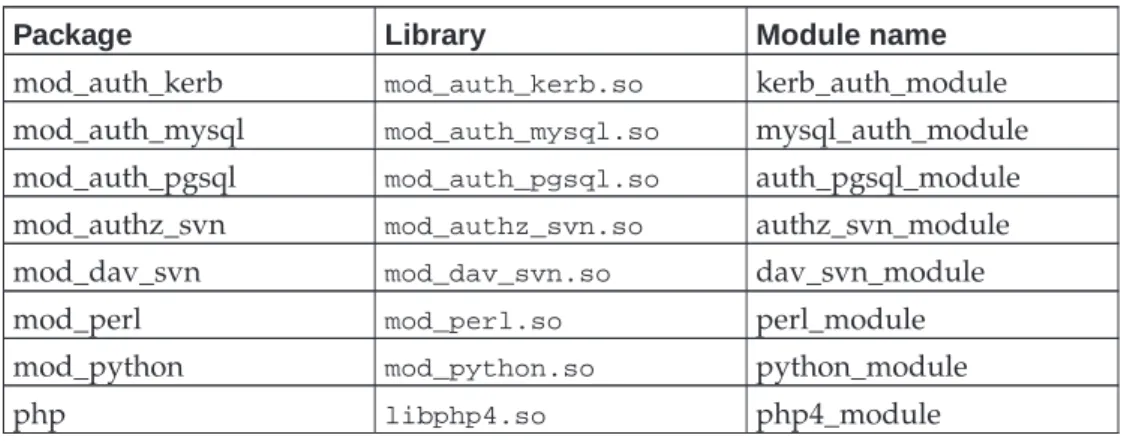
A list of all the common modules, together with their library file names, module names and brief descriptions is given inAppendix Aat the end of these notes. TheTypesConfigcommand indicates the file that has the correspondences between file name suffixes and MIME content types.
So how does our web server work now? The pages are now presented as HTML.
Syntax summary: Loading modules
LoadModulename library.soLoad the module namednamefound in the shared library filelibrary.so.
Syntax summary: mime_module
TypesConfigfile
This command specifies the name of the file that does the lookup from filename suffix to MIME content type. On a SLES system this file is/etc/mime.typesand
Chapter 5. Setting Options
Symbolic links
It is demonstrated that the web server does not follow symbolic links unless explicitly directed to do so.
Options FollowSymLinks
The instruction to make the server follow symbolic links is introduced. Options
There is general discussion about theOptionscommand. Options SymLinksIfOwnerMatch
The more restrictive command is also introduced.
Symbolic links
We can now see the index.htmlfile as expected but if we create a symbolic link calledmain.htmltoindex.htmland ask for that we get a failure.
$ cd /srv/www/WWW/
$ ln -s index.html main.html $ ls -l
ls -l total 4
-rw-r--r-- 1 root www-admin 306 2007-02-21 17:34 index.html
lrwxrwxrwx 1 root www-admin 10 2007-02-21 18:36 main.html -> index.html
When we try to access the symbolic link we get a 403 “Forbidden” error. The web server has found the symbolic link but has decided not to follow it.
Chapter 5. Setting Options
To instruct the web server to follow symbolic links we need to set an option. You will recall we unset all options withOptions Nonein the configuration file. Now we need to turn on one of them.
We can do this with the command Options FollowSymLinks but this has a cer-tain subtly we need to understand. The command Options FollowSymLinkssets theFollowSymLinksoption and unsets all of the others. TheOptionscommand fol-lowed by a list of options isabsolute; precisely the options specified will be set and no others. For this reason we will introduce the syntax for setting (and unsetting) individual options while leaving the others unchanged.
Options +FollowSymLinks
There is an analogous syntax with a minus sign for turning off options while leaving others untouched.
Chapter 5. Setting Options
Because symbolic links might be used to circumvent access controls in the web server there is a modified version of this option with the rather unwieldy name
SymLinksIfOwnerMatch. This instructs the web server to follow the symbolic link if and only if the symbolic link’s owner (typically the user who created it) and the target’s owner match.
It is worth mentioning that effects very similar to those provided by symlinks can also be created using web server facilities by using theAliascommand which we cover later inthe Section calledImproving the listingsin Chapter 6. Both have strengths and weaknesses; using both at the same time can be a recipe for madness!
Syntax Summary: The Options command
Optionsoption1option2option3
Set optionsoption1,option2andoption3and unset all others. Options+option
1+option2+option3
Set optionsoption
1,option2andoption3leaving all other options unchanged.
Options-option
1-option2-option3
Unset optionsoption
1,option2andoption3leaving all other unchanged.
Options+option1+option2-option3
Set optionsoption
1,option2and unsetoption3leaving all other unchanged.
Syntax Summary: Options for Symbolic Links
Options FollowSymLinksChapter 5. Setting Options Options SymLinksIfOwnerMatch
Chapter 6. Handling directories
Directory URLs
Some URLs (typically those that end in/) correspond to directories rather than plain files. We need to determine how to deal with these.
dir_module
The dir_module module provides the facility of using a default file (typically called
index.html) in a directory on behalf of the directory itself. autoindex_module
The autoindex_module module provides the facility of generating a listing of the files and subdirectories within a directory.
Combining approaches
We will also consider how to combine the two approaches so that anindex.htmlfile
is used if present and a directory listing is used if not.
The problem with directories
A document has a MIME content type. We’ve already seen that the URLs that correspond to files can now be served with the correct MIME type, so long as the file’s name has the appropriate suffix. But what about directories? In particular a “top level” URL such ashttp://www.dept.cam.ac.uk/will trigger a request for/.
There’s no such file so the server can’t serve it yet, let alone determine a MIME content type for it.
Chapter 6. Handling directories There are two solutions to this issue. The first, and simplest, is to nominate a filename (such asindex.html) and instruct that if a directory is requested which contains a file with this name then that file should be treated as the target of the request. This is the approach we will follow inthe Section calledUsing default documents.
The other approach is to give a listing of the directory’s contents, typically in HTML format. We will cover this inthe Section calledAutomatic indexing of directories.
Using default documents
Loading the moduleWe will add lines to the configuration file to load the module and to set up a default file. Because we want this functionality for both websites we place the instruction outside and before the virtual host sections.
LoadModule dir_module /usr/lib/apache2/mod_dir.so DirectoryIndex index.html index.htm
Note that we have a new command DirectoryIndex which is the only additional command provided by dir_module. It is passed a list of the defaults to use if the directory is looked for. If a directory is requested then the web server will look for
index.htmlin the directory because that filename is the first argument to the
com-mand. Ifindex.htmlis missing then the server will look forindex.htm, the second quoted name. If neither is present then the web server will give a not found error. Remember the server must reload its configuration to pick up these new instructions.
Chapter 6. Handling directories
Syntax summary: dir_module
DirectoryIndexSpecify the documents to be searched for given a directory query.
Document names are resolved relative to the directory queried unless they start with a/when they are resolved relative to the document root.
Automatic indexing of directories
The second approach we will consider is that of automatically generating a list of the entries in the directory. This used to be a popular approach to creating websites, especially those mainly consisting of files to download, but it’s now falling out of favour.
Basic listings
The relevant module is rather old and clunky, hailing back to the days when browsers didn’t support tables in HTML, but it is in very widespread use so we need to con-sider it. We will start by loading the module and removing dir_module (for simplicity at this stage).
This is also the largest module (in terms of number of commands) we will cover in this course. If you can cope with this one, you can cope with any of them.
LoadModule autoindex_module /usr/lib/apache2/mod_autoindex.so
If we just load the module then we see that, instead of getting a 404 “Not found” error we get a 403 “Forbidden” error instead.
Chapter 6. Handling directories
This can be confusing, because ’Forbidden’ is more commonly associated with access control. In this case you are seeing it because the web server has been configured to handle directories but by default won’t do so. As with symbolic links above (see Chapter 5) we need to set an option to instruct the module to do its job. Note that this use ofOptionsfollowsthe loading of the module. Several options we will meet rely on a specific module and their use must follow theLoadModuleline in the configuration file.
LoadModule autoindex_module /usr/lib/apache2/mod_autoindex.so Options +Indexes
And now, if we ask for the/URL we get the list of the files and directories that appear in the top-level directory. We’ve included some additional files to make things more interesting.
Chapter 6. Handling directories
Improving the listings
By default, the index produced is a very simple one (an itemised list in HTML). The module provides a number of commands to make it a bit more interesting. To see it in operation we will add a simpleIndexOptionscommand to our configuration file to turn on “fancy indexing”.
IndexOptions FancyIndexing
Next we will suppress certain rows from the listing. Why would we want to do this? Well, suppose the web developers edit their files in place (i.e. in the directory managed by the web server) with an editor (emacs, say) that while editing a file
(alpha.html, say) creates work files (#alpha.html#) while it is running and leaves behind backup files (alpha.html~) when it is finished. We don’t want these files ap-pearing in the listings. We do this with theIndexIgnorecommand.
IndexIgnore "#*#" "*~" ".*"
Note that the expressions to be ignored are placed in quotes. This is not typically necessary but under certain circumstances it is required. In this case the “#” character is the comment character inhttpd.conffiles. If it was not enclosed in quotes then everything on theIndexIgnoreline beyond the first “#” would be ignored.
Chapter 6. Handling directories
Warning
Just because a file name is not in the listing does not mean that it cannot be downloaded. If I see alpha.html and guess that there might be an alpha.html~ I can still request it and the server will serve it to me. We will deal with blocking these downloads in
the Section called Blocking access to files in Chapter 10.
In addition to having a listing of files, it is possible to place text above and below the listing. This can either be in the form of plain text or full-blown HTML. We will concentrate on the latter.
To add HTML above the listing the configuration must identify aheaderfile. This file must have a name that identifies it as having MIME content type text/html. In the simple case, however, the file’s content, should not be a full HTML document but just the HTML body component (without the leading BODY tag) for the text to appear above the listing. Everything else will be automatically generated. We identify this file (should it exist) with theHeaderNamecommand.
HeaderName HEADER.html
A suitableHEADER.htmlfile might look like this:
<p>Here is an HTML fragment.</p>
<p>It will automatically appear above the auto-generated file listing.</p>
Note that theHEADER.htmlfile appears in the listing too. Typically this is not wanted as it is already “doing its job” by having its contents appear at the top of the page. The fileHEADER.htmlwould be a good candidate for theIndexIgnorecommand. The next prettying up of the listing will be to add icons to the listing. Typically, icons are used to represent the MIME content type of the file. We will use the icons in the
/usr/share/apache2/icons/directory which are provided for this purpose.
We are immediately presented with a problem. Theiconsdirectory is not in either
web site’sDocumentRoot. We could copy the directory or symlink to it, but in this case we are going to introduce another facility: aliasing. This comes courtesy of the alias_module module and itsAliascommand.
LoadModule alias_module /usr/lib/apache2/mod_alias.so Alias /icons/ /usr/share/apache2/icons/
TheAliascommand overrides theDocumentRootfor specific URLs. In this case any URL whose local part starts with/icons/(n.b. the trailing slash) will be looked up in/usr/share/apache2/icons/. If we place this directive before the definitions of the virtual hosts then it will apply to both.
Once the module has been loaded, theAliascommand may be run multiple times, both inside and outside of the virtual host sections. If it appears within a virtual host’s paragraph then it applies to just that virtual host.
The fileicon.sheet.pngin theiconsdirectory gives a quick lookup of all the icons provided. Now we have access to the icons we need to know how to make use of them in directory listings. The auto-indexing module provides a slew of commands for this purpose. The trick to producing self-consistent indexes is to use as few as possible. We will set up distinct icons for the following entries.
Categories with distinct icons • HTML web pages
Chapter 6. Handling directories
• Any other “text” format • Any image format • Any audio format • Any movie format • PostScript
• Portable Document Format (PDF) • Any other file content type • Subdirectories
• The parent directory
The command that associates an icon with a MIME content type isAddIconByType. However, we will also specify the ALT text for text-based browsers with the analo-gousAddAltByTypecommand. While we are at it, we will supply aDefaultIconto use when nothing else matches.
AddIconByType /icons/layout.gif text/html AddAltByType "HTML file" text/html AddIconByType /icons/text.gif text/plain AddAltByType "Plain text" text/plain AddIconByType /icons/generic.gif text/* AddAltByType "Text" text/* AddIconByType /icons/image2.gif image/* AddAltByType "Static image" image/* AddIconByType /icons/sound1.gif audio/* AddAltByType "Audio" audio/* AddIconByType /icons/movie.gif video/* AddAltByType "Video" video/*
AddIconByType /icons/ps.gif application/postscript AddAltByType "PostScript" application/postscript AddIconByType /icons/pdf.gif application/pdf
AddAltByType "PDF" application/pdf DefaultIcon /icons/ball.gray.gif
Note: The icons are supplied in GIF and PNG format. Normally I would recommend using the PNG icons rather than the GIF ones since PNG is technically a better format and not troubled by patent problems. However, whoever converted the GIFs to PNGs got the background transparency wrong so you should use the GIF icons for the time being until the PNGs are fixed.
We still have a problem with directories. There is no MIME content type for a di-rectory so we must use other facilities. The following is a filthy hack introduced by Apache version 1 and preserved into version 2.
AddIcon /icons/dir.gif "^^DIRECTORY^^" AddAlt "Directory" "^^DIRECTORY^^" AddIcon /icons/back.gif ".."
AddAlt "Up" ".."
Conclusion
And now our listings look a bit more colourful. But this is a lot of effort for limited presentational value.
Chapter 6. Handling directories
Using an HTML table
We commented above that the data presented in the file listings is inherently tabular and would be better presented as an HTML table. This is now available, as an “ex-perimental feature” in versions of Apache beyond 2.0.23. (SLES 10 ships with 2.2.3). The authors can find no mechanisms for setting the attributes of the table from within Apache except to use stylesheets in the header file for the directory.
Chapter 6. Handling directories
Summary of the auto-indexing module
In the summary of the commands provided by autoindex_module given below only the commands and options discussed in this course are covered. There are many more. If you can’t get the result you want with the commands given to date then consult the full Apache documentation. You might get lucky.
Note: Commands and options that only make sense if fancy indexing is turned on are marked with an “(f)”.
Syntax summary: autoindex_module
IndexOptionsSets various parameters for how the index should look. The list below gives the options.
IndexIgnore "name" "name" ...
Takes a list of filenames or shell-style wildcarded filenames for file names. Files whose names match one or more of the patterns are not listed in the index.
Chapter 6. Handling directories AddIconByTypeiconmime_type(f)
Specifies the icon that should be used for a particular MIME content type. The MIME content type can either be fully specified (e.g. text/html) or partially spec-ified (e.g. text/*).
AddAltByType "text"mime_type(f)
Specifies the ALT attribute in the <IMG/> tag. If you are expecting text-only
browsers you might want to keep this short and of constant width (three characters is traditional). Alternatively, ditch the icons altogether.
DefaultIconicon(f)
This specifies the icon to be used if nothing else matches. There does not appear to be an equivalentDefaultAltcommand.
AddIconicon name(f)
This specifies an icon for a particular file name. Typically this should be avoided but it is the best way to match the parent directory..and other directories with the pseudo-filename^^DIRECTORY^^.
AddAlt "text"name(f)
This specifiesALTtext alongsideAddIcon’s images. HeaderNamename name...
This identifies the file whose contents should be placed above the file listing. The first file in the list that exists is used. These file names typically appear in the IndexIgnoreinstruction.
The files can be either plain text, an HTML body fragment or an entire “top half” of an HTML page. To stop the server adding its own HTML top half see the IndexOptionsoptionSupporessHTMLHeader.
ReadmeNamename name...
Exactly asHeaderNamebut it corresponds to the text below the listing. This can only be plain text or an HTML body fragment.
Syntax summary: Options to IndexOptions
FancyIndexing
Turns on the four-column (by default) indexing mode rather than plain, bullet-list indexing mode.
HTMLTable(f)
This instructs Apache to use an HTML table rather than a<PRE>block to present the listing.
Using both modules
What happens if we run both modules? The answer is that the modules cooperate as you might hope: if there is anindex.htmlfile then it is used; if there isn’t then the
directory is indexed automatically.
LoadModule dir_module /usr/lib/apache2/mod_dir.so DirectoryIndex index.html index.htm
Chapter 6. Handling directories
# Enable automatic indexing of directories
LoadModule autoindex_module /usr/lib/apache2/mod_autoindex.so Options +Indexes
IndexOptions FancyIndexing ...
Chapter 7. Logging
Error log
We will examine the error log to see what is logged and to change the amount of logging done.
log_config_module
We will load and use a module that allows us to configure exactly what we log for each request.
Log file rotation
We will illustrate the SLES system-wide mechanism for log rotation and briefly men-tion, and then discard, an Apache-specific way to do the same thing.
Legalities
There will be a brief description of the legal implications of keeping log files.
The error log
The error log file contains the error reports and warnings from the web server. Under SLES this defaults to the file/var/log/apache2/error_log. The error log is often overlooked, but when things are going wrong it will usually contain useful clues about what the problem is.
By default, the directory/var/log/apache2is readable only by root. You may want to change this on your system. Within the directory, the files are created world-readable. Only the directory’s permissions need be changed.
Let’s consider a number of the typical entries in the error log as it currently stands.
[Thu Feb 22 13:14:55 2007] [notice] Graceful restart requested, doing restart
[Thu Feb 22 13:14:55 2007] [notice] Apache/2.2.3 (Linux/SUSE) configured --resuming normal operations
Our first example will be seen in the log files from this course more than any other lines (we hope!). The line that starts “Graceful restart requested” is the logged entry that means we requested a reload of the configuration file.
The line that (hopefully) follows it is the line from Apache that says it has been (re)configured and that it is “resuming normal operations”, i.e. serving web pages again.
[Thu Feb 22 15:13:35 2007] [notice] caught SIGTERM, shutting down
SIGTERM is an operating system signal with a universal function. It is the instruction to a process to shut down.
[Thu Feb 22 15:14:43 2007] [error] [client 131.111.10.33] File does not exist: /srv/www/WWW/nonsuch.html
Another commonly occurringerror_logline is the one corresponding to a request for a file that does not exist.
Chapter 7. Logging • [date]
• [severity]
• message
We can change the level of the logging (of formatted messages) with theLogLevel command. Either globally, or within specific virtual hosts’ sections we can issue the commandLogLevel debug, say, to get more debugging.
Level Meaning Example
emerg System is unusable. The
entire web service has failed.
“Child cannot open lock file. Exiting”
alert Action must be taken
immediately. The entire web service has either failed already or is imminent danger of failing completely.
“getpwuid: couldn’t determine user name from uid”
crit Critical condition. A child
server has failed and others are likely to follow.
“socket: Failed to get a socket, exiting child”
error A request on a single request.
“File does not exist: /var/www/WWW/nonesuch.html”
warn Warnings. “child process 10108 still did
not exit, sending a SIGTERM”
notice Normal behaviour but worthy of notice.
“Apache/2.0.40 (Red Hat Linux) configured -- resuming normal operations”
info Purely informational “Server seems busy, (you may need to increase StartServers, or Min/MaxSpareServers)...” debug Debugging. “Opening config file ...”
Messages issued from a running web server are well formatted. However, if you make a syntax error in the httpd.conf file then the server won’t launch and the error message is rather more stark.
Syntax error on line 21 of /etc/apache2/httpd.conf: Invalid directory indexing option
It is also possible to move the error log file, or to do without the file altogether (but still log errors).
LogLevel info
ErrorLog /var/log/apache2/error.log
The ErrorLogdirective gives the name of the error log file. If the file name given is “syslog” then logging is not done to /var/log/apache2/syslogbut rather all error logs are passed to the operating system’s system logger. This can be useful if you arrange for your system logs to be transmitted off-machine to a central logging engine which you want to receive Apache error logs too.
Chapter 7. Logging Finally, if the file name starts with a pipe character,|, then what follows is interpreted
as a command which should be forked and executed and which has the error log lines passed to it on its standard input.
Syntax summary: Error logging commands
ErrorLoglogfileIflogfilebegins with “/” then this file will be used for the error log.
Iflogfile is “syslog” then the error logs will be passed to the system logger with facility local7.
Iflogfileis “syslog:facility” then the error logs will be passed to the system
logger with facility facility. This must be one of the facilities known to the system logger; you can’t just make up your own.
Iflogfilebegins with “|” then what follows will be run as a command to receive
the log lines on standard input.
Anything else is interpreted as a filename relative to the server root. LogLevellevel
Any errors generated at logging levels equal to or more serious thanlevelwill be logged.
Access logs
To date the only log file we have met is the error log. There is no logging in our current server configuration when things aren’t going wrong. Probably we want to log the requests that are made of our server. These are the access logs.
We need to decide what we want to log and where to log it to. We may want more than one log file for different sets of data.
As (almost) ever, the means to get this functionality is to load a module: log_config_module frommod_log_config.so.
This provides us with one particularly useful command:CustomLog. This allows us to specify what information to record and where to record it for each query/response at the server. This power comes at the price of almost complete syntactic obscurity at first glance. But in all honesty it’s not that bad.
Suppose we wanted to record just the following information about each query pro-cessed by the server:
• Time & date • URL requested
• Name of system making the request • Whether the request was successful
LoadModule log_config_module modules/mod_log_config.so CustomLog logs/request.log "%t %U %h %s"
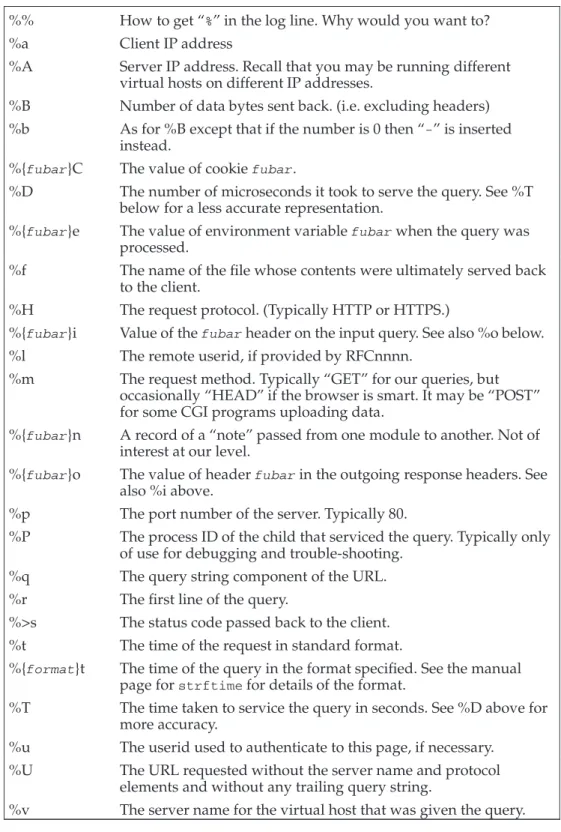
Each of the elements beginning with a percentage character is called an escape code and is converted into some piece of logged information. A complete list of the codes is given inAppendix B.
Chapter 7. Logging
Four escape sequences
%tThe time of the request %U
The URL requested %h
The client hostname %s
Status code of the request
To illustrate what they indicate and what they don’t, we will request three URLs and note a number of problems in the logged output.
The requested URLs
• http://www.dept.cam.ac.uk/ • http://prg.dept.cam.ac.uk/ • http://www.dept.cam.ac.uk/gamma.html [22/Feb/2007:15:51:43 +0000] /index.html 131.111.10.33 304 [22/Feb/2007:15:52:04 +0000] /index.html 131.111.10.33 304 [22/Feb/2007:15:52:19 +0000] /gamma.html 131.111.10.33 304
Notice how requests for the top-level directory are being logged as requests for
/index.html. It appears that apache applys at least some of it’s internal processing
to the value it loggs with %U, in this case using dir_module to locate a suitable index document.
Problems with the output as it stands
• There is no record of whether www.dept.cam.ac.uk or prg.dept.cam.ac.uk was queried.
• The hostnames are addresses, not names
The simplest way to address the issue of which website was queried is to move the CustomLog lines into the virtual host sections and to have two different log files. This gives them the flexibility to log different things too.
<VirtualHost *>
ServerName www.dept.cam.ac.uk DocumentRoot /srv/www/WWW
CustomLog /var/log/apache2/www.log "%t %U %h %s" </VirtualHost>
If we really wanted a single log file with the virtual host information we could use the %v escape code to record it.
To enable the use of hostnames rather than addresses, we must arrange for the web server to do DNS lookups for the IP addresses on each incoming query. We will do this with the HostnameLookups command. This command is a core Apache command and not part of the logging module. In some circumstances, hostnames will be looked up even without this command. For example if you do any access controls based on host names as we will be in the Section calledAccess control based on client IP addressin Chapter 10. We will set this on globally. If either website wanted to record IP addresses rather than
Chapter 7. Logging HostnameLookups On
This results in log entries that look like this:
[22/Feb/2007:15:59:06 +0000] /index.html mnementh.csi.cam.ac.uk 200 [22/Feb/2007:15:58:40 +0000] /alpha.html mnementh.csi.cam.ac.uk 200 [22/Feb/2007:15:58:47 +0000] /beta.html mnementh.csi.cam.ac.uk 200
Common Log Format
A standard format for access log files is used by many utilities and replied on by the web analysis programs. It is called “The Common Log Format” (CLF) and is shown below.
CustomLog /var/log/apache2/www.log "%h %l %u %t \"%r\" %>s %b"
This produces log entries that look like this:
mnementh.csi.cam.ac.uk - - [22/Feb/2007:16:01:48 +0000] "GET / HTTP/1.1" 200 306
mnementh.csi.cam.ac.uk - - [22/Feb/2007:16:01:53 +0000] "GET /nonsuch.html HTTP/1.1" 404 210
The escape sequences used in the Common Log Format
%hThe client’s hostname %l
If the web server was doing IDENT (RFC1413 (ftp://ftp.rfc-editor.org/in-notes/rfc1413.txt)) lookups then the returned userid would be here.
%u
If the client had authenticated as a particular user for this request the userid would be recorded here. We discuss authentication in detail in the Section calledAccess control by client identityin Chapter 10.
%t
The time of the request. %r
The first line of the query. %>s
The status code finally returned to the client. There is a subtle difference be-tween %s and %>s. In most cases they are identical. In cases where the URL gets remapped then %s gives the status code of the initial lookup and %>s the code of the final lookup (and the code passed back to the client).
%b
The number of data bytes (i.e. excluding the headers) sent back to the client in the case of successful completion.