Kinetix 350 Single-axis EtherNet/IP Servo Drives
Catalog Numbers 2097-V31PR0-LM, 2097-V31PR2-LM,
2097-V32PR0-LM, 2097-V32PR2-LM, 2097-V32PR4-LM,
2097-V33PR1-LM, 2097-V33PR3-LM, 2097-V33PR5-LM, 2097-V33PR6-LM,
2097-V34PR3-LM, 2097-V34PR5-LM, 2097-V34PR6-LM
Original Instructions
Error Codes
The following list helps you resolve memory anomalies.
When a fault is detected, the status indicator displays an E and a two-digit
error code until the anomaly is cleared.
Fault Codes
These fault code tables are designed to help you resolve anomalies. When a
fault is detected, the four-digit status indicator scrolls the display message. The
display is repeated until the fault code is cleared.
Table 44 - Fault Code Summary
Error
Code
Anomaly
Possible Cause
Action/Solution
E38
Memory module error.
Bad memory module.
Replace memory module.
E76
Blank memory module.
A Blank MEM module has been
inserted into the drive.
Push and hold the drive's enter key
(bottom most red button) on the drive's
front display until the drive shows bUSY.
This makes the drive format the blank
memory module for usage with the drive.
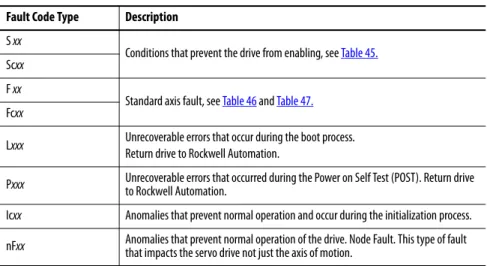
Fault Code Type
Description
S xx
Conditions that prevent the drive from enabling, see
Table 45.
Scxx
F xx
Standard axis fault, see
Table 46
and
Table 47.
Fcxx
Lxxx
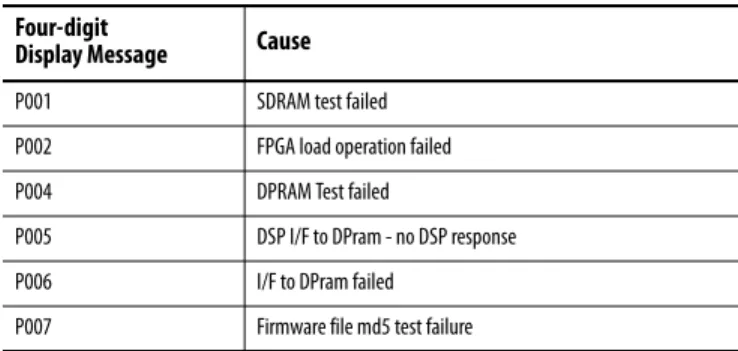
Unrecoverable errors that occur during the boot process.
Return drive to Rockwell Automation.
Pxxx
Unrecoverable errors that occurred during the Power on Self Test (POST). Return drive
to Rockwell Automation.
Icxx
Anomalies that prevent normal operation and occur during the initialization process.
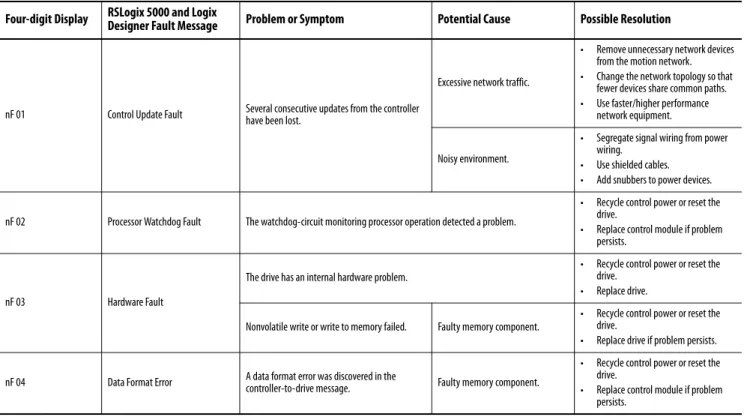
nFxx
Anomalies that prevent normal operation of the drive. Node Fault. This type of fault
that impacts the servo drive not just the axis of motion.
Table 45 - S
xx
and Sc
xx
Start Inhibit Codes
Four-digit Display
RSLogix 5000® and Logix
Designer Fault Message
Problem or Symptom
Potential Cause
Possible Resolution
S 01 Axis enable input. The axis enable input is
deactivated. Axis Enable Input is not active.
• Check wiring and 24V source for drive ENABLE Input.
• Disable enableInputChecking attribute by using a message instruction.
S 02 Motor not configured. The associated motor has not been configured for use.
Faulty intelligent encoder or incorrect motor file.
• Cycle power or reset the drive. • Check that proper motor has been
selected in Logix Designer Application.
• Replace motor if faulting continues.
S 03 Feedback not configured.
The associated feedback device has not been configured for use or the configuration does not match what is connected.
Sc05 Safe torque off. No power or safety circuitry not configured. The safety function has disabled the power structure. • Apply 24V sources to safety circuit. • Use jumpers to bypass safety circuit.
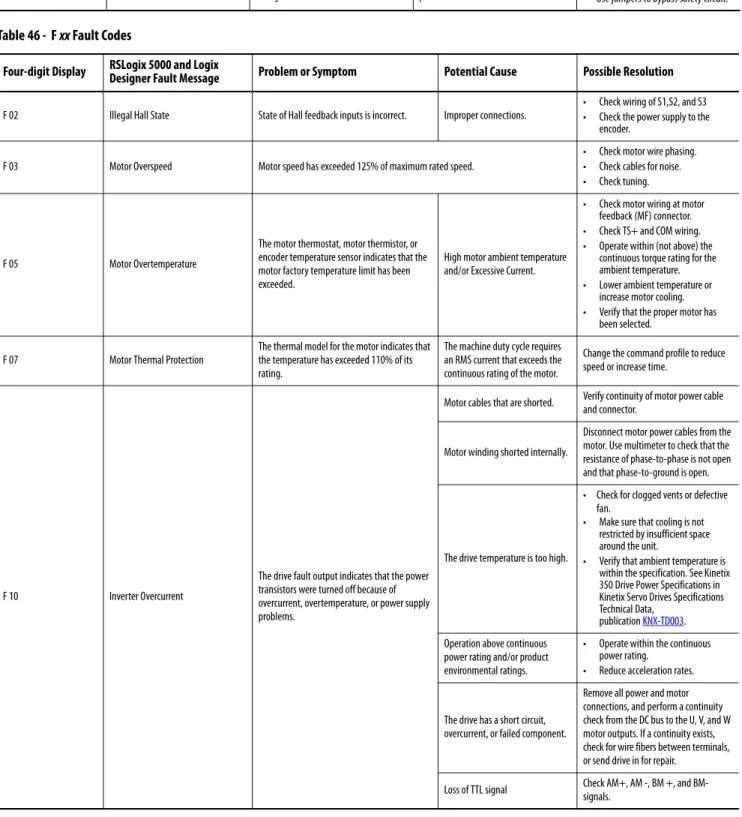
Table 46 - F
xx
Fault Codes
Four-digit Display
RSLogix 5000 and Logix
Designer Fault Message
Problem or Symptom
Potential Cause
Possible Resolution
F 02 Illegal Hall State State of Hall feedback inputs is incorrect. Improper connections.
• Check wiring of S1,S2, and S3 • Check the power supply to the
encoder.
F 03 Motor Overspeed Motor speed has exceeded 125% of maximum rated speed.
• Check motor wire phasing. • Check cables for noise. • Check tuning.
F 05 Motor Overtemperature
The motor thermostat, motor thermistor, or encoder temperature sensor indicates that the motor factory temperature limit has been exceeded.
High motor ambient temperature and/or Excessive Current.
• Check motor wiring at motor feedback (MF) connector. • Check TS+ and COM wiring. • Operate within (not above) the
continuous torque rating for the ambient temperature. • Lower ambient temperature or
increase motor cooling. • Verify that the proper motor has
been selected.
F 07 Motor Thermal Protection
The thermal model for the motor indicates that the temperature has exceeded 110% of its rating.
The machine duty cycle requires an RMS current that exceeds the continuous rating of the motor.
Change the command profile to reduce speed or increase time.
F 10 Inverter Overcurrent
The drive fault output indicates that the power transistors were turned off because of overcurrent, overtemperature, or power supply problems.
Motor cables that are shorted. Verify continuity of motor power cable and connector.
Motor winding shorted internally.
Disconnect motor power cables from the motor. Use multimeter to check that the resistance of phase-to-phase is not open and that phase-to-ground is open.
The drive temperature is too high.
• Check for clogged vents or defective fan.
• Make sure that cooling is not restricted by insufficient space around the unit.
• Verify that ambient temperature is within the specification. See Kinetix 350 Drive Power Specifications in Kinetix Servo Drives Specifications Technical Data,
publication KNX-TD003. Operation above continuous
power rating and/or product environmental ratings.
• Operate within the continuous power rating.
• Reduce acceleration rates. Remove all power and motor
Table 45 - S
xx
and Sc
xx
Start Inhibit Codes (Continued)
Four-digit Display
RSLogix 5000® and Logix
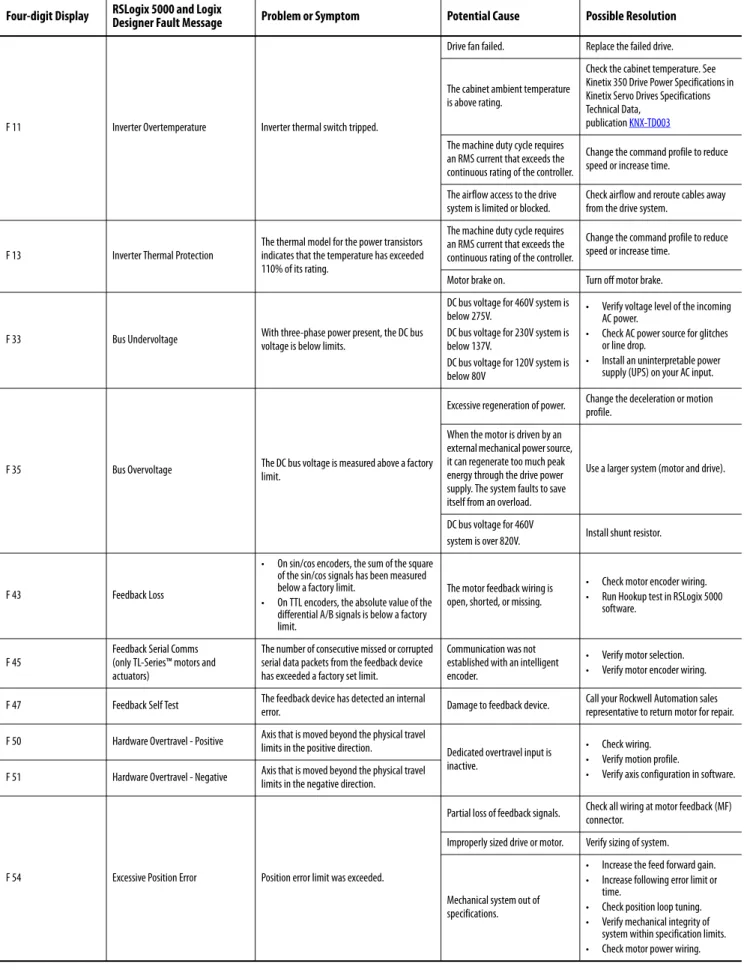
F 11 Inverter Overtemperature Inverter thermal switch tripped.
Drive fan failed. Replace the failed drive.
The cabinet ambient temperature is above rating.
Check the cabinet temperature. See Kinetix 350 Drive Power Specifications in Kinetix Servo Drives Specifications Technical Data,
publication KNX-TD003
The machine duty cycle requires an RMS current that exceeds the continuous rating of the controller.
Change the command profile to reduce speed or increase time.
The airflow access to the drive system is limited or blocked.
Check airflow and reroute cables away from the drive system.
F 13 Inverter Thermal Protection
The thermal model for the power transistors indicates that the temperature has exceeded 110% of its rating.
The machine duty cycle requires an RMS current that exceeds the continuous rating of the controller.
Change the command profile to reduce speed or increase time.
Motor brake on. Turn off motor brake.
F 33 Bus Undervoltage With three-phase power present, the DC bus voltage is below limits.
DC bus voltage for 460V system is below 275V.
DC bus voltage for 230V system is below 137V.
DC bus voltage for 120V system is below 80V
• Verify voltage level of the incoming AC power.
• Check AC power source for glitches or line drop.
• Install an uninterpretable power supply (UPS) on your AC input.
F 35 Bus Overvoltage The DC bus voltage is measured above a factory limit.
Excessive regeneration of power. Change the deceleration or motion profile.
When the motor is driven by an external mechanical power source, it can regenerate too much peak energy through the drive power supply. The system faults to save itself from an overload.
Use a larger system (motor and drive).
DC bus voltage for 460V
system is over 820V. Install shunt resistor.
F 43 Feedback Loss
• On sin/cos encoders, the sum of the square of the sin/cos signals has been measured below a factory limit.
• On TTL encoders, the absolute value of the differential A/B signals is below a factory limit.
The motor feedback wiring is open, shorted, or missing.
• Check motor encoder wiring. • Run Hookup test in RSLogix 5000
software.
F 45
Feedback Serial Comms (only TL-Series™ motors and actuators)
The number of consecutive missed or corrupted serial data packets from the feedback device has exceeded a factory set limit.
Communication was not established with an intelligent encoder.
• Verify motor selection. • Verify motor encoder wiring.
F 47 Feedback Self Test The feedback device has detected an internal
error. Damage to feedback device.
Call your Rockwell Automation sales representative to return motor for repair.
F 50 Hardware Overtravel - Positive Axis that is moved beyond the physical travel
limits in the positive direction. Dedicated overtravel input is inactive.
• Check wiring. • Verify motion profile.
• Verify axis configuration in software. F 51 Hardware Overtravel - Negative Axis that is moved beyond the physical travel
limits in the negative direction.
F 54 Excessive Position Error Position error limit was exceeded.
Partial loss of feedback signals. Check all wiring at motor feedback (MF) connector.
Improperly sized drive or motor. Verify sizing of system.
Mechanical system out of specifications.
• Increase the feed forward gain. • Increase following error limit or
time.
• Check position loop tuning. • Verify mechanical integrity of
system within specification limits. • Check motor power wiring.
Table 46 - F
xx
Fault Codes (Continued)
Four-digit Display
RSLogix 5000 and Logix
F 55 Excessive Velocity Error
Velocity Error value of the velocity control loop has exceeded the configured value for Velocity Error Tolerance.
Partial loss of feedback signals. Check all wiring at motor feedback (MF) connector.
Improperly sized drive or motor.
• Increase velocity error limit or time. • Check velocity loop tuning. • Verify sizing of system.
Mechanical system out of specifications.
• Increase velocity error limit or time. • Check velocity loop tuning. • Verify mechanical integrity of
system within specification limits. • Check motor power wiring. • Reduce acceleration.
F 56 Overtorque Limit Motor torque has exceeded a user-programmable setting.
• Overly aggressive motion profile.
• Mechanical binding.
• Verify motion profile.
• Verify that Overtorque settings are appropriate.
• Verify sizing of system. • Verify torque offset Mechanical system out of
specifications.
Verify mechanical integrity of system within specification limits.
F 57 Undertorque Limit Motor torque has fallen below a user-programmable setting.
• Improperly configured limit. • Improperly configured
motion.
• Improperly drive/motor sizing.
• Verify motion profile.
• Verify that Overtorque settings are appropriate.
• Verify sizing of system.
Mechanical system out of specifications.
Verify mechanical integrity of system within specification limits.
F 61 Drive Enable Input
The hardware enable input was deactivated while the drive was enabled. This is applicable when only drive enable input is used.
An attempt was made to enable the axis through software while the Drive Enable hardware input was inactive.
• Check wiring of drive enable input. • Check 24V source.
The Drive Enable input that has transitioned from active to inactive while the axis was enabled.
Verify that Drive Enable hardware input is active whenever the drive is enabled through software.
F 62 Controller Initiated Exception The controller has requested the drive to generate an exception. User configured software overtravel.
• Move axis out of soft overtravel range.
• Clear soft overtravel fault. • Check soft overtravel configuration. • Consult controller documentation.
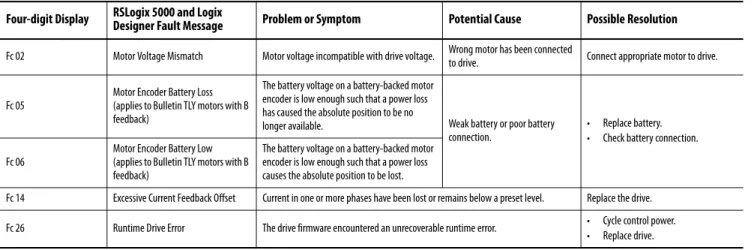
Table 47 - Fc
xx
Fault Codes
Four-digit Display
RSLogix 5000 and Logix
Designer Fault Message
Problem or Symptom
Potential Cause
Possible Resolution
Fc 02 Motor Voltage Mismatch Motor voltage incompatible with drive voltage. Wrong motor has been connected
to drive. Connect appropriate motor to drive.
Fc 05
Motor Encoder Battery Loss (applies to Bulletin TLY motors with B feedback)
The battery voltage on a battery-backed motor encoder is low enough such that a power loss has caused the absolute position to be no
longer available. Weak battery or poor battery connection.
• Replace battery. • Check battery connection. Fc 06
Motor Encoder Battery Low (applies to Bulletin TLY motors with B
The battery voltage on a battery-backed motor encoder is low enough such that a power loss
Table 46 - F
xx
Fault Codes (Continued)
Four-digit Display
RSLogix 5000 and Logix
Status messages of the format L
xxx
indicate an unrecoverable error while
starting the drive. Reload firmware and restart the drive, if status message
repeats contact Rockwell Automation technical support to return drive for
repair.
Status messages of the format P
xxx
indicate an unrecoverable error during the
Power-on Self Test (POST). Contact Rockwell Automation technical support
to return drive for repair.
Table 48 - Ic
xx
Fault Codes
Four-digit Display
RSLogix 5000 and Logix
Designer Fault Message
Problem or Symptom
Potential Cause
Possible Resolution
Ic 01 Boot Block Check Sum Fault The motor data that is stored in a smart encoder has a checksum error. Faulty intelligent encoder. • Cycle power or reset the drive. • Replace motor if faulting continues.
Ic 02 Motor Data Range Error Data within a motor data blob is out of range. Faulty intelligent encoder or incorrect motor file.
• Cycle power or reset the drive. • Check validity of the motion
database.
• Replace motor if faulting continues.
Ic 03 Motor Feedback Communication Startup
Communication with a smart encoder could not be established on the motor feedback port.
An incorrect motor has beem
selected or connected. Check motor selection. Faulty wiring. Check motor encoder wiring.
Ic 06 Motor Absolute Startup Speed
The motor absolute encoder was not able to determine the position after powerup due to motor speed greater than 100 rpm.
Mechanical movement of machine has caused excessive rotation of motor during powerup.
Allow machine motion to stop before powerup.
Table 49 - L
xxx
Fault Codes
Four-digit
Display Message
Cause
L001 Identity block corrupted
L002 Firmware file load failed
L004 Firmware not programmed (drive is new)
L008 DSP load operation failed
Table 50 - P
xxx
Fault Codes
Four-digit
Display Message
Cause
P001 SDRAM test failed
P002 FPGA load operation failed
P004 DPRAM Test failed
P005 DSP I/F to DPram - no DSP response
P006 I/F to DPram failed
Table 51 - nF xx Fault Codes
Four-digit Display
RSLogix 5000 and Logix
Designer Fault Message
Problem or Symptom
Potential Cause
Possible Resolution
nF 01 Control Update Fault Several consecutive updates from the controller have been lost.
Excessive network traffic.
• Remove unnecessary network devices from the motion network. • Change the network topology so that
fewer devices share common paths. • Use faster/higher performance
network equipment.
Noisy environment.
• Segregate signal wiring from power wiring.
• Use shielded cables. • Add snubbers to power devices.
nF 02 Processor Watchdog Fault The watchdog-circuit monitoring processor operation detected a problem.
• Recycle control power or reset the drive.
• Replace control module if problem persists.
nF 03 Hardware Fault
The drive has an internal hardware problem.
• Recycle control power or reset the drive.
• Replace drive.
Nonvolatile write or write to memory failed. Faulty memory component.
• Recycle control power or reset the drive.
• Replace drive if problem persists.
nF 04 Data Format Error A data format error was discovered in the controller-to-drive message. Faulty memory component.
• Recycle control power or reset the drive.
• Replace control module if problem persists.
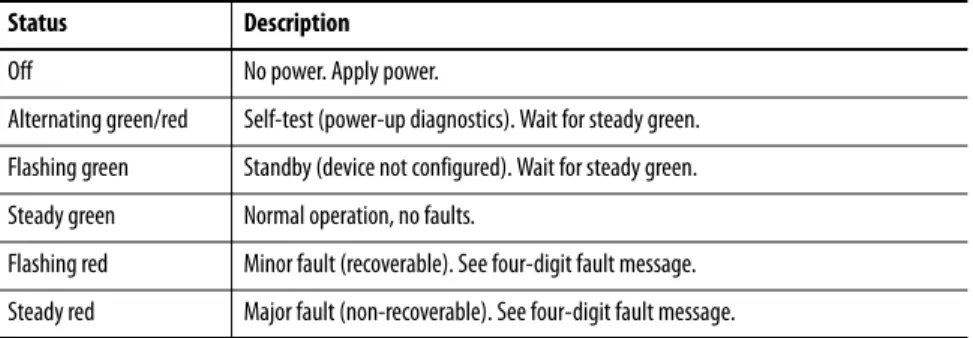
Status Indicators
Table 52 - Drive Status Indicator
Table 53 - Axis Status Indicator
Status
Description
Off
No power. Apply power.
Alternating green/red
Self-test (power-up diagnostics). Wait for steady green.
Flashing green
Standby (device not configured). Wait for steady green.
Steady green
Normal operation, no faults.
Flashing red
Minor fault (recoverable). See four-digit fault message.
Steady red
Major fault (non-recoverable). See four-digit fault message.
Status
Description
Off
Off
Flash red/green
Self test
Off
Initialization - bus not up
Flashing green
Initialization - bus up
Off
Shutdown - bus not up
Flashing amber
(1)(1) The axis and the drive define minor fault conditions. While a minor fault does not affect the drive status indicator, it does affect the axis status indicator. When a minor fault condition is detected, a normally solid-green status indicator indication changes to alternating red-green-red-green, a normally flashing green status indicator indication changes to alternating red-off-green-off, and a normally flashing amber indications changes to red-off-amber-off.
Shutdown - bus up
Off
Pre-charge - bus not up
Flashing amber
(1)Start inhibit
Flashing green
(1)(2)(2) The drive also defines alarm conditions. When an alarm condition is detected, a normally solid-green status indicator indication changes to alternating amber-green-amber green while a normally flashing green status indicator indication changes to alternating amber-off-green-off.