Installation Guide
Powered by Accton
ECS4610-24F
24-Port Stackable Layer 3
Gigabit Ethernet Switch
PROJECT: 2296506
S
AFETYC
OMPLIANCEWarning: Fiber Optic Port Safety
Avertissment: Ports pour fibres optiques - sécurité sur le plan optique
Warnhinweis: Faseroptikanschlüsse - Optische Sicherheit
PSE A
LARM 本製品に同梱いたしております電源コードセットは、 本製品専用です。本電源コードセットは、本製品以外の 製品並びに他の用途でご使用いただくことは出来ません。 製品本体に同梱された電源コードセットを利用し、他製品 の電源コードセットを使用しないで下さい。When using a fiber optic port, never look at the transmit laser while it is powered on. Also, never look directly at the fiber TX port and fiber cable ends when they are powered on.
Ne regardez jamais le laser tant qu'il est sous tension. Ne regardez jamais directement le port TX (Transmission) à fibres optiques et les embouts de câbles à fibres optiques tant qu'ils sont sous tension.
Niemals ein Übertragungslaser betrachten, während dieses eingeschaltet ist. Niemals direkt auf den Faser-TX-Anschluß und auf die Faserkabelenden schauen, während diese eingeschaltet sind. CLASS I LASER DEVICE DISPOSITIF LASER DE CLASSE I LASERGER DER KLASSE I ÄT
COMPLIANCESAND SAFETY STATEMENTS
P
OWERC
ORDS
AFETYPlease read the following safety information carefully before installing the switch:
WARNING:Installation and removal of the unit must be carried out by qualified
personnel only.
◆ The unit must be connected to an earthed (grounded) outlet to comply with international safety standards.
◆ Do not connect the unit to an A.C. outlet (power supply) without an earth (ground) connection.
◆ The appliance coupler (the connector to the unit and not the wall plug) must have a configuration for mating with an EN 60320/IEC 320 appliance inlet.
◆ The socket outlet must be near to the unit and easily accessible. You can only remove power from the unit by disconnecting the power cord from the outlet.
◆ This unit operates under SELV (Safety Extra Low Voltage) conditions according to IEC 60950. The conditions are only maintained if the equipment to which it is connected also operates under SELV conditions.
France and Peru only
This unit cannot be powered from IT† supplies. If your supplies are of IT type,
this unit must be powered by 230 V (2P+T) via an isolation transformer ratio 1:1, with the secondary connection point labelled Neutral, connected directly to earth (ground).
† Impédance à la terre
IMPORTANT!Before making connections, make sure you have the correct cord
set. Check it (read the label on the cable) against the following:
PROJECT: 2296506
Veuillez lire à fond l'information de la sécurité suivante avant d'installer le Switch:
AVERTISSEMENT:L’installation et la dépose de ce groupe doivent être confiés à
un personnel qualifié.
◆ Ne branchez pas votre appareil sur une prise secteur (alimentation électrique) lorsqu'il n'y a pas de connexion de mise à la terre (mise à la masse).
◆ Vous devez raccorder ce groupe à une sortie mise à la terre (mise à la masse) afin de respecter les normes internationales de sécurité.
◆ Le coupleur d’appareil (le connecteur du groupe et non pas la prise murale) doit respecter une configuration qui permet un branchement sur une entrée d’appareil EN 60320/IEC 320.
Power Cord Set
U.S.A. and Canada The cord set must be UL-approved and CSA certified. The minimum specifications for the flexible cord are: - No. 18 AWG - not longer than 2 meters, or 16 AWG. - Type SV or SJ
- 3-conductor
The cord set must have a rated current capacity of at least 10 A The attachment plug must be an earth-grounding type with NEMA 5-15P (15 A, 125 V) or NEMA 6-15P (15 A, 250 V) configuration. Denmark The supply plug must comply with Section 107-2-D1, Standard
DK2-1a or DK2-5a.
Switzerland The supply plug must comply with SEV/ASE 1011.
U.K. The supply plug must comply with BS1363 (3-pin 13 A) and be fitted with a 5 A fuse which complies with BS1362.
The mains cord must be <HAR> or <BASEC> marked and be of type HO3VVF3GO.75 (minimum).
Europe The supply plug must comply with CEE7/7 (“SCHUKO”).
The mains cord must be <HAR> or <BASEC> marked and be of type HO3VVF3GO.75 (minimum).
COMPLIANCESAND SAFETY STATEMENTS
◆ La prise secteur doit se trouver à proximité de l’appareil et son accès doit être facile. Vous ne pouvez mettre l’appareil hors circuit qu’en débranchant son cordon électrique au niveau de cette prise.
◆ L’appareil fonctionne à une tension extrêmement basse de sécurité qui est conforme à la norme IEC 60950. Ces conditions ne sont maintenues que si l’équipement auquel il est raccordé fonctionne dans les mêmes conditions.
France et Pérou uniquement:
Ce groupe ne peut pas être alimenté par un dispositif à impédance à la terre. Si vos alimentations sont du type impédance à la terre, ce groupe doit être alimenté par une tension de 230 V (2 P+T) par le biais d’un transformateur d’isolement à rapport 1:1, avec un point secondaire de connexion portant l’appellation Neutre et avec raccordement direct à la terre (masse).
Cordon électrique - Il doit être agréé dans le pays d’utilisation
Etats-Unis et Canada: Le cordon doit avoir reçu l’homologation des UL et un certificat de la CSA.
Les spécifications minimales pour un cable flexible sont AWG No. 18, ouAWG No. 16 pour un cable de longueur inférieure à 2 mètres.
- type SV ou SJ - 3 conducteurs
Le cordon doit être en mesure d’acheminer un courant nominal d’au moins 10 A.
La prise femelle de branchement doit être du type à mise à la terre (mise à la masse) et respecter la configuration NEMA 5-15P (15 A, 125 V) ou NEMA 6-15P (15 A, 250 V).
Danemark: La prise mâle d’alimentation doit respecter la section 107-2 D1 de la norme DK2 1a ou DK2 5a.
Suisse: La prise mâle d’alimentation doit respecter la norme SEV/ASE 1011.
Europe La prise secteur doit être conforme aux normes CEE 7/7 (“SCHUKO”)
LE cordon secteur doit porter la mention <HAR> ou <BASEC> et doit être de type HO3VVF3GO.75 (minimum).
PROJECT: 2296506
Bitte unbedingt vor dem Einbauen des Switches die folgenden Sicherheitsanweisungen durchlesen:
WARNUNG: Die Installation und der Ausbau des Geräts darf nur durch
Fachpersonal erfolgen.
◆ Das Gerät sollte nicht an eine ungeerdete Wechselstromsteckdose angeschlossen werden.
◆ Das Gerät muß an eine geerdete Steckdose angeschlossen werden, welche die internationalen Sicherheitsnormen erfüllt.
◆ Der Gerätestecker (der Anschluß an das Gerät, nicht der Wandsteckdosenstecker) muß einen gemäß EN 60320/IEC 320 konfigurierten Geräteeingang haben.
◆ Die Netzsteckdose muß in der Nähe des Geräts und leicht zugänglich sein. Die Stromversorgung des Geräts kann nur durch Herausziehen des Gerätenetzkabels aus der Netzsteckdose unterbrochen werden.
◆ Der Betrieb dieses Geräts erfolgt unter den SELV-Bedingungen
(Sicherheitskleinstspannung) gemäß IEC 60950. Diese Bedingungen sind nur gegeben, wenn auch die an das Gerät angeschlossenen Geräte unter SELV-Bedingungen betrieben werden.
Stromkabel. Dies muss von dem Land, in dem es benutzt wird geprüft werden: Schweiz Dieser Stromstecker muß die SEV/ASE 1011Bestimmungen einhalten. Europe Das Netzkabel muß vom Typ HO3VVF3GO.75 (Mindestanforderung)
sein und die Aufschrift <HAR> oder <BASEC> tragen. Der Netzstecker muß die Norm CEE 7/7 erfüllen (”SCHUKO”).
COMPLIANCESAND SAFETY STATEMENTS
W
ARNINGSANDC
AUTIONARYM
ESSAGESE
NVIRONMENTALS
TATEMENTSThe manufacturer of this product endeavours to sustain an environmentally-friendly policy throughout the entire production process. This is achieved though the following means:
◆ Adherence to national legislation and regulations on environmental production standards.
◆ Conservation of operational resources.
◆ Waste reduction and safe disposal of all harmful un-recyclable by-products.
◆ Recycling of all reusable waste content.
◆ Design of products to maximize recyclables at the end of the product’s life span.
◆ Continual monitoring of safety standards.
WARNING: This product does not contain any serviceable user parts. WARNING: Installation and removal of the unit must be carried out by
qualified personnel only.
WARNING: When connecting this device to a power outlet, connect the
field ground lead on the tri-pole power plug to a valid earth ground line to prevent electrical hazards.
WARNING: This switch uses lasers to transmit signals over fiber optic
cable. The lasers are compliant with the requirements of a Class 1 Laser Product and are inherently eye safe in normal operation. However, you should never look directly at a transmit port when it is powered on.
CAUTION: Wear an anti-static wrist strap or take other suitable
measures to prevent electrostatic discharge when handling this equipment.
CAUTION: Do not plug a phone jack connector in the RJ-45 port. This
may damage this device.
CAUTION: Use only twisted-pair cables with RJ-45 connectors that
conform to FCC standards.
PROJECT: 2296506
E
NDOFP
RODUCTL
IFES
PANThis product is manufactured in such a way as to allow for the recovery and disposal of all included electrical components once the product has reached the end of its life.
M
ANUFACTURINGM
ATERIALSThere are no hazardous nor ozone-depleting materials in this product.
D
OCUMENTATIONAll printed documentation for this product uses biodegradable paper that originates from sustained and managed forests. The inks used in the printing process are non-toxic.
A
BOUT
T
HIS
G
UIDE
P
URPOSEThis guide details the hardware features of the switch, including the physical and performance-related characteristics, and how to install the switch.
A
UDIENCEThe guide is intended for use by network administrators who are responsible for installing and setting up network equipment; consequently, it assumes a basic working knowledge of LANs (Local Area Networks).
C
ONVENTIONSThe following conventions are used throughout this guide to show information:
R
ELATEDP
UBLICATIONSThe following publication gives specific information on how to operate and use the management functions of the switch:
The Management Guide
Also, as part of the switch’s software, there is an online web-based help that describes all management related features.
NOTE: Emphasizes important information or calls your attention to
related features or instructions.
CAUTION: Alerts you to a potential hazard that could cause loss of data,
or damage the system or equipment.
WARNING: Alerts you to a potential hazard that could cause personal
injury.
PROJECT: 2296506
CHAPTER 1 | Introduction Overview
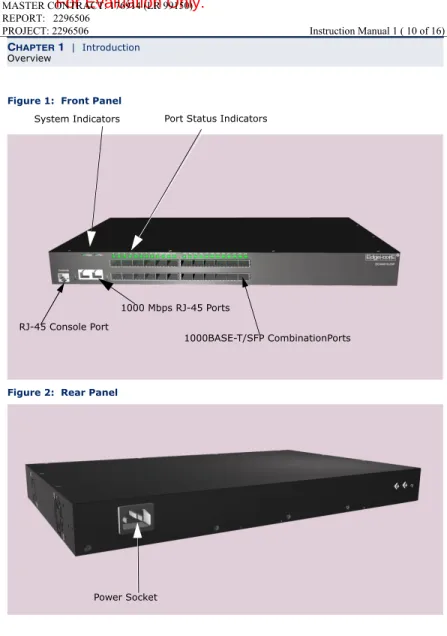
Figure 1: Front Panel
Figure 2: Rear Panel
Port Status Indicators
1000BASE-T/SFP CombinationPorts System Indicators
RJ-45 Console Port
1000 Mbps RJ-45 Ports
CHAPTER 1 | Introduction Overview
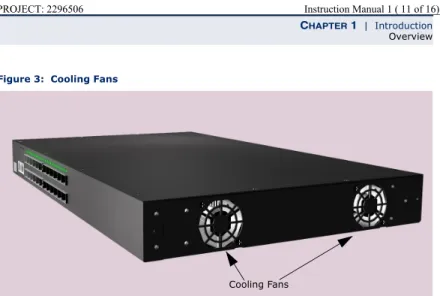
Figure 3: Cooling Fans
Cooling Fans PROJECT: 2296506
A
PPLICATION
E
XAMPLES
The switch is not only designed to segment your network, but also to provide a wide range of options in setting up network connections. Some typical applications are described below.
C
OLLAPSEDB
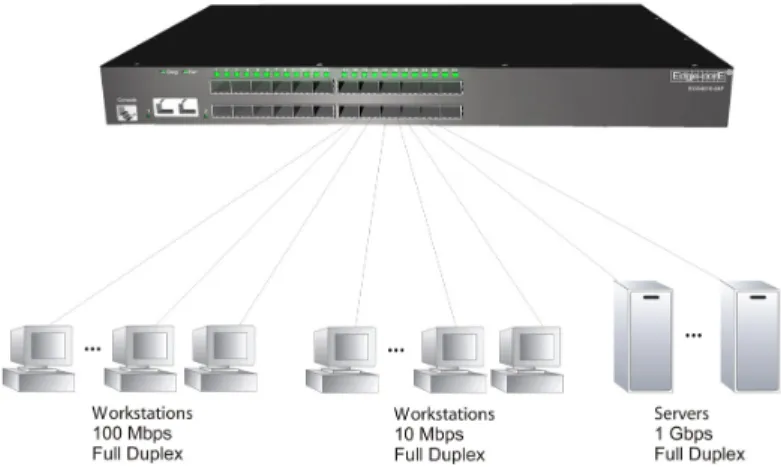
ACKBONEThe switch is an excellent choice for mixed Ethernet, Fast Ethernet, and Gigabit Ethernet installations where significant growth is expected in the near future. You can easily build on this basic configuration, adding direct full-duplex connections to workstations or servers. When the time comes for further expansion, just connect to another hub or switch using one of the Fast Ethernet ports built into the front panel or a Gigabit Ethernet port on a plug-in SFP transceiver.
In the figure below, the switch is operating as a collapsed backbone for a small LAN. It is providing dedicated 10 Mbps full-duplex connections to workstations, 100 Mbps full-duplex connections to power users, and 1 Gbps full-duplex connections to servers.
CHAPTER 2 | Network Planning Application Examples
R
EMOTEC
ONNECTIONSWITHF
IBERC
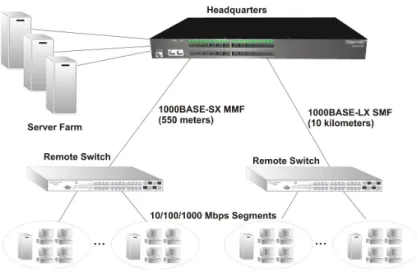
ABLEFiber optic technology allows for longer cabling than any other media type. A 1000BASE-SX (MMF) link can connect to a site up to 550 meters away, a 1000BASE-LX (SMF) link up to 10 km, and a 1000BASE-LH link up to 80 km. This allows the switch to serve as a collapsed backbone, providing direct connectivity for a widespread LAN.
The figure below illustrates the switch connecting multiple segments with fiber cable.
Figure 8: Remote Connections with Fiber Cable
PROJECT: 2296506
I
NSTALLING
AN
O
PTIONAL
SFP T
RANSCEIVER
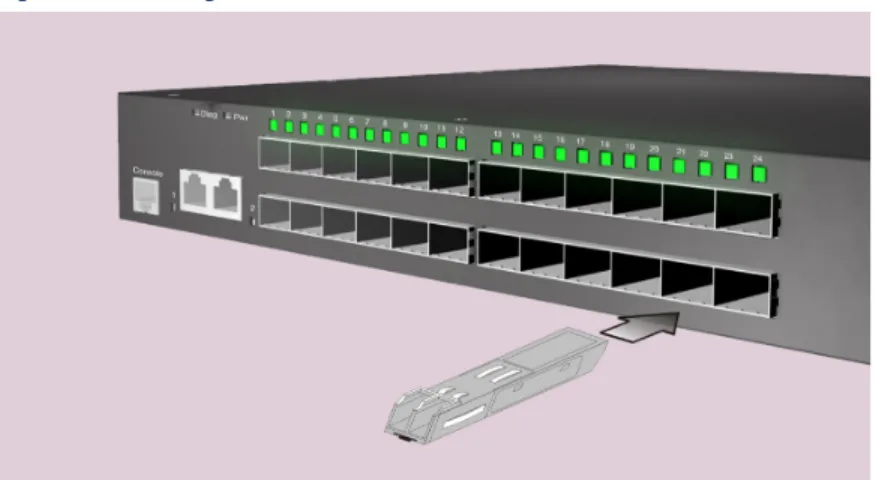
Figure 12: Inserting an SFP Transceiver into a Slot
The SFP slots support the following optional SFP transceivers:
◆ 1000BASE-SX
◆ 1000BASE-LX
◆ 1000BASE-LH
To install an SFP transceiver, do the following:
1.
Consider network and cabling requirements to select an appropriate SFP transceiver type.2.
Insert the transceiver with the optical connector facing outward and the slot connector facing down. Note that SFP transceivers are keyed so they can only be installed in one orientation.CHAPTER 3 | Installing the Switch Connecting to a Power Source
C
ONNECTING
TO
A
P
OWER
S
OURCE
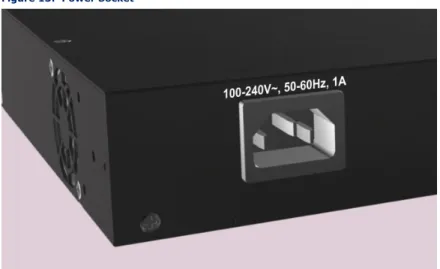
To connect a switch to a power source:
1.
Insert the power cable plug directly into the AC socket located at the back of the switch.Figure 13: Power Socket
2.
Plug the other end of the cable into a grounded, 3-pin, AC power source.NOTE: SFP transceivers are hot-swappable. The switch does not need to
be powered off before installing or removing a transceiver. However, always first disconnect the network cable before removing a transceiver.
NOTE: SFP transceivers are not provided in the switch package. PROJECT: 2296506
4
M
AKING
N
ETWORK
C
ONNECTIONS
C
ONNECTING
N
ETWORK
D
EVICES
The switch is designed to be connected remote devices using optional
1000BASE-SX, 1000BASE-LX, or 1000BASE-LH SFP transceivers. It may also be connected to 10, 100, or 1000 Mbps network cards in PCs and servers, as well as to other switches and hubs.
T
WISTED
-P
AIR
D
EVICES
Each device requires an unshielded twisted-pair (UTP) cable with RJ-45 connectors at both ends. Use Category 5, 5e or 6 cable for 1000BASE-T connections, Category 5 or better for 100BASE-TX connections, and Category 3 or better for 10BASE-T connections.
C
ABLINGG
UIDELINESThe RJ-45 ports on the switch support automatic MDI/MDI-X pinout
configuration, so you can use standard straight-through twisted-pair cables to connect to any other network device (PCs, servers, switches, routers, or hubs). See Appendix B for further information on cabling.
CAUTION: Do not plug a phone jack connector into an RJ-45 port. This
will damage the switch. Use only twisted-pair cables with RJ-45 connectors that conform to FCC standards.