Structured Audio Information Retrieval System
Dirk Schnelle
Telecooperation Group
Darmstadt University of Technology
Hochschulstrasse 10
D-64283 Darmstadt, Germany
[email protected]
Frankie James
SAP Research, RC Palo Alto
SAP Labs, LLC
3410 Hillview Avenue
Palo Alto, CA 94304
[email protected]
Abstract
The Structured Audio Information Retrieval System (STAIRS) project targets environments where workers need access to information, but can-not use traditional hands-and-eyes devices, such as a PDA. The informa-tion to be accessed is stored in an informainforma-tion base, either as pre-recorded audio or as text to be run through a text-to-speech engine. Given the in-herent limitations of the simple audio interface used in STAIRS, it is important to structure the information base in a way which makes navi-gation as easy as possible for the user.
1
Introduction
The focus of the project is on delivering audio information through a headset and using voice for interaction and navigation. We believe that, in certain scenarios, audio information delivery is superior to traditional hands-and-eyes devices, such as a display, a PC, or a PDA. This is because workers typically have their hands busy with the task they are trying to perform. Hence they cannot easily use a keyboard or a mouse because this will force them to stop working.
The information which the workers access is stored in an information base in the network of the organization. This information is structured to allow for easy delivery over audio and also contains information on how to navigate through the information base. The workers can navigate through this information base and
1 Dagstuhl Seminar Proceedings 05181
Mobile Computing and Ambient Intelligence: The Challenge of Multimedia http://drops.dagstuhl.de/opus/volltexte/2005/370
2 RELATED WORK 2
access the information they need at any given time. Voice interaction, however, requires a new type of interaction device and information access paradigms.
We use the Talking Assistant (TA) headset [1] developed at the Telecoopera-tion group at Darmstadt University of Technology as a prototype for the future audio interaction device. The headset features audio input/output capabilities, a wireless networking connection, an infrared-based local positioning system, and has a CPU for local processing.
Using the wireless networking and audio input/output capabilities, we can deliver audio information to the worker everywhere in the workplace. We also capture voice commands from the worker and feed them through a voice recog-nition system and translate them into navigation commands.
The Talking Assistant can also act as a source of context, thanks to its positioning system. This allows us to restrict the information delivered to the worker to cover only information relevant to the context of the worker. For example, consider a worker in a warehouse who needs to pick items from different aisles and shelves. The positioning system tells us in which aisle the worker is, so we can send the worker information only about the items in the current aisle. This avoids overloading the worker with information.
F. James considered structured audio in her doctoral thesis [7]. Structured audio information needs to contain additional audio clues to tell the listener what kind of information, e.g., heading, link, is currently being delivered. This project will build on her previous work and expand the structured audio to take into account navigation and context.
2
Related Work
There are already existing solutions for navigating within audio based informa-tion coming from different applicainforma-tion scenarios.
One application scenario is to revamp existing audio guides for museums with an interactive component such that visitors are not limited to a preset tour but can move around freely within an exhibition. Sennheiser’s guidePORT [10] is an example for such a system. guidePORT-users carry a set consisting of a wireless receiver and earphones, exhibits are associated with triggers that send out a near-range signal containing an ID for the exhibit. Once a visitor enters the range of the trigger, her wireless receiver fetches the audio file associated with the ID from a wireless network and plays it back. Navigation within the knowledge base of the guidePORT system is limited. Wireless receivers also have a unique ID. As the decision which audio file to fetch is based upon both exhibit ID and receiver ID it is possible to have several pre-programmed theme sets or languages based on the receiver the visitor carries. Apart from that, selection of content is solely based on the location of the visitor.
B. Arons’s Hyperspeech system [3] is inspired by both graphical hypertext systems and phone based menu systems. It presents a selection of interviews to its users. These interviews form a strongly connected graph where users are free to browse in. When browsing, the system discriminates between several types
3 USE CASE SCENARIOS 3
of links between nodes; as almost every node has a link of each type to another node this leads to a unified command set for navigating between elements. Users navigate by uttering the type of link they want to follow. The system does not use confirmations, but directly goes to the node recognized. In case of a misrecognition it is up to the user to initiate an undo command. Arons identified that both sparse graphs and overly smart systems may contribute to the lost in space problem. Sparse graphs, because the users are missing landmarks for navigation which causes the system to fall apart. Smart navigation was tried by automatically transporting the user back from a node with no links originating from, as this lead to confusion about the node the user was currently in.
HIPPIE [6] is a context aware nomadic information system that supports users with location aware information services. The used context is defined by the physical environment, the geographical position, social partners, user tasks and personal characteristics. Context is used to adapt the multimodal information presentation. The default information presentation is multimodal, containing written text, graphics and animations on the screen and spoken lan-guage via headphones. Focus of project is a the realization of a visitor walking in the physical space while getting access to contextualized information space tailored to the individual needs and the current environment. They do not consider the movement of the visitor in the electronic space.
3
Use Case Scenarios
This section presents some application scenarios for the results of this project. This list is by no means exhaustive, but serves as an example of the different kinds of scenarios where the results are applicable.
3.1
Laboratory Worker
One application scenario for the STAIRS project is delivering information to workers in laboratories, such as chemical or pharmaceutical laboratories. In these scenarios, the workers need their hands to perform their tasks, leaving voice as the logical interaction modality.
The information base contains information about all the different processes and the worker can access the parts relevant to her current task using the TA headset. She will receive instructions on how to proceed and can ask for more details or help, when needed.
Workers in a laboratory are typically stationary when performing their tasks. They have all their instruments on their desks and perform their tasks at their desks. This offers us also the possibility of augmenting the information delivery by exploiting any displays on the desk. Note that such displays, if used, are only for displaying information; interaction would still happen using voice commands issued to the headset. Mechanisms for using additional displays are beyond the current scope of the project and may be explored in a subsequent project.
3 USE CASE SCENARIOS 4
3.2
Mobile Inspection
Another interesting field of application is mobile inspection. Possible examples include automotive and aerospace industries, but also inspections of ships and trains. In these scenarios the hands and eyes are busy performing the task.
In contrast to the laboratories, we cannot assume that there is any computer infrastructure to support the worker, except for a wireless network. In a labo-ratory it is possible to install displays at the desks, but in a mobile inspection scenario, e.g., inspecting an airplane, the worker must carry all the equipment with her in addition to any tools she might need in her task. This implies that the device used to access information should be as light-weight as possible, yet provide a useful service to the worker.
The information base in this case contains information needed by the worker, such as how the inspections are to be performed, what things need to be verified, etc. It also contains solutions for common problems, as shown by the following example: Consider a worker inspecting a car who sees fluid leaking from a valve. Using the information base she can get information about possible causes of the leakage and solutions to these.
A possible extension to this scenario would be adding a head-mounted dis-play onto the headset. This would allow us to deliver low quality graphical images, such as schematics or blueprints, to the worker to aid complex tasks. The details of this are not covered in this project and are left for future work.
3.3
Warehouse Pick list
A similar scenario to the previous one is a warehouse worker who needs to pick different items from different shelves. Again, the worker’s hands are busy, calling for the use of voice interaction, and the high mobility of the worker makes carrying additional equipment impractical.
As in the mobile inspection scenario, the only infrastructure support we can assume is a wireless network and the information base. The difference between the mobile inspection and warehouse pick list scenarios are that in the former the worker is accessing information and in the latter she receives instructions and confirms them. For example, the next task could be “fetch 10 widgets from shelf 5 on aisle 7”. When the worker has performed the task and has picked up the widgets, she would confirm this to the information base which would then dispatch her onwards to the next pick-up.
In this scenario the headset provides two important functions. First one is what we mentioned above, i.e., telling the worker what to do next and receiving confirmations from the worker that the task has been completed. The second function is providing help to the worker. For example, new workers might need instructions on what is the optimal route between two pick-ups or might need help finding the correct items. The information base might also deliver descriptions of items if needed.
3 USE CASE SCENARIOS 5
3.4
Training at Work
Although all of the previous application scenarios are of great interest and use-fulness in themselves, the results of this project can help augment them further. A major issue in modern world is training workers to perform new tasks. Many industries attempt to shorten production cycles in order to bring products to the market faster. This desire to speed up production is often hampered by the need to train the workers to follow new procedures which accompany the manufacture of new products.
The STAIRS-project can help shorten the training periods by providing training at work. In other words, it helps teach the new procedures to the workers while they are actually performing them. We can deliver information from the information base directly to the worker and, more importantly, we can tailor this information to be relevant to the task she is currently learning. If the worker needs more information concerning a particular task, she can easily access it via the headset and have it delivered to her instantly. This not only shortens learning time but also includes quality as workers experience ”learning by doing”.
Another major benefit in training scenarios is the ability to talk directly to other people. This can be used to provide a help-desk for individual workers without requiring them to interrupt their tasks or requiring a large number of help-desk attendants.
3.5
Better Museum Guide
Currently many museums offer visitors the possibility to borrow audio guides which explain many details about the exhibits in the museum. Also, museum guides have traditionally been among the first application scenarios for ubiqui-tous and pervasive computing research.
The main problem with the current audio guides is that they distract the visitors attention. The visitor is expected to look at the exhibits while listening to a usually quite lengthy explanation of it. Such audio guides allow the visitor to listen to only parts of the information; either the visitor does not listen at all, thus negating the usefulness of the guide, or the visitor listens to all of it and has to divide her attention between the exhibit and the explanation.
A museum guide based on the Talking Assistant and a structured audio information base can help alleviate this problem. By default, the visitor gets only a brief description of the exhibit, e.g., title and painter for a painting. The visitor would then have the option to query for more details about the painting or the painter, depending on her interests. This eliminates the binary nature of modern audio guides and introduces many intermediate levels of detail between no information and all of the information.
4 AUDIO BROWSING 6
4
Audio Browsing
This section discusses the requirements to handle the applications described in section 3. One of these requirements concerns the command set to use.
In order to use speech as an input medium, it is common practice to build a grammar that matches exactly the requirements of the application to be imple-mented. This is a time consuming task and it has to be repeated for each new application. Attempts to reduce the cost for this task range from the definition of speech contexts, e.g. specifying a time and a date for a jour fixe1to complex
GUIs for a visual manipulation of the dialog2.
A promising approach is Speech Graffiti from the USI project of Carnegie Mellon University. An overview of this project can be found in [12]. The project tries to find a standard, that is already present in the GUI world, and was successfully ported to handwriting recognition throughgraffiti by Palm OS [9]. The target is to transfer the idea oflook & feel from the world of graphical user interfaces to audio based user interfaces This conflicts with the efforts being made to reproduce a natural language like human-computer-dialog. The USI project describes their efforts like this:
”Yet another interface alternative is specialized Command-and-Control languages. While these are viable for expert users who can invest hours in learning their chosen application, they do not scale dozens of applications used by millions of occasional users. Our system, on the other hand is universal – that is, application independent. Af-ter spending 5 minutes learning the inAf-terface, a typical user should be able to communicate with applications as diverse information servers, schedulers, contact managers, message services, cars and home appliances. In essence, we try to do for speech, what the Mac-intosh universal “look and feel” has done for the GUI world.”
Our approach is more minimalistic. Our goal is to deliver audio documents to the user. This is comparable to a web browser which can be used to retrieve textual documents or to start applications. Although the documents, or appli-cations, can be complex, the basic functionality of such a browser is not. It can be controlled by only few commands. The basic command set can be boosted by the environment if the user enters an application that needs more complex interaction mechanisms. However, the command set should satisfy the basic needs to navigate to those applications and access audio based information.
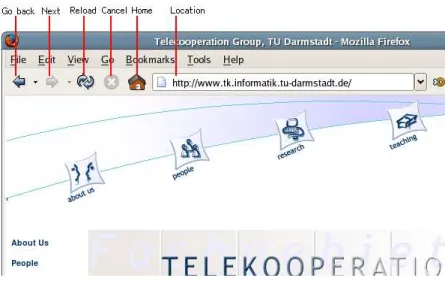
One goal was to find a command set whose commands are equivalent to the controlling functions of a web browser, see figure 1. We assume that the information is stored in a tree-like structure (see section 4). The audio naviga-tion document structures borrow from hypertext the nonaviga-tion of enabling users to access information in an intuitive and associative way. However, hypertext systems rely on graphical user interfaces to navigate through a two-dimensional space.
1e.g. SymComponents from Sympalog [11] 2e.g. GenieBuilder from VoiceGenie [13]
4 AUDIO BROWSING 7
Figure 1: Analogy to web browser
Unfortunately, accessing information through navigation is more complex in the audio domain. In aural interfaces, concepts such as menu selection, control widgets, and link anchors must be performed and revealed differently than in visual interfaces. While speech is a powerful means of communication, its transient nature severely limits the amount of information that can be conveyed to the user. The eye is active whereas the ear is passive, i.e. the ear cannot browse a set of recordings the way the eye can scan a screen of text and figures. Instead it has to wait until the information is available, and once received, it is not there anymore. Furthermore, the voice as a means for selection brings forth the set of ambiguities inherent to the natural language. Finally, other human factors such as user’s short term memory (STM) capabilities and listening skills strongly influence the efficiency of a speech interface.
Due to the nature of an embedded device, a recognizer which runs on such a small device has strong limitations in memory and computing power. Such a device could not handle a fully-fledged speech recognizer, but is able to handle our small command set. A further advantage of a small command set is that it is simple and easy to learn.
We made a survey to find a command set that satisfied our needs. It is obvious that our survey is not representative of the whole field of users, since there are too few answers. However, one of our goals with the survey was to find out how closely the answers would correspond to the words proposed by ETSI [5]. The users answering the survey were unaware of the ETSI words. In addition, ETSI does not provide words for all the scenarios needed in this project, thus requiring us to use the words from our survey.
5 CONTEXT 8
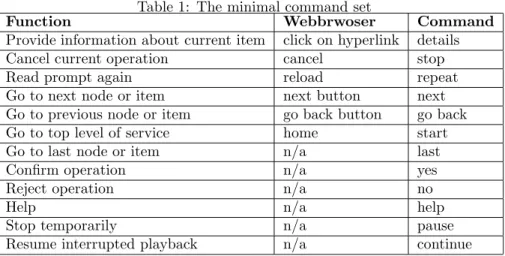
Table 1: The minimal command set
Function Webbrwoser Command
Provide information about current item click on hyperlink details
Cancel current operation cancel stop
Read prompt again reload repeat
Go to next node or item next button next
Go to previous node or item go back button go back
Go to top level of service home start
Go to last node or item n/a last
Confirm operation n/a yes
Reject operation n/a no
Help n/a help
Stop temporarily n/a pause
Resume interrupted playback n/a continue
browser. Besides the main browsing commands, we will need some additional commands, which relate to the audio domain, likepause/continueor a selection facility, likeyes/no.
5
Context
This section addresses, what context information needs to be taken into account and how it is to be exploited. Context is defined as
Definition 1 Contextare the circumstances or events that form the
environ-ment within which something exists or takes place. In [4] Dey differentiates between
• presentation of information and services to a user, • automaticexecution of a service for a user and
• tagging of context to information to support later retrieval.
These items become more clear in an example where a user moves through a building with her mobile computer and randomly starts some printing jobs. Presentation is done by her mobile computer that asks the user to select one of n nearby printers as she moves through the building. Tagging is done by an application that records the selected device in relation to the user’s physical locationAutomatic execution is then using the last selected printer based upon the current physical location.
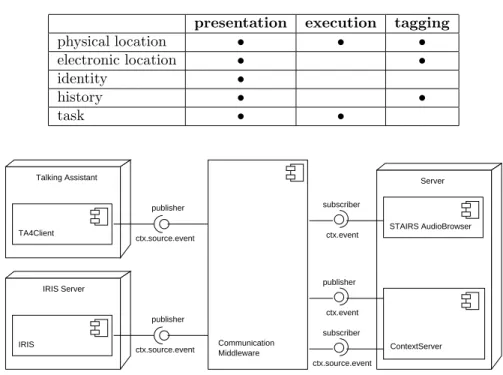
Before discussing how context can help, it must be clear which aspects of the environment are of special interest. For the main categories, the applying class is marked with a• in table 2.
5 CONTEXT 9
Table 2: Context classification after Dey
presentation execution tagging
physical location • • • electronic location • • identity • history • • task • • IRIS
TA4Client STAIRS AudioBrowser
ctx.source.event publisher ContextServer ctx.event subscriber ctx.source.event publisher publisher ctx.event subscriber ctx.source.event Middleware Communication Server Talking Assistant IRIS Server Figure 2: Architecture
Aiding the user not to get lost in the audio world is one of our most important goals. Nearly all of our context data focus on this goal. The only exception is the physical location. Physical location is primarily used to identify anchor points for a graph. It can be compared to clicking thehome button in a conventional web browser. Besides physical location can be used to aid the user in identifying objects.
5.1
Architecture
To preprocess and collect context we use theContext Server [8], developed at Telecooperation group at Darmstadt University of Technology. The Context Server has a similar approach tool as theContext Toolkit from Dey [4]. It offers support for building context-aware applications by a widget based approach.
Figure 2 shows, how the STAIRS audio browser interacts with the environ-ment.
In the following section we describe, how we use the location context via this architecture, since this is our most important context data. It is the most important data in the sense that it is used to identify graphs, which are the starting point for audio browsing. Other contexts, like electronic location, are
5 CONTEXT 10
also part of the evaluated context data, but are not covered within this paper.
5.2
Physical location
The physical location is obtained from a positioning system. STAIRS uses the Talking Assistant (TA) which features two positioning models:
• relative positioning and • absolute positioning.
5.2.1 Relative Positioning
Relative positioning uses tags to get an idea of the user’s location. Tags own an ID, which they emit via infrared. The TA works as an infrared receiver and is able to read the ID from the infrared signal, if it is in the range of the emitter on the tag. When the TAsees a tag, the TA sends a location enter event, whereas it sends a location leave event when it gets out of the range of it. Tags are only visible to the TA if the user approached close enough and is within a certain wave angle.
vT Atag(d, s) =
1 ifd < dθ∧α < αθ
0 otherwise (1)
where αis the angle to the center of the tag andαθ is the maximum angle
where a user is in the range of the tag.
5.2.2 Absolute positioning
Absolute positioning, as described in [2], offers a more concrete idea of of the user’s location. STAIRS uses the Talking Assistant which features an infrared-based local positioning system. The positioning system delivers the values to determine the users position (xu, yu) head orientationαand tiltβ. With these
values it is easy to determine the user’s line of sight. But this will not be enough to determine the object of interest for sure. Imagine a user looking at a match box with a distance of 10 meters, and it becomes clear that there must be a relationship between the distancedand the visible surfacesof the object.
Visibility of an object then is expressed by vT Airis =
s
2dtanβ (2)
whereβ is the measurement error of the TA’s internal compass.
Conventional museum guides like guidePORT [10] define an aura around the object and if the user comes into it, it is assumed that she is looking at it. This means
vM(d, s) =
1 ifd < dθ
6 SUMMARY 11
The visible surface of the object gets lost, because these systems do not now anything about the user’s head orientation. The disadvantage is that only large objects can be handled. But we want to recognize smaller objects too, even if this means that the user has to be very close.
5.3
Identifying graphs
Both systems, described in section 5.2, send their data to the Context Server, figure 2. The widget chains of the context server derive an ID of the object of interest that can be linked against documents. It is possible to get more data out of this by using other widget chains. At this stage STAIRS will only evaluate the ID of the object. When the user looks as an object that has an associated root document we want to inform the user with an auditory icon. Since physical location is the only context with an executional category it has to be treated different to other context data. We do not need an utterance to play back the auditory icon. After hearing the icon, the user can start browsing the documents related to that position.
6
Summary
In this paper we have introduced STAIRS, an audio browser for a ubiquitous environment. Starting from graphical web browsers, we showed how these con-cepts for a multifunctional, but minimalistic browser can be mapped to the audio domain. This includes the commands and the way to find a root document.
Next steps will be to use more of the context data, that is available via our ContextServer and to introduce a style guide to handle the pitfalls of the auditory medium.
7
Acknowledgments
We want to say thank you to SAP Corporate Research,http://www.sap.com who funded this project. Thanks to Knut Manske and Jussi Kangasharju for taking the time to review this paper and their suggestions for improvement.
References
[1] Erwin Aitenbichler and Max M¨uhlh¨auser. The talking assistant headset: A novel terminal for ubiquitous computing. Technical Report TK-02/02, Telecooperation Group, Department of Computer Science, Darmstadt Uni-versity of Technology, 2002.
[2] Erwin Aitenbichler and Max M¨uhlh¨auser. An IR Local Positioning System for Smart Items and Devices. InProceedings of the 23rd IEEE International Conference on Distributed Computing Systems Workshops (IWSAWC03), pages 334–339. IEEE Computer Society, May 2003.
REFERENCES 12
[3] Barry Arons. An IR Local Positioning System for Smart Items and Devices. InUK Conference on Hypertext, pages 133–146, 1991.
[4] Anind K. Dey.Providing Architectural Support for Building Context-Aware Applications. PhD thesis, Georgia Institute of Technology, February 2000. [5] ETSI. Human factors (HF);user interfaces;generic spoken command
vocab-ulary for ict devices and services. Technical report, ETSI, April 2000. [6] Tom Gross and Markus Specht. Awareness in context-aware information
systems. InMensch & Computer 2001, pages 173–181, 2001.
[7] Frankie James. Representing Structured Information In Audio Interfaces: A Framework For Selecting Audio Marking Techniques To Present Docu-ment Structures. PhD thesis, Stanford University, 1998.
[8] Marek Meyer. Context server - location context support for ubiquitous computing. Master’s thesis, TU Darmstadt, Telecooperation Group, Darm-stadt, January 2005.
[9] palm. Ways to enter data into a palm handheld. http://www.palm.com/ products/input.
[10] Sennheiser. guideport. http://www.guideport.com/.
[11] Sympalog. Symcomponents - vorkonfigurierte spracherkennungsmodule. http://www.sympalog.de/produkte/symrec.html.
[12] Carnegie Melon University. Universal speech interface project homepage. http://www.cs.cmu.edu/∼usi.