CMS Centres Worldwide: a New Collaborative Infrastructure
Lucas Taylor, Northeastern University, Boston, MA 02115, USAErik Gottschalk Fermilab, P.O. Box 500, Batavia, IL 60510-5011, USA Emails: [email protected] and [email protected]
Abstract.
The CMS Experiment at the LHC is establishing a global network of inter-connected "CMS Centres" for controls, operations and monitoring. These support: (1) CMS data quality monitoring, detector calibrations, and analysis; and (2) computing operations for the processing, storage and distribution of CMS data. We describe the infrastructure, computing, software, and communications systems required to create an effective and affordable CMS Centre. We present our highly successful operations experiences with the major CMS Centres at CERN, Fermilab, and DESY during the LHC first beam data-taking and cosmic ray commissioning work. The status of the various centres already operating or under construction in Asia, Europe, Russia, South America, and the USA is also described. We emphasise the collaborative communications aspects. For example, virtual co-location of experts in CMS Centres Worldwide is achieved using high-quality permanently-running "telepresence" video links. Generic Web-based tools have been developed and deployed for monitoring, control, display management and outreach.
1. What is a CMS Centre and how is it used ?
CMS is establishing a network of "CMS Centres Worldwide" at CERN, in the Americas, Asia, Australasia, and Europe. The current locations are shown in figure 1. The goal is to help all collaborators to participate effectively in the CMS research programme, irrespective of location[1,2,3].
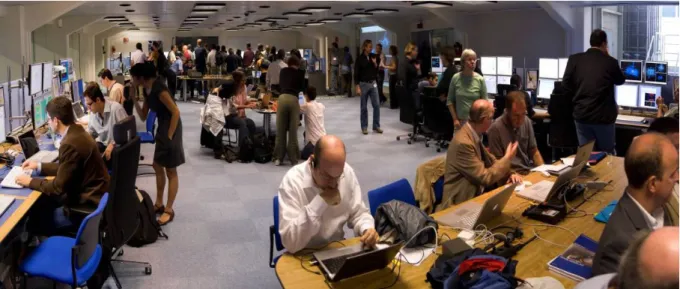
A CMS Centre is a communications focal point for students, post-docs and faculty. It is a common (physical and virtual) workplace with easy access to up-to-date information via (Web) services. As seen in figures 2 and 3, which show the CMS Centre@CERN and the LHC@FNAL, there are numerous status and monitoring screens, interactive consoles, high quality video-conference systems [4], meeting rooms and outreach displays.
CMS Centres are used for CMS operations, sub-detector data quality monitoring (DQM) [5], data analysis, and outreach [6]. They may also participate in CMS computing (grid) operations. When CMS running stabilizes, remote shifts may become possible for certain tasks (e.g. computing operations or DQM) but this is not guaranteed from the outset.
A CMS Centre increases CMS visibility in the institute, helps attract new students, and supports outreach activities such as tours, discussions with physicists, live displays, posters, and other exhibits. CMS Centres may also be used for media events. For example, on the LHC First Beam Day event of 10th Sept. 2008, the world’s largest scientific press event since the moon landing, 37 media organizations visited the CMS Centre @ CERN from where BBC TV News broadcast worldwide throughout the day.
Figure 1. Locations of operating or planned CMS Centres Worldwide (as of April 2009).
Figure 3. CMS Centre @ FNAL (aka LHC@FNAL).
2. What hardware is needed ?
A CMS Centre at an institute requires a room of 20 sq. m or more with electrical power, networking, lighting, cooling, heating, and ventilation systems consistent with a modern office. The room should preferably be centrally located and close to the CMS users and a meeting room.
2.1. Computing systems
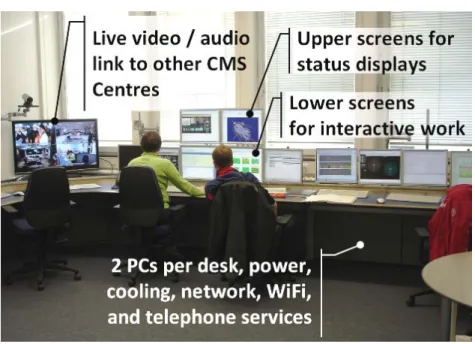
A CMS Centre has a number of computing consoles or desks, as shown in figure 4. Each console has two lower screens for interactive work connected to one Linux PC. The two upper screens, connected to another non-interactive PC, show displays of the LHC and CMS status, detector monitoring pages, event displays, etc. The content on all the upper screens is served and configured through the ci2i Web application (described below); no mouse or keyboard is connected to the upper screens’ PC. Each console requires about ten power sockets (total 2 kW) and four network sockets: two for the PCs, one with DHCP for a laptop, and one spare, e.g. for a printer.
2.2. Videoconferencing systems
The major CMS Centres (CERN, FNAL, DESY) are linked to the CMS Control Room and each other by a permanently-running, high-definition, commercial videoconference system. One can simply approach the TV and talk to remote people (see figure 5).
Figure 5: High Definintion H.323 video-confering links between CMS Centres.
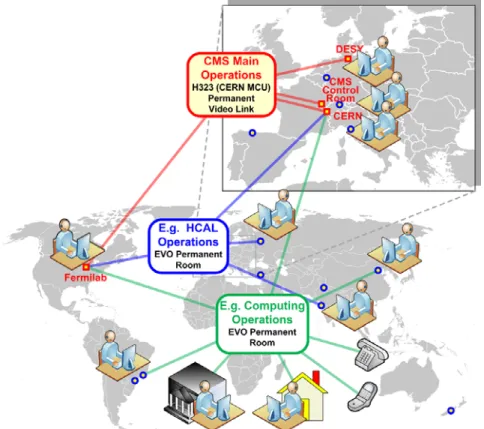
Smaller CMS Centres use a software video system (EVO) to connect to remote locations as needed. Permanent EVO meeting rooms have been established for various CMS operations communities, such as Computing Operations, HCAL operations, etc. (see figure 6) to enable connections to be made as and when needed between experts.
Figure 6. Schematic overview of video systems for “CMS Centres Worldwide”. EVO links are dynamic and change according to need.
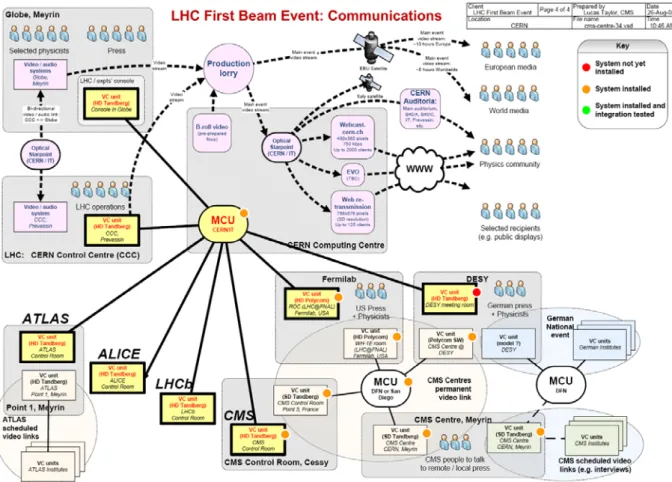
The video systems are designed to be flexible to meet rapidly changing operations and outreach needs. This proved invaluable on LHC First Beam day, 10th September 2008, when more than 40 press organizations visited the CMS Centre at CERN, including exclusive worldwide BBC News coverage, as shown in figure 7.
Figure 7. Schematic layout of communications systems involving CMS Centres for LHC First Beam day, 10th September 2008.
2.3. Outreach
At least two large computer (TV) displays or projectors show top-level status and outreach displays and additional posters or detector exhibits are often shown. The public screens are usually driven by a PC running the Web-based ci2i-TV (aka CMS-TV) system, described in section 3.
3. What software is needed ?
The PCs usually run CERN-standard Linux. This is not a rigid constraint as most applications are Web-based, as described below. There are various Web applications to help follow CMS operations, notably the DQM system used by all CMS sub-systems:
http://cmsdoc.cern.ch/cms/performance/commissioing/monitoring.html). 3.1. ci2i (see eye to eye) Web Application
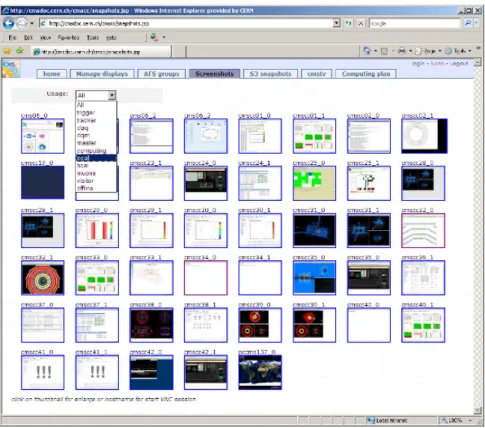
The ci2i tool enables many CMS Centre tasks to be managed from a Web browser (http://cmsdoc.cern.ch/cmscc/). It is used for viewing remote displays (figure 8); mapping of monitoring content (URLs) to local or remote displays; hardware configuration; setting up group accounts and user privileges; screen snapshot services; and operations planning.
Figure 8. Example screenshot of the ci2i Web application for managing CMS Centres Worldwide. 3.2. “CMS-TV” Web Application
“CMS-TV” shows displays (e.g. LHC status, CMS page 1, live events, etc.) on big screens in CMS Centres similar to a TV news channel that cycles through headlines, business, sports, etc. as shown in figure 9. It aggregates a set of URLs to form a single new URL, or “TV channel,” viewable in a Web browser. Follow the link: http://cmsdoc.cern.ch/cmscc/ cmstv/cmstv.jsp?channel=1 and press F11 for full screen. New "TV channels" can be set up easily using ci2i.
4. How much does it cost ?
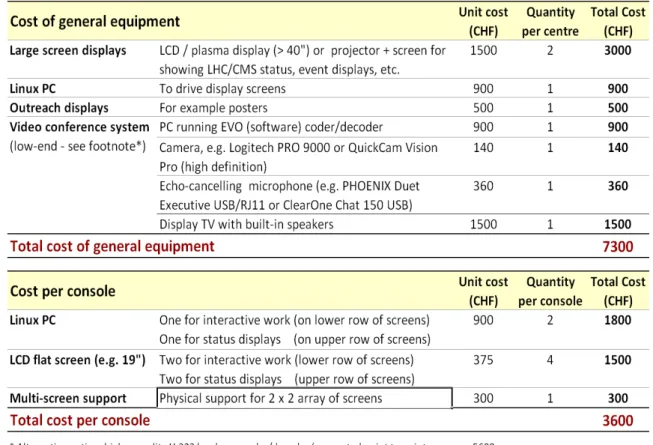
General equipment for a CMS Centre in an institute costs about 7.3 kCHF and the consoles are 3.6 kCHF each (see Table 1), so the total cost is approximately
Cost § 7.3 + 3.6 * (number of consoles) kCHF.
Thus a CMS Centre with two full consoles costs 14.5 kCHF, or less if some equipment is re-used. To equip all 182 CMS institutes with a CMS Centre would cost 2.6 MCHF.
Table 1: Summary of costs for equipping a canonical (modest) CMS Centre in an Institute.
5. References
[1] L. Taylor et al., “Functions and Require-ments of the CMS Centre at CERN”, CMS NOTE-2007 / 010, 16 March NOTE-2007
[2] L. Taylor et al., “CMS centres for control, monitoring, offline operations and prompt analysis” Proc. of CHEP '07, 2–7 Sept. 2007, Victoria; J. of Phys: Conf. Series, Vol. 119, 2008. [3] http://cmsdoc.cern.ch/cmscc/index.jsp
[4] CHEP 09: Erik Gottschalk et al. in plenary and HD Videoconferencing talk [5] CHEP 09: Lassi Tuura et al. on CMS Data Quality Monitoring talk