Copyright © TID and other members of the 4CaaSt consortium 2011 Page 1
Building the PaaS Cloud of the Future
WP2: Experimental Prototype of
Software Components and
Documentation:
D2.3.2
Version x,x
WP2 – Service Engineering and Lifecycle Management
Dissemination Level: Limited to Programme Participants
Lead Editor: Francesco Lelli, ERISS
11/03/2013
Status: Final
The research leading to these results has received funding from the European Union's Seventh Framework Programme (FP7/2007-2013) under grant agreement n° 258862
Seventh Framework Programme FP7-ICT-2009-5
Copyright © ERISS and other members of the 4CaaSt consortium 2013 Page 2
This is a public deliverable that is provided to the community under a Creative Commons Attribution 3.0 Unported License: http://creativecommons.org/licenses/by/3.0/
You are free:
to Share — to copy, distribute and transmit the work to Remix — to adapt the work
Under the following conditions:
Attribution — You must attribute the work in the manner specified by the author or licensor (but
not in any way that suggests that they endorse you or your use of the work).
With the understanding that:
Waiver — Any of the above conditions can be waived if you get permission from the copyright
holder.
Public Domain — Where the work or any of its elements is in the public domain under
applicable law, that status is in no way affected by the license.
Other Rights — In no way are any of the following rights affected by the license:
Your fair dealing or fair use rights, or other applicable copyright exceptions and limitations; The author's moral rights;
Rights other persons may have either in the work itself or in how the work is used, such as publicity or privacy rights.
Notice — For any reuse or distribution, you must make clear to others the license terms of this
work. The best way to do this is with a link to this web page.
For a full description of the license legal terms, please refer to:
Copyright © ERISS and other members of the 4CaaSt consortium 2013 Page 3
Contributors: Francesco Lelli
1, ERISS
Mathijs van der PaauW, ERISS
Joerg Nimeoeller, Ericsson
Dimitri Mazmanov, Ericsson
Internal Reviewer(s):
Daniel Scheibli, SAP
Sergio Garcia Gomez, TID
Version History
Version Date Authors Sections Affected
0.1 11/11/2011 Francesco Lelli Outline
0.2 05/12/2011 Francesco Lelli Initial Version
0.3 10/01/2012 Francesco Lelli Description of the Interfaces
0.4 15/01/2012 Mathijs van der PaauW Deployment instructions
0.9 19/01/2012 Francesco Lelli Version for internal Review
0.9a 10/02/2012 Francesco Lelli Feedback from reviewers
1.0 12/02/2012 Francesco Lelli Final version
1.1 10/12/2012 Francesco Lelli Porting to the new template
1.2 15/01/2013 Francesco Lelli Integration with the Information of
the Blueprint Editor from FT
1.3 18/01/2013 Mathijs van der PaauW New deployment information
1.4 31/01/2013 Francesco Lelli
Stephane Pierre Carrie
Information regarding the Blueprint Editor
1.5 07/03/2013 Joerg Niemoeller
Dimitri Mazmanov
Information regarding the resolution engine.
1.0 11/03/2013 Francesco Final version
Copyright © ERISS and other members of the 4CaaSt consortium 2013 Page 4
Table of Contents
Executive Summary ... 9
1. Introduction ...10
1.1. Purpose and scope ...11
1.2. Document Overview ...11
1.3. Change Log (compared to D2.3.1) ...11
2. Prototype Description management ...12
2.1. WP2 Demos ...14
2.2. Infrastructure and Deployment ...14
2.2.1. BlueprintHQ and BlueprintEXE ...14
2.2.2. Blueprint Editor ...15
2.2.3. SLA Resolution Engine ...15
2.3. Relationship to other 4CaaSt Work Packages ...15
2.3.1. Interfaces to WP3 ...15 3. Component Management ...16 3.1. Blueprint HQ ...16 3.1.1. Generation instruction ...16 3.1.2. Installation instructions ...17 3.1.3. Configuration ...17 3.1.4. Execution Instructions ...17 3.2. Blueprint EXE ...18 3.2.1. Generation instruction ...19 3.2.2. Installation instructions ...20 3.2.3. Configuration ...20 3.2.4. Execution Instructions ...20 3.3. Blueprint Editor ...20 3.3.1. Generation instruction ...21 3.3.2. Installation instructions ...21 3.3.3. Configuration ...21 3.3.4. Execution Instructions ...23
3.4. SLA Resolution Engine ...23
4. User guide ...24
4.1. Blueprint Visualization...24
4.2. Blueprint Editor ...25
4.3. SLA Resolution Engine ...33
4.4. Blueprint Repository APIs ...33
Copyright © ERISS and other members of the 4CaaSt consortium 2013 Page 5
4.4.2. getBlueprints ...35
4.4.3. resolveBlueprints ...36
4.4.4. resolveBlueprintAlt ...37
4.4.5. Example of Request Response message ...39
5. Conclusions ...41
6. References ...42
Copyright © ERISS and other members of the 4CaaSt consortium 2013 Page 6
List of Figures
Figure 1 Blueprint Architecture ...10
Figure 2 Virtual Machine of the blueprintHQ server ...16
Figure 3 XAMPP: Configuration settings for Blueprint HQ ...18
Figure 4 Virtual Machine of the blueprintEXE server ...19
Figure 5 XAMPP: Configuration settings for Blueprint EXE ...20
Figure 5 Blueprint Visualization ...24
Figure 6 Blueprint Editor ...25
Figure 7 Blueprint HQ: documentation ...34
Figure 8 getBlueprint: details of the remote call ...35
Figure 9 getBlueprints detail of the remote call ...36
Figure 10 resolveBlueprints details of the call ...37
Copyright © ERISS and other members of the 4CaaSt consortium 2013 Page 7
List of Tables
Table 1 Features and Component mapping ...12 Table 2 Component and Associated Functionalities ...13 Table 3 Summary of the Deployed Machines ...14
Copyright © ERISS and other members of the 4CaaSt consortium 2013 Page 8
Abbreviations
A table with used abbreviations is strongly recommended
BAC Business Advisory Committee
TAC Technical Advisory Committee
SB Steering Board
GA General Assembly
IP Integrated Project
TCC Technical Coordination Committee
TM Technical Manager
PC Project Coordinator
4CaaSt Building the PaaS Cloud of the future
TL Task Leader
TOC Table of Content
WPC Work Package Committee
Copyright © ERISS and other members of the 4CaaSt consortium 2013 Page 9
Executive Summary
The 4CaaSt Blueprint Repository offers tooling and services for storing, retrieving filtering and combining blueprints. In other words it is intended as a layer offering a set of services for manipulating blueprints to the user.
The first release of the Blueprint has been prototyped and deployed in the FLEXISCALE cloud infrastructure and each component has been realised as a dedicated virtual machine.
The present prototype is based on the first blueprint version that is offering: - Support for publication of blueprints
- Basic Support for editing blueprints
- Basic APIs for integration with Marketplace (WP2) and Deployment (WP4)
This document intends to provide a set of guidelines on how to set up and configure the 4CaaSt Blueprint Repository. In addition we present the developed components and describe the main user interfaces.
Copyright © ERISS and other members of the 4CaaSt consortium 2013 Page 10
1.
Introduction
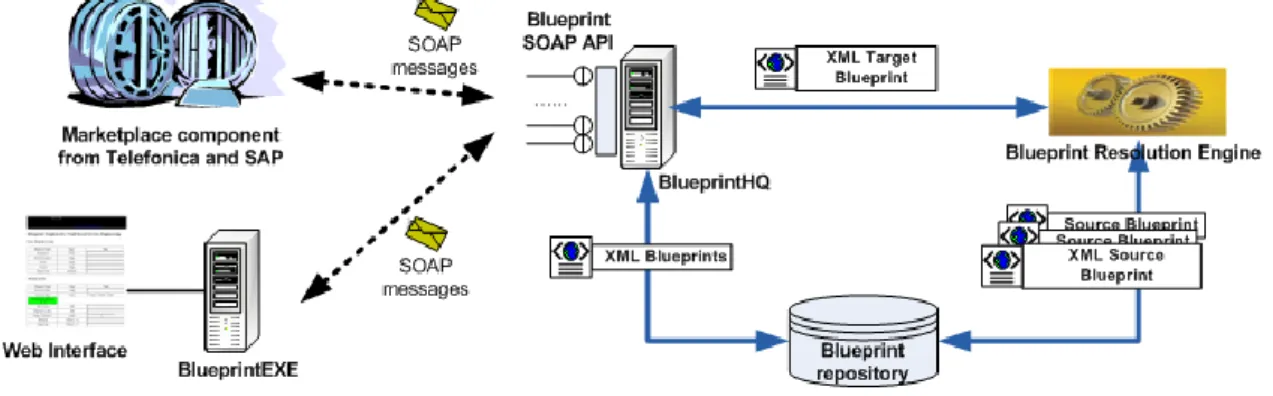
Following the requirements specified in [2] we have worked towards a comprehensive blueprint tool for supporting the application developers during the entire development lifecycle as described in deliverable D2.2.2 and D.2.1.2. Figure 1 presents the prototype architecture of the blueprint repository and blueprint tools.
The Blueprint Headquarter (BlueprintHQ) server provides the SOAP API for accessing the repository and manipulating stored blueprints. provide the interface that can be used by external components for accessing the blueprint repository and the resolution engine via SOAP message communication. Key operations are:
getBlueprint(BlueprintID) to retrieve a blueprint from the repository based on its unique ID, getBlueprints([property, value]*) to retrieve several blueprints based on their property values, like, requirements, offerings artefacts etc.
resolveBlueprint(BlueprintID) to resolve a blueprint by invoking the Blueprint Resolution Engine. This API is consumed by the marketplace component provided by WP3.
The BlueprintEXE server supporting a web-based user interface for visualization purpose that consumes the BlueprintHQ API described above. All the components of the blueprint prototype, i.e. the BlueprintEXE, BlueprintHQ, blueprint repository and blueprint resolution engine, are currently hosted on a Flexiscale virtual machine (supported by our Flexiant partner).
Figure 1 Blueprint Architecture
The Blueprint repository is where all the XML-based Blueprints in the 4caaSt project are stored. The Blueprint resolution engine: performs the matchmaking of the requirements contained in an input blueprint against the existing blueprints in the blueprint repository, and then produces a set of alternative Abstract Resolved Blueprints (ARBs) as the result. Each ARB is a possible combination of blueprints that constitute a cloud application.
The Blueprint editor: is a Web interface that allows end-users to interact with the blueprint repository, e.g. to add, modify, display, or delete blueprints.
Copyright © ERISS and other members of the 4CaaSt consortium 2013 Page 11
1.1.
Purpose and scope
This Document intends to complement the software release WP2 providing an overview of the deployed architecture, information regarding the installation and use guidelines.
This document should be used as starting point for deploying and run the present release of the software. Note that this document only refers to the functionalities that have been implemented and released for the first version of the blueprint repository and will be updated during the various releases
1.2.
Document Overview
The rest of this document is organized as follows:
Section 2: provides detailed information regarding component management and the deployed machines.
Section 3: provides user information, regarding the released APIs and the Visualization Interfaces.
Section 4: give a set of references for accessing the Demo that has been realised together with the first release of the code.
Section 5: gives some conclusions about the results obtained in the first iteration of the Blueprint Repository and related tooling.
1.3.
Change Log (compared to D2.3.1)
From a comparison between D2.3.1 and D.2.3.2 we can note the following:
The architecture of the components is substantially unchanged. Thus validating the work performed in the previous version of the document.
All the components have been improved and during this iteration and new figures have been provided
A new component called “blueprint editor” has been developed
A video describing the functionalities of the blueprint visualizer have been provided A Chapter regarding the designed Manipulation APIs has been added.
Appendix A (WSDL) has been modified following the changes in the language New demos have been created and a collection of links have been reported
Copyright © ERISS and other members of the 4CaaSt consortium 2013 Page 12
2.
Prototype Description management
The second release of WP advance all the features reported in D.1.1.3b. All the features have been implemented however some of the aspects remain basic and will be improved in the 3rd iteration.
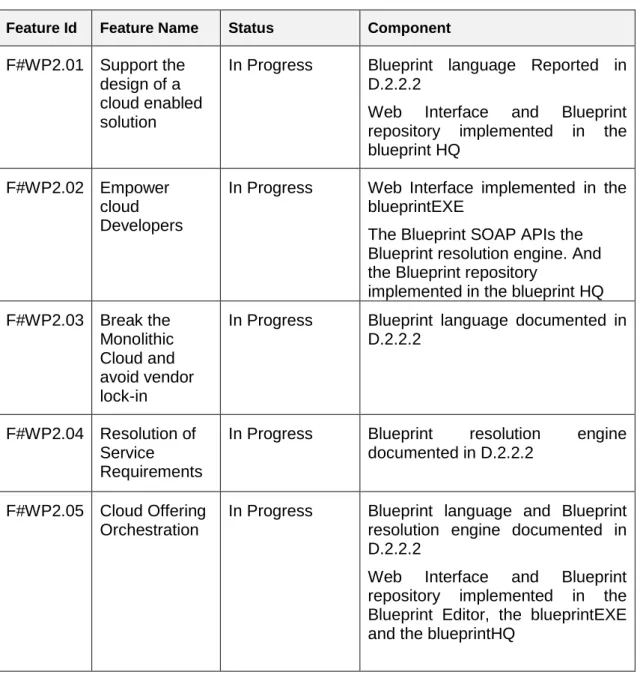
The following table report the features and the software that have been delivered: Table 1 Features and Component mapping
Feature Id Feature Name Status Component F#WP2.01 Support the
design of a cloud enabled solution
In Progress Blueprint language Reported in D.2.2.2
Web Interface and Blueprint repository implemented in the blueprint HQ
F#WP2.02 Empower cloud Developers
In Progress Web Interface implemented in the blueprintEXE
The Blueprint SOAP APIs the Blueprint resolution engine. And the Blueprint repository
implemented in the blueprint HQ F#WP2.03 Break the
Monolithic Cloud and avoid vendor lock-in
In Progress Blueprint language documented in D.2.2.2
F#WP2.04 Resolution of Service Requirements
In Progress Blueprint resolution engine documented in D.2.2.2
F#WP2.05 Cloud Offering Orchestration
In Progress Blueprint language and Blueprint resolution engine documented in D.2.2.2
Web Interface and Blueprint repository implemented in the Blueprint Editor, the blueprintEXE and the blueprintHQ
As described in section 1 the 4CaaSt blueprint prototypes are a set of software components deployed into the FLEXISCALE cloud infrastructure. The present deployment consists of 4 different virtual machines.
Users of the blueprint services stored in the BluepringHQ can access to its user interface by means of a Web-based front end deployed on an Apache application server, with a MySQL database. Communications between different components are mainly based on SOAP interfaces/Web services.
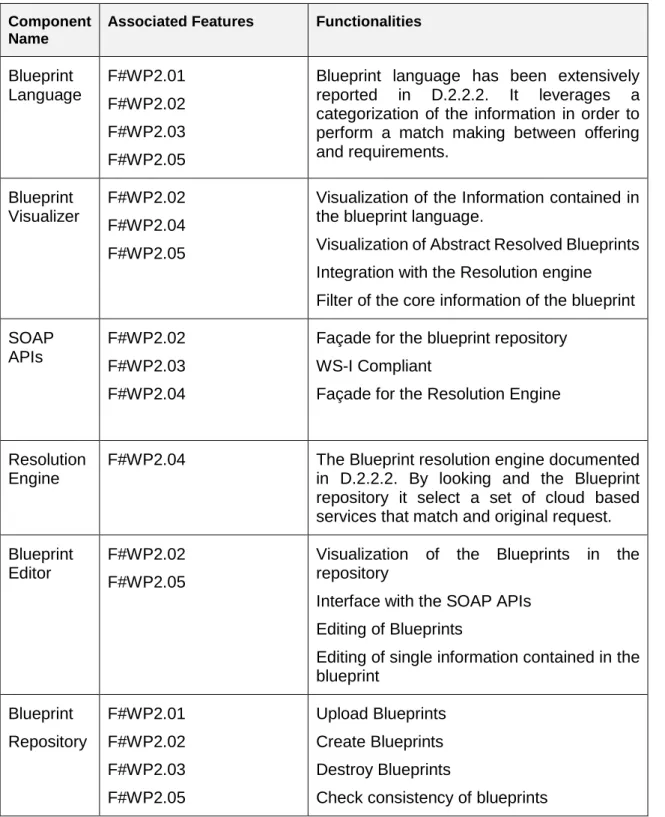
Copyright © ERISS and other members of the 4CaaSt consortium 2013 Page 13 The following table summarize the released components and provides an overview of the functionalities offered by each of them. Please note also that the blueprint language and the blueprint resolution engine have been extensively described in D.2.2.2.
Table 2 Component and Associated Functionalities Component
Name
Associated Features Functionalities
Blueprint Language F#WP2.01 F#WP2.02 F#WP2.03 F#WP2.05
Blueprint language has been extensively reported in D.2.2.2. It leverages a categorization of the information in order to perform a match making between offering and requirements. Blueprint Visualizer F#WP2.02 F#WP2.04 F#WP2.05
Visualization of the Information contained in the blueprint language.
Visualization of Abstract Resolved Blueprints Integration with the Resolution engine Filter of the core information of the blueprint SOAP
APIs
F#WP2.02 F#WP2.03 F#WP2.04
Façade for the blueprint repository WS-I Compliant
Façade for the Resolution Engine
Resolution Engine
F#WP2.04 The Blueprint resolution engine documented in D.2.2.2. By looking and the Blueprint repository it select a set of cloud based services that match and original request. Blueprint
Editor
F#WP2.02 F#WP2.05
Visualization of the Blueprints in the repository
Interface with the SOAP APIs Editing of Blueprints
Editing of single information contained in the blueprint Blueprint Repository F#WP2.01 F#WP2.02 F#WP2.03 F#WP2.05 Upload Blueprints Create Blueprints Destroy Blueprints
Check consistency of blueprints
The source code released under BSD license is available at the following URL: https://svn.forge.morfeo-project.org/4caast/trunk/WP2/
Copyright © ERISS and other members of the 4CaaSt consortium 2013 Page 14 and organized in two directory, one for each machine that has been deployed:
Exe blueprintEXE server Hq BlueprintHQ server
2.1.
WP2 Demos
A demo of the blueprint repository and of the visualization tool is available is available at the following links:
- http://blueprintexe.host-for.me/4CaaSt/blueprint_sdk_main.php As described in Section 4 This GUI accesses the blueprint repository and visualizes the blueprints in way that is easy to understand for cloud service developers. In addition a video describing the functionalities is available at the following link: http://www.youtube.com/watch?v=7UX5NfvP-Mw
- http://blueprintexe.host-for.me/4CaaSt/blueprintHQ.htm The Blueprint HQ is the server that exposes the WSDL (See appendix A) for accessing manipulating Blueprints.
- The Blueprint editor: is a Web interface that allows end-users to interact with the blueprint repository, e.g. to add, modify, display, or delete blueprints. http://109.231.78.131/fourcaast-blueprint-editor
2.2.
Infrastructure and Deployment
2.2.1.
BlueprintHQ and BlueprintEXE
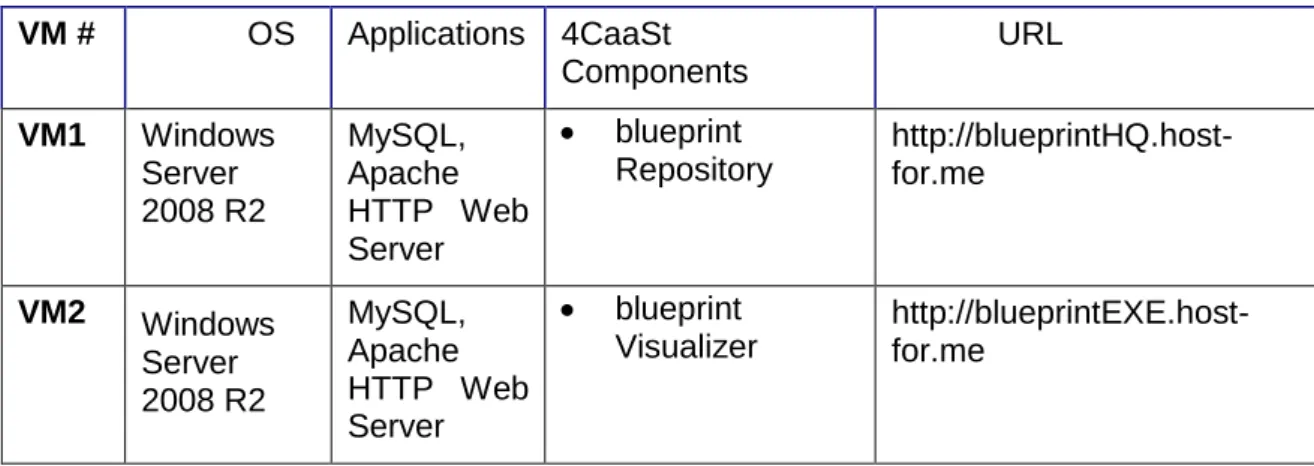
The following table summarizes the information related to 4CaaSt blueprint VMs:
Table 3 Summary of the Deployed Machines VM # OS Applications 4CaaSt Components URL VM1 Windows Server 2008 R2 MySQL, Apache HTTP Web Server blueprint Repository http://blueprintHQ.host-for.me VM2 Windows Server 2008 R2 MySQL, Apache HTTP Web Server blueprint Visualizer http://blueprintEXE.host-for.me
Copyright © ERISS and other members of the 4CaaSt consortium 2013 Page 15
2.2.2.
Blueprint Editor
Blueprint editor
VM3 Ubuntu MyQL Blueprint Editor http://109.231.78.131/fourcaast-blueprint-editor
2.2.3.
SLA Resolution Engine
SLA resolution Engine
VM4
Ubuntu Tomcat
Application Server
SLA Resolver http://109.231.73.115/App-
Web-Resolve/SlaResolverSvc
2.3.
Relationship to other 4CaaSt Work Packages
2.3.1.
Interfaces to WP3
The blueprint manipulation language that has been extensively described in D2.2.2 represents the interface between the blueprint repository and the marketplace. The language has been coded in a WS-I compliant service and in appendix A we report the WSDL.
Copyright © ERISS and other members of the 4CaaSt consortium 2013 Page 16
3.
Component Management
3.1.
Blueprint HQ
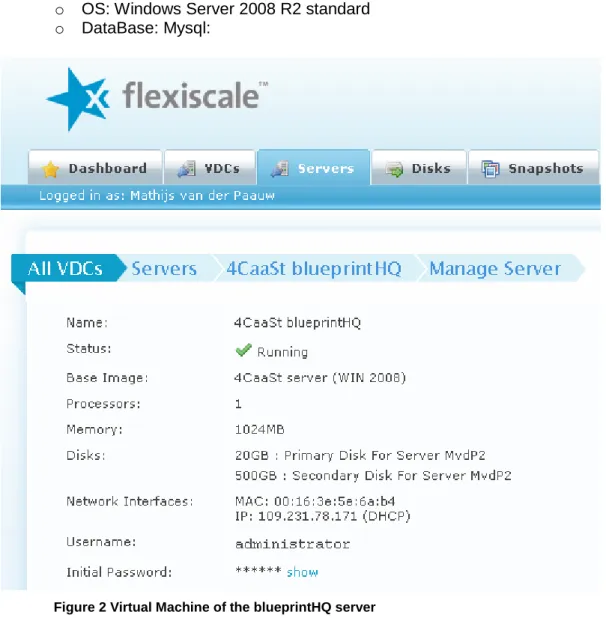
We provided the component as a Virtual Machine for the 4CaaSt platform, and have been deployed in FLEXISCALE, in particular as follows:
blueprintHQ
o Url: http://blueprintHQ.host-for.me o OS: Windows Server 2008 R2 standard o DataBase: Mysql:
Figure 2 Virtual Machine of the blueprintHQ server
3.1.1.
Generation instruction
The source code is available in the 4CaaSt repository at the following link: https://svn.forge.morfeo-project.org/4caast/trunk/WP2/
In particular at the following subdirectory Exe blueprintEXE server
Copyright © ERISS and other members of the 4CaaSt consortium 2013 Page 17
3.1.2.
Installation instructions
Two different installation procedure have been produced: - Virtual machine
- Manual installation
In the first case the artefact is provided as a Virtual Machine so no particular installation instructions are required.
In the second case the procedure is the following:
$ Install XAMPP //(change all default passwords): this installs Apache, MySQL (& FileZilla FTP)
$ Copy htdoc from repository to htdoc directory (BlueprintHQ:
https://svn.morfeo-project.org/4caast/trunk/WP2/hq)
Installation Notes:
The application embeds the NuSoap Library for developing web services.
We recommend to move the htdoc directory from the default drive C: to D: (due to the size of the drive).
Both BlueprintHQ and BlueprintEXE share a very similar installation procedure
3.1.3.
Configuration
The internal database and the PHP engine are already pre-configured in the virtual machine so no additional instructions are required. However we recommend 1GB or RAM and a dimension of the virtual disk adequate to the size of the foreseen blueprint repository.
3.1.4.
Execution Instructions
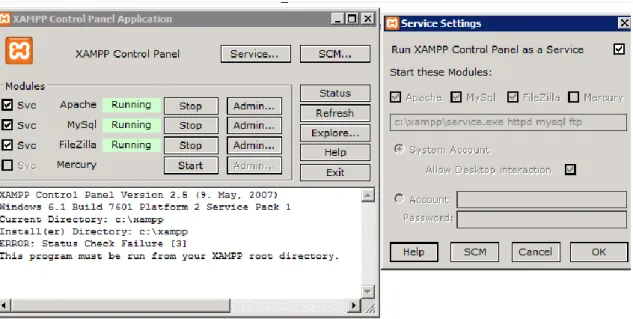
The PHP server and the MySQL engine run as a service inside the virtual machine therefore, no execution instructions are required. We recommend giving a name to the machine in order to easily address the service. The application server run as a service in following the standard configuration of XAMPP.
$ Xampp setting
Copyright © ERISS and other members of the 4CaaSt consortium 2013 Page 18 Figure 3 XAMPP: Configuration settings for Blueprint HQ
3.2.
Blueprint EXE
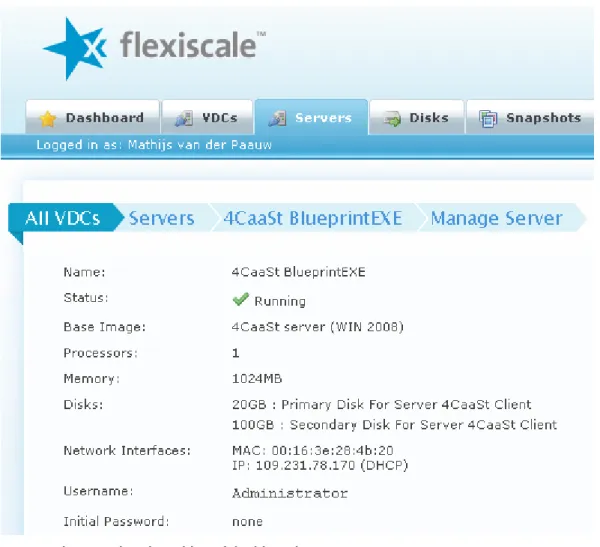
The Blueprint EXE is the component that interfaces the blueprint repository to the rest of the 4CaaSt middleware. It is delivered as a Virtual Machine that can be easily re-deployed. Virtual Machine: blueprintEXE
o Url: http://blueprintEXE.host-for.me o OS: Windows Server 2008 R2 standard o Web Server: Appache
Copyright © ERISS and other members of the 4CaaSt consortium 2013 Page 19
Figure 4 Virtual Machine of the blueprintEXE server
3.2.1.
Generation instruction
The Blueprint EXE, share a similar installation procedure of the one provided for the Blueprint HQ. In particular, two different installation procedure have been produced:
- Virtual machine - Manual installation
In the first case the artefact is provided as a Virtual Machine so no particular installation instructions are required.
In the second case the procedure is the following:
$ Install XAMPP //(change all default passwords): this installs Apache, MySQL (& FileZilla FTP)
$ Copy htdoc from repository to htdoc directory (BlueprintEXE: https://svn.morfeo-project.org/4caast/trunk/WP2/exe)
Installation Notes:
The application embeds the NuSoap Library for developing web services.
We recommend to move the htdoc directory from the default drive C: to D: (due to the size of the drive).
Copyright © ERISS and other members of the 4CaaSt consortium 2013 Page 20
3.2.2.
Installation instructions
The internal database and the PHP engine are already pre-configured in the virtual machine so no additional instructions are required. However we recommend 1GB or RAM and a dimension of the virtual disk adequate to the size of the foreseen blueprint repository.
3.2.3.
Configuration
The PHP server and the MySQL engine run as a service inside the virtual machine therefore, no execution instructions are required. We recommend giving a name to the machine in order to easily address the service
3.2.4.
Execution Instructions
The PHP server and the MySQL engine run as a service inside the virtual machine therefore, no execution instructions are required. We recommend giving a name to the machine in order to easily address the service
The application server run as a service in following the standard configuration of XAMPP. $ Xampp setting
$ Start the module on start-up
Figure 5 XAMPP: Configuration settings for Blueprint EXE
3.3.
Blueprint Editor
Easy deployment is an important feature for an Open source product if a successful dissemination is desired.
Once deployed in a DEBIAN compliant package repository (basically a website with a particular layout and file descriptor), our open source blueprint editor should be installable on a recent UBUNTU or DEBIAN server with commands similar to these:
Copyright © ERISS and other members of the 4CaaSt consortium 2013 Page 21 $ sudo sh -c "echo 'deb <<URL of 4Caast repository>> binary/' >
/etc/apt/sources.list.d/fourcaast.list" $ sudo apt-get update
$ sudo apt-get install fourcaast-blueprint-editor
3.3.1.
Generation instruction
1. Build orange version of the telco-server from scratch using the following commands: $ svn checkout
https://svn.forge.morfeo-project.org/4caast/trunk/WP2/orangeBlueprintEditor/source $ cd orangeBlueprintEditor/source
$ mvn install -Pdebian
2. Deploy generated *.deb file in a Debian repository.
3.3.2.
Installation instructions
1. Install a Mysql database somewhere. Create a schema and a user with grants. 2. Install an Ubuntu server Lucid 10.04 (later version should work but are not tested). 3. Configure networking so this server can reach 4CaaSt SVN repository. If necessary
define a proxy following standard procedures. $ sudo bash
$ export
REP=’https://svn.forge.morfeo-project.org/4caast/trunk/WP2/orangeBlueprintEditor/debian’
$ echo “deb $REP precise 4CaaSt_wp2” > /etc/apt/sources.list.d/4CaaSt_wp2” 4. Update local package list with the following command:
$ sudo apt-get update
5. Install fourcaast-blueprint-webapp with command: $ sudo apt-get install fourcaast-blueprint-webapp
3.3.3.
Configuration
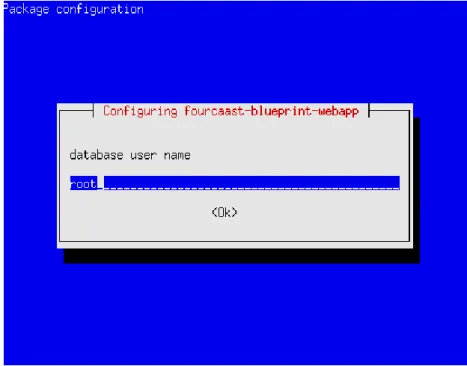
1. Configure fourcaast-blueprint-webapp interactively with command $ sudo dpkg-reconfigure fourcaast-blueprint-webapp
Copyright © ERISS and other members of the 4CaaSt consortium 2013 Page 22 Figure 1. Blueprint editor database user configuration screen
b. Provide database password
Figure 2. Blueprint editor database password configuration screen
Copyright © ERISS and other members of the 4CaaSt consortium 2013 Page 23 Figure 3. Blueprint editor JDBC configuration screen
Note: This configuration can also be done programmatically using DEBIAN standard tools
3.3.4.
Execution Instructions
Reboot your server or run the following DEBIAN standard compliant command: $ sudo service fourcaast-blueprint-webapp start
3.4.
SLA Resolution Engine
The resolution engine is delivered as already fully configured package. The delivered .war file can be deployed on a java application server to be integrated into the WP2 infrastructure. No additional configuration is necessary. Prerequisite: blueprint repository.
Copyright © ERISS and other members of the 4CaaSt consortium 2013 Page 24
4.
User guide
In this section we describe the released software from an end users point of view.
4.1.
Blueprint Visualization
The information contained in the Blueprint is represented in XML and particularly difficult to read by a human. Therefore we decide to implement a viewer supporting the visualization of blueprints for overcome this issues. The present prototype is capable of visualizing Abstract Resolved Blueprints and using the following legend:
Blue box: refers to cloud services described via blueprint Yellow ellipse: refers to artefacts that will be deployed Blue arrow: refers to needs of the particular blueprint Red arrow: refers to offering of a particular blueprint
Note, that users can move items in the visualisation to screen in order to display the concatenation of a set of blueprints in an intuitive way. The position in the screen will be kept in the BlueprintEXE and saved for future usages. This functionality is not part of the blueprintHQ server because we decided to maintain a clear separation between functionalities of the repository and visualization issues.
Figure 6 Blueprint Visualization
A demo is also available at the following link: http://blueprintexe.host-for.me/4CaaSt/
Copyright © ERISS and other members of the 4CaaSt consortium 2013 Page 25 http://www.youtube.com/watch?v=7UX5NfvP-Mw
4.2.
Blueprint Editor
The blueprint editor integrates with other blueprint component thanks to the APIs that will be presented in section 3.2. It allows user-friendly visualization and editing of one or more services described using the blueprint template presented in the deliverable D.2.2.2
The figure below report a snapshot of the graphical user interface that has been developed:
Figure 7 Blueprint Editor Key features includes:
Staging Editor of Blueprints
Built-in support for blueprint extension language Publication and editing of blueprints in the repository
Copyright © ERISS and other members of the 4CaaSt consortium 2013 Page 26
4.2.1.1.
Importing a blueprint from XML
From application welcome screen, click on , then edit or paste XML blueprint in “blueprint XML” field and click on validate.
4.2.1.2.
Creating a blueprint from scratch
From application welcome screen, click on creation box next to “abstract blueprint” label.
For the core blueprint, Blueprint editor follows the structure of the blueprint XSD. In order to create a sub-element, click on a creation box. Present document presents generic rules for navigating in the structure but does not document structure of field usage which is documented in blueprint documentation.
To create a new sub-element such as a new artefact, you need to locate the name of the field in the editor, and click on creation box on its right.
Figure 4. Blueprint editor creation box
Then select the type of element to create (only one choice in this example)
Figure 5. Blueprint editor creation box – select type
To navigate to an already existing referenced element, click on the edit/view icon generally located on the left column of an item table:
Copyright © ERISS and other members of the 4CaaSt consortium 2013 Page 27
4.2.1.3.
Displaying XML view of a blueprint
On the blueprint screen, click on then click on XML result and eventually zoom using F11.
Figure 7. Blueprint editor XML view of a blueprint
4.2.1.4.
Creating a blueprint graphical view
Blueprint editor allows multiple views to be created for a given blueprint. To create a view, click on “create and add a” and select “Blueprint Graphical View”.
Copyright © ERISS and other members of the 4CaaSt consortium 2013 Page 28 Figure 8. Blueprint editor create a blueprint view
4.2.1.5.
Customizing a blueprint graphical view
Blueprint graphical view may be customized individually by end user using the following options:
Figure 9. Blueprint editor graphical view customization
4.2.1.6.
Content and purpose of a blueprint Graphical view
Understanding a blueprint structure is sometime easier using a graphical view. Also some classes of errors can be easily spotted in graphical mode. For these reasons, blueprint editor provides graphical views for blueprint under edition.
In the diagram below, each element have a different shape. Nature of the element is given by the first word before semicolon (Offering, Blueprint, Artefact requirement).
A blueprint is shown on the diagram as:
An offering linked to a blueprint (basic properties) A blueprint (basic properties) linked to Artefacts Artefacts
Copyright © ERISS and other members of the 4CaaSt consortium 2013 Page 29 Diagram elements are link by
Implicit ownership link from offering to blueprint (basic properties) Implicit ownership links from blueprint (basic properties) to artefacts. Implicit ownership links from blueprint (basic properties) to requirements. Vertical dependencies links (in dashed red)
Horizontal dependencies links (in dotted green)
Figure 10. Blueprint editor unfolded view graphical with horizontal and vertical dependencies
The previous diagram displays artefact with similar links. They have in fact the exact same graph structure and may thus be grouped in a single box. Blueprint editor implements a graph manipulation algorithm for grouping similar artefacts as shown in the following diagram. This feature greatly improves readability of some family of blueprints and can greatly help tracking inconsistencies that would otherwise be hard to detect in an unfolded diagram.
Figure 11. Blueprint editor folded graphical view with horizontal and vertical dependencies
4.2.1.7.
Content and purpose of a resolved blueprint graphical view
Graphical view is also especially important for resolved blueprint which contain a recursive list of blueprint dependencies. In order to see how a blueprint is resolved, click on “show required blueprints”. This will only display additional element if selected blueprint is resolved.
Copyright © ERISS and other members of the 4CaaSt consortium 2013 Page 30 Resolved blueprint graphical view is similar to blueprint graphical view besides:
Show requirement Resolution option must be switch on. Multiple blueprints are visible in a single diagram
An additional link (resolved by) is displayed between requirement and a correspondent resolving offering.
In the following diagram example, a (..)Warrant management(...) blueprint has 2 requirements which are resolved by 2 blueprint offerings postgresql and tomcat 6 which in turn have 2 requirements toward a linux server which are offered by a flexiscale virtual machine offering.
Copyright © ERISS and other members of the 4CaaSt consortium 2013 Page 31 Figure 12. Blueprint editor graphical view of a resolved blueprint
Copyright © ERISS and other members of the 4CaaSt consortium 2013 Page 32
4.2.1.8.
Editing known blueprint extensions
Known blueprint extensions are edited using the same built-in mechanism as used for the core blueprint.
4.2.1.9.
Editing other blueprint extensions
When a blueprint extension is not known to the blueprint editor, a generic blueprint editor is provided. XML is color highlighted for improved readability and completion may be provided with future development.
Figure 13. Blueprint editor XML view of a generic extension
Clicking on “format”, reformat text for easier text reading. It can also be viewed full paged by clicking on F11.
Figure 14. Blueprint editor formatted XML view of a generic extension
For large XML editing, user may click on F11. The XML text is then rendered full page and other page elements are hidden in the background.
Faulty XML is highlighted in red for easy correction. In the example below, “aaa” does not match “bbb”.
Copyright © ERISS and other members of the 4CaaSt consortium 2013 Page 33 Figure 15. Blueprint editor faulty XML highlight of a generic extension
4.2.1.10.
Importing a blueprint from Blueprint repository
On welcome screen, click on “import Blueprint From Cache”. Then select desired blueprint in the proposed list.
4.2.1.11.
Exporting a blueprint to a Blueprint repository
On a blueprint page, click on “publish to runtime repository”, then select a runtime repository in the proposed list and click on validate.
Status of export is saved in “information Log” visible from the main blueprint page. You may know when a blueprint was exported and the status of the export.
4.3.
SLA Resolution Engine
The resolution engine is integrated into the overall WP2 infrastructure as a service. It does not have dedicated user front-ends or configuration tools.
4.4.
Blueprint Repository APIs
In this section we describe some of the APIs developed for accessing and manipulating the Blueprints. Most of the content of this section is available online:
http://blueprintexe.host-for.me/4CaaSt/blueprintHQ.htm
Copyright © ERISS and other members of the 4CaaSt consortium 2013 Page 34
Figure 8 Blueprint HQ: documentation
The keys methods are: getBlueprint getBlueprints resolveBlueprint resolveBlueprintAlt
these methods have been adapted and extended for supporting the second version of the blueprinting language.
4.4.1.
getBlueprint
Retrieve a blueprint from the blueprintHQ based on its unique ID. Below you can find the details of the call
Copyright © ERISS and other members of the 4CaaSt consortium 2013 Page 35
Figure 9 getBlueprint: details of the remote call
4.4.2.
getBlueprints
Retrieve several blueprints from the blueprintHQ based on their property values. Below you can find the details of the call:
Copyright © ERISS and other members of the 4CaaSt consortium 2013 Page 36
Figure 10 getBlueprints detail of the remote call
4.4.3.
resolveBlueprints
Provide the user the best candidate for deployable solution of given blueprint. Below you can find the details of the call:
Copyright © ERISS and other members of the 4CaaSt consortium 2013 Page 37
Figure 11 resolveBlueprints details of the call
4.4.4.
resolveBlueprintAlt
Provide the user all deployable solutions of given blueprint as Input. Below you can find the details of the call:
Copyright © ERISS and other members of the 4CaaSt consortium 2013 Page 38
Copyright © ERISS and other members of the 4CaaSt consortium 2013 Page 39
4.4.5.
Example of Request Response message
An example of Request/Response message is shown in this section. Additional example are available from: http://blueprintexe.host-for.me/4CaaSt/blueprintHQ.htm
Request
POST /4CaaSt/blueprint.php HTTP/1.0
Host: 109.231.78.171
User-Agent: NuSOAP/0.9.5 (1.123)
Content-Type: text/xml; charset=ISO-8859-1
SOAPAction: "urn:blueprint#getBlueprint"
Content-Length: 462
<?xml version="1.0" encoding="ISO-8859-1"?>
<SOAP-ENV:Envelope
xmlns:SOAP-ENV="http://schemas.xmlsoap.org/soap/envelope/"
xmlns:xsd="http://www.w3.org/2001/XMLSchema"
xmlns:xsi="http://www.w3.org/2001/XMLSchema-instance"
xmlns:SOAP-ENC="http://schemas.xmlsoap.org/soap/encoding/"
xmlns:ns3190="urn:blueprint">
<SOAP-ENV:Body>
<getBlueprint
xmlns="http://109.231.78.171/4CaaSt/blueprint.php">
<uuid xmlns="">1</uuid>
</getBlueprint>
</SOAP-ENV:Body>
</SOAP-ENV:Envelope>
ResponseHTTP/1.1 200 OK
Date: Wed, 18 Jan 2012 13:35:29 GMT
Server: Apache/2.2.17 (Win32) mod_ssl/2.2.17 OpenSSL/0.9.8o
PHP/5.3.4 mod_perl/2.0.4 Perl/v5.10.1
X-Powered-By: PHP/5.3.5
X-SOAP-Server: NuSOAP/0.9.5 (1.123)
Content-Length: 2073
Connection: close
Content-Type: text/xml; charset=ISO-8859-1
<?xml version="1.0" encoding="ISO-8859-1"?>
<SOAP-ENV:Envelope
xmlns:SOAP-ENV="http://schemas.xmlsoap.org/soap/envelope/"
xmlns:xsd="http://www.w3.org/2001/XMLSchema"
xmlns:xsi="http://www.w3.org/2001/XMLSchema-instance"
xmlns:SOAP-ENC="http://schemas.xmlsoap.org/soap/encoding/">
<SOAP-ENV:Body>
<getBlueprintResponse
Copyright © ERISS and other members of the 4CaaSt consortium 2013 Page 40
xmlns="http://109.231.78.171/4CaaSt/blueprint.php">
<result xmlns="">
<uuid>1</uuid>
<name>Lucy's Blueprint</name>
<date_created>2011-08-08 12:31:55</date_created>
<blueprint>&lt;?xml version=&quot;1.0&quot;
encoding=&quot;UTF-8&quot;
standalone=&quot;no&quot;?&gt;
&lt;blueprint
NS1:schemaLocation=&quot;http://www.4caast.eu/blueprint
blueprint_template.xsd &quot;
xmlns=&quot;http://www.4caast.eu/blueprint&quot;
xmlns:NS1=&quot;http://www.w3.org/2001/XMLSchema-instance&quot;&gt;&lt;basic_properties_section&
;gt;&lt;blueprint_id&gt;Lucy's sexiest
Blueprint&lt;/blueprint_id&gt;&lt;description&
gt;My hamster Lucy (5.0) as a
Blueprint&lt;/description&gt;&lt;version&gt;1.
0&lt;/version&gt;&lt;release_date&gt;2011-09-15&lt;/release_date&gt;&lt;owner&gt;4CaaSt/ERI
SS&lt;/owner&gt;&lt;/basic_properties_section&
gt;&lt;offering_section&gt;&lt;capability&gt;H
amster
awerness&lt;/capability&gt;&lt;service_signature&a
mp;gt;&lt;api_location&gt;http://hamstertracker.com/Pr
inciples.html&lt;/api_location&gt;&lt;endpoint_loc
ation&gt;http://hamstertracker.com/&lt;/endpoint_locat
ion&gt;&lt;range_of_instance&gt;&lt;minimum&am
p;gt;1&lt;/minimum&gt;&lt;maximum&gt;1&lt;
/maximum&gt;&lt;/range_of_instance&gt;&lt;func
tionality&gt;To publish and retrieve hamster data,
generated by
Lucy(5.0)&lt;/functionality&gt;&lt;/service_signat
ure&gt;&lt;/offering_section&gt;&lt;/blueprint
&gt;</blueprint>
</result>
</getBlueprintResponse>
</SOAP-ENV:Body>
</SOAP-ENV:Envelope>
Copyright © ERISS and other members of the 4CaaSt consortium 2013 Page 41
5.
Conclusions
This document contains information for deploying and operating the first version of the Blueprint repository and tools supporting blueprint visualization.
The software was deployed to the Flexiscale cloud infrastructure and successfully integrated with WP3 and between WP3 and WP4.
The interoperability has been achieved using WS-I compliant interfaces exchanging messages in SOAP.
The present APIs give support for publication, resolution and editing of blueprints.
Most of the documentation contained in this document and examples of use have been released as part of the demos and are available online.
Copyright © ERISS and other members of the 4CaaSt consortium 2013 Page 42
6.
References
[1] 4CaaSt FP7 Grant Agreement - Annex II General Conditions Grant Agreement No. 258862 [2] F. Lelli, D.K. Nguyen, M. Parkin,Y. Taher Blueprinting the Cloud: Scientific and Technical Report,
4CaaSt Project, Deliverable 2.1.1, July 2011
[3] F. Lelli, D.K. Nguyen, M. Parkin,Y. Taher, S. Strauch, T. Binz, J. Niemoeller Component Design and Open Specification, 4CaaSt Project, Deliverable 2.2.1, July 2011
[4] F. Lelli, D.K. Nguyen, M. Parkin,Y. Taher Blueprinting the Cloud: Scientific and Technical Report, 4CaaSt Project, Deliverable 2.1.2, July 2012
[5] F. Lelli, D.K. Nguyen, M. Parkin,Y. Taher, S. Strauch, T. Binz, J. Niemoeller Component Design and Open Specification, 4CaaSt Project, Deliverable 2.2.2, July 2012
Copyright © TID and other members of the 4CaaSt consortium 2011 Page 43
Annex A.
WSDL of the Blueprint Repository
The WS-I compliant WSDL that is available at the following link: http://blueprinthq.host-for.me/4CaaSt/blueprint.php?wsdl <?xml version="1.0"?> <definitions targetNamespace="http://109.231.78.171/4CaaSt/blueprint.php"> <types> <schema elementFormDefault="qualified" targetNamespace="http://109.231.78.171/4CaaSt/blueprint.php"> <import namespace="http://schemas.xmlsoap.org/soap/encoding/"/><import namespace="http://schemas.xmlsoap.org/wsdl/"/> <complexType name="Blueprint"> <sequence>
<element name="uuid" type="xsd:string"/> <element name="name" type="xsd:string"/>
<element name="date_created" type="xsd:string"/> <element name="blueprint" type="xsd:string"/> </sequence>
</complexType>
<complexType name="getBlueprintRequestType"> <all>
<element name="uuid" type="xsd:string" form="unqualified"/> </all>
</complexType><complexType name="getBlueprintResponseType"> <all>
<element name="result" type="tns:Blueprint" form="unqualified"/> </all>
</complexType>
<complexType name="Map"> <sequence>
<element name="key" type="xsd:string"/> <element name="value" type="xsd:string"/> </sequence>
</complexType>
<complexType name="Maplist"> <sequence>
<element name="element" type="tns:Map" minOccurs="0" maxOccurs="unbounded"/> </sequence>
</complexType>
<complexType name="reslveBlueprint"> <sequence>
<element name="uuid" type="xsd:string"/> <element name="map" type="tns:Maplist"/> </sequence>
</complexType>
<complexType name="ffBlueprintResult"> <sequence>
<element name="blueprint" type="xsd:string"/> </sequence>
</complexType>
<complexType name="blueprintList"> <sequence>
<element name="element" type="tns:Blueprint" minOccurs="0" maxOccurs="unbounded"/> </sequence>
</complexType>
<complexType name="getBlueprintsRequestType"> <all>
<element name="input" type="tns:Maplist" form="unqualified"/> </all>
</complexType>
<complexType name="getBlueprintsResponseType"> <all>
<element name="result" type="tns:blueprintList" form="unqualified"/> </all>
</complexType>
<complexType name="resolveBlueprintRequestType"> <all>
Copyright © ERISS and other members of the 4CaaSt consortium 2013 Page 44
</all>
</complexType>
<complexType name="resolveBlueprintResponseType"> <all>
<element name="result" type="tns:ffBlueprintResult" form="unqualified"/> </all>
</complexType>
<complexType name="resolveBlueprintAltRequestType"> <all>
<element name="input" type="tns:reslveBlueprint" form="unqualified"/> </all>
</complexType>
<complexType name="resolveBlueprintAltResponseType"> <all>
<element name="result" type="tns:ffBlueprintResult" form="unqualified"/> </all>
</complexType>
<element name="getBlueprint" type="tns:getBlueprintRequestType"/>
<element name="getBlueprintResponse" type="tns:getBlueprintResponseType"/> <element name="getBlueprints" type="tns:getBlueprintsRequestType"/>
<element name="getBlueprintsResponse" type="tns:getBlueprintsResponseType"/> <element name="resolveBlueprint" type="tns:resolveBlueprintRequestType"/>
<element name="resolveBlueprintResponse" type="tns:resolveBlueprintResponseType"/> <element name="resolveBlueprintAlt" type="tns:resolveBlueprintAltRequestType"/>
<element name="resolveBlueprintAltResponse" type="tns:resolveBlueprintAltResponseType"/> </schema>
</types>
<message name="getBlueprintRequest">
<part name="parameters" element="tns:getBlueprint"/> </message>
<message name="getBlueprintResponse">
<part name="parameters" element="tns:getBlueprintResponse"/> </message>
<message name="getBlueprintsRequest">
<part name="parameters" element="tns:getBlueprints"/> </message>
<message name="getBlueprintsResponse">
<part name="parameters" element="tns:getBlueprintsResponse"/> </message>
<message name="resolveBlueprintRequest">
<part name="parameters" element="tns:resolveBlueprint"/> </message>
<message name="resolveBlueprintResponse">
<part name="parameters" element="tns:resolveBlueprintResponse"/> </message>
<message name="resolveBlueprintAltRequest">
<part name="parameters" element="tns:resolveBlueprintAlt"/> </message>
<message name="resolveBlueprintAltResponse">
<part name="parameters" element="tns:resolveBlueprintAltResponse"/> </message>
<portType name="blueprintPortType"> <operation name="getBlueprint">
<documentation>This interface returns a blueprint with a given UUID</documentation> <input message="tns:getBlueprintRequest"/><output message="tns:getBlueprintResponse"/> </operation>
<operation name="getBlueprints">
<documentation>This method returns blueprints based on input criteria.</documentation> <input message="tns:getBlueprintsRequest"/>
<output message="tns:getBlueprintsResponse"/> </operation>
<operation name="resolveBlueprint">
<documentation>This method returns the result of resolving a blueprint. If there are configuration properties they could be specified here.</documentation>
<input message="tns:resolveBlueprintRequest"/> <output message="tns:resolveBlueprintResponse"/> </operation>
<operation name="resolveBlueprintAlt">
<documentation>This method returns the result of resolving a blueprint. If there are configuration properties they could be specified here.</documentation>
<input message="tns:resolveBlueprintAltRequest"/> <output message="tns:resolveBlueprintAltResponse"/> </operation>
Copyright © ERISS and other members of the 4CaaSt consortium 2013 Page 45
<binding name="blueprintBinding" type="tns:blueprintPortType">
<binding style="document" transport="http://schemas.xmlsoap.org/soap/http"/> <operation name="getBlueprint">
<operation soapAction="urn:blueprint#getBlueprint" style="document"/> <input>
<body use="literal" namespace="urn:blueprint"/> </input>
<output>
<body use="literal" namespace="urn:blueprint"/> </output>
</operation>
<operation name="getBlueprints">
<operation soapAction="urn:blueprint#getBlueprints" style="document"/> <input><body use="literal" namespace="urn:blueprint"/></input>
<output><body use="literal" namespace="urn:blueprint"/> </output>
</operation><operation name="resolveBlueprint">
<operation soapAction="urn:blueprint#resolveBlueprint" style="document"/> <input>
<body use="literal" namespace="urn:blueprint"/> </input>
<output>
<body use="literal" namespace="urn:blueprint"/> </output>
</operation>
<operation name="resolveBlueprintAlt">
<operation soapAction="urn:blueprint#resolveBlueprintAlt" style="d ocument"/> <input>
<body use="literal" namespace="urn:blueprint"/> </input>
<output>
<body use="literal" namespace="urn:blueprint"/> </output>
</operation> </binding>
<service name="blueprint">
<port name="blueprintPort" binding="tns:blueprintBinding">
<address location="http://blueprinthq.host-for.me/4CaaSt/blueprint.php"/> </port>
</service> </definitions>