Exploratory Climate Data Visualization and Analysis
Using DV3D and UVCDAT
Thomas Maxwell
NASA Center for Climate Simulation Goddard Space Flight Center
Greenbelt, MD [email protected]
AbstrucJ- Earth system scientists are being inundated by an explosion of data generated by ever-increasing resolution in both
global models and remote sensors. Advanced tools for accessing, analyzing, and visualizing very large and complex climate data
are required to maintain rapid progress in Earth system research. To meet this need, NASA, in collaboration with the
Ultra-scale Visualization Climate Data Analysis Tools
(UV-COAT) consortium, is developing exploratory climate data analysis and visualization tools which provide data analysis
capabilities for the Earth System Grid (ESG).
This paper describes DV3D, a UV·COAT package that enables exploratory analysis of climate simulation and
observation datasets. OV3D provides user-friendly interfaces for
visualization and analysis of climate data at a level appropriate for scientists. It features workflow interfaces, interactive 40 data exploration, hyperwall and stereo visualization, automated provenance generation, and parallel task execution. DV30's integration with CDAT's climate data management system
(COMS) and other climate data analysis tools provides a wide
range of high performance climate data analysis operations. DV3D expands the scientists' toolbox by incorporating a suite of rich new exploratory visualization and analysis methods for addres~ing the complexity of climate datasets.
Keywords- climatej visualizatioll,' mllllysis; simulatioll,' I. INTRODUCfION
In recent years substantial progress in understanding Earth's climate system is driving an explosion, both in scale and complexity, of climate related data. Current climate models are capable of generating petabytes of data from a single run. The complexity of these datasets is also increasing as models encompass an increasingly wide range of earth systems, adding many new variables to the datasets and requiring integration of an increasingly wide range of observational data sources.
The process of knowledge discovery in climate science requires effective lools to discover, access, manipulate, and visualize the dala sets of interest. Recent developments are driving the need for a new generation of climate knowledge discovery tools as the scientists' traditional toolkit is progressively being overwhelmed and rendered obsolete by the "data tsunami". Key technical challenges include the seamless integration of advanced exploratory visualization tools, workflow and provenance support, and high perfomlance computing.
I!. TECHNICAL CHALLENGES A. Exploratory Visualization
Deriving actionable information from climate simulations requires the capacity to detect, compare, and analyze features spanning large heterogeneous, multi-variate, multi-dimensional datasets with spatial and temporal references. The brain's capacity to detect visual patterns is invaluable in this knowledge discovery process. Visual mapping techniques are very effective in expressing the results of feature detection and analysis algorithms as they naturally employ the visual information processing capacity of the cerebral cortex, which is extremely difficult to emulate using statistical and machine learning approaches alone. Graphical representations are very effective at summarizing data, exposing unusual features, and communicating "interesting" and information rich concepts, relationships, and processes that are latent in the data. Exploratory climate data analysis relies heavily on such mapping techniques but has traditionally been confined to two dimension views such as contour plots, line and scatter graphs, and histograms. The complexity of the climate knowledge discovery process is increasing due to the increasing complexity of climate datasels. Visual representations, which play an important role in addressing data complexity, can be enhanced by an increase in the number of "degrees of freedom" in the visual mapping process. Interactive three-dimensional views into complex high dimensions datasets can offer a widened perspective and a more comprehensive gestalt facilitating the recognition of significant features and the discovery of important patterns.
B. Work flows and Provenance
The climate knowledge discovery process typically involves the assembly of complex computational processes, often requiring the combination of disparate applications, libraries, and data sources. These processes may generate many intermediate and final data products, adding to the complexity of task management. Workflow systems have been shown to be an effective tool in addressing these challenges [I]. Not only do they support the automation of repetitive tasks, but they can also embody complex analytical processes at various levels of encapsulation and facilitate the integration of multiple tools, languages, and approaches within a cohesive framework. Each module within a workflow can wrap a distinct tool, script, or library, providing a unified
interface to disparate programming paradigms. The workflow infrastructure transparently maps the data structures exported
from each module into the data structures required as inputs to
the connected modules, providing an invisible "glue"
facilitating application integration. Structuring the computation as a set of interchangeable building blocks simplifies application development. The workflow framework
can also transparently automate provenance collection.
A comprehensive provenance infrastructure records
detailed history information about the steps followed and data derived in the course of an exploratory knowledge discovery task [2]. It maintains a record of every step of the workflow development and configuration process, as well as the datasets and parameters used in each workflow execution. It transparently documents every step of the discovery process
enabling users to readily regenerate any analysis product. The
providence trail allows users to query, interact with, and
understand the history of an analysis process. It enables users
to easily navigate through the space of pipelines created for a
given exploration task and compare analysis products as well
as their corresponding work flows. Users can easily back up to earlier sages of the exploration and start a new branch of
investigation without losing the previous results. Provenance
facilitates the flexible reuse of workflows, as knowledge embedded in existing workflows can be reused to simplify the construction of new work flows.
[ R
C
VisItG
Vie~
[ Matlab
[ Workflow UY-CDAT
}
,
I
Builder GUI Scripling1.
:\
'
1
- - -
--r-
-
,-CO- -AT-Cor.i
JI·~t' &11::[ ,
}
~
h
~ ~
I
~sTrails
~~
~
vcs
-
J
IrQ, VI r---~
:.
w - -.t'[U(
Provenance Stor.g. ). VTK/para!'!'.wJ
J
UV·CDAT
loosely eoo,iIed
I~egralon
T~hity Coopled Integration
Figure 1. The UV-DCA T architecture.
Ill. FACILITATING EXPLORATORY KOWLEDGE DISCOVERY
This project is motivated by the observation that climate
scientists can benefit greatly from comprehensive workflow,
provenance, and 3D exploratory visualization infrastructure,
but they rarely employ these methodologies. Even though
advances in computer hardware and applications have yielded a
number of innovative and promising solutions, most of them
are not yet available to climate scientists because the existing
interfaces are too complex and/or generic. Support for
climate-specific operations (e.g. climate data access,
processing, and custom display) are generally lacking_
Advanced visualization modalities have been relegated to
visualization professionals. Tools supporting these important
methods have largely been confined to the realm of computer
science research and play little jf any role in climate scientists'
interactive knowledge discovery process.
To address these technical challenges, researchers at NASA
have been developing the DV3D [3] climate data analysis and
visualization tool and collaborating with the UV-CDAT development consortium [4]. DV3D has been developed as a
module within the Vistrails [5] scientific workflow and
provenance management system and later integrated into the UV -CDA T framework, which is also build upon Vistrails (Fig.
I). UV-CDAT is a workflow-based, provenance-enabled
system that integrates numerous climate data analysis libraries and visualization tools in an end-to-end application.
UV-CDAT (with DV3D) enables users to build complex data
analysis and visualization workflows that utilize user-defined
processing operations as well as predefined components for data transformation, data collection from disparate data sources
including the Earth System Grid (ESG), and interactive
visualization.
..
..
.
"
--
._
.
-
.
--_N __ --~-.
-
L _ _ _
....,!;;
=!:.!.:::.L
_.J.
==-
...
Figure 2. DV3D within the UV-CDAT GUI.
A. Vistrails Infrastructure
VisTrails provides a package mechanism enabling
developers to expose their libraries (written in any language) to
the system using a thin Python interface through a set of
VisTrails workflow modules. UV-CDAT uses this mechanism to tightly integrate the CDA T [6J and DV3D modules into the VisTrails infrastructure, providing both modules with
integrated workflow and provenance support. Users can
interact with either module using the UV-CDAT GUI, the
VisTrails workflow builder, or Python scripts. UV-CDAT also
provides a loosely coupled integration mechanism that provides the flexibility to interface tools such as Visit, ParaView, R. and MatLab for data analysis and visualization as well as to apply
customized data analysis applications within an integrated environment.
B. The DV3D Package
DV3D is a Vistrails package of high-level modules for
UV-CDAT providing user~friendly workflow interfaces for advanced visualization and analysis of climate data at a level
appropriate for scientists. DV3D's straightforward QUI
interface is designed for scientists who would have little
interest in taking time away from research to become
visualization experts. The application incorporates numerous features specifically designed for climate data analysis. It
builds on VTK [7], an open-source, object-oriented library, for visualization and analysis. DV3D provides the high-level interfaces, tools, and application integrations required to make the analysis and visualization power of VTK readily accessible to users without exposing details such as actors, cameras,
renderers, and transfer functions. It can run as a desktop
application or distributed over a set of nodes for hyperwall or distributed visualization applications.
C. DV3D Plot Types
The DV3D package offers scientists a set of coordinated interactive 3D views (Le. plots) into their datasets. Each DV3D plot type offers a unique perspective by highlighting
particular features of the data. Multiple plots can be combined
synergistically (within a single cell or across multiple cells) to facilitate understanding of the natural processes underlying the data. For example, the plot types include:
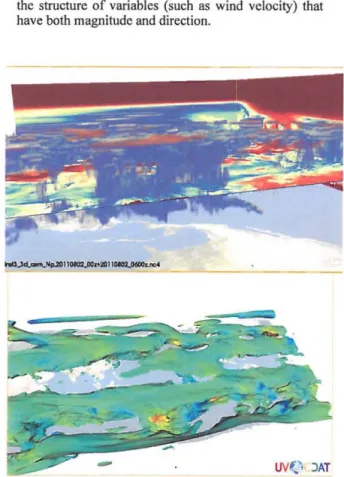
The Slicer plot (Fig. 2, 3, 4) provides a set of slice planes that can be interactively dragged over the dataset. A slice through the data volume at the plane's location is displayed as a pseudocolor image on the plane. A slice through a second data volume can also be overlaid as a contour map over the first. This tool
allows scientist to very quickly and easily browse the 3D structure of the dataset, compare variables in 3D,
and probe data values.
• The Volume render plot (Fig. 2, 3, 4) maps variable values within a data volume to opacity and color. It
enables scientists to create an overview of the topology of the data, revealing complex 3D structures at a glance. Due to the complexity of creating useful
transfer functions the art of generating volume renderings has in the past been relegated to visualization professionals. DV3D offers interfaces that greatly simplify this process, enabling interactive volume rendering to play an important role in the scientist's data exploration process.
The lsosurface plot (Fig. 2, 3): displays an isosurface derived from one variable's data volume and colored by the spatially correspondent values from a second
variable's data volume. It can produce views similar to a volume rendering while facilitating the comparison of two variables.
• The Hovmollcr slicer (Fig. 4) and volume render plots arc similar to the 3D slicer and volume render plots described above except that they operate on a data volume structured with time (instead of height or prcssure level) as the vertical dimension. This plot
allows scientists to quickly and easily browse the 3D
structure of spatial time series.
The Vector slicer plot (Fig. 2) provides a set of slice planes that can be interactively dragged over a vector
field dataset. A slice through the field at the plane's location is displayed as a vector glyph or streamline plot on the plane. This plot allows scientists to browse
the structure of variables (such as wind velocity) that have both magnitude and direction.
-
uv
(
'.
·
JATFigure 3. An isosurface plot (bottom) and a combination volume render
and slicer plot (top).
D. DV3D Plat Features
All of the plot types described above offer the following features:
• Animating over one of the data dimensions (typically time) provides a very effective method for viewing and browsing 4D data.
The Vistrails workflow interface, providing individual GUIs for each module, provides a powerful tool for developing custom visualization and analysis pipelines.
A rich selection of interactive query> browse,
navigation, and configuration options facilitates exploratory visualization.
Integration with the Vistrails spreadsheet provides multiple synchronized plots for desktop or hyperwall.
Integration with the Vistrails provenance architecture provides transparent collection and comprehensive management of workflow and data provenance. The underlying VTK architecture provides active and passive 3D stereo visualization support.
Seamless integration with CDA Ts climate data
management system (CDMS) [8] and other climate
data analysis tools provides extensive climate data processing and analysis functionality.
E. The UVCDAT GUf
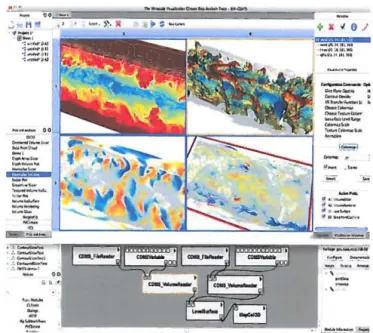
Fig. 2 displays DV3D within the UV-CDAT GUI, which extends the Vistrails spreadsheet (middle), a rcsizable grid of visualization cells. Visualizations can be created, modified, copied, rearranged, and compared using drag-and-drop operations. Spreadsheets maintain their provenance and can be
saved and reloaded. Visualizations can be used for data
exploration and decision-making, while at the same time being fully customizable and reproducible. Around the spreadsheet are tools for building visualizations. The project view (top left) facilitates the organization of spreadsheets into projects. The plot view (bottom left) provides a palette of available plots, exposing a list of prebuilt workflows from DV3D and other Vistrails packages. The" variable view (top right) provides an interface for selecting and editing variables. The bottom right contains tools for executing data processing and analysis operations on variables using either a command-line or
calculator interface.
F. The DV3D Interface
The DV3D package is composed of a set of Vistrails modules. Each DV3D module offers a distinctive GUt interface (accessible from the Vistrails workflow builder) enabling the configuration of workflow parameters. These modules can be selected from a palette and linked to create custom workflows using the Vistrails workflow builder. The DV3D spreadsheet cells also offer a wide range of interactive
key press and mouse drag operations facilitating the
configuration of colormaps, transfer functions, and other display and execution options. For example, pressing a button in a configuration panel and then clicking and dragging in a
spreadsheet cell displaying a DV3D volume render plOl
initiates a leveling operation that controls the shape of the plot's opacity or color transfer function. The volume render plot changes interactively as the user drags the mouse around the cell.
All configuration operations are saved as Vistrails provenance. The provenance trail contains a record of all
workflow construction and configuration operations that contributed to the current visualization, making it easy to revert to an earlier configuration of the workflow at any stage of
development. The user can maintain multiple developmental
branches of a single workflow and easily switch back and forth between them.
G. DV3D Workflows
A DV3D workflow begins with a set of modules
encapsulating CDMS operations for accessing and processing
climate data from the local file system, the Earth System Grid Federation, or the ParaView server on a remole supercomputer. The CDA T toolkit provides a wide range of climate data analysis operations, e.g. simple arithmetic operations, regridding, conditioned comparisons, weighted averages, various statistical operations, etc. A DV3D translation module converts the proccssed CDMS data volumes into VTK image data instances to initialize the visualization branch of a DV3D workflow. DV3D visualization modules encapsulate complex
VTK pipelines with numerous supporting objects such as
actors, cameras, renderers, interaction observers, data mappers, and transfer functions. Each visualization pipeline implements a unique interactive 3D plot. Each branch of a DV3D workflow terminates in a DV3D cell module, which represents a custom cell in the UVCDAT spreadsheet. The DV3D cell module
includes a configurable base map. navigation controls,
onscreen dataset and variable labels, a pick operation display, and legendlcolormap displays. Cells in the spreadsheet can be individually activated or deactivated by selection. Configuration and navigation operations are propagated to all
active cells.
H. Distributed Visualization/or the Hyperwall
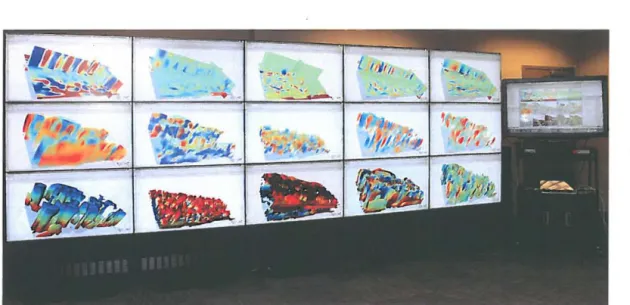
DV3D has also been deployed within a distributed visualization framework in order to facilitate simultaneous interactive visualization of the large numbers of variables contained in a typical climate simulation dataset. This framework employs a hyperwall cluster, which at NCCS consists of a 5x3 array of 46" displays, each with a dedicated compute (client) node, plus a .single control (server) node (Fig. 5). In this framework an instance of UV -CDA T runs on each node, coordinated using socket connections between the client nodes and the server node. Each client instance opens a single-cell visualization spreadsheet window, covering its hyperwall display. The user interacts with the GUI of the server instance using a 46" touchscreen display. In a typical scenario the user would open (or construct) a workflow with 15 cell modules on the server node. At execution time the server instance sends edited versions of the workflow to each client node for local
execution. Each client workflow consists of one of the cell modules (and all its upstream modules) from the server workflow. The server instance executes a reduced resolution
instance of the full (I5-cell) workflow, whereas each client
instance executes a full resolution I-cell sub-workflow. The plots that are displayed in low resolution in the server spreadsheet cells are mirrored in full resolution on the corresponding client (hyperwall) displays. All interactive
navigation and configuration operations (executed in the UVCDAT server GUI) are applied to the active cells in the server visualization spreadsheet and then are propagated to the corresponding client display cells on the hyperwall.
CONCLUSIONS
The inundation of data generated by ever-increasing resolution in both global models and remote sensors is presenting both a challenge and an opportunity for earth
science analytics. New tools and methods are needed to reap the benefits of this overabundance of information. Key technical challenges include the seamless integration of advanced visualization tools, workflow and provenance
support. and high performance computing.
The complexity of the climate knowledge discovery process
is increasing due to the increasing complexity of climate datasets. Graphical representations (which are very effective at
addressing data complexity) can be enhanced by an increase in
the number of "degrees of freedom" in the visualization
process. Three-dimensional views into complex high dimensions datasets can offer a widened perspective and a
more comprehensive gestalt facilitating the recognition of
significant features and the discovery of important patterns.
UV-CDA T and DV3D present a novel architecture that
seamlessly integrates a comprehensive workflow and provenance architecture with interactive climate data analysis
and visualization tools. This end-ta-end application enables scientists to engage in exploratory analyses that were previously difficult or intractable due to the size and
complexity afthe datasets and, using DV3D, seamlessly couple these analyses with advanced visualization methods.
ACKNOWLEDGMENT
Resources supporting this work were provided by the
NASA High-End Computing (HEC) Program through the
'F .• ~., ,
"::-~-... ,,
NASA Center for Climate Simulation (NCCS) at Goddard
Space Flight Center.
REFERENCES
[1) S. Davidson and 1. Freire, "Provenance and Scientific Workflows:
Challenges and Opponunities" ACM SIGMOD, pp. 1345-1350,2008. [2J C. Silva. 1. Freire and S. Callahan, "Provenance for Visualizations:
Reproducibility and Beyond", IEEE Computing in Science &
Engineering, vol. 9(5), pp. 82-29,2007.
[3] Maxwell, Thomas, DV3D documentation: http://ponal.nccs.nasa.govIDV3Df,2010.
[4] D. Williams, "Ultrascale Visualization - Climate Dala Analysis Tools", hnp:llclimatemodeling.science.energy.govfprojectslultr ascale-visualizalion"-clim atc.data-analysis-tools-uv-cdat, 20 I O.
[5] S. Callahan. 1. Freire, E. Santos, et ai., "VisTrails, Visualization meets Data Management", Proceedings of ACM SIGMOD: 2006.
[6J D. Williams, 2007, "The PCMDI Software System: Status and Future
Plans of CD AT (Climate Data Analysis Tools)", PCMDI Repon No. 44.
http://www2-pcmdi.llnl.govlcdat.
[7J W. Schroeder, K. Martin, and B. Lorensen, Visualization Toolkit: An Object-Oriented Approach to 3D Graphics. 4th Edition. Kilware: 2006. (8) R. Drach, P. Dubois, and D. Williams, 2007: Climate Data Management
System, version 5.0, http.li
www2-pcmdi. 1lnl.gov/cdatfmanuaJslcdms5. pd
r.
{ 1IIIh
Figure 5. The DV3D distributcd visualization framework deployed on the NASA NCCS hypclWall,. This configuration enables scientists to exploit the full
capacity of the NCCS hYPClWall cluster (32 dual·core Xeon Harpertown processors, 16 Quadro FX 1700 OPUs, and a 17 by 6-foot, 15.7 million pixel display) in support of interactive visual data analysis and understanding of very complex climate datasets.