Design and Implementation of Meetings Document Management
and Retrieval System
Obagbuwa, I. C. [email protected]
Department of Computer Sciences, Lagos State University,
Lagos, +234, Nigeria.
Oyelade. O. J. [email protected]
Department of Computer and Information Sciences, Covenant University,
Ota, +234, Nigeria.
Oladipupo. O. O. [email protected]
Department of Computer and Information Sciences, Covenant University,
Ota, +234, Nigeria.
Ewejobi I. M. [email protected]
Department of Computer and Information Sciences, Covenant University,
Ota, +234, Nigeria.
Aborisade D. O. [email protected]
Department of Computer Science, College of Natural Sciences, Federal University of Agriculture, Abeokuta, Ogun State, +234, Nigeria.
Abstract
Meetings management system has components to capture, storing/archiving, retrieve, browse, and distribute documents from the system and Security to protect documents from unauthorized access. Lack of proper organization, storage and easy access of meeting documents, bottleneck of keeping paper documents, slow distribution, and misplacement of documents necessitated the need for this work. Document management software that can be used to organize and maintain the records of meetings has been developed. The system, developed as a web application, is based on the use of objects and Web technologies. A search facility is included to support rapid location of topics of interest, and navigation is enabled by the employment of hyperlinks. The system was implemented using asp.net. This document management system can enable users to follow the development of any topic through several meetings of a particular body or committee, Members of the body should be able to have instant and full access to what has been discussed and decided about the given issue no matter how long that had been.
Keywords:
Document Management, Capture, Storage, Retrieval, Security, Hypertext and
Hyperlinks.1. INTRODUCTION
Document management systems are software applications that capture paper and electronic documents and provide the storage, retrieval, security and archival of those documents. These electronic documents they manage can include any kind of digital object -- bitmap images, HTML files, SGML, PDF, graphics, spreadsheets, and word-processed documents. The document management process begins with the conversion of paper documents and records to electronic
files. Document management systems expedite business processes by allowing instant access to information; greater collaboration within and among departments and offices; enhanced security for files and records [6].
Some document management systems are already in existence, such as paperless office [12], Document imaging system[14], content management [15], Business document management[13] etc, but none has been designed to manage meeting documents ; meeting agendas, members registration, the minutes of the meetings, for proper storage and easy retrieval. The focus of this work is managing meetings documents.
In this research work, a document management system has components for: capturing and bringing documents into the system; methods for storing and archiving documents; indexing and retrieval tools to locate documents; and for distribution of documents. It is possible with this system to manage millions of documents and retrieve and document of choice. The major tool for achieving this are the indexing methods which are used to categorize and link documents, indexing allows users to quickly sort large volumes of data to find the right document.
The three primary ways of indexing files in a document management system are: Full-text indexing, or indexing every word contained within a document; Index fields, or indexing through keyword categories of documents; and Folder/file structure, or indexing by associated document groups.
Retrieval is where the quality of the indexing system is most evident. Some document management systems let users search only by indexed keywords, which requires a person to know how the document was categorized and what index fields were assigned to it [6,12,14]. A powerful indexing system will make it possible for users to find any document based on what they know, even if that amounts to no more than a word or phrase within the document [6].
Since a document can be viewed as a complex object, utilizing object-oriented approach in the design and implementation of the document management system is likely to enhance it. For example, a meeting could be viewed as consisting of a schedule, an agenda, a minute collection, and so on. An object-oriented database management system (OODBMS) is a database management system that supports the modeling and creation of data as objects [8,10]. This includes some kind of support for classes of objects and the inheritance of class properties and methods by subclasses and their objects.
Object-orientation is yet another step in the quest for expressing solutions to problems in a more natural, easier-to-understand way [1,8], "The fundamental characteristic of this level of system description being that it is closer to the human conceptualization of a problem domain. Descriptions at this level can enhance communication between system designers, domain experts and, ultimately, system end-users."
A data model consists of static properties such as objects; attributes and relationships; and integrity rules over objects and operations and dynamic properties such as operations or rules defining new database states based on applied state changes [7,8]. Object-oriented databases have the ability to model all of these components directly within the database supporting a complete problem/solution modeling capability. Prior to object-oriented databases, databases relied on applications for defining the dynamic properties of the model. The disadvantage of delegating the dynamic properties to applications is that these dynamic properties could not be applied uniformly in all database usage scenarios since they were defined outside of the database in autonomous applications [1,7,8]. Object-oriented databases provide a unifying paradigm that allows the integration of all three aspects of data modeling and to apply them uniformly to all users of the database [7].
The use of hypertext in documents could also enhance the document browsing experience. Hypertext has to do with interrelating information elements (linking pieces of information) and using these links to access them. Thus, a hypertext is a collection or webof interrelated or linked nodes, these nodes or information element ranging from single ideas or chunks to entire documents [3, 4]. The system allows an author to create the nodes and the links among them, and allows a reader to traversethese links, i.e., to navigate from one node to another using these links. The nodes contain the content and attributes of information elements.
Typically hypertext systems mark link access points or link anchors in some manner within a node when displaying it on a computer screen (e.g., underlined text displayed within documents on World Wide Web browsers). When the user selects the linkmarker, e.g., by clicking on it with a mouse cursor, the hypertext system traverses to and displays the node at the other end of the link. Hypertext systems include navigation, annotation and structural features, which take advantage of the node and link structure to support authors and readers. Hypertext enables people to read, author and comprehend information more effectively than traditional documents [3,9]. People typically read documents from start to end, i.e., in a linear, sequential manner. Hypertext frees readers and authors from this linear, sequential form of expression. Authors can structure information as a web of information chunks and interrelating links. Presenting information as a web enables readers to access information in the order most appropriate to their purposes [2].
2. ANALYSIS AND DESIGN
The meeting management system is expected to have a database for storing minutes of meetings and other information pertaining to meetings; Capture documents into the system; storing and archiving documents; retrieve documents; Distribution of documents from the system; and Security to protect documents from unauthorized access.
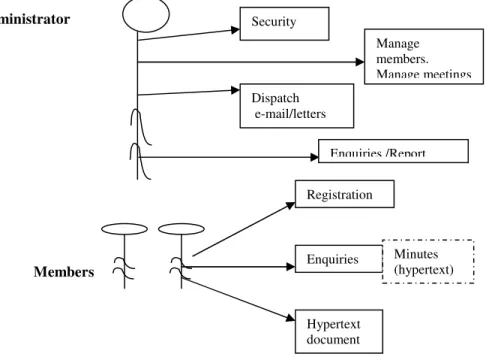
Object oriented analysis for any system typically begins with the identification of the major actors within the system. For the system under consideration the actors are the Users of the system. The Users can be classified into two – Administrator and Members. The Use Case model for the system is depicted in Figure 1.0 below.
Security Dispatch e-mail/letters Manage members. Manage meetings Enquiries /Report Registration Enquiries Hypertext document Minutes (hypertext)
FIGURE 2.1: Administrator and Member Members
Use Case model for the system. The use cases are as described below:
CASE 1 - ADMINISTRATOR
In this system, administrator performs four main functions:
(a) Security: Ensure that the system is secure; ensure strict access denial to non members; Create the users of the system; and Create users authorization and levels of authorization.
(b) Manage members: Register members; and Edit member’s accounts.
(c) Manage meetings: Create meetings; and Edit meeting accounts.
(d) Manage hyperlinks: Create links among related information, meetings etc. (e) Dispatch notice /letter, minutes of meeting to members e-mail.
CASE 2 MEMBERS
Register for a meeting; Make enquiries, the enquiries is displayed in hypertext i.e links of nodes; View hypertext document.
2.1
IDENTIFICATION OF CLASSES
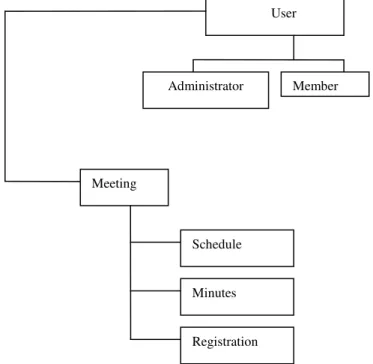
Two main classes can be identified in the system, viz., User and Meeting. User has two subclasses: Member and Administrator. The Meeting class has three subclasses: Schedule, Minute and Registration. This is shown in figure 2.0.
User Administrator Member Meeting Schedule Minutes Registration
2.2 MEETING SYSTEM DIAGRAM
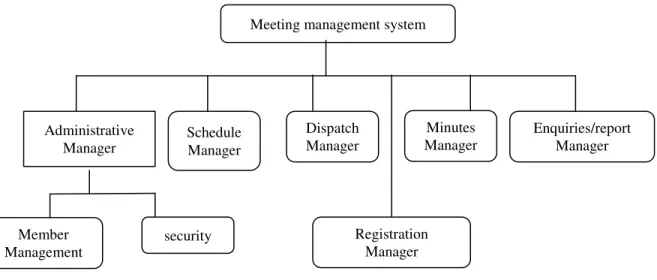
The design of the system is shown in Figure 2.3 below.
FIGURE 2.3: Meeting Management System Diagram.
The system was broken down into six sub-systems: Administrative manager, Schedule manager, Minutes manager, Registration manager, Dispatch manager, Enquiry/report manager
Administrative manager: manage members; creates members’ data such as: Names, Addresses, Email, Phone number, Password, and so on. It also manages security, creating user authorization and authorization levels.
Schedule manager: Creates a record for a proposed meeting containing elements such as: Agenda, Chairman, Special guest, Date, Time, and Venue.
Dispatch manager: Dispatches both scheduled meeting notices and minutes of meetings held to members’ e –mails.
Registration manager: Creates forms for members to register for meetings.
Minute manager: Used after the meeting has been held to: Enter the minutes of the meeting, the attendance, and any other remarks.
Enquiry/report manager: Supports enquiries and report generation. Enquiries could be about the meeting schedules, minutes, agenda and attendance. Management reports could also be generated on these matters.
Meeting management system
Administrative Manager
Schedule Manager
Dispatch Manager
Minutes Manager
Enquiries/report Manager
Registration Manager
security Member Management
2.3
DATA STORES
Meeting management database has six stores as described below:
Member (Member ID, Surname, Firstname, Address1, Address2, Address3, e- mail, phone, password): Stores members’ data and passwords.
Meeting (Meeting ID, Schedule ID, Chairman, Agenda): Stores the meeting schedule chairman and agenda
Schedule (Schedule ID, Meeting ID, Date, Time, Venue): Stores meeting date, time and venue
Attendance (Meeting ID, Member ID): Stores members attendance at meetings. Guest speaker (Meeting ID, Speaker, Topic): Stores speaker and topic
Minutes (Meeting ID, Details): Store meeting details
2.4
DOCUMENT RETRIEVAL
One important component of this system is the document retrieval and browsing component. This component is implemented as part of the Enquiry /Report Manager. Our main motivation for this work is to create a system that can enable users to follow the development of any topic through several meetings of a particular body or committee. Members of the body should be able to have instant and full access to what has been discussed and decided about the given issue no matter how long that had been. This is important because we often have bodies and committees discussing the same issues without the benefit of what had been earlier done, either by the same or a different membership. This is also an important consideration for management in the process of decision making and evaluation.
2.5
SYSTEM ARCHITECTURE
All web clients communicate with ASP.NET applications through IIS(internet information service) . IIS finds the requested source (meeting management system application) and if the client is authorized, returns the appropriate resources.
2.6
SECURITY CHECK
In this application, the ASP.NET form authentication is used.
FIGURE 2.5: A process flow for the forms authentication process [5].
ASP.NET application .NET framework Windows NT/2000/XP IIS Web client Meeting mgt system Business rules Database
3.0 SYSTEM IMPLEMENTATION
Web Forms pages are built with ASP.NET technology. ASP.NET is a unified Web platform that provides all the services necessary to build enterprise-class applications.
ASP.NET, in turn, is built on the .NET Framework, so the entire framework is available to any ASP.NET application. Applications can be authored in any language compatible with the common language runtime, including Microsoft Visual Basic, Visual C#, and JScript .NET.
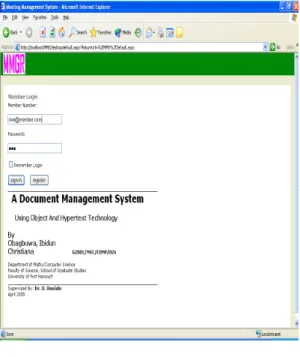
FIGURE 3.1: Login Page.
When the user is authenticated, the default page is displayed. If the password does not tally with the existing password in the database, a access denial page is displayed. If a password is found, registration page that has members account will be displayed as shown below in figure 3.2.
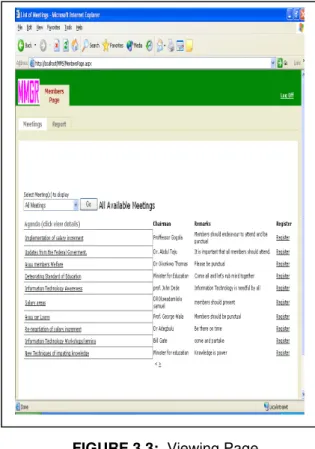
Members can register their accounts as shown in the figure 3.3 below
FIGURE 3.3: Viewing Page.
Members can make enquiries about meetings such as meetings in 2004
4.0
SUMMARY AND CONCLUSION
This research work was carried out to provide proper organization, storage and easy & instant access of meeting documents. The system was developed as a web application, it enabled users to check meetings agenda and register for meetings on-line, users can browse for minutes of interest and use hyperlinks to link minutes and topics of interest.
Acknowledgments
We are grateful to Dr Olumide Owolabi for his valuable contributions and materials. We also thanked Prof. C. K. Ayo for his useful assessment which has improved on the quality of this work.
5.0
REFERENCES
1. Brodie M.L., Mylopoulous J., Schmidt J.W. “On Conceptual Modeling”. New York: Springer- Verlag, 1984.
2. Bush, Vannevar, "As We May Think," Atlantic Monthly 176, 1945, 101-108.
3. Conklin, E. Jeff, "Hypertext: a Survey and Introduction," IEEE Computer 20(9),1987, 17-41. 4, Halasz, Frank G., "Reflections on NoteCards: Seven Issues for the Next Generation of Hypermedia Systems," Communications of the ACM 31 (7), 1988, 836-855.
5. Jeffrey P.Mcmanns ,Chriskinsman Visual basic .NET developer’s guide to Asp.NET, XML,and ADO.NET.. Published by Addison Wessley, February 27, 2002. ISBN 0-672-32131-9.
6. Laserfiche, A Division of Compulink Management Center, Inc.3545 Long Beach Blvd.Long Beach, CA 90807 USA Copyright ©2000, 2003, 2004,2005,2006,2007 by Compulink Management Center, Inc.All rights reserved. Tenth edition published 2007 Printed in the United States of America ISBN 09726861-0-X [email protected]/www. laserfiche.com 7. Gregory Mcfarland,Andres Rudmilk and David Large, “Object-oriented database management system” 1997
8. Loomis, Mary E.S.,“ODBMS vs. Relational.” Journal of Object-Oriented Programming Focus On ODBMS, (1992) pg. 35.
9. Malcolm, Kathryn C., Steven E. Poltrock and Douglas Schuler, "Industrial Strength
Hypermedia: Requirements for a Large Engineering Enterprise," Hypertext '91 Proceedings, San Antonio, 1991, ACM Press, 13-24.
10. Soley, Richard Mark (ed.) Object Management Architecture Guide. Object Management Group, Vol. 2.0, September 1992.
11. Yankelovich, Nicole, Bernard J. Haan, Norman K. Meyrowitz, and Steven M. Drucker, "Intermedia: The Concept and the Construction of a Seamless Information Environment," IEEE Computer, January 1988, pages 81-96.
12. Miles L. Mathieu “ paperless office: accepting Digitized Data” 2002
13. Wagner, V. “chase kicks off business document archive services” Bank systems and technology 38(2) ,24-25
14. Paperless office – Imaging solution ;1998 advanced information technologies. 15. Drupal content management system. http:www.org.accessed 28 march 2006. 16. Anas Tawile “ free and open source document management system” 2002
![FIGURE 2.5: A process flow for the forms authentication process [5].](https://thumb-us.123doks.com/thumbv2/123dok_us/9620622.2449613/7.918.245.544.117.483/figure-process-flow-forms-authentication-process.webp)