“Professional Development Kit” Series
Specifications, Installation & Operation
Doc. Rev. 2
Copyright c2013 Range Networks, Inc.
Contents
1 Introduction 6
1.1 Scope and Audience . . . 6
1.2 Disclaimers. . . 6
1.2.1 Errors and Future Changes . . . 6
1.2.2 Radio Interference . . . 6 1.3 Abbreviations . . . 6 1.4 References . . . 7 1.5 Contact Information . . . 7 2 Specifications 8 2.1 Mechanical Specifications . . . 8 2.1.1 Package Dimensions. . . 9 2.1.2 Ventilation . . . 10 2.2 Environmental Specifications . . . 10 2.3 Electrical Specifications . . . 10 2.4 RF Specifications . . . 10 2.4.1 RF Output . . . 10 2.4.2 RF Input . . . 11 3 BTS Operation 13 3.1 Installed Components . . . 13 3.2 Source Code . . . 13
3.3 Initial Power-Up Procedure . . . 14
3.4 System Access and Control . . . 14
CONTENTS 3
3.6 “Safe” GSM Configuration . . . 15
List of Figures
2.1 Professional Development Kit front panel mechanical. . . 9
List of Tables
2.1 Professional Development Kit mechanical dimensions. . . 9
2.2 Professional Development Kit environmental specifications. . . 10
2.3 RF operating ranges . . . 11
2.4 Professional Development Kit model tyles and numbers . . . 12
Chapter 1
Introduction
1.1
Scope and Audience
This document describes the physical specifications and initial installation of the Professional Development Kit series (part number 2110-xx1-x) units. This manual does not cover full unit configuration or any significant aspects of GSM/VoIP operation. For those topics, see the OpenBTS software manual.
This document is intended for use by researchers, developers, and laboratory specialists. It assumes a general familiarity with the Linux operating system and IP networking.
1.2
Disclaimers
1.2.1 Errors and Future Changes
Although the information in this manual has been carefully checked for accuracy, and is believed to be correct and current, no warranty, either express or implied, is made as to either its applicability to, or its compatibility with, specific requirements; nor does Range Networks, Inc. assume any responsibility for correctness of this information, or for damages consequent to its use. All design characteristics, specifications, tolerances, and the like are subject to change without notice.
1.2.2 Radio Interference
Operation of improperly configured cellular equipment can result in interference to existing services, possibly interrupting public networks and public safety systems, even though the output power of the Professional Development Kit is relatively low. Range Networks, Inc. cannot insure that any of the procedures in this manual will not result in radio interference to other services and networks.
1.3
Abbreviations
1.4. REFERENCES 7
• dBm – decibel milliwatts
• MS – mobile station (cellular phone or handset)
• RF – radio frequency
• VDC – Volts, direct current
1.4
References
This document references the following GSM specifications, which can be downloaded for free from http://webapp.etsi.org/key/queryform.asp
• GSM 03.40: “Digital cellular telecommunications system (Phase 2+); Technical realization of the Short Message Service (SMS) Point-to-Point (PP)”
• GSM 04.08: “Digital cellular telecommunications system (Phase 2+); Mobile radio interface layer 3 specification”
• GSM 05.05: “Digital cellular telecommunications system (Phase 2+); Radio transmission and reception”
• GSM 05.08: “Digital cellular telecommunications system (Phase 2+); Radio subsystem link control”
1.5
Contact Information
For additional information or products referenced in this manual, please contact: Range Networks, Inc.
560 Brannan Street
San Francisco, California 94107 United States of America telephone +1 415-778-8700 email [email protected]
Chapter 2
Specifications
The Professional Development Kit consists of:
• a mini-ITX computer with 16GB mSATA flash drive, and 2GB RAM,
• a Range Networks ”RAD1” wideband or single-band digital radio,
• a +12V, 5A power supply with a power cord,
• two multi-band rubber duck antennas,
• two pre-programmed SIM cards,
• two test phones.
2.1
Mechanical Specifications
The Professional Development Kit is packaged in a desktop enclosure. The Range Networks Rack Mounting Brackets (part number 8710-000-0) are available separately and allow you to mount your Professional Develop-ment Kit onto your existing rack (1U, 4.45 cm / 1.75”).
2.1. MECHANICAL SPECIFICATIONS 9
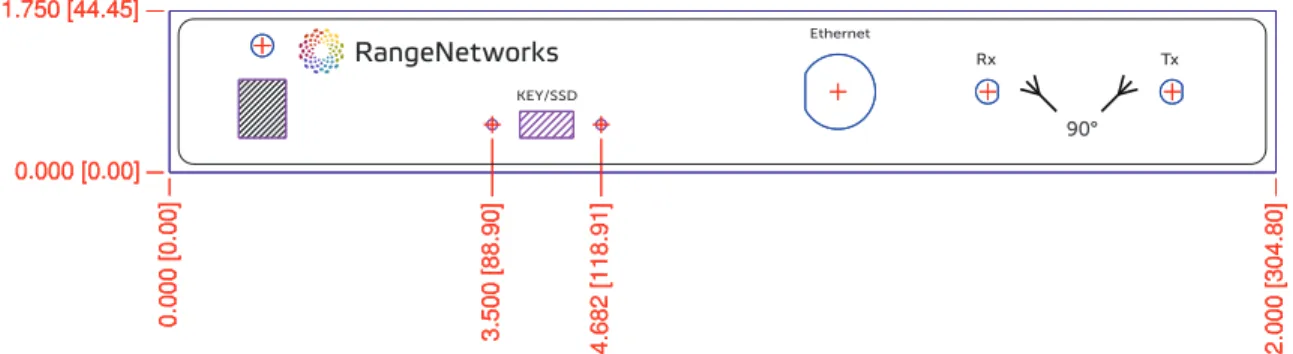
Figure 2.1: Professional Development Kit front panel mechanical.
Figure 2.2: Professional Development Kit side view mechanical.
2.1.1 Package Dimensions
Figures 2.1 and 2.2 show front and side views with all measurements marked in inches and millimeters. The mechanical dimensions are given in Table2.1. Range units use standard metric-sized Phillips-head (crosspoint) fasteners throughout.
Table 2.1: Professional Development Kit mechanical dimensions.
Dimension Value Comments
width 30.48 cm (12”)
height 4.45 cm (1.75”) 1U in optional rack mounting brackets depth 25.40 cm (10”)
min. front clearance 5.08 cm (2”)
min. rear clearance 5.08 cm (2”) ventilation min. side clearance 3.81 cm (1.5”) ventilation min. top clearance 0 cm (0”) touching OK min. bottom clearance 0 cm (0”) touching OK
weight 1.5 kg (3.3 lbs) unit only
Starting from the left and moving across, the items on the Professional Development Kit front panel are:
• Power switch with a LED indicator above it,
10 CHAPTER 2. SPECIFICATIONS
• “ETHERNET” – Ethernet connector (RJ-45 socket),
• “Rx” – receive-side RF connector,
• “Tx” – transmit-side RF connector.
2.1.2 Ventilation
Do not block the Professional Development Kit unit on the sides, as they contain the ventilation openings. The unit does not require forced air cooling.
2.2
Environmental Specifications
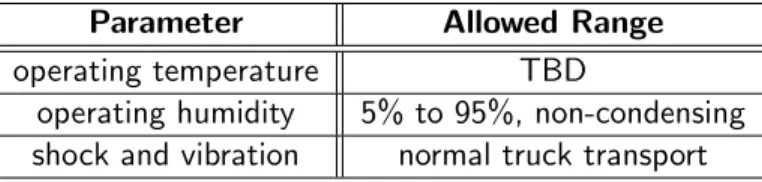
Table 2.2gives the environmental requirements for the Professional Development Kit series. The Professional Development Kit is designed for indoor use, either in a desktop or a rack-mounted installation. However, the unit should not require refrigeration, even in the warm climates.
Table 2.2: Professional Development Kit environmental specifications.
Parameter Allowed Range
operating temperature TBD
operating humidity 5% to 95%, non-condensing shock and vibration normal truck transport
2.3
Electrical Specifications
The Professional Development Kit takes a 12V, 5A DC power supply.
2.4
RF Specifications
The Professional Development Kits come in single-band and multi-band configurations. The single-band units run in one of the four standard GSM bands: GSM850, EGSM900, DCS1800, PC1900. The multi-band units can be used in any of the four standard GSM bands, selected programmatically. The latter do not include any band-specific filtering in the transmitter or receiver.
The receiver frequency range is given in Table2.3.
2.4.1 RF Output
Depending on a model, the Professional Development Kit features a wideband, or a single-band Range Networks ”RAD1” digital radio, and has the maximum output power of 100 mW (20 dBm). The actual output level is controlled by the software.
2.4. RF SPECIFICATIONS 11 Table 2.3: RF operating ranges
Band Receive Range Transmit Range
GSM850 824-849 MHz 869-894 MHz EGSM900 880-915 MHz 925-960 MHz DCS1800 1710-1785 MHz 1805-1880 MHz PCS1900 1850-1910 MHz 1930-1990 MHz
On any given ARFCN, the output bandwidth is 270.833 kHz. The spectrum mask is verified to comply with GSM 05.05 Appendix A. All noise emissions in the downlink band are at least 50 dB below the main signal.
2.4.2 RF Input
The Professional Development Kit unit can demodulate GSM signals down to a power level of -110 dBm at the RF connector across its entire receive band.
12 CHAPTER 2. SPECIFICATIONS
Table 2.4: Professional Development Kit model tyles and numbers
Model Type Operation band
2110-001-1 Multi-band 2110-851-1 850 2110-901-1 900 2110-181-1 1800 2110-191-1 1900
Chapter 3
BTS Operation
In normal operation, there are two interfaces to the Professional Development Kit:
• the Ethernet interface, for backhaul and administrative access, and
• the air interface, Um, for subscriber services.
3.1
Installed Components
The Professional Development Kit comes with the following components installed and preconfigured:
• OpenBTS – the GSM stack from layer 1 forward error correction up through layer 3, commercial release;
• Transceiver,
• sipauthserve – the SIP registration proxy;
• SubscriberRegistry – the subscriber registry database;
• smqueue – the SMS store and forward server;
• Asterisk – the SIP softswitch;
• WebUI – administrative web interface.
3.2
Source Code
The unit also comes equipped with the latest public release source code for the following Range Networks components:
• OpenBTS,
• smqueue,
14 CHAPTER 3. BTS OPERATION
• sipauthserve, and
• RRLP aiding server.
The source code is located on the file system under “/home/openbts/software/”. All of the source code directories are installed as SVN working directories, linked to the official public release repository. Any of them can be updated using “svn update” command on the command line.
3.3
Initial Power-Up Procedure
1. Place the unit on your desk, or install in it a rack nearby (within 2-10 meters/6-30 feet).
2. Attach the provided antennas to the transceiver (Tx) and receiver (Rx). The receiving antenna must be positioned at an angle of 90◦ to the transmitting antenna.
3. Power up the unit. It takes up to 3 minutes to load the operating system and all the applications.
3.4
System Access and Control
The Professional Development Kit runs Ubuntu Linux operating system. The primary interface to the Profes-sional Development Kit is the UNIX shell, accessed via ssh from the Ethernet connector on the front panel. The unit’s Ethernet interface is auto-sensing, requiring no hub or crossover cable. It is shipped with the default IP address of 192.168.0.22.
Once the unit is connected to another computer or a network on the 192.168.0.x subnet, it can be accessed via ssh using “openbts” account name with password “openbts”. The account is sudo-enabled. The command to issue on any UNIX system, including OS X, is:
From a Windows machine, an ssh client, like PuTTY, can be used.
Note: Make sure to change the password for user “openbts” before you connect the Professional Development Kit to the public network.
In order to reboot the unit, type the following command at the UNIX command line prompt:
sudo reboot
Following the reboot, OpenBTS and its related services will start automatically. This process takes about 3 minutes.
The IP address of the unit is controlled by the Linux configuration file “/etc/network/interface”. The unit is preconfigured to have two IP addresses, “192.168.0.21” and “192.168.0.22”.
The “192.168.0.22” address should be changed to match your local network for administrative access. In order for the new network parameters to take effect, reboot the unit.
The “192.168.0.21” address is defined as a virtual interface in the event something goes wrong with the network setup, and you lose access to the unit. It is highly recommended that you do not modify it.
3.5. ACCESSING THE OPENBTS CONSOLE 15
3.5
Accessing the OpenBTS Console
OpenBTS command line interface (CLI) is used to access (or “attach to”) the running OpenBTS software. Log in to the unit via SSH as user “openbts” and type the following at th command line:
cd ~; ./CLI
To exit the command line interface, type “quit” and hit “Return”. Doing so does not stop the OpenBTS software. Refer to the OpenBTS software manual for instructions on how to access and modify the OpenBTS settings and runtime information.
3.6
“Safe” GSM Configuration
The Professional Development Kit is preset with the initial “safe” configuration. Before engaging up the unit, be sure that the OpenBTS configuration is compatible with the surrounding GSM networks so as to prevent disruption of service for existing cells. At a minimum, confirm appropriate values for the following parameters:
• GSM.Identity.MCC – mobile country code. Set to 001.
• GSM.Identity.MNC – mobile network code. Set to 01. The MCC/MNC tuple uniquely identifies a mobile phone operator/carrier. 001/01 is traditionally used for test networks.
• GSM.Identity.BCC – base station color code. Should not match the BCC of any nearby cell.
• GSM.Radio.Band – operating band. Should be 850, 900, 1800 or 1900. On single-band units this number must match the unit’s band.
• GSM.Radio.C0 – radio channel number. Should not conflict with any cell in the surrounding area.
• GSM.Radio.ARFCNs – number of ARFCNs to use. Set to 1.
• Control.LUR.OpenRegistration – Be sure this is NULL.
• Control.LUR.UnprovisionedRejectCause – cause code to report for failed location updates. Should be set to 0x04 “IMSI not in VLR”.
• GSM.RACH.AC – access classes. Should be set to 0x0400 to indicate no support for emergency calls.
• GSM.Radio.PowerManager.MinAttenDB – minimum output attenuation. This parameter limits the max-imum output power of the unit. The value is anattenuation, so the bigger it is, the less the maximum output power. For initial testing, use a value of 20.
This is not necessarily a configuration that you will use for normal operation, but this set of parameters will minimize the likelihood of interference with existing services while the unit is tested and configured. See the corresponding software manual for further information.
16 CHAPTER 3. BTS OPERATION
3.7
Initial Testing
The default Professional Development Kit configuration provides several tests that can be run independently of the network, with no backhaul:
1. location updating test,
2. mobile-originated loopback test, 3. mobile-originated call,
4. mobile-terminated delivery of SMS, with and without a parallel call, and 5. autoprovisioning of an handset via SMS.
See the “Test Procedures” chapter in the corresponding software manual for detailed description of these test procedures.
Document History
Date Doc. Rev. Changes 14 August 2013 - initial draft 4 October 2013 0 working draft 28 October 2013 1 Initial release revision 12 November 2013 2 IP settings correction