A CASE STUDY OF USING IPAD AND IBOOKS IN FIELDWORK AND LOCATION BASED EXERCISES
_______________
A Thesis Presented to the
Faculty of
San Diego State University
_______________
In Partial Fulfillment of the Requirements for the Degree
Master of Science in Geography _______________ Yi-ting Chuang Spring 2015
Copyright © 2015 by
Yi-ting Chuang All Rights Reserved
ABSTRACT OF THE THESIS
Utilizing Mobile Technology in GIS Education:A Case Study of Using iPad and iBooks in Fieldwork and Location Based Exercises
by
Yi-ting Chuang Master of Science
San Diego State University, 2015
The advancement of mobile computing technology has provided diverse way for education. Combination of mobile devices and GIS tools has become a trend in many geospatial technology applications (i.e., Google Maps application on smartphones). This research aims to develop an iBook prototype (a GIS textbook) for GIS education on Apple iPads and to evaluate the effectiveness of adopting the GIS iBook in classes and fieldwork exercises. We conducted the evaluation tests in two GIS courses (GEOG104 and GEOG381) in Fall 2014 at San Diego State University. There are two main research questions in this study: (1) How to assess and evaluate the effectiveness of location-based learning exercises (from iBook) and fieldwork exercises for first-time GIS students? (2) What were major technical challenges and opportunities to utilize mobile device and mobile technology in GIS education?
The procedures of developing and evaluating the prototype of the GIS iBook include creating two new chapters (chapter three: Wander the World through Remote Sensing Data and chapter four: Internet and Mobile GIS), interviewing five educators from high schools and community colleges, and improving the contents of the GIS iBook after the interview. There were 31 students who tested the GIS iBook and did a fieldwork exercise with iPads. The 31 students were required to finish five questionnaires after the exercise to express their user experiences and thoughts about the GIS iBook.
Based on the result of questionnaires, most students preferred to take GIS classes with the free GIS iBook and thought fieldwork exercise can help their learning. The students also performed better in knowledge oriented survey after reading the GIS iBook. This research also adopts the SWOT analysis method to evaluate the prototype of the GIS iBook. The result of the SWOT analysis indicates that utilizing mobile device in GIS education does have a great potential value in enhancing student’s understanding. The strengths of utilizing mobile device in GIS education include portability, easy update contents and abundant free development resources, while the weaknesses include distracting multimedia widgets, lack of Internet access, and security issues. The opportunities of SWOT analysis include financial plan for iPads and lack of competitors, while the threats include higher price and
incompatibility of iBooks on other tablet computers. The major limitations and key
challenges are limited survey time, small sample size, and technical difficulties of developing the GIS iBook.
TABLE OF CONTENTS
PAGE
ABSTRACT ... v
LIST OF TABLES ... viii
LIST OF FIGURES ... ix
ACKNOWLEDGEMENTS ... x
CHAPTER INTRODUCTION ... 6
1.1 RESEARCH QUESTIONS ... 7
BACKGROUND AND LITERATURE REVIEW ... 9
2.1 GIS IN EDUCATION... 10
2.2 MULTIMEDIA GIS ... 11
2.2.1 Integration of multimedia technologies and GIS ... 11
2.2.2 On-line multimedia GIS in education ... 11
2.3 MOBILE GIS ... 12
2.3.1 Mobile GIS in location based service ... 12
2.3.2 Mobile GIS in fieldwork education ... 13
METHODOLOGY ... 14
3.1 PROTOTYPE OF THE GIS IBOOK ... 16
3.1.1 Content of the GIS iBook ... 17
3.1.2 Collaborators’ reviews ... 21
3.2 INTERVIEWS OF EDUCATORS ... 22
3.3 SURVEY IN GEOG104 AND GEOG 381 ... 22
3.3.1 Pre-assessment and post-assessment ... 22
3.3.2 Test of the GIS iBook ... 23
3.4EVALUATION METHODS ... 24
3.4.1 Dependent samples t-test ... 24
3.4.2 SWOT analysis ... 24
RESULT ... 26
4.1.1 Content... 26
4.1.2 GIS iBook website ... 29
4.2 FEEDBACKS FROM EDUCATORS ... 30
4.3 SURVEY IN GEOG104 AND GEOG 381 ... 32
4.3.1 Reviews of the GIS iBook ... 32
4.3.2 Reviews of utilizing iPads in fieldwork exercise ... 36
4.4 DEPENDENT SAMPLES T-TEST ... 36
4.5 TECHNICAL CHALLENGES ... 37 DISCUSSION ... 40 5.1 SWOT ANALYSIS ... 40 5.1.1 Strengths ... 42 5.1.2 Weaknesses ... 44 5.1.3 Opportunities ... 45 5.1.4 Threats ... 47 5.2CONCLUSION ... 48
5.2.1 Limitations of This Research ... 52
5.2.2 Future Work ... 53
REFERENCES ... 55
APPENDIX A ... 59
SURVEY QUESTIONNAIRES ... 59
Utilization of GIS iBook on iPads (Pre-Assessment) ... 60
Utilization of GIS iBook on iPads (Post-Assessment)... 61
Utilization of iPads in fieldwork (Post-Assessment) ... 63
Knowledge Oriented Questionnaires in Pre-assessment and Post-assessment ... 65
APPENDIX B ... 67
RESULTS OF SURVEY QUESTIONNAIRES ... 67
Utilization of GIS iBook on iPads (Pre-Assessment) ... 68
Utilization of GIS iBook on iPads (Post-Assessment)... 70
Utilization of iPads in fieldwork (Post-Assessment) ... 74
Knowledge Oriented Questionnaires in Pre-assessment and Post-assessment ... 76
LIST OF TABLES
PAGE
Table 3.1 ADDIE Model (Branch 2009, p.3). ... 14
Table 3.2 Software and hardware that will be used to develop the GIS iBook. ... 17
Table 3.3 Multimedia widgets in the GIS iBook. ... 20
Table 3.4 General guidelines for SWOT Analysis. ... 25
Table 4.1 Result of knowledge oriented questionnaire. ... 37
Table 4.2 Result of dependent samples t-test. ... 37
Table 5.1 Strengths and weaknesses (internal factors) of utilizing iBooks on iPads in GIS education. ... 40
Table 5.2 Opportunities and threats (external factors) of utilizing iBooks on iPads in GIS education. ... 41
LIST OF FIGURES
PAGE
Figure 2.1 Three main concepts of this research... 9
Figure 3.1 ADDIE Model (Branch 2009, p.2). ... 15
Figure 3.2 Flowchart of methodology. ... 16
Figure 3.3 Cover of each chapter in the GIS iBook. ... 18
Figure 3.4 Movie and Dynamic image widgets. ... 18
Figure 3.5 User interface of iBook Author. ... 19
Figure 3.6 Widget library provided by Bookry.com (https://bookry.com/dashboard/). ... 20
Figure 4.1 Before and After Comparison widget. Students can slide the blue bar (the one the blue arrow points at) to see the differences between two scenes. (A screen capture from the GIS iBook chapter three). ... 27
Figure 4.2 The Framework of Internet GIS (A screen capture from the GIS iBook chapter four). ... 28
Figure 4.3 GIS iBook website (http://mappingideas.sdsu.edu/ibook/index.html). ... 30
Figure 4.4 Numbers of different groups of testers. ... 32
Figure 4.5 Reviews of multimedia widgets in the GIS iBook. ... 33
Figure 4.6 Comparison of different multimedia widgets (level of interesting). ... 33
Figure 4.7 Comparison of different multimedia widgets (level of helpful in GIS learning). ... 33
Figure 4.8 Percentage of students who answer questions correctly before and after reading the GIS iBook. ... 35
Figure 4.9 Problems of utilizing iPads in fieldwork. ... 36
Figure 4.10 Distribution of dependent samples t-test (two-tailed). ... 38
Figure 5.1 Multimedia widgets in the GIS iBook for first-time GIS students. ... 50
Figure 5.2 How free GIS iBook influence students’ choices for first-time GIS students. ... 50
Figure 5.3 Number of students who answer the knowledge oriented questions correctly... 51
CHAPTER 1
INTRODUCTION
The extensive utilization of geographic information systems (GIS) and geospatial technology has made a significant impact on many academic disciplines, professional
trainings, and education communities (Cheng et al. 2007; Kong et al. 2007; Zerger and Smith 2003). Courses utilizing GIS technology at high schools, colleges, and universities are more popular than before (Kawabata et al. 2010). As GIS becomes more important for academic learning and teaching, how to provide an effective and accessible material for GIS education is a major challenge for GIS educators. Armstrong and Bennet (2005) indicates that
fieldwork plays an essential role in GIS education because it not only lets students know how to collect raw data by themselves but also can provide an opportunity to teach geospatial skills and technological theories (e.g. how Global Positioning System (GPS) and wireless network operate). On the other hand, indoor and software-operation courses sometimes limit what student can learn because of lack of interaction with real-world phenomena (Armstrong and Bennet 2005). Adding fieldwork in GIS education will be valuable for students and GIS career preparedness.
This research aims to develop a GIS iBook prototype for an introductory GIS course and utilize iPads in fieldwork and location-based learning exercises. This research adopts iPad as the development platform because of its comprehensive content development environment (free iBook Author software with more widgets and tools available for iBook format comparing to Andriod O.S.). iPads also possess more user-friendly functions including searching information from wireless networks and cellular networks, and displaying both maps and data during the outdoor survey. In the past, some researchers adopted personal digital assistant (PDA) as a platform to develop customized educational program (Hsu and Chen 2010). However, the small screen size and limited memory of PDA made users hard to display data clearly and cannot operate key functions effectively for fieldwork (Tsou 2004). By implementing the GIS iBook on an iPad as a teaching instrument, students can follow interactive guidance in the GIS iBook to perform outdoor learning
exercises using built-in GPS and digital camera on iPads. iPads enable a richer learning environment for students to record spatial data, searching web information, and process images and GPS data from multiple resources.
1.1
R
ESEARCHQ
UESTIONSAlthough GIS has been widely promoted in education, it has been limited to software operation. Lack of data collecting and hands-on experience become challenges in improving GIS education. Students can hardly know techniques of collecting data and observe real-world phenomenon without fieldwork exercise (Armstrong and Bennet 2005). By utilizing iPads in fieldwork, students can record their locations and search information outside classrooms via wireless network. In addition, the GIS iBook in iPads can be updated immediately once a new version is published, while the GIS desktop cost for software renewal.
The combination of iPad in fieldwork has not been studied deeply and widely. This research promotes fieldwork education in GIScience and provides other researchers with an innovative idea in developing teaching material. In terms of theoretical impact, this research 1) can be as a pioneering research to provide researchers who specialize in GIS education with an innovative idea and 2) can promote combination of fieldwork exercise and GIS education. From practical perspective, I expect this research 1) can be a multifunctional tool for fieldwork and 2) can provide free teaching materials for basic GIS education.
The purposes of this research are developing and assessing a GIS iBook prototype for GIS education and location-based learning exercises (fieldwork). The prototype of the GIS iBook had been partly developed by another researcher, Cynthia S. Poloma, on 2013. As an extended study, this research focuses on evaluating and implementing the GIS iBook in fieldwork and location-based learning exercises. To ensure that the GIS iBook can satisfy educators’ demands and help students to do fieldwork, this research collected comments from educators and students through in-person interviews and questionnaire surveys. Methods adopted in this research are in-person interview, pre-assessment and
post-assessment through questionnaires on SurveyMonkey.com, and SWOT analysis. This study addresses the following three questions:
1. How to assess and evaluate the effectiveness of location-based learning exercises (from iBook) and fieldwork exercises for first-time GIS students?
This research continues to develop a GIS iBook prototype by adding two more chapters and an exercise. The final version of the GIS iBook was tested in two courses, GEOG 104 and GEOG 381 in fall 2014, at the department of geography, San Diego State University. Students in the classes were asked to complete two questionnaires,
pre-assessment and post-pre-assessment, on SurveyMonkey.com before and after using iPads in the fieldwork exercise. The questionnaires include questions related to GIS knowledge, reviews of the GIS iBook, and experience of the fieldwork exercise. This research evaluates the GIS iBook with SWOT analysis based on the results of questionnaires and students’ feedbacks.
2. What are the learning outcomes when the GIS iBook is adopted as a textbook in GIS classes?
In order to assess whether the GIS iBook could help students in learning new knowledge of GIS technology, this research design a knowledge oriented questionnaire, which students answered twice during the survey (before and after reviewing the GIS iBook). By analyzing students’ scores before and after students read the GIS iBook with dependent samples t-test (paired-samples t-test) through hypothesis testing, this research can compare whether there is a significant difference in learning outcomes of before and after adopting the GIS iBook as a textbook in GIS classes.
3. What were the major technical challenges and opportunities associated with using mobile device and mobile technology in GIS education?
To develop and implement the GIS iBook in classes, specific software (iBook author, keynote, Microsoft PowerPoint, etc.) and iPads are necessary. By reviewing the whole developing procedure and results of implementing the GIS iBook, this research discusses technical challenges and human factors that influenced the whole research. The technical challenges refer to software and hardware limitations. The human factors refer to feasibility of implementing iBooks and iPads in classes. Finally, this research analyzes potential threats and opportunities by reviewing challenges encountered during the development and survey.
CHAPTER 2
BACKGROUND AND LITERATURE REVIEW
This research aims to assess the potential value of using mobile devices with GPS capability in GIS education and engages students to grow their GIS knowledge. The research utilizes an iPads as a research instrument and develops a GIS iBook for basic GIS education as a case study. The portability of iPads and location-based map service enable students to apply what they learn in classes in fieldwork. Students can interact with real world
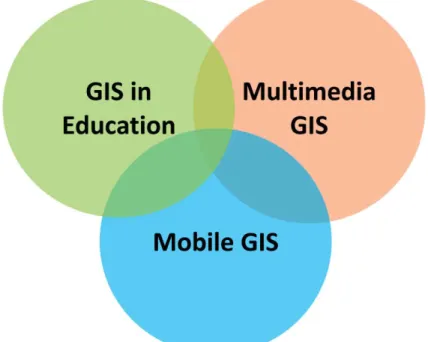
phenomena directly and access to information they need by using iPads. To provide an appropriate and complete material, further discussions of GIS implementation was necessary. This literature review addresses issues in three areas: 1) GIS in education, 2) multimedia GIS, 3) and mobile GIS (Fig. 2.1). The first section introduces the role of GIS in current education especially its influence on multi-disciplinary education. The second section illustrates utilizations of multimedia technologies in GIS such as three-dimensional video (3D), on-line interactive map service, location-based service, etc. The last section introduced basic concepts and past studies of mobile GIS.
2.1
GIS
INE
DUCATIONMany research studies have emphasized the importance of utilizing GIS in
geographic and multidisciplinary education in universities and secondary education (Bednarz 2004; Kawabata 2010; Oyana 2012). GIS has been utilized in city planning, environmental monitoring, business decision making, etc. since it is integrated with multiple functions from save, retrieve, analyze data to represent spatial information (Cheng and Yu 2007; Kong et al. 2007; Zerger and Smith 2003). Functions of visualizing and symbolizing spatial data based on their attribute values make GIS become an efficient instrument to enhance students’ understandings of spatial pattern. Students from different disciplines can understand species distribution, human activity pattern, condition of agricultural growth, etc. by analyzing temporal data under GIS software (Fisher and Toepfer 1998; Fischer et al. 2001; Knowles 2005). Kawabata et al. (2010) examined 163 GIS multidiscipline education programs provided by US universities during 2007-2008. They found that students could understand relationships between the environment and their own provinces easier by integrating GIS with other disciplines. The paper also pointed out an increasing tendency in cooperation of geography and other disciplines. GIS is no longer an independent subject but can be integrated with courses of various disciplines. The concept of Kawabata et al. urges multidisciplinary learning in GIS and motivates this research to develop educational materials for students who are not familiar but are interested in GIS.
The importance of applying GIS in secondary education also has been emphasized in the past few years (Baker 2005; Kerski et al. 2013; Wechsler and Pittstr 2004). Liu et al. (2010) investigated whether applying GIS in problem-based learning (PBL) could result in higher learning outcomes. They separated students into two groups: control and experimental group. The experimental group was taught PBL with GIS; and the control group was taught PBL without using GIS. Their result showed that the experimental group had better feedback and cognition. Benefits brought by GIS in education explain its significance in other
disciplines. However, most GIS educational materials were designed for professional person in specific fields like geography or urban planning. Therefore, this research expects to provide resources for students who are new to GIS.
2.2
M
ULTIMEDIAGIS
2.2.1 Integration of multimedia technologies and GIS
The integration of multimedia and GIS brings new developments in map services. Multimedia technologies combine various types of data like sound, video, and 3D images in a context. Multimedia technologies have utilized different platforms such as computer, mobile phone and on-line services (Raper 1999). Multimedia in GIS can leave users with deeper impressions and better understandings. Online discourse maps, Google Earth, 3D landscape simulation video, etc. are examples of integrating GIS and multimedia. Web-based interactive map can provide users with real-time spatial data and spatial analysis tools
without installing software (Zerger 2002; Hu 2002; Huang 2011). As the Internet supports more mapping functions than before, web-based interactive map conveying information or providing services becomes in multiple ways. Duran et al. (2004) developed a website to provide functions of saving, analyzing and displaying data. The website emphasized the techniques of 3D GIS and virtual reality model which can present real world landforms vividly. The 3D GIS constructed landforms based on terrain's surface elevation. The
techniques of the virtual reality model enabled researchers to visualize and simulate realistic urban pattern. By combining multimedia in GIS, people can gain more accurate and abundant information.
2.2.2 On-line multimedia GIS in education
Online multimedia GIS educational materials have been developed for GIS or Geography education recently. Comparing to traditional desktop GIS software, online multimedia GIS tools are more accessible for teachers and students. In the United States, only limited computer labs are equipped with desktop GIS software in universities and less than 2% of high schools are equipped GIS desktop. Moreover, half of the schools use the software less than two lessons during whole semester (Kerski 2007; Baker et al. 2009). Except the problems of inadequate instruments, teachers and students need to spend much time on being familiar with operation of desktop GIS (Baker 2005; Chen 2006; Oyana 2012). To enable students understand basic concepts of GIS and validate educators to teach GIS efficiently, researchers have suggested different approaches to learn and teach GIS (Baker 2005; Oyana 2012).
Baker (2005) promoted utilizing Internet-based map instead of desktop GIS in high school GIS courses. He mentioned that online map can satisfy instructors’ demands for teaching knowledge and basic skills of GIS. Chen (2006) collected high school educational materials and GIS layers to build online map by utilizing ArcMIS services. Both Baker’s and Chen’s research provided examples of learning GIS with online multi-media devices.
Although their studies revealed new learning ways for GIS education, students could hardly know the procedure of processing data and lack for hands-on experience (Tsou and Yanow 2010). The process of collecting data not only played an important role in GIS but also could be a great opportunity to teach geospatial skills and technological theories (Armstrong and Bennet 2005; Favier and Schee 2009). Therefore, how to provide portable fieldwork learning material is a critical issue in this research.
2.3
M
OBILEGIS
2.3.1 Mobile GIS in location based service
Mobile GIS is a technology that enables people to access functions of GIS through mobile platforms like personal digital assistant (PDA), smart phone, tablet PC, etc. (Tsou 2004; Hsu and Chen 2010; Kim et al. 2004). Location based services provide users
information or applications within specific area via wireless network (Koeppel 2000). The portability of mobile GIS benefits different types of location-based services including fieldwork and navigation (Sadoun and Al-Bayari 2007; Jiang and Yao 2006). For
geographers, mobile GIS especially facilitate data sharing, saving, editing during fieldwork. Tsou (2004) utilized Internet map service (IMS), a Pocket PC and GPS to collect spatial data through wireless network. He first established a wireless local network so he could collect data nearby the wireless router. The customized mobile GIS software (ESRI ArcPad 6.0) in the Pocket PC enabled Tsou to collect and upload local data to the map server synchronously and provided him spatial data (e.g., roads, terrain elevation, points of interests, etc.) from a GIS workstation. Compared with Tsou’s research, this research utilizes iPads instead of a Pocket PC to provide more functions during fieldwork. Students can do multiple tasks such as recording location, observing real-world phenomenon, and collecting sample in fieldwork with only an iPads. Tsou’s research established a fundamental framework and concepts for this research (Tsou 2004).
2.3.2 Mobile GIS in fieldwork education
Armstrong and Bennet (2005) advocated that fieldwork can let students learn the procedure of producing data and related knowledge. For example, students can acquire skills of presenting data correctly and knowledge of supporting techniques (e.g., GPS). To
demonstrate the effectiveness of integrating fieldwork and GIS learning, Favier and Schee (2009) held a project-based learning experiment and asked high school students to observe and collect spatial data of some areas. The result showed that students get better
understanding about spatial pattern and relationship between human activities. Other researchers also emphasized how fieldwork leaves students deep impression of geographic phenomena (Carlson 2007). From classroom to observed field, students could know each procedure of processing and analyze data with GIS software.
This research takes iPads as research instruments because of its portability and multiple functions. Tsou (2010) proposed that combination of wire-less network and mobile devices can connect geographic knowledge to students’ daily lives. Location-based service (LBS) provided relevant geographical information when students were getting close to specific places with their mobile computing devices. Furthermore, students could get
information without returning to libraries or classes. Based on these concepts, Hsu and Chen (2010) developed a mobile learning module for high school fieldwork. The module
integrated web-based map services, mobile GIS, GPS and educational materials on a personal digital assistant (PDA). However, the limited RAM and small screen of the PDA could hardly satisfy demands from developers and users (Armstrong and Bennett 2005). iPads, on the other hand, possesses wide screen and large memory that can conquer the limitations of past devices. This research examines deficiencies of past mobile computing devices and takes advantages of current technologies to provide a better material for fieldwork and GIS education.
CHAPTER 3
METHODOLOGY
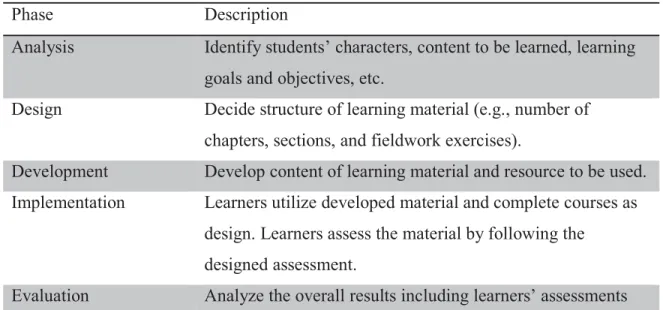
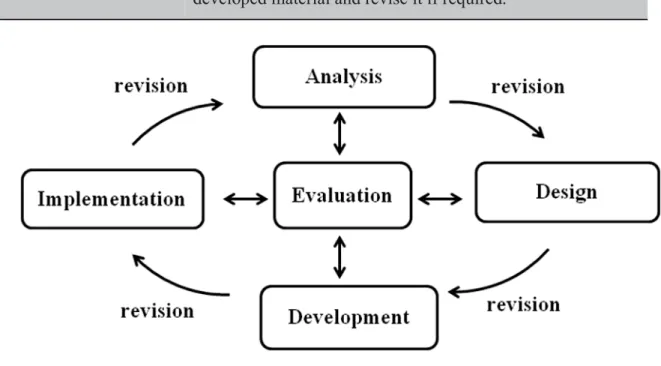
The development and implementation of the GIS iBook in this research is established based on the ADDIE Model – a systematic instructional design model constructed with five phases: analysis, design, development, implementation, and evaluation (Table 3.1) (Branch 2009). The analysis phase defines development objectives, identifying backgrounds and learning problems of learners, and knowing learning environment. The design phase defines learning goals, assessing available instruments, and designing the framework and user interface of the prototype. The development phase relates to the development of the prototype based on the considerations in previous two phases. The implementation phase includes trainings for educators and students to utilize the teaching material and collecting their feedbacks. The evaluation phase refers to analysis of results and feedbacks, assessing learners’ performances, and assessing learners’ outcomes. The evaluation phase is related to each of the other four phases. By evaluating feedbacks in each phase, the teaching material was revised repeatedly. Phases in the ADDIE Model connect and interact with each other through a cycle (Fig. 3.1).
Table 3.1 ADDIE Model (Branch 2009, p.3).
Phase Description
Analysis Identify students’ characters, content to be learned, learning goals and objectives, etc.
Design Decide structure of learning material (e.g., number of chapters, sections, and fieldwork exercises).
Development Develop content of learning material and resource to be used. Implementation Learners utilize developed material and complete courses as
design. Learners assess the material by following the designed assessment.
and learners’ performances. Evaluate the effectiveness of developed material and revise it if required.
Figure 3.1 ADDIE Model (Branch 2009, p.2).
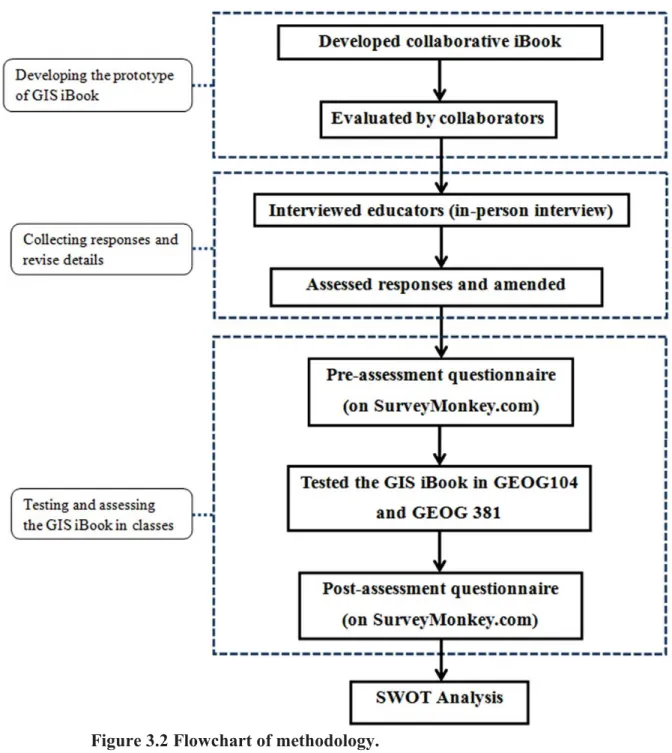
In this research, the first three phases (analysis, design and implementation) in ADDIE Model related to research objectives, materials for the GIS iBook, content decision, outline design, and user interface design (UID) of the GIS iBook. The content, outline, and user interface of the GIS iBook were discussed and examined by collaborators and previous developer, Cynthia S. Paloma. The other two phases, implementation and evaluation, were covered by applying the GIS iBook in GIS classes and analyzing data of survey questionnaire in this research. In general, the procedures of this research could be organized as (Fig. 3.2):
1. Developing the prototype of GIS iBook. 2. Collecting responses and revise details.
3. Testing and assessing the GIS iBook in classes. 4. Analyzing the results with SWOT analysis.
Figure 3.2 Flowchart of methodology.
3.1
PROTOTYPE OF THEGIS
IB
OOKThe first procedure was continuing to develop the prototype of the GIS iBook. There were two sub-steps in this procedure: developing prototype of the collaborative GIS iBook and being evaluated by other collaborators. The first sub-step introduced tools that used for developing the GIS iBook – software and hardware devices, and content of the GIS iBook.
The second sub-step discussed factors that were considered when collaborators reviewed the GIS iBook.
3.1.1 Content of the GIS iBook
This research continues to develop an educational material that combines multimedia GIS and a portable device: iPad. The first and second chapters in the GIS iBook were
developed by another master student, Cynthia S. Paloma, on 2013. The first two chapters are related to basic introduction of GIS and application of GIS respectively. This research takes over the development work and keep creating and editing new chapters for the GIS iBook. The number of chapters included in the GIS iBook was extended from two to four chapters. The framework of the GIS iBook follows the developed two chapters to ensure the
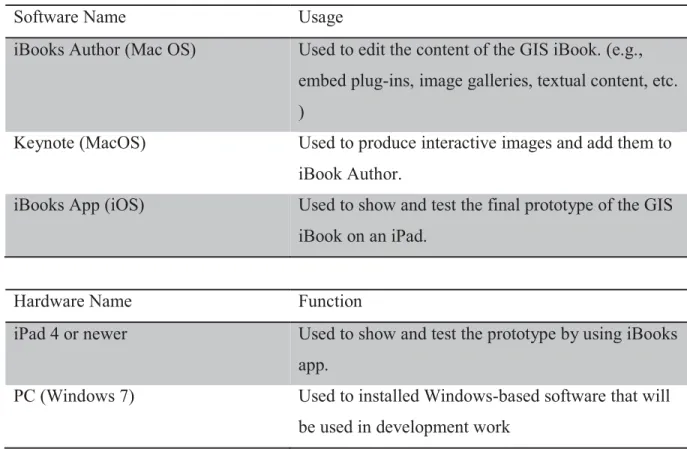
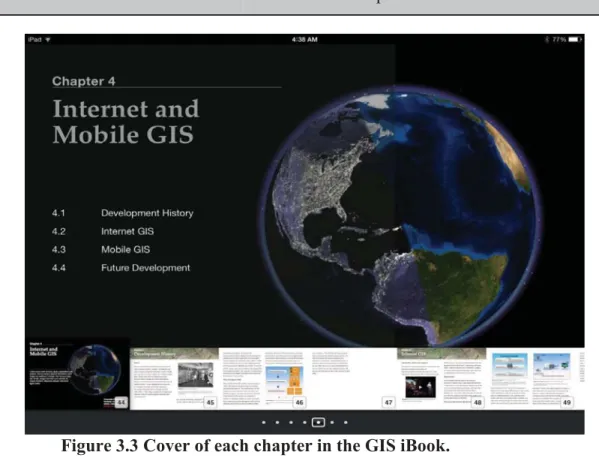
consistency between developed and new chapters – each chapter has a catalog cover and contained three to five sections (Fig. 3.3). Each section is constructed with multimedia widgets: Dynamic Image, Youtube Video, Image Gallery, etc. and textual contents (Figure 3.4). Software and hardware that were used to develop the GIS iBook are listed in Table 3.2. Table 3.2 Software and hardware that will be used to develop the GIS iBook.
Software Name Usage
iBooks Author (Mac OS) Used to edit the content of the GIS iBook. (e.g., embed plug-ins, image galleries, textual content, etc. )
Keynote (MacOS) Used to produce interactive images and add them to iBook Author.
iBooks App (iOS) Used to show and test the final prototype of the GIS iBook on an iPad.
Hardware Name Function
iPad 4 or newer Used to show and test the prototype by using iBooks app.
PC (Windows 7) Used to installed Windows-based software that will be used in development work
MacBook Pro Used to installed Macintosh-based software that will be used in development work
Figure 3.3 Cover of each chapter in the GIS iBook.
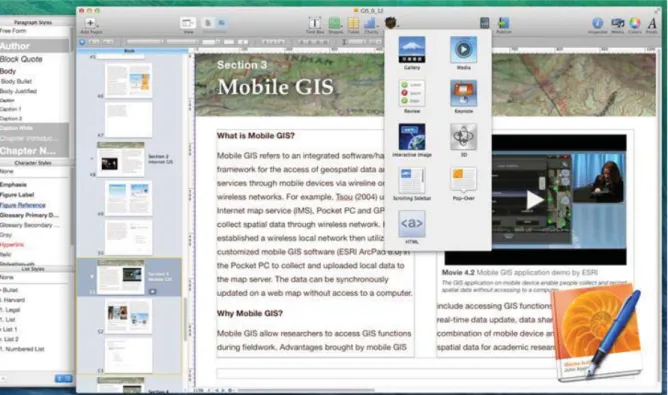
The research utilizes an iPad as a research instrument and developed an iBook for GIS education. Compared with other e-readers and tablet computers (e.g., Kindle Fire, Galaxy Tab, Surface Pro, etc.), iBooks on iPads could be created and edited with free software called iBook Author by Apple. The free iBook Author enabled this research to author and to write an educational material with less expenditure. iBook Author provides functions such as document editor, inserting tables and charts, and publishing iBooks. In addition to creating and editing an iBook, iBook Author enables editors to embed build-in widgets: Image Gallery, Interactive Images, Keynote Presentations, videos, etc (Fig. 3.5). Editors can also create their customized plug-in widgets with HTML code. This research not only utilizes built-in widgets in the iBook Author but also downloads and embeds widgets provided by Bookry.com – a website that provides a widget library for developing iBooks (Fig. 3.6). Table 3.3 lists widgets that are embedded in the two new chapters. (See the results and analysis in 4.1)
Figure 3.6 Widget library provided by Bookry.com (https://bookry.com/dashboard/).
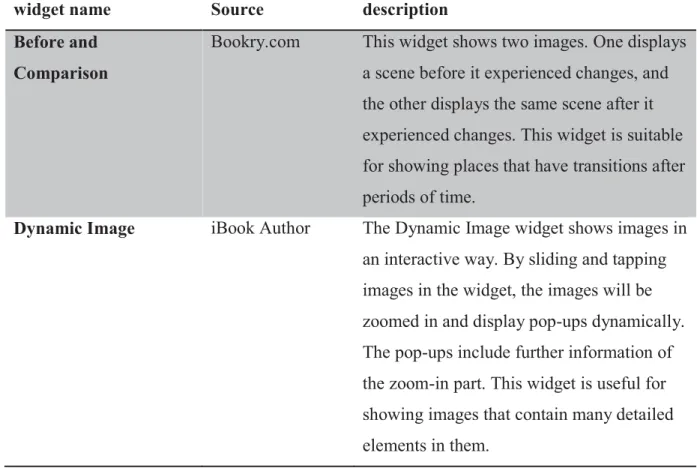
Table 3.3 Multimedia widgets in the GIS iBook.
widget name Source description
Before and Comparison
Bookry.com This widget shows two images. One displays a scene before it experienced changes, and the other displays the same scene after it experienced changes. This widget is suitable for showing places that have transitions after periods of time.
Dynamic Image iBook Author The Dynamic Image widget shows images in an interactive way. By sliding and tapping images in the widget, the images will be zoomed in and display pop-ups dynamically. The pop-ups include further information of the zoom-in part. This widget is useful for showing images that contain many detailed elements in them.
Word Search Puzzle Bookry.com The Word Search Puzzle is a widget that contains several letters of words hidden inside a grid box. This widget is helpful for leaving readers a deep impression of key words of each chapter.
Youtube Video Bookry.com The Youtube Video widget is similar to a video player. Different from embedding a video file from one’s computer, the Youtube Video widget can play a video which is put on Youtube website through a hyperlink. This widget can make the size of an iBook file as small as possible.
Image Gallery iBook Author The Image Gallery widget displays a list of images and images’ descriptions. Readers can change the displayed image by sliding the widget with their fingers. Each image has its own description at the bottom of the widget. This widget saves lots of space in an iBook if there are many images that need to be displayed.
3.1.2 Collaborators
’
reviews
To ensure that the framework of following chapters consisted with previous ones, the GIS iBook was examined by ex-developer, Cynthia S. Paloma. Other collaborators including Dr. Ming-Hsiang Tsou and Dr. Wing Cheung, a professor of geography and GIS at Palomar College, reviewed the content of each chapter to make sure the quality of the GIS iBook. The collaborators examined the ways of displaying information and consider whether the content was accordance with raw educational material such as textbooks or lecture notes. For
example, the contents of chapter three and four are designed based on lecture notes from GEOG 104 and GEOG 381 in fall 2014.
3.2
INTERVIEWS OF EDUCATORSBecause the GIS iBook is designed as a teaching material and is tested in classes, this research needs to know educators’ demands and their comments for the GIS iBook. The developed GIS iBook was reviewed by not only collaborators but also educators who may use it as a teaching material in the future. This research interviewed 5 high educators from high school and community college during a GIS workshop organized by GeoTech Center in Summer 2014 at San Diego State University. To realize interviewees’ experiences and comments for the GIS iBook, the following questions were asked during the interview:
1. Have you ever utilized any non-paper material to teach GIS? If yes, what are those materials?
Sub-question:
a. What is the difference between the GIS iBook and material you used in the past? b. Could you describe the advantages and disadvantages of past materials and the GIS iBook?
2. As an educator, what features do you think that should be contained in the GIS iBook?
Sub-question:
a. If you can, how would you improve the current version of the GIS iBook? b. Are there any features in this GIS iBook you think are useful or distracting for student’s learning?
By interviewing the educators in person, the educators could not only answer the questions above but also provides innovative ideas and their teaching experiences for this research. The GIS iBook was revised and renewed based on educators’ comments before the implementation test in GEOG 104 and GEO 381 in Fall 2014 at San Diego State University. Feedbacks that gained from this interview are listed and evaluated in 4.2.
3.3
S
URVEY INGEOG104
ANDGEOG
381
3.3.1 Pre-assessment and post-assessment
The experimental procedure of this research adopts one-group pre-assessment-post-assessment (Creswell 2013). To know students’ backgrounds and how familiar are they with GIS related knowledge, a pre-assessment and a post-assessment were requested before and
after applying the GIS iBook in classes. Students finished questionnaires on an online survey service called Survey Monkey. This research adopts Likert scale questionnaire in survey collection because of its understandability and universality. (Laerhoven et al. 2004). Students could spend more time on thinking questions instead of understanding how to answer the questions.
Questions in the pre-assessment ask about students’ backgrounds like level of education, reading habits or preferences, and understanding of GIS. Questions in the post-assessment ask about students’ experiences of using the GIS iBook, reviews of multimedia in the GIS iBook, whether the GIS iBook could help learning basic GIS knowledge or not, and understanding of GIS. The pre-assessment and post-assessment questionnaires are hosted on Survey Monkey website. Students finished all questionnaires online within 10 minutes in the test.
3.3.2 Test of the GIS iBook
The prototype of the GIS iBook was used as a teaching material in parts of course of GEOG 104 and GEOG 381 in Fall 2014 at the department of geography, San Diego State University. Students first reviewed new chapters in the GIS iBook within 20 minutes and then utilized iPads to do a fieldwork exercise within another 20 minutes. By following audiences provided in the GIS iBook, students recorded spatial data, using online mapping services during fieldwork and uploaded collected information to online maps supported by ESRI by using iPads. For instance, one of the exercises requested students to record places they spent money and amounts of expenditures to know the spatial pattern of their consuming behaviors. Finally, students were asked to finish post-assessment questionnaire after doing the exercises. Utilizing iPads in fieldwork exercise not only helped students to get
information they need from the Internet but also enabled them to edit and display collected data during a fieldwork. The whole test, including answering the questionnaires, took about 50 minutes to finish. (See the results and analysis in 4.3)
3.4
E
VALUATIONM
ETHODS3.4.1 Dependent samples t-test
Dependent samples t-test, also called paired-samples t-test, is used for determining whether there is a significant different between two related groups based on the same variables under different conditions. This research tested the GIS iBook with one sample group of students from GEOG 104 and GEOG 381 at San Diego State University at 2014 and asked the students to take a knowledge oriented questionnaire twice (before and after
reviewing the GIS iBook). There were five questions in the questionnaire, and each question was selected from the content of the GIS iBook. The results of before and after reviewing the GIS iBook are taken as two related groups and questions in the questionnaire are unchanged variables. The procedures of doing dependent sample t-test including defining null and alternative hypotheses, stating alpha, calculating degrees of freedom, calculating test statistic. The null and alternative hypotheses are as follows:
H0: μbefore = μafter (There is no significant difference between pre-test and post-test.) HA: μbefore≠ μafter (There is a significant difference between pre-test and post-test.)
If the result of t-test accepted the null hypothesis, reading the GIS iBook did not make a significant impact on students’ learning outcomes. On the other hand, if the result rejected the null hypothesis, reading the GIS iBook did make a significant impact on students’ learning outcomes. (See the result of dependent samples t-test in 4.4)
3.4.2 SWOT analysis
After testing the GIS iBook in classes, this research analyzes comments from
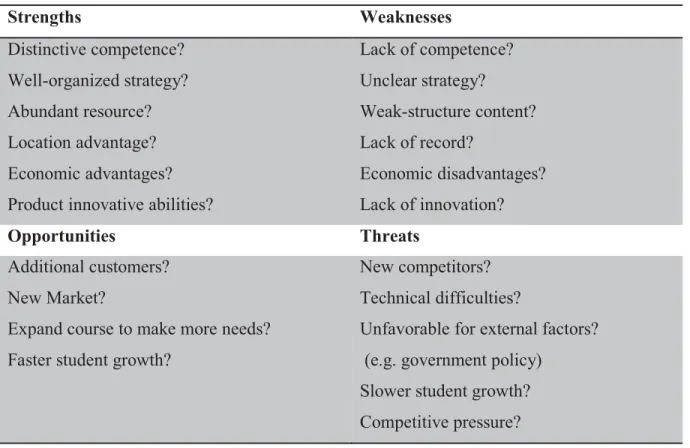
educators and questionnaires’ results from students with SWOT analysis. To further improve the prototype of the GIS iBook, strengths and weakness of the GIS iBook are considered. SWOT analysis, also called strategic planning, is used to evaluate one product from four different aspects: strengths, weaknesses, opportunities, and threats (Lee et al. 2000).
Strengths and weaknesses consider the advantages and disadvantages of the GIS iBook while opportunities and threats are related to potential competitors or market (Table 3.4). This research adopts SWOT analysis because it can be used to evaluate a subject internally and externally (Hill and Westbrook 1997). Strengths and weaknesses are internal assessments, while opportunities and threats are external assessments. The internal assessments helped this
research to examine factors that influence the effectiveness of the GIS iBook. For example, whether the interactive images, movies, lab exercises, etc. in the content are helpful for students’ learning or not. On the other hand, aspects of opportunities and threats help this research to consider how to promote the GIS iBook and what obstacles that may encounter in the future development. Figure 3.4 are questions that are considered for SWOT analysis. By considering each question with collected data, this research discusses how iPads and iBooks influenced GIS education and potential values of using these materials in GIS education from four different aspects. (See the discussions of SWOT analysis in 5.1)
Table 3.4 General guidelines for SWOT Analysis.
Strengths Weaknesses Distinctive competence? Well-organized strategy? Abundant resource? Location advantage? Economic advantages? Product innovative abilities?
Lack of competence? Unclear strategy? Weak-structure content? Lack of record? Economic disadvantages? Lack of innovation? Opportunities Threats Additional customers? New Market?
Expand course to make more needs? Faster student growth?
New competitors? Technical difficulties?
Unfavorable for external factors? (e.g. government policy)
Slower student growth? Competitive pressure?
CHAPTER 4
RESULT
4.1
D
EVELOPMENT OF THE PROTOTYPE OF THEGIS
IB
OOK4.1.1 Content
For this research, the author added two new chapters to the developed prototype of the GIS iBook. The two chapters are chapter three: “Wander the World through Remote Sensing Data” and chapter four: “Internet and Mobile GIS”. Chapter three is related to remote sensing technology. Contents of chapter three range from the basic concepts to the introductions of different types of remote sensing platforms and sensors. Chapter four is related to Internet and mobile GIS. Contents of chapter four include the history of GIS, the evolution of platforms for GIS, and application of Internet and mobile GIS. Both these two chapters were developed by following the structure of previous developed chapters (chapter 1 and chapter 2) – each chapter has one catalog cover and multiple sections.
Chapter three has three sub-sections that explain backgrounds of remote sensing, satellite imagery data, and application of remote sensing respectively. The first sub-section introduces broad and narrow background of remote sensing technology – from the definition of remote sensing to the introduction of electromagnetic spectrum and operation of satellite sensors. The first sub-section gives readers a brief concept and basic theories of remote sensing, features of different types of satellite, and differences between active and passive sensors. The second sub-section explains different formats of remote sensing data provided by aerial and satellite sensors. Types of various remote sensing data include film based and video, microwave radiometer (MWR), hyper-spectral imagery, RADAR, and LiDAR data. This section also explains the 4 major types of resolution (spatial, temporal, spectral, and radiometric resolution) in remote sensing and how the 4 resolutions influence satellites’ operations and their data product. Readers can further understand satellite imagery and factors that influence the scale of imagery data from second section. The third sub-section introduces current applications of remote sensing data in daily life and academic
research. The application of remote sensing data include identifying land use/ land cover changes, detecting vegetation distributions, building terrain module, and so on. This sub-section contains a “Before and After Comparison” widget to provide students a practical example of utilizing remote sensing data on land use/ land cover identification (Fig.4.1). All of chapter three can teach students, who are new to remote sensing, a simple but complete knowledge of remote sensing technology.
Figure 4.1 Before and After Comparison widget. Students can slide the blue bar (the one the blue arrow points at) to see the differences between two scenes. (A screen capture from the GIS iBook chapter three).
Chapter four, Internet and Mobile GIS, has four sub-sections that explain development history of GIS, Internet GIS, Mobile GIS, and future development of GIS respectively. The first sub-section introduces a brief background of the development of GIS – the history of software development and transition of platforms from 20th century to today. This sub-section also explains differences between the traditional GIS systems and today’s distributed GIS systems. Readers can have a preliminary understanding of the history of GIS systems. The second and third sub-section were designed to give readers a general idea of
Internet and Mobile GIS. The second sub-section contains the definition and key concepts of Internet GIS. This sub-section explains the operation of Internet GIS services and how Internet GIS enables the real-time web maps. The Dynamic Image widget in this sub-section helps students to know the procedures of requesting GIS data from servers via the Internet (Fig. 4.2). The third sub-section introduces the basic concept of mobile GIS and how mobile GIS benefits people’s lives and business circles. The structure of this sub-section is similar to the second sub-section – explains the operation of mobile GIS and practical examples. The last sub-section in chapter four discusses the current trend of utilizing Internet and mobile GIS and the future development of this technology. The main idea of this sub-section is Digital Earth – a virtual representation of Earth with a database that provides natural and cultural information (Consensus definition adopted at 2nd interagency workshop, 1999 Sept. 23). People can gain information from a web map and interact with the map. All of chapter four enables students to understand the trend of GIS development and enlighten students with the application of new technology in web mapping.
Figure 4.2 The Framework of Internet GIS (A screen capture from the GIS iBook chapter four).
4.1.2 GIS iBook website
After developing the GIS iBook, how to make the GIS iBook become an easy accessible resource for students and educators is a key question. There are two ways to publish the GIS iBook on the Internet. One is publishing the GIS iBook to iBooks Store, and the other is sharing the GIS iBook via a hyperlink that links to the iBooks file. This research adopts the later method since the GIS iBook is a prototype but not a final version. The contents of the GIS iBook still need to be tested and revised.
To make the GIS iBook be easy to access and introduce people the background of this research, this research built a website called “GIS Textbook for iBook on iPads”
(http://mappingideas.sdsu.edu/ibook/index.html) to introduce the objectives, developers, and available resources of the GIS iBook. The website contains 6 different webpages: Home, Participants, About Book, Download, Contact Us, and References pages (Fig. 4.3). The Home page clarifies the idea of the GIS iBook; the participants page lists developers and collaborators in the GIS iBook development project; the About Book page lists the GIS iBook’s outlines and available materials for developing an iBook; the Download page provides a hyperlink for downloading the latest version of the GIS iBook and instruction of downloading the GIS iBook file on an iPad; and the Contact Us and Refernces pages list particiants’ emails and reference documents respectively. Students and educators can not only link to the website to download the latest GIS iBook but also get resources for developing their own iBook.
Figure 4.3 GIS iBook website
(http://mappingideas.sdsu.edu/ibook/index.html).
4.2
FEEDBACKS FROM EDUCATORSFive geography or GIS educators from high schools or community colleges reviewed the GIS iBook and were interviewed with questions related to GIS education and their teaching experience during a workshop held by GeoTech Center in Summer 2014 at San Diego State University. The interview was no longer than 20 minutes due to the limited time of the workshop. Each educator got an iPads and reviewed the GIS iBook. The researcher asked the following questions to gather feedbacks and ideas from the educators and improved the contents of the GIS iBook before the test in GEOG 104 and GEOG 381.
1. Have you ever utilized any non-paper material to teach GIS? If yes, what are those materials?
For question one, all of the educators expressed that they utilized web based maps such as ArcGIS Online and Google Earth as parts of their teaching materials except paper based textbooks. The educators pointed out that web mapping resources not only attract students’ attentions but also give students better understandings about applications of GIS.
Sub-questions:
a. What is the difference between the GIS iBook and material you used in the past? b. Could you describe the advantages and disadvantages of past materials and the GIS iBook?
For sub-questions of question one, some of the educators indicated that the portability of the iPad and the easy-update content are the main advantages of the GIS iBook. On the other hand, disadvantages mentioned by the educators include lack of accessible network for students, distracting Youtube Video widget, and security issues of using iPad in classes (i.e., students may damage or lose iPads).
2. As an educator, what features do you think that should be contained in the GIS iBook?
For question two, all of the educators implied that embedding more Quiz widgets can help students review what they learned in their classes efficiently and can enhance students’ impressions.
Sub-questions:
a. If you can, how would you improve the current version of the GIS iBook? b. Are there any features in this GIS iBook you think are useful or distracting for student’s learning?
For sub-questions of question two, educators expressed that they would like to
remove the embedded hyperlinks in the GIS iBook because clicking the hyperlinks will break down iBooks application but launch a web browser. The launch of a web browser will disrupt student’ readings, and students may even start to surf the Internet. The educators also
mentioned that they would like to see social media widgets or some online collaboration tools in the future GIS iBook.
Comments and ideas provided by educators help this research to develop a better and more appropriate educational resource for students and educators. However, due to some technical limitations such as unavailable widgets and lack of accessible Internet, this research can only improve parts of the content of the GIS iBook based on the educators’ feedbacks. For future development work and improvement, see 5.2.2.
4.3
S
URVEY INGEOG104
ANDGEOG
381
This research collects 31 questionnaires finshied by students who were taking GIS courses, GEOG104 and GEOG 381, at San Diego State University during Fall 2015. Figure 4.4 shows percentages of different student groups in this survey. Over 60% of students were taking their first GIS course and less than 10 % of students finished over three GIS courses.
Figure 4.4 Numbers of different groups of testers.
4.3.1 Reviews of the GIS iBook
The most influential factor in reviwing the GIS iBook are students’ reviews of multimedia widgets becuase the widgets enable interactive learning materials, which are different from traditional textbooks. Overall, the result of 31 questionnaures indicates that all students thought multimedia widgets were helpful in GIS learning, while some students thought it might be distracting (Fig. 4.5). Dstracting factors might refer to the links linking to other videos or advertisements in the Youtube widget. Students might also be distacting if they focus on the multimedia widgets, while ignore the texture content. This research also surveyed reviews of different widgets in the GIS iBook (Fig. 4.6 and Fig. 4.7). The multimedia widgets in the GIS iBook include Before and After Comparison, Dynamic images, Word Search Puzzle, movies, etc. Students ranked each widget from 1 to 5 point. Higher point implies that the widget was more insteresting or more helpful for the students, while lower point implies that the widget was less insteresting or less helpful for the students.
3% (1) Don't know GIS 65% (20) 1 course 26% (8) 2-3 courses 6% (2) >3 courses
Don't know GIS 1 course 2-3 courses >3 courses Total number: 31
Figure 4.5 Reviews of multimedia widgets in the GIS iBook.
Figure 4.6 Comparison of different multimedia widgets (level of interesting).
Figure 4.7 Comparison of different multimedia widgets (level of helpful in GIS learning).
17 14 0 0 0 5 10 15 20
Helpful. Mostly helpful, but sometimes distracting. Mostly distracting, but sometimes helpful. Distracting. 3.52 3.94 4.16 3.45 4.32 3.58 0 1 2 3 4 5 Single Image Image Gallery Youtube Video Word Search Puzzle Dynamic Image Before and After Comparison
score 4.42 4.71 4.29 2.52 4.58 3.65 0 1 2 3 4 5 Single Image Image Gallery Youtube Video Word Search Puzzle Dynamic Image Before and After Comparison
score Total number: 31
Total number: 31
Figure 4.6 shows that Youtube Video and Dynamic Image are the most interesting widgets for students. Based on students’ feedbacks, the embedded Youtube videos can help students to review each chapter efficiently without instructors. Students can also watch the videos repeatedly until they understand the content of each chapter. In terms of the Dynamic Image, which is different from traditional static pictures in textbooks, the embedded images are displayed like animated images and can show sequential changes (e.g. terrain chages and land use land cover changes). On the other hand, the least interesting widgets were Word Search Puzzle and Single Image. The Word Search Puzzle is a widget that consists of the letters of key words in each chapter. Students can have deep impressions by finding words hidden in the puzzle. However, students mentioned that the Word Search Puzzle could not provide further information related to professional knowledge since it only display words. Students could remember key words in a chapter but did not know the meaning of those key words through the Word Search Puzzle. In terms of Single Image, this widget did not catch much attention from students since it is similar to static images in traditional textbook.
Figure 4.7 shows that Dynamic Image and Image Gallery were the most helpful widgets for students in learning GIS. Although Youtube Video got a higher score in interesing part, it got a a lower score in this question compared to Dynamic Image, Image Gallery, and Single Image. This may be because students did not have sufficient time to finish watching each video in the GIS iBook, and they therefore could not understand videos’contents thothroughly. However, since differences between these four widgets (Youtube Video, Dynamic Image, Image Gallery, and Single Image) are inapparent and the score of Youtube Video widget is above 4 point, the Youtube Video will still be one of the most important widgets in the future development. In terms of the Image Gallery, this widget can save more space for texture content and diplay a lsit of images. Students can slide images using their fingers to browse images and descriptions in the this widget, which eases
assimilation of new knowledge and leaves students deep impression. Word Search Puzzle, which is also the least interesting widget for students in previous question, was thought to be the least helpful widget for student in this question. Similar to the reason in previous
question, students could not get further information, such as explanation of a key word, from this widget. The Word Search Puzzle wideget will be removed from the GIS iBook based on the results in Figure 4.6 and 4.7.
This research also surveyed whether students can learn new knowledge from the GIS iBook within limited time (approximately 20 minutes). Students were required to finish an online questionnaire, which includes five questions related to the content of GIS iBook, before and after reading the GIS iBook. The five questions were selected from texture content, Dynamic Image widget, and Quiz widget (Fig. 4.8). The first three questions are about remote sensing in chapter 3, and the last two questions are about Internet and Mobile GIS in chapter 4. Apeendix contains further information of each question in this survey.
Figure 4.8 Percentage of students who answer questions correctly before and after reading the GIS iBook.
Figure 4.8 illustrates that more students answer correctly after reading the GIS iBook for each question, specially for question 2 and 4. Before reading the GIS iBook, 50% of students answer question 2 correctly, while only about 10% of students answer question 4 correctly. After reading the GIS iBook, correct percentage of both question 2 and 4 incresed by over 20%. The common ground between question 2 and 4 is that both they were selected from Quiz widget in chapter three and four. In the GIS iBook, each Quiz widget contains 3 questions, which are key concepts of each chapter. By answering questions in the Quiz widgets, students can learn new knowledge from incorrect answer. The Quiz widget can enhance students’ impression, and therefore students could remember the correct answer after reading the GIS iBook.
86.21 44.83 72.41 72.41 72.41 67.86 10.71 67.86 50.00 67.86
Internet and Mobile GIS (Dynamic Image) Internet and Mobile GIS (Quiz) Remote Sensing (Dynamic Image) Remote Sensing (Quiz) Remote Sensing (texture content)
Before After Total number: 31
4.3.2 Reviews of utilizing iPads in fieldwork exercise
Based on the result of 31questionnaires, all the students thought fieldwork could enhance their understanding of GIS learning, and over 90% of them inclined to take more fieldwork exercises in their GIS classes. However, some problems of using iPads in fieldwork were also revealed in this survey. Figure 4.9 shows problems that might be
encountered during the fieldwork exercise using iPads. Students ticked all the problems they had during fieldwork in this question. With 20 votes in this question, needing two hands to operate iPads was the most difficult problem for students to use iPads in fieldwork. The size of an iPad is too big to be operated with only one hand, and therefore students could hardly bring other tools with them in fieldwork. Hard to take note with two hands was another difficulty for students using iPads in fieldwork. Although there is a notepad application on iPad, students could only take note with one hand, which is very slow and incontinent. Others such as fragile iPads and screen reflection were also problems of utilizing iPads in fieldwork in this survey.
Figure 4.9 Problems of utilizing iPads in fieldwork.
4.4
DEPENDENT SAMPLES T-
TESTThere are total 31 students took the knowledge oriented questionnaires before and after reviewing the GIS iBook. All of the students answered all of the questions (five questions) in the questionnaire. Table 4.1 shows the number of correct answers in pre-test and post-test of each student. Formula of calculating t value is as follow:
10 1 5 20 7 0 5 10 15 20 25
hard to take note with two hands
distracting screen reflection need two hands to operate
fragile
Total: 31
ൌ
ഥ
ୈ ୈξ
൘
ഥD is the mean of differences between the two groups of numbers (pre-test and post-test); SD
is the standard deviation; and n is the sample size. Table 4.2 lists the value of ഥD, SD, standard
deviation, degree of freedom, critical t score, and the final t value. The final t value is 4.93, which is larger than the critical t score (2.04). Therefore, this research rejects the null hypothesis: H0:μbefore=μafter (There is no significant difference between pre-test and
post-test.) but accepts the alternative hypothesis:HA:μbefore≠μafter (There is a significant
difference between pre-test and post-test.). With 95% of confidence, students had better learning outcomes after reviewing the GIS iBook (Fig. 4.10).
Table 4.1 Result of knowledge oriented questionnaire.
Students Before After Students Before After
1 4 4 17 0 2 2 4 4 18 4 3 3 4 3 19 4 4 4 1 3 20 3 5 5 2 4 21 4 4 6 3 5 22 4 4 7 3 5 23 2 3 8 2 3 24 2 4 9 3 3 25 3 2 10 2 5 26 3 5 11 2 3 27 2 4 12 1 2 28 3 4 13 3 5 29 1 3 14 3 5 30 2 3 15 2 3 31 2 3 16 2 1 Mean 2.58 3.58
Table 4.2 Result of dependent samples t-test. Mean of differences (܆ഥD) 1
Degree of freedom 31-1=30
Standard Deviation (SD) 1.13
t value 4.93
Figure 4.10 Distribution of dependent samples t-test (two-tailed).
4.5
T
ECHNICAL CHALLENGESTechnical challenges that encountered during development included 1) nonsupport of animated GIF images and 2) hyperlinks that force iBooks application to close.
Types of raw teaching materials ranged from Powerpoint slides and html file to paper-based textbooks. Animated images in Powerpoint slides and html files can enhance students understanding and leave them a deep impression of knowledge. However, iBooks does not support embedding images in Graphics Interchange Format (GIF) extension, which has been extensively used to save animated images. To display animated images from the Powerpoint slides or html files in the GIS iBook, this research utilized Keynote for Mac to create slides to imitate dynamic changes in the original GIF images. In a Keynote file, subtle differences are shown in each slide, and therefore can be presented like an animated image when playing the slides. Although Keynote slides are not able to display continuous actions as smooth as original GIF images, it does achieve the same effect in conveying information in a dynamic way.
The other technical challenge was the hyperlinks embedded in the GIS iBook. The embedded hyperlinks force iPads to launch a web browser but close the iBooks application. Readers need to jump back to the home screen and re-launch iBooks application to get back
to the GIS iBook. To prevent launching a web browser, this research replaced hyperlinks in the GIS iBook with a widget called “Browser” provided by Bookry.com. The widget is created with HTML code and can display web page in a frame in the GIS iBook. Readers can directly browse the embedded web page without launching a web browser, and the iBook application can therefore keep running.
CHAPTER 5
DISCUSSION
5.1
SWOT
A
NALYSISFrom the development of the GIS iBook to the survey of implementing the GIS iBook in classes, SWOT Analysis provides a structure for reviewing the utilization iBooks on iPads in GIS education from four different aspects: strengths, weaknesses, opportunities, and
threats. This research discusses each aspect by considering educators’ opinions, collaborators’ suggestions, development experience, results of the questionnaires, and students’ feedbacks. For identifying the strengths aspect, this research takes positive feedbacks from educators and students into account, and assesses the results of knowledge oriented questionnaires from the survey of implementing the GIS iBook in classes. For identifying the weaknesses aspect, this research takes negative feedbacks from students and educators into account, and
considers problems met during the development of the GIS iBook. For identifying the opportunities aspect, this research compares the GIS iBook with other multimedia resources for GIS education by considering their target users, feasibilities, and future plans. For identifying the threats aspect, this research considers technical challenges met during the development and problems students mentioned during their fieldwork exercise.
Table 5.1 Strengths and weaknesses (internal factors) of utilizing iBooks on iPads in GIS education.
Strengths (Internal Factors) Weaknesses (Internal Factors)
x Multimedia widgets can attract students’ attentions and enhance students’ understandings.
x The GIS iBook can be renewed and updated frequently and can be easily accessed.
x Educators and students can create
x Some multimedia widgets in the GIS iBook can only work in places with wireless networks.
x Hyperlinks in the GIS iBook force iBooks application to close.
x Some students need to spend extra time to learn how to operate and
their own iBooks for free.
x iPads support multiple useful functions either in classes or in fieldwork.
x The combination of textbook and fieldwork exercise on a mobile device is an innovative idea in GIS education.
x iPad has many convenient and user-friendly designs: portability, large screen, easy and intuitive user interface, numerous synchronization tools.
interact with the GIS iBook.
x The size and fragility of the iPad cause inconveniences during fieldwork.
x Some applications on iPads and multimedia widgets in the GIS iBook may distract students’ attentions.
Table 5.2 Opportunities and threats (external factors) of utilizing iBooks on iPads in GIS education.
Opportunities (External Factors) Threats (External Factors)
x The popularization of using mobile device familiarizes students with the operation of iPads.
x There is no other teaching material for GIS education that adopts iPads as devices.
x As technology advances, GIS becomes more important than the past.
x With new version of Mac OS X (OS X Mavericks or newer), students can read iBooks without an iPad.
x New release widgets can enrich the
x Compared with other tablet computers, Apple iPad costs more money.
x Other teaching materials may be easier to access than the GIS iBook (e.g., web maps) since iBooks can only be launched on iPads or computers with OS X Mavericks or newer.
x Future policy change in free widgets and iBook Author may hinder the development of the GIS iBook.
content of the GIS iBook (i.e. embedding ArcGIS Online web maps in iBooks).
x Apple provides several plans for education: education financing plan and volume purchase program.
therefore it is hard to forecast problems of compatibility between old and new version of iPads.
5.1.1 Strengths
1. Multimedia widgets in the GIS iBook could attracted students’ attentions and enhance students’ understandings. Based on the results of questionnaires collected from class GEOG104 and GEOG 381, nearly all of the multimedia widgets in the GIS iBook interested over half of the students in the survey. For the question “Please rate how interesting you feel for different multimedia widgets in the GIS iBook on a scale from 1 (very boring) to 5 (very interesting)”, over 50% of the students rated 4
(somewhat interesting) or 5 (extremely interesting) for each multimedia widget except Word Search Puzzle. For another question “Do you find multimedia elements (widgets) helpful or distracting?”, 54% of students expressed helpful, and the other 46% of students expressed helpful but somewhat distracting. In addition, the Quiz widget in the GIS iBook did improve students’ academic performances based on the survey results (Fig. 4.8). Overall, the multimedia widgets in the GIS iBook provide more diverse ways to convey knowledge and make GIS education more interesting and understandable.
2. The GIS iBook can be renewed frequently and be easily accessed. Compared with traditional paper based textbooks, which needs to be reprinted if there are adjustments, the GIS iBook can be easily revised and added new contents without printing a new edition. By using free iBook Author application, the GIS iBook can be edited and republished to the GIS iBook website or iTunes once there are errors or modifications in it. Educators and students only need to download the latest GIS iBook using their computers or iPads via the Internet.
3. Educators and students can create their own iBooks for free. The advantages of adopting iBook as a teaching material instead of other electronic books are free