Stata Tutorial
—
Francesco Andreoli
CEPS/INSTEAD and University of Verona [email protected]
IT9 Winter School.
January 12-15, 2014
Acknowledgements
Arnaud Lefranc
(THEMA),
Philippe Van Kerm
and
Alessio
Fusco
(CEPS-INSTEAD),
Andrea Bonfatti
and
Nicola Tommasi
(Verona)
-Department of Economics
(DSE) - Università di Verona
Outline
1
Introduction
Organization of the Directory
Motivation
The Tutorial
2Environment
Stata Features
Getting Started
3Data Management
Setting the Environment
Use Data
Qualifiers and Operators
Describe Data
Modify Data
4Statistical Analysis
Generate Variables
Statistics
Tests
Graphs
Regression
5Program/Output
Overview
Macros
Loop
Programming Arguments
Output: Interpreting
Programming with Estimates
and Data
Organization of the tutorial directory
../stata_tutorial |
|--> /read_me_first.txt |
|--> /tutorial.pdf * You are here! * | |--> /data_files | | | |--> /smallPSELL.dta | |--> /smallPSELL.csv | |--> /smallPSELL.txt | |--> /smallPSELL2.dta | |--> /smallPSELL2.csv | |--> /smallPSELL2.txt | |--> /estimates.txt | |--> /do_files | | | |--> /do_first.do | |--> /do_first.log | |--> /output |--> /model.txt |--> /model.gph |--> /model.tex |--> /b_vc_matrix.xls |--> /inequality.xls ../additional_material | |--> /read_me_first.txt | |--> /tutorials | |--> /statatuto.pdf * By A. LEFRANC * | |--> ... * Other stuff * | |--> /data | |--> /auto.dta | |--> /fqp0.dta | |--> /fqp93.dta | |--> /hsb2.dta | |--> /monfich.dta | |--> /dofiles | |--> /stata_example.do | |--> /stata_example graph.do | |--> /stata_examplegraph.do | |--> /stata_reg_et_prog.do | |--> /stata_progexample1.do | |--> /tmp.do | |--> /output
Motivation
This tutorial addresses to a beginner level or early trained audience
which needs notions as well as operational hints to get started with
Stata software. The handout is a support for a three hours tutorial,
and it can be considered
complementary
to other more exhaustive
and rigorous sources.
You are invited to take a look at the Official Stata website,
http://www.stata.com/bookstore/documentation.html
as a general
reference. The “
Getting Started with Stata
” manual is an introductory
(although very complete) users manual. There exist other important
resources, and in particular resources for learning Stata, which are
freely available at
http://www.stata.com/links/
. You should always
keep an eye on the official Stata web page to keep in touch with news
and updates:
http://www.stata.com
Motivation
Additional material can be found in
official
websites:
http://www.stata.com/bookstore/pdf/gsw_samplesession.pdf http://www.stata.com/bookstore/pdf/r_intro.pdf(commands) http://www.stata.com/bookstore/pdf/g_graph_intro.pdf(graphs) http://www.stata.com/bookstore/pdf/d_merge.pdf(merge)
and
unofficial
ones:
http://www.ats.ucla.edu/stat/stata/
http://www.nyu.edu/its/statistics/Docs/Intro_stata5.pdf
http://www.eui.eu/Personal/Researchers/decio/PS/Stata.pdf
http://leuven.economists.nl/stata/stataintro.pdf
http://data.princeton.edu/stata/
Moreover, ado-files of virtually all the additional commands already
existing can be downloaded from the
Repec
library (which is constatly
updated). Some of the most productive authors (in economics) are
Nicholas J. Cox,
Stephen Jenkins
and
Philippe Van Kerm.
Organization of the Tutorial
The tutorial focuses on Stata for Windowspackage, SE version, actually at the 11th release.
Firstly, the tutorial will exploit the generalsettings of the working environmentwhere data are stored, managed and analyzed. We will learn how to organize data into folders and how to work with a hierarchy of folders, in order to make the research work intelligible by all audienced. Organization is necessary towork scientifically, i.e. to be able to replicate an experiment starting from the observed phenomena, preserving the measurability.
Moreover, organization is a prerequisite for understanding and interpretability of results.
On a second stage, we focus onprogramming and coding. We introduce the general setting for writeing a code: windows, interface, .do .dta .log .ado extensions, input/output of data files, basic syntax (data management, statistics, regression, principles of graphs).
Organization of the Tutorial
The concluding stage of the tutorial aims at showing how Stata works in practice, by applying the program(.dofile)to a small subsample (50 observations and 8 variables) from the PSELL (Panel Socio-économique “Liewen zu Lëtzebuerg”) database (.dta file). Finally, Stata output will be described and analyzed (.log file).
The general purpose of the tutorial is to provide you the means to
autonomously search and apply new syntax already stored in Stata memory (.ado files) or downloadable from the web sites ofStata Journal,Stata Technical Bullettin or fromRepec Library. The use of any particular code, as the one treated in classes to perform income distribution analysis, depends on your research scopes. For more advanced users, Stata offers the possibility to code new functions and syntax (see the programming section).
A First Approach...
Open Stata by clicking on the Stata icon. You recognizefour windows: a)the output window, reporting on a black screen the output associated to your coding;b)aninput window(below the output window), where each code, line by line, can be written; c)areview window (upper-left) in which is recorded the code inputted in Stata andd) avariables window(bottom-left), which reports all the variables in use, a sort of summary of the database.
The coding you use can be either imputted by the command window (see pointb9) or selected interactively by the options bar of the software, and it is systematically recorded by Stata in the review windows (see pointc)). These inputs may refer to statistical operations as means, frequency tables,
regressions, etc., as well as changes to the database, transformations or the creation of new variables or changes in the entire database. In the former case, the output (the value of the mean, the table, the regression coefficients, etc.,) is displayed in the output window (pointa)), while in the latter, the variable window (point d)will report the resulting modifications. If you want to draw graphs, those are displayed in a separeted window
A First Approach...
Input data are stored in the RAM memoryof your computer (which is then required to be at least as large as the size of the database in use) as ann
observations byk variablesmatrix which you do not need to see while programming. In the philosophy of the software,the original database is sacred.
For the sake of reproducibility of the experiment you are running on your data, the primitive source of information (i.e. your original database) must be preserved intact and unaffected by additional elaborations which may induce errors in future users elaborations, tests or verifications. For this reason, any change of the database remains stored only in the RAM memory of your computer and it will be completely deleted when Stata is closed, if you refuse to save changes and results when asked. If you decide to save, it is important to choose what to save and how to save it appropriately.
A First Approach...
Three fundamental steps:1 If the original database has been modified, a new database must be created containing all new variables and transformations performed. In this way, the original database will be preserved as an independent object from the new one, but any information about how to go from one database to the other will be lost. If the original database is not
modified, there is no need to save it and you will not be even asked to do so. Stata opens and saves databases in the.dta extention.
2 Output results can be saved in a log-on file, reporting a list of your results in a.txt extension. From this file you can copy tables or
coefficient results to be used in you research report. In Stata jargon, this is a log-file.
3 Inputs as well can be saved, reporting the full list of commands appearing in the review window on a.txtdocument. This list can be used by other readers to understand how the new database and the output saved in the log file were obtained. In Stata jargon, this is ado-file.
Setting the Environment
The scope of this section is to show how to correctly manage your data, commands and output files for the sake of reproducibility and intelligibility of your work. The first object you need to manage is the initial source of data. The original database is your primitive source of information, therefore it must be preserved on its original status. Data can be read, and you can work with them, but never modify or delete them.
Stata programming must be created to work withrelative paths, which is usually agreed upon all users of the same code, such that there is no need to repeatedly change stata operating folders. Apath, the general form of a filename or of a directory name, specifies a unique location in a file system. A relative path is a path relative to the working directory of the user or
application (eg: ../stata_tutorial/do_files/do_first.do) which does not need to depend on the full path root usually system specific
(C://Francesco_Andrea/IT2010/stata_tutorial/do_files/do_first.do).
Setting the Environment
Golden rules in Stata
Generate a directory
projects
in which to put in all your current
projects;
Inside a specific project, take
documents, data, programs
as
distinct elements;
In the
data
directory put your database. It is your original object;
In the
programs
directory put your coding and the statistical
results;
Statistical results can be used either directly in a paper (graphs,
tables,...) or by other softwares (derived databases, parameters
estimates,...);
Use simple names for files. File log in accordance with
programming file. Be sequential. Use comments and always
describe what you are doing.
Files Extentions in Stata
.dta
data files, also in
.csv
or
.txt
.do
program file containing coding, the starting point
.log; .smcl
output logging files, results storing
.ado
files used by programmers, advanced code
.mata
file extention in Mata environment
.hlp; .sthlp
help files
.scheme; .style; .gph
extension for graph attributes and to save
graphs
Commands
All Stata commands are contructed following a precise syntax
structure, allowing you to recognize always what is the command
employed, the variables in use and the options, even for previously
unseen objects. In this way, you can search for command help files.
The general syntax of a command:
command varlist =exp if in weight , options
mandatory coding between brackets
optional coding between
commands in { } are parameters whose value must be specified
underlined letters are abbreviations for commands
Help
The general syntax for
help, search, find
help command_or_topic_name , options search word word ..., search_options findit word word ...
Help is the most important command in Stata. It provides the full
dictionary and help of the
commandlist
specified.
Use
help
! You cannot (and you must not) learn by hart all
possible options and applications. The complete hep library is also
online: try to Google “Stata help
command_name
”.
Each help file, appearing on Stata screen, has the form:
1 Command syntax2 Description 3 Options
4 Additional options for related commands 5 Examples
6 See Also
Prepare Your
.do
File
A do-file is a Stata file in
.do
extension, which collects all the
input commands to be used on the original database. A do-file is
stored in memory and can be shared among all users of the same
database. You can also save your own commands in a do-file.
Stata works with commands, so you need to know the syntax
The coding in do-files must be intellegible: use comments and be
sequential and schematic
Do file is the source of your commands. In case of errors, you can
easily correct it and re-run the program.
Follow a
operational sequence
:
1 double click on do-file: positioning Stata on the relative path you are using
2 write and run the do-file (or parts of it) by Stata do-editor 3 look at results on log-files
4 save changes on a new database if the original one has changed 5 keep all the results in a well organized directory
Prepare Your
.do
File
In any application of a
dofile
.do
, you are recommanded to follow the
three steps here presented (“;” can be deleted if no
delimit
is specified):
.do
file
#delimit; set more off; clear;
set mem 150m; capture log close;
log using dofile.log, rep; ... command list; ... exit;
Stata runs
Stata
do
dofile
.log
file
Output is recorded
in
dofile
.log
as it appears in
the result window
Other output files:
- graphs:
.gph/.png/.pdf
- data:
.dta/.txt/.csv
- tables of results:
.tex/.xls/.txt
Syntax for Data Management
In the following 2 sections we will describe most of the syntax for data management and statistical analysis implemented in Stata.
In the Data Managementsection you find commands and options which allow to use other statistical commands or to menage the data stored in memory. They are mainly functional to a statistical program.
In the Statistical Analysissection are displayed the most important statistical tools of Stata allowing data analysis, graphic analysis, regression and testing. It is worth to note that our list does not exhaust the full set of statistical routines in Stata. Many of them can be derived (see thehelpfiles) from the ones we show here, while other can be found in Repec Lybrary or looking at the Stata online help.
All these commands applyexclusively to data stored in Stata memory at the moment in which they are used, and they provide a syntetic output (coefficients, estimates) as well as new variables to be added at the database. We will see in the last section how to create new commands and to work with estimates and output.
Change Folder
Shows current working folder
pwd
Create a new folder
mkdir pathdirectoryname
Folder content
dir path
directoryname
Change working folder
cd path
Search and Upload New Commands
Search
ssc hot , n(#) ssc new
Update the software
update all
Update commands
adoupdate pkglist, options adoupdate, update
Manual Imputation of Data
The following commands should be used to create small databases, or for manual imputation of additional/lacking observation. Writing data on a.csvformat file is normally the preferred option.
Generate observations and create a variable x= 1, ..., N
(an identification variable)
set obs N gen x = _n
Manual imputation of data by .dofile
input varlist, automatic label
Type observations by row, columns separated by space
end
Missing values imputation (by patterns or interpolation)
impute depvar indepvars if in weight , generate(newvar1) options
ipolate yvar xvar if
in
, generate(newvar1) epolate
Use
.dta
Files
Set memory capacity
set memory # b|k|m|g, permanently
Use data /1
use filename , clearUse data /2
use varlistif in using filename , clear nolabel
Compress the data
Use Delimited Format (Unformatted) Data
Read data wich are not in Stata format (ASCII/text data, usually in
.csv
or tab separated format). Each variable realization is separated
from the others by a given separating character or by tabulation. Stata
does not need additional information to read the data. Non propietary
format is read by
all
spreadsheets.
Delimiters
: ,
;
|
<space>
<tab>
insheet infile1 is a more refined version
-insheet varlist
using filename
, options
Between the most important options:
tab
: to indicate that data are devided by tabs,
.txt
comma
: to indicate that data are devided by commas,
.csv
delimiter
: specifies the delimiting object between quotations
clear
: to clean other data stored in memory
Use Not Delimited (Fixed Format) Format Data
- Each varible is identified depending on the required space. Only ASCII format (.txt) is allowed. Each observation appers in the data as a row of numbers and letters, which opportunely separated by the dictionary allows to restore the original shape of the data. - Stata needs to know the formatting information to decript data, which is usually contained in the companiondictionaryfile (the commandinfile2does the same job).
infix
infix using dictfilename if in, using(filename2) clear
Build a dictionary file
infix dictionary using datafile.ext { var1 s1-e1
var2 s2-e2 var3 s3-e3 }
Export Data
In Stata format:
save & saveold
save filename , replace saveold filename , replace
In text format (You could generate a
.csv
database even with
Excell. The
.csv
or
.txt
ASCII formats are recommanded for they
are easilly readable with virtually
all
spreadsheets in commerce):
outsheet (outfile
for more elaborate settings)
outsheet varlist
using filename if in
, options comma data separated by “,” (usually.txt) instead of tabulation (.csv)
delimiter(“char”) other delimiter, for instance “;”
nolabel export the numeric value, not the label
replace overwrite the existing file
Key Variable(s)
Definition
A
key variable(s)
is a variable (or set of variables) which
uniquely
identifies each observation
How to identify the key variable:
duplicates report
duplicates report varlist if
in
Search among the variables of the database the ones to be put in
varlist
which uniquely identify any observation (Stata will confirm you that
there are no duplicate observations in data). Usually (but not always)
the key variables are the identifications numbers.
Qualifiers
in
and
if
in
restricts the set of observations to which a command
applies
it refers to the rows identifying the observations
not applicable to all commands
not sensitive to the sorting of data
if
specifies the conditions for the execution of a command
it applies to the values of variables and always refers
to observations
not applicable to all commands
not sensitive to the sorting of data
it requires relational qualifiers
Relational-Logical-Jolly Operators
Relational operators > strictly greater of < strictly less of >= greater or equal to <= less or equal to== equal to (note the use of the double sign==)
˜=or != different from
Logical operators
& (and) it requires that both relations hold
| (or) it requires that at least one of the relations holds
Jolly operators
* any character and for whatever number of times
? any character for one time only
- a contiguous series of variables. (Note, this espression depends on the order of variables!)
by
and
bysort
by
repeats the command for each group of observations for which
the values of the variables in
varlist
are the same. Without the sort
option
by
requires that the data be sorted by
varlist
bysort
performs the sorting of
varlist
and then repeats the
command
by
and
bysort
by varlist: command
bysort varlist: command
Not all commands are
byable
, that is support
bysort
Describe Data
describe
describe varlist, memory_options memory_options
short less information and memory space allocated, number of variables, number of observations
detail more detailed information
fullnames variable names not abbreviated
codebook
codebook varlistif in, options
notes displays the notes associated to the variables
tabulate(#) shows the values of categorical variables
problems detail reports problems to the dataset (missing variables, variables without label, constants)
Label Data
Put a label to your variable (
var#
by default)
label variable varname “label”Define a label (a)...
label define label_name #1 “desc 1”
#2 “desc 2” ...#n “desc n” , add modify nofix
... and label a variable values (b)
label values varname label_name , options
Rename Variables
Put a new name on variables
rename old_varname new_varname
renvars varlist \ newvarlist , display test renvars varlist , transformation_option , display test symbol(string)
display displays each change
upper convert the names in upper case
lower convert the names in lower case
prefix(str) assign the prefixstrto the name
postfix(str) addstrat the end of the name
subst(str1 str2) replace allstr1withstr2(str2can be empty)
trim(#) take only the first# characters of the name
Modify Data
Your original database (n×k) can be integrated, compressed or shaped: Add observations: type help append
You addobservations to your database from other data sources (m
observations) obtaining a new database(n+m)×k0 withm >0 andk0=k required to have a balanced sample (otherwise missing values are generated for surplus variables).
Add variables: type help merge orhelp mmerge
You addvariables to your database from other data sources (hvariables) obtaining a new databasen0×(k+h)withh >0 andn0=nrequired to have a balanced sample (no missing observations). A variable_merge∈ {1,2,3} is created, showing if missing observations result from merging. Both databases used must have the same key variable(s).
Modify Data
J groups ofnj observations (with a max ofnj=N) andkt attributes in each
category t.
Transform and preserve information: type help reshape
Transform aPJ j=1nj ×PT t=1kt database in aJ×N·PT t=1kt format (wide option) or in aT·PJ j=1nj
×kformat (long option). It is not required that allJ groups displaynobservations or each variable to havet
categories; missing values generated instead.
Transform but not preserve information: type help collapse
Transform a(PJ
j=1nj)×kdatabase in aJ ×k
0 format, where in general
k06=kcontains statistics ofkas mean, sd, count, freq,..., for each subgrup j made bynj units. You loose information but you can work with
subsample group averaged data. Importantly, any information lost can not be restored from the last database saved. There is not equivalence in the
Sort, Keep of Drop Variables/Observations
Order variables
order varlist
move varname1 varname2 Sort observations
sort varlist in
, stable
gsort +|- varname +|- varname ... , options Keep or drop observations
keep if condition
drop if condition
sample # if
in
, count by(groupvars)
Keep or drop variables
keep (or drop) varlist
Create Variables
These commands allow to operate withnumericvariables only. They are column operators which return a new column of values in the database.
generate
generate type newvarname=exp if
in
An algebraic function between existing variables
abs(x) generate the absolute value of each value of the variablex
int(x) returns the integer obtained by truncatingxtoward 0
ln(x) returns the natural logarithm ofx
max(x1,x2,...,xn) returns the maximum value ofx1, x2, ..., xn
min(x1,x2,...,xn) returns the minimum value ofx1, x2, ..., xn
sum(x) returns the running sum ofxtreating missing values as zero
uniform() returns uniformly distributed pseudorandom numbers on the interval [0,1)
invnormal() returns the inverse cumulative standard normal distribution
Create Variables
Advanced generate command (for column-wide functions)
egen type newvarname = fcn(arguments) if
in
, options
count(
exp
)
creates a constant (within
varlist
) containing the number
of nonmissing observations of
exp
mean(
varlist
)
creates a constant (within
varlist
) containing the mean
of
exp
rowtotal(
varlist
)
creates the (row) sum of the variables in
varlist
,
treating missing as 0
group(
varlist
)
creates one variable taking on values 1, 2, ... for the
groups formed by
varlist
Replace values of a variable
replace varname =exp if
in
Create Variables: Dummy Variables
Dummy variables: variables taking on the values (1), when the character of interest is present, or (0) otherwise. To generate the variable you can either use
generateand thanreplacemissing values generated; or:
1) Recode your data into a dummy variable recode varlist (erule) (erule) ...if
in
, options generate(newvar) create a new variable
prefix(string) create new variables with the prefixstring
This command can be used simply to change sequences of values
2) Follow a programming procedure char varname
omit value
xi , prefix(string): term(s)
char specifies the reference variable of a set of dummies (to evitate perfect collinearity)
Continuous Variables
To obtain statistics as output coefficients summarize varlist
if in
weight
, detail To obtain statistics between data
fsum varlist
weight if
in
, options
where the mainoptionisstats()with these possibilities: n, miss, abspct, mean, vari, sd, se, p1, p5, p25, p50 or median, p75, p95, p99, min, max
To obtain statistics on the mean(like ciand se) ci varlist
if in
weight , options
Percentiles on variables: generate pctile values or ranking function pctile type newvar = exp if
in
weight , options xtile newvar = exp if
in
weight , options
Continuous Variables
Compute the correlation (1)
correlate varlist if
in
weight
, correlate_options
Compute the correlation (2)
pwcorr varlist if
in
weight
, pwcorr_options obs print the number of observations for each couple of variables
sig print the significance level of the correlation
star(#) display with the sign*significance levels less than#
bonferroni use Bonferroni-adjusted significance level
sidak use Sidak-adjusted significance level
Check for outliers
hadimvo varlistif in, generate(newvar1 newvar2) p(#) grubbs varlistif in,options
drop eliminate the observations identified as outliers
Discrete Variables
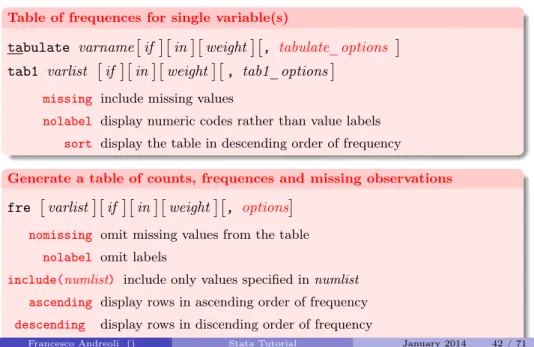
Table of frequences for single variable(s)
tabulate varnameif inweight, tabulate_options tab1 varlist if inweight, tab1_options
missing include missing values
nolabel display numeric codes rather than value labels
sort display the table in descending order of frequency
Generate a table of counts, frequences and missing observations fre varlistif inweight, options
nomissing omit missing values from the table
nolabel omit labels
include(numlist) include only values specified innumlist
ascending display rows in ascending order of frequency
descending display rows in discending order of frequency
tex export LaTeX-formatted table
Discrete Variables
Cross-tabulation of 2 variablestabulate varname1 varname2 if inweight, options
chi2 report Pearson’sχ2
exact (#) report Fisher’s exact test
gamma report Goodman and Kruskal’s gamma
column report the relative frequency within its column of each cell
row report the relative frequency within its row of each cell
cell report the relative frequency of each cell
nofreq do not display frequencies (use only withcolumn,roworcell)
summarize(varname3) report summary statistics (mean, sd) forvarname3
Cross-tabulation of more than 2 variables, by values tab2 varlist if inweight, options
Tables of Statistics
table
table rowvar colvar supercolvar if in weight , options where inrowvarcolvar supercolvar we put categorical variables (up to 3).
by(superrowvarlist)variables to be treated as superrows (up to 4)
contents(clist)contents of the table’s cells, whereclistmay contain up to 5 statistics
mean varnamemean
sd varnamestandard deviation
sum varnamesum
n varnamecount of nonmissing observations
max,min varnamemaximum and minimum value
median varnamemedian
p1... p99 varnamepercentiles
iqr varnameinterquartile range (p75-p25)
Tables of Statistics
tabstat
tabstat varlist if in weight, by(varname) options
where invarlistwe place a list of continuous variables, inby(varname)a categorical variable and among theoptionsinstatistics() we can choose:
mean n sum max,min sd
cv coefficient of variation (sd/mean)
semean standard error of mean (sd/sqrt(n))
skewness index of skewness
kurtosis index of kurtosis
p1... p99
range = max - min
Sample Tests
Tests apply to variables and allow to compare statistical significance of estimates against a null hp on the whole sample or for its subgroups. You can also use the command to perform tests under subgroups mean equality for the same variable, once a dicotomus variable identifying groups is selected (use missing values in this dummy varible to select only two subgroups which do not exhaust the sample dimensionn). You can use thetest_commandito obtain t-tests from inputted data (n, sd, means) that you like to compare. Other more specific tests can be
downloaded and installed. Here is a list of general features:
Test for means equality: help ttest
Performs t-test for1)one variable sample mean equality to a constant2)one variable two subsample means equality3)two variables means equality4)two variables two subsample means equality. You can specify distributions.
Test for standard deviations equality: help sdtest
Performs t-test for1)one variable sample sd equality to a constant2)one variable two subsample sd equality3)two variables sd equality4)two variables two subsample sd equality. You can specify distributions.
Graphs
help graph
This is the general command for all graphs. From here you can start searching the graphic style that you need, for univariate or multivariate representations, as well as statistical constructions. This is the broadest family of graphics.
help twoway
This command applies to bivariate graphics. The objective is to obtain a classical 2 coordinates graph, like scatter plots, connected points, confidence intervals,
regression fit, distributions... One graph may contain different series (ex: time against income and consumption) or different objects (ex: observed and predicted values). Oncetwowayis declared, you have to select (in pairs) the variables that you want to put in the same graph and thetypeof graph linking the two variables (ex:
scatter; connected; lfit; tsline; bar; spike; mband; lpoly;
function;...). In this way,graphs are built sequentiallyand all the objects will appear in the same space. You can add graphsoptions by looking at thehelp. Usingby(), you obtain separeted graphs according to the variable you want to be conditioned to. Optionsandin, ifmust be specified foreach graphic toolyou use, bacause they refer to a particular set of data in use.
Regression Analysis
Stata econometrics models can be included into 5 large families, but only the first one will be analysed. You are invited to read on thehelpthe full characterization of commands. In eachhelpfile you also find examples and interpretations of output results.
1) Cross-section econometrics
You are invited to look athelp regressfor the admissible regression commands, including OLS, IV, limited dependent variables methods, treatment effects models, censoring and selection bias corrections, 3SLS, systems of equations, quantile regression. Using the commandhelp regress_postestimationyou also obtain information on post-estimation tests and model application syntax.
2) Time series econometrics
You are invited to look athelp time, you will find all the list of commands associated with time series estimations, and how to build econometrics models in Stata. In particular,help tssetcan be used to declare a time series structure of your data, and than proceed with usual regression techniques. Using the command
help regress_postestimationtsyou also obtain information on post-estimation tests and model application syntax.
Regression Analysis
3) Panel data econometrics
You are invited to look at help xt, you will find all the list of commands associated with the panel dimesion of a database. In particular,help xtreg offers a wide explanation of panel-data analysis techniques, while with help xtreg_postestimationyou also obtain information on post-estimation tests and model application syntax.
4) Survey data analysis
Seehelp surveyfor all the details on data setting and regression techniques 5) Spatial econometrics
Seehelp spatregorspatwmatfor geographically located data. Commands available for Stata 10 or superior.
Regression Analysis
Common models: OLS, IV, probit, multiple logit
regress depvar indepvars if in weight , noc options ivregress estimator depvar varlist1 (varlist2=varlist_iv)
if inweight, noc options
probit depvar indepvars if inweight, options
mlogit depvar indepvars if inweight, options
options
refers to regression specific options or estimation
correction (robust se, constant...)
estimator
IV can be performed by 2SLS, GMM or limited info max
likelihood.
Regression Anlysis
Other regression models: List Iareg an easier way to fit regressions with many dummy variables
arch regression models with ARCH errors
arima ARIMA models
boxcox Box-Cox regression models
cnreg censored-normal regression
cnsreg constrained linear regression
eivreg errors-in-variables regression
frontier stochastic frontier models
heckman Heckman selection model
intreg interval regression
ivregress single-equation instrumental-variables regression
ivtobit tobit regression with endogenous variables
newey regression with Newey-West standard errors
qreg quantile (including median) regression
reg3 three-stage least-squares (3SLS) regression
rreg a type of robust regression
sureg seemingly unrelated regression
Regression Anlysis
Other regression models: List IItobit tobit regression
treatreg treatment-effects model
truncreg truncated regression
xtabond Arellano-Bond linear dynamic panel-data estimation
xtdpd linear dynamic panel-data estimation
xtfrontier panel-data stochastic frontier model
xtgls panel-data GLS models
xthtaylor Hausman-Taylor estimator for error-components models
xtintreg panel-data interval regression models
xtivreg panel-data instrumental variables (2SLS) regression
xtpcse linear regression with panel-corrected standard errors
xtreg fixed- and random-effects linear models
xtregar fixed- and random-effects linear models with an AR(1) disturbance
xttobit panel-data tobit models
Post Estimation
Any Post Estimation command must be used immediately after a
regression model, and in any case it refers to last estimates stored in
Stata memory. You can save any model with a name and then proceed
in post estimations recalling the model name.
Predict
calculates predictions, residuals, influence statistics, and the
like after estimation
Predict regression output as new data
predict type newvar if in , statistic statistic
xb linear prediction; the default
residuals residuals
rstandard standardized residuals
rstudent studentized (jackknifed) residuals
stdp standard error of the linear prediction
Post Estimation
Test linear hypothesis on coefficients test coeflist
test exp=exp =...
Test on residuals: normality and zero-mean sktest varname
ttest varname == 0 scatter/mband
Test on residuals: heteroskedasticity by graph and tests rvplot
estat hettest estat imtest whitetst
Post Estimation
Test on variables: influential values
dfbetaLogic of the
dfbeta
test:
1
Estimation with the complete sample
2Estimation without the i-th observation
3Comparison
Test on variables: collinearity
vif collin
Overview
Programming is an advanced topic. Some Stata users live productive lives without ever programming Stata. Chapter 18 in StataUsers Guideis an extremely useful reference for beginners in programming. Programs and do-files are related: a do-file is actually a collections of programs, which you can either recalled from the ado-file library (updated or increased depending on user needs) or created by the user. Once a program is specified, Stata gives you only the final output. Recall that do-files and programs both contains and share the same Stata commands.
Moreover, programs may call other programs or do-files, and do-files may call other do-files or programs. In general, programs are defined in do-files. The objective of programs is to simplify your life by nesting a specific set of operations in a unique command, which is initially defined in your do-files, and then can be repeatedly used in the rest of your session. A program is a sort of flexible do-file: variables names and options remains unspecified and it can be used in other circumstances. Programs may also be saved as Stata commands in ado-file format in a specific library and you are therefore free to call the program at occurrance as a Stata command.
In this section we will surveymacros, local and global, which allow to simplify the writeing. We will also describeloopsand then move toprogram arguments. Next section overviews the output programs and matrix programming.
Macros
Macros are the variables of Stata programs. A macro is simply a name associated with some text or a equence of arguments and can belocalorglobalin scope. We focus on local macros, which are private information of a single program, and no other program can make use of them (otherwise, they are global macros).
Macros: local and global local lcname
, =exp | :extended_fcn | [‘]"[string]"[’] global glname
, =exp | :extended_fcn | [‘]"[string]"[’] Use=expwhen the macro name refers to a result of an expression, stored in memory under the macro name. You can use it later in further calculations. When "=" is omitted, Stata stores in memory only theexp, which can me recalled in other mathematical expressions.
Use "[string]" when the macro name refers to a particular string. The string may contains a set of variables names, commands options, or other.
When you recall macro names in programs or commands, always use ‘’ indicators: ‘lcname’and‘glname’
Macros
Modify macros: show macro directory, drop and list macros,
program macros
macro dir/drop/list/shift mname
mname . . . | _all
Loop
Alooptakes a list and then executes a command or a set of commands for each elements of the list. The element currently being worked on is stored in a macro so you can refert to it in the commands. The list to be looped over can be a generic list of variable, values and levels. The list can be saved in macros as well.
foreach
: looping over a list of variables
foreach lname { in|of listtype } list {
commands referring to ‘lname’
}
You repeat the list of commands for all variables in a varlist, recalling each time the variable by its macroname ‘lname’
Obviously, you need to write the commands only once, using ‘lname’ in place of each variable name.
Withlnameyou create a fictious macro variable wich looped over thelistof variables.
There are different possible lists to be used: useinwhen the list is named,of
Loop
forvalues
: looping over a list of values
forvalues lname = range {
commands referring to ‘lname’
}
Commands are looped on some particular values, expecially usefull whenif, inis used as a conditioning statement.
Again, values must be recalled by ‘lname’.
Nested loops
foreach lname { in|of listtype } list { forvalues l2name = range {
for each ‘lname’ in sequence, commands refer to ‘l2name’
} }
Programming
Programming: basic elements for programming program define pgmname
, nclass | rclass | eclass | sclass
byable(recall, noheader | onecall) properties(namelist) sortpreserve plugin
version Stata_version
syntax varlist if in, DOF(integer 50) Beta(real 1.0)
The rest of the program must be coded in terms of ‘varlist’, ‘if ’, ‘in’, ‘dof ’, and ‘beta’
Programming
This is the standard syntax for a command. Inside the program
you must spacify the operations that Stata must run when the
name of the new command runs.
Assign a name to the program by
pgmname
, which is used
afterwards as a new command.
version
allows to optimize the program efficiency according to the
version of stata specified
syntax
must be used to specifues the syntax of the new
commands, for example the type and number of variables
admitted, their order in execution, if and in options.
After, write te list of commands, loops, macros that generate the
souce of your personal command created by the program.
Use
quietly
before commands to force Stata not to give the
output of the commands run inside the program. To decompose
the
varlist
in variables according to a specific order, see
help
tokenize
.
Output: Interpreting
Results from computations are showed in the Results Window and stored in memory by the .logfile. You can paste your output directly on your paper (or in other spreadsheet to rework them) by using the tables reported in the .log file. Stata offers other opportunites to list estimates and coefficients in a proper way (ex. with standard errors between brackets) whithout requiring additional changes in estimates values. In this Programming section we will see how output coefficients, vectors (ex. the regression parameters), matrices (ex. the variance-covariance matrix of regression coefficients) or scalars (ex. the mean of a variable, its standard deviation, or an R2 estimation) can be properly represented and used. By matrix algebra, we can perform advanced econometrics on data.
Remember that all the syntax previously presented appliesexclusivelyto data stored in memory. To apply this syntax to your output coefficients (for example compute the average of average values obtained by bootstrapping) you need to transform your results in data format (i.e. add columns).
Show Estimates
Your code must be operable even after that changes in your data occurs (by merge
orappend). Therefore, you need to perform your tests or report coefficients
independently from your output windows results (ex: t-test for means). Stata allows to save the estimates as scalars or vectors/matrices. The general procedure is the following:
1 Perform your statistical procedures or your estimations (likesummarizeor
regress);
2 Save your results and estimates in the memory by usingr()ore() respectively. In this way you generate a new object;
3 Use your objects or display them in the output files.
Alternatively, save regression results outreg varlist
using filename
, options text opt.: nol; title(); addn()
coefficients opt.:bdec(); coefstar
significance opt.:se | p | ci | beta; bracket; 3aster stat opt.: addstat(r2, N, F); xstats
other opt.:replace; append
Show Estimates
A program by Ben Jann, called
estout
, allows to organize post
estimation results, in particular for single regressions, system of
equations, maximum likelyhood estimation and marginal effects. The
extreme frexibility granted by this command allows you to reproduce
directly in Stata a final version of the table that you can copy and past
on your paper or report, with the calssical representation of regressors
by row, models by columns, coefficients over standard errors in
parenthesis, a separate line for additional statistics. You can also save
the result as L
ATEXcode of the table (by choosing the
style
option).
estout
must be used after estimation. If you works with multiple
models, you can stored in memory each model estimates by using
estimates store
, and then recall them with
estout
.
Useful commands:
estpost
,
eststo
,
tabstat
,
esttab
,
est save
,
Show Estimates
See
help postest
for a general description of post estimations
commands.
help estimates
provides all the info to store, use and
report estimates. All commands work iff there is some result stored in
the memory.
Show estimates
After statistics
: see
help return
After regressions
: see
help ereturn
Scalar define, after summary statistics or table are reported
scalar define scalar_name = exp
scalar list scalar_list
scalar drop scalar_list
Show Estimates
After a regression command, use:To store estimates in the memory (usename of your model) estimates store name , nocopy
estimates dir
scalar drop name_list
To report statistics and estimates tables from modelname estimates stats namelist , n(#)
estimates table namelist , options
stats(N r2 ll chi2 aic bic rank)reports statistics in the table;
keep(coeflist);drop(coeflist)to eliminate some coeff from the table;
b(%9.2f), se, t, pspecify the format of coeff reported and additioal stats;
To use results
Work with Data as Matrices
Data can be exported as a
matrix
n
×
k
(a vector is a single column
matrix), any statistics or estimation can be performed and result listed
in the matrix format. New data created (ex., predictions) can be
transformed in data from matrices.
If you operate with matrices, use algebra to compute statistics (ex.
¯
X
= (e
0e)
−1e
0X
), any other command will not be working. If you
transform matrices in data (see the data editor), you can use previously
seen commands. Use
help matrix
for an exhaustive review of
commands to be used. To perform more complicated computation or
build your program, use the
Mata
environment which allows to use
Stata more interactively. See
help mata
for review of commands,
available in Stata 9 or superior.
The Mata environment is build-in in the Stata environment, that is it is
possible to call Mata when working with the Stata coding. This is done
by using functions such as:
mata:
text
.
Work with Data as Matrices
Set the size of a matrix
set matsize #
Data
→
Matrix; Matrix
→
Data; Input Matrix
mkmat varlistif in, matrix(matname) nomissing rownames(varname)svmat matname , names( col | eqcol | matcol | string ) matrix input matname = (#[,#...][\#[,#...][\[...]]])
Operations with matrices
Mata language
In general, Mata environment is opened by setting: mata; and closed by settingend. All the code in the middle works exclusively for the Mata environment, but not for the Stata environment. Hence, Stata and Mata act as two separated softwares. Mata exploits a Matlab (C++) type of language.
Mata allows to import/export data from Stata usingst_matrixorst_data. The philosophy of Mata consists in taking "views" of the data stored in Stata format, use them in a form of an×k matrix, and perform the needed operations on these data. In the Mata environment, one can constructfunctionsthat recall a sequence of operations in Mata language. These functions are, in fact, programs.
Use Mata and notmatrixto work with data: Mata is designed to deal with huge dataset, matrix language is useful to deal with post-estimation results. The logic to construct a program is: (i) construct Mata functions with the needed arguments, saved after your program; (ii) construct the main program in Stata, when needed you should transform your data into Mata matrices/data views; (iii) recall Mata functions with simple code lines, thus not making it necessary to open/close the Mata environment within a Stata program (which would give an error).
For more hints on Mata, seehttp://www.ssc.wisc.edu/sscc/pubs/4-26.htmand
optimizefor the optimization tool.
Advanced material
Generate a unique file with panel structure from a series of separate waves, each divided into separate.csv files. A simple program allows to merge these data without even opening them.
Construct the maps of some data, provided these data can be linked with the relevant maps, and then geocoded.
Construct a program for a Gini-type multi-dimensional inequality indicator. This involves not only the construction of the program itself, but some Mata programming based on loops and combinatorics.
Advanced graphics to represent distributions functions, quantiles of these distributions, and estimates plus confidence intervals for estimators based on these quantiles.
Construct a program for testing ISD1 and dominance in gap curves under the assumption of independence. This step involves the use of Stata programming as well as Mata programming/optimization, along with the rearrangement of the result in easily interpretable tables.