by Vasileios Papadimitriou A Thesis Submitted to the Graduate Faculty of
George Mason University in Partial Fulfillment of the Requirements for the Degree
of
Master of Science Software Engineering
Committee:
Jeff Offutt, Thesis Director Paul Ammann
Ye Wu
Hassan Gomaa, Chairman, Department of Software Engineering
Lloyd J. Griffiths, Dean, Volgenau School of Information Technology & Engineering
Date: Summer Semester 2006
George Mason University Fairfax, VA
Master of Science at George Mason University
By
Vasileios Papadimitriou Bachelor of Science George Mason University, 2004
Director: Jeff Offutt, Professor Department of Software Engineering
Summer Semester 2006 George Mason University
Copyright c° 2006 by Vasileios Papadimitriou All Rights Reserved
Dedication
I dedicate this thesis to my wife Mimi and my son Konstantinos for their patience and support.
Acknowledgments
First, I would like to express my appreciation for the valuable advice and support from Dr. Offutt, who has been an outstanding advisor and professor throughout the course of this thesis and the MSSWE program.
For serving in my committee, I would like to thank Dr. Paul Ammann and Dr. Ye Wu. Next, I would like to thank Human Resources Research Organization and specially Dr. Beverly Dugan, Dr. Carolyn Harris, and Dr. Cathy Stawarski for providing me with an excellent employment environment that promotes research and professional development, which had a great impact in the completion of this project.
I thank Wuzhi Xu, who’s input in the early stages played a significant role in the foundation of this project.
Finally, I would like to acknowledge the valuable feedback that was provided by Christodoulos Christodoulou, Emmanuel Spyridakis, and Lima Beauvais.
Table of Contents
Page
Abstract . . . 0
1 Introduction . . . 1
2 Types of Client Input Validation . . . 4
2.1 HTML Validation . . . 4
2.1.1 Length Constraints . . . 5
2.1.2 Value Constraints . . . 5
2.1.3 Transfer Mode Constraints . . . 6
2.1.4 Field Element Constraints . . . 6
2.1.5 Target URL Constraints . . . 7
2.2 Scripting Validation . . . 7
2.2.1 Data Type Constraints . . . 8
2.2.2 Data Format Constraints . . . 9
2.2.3 Data Value Constraints . . . 9
2.2.4 Inter-Value Constraints . . . 10
2.2.5 Invalid Characters Constraints . . . 10
3 Rules for Defining Test Cases . . . 11
3.1 HTML Rules for Violating Input Constraints . . . 12
3.1.1 Length Constraints Violation . . . 13
3.1.2 Value Constraints Violation . . . 13
3.1.3 Transfer Mode Violation . . . 16
3.1.4 Field Element Constraints Violation . . . 16
3.1.5 Target URL Violation . . . 19
3.2 Scripting Rules for Violating Input Constraints . . . 20
3.2.1 An Approach to Automate Scripting Rules . . . 20
3.2.2 Current Support for Scripting Rules . . . 21
4 Automating Bypass . . . 23
4.2 Interface Analysis . . . 25
4.3 Test Inputs . . . 27
4.4 Test Case Generation . . . 29
5 Empirical Evaluation . . . 36 5.1 Experiment Design . . . 36 5.1.1 Hypothesis . . . 37 5.1.2 Independent Variables . . . 37 5.1.3 Dependent Variables . . . 38 5.2 Subjects . . . 40 5.3 Results . . . 41
5.3.1 ATutor Learning Content Management System . . . 41
5.3.2 Joomla Content Management System . . . 44
5.3.3 PhpMyAdmin, Web Based MySQL Client . . . 47
5.3.4 Brainbench.com Online Assessment Products . . . 49
5.3.5 Myspace.com Online Community Portal . . . 51
5.3.6 NYtimes.com Online New . . . 53
5.3.7 Mutex.gmu.edu Libraries Database Gateway . . . 54
5.3.8 Yahoo.com, Global Internet Service . . . 56
5.3.9 Barnesandnoble.com, Online Store . . . 59
5.3.10 Amazon.com, Online Store . . . 62
5.3.11 Bankofamerica.com, Online Banking . . . 64
5.3.12 Comcast.net, Communications Provider . . . 67
5.3.13 Ecost.com, Online Store . . . 68
5.3.14 Google.com, Search Engine . . . 69
5.3.15 Pageflakes.com, Community Personalized Portal . . . 71
5.3.16 Wellsfargolife.com, Life Insurance . . . 71
5.3.17 Result Summary . . . 72
5.4 Confounding Variables . . . 79
5.4.1 Effects of AutoBypass Implementation . . . 79
5.4.2 Sample Web Applications Selected . . . 81
5.4.3 Test Values Input . . . 82
5.4.4 Result Evaluation . . . 83
6.1 Future Work . . . 86 References . . . 88
List of Tables
Table Page
5.1 Experiment Subjects . . . 42
5.2 Result Legend . . . 43
5.3 Results for ATutor . . . 44
5.4 Results for Joomla CMS, Poll Administration module . . . 45
5.5 Results for Joomla CMS, Online User Information module . . . 47
5.6 Results for PhpMyAdmin, Current Database Control . . . 48
5.7 Results for PhpMyAdmin, Set Theme Module . . . 48
5.8 Results for PhpMyAdmin, SQL Form . . . 49
5.9 Results for PhpMyAdmin, Data Base Statistics . . . 49
5.10 Results for Brainbench.com, Information Request Form . . . 50
5.11 Results for Brainbench.com, New User Registration . . . 52
5.12 Results for Myspace.com, Event Search . . . 52
5.13 Results for Myspace.com, Music Search . . . 53
5.14 Results for NYtimes.com, Market Watch . . . 55
5.15 Results for mutex.gmu.edu, University Libraries Database Gateway . 55 5.16 Results for Yahoo.com, mail: notepad . . . 56
5.17 Results for Yahoo.com, compose message . . . 57
5.18 Results for Yahoo.com, Desktop Search Reminder . . . 58
5.19 Results for Yahoo.com, Weather and Traffic Search . . . 58
5.20 Results for Barnesandnoble.com, Shopping Cart . . . 59
5.21 Results for Barnesandnoble.com, Book Search . . . 61
5.22 Results for Amazon.com, Item Dispatcher . . . 62
5.23 Results for Amazon.com, Handle Buy . . . 63
5.24 Bankofamerica.com, ATM & Branch Locator by infonow.net . . . . 65
5.25 Bankofamerica.com, Web Site Search . . . 67
5.27 Ecost.com, Shopping Cart . . . 69
5.28 Ecost.com, Shopping Cart . . . 69
5.29 Google.com, Froogle - Shopping Search Engine . . . 70
5.30 Google.com, Language Tools . . . 70
5.31 Pageflakes.com, User Registration . . . 71
5.32 Wellsfargolife.com, Insurance Quote . . . 72
5.33 Result Summary . . . 73
5.34 Types of Invalid Responses . . . 74
5.35 Result Summary by Violation Rules . . . 78
List of Figures
Figure Page
4.1 AutoBypass Architecture . . . 24
4.2 AutoBypass - Main Page . . . 25
4.3 AutoBypass - Form and URL selection for testing . . . 26
4.4 AutoBypass - Test Input . . . 30
4.5 AutoBypass - Test Results . . . 32
4.6 AutoBypass - Example Test Response . . . 34
4.7 AutoBypass - Example Mutant Form . . . 35
5.1 Exposure at Joomla CMS, Online User Information Module . . . 46
5.2 Fault/Failure at Barnesandnoble.com, Book Search component . . . 62
5.3 Exposure at Bankofamerica.com, ATM & Branch Locator . . . 66
5.4 Result Summary Graphs . . . 75
AUTOMATING BYPASS TESTING FOR WEB APPLICATIONS Vasileios Papadimitriou
George Mason University, 2006 Thesis Director: Jeff Offutt
By introducing new quality standards, the World Wide Web has a great impact on how software is being developed and deployed. Web software is mainly accessed through browsers and dynamically created user interfaces. HTML source and scripts are available to the user and can be modified and resubmitted due to the stateless nature of HTTP; thus, arbitrary requests from clients are permitted and web appli-cations become vulnerable to input manipulation. Previous work on bypass testing is extended to develop an automated approach. An open source testing tool, HttpUnit, is used to build a prototype application, AutoBypass, which parses HMTL pages, identifies forms and their fields, and automatically creates bypass test cases that vi-olate the user interface’s constraints. AutoBypass performs testing on the external system level, eliminating the need for accessing the application source or server. The bypass method’s effectiveness is empirically evaluated with web applications devel-oped by professionals. The results show that applications generated numerous faults when bypass test cases were submitted. It is concluded that bypass testing can improve the quality of web applications by revealing potential vulnerabilities while providing an efficient method to reduce the development cost.
The World Wide Web has a great impact on how software is being developed and deployed. Web applications introduced new priorities for developers, driving the industry to value reliability, usability, and security instead of “time to market” which is more typical in the case of traditional software [13]. This shift on the criteria of software quality poses a new need in developing new methods to design, implement, and test software that is characterized by a distributed environment, implemented on a diverse collection of hardware and software platforms, and often requires interaction of heterogeneous components. Web applications are extremely loosely coupled and heavily user interactive in a dynamic manner, which is very different than the pre-established flow of control in traditional systems. User interfaces are dynamically created and the flow of control depends on the inputs provided to the system.
Interestingly, Xu et al. found in the 2003-2004 Common Vulnerability and Expo-sure (CVE) report that approximately 40% of the security problems originate from implementation errors that allow attackers to inject malicious code into carefully crafted inputs [19]. Due to the unique methods used to deliver graphical user inter-faces and accept requests, web applications are extremely vulnerable to input manip-ulation attacks that compromise security. In addition, web applications are exposed to a variety of potential input sets that can reduce the reliability of the application.
Web software is mainly accessed through web browsers using HTML that allow the user to input data and submit requests. Input validation can be performed both
on the client and the server. In the past, client side validation was often used in order to reduce overhead network traffic between the client and server. In recent years, we see a trend to check input on the server as software components have more resources to perform input validation [14]. As a result, we find web applications using a hybrid of the two techniques to validate user input. In addition, client side technologies provide a rich environment for response to user events, improving the usability of the interfaces. For that reason, it is almost certain that client side validation will be used extensively, despite the need for more robust server side modules.
Client side input validation is performed by imposing constraints defined in the HTML language and the scripts supported by the browsers. On the other hand, server side modules are able to use a variety of programming languages and resources to identify invalid input requests.
Many features are available to the interface designers to control the way that users interact with the interface. By combining several HTML language features and scripting, interfaces can react to user’s events and prohibit the form submission, if some requirements are not met, or provide feedback for the user. However, HTML code and scripts are available to the user once they have been accessed and can be modified and resubmitted to the server [14]. Due to the stateless nature of the Hyper Text Transfer Protocol (HTTP), server software cannot completely control user interactions; thus arbitrary requests from clients are permitted. HTML interfaces can be modified and/or circumvented, allowing the submission of unconstrained input to server software.
Several research papers have addressed this issue and identified ways that users can bypass the interfaces and provide input directly to the server. In fact, an active
area of research is SQL injection techniques, which essentially take advantage of the ability to bypass user interfaces.
This thesis, extends Offutt et al.’s work on bypass testing of web application, which defined a method for creating test cases for web applications that evade constraints set by the user interface [14]. The theoretical background has been revised and extended in order to support the use of an automated approach in the test case generation. A unit testing tool, HttpUnit [7], is extended to build a prototype software application that parses HMTL forms, identifies fields, create test cases that violate constraints set by the interface designer, and finally performs testing. This document includes analysis of types of client side input validation in chapter 2, definitions of the rules and pseudo-algorithms that are used to automatically generate test cases in chapter 3, the design of AutoBypass application in chapter 4, the experiment design and results and in chapter 5, and finally the conclusions in chapter 6.
Client side input validation is primarily performed by using HTML form controls, their attributes, and scripts that can access the Document Object Model (DOM) and evaluate the inputs or check for required fields before a form submission. A previous attempt [14] to categorize validation constraints categorized the two types of client side validation as syntactic and semantic. In this study the author revised and reorganized the individual items, which are labeled as HTML validation and scripting validation. Several aspects of the previous categorization are revised in order to provide a more abstract notion of the validation types and a better foundation for an automation tool.
2.1
HTML Validation
Types of input validation that are performed using the HTML syntax on forms are listed in this section. HTML has syntactic rules that define input controls that implicitly validate the user input. Although web browsers define different rendering capabilities for HMTL pages and forms, the HTML 4.1 language specification [16] is used to identify specific features that are applicable to this research. The following types of input validation are defined:
1. Length Constraints 2. Value Constraints
3. Transfer Mode Constraints 4. Field Element Constraints 5. Target URL Constraints
2.1.1
Length Constraints
The most common type of input constraint imposed by the HTML syntax is the maxlength attribute for text or password input controls. This attribute limits the number of characters of the string entered by the user in the input field.
2.1.2
Value Constraints
The HTML language specifies input controls that apply limitations on the set of values available to the user. Parameter name and values pairs contained in a form can be submitted either explicitly or implicitly. For instance, the number of selections of a drop down list or check boxes is limited by the predefined set of values applied by the application designer; these controls explicitly constrain the set of values available to the user. On the other hand, hidden fields include predefined values without the user’s knowledge and implicitly dictate the values available to the form. The types of controls that define value constrains are:
• Hidden controls (input element)
• Menu controls (select,option group, and option elements)
• Read-Only controls (textarea elements or text controls with the readonly attribute set)
Radio buttons allow mutually exclusive selection, while checkboxes can allow multiple selections. Similarly, the select element allows single or multiple selections.
2.1.3
Transfer Mode Constraints
The form element specification includes the method attribute that defines the Hyper Text Transfer Protocol (HTTP) method used to submit the form. There are several request methods defined on HTTP, but this study only uses the two most common, GET and POST. Note that in the HTML 4.1 specification, the method attribute is not required but forms that do not define a submit method will be submitted using the GET by default. Forms that use the GET method are transmitted in ASCII as parameters appended to the URL as a form data set separated by a question mark (?). GET request parameters and their values are clearly visible to the user in the URL, and they impose a maximum limit on the data transmitted of 1024 bytes. POST requests are constructed as HTTP messages to the action URL, can have specified data encoding and are not limited in size. Users can bypass the HTTP method that is imposed by the interface simply by changing the HTML attributes of the form.
2.1.4
Field Element Constraints
Interfaces in web applications provide a defined set of controls including inputs, but-tons, and menus. The set of controls submitted to the server application is predefined by the application designer and classifies the set of controls in a form as input con-straints. Values are explicitly assigned in controls that render on HTML pages and
implicitly in non-rendered fields such as hidden controls. The HTML specification does not require all controls in a form to be successful (transmitted to the server). Instead, during form submission, all the successful controls are organized in a package and sent by the user agent (typically a web browser). On the other hand, web ap-plications can implicitly constrain the user from supplying inputs in specific controls on the forms. This type of input constraint is also related to the scripting validation types.
2.1.5
Target URL Constraints
The most common mechanism to traverse through multiple web pages are links (an-chor <a> tag). All links in HTML pages generate GET requests to the web servers; therefore, anchors allow URL rewriting by appending parameter-value pairs to the URL. Similarly to the GET requests, links with parameters can be modified by the user by simply altering the HTML code or modifying the address of the target URL. Through a predefined set of links, applications can constrain the user to navigate to a fixed set of URLs [14].
2.2
Scripting Validation
HTML pages may contain scripts to respond to user events and validate data input prior to form submission [14]. There are multiple scripting languages available, such as JavaScript, TCL Script, and VBScript, to perform similar actions, but the use of JavaScript is dominant and was used in this study. The main advantage of using scripts in HTML pages is the full access to the Browser Object Model (BOM) and the Document Object Model (DOM). Specifically, access to the DOM allows programmers
to control and respond to following events: onload, onunload, onclick, ondblclick, on-mousedown, onmouseup, onmouseover, onmousemove, onmouseout, onfocus, onblur, onkeypress, onkeydown, onkeyup, onsubmit, onreset, onselect, and onchange [16].
By associating actions with form elements, application designers can respond to user inputs, prohibit form submission due to input restrictions, add/remove elements from the forms, change the form’s action etc. Similarly to the HTML validations, a set of validation types are defined, which are enforced via scripting. Scripts can perform all the types of validations that are implicitly done by the HTML syntax, yet scripting provides ways to enforce application specific requirements and apply semantic restrictions. Via scripting, a web interface can perform all the validation checks described for HTML constraints; however, validation with semantic scope that is available with use of a scripting language cannot be replaced by the interface itself. Several types of scripting validations:
1. Data Type Constraints 2. Data Format Constraints 3. Data Value Constraints 4. Inter-Value Constraints
5. Invalid Characters Constraints
2.2.1
Data Type Constraints
A major use of scripting validation is to examine input values that relate to specific data types in the server application. By definition, all values in form controls are
transmitted as sequence of characters; therefore, validation is required to ensure that the server side software component receives appropriate values. For instance, a field that accepts inputs for age should only accept integers. A scripting function can verify that requirement by checking the input control before submission and ask the user to correct mistakes.
2.2.2
Data Format Constraints
Often, applications require input for values that need to conform to a specific format. For instance, in the US, a zip code is a string of five digits and a phone number is typically comprised of the area code and the local number (10 digits). Other types of values that are often checked are the format of money, personal identification numbers, email address, URLs etc. Using client side scripts to validate these types of inputs in the interface applies constraints that can be circumvented by a user; all the user needs to do is save the HTML, modify to delete scripts and resubmit the invalid data.
2.2.3
Data Value Constraints
Data value constraints are used in web applications to provide input validation in fields that have semantic restrictions. As an example, a field that denotes the age of an individual should not only prohibit non-integer values (as a data type constraint), but also limit the value of the integer to an appropriate range (e.g. 0 - 150).
2.2.4
Inter-Value Constraints
A very useful function of scripting in web interfaces is to constrain relationships among several input controls in a form [14]. For example, when payment information is required on a form, a choice of a credit card payment should require the input of credit card type, account number, and expiration date. Omission of any of these values makes the transaction impossible to complete; therefore, scripts are used to verify that all required fields are completed and valid prior to form submission.
2.2.5
Invalid Characters Constraints
Security measures require input validation that will prohibit malicious string injec-tions in to web applicainjec-tions. Inputs are frequently checked on the client to determine whether they contain obvious invalid strings that can cause security infiltrations on the server. Inputs with invalid characters can not only affect the security of the ap-plication, including SQL statements, but also the robustness of the web applications. Several types of invalid characters, such as XML tags (<, >) and directory separators (../) can cause server applications to become unavailable. Wheeler provides a list of common invalid characters that affect software [17].
Having identified the types of the client side constraints that are imposed by web interfaces but can be bypassed by the end user, this chapter defines a set of rules that are used to generate invalid inputs. The generated test cases are used to test web applications with inputs that are validated on the client side either explicitly by the application or implicitly by the interface. Following the structure of the validation types defined in the previous chapter, the author aims to structure a set of rules and algorithms implemented on the automated test generation tool.
A challenging issue for automatic test case generation is how to provide new test values for fields and parameters that violate the applicable constraints. Theoreti-cally, there are an infinite number of possible new values and parameters that can be submitted. Yet, for appropriate testing, values that exist within the domain of the application are preferred. Assume a value constraint applied through a drop down list that allows the user to select his/her favorite color; the existing list could be blue, yellow, and green. An effective test would be to add the value of red since it is part of the input domain and it is more likely to affect the application. However, the problem is knowing alternative values that are in the domain.
The author refers to this condition as the “Semantic Domain Problem” (SDP). The SDP can be approached in many different ways. Random values can be used to test the application; however, this approach is inefficient as it can lead to an infinite number of alternative values, which are unlikely to be part of the application domain.
Therefore, this approach is not used in this research. Alternatively, automatically generated domain related values can be used. By examining the initial values of the input set, one can potentially generate related values that belong in the same domain. For example, in a drop down list that allows course selection (e.g. SWE763), a pattern can be observed and be used to generate new values. In this case, the pattern is 3 characters followed by 3 digits. An interesting approach is one similar to Google sets (http://labs.google.com/sets), where with an input of a few terms, one can generate a set (small or large) of values with in the same domain. For instance, the input of values red, blue, green produces: Blue, Red, Green, Yellow, Black, White, Magenta, Cyan, Gray, Browser, Orange, Purple, Brown, and Transparent. This approach is very promising, yet the author leaves its implementation for the future. Another solution is to gather parameter and values from one application by parsing multiple pages that would provide input with parameters used. Finally, tester supplied values can be used to test web applications. This approach is feasible for this study, and also appropriate for selecting new values that can be intelligently chosen by human users that are familiar with the application domain. Nevertheless, this reduces the automation of this process.
3.1
HTML Rules for Violating Input Constraints
Parsing HTML code allows detection of constraints that are mainly enforced by the web interface. The following subsections define a set of rules that are used to generate test cases with regards to the HTML client validation.
3.1.1
Length Constraints Violation
This type of validation is the most trivial to detect and bypass. For each text or password input in a form with an attribute maxlength = L, the test case generated (TC) is length = L+1. On the other hand, automatically selecting an effective value that will violate the length constraint is not trivial. As described in the beginning of chapter 3, the SDP applies, and a human tester is required to provide test inputs.
In the automated test generation tool, the form controls of the subject are scanned to find maxlength attributes. Disabled controls are excluded in this process since they are not successful controls upon a form submission. Then, the input domain is searched for values assigned to the same parameter that would violate the input length. If none are found, the search continues to values that are assigned to other parameters in the application input domain and violate the length constraints. If still no value satisfies the test case requirements, a random string is generated and replaces the default value of the control.
3.1.2
Value Constraints Violation
There are several ways that test cases can be generated by the value constraints on an HTML form. In general, this type of constraint is violated by submitting a value outside the predefined set of values (modified value) [14]. Modified values are generated by either adding new values (as described in the beginning of chapter 3) or by value omission, which is applied to obtain values outside the predefined set. For all input, selection, and button elements specified in the HMTL language, the value attribute is of type CDATA [16], which is a sequence of characters (or string). The preset values can be violated by replacing the existing values with an empty
string. Value omission applies to hidden, read-only, selection menus, radio buttons, and checkboxes controls and can be accomplished for each control as follows:
• For each Hidden Control in a form, the original value is replaced with a mod-ified value. Use of hidden controls is very sensitive, as many applications use hidden fields to identify the user or otherwise transmit values between server side software components [14].
• For each Read-Only Control, the readonly attribute is omitted and its value is set to a modified value.
For selection menus, radio buttons, and checkboxes, we define an abstract way to produce test cases. By specification, form submission includes name-value pairs and disregards the rendering scope of the controls themselves; thus, regardless of the type of input, only the parameter name and value(s) will be transmitted to the server application. An efficient testing method for the preset values in this set of controls requires an abstract model that will distinguish them into single-value and multi-value controls. Single-multi-value controls include selection menus that prohibit multiple selections, radio button groups and checkboxes that do not belong in a group. Multi-value controls include checkboxes that are grouped by using the same identifier, and selection menus that allow multiple selections. Check boxes that share the same name identifier will allow multiple selections, and thus behave similarly to the multi-value selection menus. With this abstract concept in mind, two more rules for test generation are identified:
• For each Single-Value Control, the original value is replaced with a modified value.
• For each Multi-Value Control, a combination of a valid value and a modified one is tested. The control is submitted with pairs of valid and modified values, but producing all the combinations of the possible valid-invalid sets is avoided due to the potential for generating an enormous number of test cases, which is likely to produce similar results.
There are some special types of input types that are related to value violation rules. These are disabled, image maps, and file upload controls. Disabled fields also have preset values by the interface; yet disabled controls are not successful during form submission (i.e. not transmitted to the server). Disabled fields can be enabled on the client side by manually modifying the HTML code; yet, this is addressed in the Field Element Constraints Violation rules. Therefore, disabled fields are out of the scope of this rule.
Next, image maps are primarily used for navigation [16]. Moreover, prior to the availability of advanced technologies for animated graphical elements (such as Macromedia Flash), image maps were also used to provide visual effects rather than to send critical data to web applications. According to the HTML specification, images can be used in several ways with the same outcome. The input element can be of type image providing the functionality of a button. The use of image buttons will result to the submission of the form data appended with the control’s name and itsx andypixel coordinates relatively to the image location. Alternatively, an anchor combined with map element can be used to specify areas of an image that will function as different references. Maps can be defined as client side or server side. Client side maps use predefined references specified in each area and become equivalent to an link. For server side maps the browser will generate a GET request to the server by
appending the coordinates of the mouse location as parameters.
Lastly, input controls of type file upload are used to upload files from the browser to the server. The specification defined for file upload at RFC1867 [11] requires the HTML form ENCTYPE set to multipart/form-data, which is used by most web technologies. It is unlikely that manipulations of this input control will produce major faults to the applications, because of the fact that file uploads are not very common, and second because file uploads require specific processing by the applications, which will force developers to eliminate invalid requests. However, in theory one can violate the constraint by providing corrupted files, files with different extension than those required, try to upload malicious code, or simply replace the value of the parameter with a string.
3.1.3
Transfer Mode Violation
Violation of the transfer mode constraint is accomplished by alternating the method of HTTP transfer. The forms that define a GET method will be replaced with POST and vice versa.
3.1.4
Field Element Constraints Violation
The rules for violating field element constraints are very similar to the rules for value constraints. With the bypass method, field element constraints are violated by submitting forms that include a set of controls that are different from the predefined selection. For example, an HTML form that consists of a user name, test input and a password input has a defined set of two inputs. To violate this constraint, one can remove or add a new field. Specifically, modified sets of controls are created first by
control omission, then by control addition, and finally by control type alteration. An exception to this rule and the implementation of the automation tool are the image maps and file upload controls for the same reasons discussed in section 3.1.2.
Control Omission
To achieve modified control sets by control omission, form controls are eliminated sequentially. Theoretically, for a form with n controls, a large number of test cases can be generated as the sum of the all possible combinations for a set of predefined controls, as shown in equation 3.1. For instance, for a form with 3 controls, first one at a time is omitted, then two at a time and finally an empty form is submitted. That is, 3+3+1 = 7 modified forms can be used. Instead, only one form control is eliminated sequentially in order to avoid a large number of test cases that are expected to have similar effect.
|T C|= (n
1) + (n2) + (n3) +...+ (nn−1) + (nn) (3.1) Control Addition
Next, test cases are generated by form control addition. For effective testing, the added fields must exist in the current application, and perhaps used in other forms. In the case of random control addition, the server-side software will most likely ignore them. Adding new controls is affected by the Semantic Domain Problem; therefore, controls are primarily added by a human tester that can identify possible new controls that belong to the application domain. Apart from the user input, the automated tool will implicitly use disabled controls and other buttons defined in the form that
are not used for submission. Such controls may or may not be available.
Control Type Alteration
Field value constraints are also violated by virtually converting the type of the field elements. Since all successful controls in a form are transmitted as name-value pairs to the server, alternating a control type will have no effect. For instance, the data set will not change if a radio button is altered to a checkbox (as long as the input name remains the same). Taken this fact under consideration, instead of changing the HTML input types of the controls (e.g. from radio to select), only controls that accept single values are modified to accept multiple values and vise versa.
It is assumed that omitting a selection from a multi-value control will not signif-icantly affect the application, since most applications use such controls for optional additional selections by users. On the other hand, adding values to originally single-valued parameters is expected to influence the tested application since the application will expect to receive only one parameter. Therefore, the automated tool implements this rule by adding a value to every single-valued parameter, which alters its type to a multi-value parameter.
The main focus for testing the application will be values from the human tester; thus, the first candidate values are those in the input domain. If no input is provided, the default values of other controls in the form expecting that values that already exist in the application are more likely to affect the output. Yet, in a form with k controls we can create k-1 test cases for each and k(k-1) in total; i.e. for each control we would have to add one default value from every other control. That would result in a large number of test cases that are likely to have the same effect. For that reason
the automation tool limits the additional values to the inputs by the tester and an additional one found in a default value of an other control in the form.
3.1.5
Target URL Violation
Target URL inputs typically exist in forms using GET methods and requests embed-ded in links with parameters. By altering the parameters and their values, testers can create test cases that will interact with the state of the server as unexpected requests are received. For each anchor that contains name-value pairs, combinations of modi-fied parameter sets can be created. Modimodi-fied parameter sets can be generated either by dropping parameters (equivalent to omitting fields or values) or using alternative URL paths. Alternative URLs must exist in the web application, probably pointing to different components in the same application domain, in order to be effective. Ad-dressing this requirement programmatically will introduce SDP since a large number of random inputs can be generated that will possibly have no effect. Instead, this version of the testing tool uses name-value pairs supplied by a human tester.
In addition, in a given HTML interface of an application there may be several URL links that reference and send parameters to different application modules or even different applications all together. By testing all possible URLs that carry parameters, a great number of test cases will be created. Just to illustrate that point, the bestbuy.com index page contains 187 URLs, and amazon.com contains 347. Moreover, the test set will address modules from the application that are not in the current focus of the user, or may even belong to a different application all together.
URLs found according to the application (identified by the URL domain) and ap-plication component (identified by the URL path). The java.net.URL class is used to reconstruct and evaluate the application and component references, in addition to the validity of the URL format. During that process, links that include no pa-rameters are isolated together with links that use scripts, those that include relative paths that are not correctly resolved (e.g. ../../somerelativepath.html), and finally those that produce exceptions for unexpected situations. The user may select from the remaining groups that may include one or more URLs for each application and component to generate URL violations.
3.2
Scripting Rules for Violating Input Constraints
This implementation of the testing tool does not include an automated mechanism for the violation of constraints that are enforced via scripting in web application interfaces. Yet, on the theoretical component of this study, a possible approach for automating scripting violation is defined and presented below. In addition, current functionality of the testing tool that can be manually be used to address some of the scripting violations is also discussed.
3.2.1
An Approach to Automate Scripting Rules
To approach the detection of scripting validation, scripts running on web interfaces must be parsed. Indeed, an automated detection of the semantic validation via script-ing is non-trivial. The initial strategy to generate test cases that aim to violate con-straints for all types of scripting concon-straints types (Data Type, Data Format, Data Value, and Invalid Character). Upon parsing the scripts, scanning to detect error
states (e.g. alert statements in functions that are triggered upon form submission) can identify input restrictions. The tool may then detect the conditions under which the error states occur and create test cases that include values that violate the inter-face’s validation.
Another strategy refers to inter-value constraints that occur when a form element is changed. A user action may trigger the change of other fields and their values in the form. For example, assume a web site about cars; a form may include a drop down list for users to select a make and a drop down list to select a model of a vehicle. The selection on the car make list may affect the values displayed on the model list dynamically. Often a JavaScript manipulates the form fields on the client side and the inter-value constrains are enforced. An approach for automating the violation of such cases would be the detection of scripts that alter values on fields upon events (e.g. onchange) and comparting values of other fields. A sophisticated mechanism is required to model the relationships of values in various fields and then create test cases that will violate them.
Finally, a very common example to enforce scripting validation is checking for the required fields in a form. To ensure that all required fields have inputs by the user, scripting functions check the form contents prior to form submission. The approach to violate them is to first identify all required fields dynamically, then create a control set that has no values, and finally submit values that violate other constraints.
3.2.2
Current Support for Scripting Rules
The automation tool is designed to behave similarly to a browser that does not support scripts. In such cases, applications are by default exposed to invalid inputs as scripts
that perform the validations are not enabled. Using application domain knowledge, a tester can manually select test values that violate the scripting constraints in the interface and essentially achieve the same results as an automated scripted constraint detection and input violation.
The tester is expected to be familiar with the interface and the constraints en-forced. During the process of creating the test cases the tester has the ability to address these issues and invalidate the requests. For instance, assume that an input field exist to enter the user’s age. Typically, a script function is used to validate and warn the user if the data entered is invalid type or out of range; e.g. ’-1’, or ’230’, or ’someText’. In that case the human tester can simply test these values by providing additional parameters in the tool’s interface and be part of the HTML field value constraints.
An additional feature was provided in the user interface of the tool that allows the tester to efficiently violate input with invalid characters. For each input control, the user can select a category of invalid characters, including empty string, commas, directory paths, ampersands, strings starting with forward slash, strings starting with a period, control characters, characters with high bit set, and XML tag characters. These sets of invalid characters are then used to generate test cases. Actually, special characters created problems in the testing tool. In earlier versions of the testing tool, when invalid characters were selected, the generated test cases were corrupted and problems occurred with the display and scripts used for the tool’s interface. For that reason, the tester’s selections of invalid characters had to be encoded with tokens and decoded again, just before the test case generation mechanism assigned them to the parameters of the test cases.
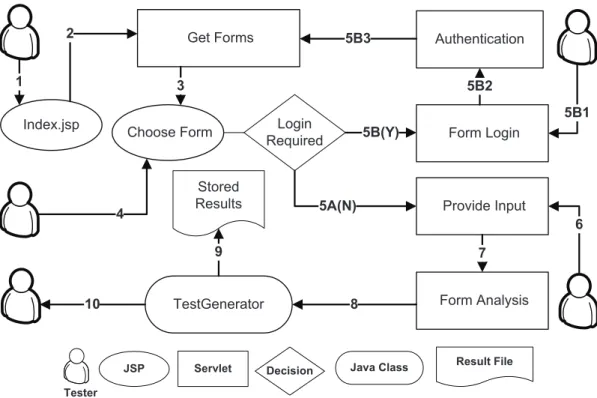
Test case generation, as defined in the previous chapter, is performed by an automated tool, AutoBypass. The tool is an extension and modification of HttpUnit, an open source package. HttpUnit is written in Java and emulates web browser behavior by allowing Java programs to manipulate HTML elements, submit requests and receive responses that can be parsed and examined [7]. A new approach was followed to modify HttpUnit and adapt it to the functionality required to perform automated test case generation based on bypass methods. By itself, HttpUnit simulates the behavior of a web browser, yet it requires manual creation of test classes that will test specific forms, fields and URLs that are known in advance. In the case of Bypass testing, a dynamic approach to parse HTML pages needed to be designed, since that form information is not available until the interface is parsed and analysed. Figure 4.1 shows the interactions of the user and the various components of AutoBypass. The functionality of the tool is defined in the following sections.
4.1
Interface Parsing
As a first step, a tester provides a URL for the application to be tested. This initial screen is shown in figure 4.2. Upon submission, the tool parses the input and checks whether it is a valid URL. The document corresponding to that URL is received and analyzed. All anchors, forms, and script elements are obtained and made available to the application.
Sequence Event
1 The tester provides a URL for the application to be tested
2 All anchors, forms, and script elements are obtained and made available to the application
3 The request is forwarded to a component that presents the forms and the URLs found
4 The tester is presented with a list of forms and URLs available to select for testing
5A No authentication is required (proceed to seq. 6)
5B The tester chooses to test password protected components
5B1 The tester provides the authentication information for tested application 5B2 Submit login name and password to the application. A session is
established by the WebConversation object and the subject application (Return to Seq. 4)
6 The tester provides test input
7 Bypass rules are applied to create test cases 8 Submit invalid requests to the application 9 Test responses are stored to file
10 Result summary presented to the tester 1 Index.jsp Get Forms JSP 3 2 Choose Form Provide Input Servlet 4 Decision Login Required 5A(N)
5B(Y) Form Login Authentication 5B2 5B3 Tester 5B1 6 Form Analysis 7 Java Class TestGenerator 8 Result File Stored Results 10 9
Figure 4.2: AutoBypass - Main Page
4.2
Interface Analysis
Given a valid URL for the subject application, the request is forwarded to a compo-nent that presents the forms and the URLs found. Figure 4.3 shows a sample output for this stage. The tester is presented with a list of forms available and required to select the form that test cases will be generated for this set. In addition, URL references (links) are identified and processed in order to perform optional test case generation as described in chapter 3.
At this point, the application also detects whether the forms that were found in-clude login fields. That is decided by parsing the field names (e.g. login, user name etc.) and also by detecting password controls. If the tester selects to test password protected components, he or she may choose to provide authentication information. The authentication process takes place through submitting login name and password
to the application. A session is established by the HttpUnit.WebConversation object and the subject application. Yet, protected areas present a different set of input forms to the users. For that reason, AutoBypass forwards the request back to step two, where the new output of the tested application is analyzed. The tester is then presented with a new set of forms and URL groups that can be analyzed. In ad-dition, a new field is available to give the option for testing a different area of the web application that that was not accessible prior to authentication but now can be reached.
4.3
Test Inputs
The selected form is analyzed and all controls are identified. The interface shown in figure 4.4 is generated based on the subject’s form fields, and allows the tester to provide test inputs. As discussed in chapter 3, the set of parameter-value(s) pairs that will be transmitted to the server for the generated test cases should be all valid with the exception of the modified parameter in each test case. For that reason, the tester shall provide a complete set of valid parameters (a set that would result in a known valid response conforming to the constraints of the HTML interface), and a set of invalid parameters that will be used in the invalidated requests.
For every control, the default values from the HTML specification are loaded au-tomatically if available, and can be changed. The default values will constitute the valid set for this parameter. The user will then have the opportunity to specify ad-ditional values that violate the interface constraints. For instance, given an interface with an input control having a maxlength string constraint, the tester can specify a string larger than would normally be allowed. The tester can enter additional values
separated by commas, which will define the pool of new options for use in the bypass testing automation. Invalid inputs can also be specified by selecting invalid characters (empty string, control characters, etc).
Some variations for the tester input values occur for the disabled controls and buttons. Disabled controls would not be successful and thus their default values would not be transmitted to the server. For that reason, the default values of disabled items, if available, are automatically transferred to the test value set for this parameter. Buttons in HTML forms create another challenge for the automation of bypass testing. A form may have more than one button that can be used to submit the request and can carry different values that will affect the processing in the server. Thus, it is unrealistic to use all buttons and their values in the default parameter-value pairs. The tester chooses which main button will be used as the standard in the test set. If no button is specified, the application will arbitrarily pick one. The remaining buttons will be used as part of the input domain for other violation rules (e.g. control addition).
Finally, a field for additional parameter-value pairs is provided. Using this text box, the tester can specify additional input parameters and values. A specific format is required to allow multiple parameters that may have zero or more values (e.g. sim-ulating a select control with multiple selection). The format required is a parameter name followed by a colon ’:’ and its value set. Value set may include zero or more values separated by the dollar sign ($). Parameter name-value pairs are separated by semi-colons. For example:
4.4
Test Case Generation
When the collection of the control elements and their test values are constructed, bypass rules are applied to create test cases, generate invalid requests and finally submit them to the application. A java class,TestGenerator (TG), was implemented to generate and run the test cases. Every new test set will generate a new instance of TG given a set of parameters that would specify the test case generation, such as the WebResponse and WebConversation, which are objects that contain the subject forms and links from its initial response and current HTTP session, a Map with the default values for each control, a Map with the input domain that includes the test values provided by the user, a Map with the buttons to be used for submission and other operational parameters.
The map representation of the parameter value pairs is initially a concept bor-rowed from the Java servlet API [2], which provides the functiongetParameterMapto retrieve the request’s parameter mappings. This function returns a Map containing parameter names as keys corresponding to parameter values. In this API, the keys are represented by a String and the values by String Array. Note that for each pa-rameter in a HTTP request, there may be more than one value (e.g. drop down fields that allow multiple selections) that are stored in the value array. In the AutoBypass implementation, a Set data structure was used to represent the parameter’s values, instead of the string array to allow a flexible environment for value addition and omission, as well as to create a homogenous approach for all the test data collected (default values, invalid parameters, URL parameters, etc.).
As each of the bypass constraint violation rules is applied, a Map of parameter-value pairs is generated. A member function is implemented to accept the mappings that represent the invalid request. This function creates a simplified HTML form equivalent to the test case specification, stores it in a local HTML file and then requests a WebResponse object using the HttpUnit API.
The generated HTML represent an invalidmutated version of the valid parameter-value set. The WebForm is then retrieved in the response and added in the a global Vector that stores all the test cases waiting to be submitted. Upon completion of the test case generation, TG uses the runTests method, which iterates through the vector that contains the mutant forms and submits them to the subject application using the pre-established session. For each test case, the test response is stored in a file along with the test case information (including a public URL for the mutated form and response and the form control related to this test case with its original and modified values).
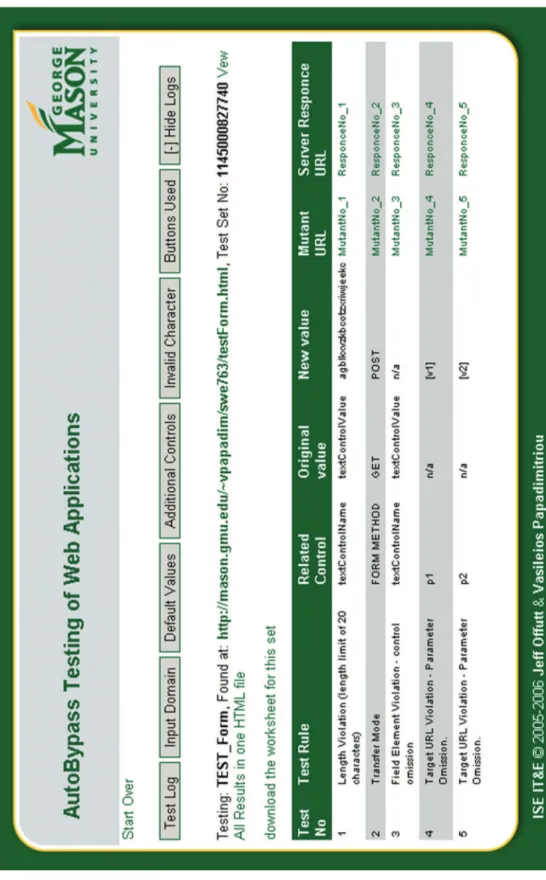
The tester is presented with the final screen of the application that includes the test result summary. An example is shown in figure 4.5. The tester can review a table of all the tests generated and use links to the subject’s responses to review each test case’s result. Together with the the result table, the tester can also access logs that will provide further information, including the test generation log, the input domain map, the default value map, the additional controls specified, the invalid characters selected for each control, and the buttons used.
A major issue with the automation of web application testing is still the review of the application responses. Indeed, the bypass methodology produces a variety of mutated requests that are not expected to result in the some predefined application
output. The usual approach used in unit testing frameworks is to compare the results with a predefined output set given a predefined input set. This is not the case with the automation of bypass, since that invalid requests may produce different responses. Therefore, the review of the results must be performed by a human that will have to account for the mutations created and whether the response of the application was appropriate. In this process, the two generated HTML documents for each test case (mutant form and the subject’s response) are of special importance for the review and for that reason, they are both stored to a local disk with web access permissions to allow later access for evaluation by the tester.
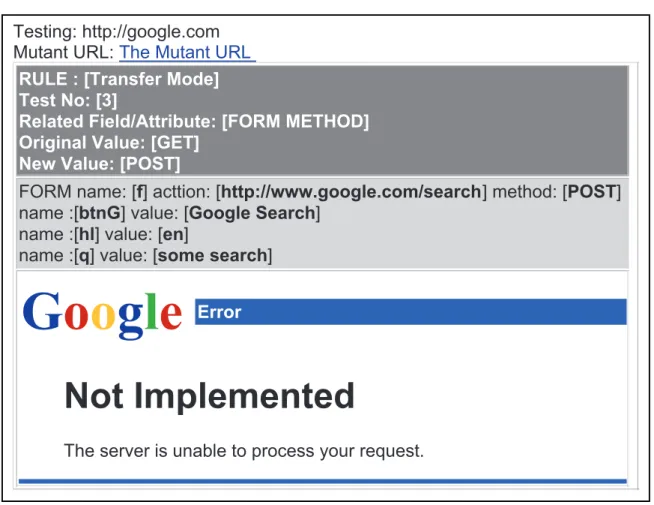
The result files follow a specific structure with four parts as shown in the example on figure 4.6. The first part, on top, includes the URL of the subject application in which the form tested was found, in addition to a link to the mutant form that was used to produce this response. The second part includes the test case description with the rule information, the test case number, the related control, the original value(s), and the modified value(s). The rule used to generate this test case may include additional information. For instance, in a length constraint violation, the control’s maxlength is reported.
Note that in special cases, original and modified values may not be applicable; such examples include the control omission rules that will not have a modified value since they are omitted all together, and the control addition which will not have an original value. The third part consists of the mutant form control list along with their values as submitted. The last part of the result output is a capture of the HTML response from the subject application. It is important to note that other supporting elements, such as that images and external script files, are not saved with the result.
Testing: http://google.com Mutant URL: The Mutant URL
RULE : [Transfer Mode] Test No: [3]
Related Field/Attribute: [FORM METHOD] Original Value: [GET]
New Value: [POST]
FORM name: [f] acttion: [http://www.google.com/search] method: [POST] name :[btnG] value: [Google Search]
name :[hl] value: [en]
name :[q] value: [some search]
Not Implemented
The server is unable to process your request.
theForm.getBaseURL(): http://www.google.com/ theForm.getAction() :/search
btnG: hl: q:
Submit This Mutant Google Search en
some search
Figure 4.7: AutoBypass - Example Mutant Form
That may produce some display limitations that should not affect on the evaluation of the results.
The mutant forms provide the ability to verify the result by accessing the subject with a common browser. During the development of the automated test tool, it was very important to have access to a copy of the mutant forms and verify the automated responses. Thus, an HTML version of the mutated form is included in the test case’s result package. For instance, the mutant form for the response discussed above can be accessed with a browser and resubmitted manually. Figure 4.7 shows the HTML version of the mutant form.
Initially, a generic HTML submit button was introduced that had a name and a value that were transmitted along with the mutated request. For that reason, a scripted submission is provided to avoid the addition of parameters out of the test case scope.
A goal of this project is to use the theory of bypass testing to implement an automated tool that can generate test cases and provide developers with an efficient way to use the bypass method to produce better applications. This chapter presents results from applying this tool to a mix of commercial, open source, and proprietary web applications.
5.1
Experiment Design
The nature of web applications makes testing very complex and tedious. In general, one can follow two approaches to test web applications using the bypass method, a generic approach and a specific approach. The generic approach is to test the application with all possible fields and all possible values for all the rules defined previously in this paper. For example, assuming a text field t with a constraint for maxlength=“n”, test cases are generated for the value of twith length=0,1,...,n,n+1. On the other hand, the specific approach is to test a field only with values produced by the rules defined above. For the example above, the text field t would be tested with a value oflength=0, and with a value oflength=n+1. This experiment used the specific approach, which generates fewer test cases. In fact, the foundation of bypass testing is to test values that are restricted by the client side interface; we assume that developers perform some basic testing with values that satisfy these requirements.
5.1.1
Hypothesis
Taking into consideration that modern web applications should be designed and built with reliability, usability, and security in mind, it is assumed that the applications used as subjects have been tested by their designers. The testing method of the subject developers are not often well known and quite possibly may not be well defined. However, the fact that the subject applications are in the production phase suggests that extensive testing was performed by the developers. In addition, the subjects are applications that have been used by large number of users.
In order to validate the effectiveness of bypass testing, one can suggest that this new method will reveal additional faults on the subject applications. However, due to the diverse set of subjects used in this experiment and also the fact that testing was performed in few components of each subject, the author can not statistically generalize this proposition [6, 10, 12, 18]. Instead a null hypothesis is formed:
H0: Bypass testing of web applications will not expose more faults than standard testing
5.1.2
Independent Variables
There is one independent variable in this experiment, which is the method of testing web applications. Two values are used in this study:
1. Bypass method of testing web applications.
5.1.3
Dependent Variables
This experiment is designed to study potential faults, failures, and security vulner-abilities in web applications. Therefore, the dependent variables for this study are the types of the server responses given a request submission. The main concept of the original experiment by Offutt et al. [14] will be followed and server responses will be categorized into three areas, valid responses (V),faults and failures (F), andexposure (E). Valid responses are when invalid inputs are adequately processed by the server. Faults and failures include invalid inputs that cause abnormal server behavior. Typically, the server’s automatic error handling mechanisms will catch the errors. Finally, exposure occurs when invalid input is not recognized by the server and abnormal software behavior is exposed to the users.
An important aspect of the responses evaluation is appropriateness vs. expectancy. That is, upon the submission of an invalid request, the servers response cannot be evaluated according to the result expected, since an expected response is not defined for invalid input; as least for the end user. Thus the results for invalid requests cannot be compared with some expected response. Instead, the responses are evaluated by examining the appropriateness of the handling action for the invalid input by the application.
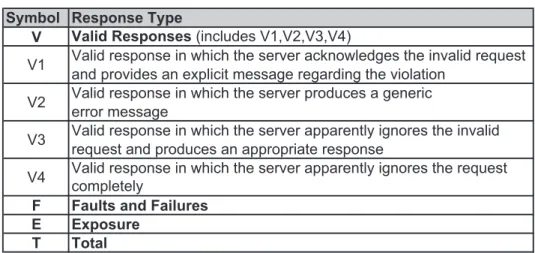
Preliminary results showed a variety of responses that comply with the definition of the valid response. Specifically, there are test cases that produce a specific error message by the application in regards to the invalid parameter. An example is when the server would respond with a message like “The zip code you entered is invalid” or “We can not process your request” or “Your browser sent an invalid request”. Some other test cases produced generic messages upon receiving invalid requests. For
instance, messages such as “Server is unavailable, try later” or “Server Error” are returned. Note that this type of server error message is displayed in the context of the application interface, so it is assumed that handling took place at the application level. This type of message may be less helpful than the others, but this research did not evaluate usability. Next, there are cases where applications treat invalid requests by apparently ignoring them and processing the request, which results in output that corresponds to a valid response. Finally, some test cases produce responses that ignore the invalid request and do not process the input. For instance, a request is submitted and the server’s response is the originating web page. Therefore, a breakdown of these cases is provided as subsets of the valid response definition:
• (V1) Valid response in which the server acknowledges the invalid request and provides an explicit message regarding the violation
• (V2) Valid response in which the server produces a generic error message • (V3) Valid response in which the server apparently ignores the invalid request
and produces an appropriate response
• (V4) Valid response in which the server apparently ignores the request com-pletely
In the author’s view, the responses in V3 (provided that no error occurs in the application’s database or the user’s session) or V1 are the desired behavior of an application in general. On the other hand, for the responses that produce generic messages (V2), one can claim that a fault was caught somewhere, but not 100% adequate handling took place. This is bases in usability factors, which are hard to
quantify; therefore, such responses are considered valid based on the fact that we can only see the result of the test in the HTML response. Yet, errors may become exposed if the back end of the application would be available.
Since there is no access to the server, source code or media (e.g. database or files), one cannot determine whether the invalid inputs cause an invalid state on the server but the response to the user is as expected or it appears appropriate. Evaluation of the validity of a response can take place only by external inspection of the output. By classifying the valid responses in the above sub-categories one can better evaluate the error handling mechanisms.
5.2
Subjects
This section provides details about the subjects,the test cases generated, the responses from the servers, and finally some confounding variables that may have affected the results.
Several criteria were used to create a pool of subject applications for this ex-periment. The subjects in this experiment are selected based on complexity of the application, and the ability to perform bypass testing. The complexity criterion is estimated by examining the components that interact through the HTTP requests. One characteristic of bypass testing is that no access to the application’s source code is required; therefore, the complexity of a subject is determined only by external in-spection. The ability to perform bypass testing is determined by the compatibility of the web interface of each application. For example, AutoBypass currently supports parsing HTML pages with some limitations on the support of JavaScript. Thus, web interfaces that use extensive scripting to do things such as substantially modify the
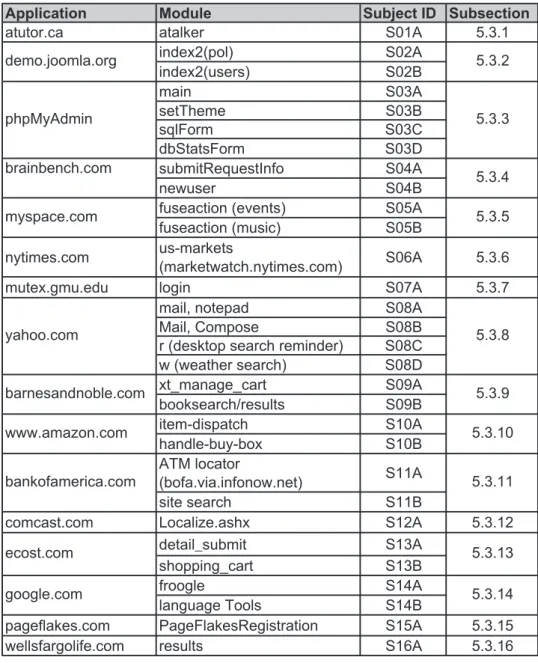
DOM or different technologies, such as Macromedia Flash, cannot currently be tested. Test data were collected from various publicly available applications. The sample included open source applications as well as proprietary commercial web applications. All of the commercial application have a large user base, yet some are significantly larger than others. This particular mix of applications is composed of a variety of web applications and their responses to bypass testing. Table 5.1 lists the 16 subject applications and their 30 components.
5.3
Results
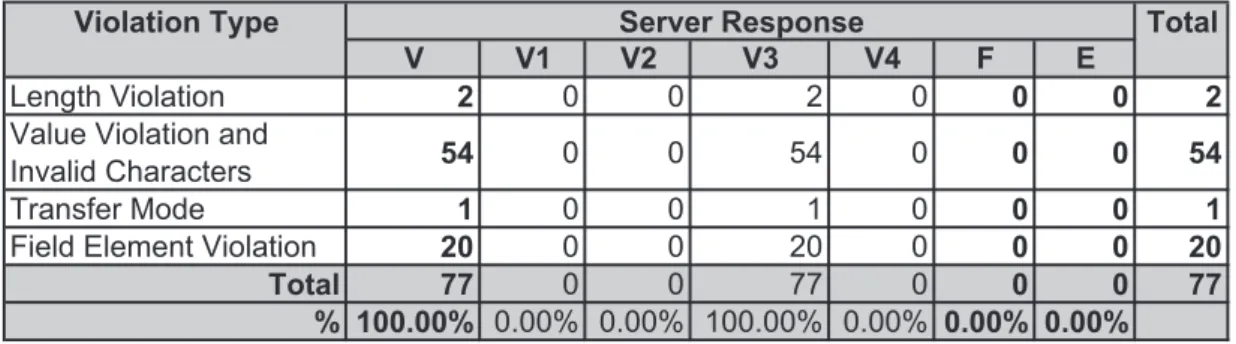
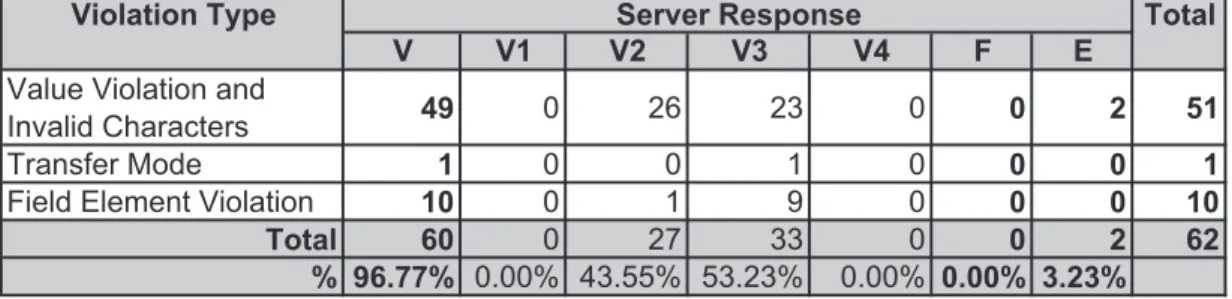
The results are presented in this section one subject application per subsection (5.3.1-5.3.16), with a summary in subsection 5.3.17. Result tables include the number of test cases created for each subject together with the type of response as described in the dependent variables of the experiment. Note that the legend provided in table 5.2 for the types of server responses is used for all the results presented.
5.3.1
ATutor Learning Content Management System
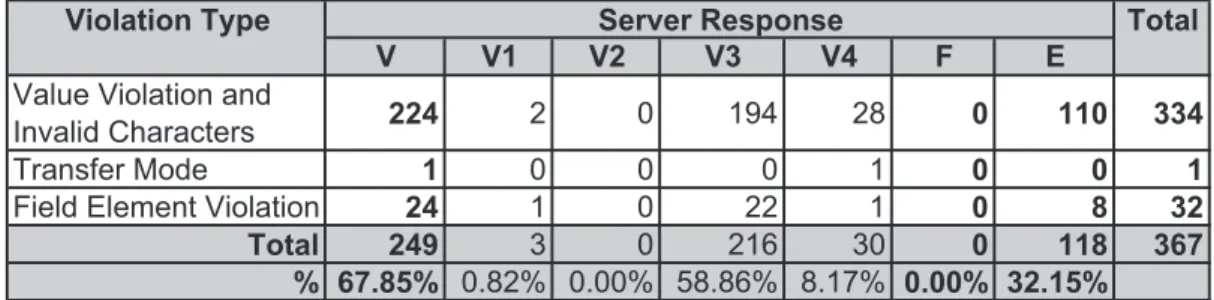
The first subject of the study is ATutor, an Open Source Web-based Learning Content Management System (LCMS) [3]. ATutor is a product of the Adaptive Technology Resource Centre of the University of Toronto. ATutor is written in PHP and includes a large nubmer of components. The component tested in this experiment is the ATalker module, which is a Web-based text-to-speech utility. From the 367 test cases, 67.9% resulted in valid responses, 0% in faults and failures, and 32.2% in exposure. Results for this module are presented in table 5.3.
Table 5.1: Experiment Subjects b u S e l u d o M n o i t a c i l p p A ject ID Subsection 1 . 3 . 5 A 1 0 S r e k l a t a a c . r o t u t a A 2 0 S ) l o p ( 2 x e d n i index2(users) S02B A 3 0 S n i a m B 3 0 S e m e h T t e s C 3 0 S m r o F l q s dbStatsForm S03D submitRequestInfo S04A B 4 0 S r e s u w e n
fuseaction (events) S05A fuseaction (music) S05B nytimes.com us-markets (marketwatch.nytimes.com) S06A 5.3.6 7 . 3 . 5 A 7 0 S n i g o l u d e . u m g . x e t u m
mail, notepad S08A
Mail, Compose S08B
r (desktop search reminder) S08C w (weather search) S08D xt_manage_cart S09A booksearch/results S09B item-dispatch S10A handle-buy-box S10B ATM locator (bofa.via.infonow.net) S11A B 1 1 S h c r a e s e t i s
comcast.com Localize.ashx S12A 5.3.12
GHWDLOBVXEPLW S13A shopping_cart S13B A 4 1 S e l g o o r f language Tools S14B
pageflakes.com PageFlakesRegistration S15A 5.3.15 6 1 . 3 . 5 A 6 1 S s t l u s e r m o c . e f il o g r a f s ll e w ecost.com google.com 5.3.9 5.3.10 5.3.11 5.3.13 5.3.14 barnesandnoble.com www.amazon.com bankofamerica.com yahoo.com 5.3.5 5.3.8 myspace.com phpMyAdmin demo.joomla.org brainbench.com 5.3.2 5.3.3 5.3.4
Table 5.2: Result Legend
Symbol Response Type
V Valid Responses (includes V1,V2,V3,V4)
V1 Valid response in which the server acknowledges the invalid request and provides an explicit message regarding the violation
V2 Valid response in which the server produces a generic error message
V3 Valid response in which the server apparently ignores the invalid request and produces an appropriate response
V4 Valid response in which the server apparently ignores the request completely
F Faults and Failures E Exposure
T Total
violation rules. Most of these test cases caused the application to reference a file that does not exist. As a result an HTTP error 404 was presented in the main body of the interface, while the navigation, the header, and footer of the interface printed correctly. Other invalid requests created a corrupted output from the application. In this case the output is a sound file which is produced by the text-to-speech utility according to the input parameters specified in the web interface. Typically, other parameters (e.g. language setting) with invalid values were used to produce the speech file instead the “textIn” which specifies the text to become speech.
Finally, from the results of this module, one can see that more than 90% of the test cases were generated using the value violation rules. Note that as described in the previous chapters, AutoBypass does not implement the script constraint violations. The tester can inspect the HTML interface and detect fields that use scripting to detect invalid inputs and also types of controls that have predefined values. In such cases test values can be used by selecting one or more typical invalid strings provided in the AutoBypass interface. In this experiment, invalid characters are used as inputs