This project has received funding from the European Union’s Seventh Framework Programme for research, technological development and demonstration under grant agreement no 318201
WP4 – Mobility-related Data as a Service
D4.2: Cloud-based Intelligent Infrastructure Prototype
Deliverable Lead: ASCContributing Partners: TUDA
Delivery Date: 09/2014
Dissemination Level: Public
Version 1.00
This deliverable describes the work carried out during the development of the prototype of the Cloud-based Intelligent Infrastructure component of the SIMPLI-CITY platform. It specifies the scope of this version and the degree of fulfilment of the requirements to be covered by the component. Moreover it specifies how to install and execute the different subcomponents implemented.
D4.2_Cloud-based_Intelligent_Infrastructure_Prototype_v1.00_E C_Approved.docx Document Version: 1.00 Date: 2015-04-21 Status: Approved Page: 2 / 35 http://www.simpli-city.eu/ Copyright © SIMPLI-CITY Project Consortium. All Rights Reserved. Grant Agreement No.: 318201
Document Status Deliverable Lead Jan Reehuis, ASC
Internal Reviewer 1 Philipp Hoenisch, TUV
Internal Reviewer 2 Marina Giordanino, CRF
Type Deliverable
Work Package WP4: Mobility-related Data as a Service
ID D4.2: Cloud-based Intelligent Infrastructure Prototype
Due Date 30.09.2014
Delivery Date 24.09.2014
Status Approved
Document History
Contributions
V0.1, Stefan Schulte, Philipp Hoenisch, TUV, 04.12.2012, Added document structure.
V0.2, Jan Reehuis, ASC, 09.09.2014, adapted document structure to deliverable. V0.3, Jan Reehuis, ASC, 16.09.2014, integrated the review comments from TUV V0.3, Jan Reehuis, ASC, 18.09.2014, integrated the review comments from CRF V1.0, Jan Reehuis, ASC, Stefan Schulte, 23.09.2014, minor layout changes
Final Version September 24th, 2014
Disclaimer
The views represented in this document only reflect the views of the authors and not the views of the European Union. The European Union is not liable for any use that may be made of the information contained in this document.
Furthermore, the information is provided “as is” and no guarantee or warranty is given that the information is fit for any particular purpose. The user of the information uses it at its sole risk and liability.
D4.2_Cloud-based_Intelligent_Infrastructure_Prototype_v1.00_E C_Approved.docx Document Version: 1.00 Date: 2015-04-21 Status: Approved Page: 3 / 35 http://www.simpli-city.eu/ Copyright © SIMPLI-CITY Project Consortium. All Rights Reserved. Grant Agreement No.: 318201
Project Partners
Vienna University of Technology (Coordinator),
Austria Ascora GmbH, Germany
TIE Nederland B.V., The Netherlands Technische Universität Darmstadt, Germany
IBM Research – Ireland
Smarter Cities Technology Centre Forschungsgesellschaft Mobilität, Austria
Talkamatic AB, Sweden Atos Worldline, Spain
D4.2_Cloud-based_Intelligent_Infrastructure_Prototype_v1.00_E C_Approved.docx Document Version: 1.00 Date: 2015-04-21 Status: Approved Page: 4 / 35 http://www.simpli-city.eu/ Copyright © SIMPLI-CITY Project Consortium. All Rights Reserved. Grant Agreement No.: 318201
Executive Summary
This deliverable describes the work carried out during the development of the prototype of the Cloud-based Intelligent Infrastructure component of the SIMPLI-CITY Data Processing. The document starts by introducing the Cloud-based Intelligent Infrastructure component and describing the scope of this prototype.
Afterwards, the degree of fulfilment of each requirement to be covered by the component and specified in the Requirements Analysis Report (D2.3) is described.
In this final deliverable, the complete functionality of the Cloud-based Intelligent Infrastructure is given. It provides the functionality of storing and requesting data to/from the Cloud Storage and it supports the three different storage types “Structured”, “Binary” and “Semantic”. Moreover it allows developers to provide access rights to other developers, so that they are able to access the data.
Section 5 of this document describes how potential users (i.e. SIMPLI-CITY developers and administrators) can prepare, install, execute and use the Cloud-based Intelligent Infrastructure component. For this, a step-by-step process to install and make use of the prototype is provided.
D4.2_Cloud-based_Intelligent_Infrastructure_Prototype_v1.00_E C_Approved.docx Document Version: 1.00 Date: 2015-04-21 Status: Approved Page: 5 / 35 http://www.simpli-city.eu/ Copyright © SIMPLI-CITY Project Consortium. All Rights Reserved. Grant Agreement No.: 318201
Table of Contents
1 Introduction ... 6
1.1 SIMPLI-CITY Project Overview ... 6
1.2 Deliverable Purpose, Scope and Context ... 7
1.3 Document Status and Target Audience ... 7
1.4 Abbreviations and Glossary ... 7
1.5 Document Structure ... 7
2 Prototype Scope and Requirements Coverage ... 8
2.1 Cloud-based Intelligent Infrastructure – General Information ... 8
2.2 Scope of the Prototype ... 9
2.2.1 Storage Backends ... 10
2.2.2 Storage Abstractors ... 10
2.2.3 Cloud Storage Facade ... 10
2.2.4 CRUD Interface ... 10
2.2.5 Cloud Storage Backend ... 10
2.2.6 Cloud Storage RESTful Interface ... 11
2.2.7 Cloud Storage Java API ... 11
2.3 Covered Requirements ... 12
3 Preparations ... 13
3.1 Server Side (System Administrators) ... 13
3.2 Cloud Storage Java API (Developers) ... 13
4 Installation (Deployment) ... 14
4.1 Server Side (System Administrators) ... 14
5 Execution and Usage of the Software ... 16
5.1 Server Side (System Administrators) ... 16
5.2 Cloud Storage Usage (Developers) ... 17
5.2.1 RESTful Interfaces ... 17
5.2.2 Cloud Storage Java API (Developers) ... 30
6 Limitations and Further Developments ... 34
6.1 Limitations ... 34
6.2 Further Developments ... 34
D4.2_Cloud-based_Intelligent_Infrastructure_Prototype_v1.00_E C_Approved.docx Document Version: 1.00 Date: 2015-04-21 Status: Approved Page: 6 / 35 http://www.simpli-city.eu/ Copyright © SIMPLI-CITY Project Consortium. All Rights Reserved. Grant Agreement No.: 318201
1
Introduction
SIMPLI-CITY – The Road User Information System of the Future – is a project funded by the Seventh Framework Programme of the European Commission under Grant Agreement No. 318201. It provides the technological foundation for bringing the “App Revolution” to road users by facilitating data integration, service development, and end user interaction. Within this document, the prototype of the Cloud-based Intelligent Infrastructure will be presented. The document accompanies the corresponding software prototype, which is the main content of the deliverable.
1.1 SIMPLI-CITY Project Overview
Analogously to the “App Revolution”, SIMPLI-CITY adds a “software layer” to the hardware-driven “product” mobility. SIMPLI-CITY will take advantage of the great success of mobile apps that are currently being provided for systems such as Android, iOS, or Windows Phone. These apps have created new opportunities and even business models by making it possible for developers to produce new apps on top of the mobile device infrastructure. Many of the most advanced and innovative apps have been developed by players formerly not involved in the mobile software market. Hence, SIMPLI-CITY will support third party developers to efficiently realise and sell their mobility-related service and app ideas by a range of methods and tools, including the Mobility Services and App Marketplaces.
In order to foster the wide usage of those services, a holistic framework is needed which structures and bundles potential services that could deliver data from various sources to road user information systems. SIMPLI-CITY will provide such a framework by facilitating the following main project results:
Mobility Services Framework: A next-generation European Wide Service Platform (EWSP) allowing the creation of mobility-related services as well as the creation of corresponding apps. This will enable third party providers to produce a wide range of interoperable, value-added services, and apps for drivers and other road users.
Mobility-related Data as a Service: The integration of various, heterogeneous data sources like sensors, cooperative systems, telematics, open data repositories, people-centric sensing, and media data streams, which can be modelled, accessed, and integrated in a unified way.
Personal Mobility Assistant: An end user assistant that allows road users to make use of the information provided by apps and to interact with them in a
non-distracting way – based on a speech recognition approach. New apps can be integrated into the Personal Mobility Assistant in order to extend its functionalities for individual needs.
To achieve its goals, SIMPLI-CITY conducts original research and applies technologies from the fields of Ubiquitous Computing, Big Data, Media Streaming, the Semantic Web, the Internet of Things, the Internet of Services, and Human-Computer Interaction. For more information, please refer to the project website at http://www.simpli-city.eu.
D4.2_Cloud-based_Intelligent_Infrastructure_Prototype_v1.00_E C_Approved.docx Document Version: 1.00 Date: 2015-04-21 Status: Approved Page: 7 / 35 http://www.simpli-city.eu/ Copyright © SIMPLI-CITY Project Consortium. All Rights Reserved. Grant Agreement No.: 318201
1.2 Deliverable Purpose, Scope and Context
The purpose of this document is to provide the means to use the prototype of the Cloud-based Intelligent Infrastructure and exploit its functionalities. For this, the scope and requirements of the Cloud-based Intelligent Infrastructure and this prototype, the requirements and preparations for administrators and developers, an installation and usage guide are provided.
The Cloud-based Intelligent Infrastructure prototype is the outcome of the discussions and implementation work done in project months 10 to 24. It provides an implementation of the functionalities of the Cloud-based Intelligent Infrastructure as provided with SIMPLI-CITY deliverables D3.2.1 (Functional Specification), and D3.2.2 (Technical Specification).
1.3 Document Status and Target Audience
This document is listed in the Description of Work (DoW) as “Public”, since the content is functional complete (beta prototype) but subject to changes, depending on the upcoming demands in other work packages and/or issues with the current implementation.
1.4 Abbreviations and Glossary
A definition of common terms and roles related to the realization of SIMPLI-CITY as well as a list of abbreviations is available in the supplementary document “Supplement: Abbreviations and Glossary”, which is provided in addition to this deliverable.
Further information can be found at http://www.simpli-city.eu.
1.5 Document Structure
This deliverable is broken down into the following sections:
Section 1 provides an introduction for this deliverable including a general overview of the project, and outlines the purpose, scope, context, status, and target audience of this deliverable.
Section 2 provides an overview of the scope and relationship of the prototype, showing were the Cloud-based Intelligent Infrastructure fits into the overall SIMPLI-CITY software framework and the outcome of the prototype. Furthermore, an assessment of the requirements covered by this prototype is given.
Section 3 presents the requirements and preparations to be done by administrators and software developers if they want to make use of the Cloud-based Intelligent Infrastructures prototype.
Section 4 states information about the installation and deployment of the provided software package.
Section 5 describes how administrators and software developers can execute and use the provided functionalities.
Section 6 discusses the current limitations of the prototype of the Cloud-based Intelligent Infrastructure.
D4.2_Cloud-based_Intelligent_Infrastructure_Prototype_v1.00_E C_Approved.docx Document Version: 1.00 Date: 2015-04-21 Status: Approved Page: 8 / 35 http://www.simpli-city.eu/ Copyright © SIMPLI-CITY Project Consortium. All Rights Reserved. Grant Agreement No.: 318201
2
Prototype Scope and Requirements Coverage
2.1 Cloud-based Intelligent Infrastructure – General Information
SIMPLI-CITY Server Side
Developer Web Cons oles Market-places Service Regis-try Cloud-Based Information Infrastructure Data Processing Service Runtime Environment Context-based Servi ce Personalization Moni-toring Services Data Prefetching Logic Sensor Abstraction and Interoperability Interfaces User-Centric & Open Data Access Developers
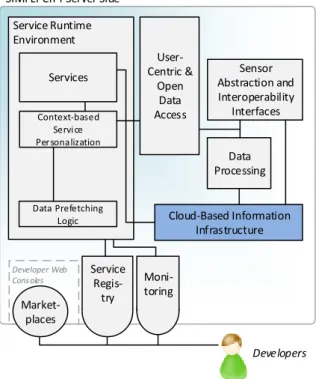
Figure 1: Location of Cloud-based Intelligent Infrastructure in the SIMPLI-CITY Global Architecture
The Cloud-based Intelligent Infrastructure will provide persistence functionality for SIMPLI-CITY. It will act as a service which is designed for managing different types of data in a persistent, scalable and efficient storage. Hence, access, storage, and retrieval of mobility-related data are performed through the Cloud-based Intelligent Infrastructure. The component will act as a data storage solution for information and serves as a source for static data that can be used by apps and services.
The Cloud-based Intelligent Infrastructure will be fed with information from apps (e.g., to store data from users), from services (e.g., to store settings or data for backend services) or from external data sources such as sensors or user centric data. It will be accessed by services, other components or apps but there will be no direct access from apps to the data storage: All App access will be performed via the Service Runtime Environment. The component will allow services, apps and components to create isolated data storage spaces which will not overlap with those of other components, services or apps. Those isolated storage spaces are referred to as “Buckets”, which is a concept originating from the Amazon S3 storage solution and has proved to be robust in many cloud based storage solutions. The bucket concept allows the usage of different storage backends in order to support different types of data storage. The project will provide NoSQL storage for structured JSON-based data, semantic storage and storage for binary data.
D4.2_Cloud-based_Intelligent_Infrastructure_Prototype_v1.00_E C_Approved.docx Document Version: 1.00 Date: 2015-04-21 Status: Approved Page: 9 / 35 http://www.simpli-city.eu/ Copyright © SIMPLI-CITY Project Consortium. All Rights Reserved. Grant Agreement No.: 318201
Figure 1 shows the location of the Cloud-based Intelligent Infrastructure in the SIMPLI-CITY Global Architecture. For the full Global Architecture, refer to deliverable D3.1.
2.2 Scope of the Prototype
R
R
Cloud Storage
R
Cloud Storage Java API
R R
Cloud Storage RESTful Interface
Cloud Storage Facade MongoDB
(NoSQL Backend)
NoSQL Abstractor Semantic Abstractor Binary Abstractor
Sesame (Semantic Backend) Amazon S3 (Binary Backend) CRUD Interface Other SIMPLI-CITY Components R R Service Runtime Environment Apps Services
Cloud Storage Backend
Buckets ACL
R R
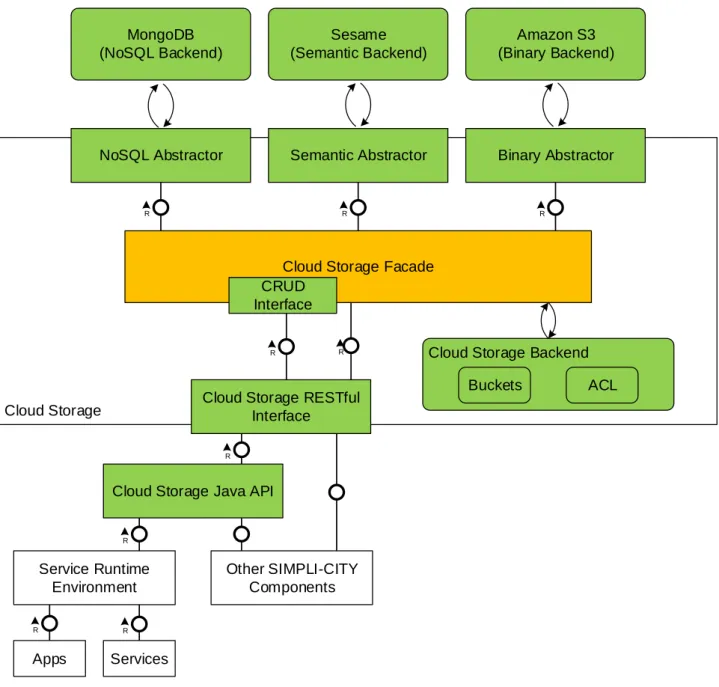
Figure 2: Scope of the Prototype of Cloud-based Intelligent Infrastructure
Figure 2 depicts the status of development of the prototype of Cloud-based Intelligent Infrastructure, showing the subcomponents that are covered within this prototype. Note, that this figure shows the Service Runtime Environment, Apps, Services and other SIMPLI-CITY components within the Cloud-based Intelligent Infrastructure; therefore, also other parts of the SIMPLI-CITY Global Architecture, which are not developed within this component, are depicted.
D4.2_Cloud-based_Intelligent_Infrastructure_Prototype_v1.00_E C_Approved.docx Document Version: 1.00 Date: 2015-04-21 Status: Approved Page: 10 / 35 http://www.simpli-city.eu/ Copyright © SIMPLI-CITY Project Consortium. All Rights Reserved. Grant Agreement No.: 318201
The status of the implementation is shown using the following colour codes:
Green: Fully implemented.
Orange: Partially implemented.
White: No implementation so far.
In the following subsections, the scope and status of the single subcomponents (as depicted in Figure 2) will be discussed in more detail. For the Functional Specification and Technical Specification of these subcomponents, refer to SIMPLI-CITY deliverables D3.2.1 and D3.2.2, respectively.
2.2.1 Storage Backends
Those are external storage systems offering a concrete storage facility for a storage type. SIMPLI-CITY supports NoSQL (MongoDB), Binary (Amazon S3) and Semantic (Sesame) Storages. The access to each of this storage types is implemented in this prototype.
2.2.2 Storage Abstractors
Abstractors provide an abstraction layer around concrete storage implementations. This allows SIMPLI-CITY to replace one storage engine with another one if necessary. The prototype provides a fully implemented abstraction layer in the Cloud Storage, so an exchange of a storage engine is easily possible.
2.2.3 Cloud Storage Facade
The Cloud Storage Facade hosts the CRUD Interface as well as more advanced query facilities to send generic queries to the backends and provide the possibility to manipulate the Access Control List. This component is responsible for the bucket management and handles the configuration and connections to the specific storage backend systems.
As the central SIMPLI-CITY user management is not available yet, the Cloud Storage uses a dummy user to assign buckets to. User credentials are accepted by the interfaces, but they are not validated or used. This will be changed and aligned during the development of the SIMPLI-CITY user management.
2.2.4 CRUD Interface
The CRUD Interface provides standard functionality for Create, Read, Update and Delete (CRUD), which is available for all storage types. The CRUD Interface acts as an interface for the Cloud Storage RESTful Interface. It decouples the CRUD operations from management operations or advanced queries. In this prototype the CRUD operations for the abstraction layer is provided. In this way all CRUD operations are also decoupled from a specific storage engine.
2.2.5 Cloud Storage Backend
The Cloud Storage Backend is used by the Cloud Storage Facade, which delegates the management of buckets and ACLs to this component. The Cloud Storage Backend holds the bucket definitions and ACLs.
D4.2_Cloud-based_Intelligent_Infrastructure_Prototype_v1.00_E C_Approved.docx Document Version: 1.00 Date: 2015-04-21 Status: Approved Page: 11 / 35 http://www.simpli-city.eu/ Copyright © SIMPLI-CITY Project Consortium. All Rights Reserved. Grant Agreement No.: 318201
2.2.6 Cloud Storage RESTful Interface
The Cloud Storage RESTful Interface provides the interface between the Cloud Storage and the external components like the Service Runtime Environment. This includes the access for all query and CRUD operations, the streaming access and the definition of simplified ACL functionalities. An observer interface enables the developer to get notified on a change in a bucket. The use is explained later in Section 5.2.1.
2.2.7 Cloud Storage Java API
The Cloud Storage Java API will provide the functionalities of the Cloud Storage RESTful Interface as an easy to use Java component. A component using the Cloud Storage Java API could be deployed on a different server or device than the Cloud Storage itself. To provide a flexible usage, the Cloud Storage Java API abstracts the RESTful interface and can so be used on a different physical machine. The use is later detailed in Section 5.2.2.
D4.2_Cloud-based_Intelligent_Infrastructure_Prototype_v1.00_E C_Approved.docx Document Version: 1.00 Date: 2015-04-21 Status: Approved Page: 12 / 35 http://www.simpli-city.eu/ Copyright © SIMPLI-CITY Project Consortium. All Rights Reserved. Grant Agreement No.: 318201
2.3 Covered Requirements
This section describes the degree of fulfilment of the requirements to be covered by Cloud-based Intelligent Infrastructure and specified in the Requirements Analysis Deliverable (D2.3) and the Functional Specification (D3.2.1).
Table 1: Requirements Related to Cloud-based Intelligent Infrastructure and their Degree of Fulfilment
Requirement Degree of Fulfilment Comment
Must Have Requirements
U80: Profile in the cloud
100%
In this prototype of the Cloud-based Intelligent Infrastructure the whole chain from the developer’s service to the structured storage backend is provide. So it is capable of storing structured data, for example the profile of a SIMPLI-CITY user. U81: Storage of data in the
cloud
U122: Storage of data in the cloud: binary, semantic and
structured 100%
All three requested storage backends are implemented in the Cloud-based Intelligent Infrastructure prototype. The Cloud Storage Facade abstracts the operations on specific backends and provides a single interface to the
developer.
Should Have Requirements
U121: Local storage of data
20%
Functionality is not covered by the prototype. The further development will take place in WP6 to have a seamless integration with the PMA. U123: Scalability of the cloud
infrastructure
25%
The prototype started to implement to offer a scalability of the Cloud-based Intelligent Infrastructure. As it is still in a prototype state, this
D4.2_Cloud-based_Intelligent_Infrastructure_Prototype_v1.00_E C_Approved.docx Document Version: 1.00 Date: 2015-04-21 Status: Approved Page: 13 / 35 http://www.simpli-city.eu/ Copyright © SIMPLI-CITY Project Consortium. All Rights Reserved. Grant Agreement No.: 318201
3
Preparations
This section provides information about what potential users (both administrators and software developers) need to prepare in order to use the functionalities of the delivered prototype.
The server side part of the Cloud-based Intelligent Infrastructure component will be executed by administrators of the SIMPLI-CITY Data Processing, whereas the Java API and REST interfaces will be used by developers.
3.1 Server Side (System Administrators)
In order to deploy the server side part of the Cloud-based Intelligent Infrastructure, it is necessary to have an Apache Felix package installed. It can be downloaded from:
http://felix.apache.org/downloads.cgi
For execution, the Apache Felix package has to be extracted and a Java Runtime must be installed.
As the Apache Felix Runtime Environment is just a plain Java package, it does not require a special installation. For running it later on as a background service or for an automatic start with the operating system, proper start scripts and/or a Java service wrapper is needed. As an example the Java Service Wrapper can be downloaded from:
http://wrapper.tanukisoftware.com/doc/english/download.jsp#stable
The documentation for the installation of this wrapper can be found under:
http://wrapper.tanukisoftware.com/doc/english/introduction.html
In this document, it is presumed that Apache Felix 4.4.1 is successfully extracted and can be started on the developer’s computer. An installation as a service is not needed.
It’s also necessary that the operating system hosting the server side must have the TCP networking port 8182 free, as this is the port that will be used by the Cloud-based Intelligent Infrastructure.
This prototype has been tested in Windows 7 and Ubuntu 12.04 Operating System with Java SE Development Kit 7, even though it is usable under all major Java platforms running in Windows or Linux.
3.2 Cloud Storage Java API (Developers)
Java Developers who wants to make use of the Cloud Storage Java API, have to include the Java API (eu.simpli-city.cloudstorage.javaapi-1.jar), Apache Commons-Codec 1.4 (commons-codec-1.4.jar) and the JSON.org 20131018 (json-20131018.jar) JAR bundle to the compile class path of their project.
For an easy use, the Cloud Storage Java API is a Maven bundle. If it is included into a Maven Project, the Apache Commons-Codec and JSON.org bundles will be downloaded automatically to the local Maven repository.
The Java API can be used in any Java project. It was tested with Java 7 but it should run with every major Java version.
D4.2_Cloud-based_Intelligent_Infrastructure_Prototype_v1.00_E C_Approved.docx Document Version: 1.00 Date: 2015-04-21 Status: Approved Page: 14 / 35 http://www.simpli-city.eu/ Copyright © SIMPLI-CITY Project Consortium. All Rights Reserved. Grant Agreement No.: 318201
4
Installation (Deployment)
This section provides guidelines on how to install and deploy the prototype of the Cloud-based Intelligent Infrastructure.
4.1 Server Side (System Administrators)
The server side is supplied in a form of JAR files. Namely all de.ascora.cloudstorage*.jar bundles and some dependencies like e.g. gson-2.2.4.jar.
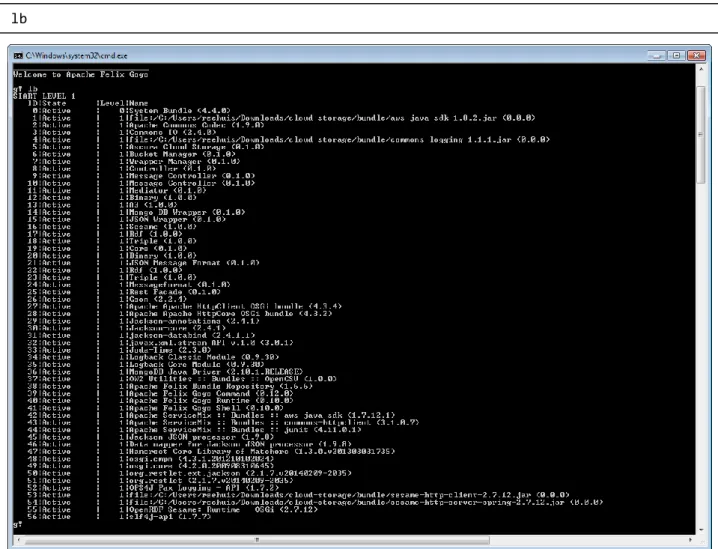
All JAR files have to be copied into the bundles folder in the Felix installation. If the Apache Felix server is already running, it has to be restarted to load and start the Cloud-based Intelligent Infrastructure bundles. Upon the start-up, the Cloud Storage packages are loaded and started. To check the start of all bundles, the command in Listing 1 shows a list of all deployed bundles in the Felix environment. In Figure 3 a successful example output is shown. All Cloud-based Infrastructure bundles should be in the state “Active”.
Listing 1: Command to Show all Deployed Bundles in Apache Felix
Figure 3: Output of all Deployed Bundles in the Apache Felix Server
In this Cloud Storage installation the credential configuration file for the binary Amazon Installation is missing, as they should not be available for public. For tests of the binary
D4.2_Cloud-based_Intelligent_Infrastructure_Prototype_v1.00_E C_Approved.docx Document Version: 1.00 Date: 2015-04-21 Status: Approved Page: 15 / 35 http://www.simpli-city.eu/ Copyright © SIMPLI-CITY Project Consortium. All Rights Reserved. Grant Agreement No.: 318201
storage type in the Cloud-based Intelligent Infrastructure, a AwsCredentials.properties file has to be created in the Apache Felix folder. It contains the Amazon S3 credentials, which have to be entered in the file like explained in Listing 2.
Listing 2: AwsCredentials.properties Content Template
secretKey=<yourSecretKey> accessKey=<yourAccessKey>
D4.2_Cloud-based_Intelligent_Infrastructure_Prototype_v1.00_E C_Approved.docx Document Version: 1.00 Date: 2015-04-21 Status: Approved Page: 16 / 35 http://www.simpli-city.eu/ Copyright © SIMPLI-CITY Project Consortium. All Rights Reserved. Grant Agreement No.: 318201
5
Execution and Usage of the Software
This section describes how to use the different subcomponents of the prototype.
5.1 Server Side (System Administrators)
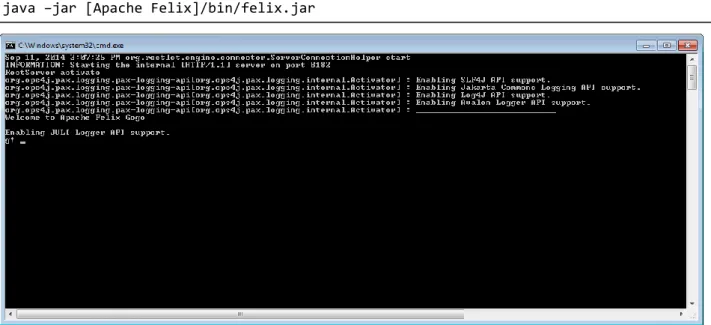
In order to execute the server side of the Cloud-based Intelligent Infrastructure, the Apache Felix package must be started, by executing the command in Listing 3.
Listing 3: Apache Felix Start Command
Figure 4: Apache Felix Window with Startup Logs
Once the Apache Felix package is running, a new window appears containing all log messages during the start-up process and running the server.
The server side uses RESTful interfaces to provide the Cloud Storage functionality to developers. For all available RESTful interfaces including their HTTP Operations, expected input parameters and given output results, please refer to Section 5.2 in this document.
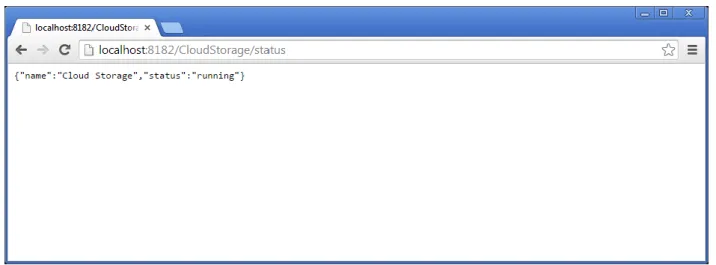
In order to test the GET method and the availability of the Cloud-based Information Structure, a browser can be used with the following URL:
http://localhost:8182/CloudStorage/status
The generated result shows a JSON response with some status information of the Cloud Storage.
D4.2_Cloud-based_Intelligent_Infrastructure_Prototype_v1.00_E C_Approved.docx Document Version: 1.00 Date: 2015-04-21 Status: Approved Page: 17 / 35 http://www.simpli-city.eu/ Copyright © SIMPLI-CITY Project Consortium. All Rights Reserved. Grant Agreement No.: 318201
Figure 5: Response of the RESTful Status Interface
As a result of this request, a set of logs are generated displaying the activity on the server side.
The following Figure 6 shows the logs generated by the activity done by the server side, and also displays the Status component activity log, executing the content sent by the server side.
Figure 6: Server Side and Data Template Activity Log
5.2 Cloud Storage Usage (Developers)
5.2.1 RESTful Interfaces
This chapter explains the usage of the Cloud-based Intelligent Infrastructure by RESTful interfaces. It targets developers which are not using Java. This deliverable also provides a dedicated Java API for developers. It is explained in Section 5.2.2.
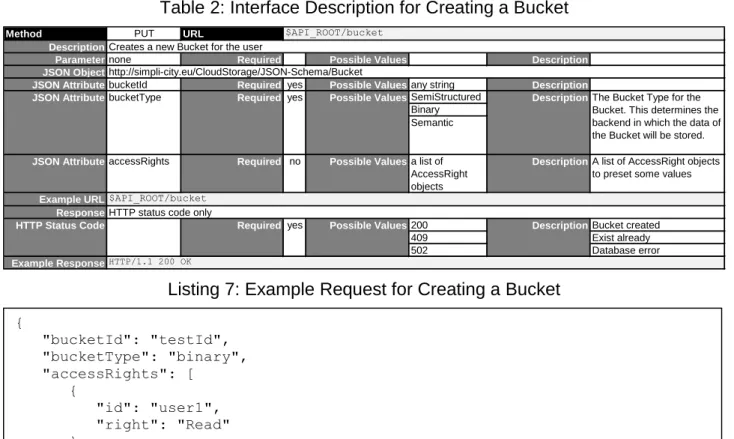
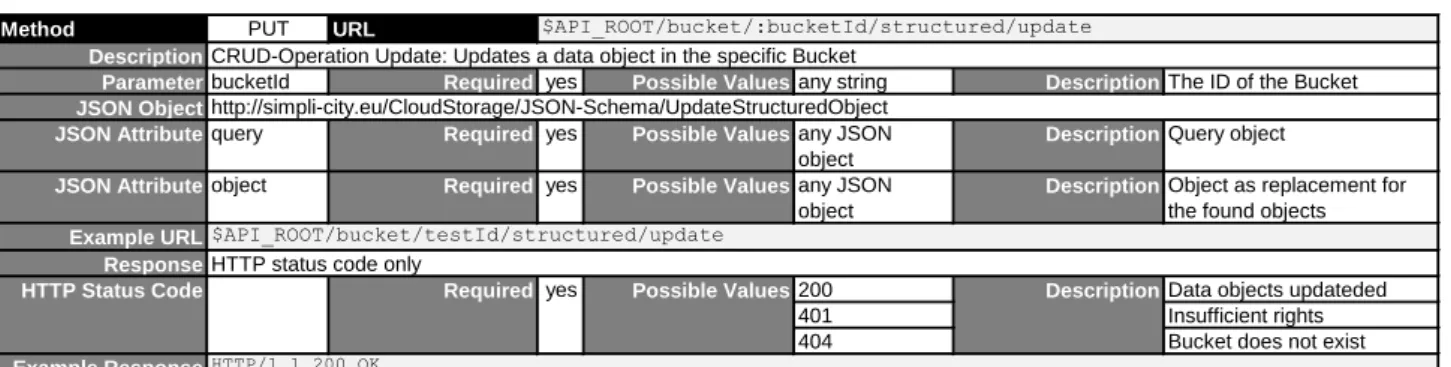
In this document, it is assumed, that the general use of REST interfaces is known to the developer. For each interface just a description and an example are given. Each description is presented as a table, which includes all necessary request and response parameters and their expected value types and values.
Section 5.2.1.3 details the expected input and output JSON objects for each REST call as JSON schema.
D4.2_Cloud-based_Intelligent_Infrastructure_Prototype_v1.00_E C_Approved.docx Document Version: 1.00 Date: 2015-04-21 Status: Approved Page: 18 / 35 http://www.simpli-city.eu/ Copyright © SIMPLI-CITY Project Consortium. All Rights Reserved. Grant Agreement No.: 318201
In the later figures, $API_ROOT is mentioned in the URL field. It is a placeholder for the server on which it is running. So the expected value is constructed like shown in Listing 4.
Listing 4: Construction of the $API_ROOT Variable
In general, the bucketId can be any string containing letters and numbers. This bucketId is used to access an own bucket with this id. If the developer wants to access a bucket of
another user, he has to append the userId of this user with a “@” to the bucketId. Listing 5: Example bucketId when Accessing an own Bucket
Listing 6: Example bucketId when Accessing a Bucket of Another User
General Bucket Interfaces
5.2.1.1.1 Bucket Create/Delete Interfaces
Table 2: Interface Description for Creating a Bucket
Listing 7: Example Request for Creating a Bucket
Method PUT URL
Description
Parameternone Required Possible Values Description
JSON Object
JSON AttributebucketId Required yes Possible Valuesany string Description
SemiStructured Binary Semantic
JSON AttributeaccessRights Required no Possible Valuesa list of
AccessRight objects
DescriptionA list of AccessRight objects to preset some values
Example URL Response 200 Bucket created 409 Exist already 502 Database error Example Response $API_ROOT/bucket
Creates a new Bucket for the user
http://simpli-city.eu/CloudStorage/JSON-Schema/Bucket
JSON AttributebucketType Required yes Possible Values DescriptionThe Bucket Type for the
Bucket. This determines the backend in which the data of the Bucket will be stored.
$API_ROOT/bucket
HTTP status code only
HTTP Status Code Required yes Possible Values Description
HTTP/1.1 200 OK $API_ROOT = http://<Server_Url>:8182/CloudStorage :bucketId = myTestBucket :bucketId = hisTestBucket@otherUser { "bucketId": "testId", "bucketType": "binary", "accessRights": [ { "id": "user1", "right": "Read" } ] }
D4.2_Cloud-based_Intelligent_Infrastructure_Prototype_v1.00_E C_Approved.docx Document Version: 1.00 Date: 2015-04-21 Status: Approved Page: 19 / 35 http://www.simpli-city.eu/ Copyright © SIMPLI-CITY Project Consortium. All Rights Reserved. Grant Agreement No.: 318201
Table 3: Interface Description for Deleting a Bucket
5.2.1.1.2 AccessRight Interfaces
Table 4: Interface Description for Adding an AccessRight to a Bucket
Listing 8: Example Request for Adding an AccessRight to a Bucket
Table 5: Interface Description for Removing an AccessRight from a Bucket
Listing 9: Example Request for Deleting an AccessRight from a Bucket
Method DELETE URL
Description
ParameterbucketId Required yes Possible Valuesany string DescriptionThe ID of the Bucket
Example URL Response
200 Bucket deleted
401 Insufficient rights
404 Bucket does not exist
Example ResponseHTTP/1.1 200 OK
$API_ROOT/bucket/:bucketId
Deletes the specific Bucket
$API_ROOT/bucket/testId
HTTP status code only
HTTP Status Code Required yes Possible Values Description
Method PUT URL
Description
ParameterbucketId Required yes Possible Valuesany string DescriptionThe ID of the Bucket
JSON Object
JSON Attributeid Required yes Possible Valuesany string DescriptionUser or group ID
Denied Read Write Super Example URL Response 200 Right updated 201 Right created 401 Insufficient rights
404 Bucket does not exist
Example Response
$API_ROOT/bucket/:bucketId/access
Adds Access Rights to a bucket
http://simpli-city.eu/CloudStorage/JSON-Schema/AccessRight
$API_ROOT/bucket/testId/access
HTTP status code only
HTTP Status Code Required yes Possible Values Description
HTTP/1.1 200 OK
DescriptionThe right to be granted Possible Values
yes Required right
JSON Attribute
Method POST URL
Description
ParameterbucketId Required yes Possible Valuesany string DescriptionThe ID of the Bucket
JSON Object
JSON Attributeid Required yes Possible Valuesany string DescriptionUser or group ID
Denied Read Write Super Example URL Response 200 Right deleted 401 Insufficient rights
404 Bucket does not exist
Example Response
$API_ROOT/bucket/:bucketId/access
Deletes Access Right from a bucket
http://simpli-city.eu/CloudStorage/JSON-Schema/AccessRight
$API_ROOT/bucket/testId/access
HTTP status code only
HTTP Status Code Required yes Possible Values Description
HTTP/1.1 200 OK
DescriptionThe right to be granted Possible Values Required yes right JSON Attribute { "id": "testUser", "right": "Read" } { "id": "testUser", "right": "Read" }
D4.2_Cloud-based_Intelligent_Infrastructure_Prototype_v1.00_E C_Approved.docx Document Version: 1.00 Date: 2015-04-21 Status: Approved Page: 20 / 35 http://www.simpli-city.eu/ Copyright © SIMPLI-CITY Project Consortium. All Rights Reserved. Grant Agreement No.: 318201
5.2.1.1.3 Observer Interfaces
Table 6: Interface Description for Adding an Observer to a Bucket
Listing 10: Example Request for Adding an Observer to a Bucket
Table 7: Interface Description for Removing an Observer from a Bucket
Listing 11: Example Request for Deleting an Observer from a Bucket
Bucket Type specific Interfaces
5.2.1.2.1 Structured Interfaces
Table 8: Interface Description for Adding Data to a Structured Bucket
Method PUT URL
Description
ParameterbucketId Required yes Possible Valuesany string DescriptionThe ID of the Bucket
JSON Object
JSON Attributelink Required yes Possible Valuesany string DescriptionLink to the web service as
Callback
JSON Attributedescription Required no Possible Valuesany string DescriptionMeta description of the
object Example URL
Response
200 OK
404 Bucket does not exist
Example ResponseHTTP/1.1 200 OK
$API_ROOT/user/:bucketId/observer
Adds an observer to the specific Bucket
http://simpli-city.eu/CloudStorage/JSON-Schema/ObserverObject
$API_ROOT/user/testId/observer
HTTP status code
HTTP Status Code Required yes Possible Values Description
Method POST URL
Description
ParameterbucketId Required yes Possible Valuesany string DescriptionThe ID of the Bucket
JSON Object
JSON Attributelink Required yes Possible Valuesany string DescriptionLink to the web service as
Callback
JSON Attributedescription Required no Possible Valuesany string DescriptionMeta description of the
object Example URL
Response
200 OK
404 Bucket or observer does not exist
Example ResponseHTTP/1.1 200 OK
$API_ROOT/user/:bucketId/observer
Deletes an observer from the specific Bucket
http://simpli-city.eu/CloudStorage/JSON-Schema/ObserverObject
$API_ROOT/user/testId/observer
HTTP status code
HTTP Status Code Required yes Possible Values Description
Method PUT URL
Description
ParameterbucketId Required yes Possible Valuesany string DescriptionThe ID of the Bucket
JSON Object Example URL Response
200 Data object created
401 Insufficient rights
404 Bucket does not exist
Example Response
$API_ROOT/bucket/:bucketId/structured/create
CRUD-Operation Create: Creates a data object in the specific Bucket
any JSON object to store
$API_ROOT/bucket/testId/structured/create
HTTP status code only
HTTP Status Code Required yes Possible Values Description
HTTP/1.1 200 OK { "link": "http://www.someWebservice.url" } { "link": "http://www.someWebservice.url" }
D4.2_Cloud-based_Intelligent_Infrastructure_Prototype_v1.00_E C_Approved.docx Document Version: 1.00 Date: 2015-04-21 Status: Approved Page: 21 / 35 http://www.simpli-city.eu/ Copyright © SIMPLI-CITY Project Consortium. All Rights Reserved. Grant Agreement No.: 318201
Listing 12: Example Request for adding data to a structured Bucket
Table 9: Interface Description for Reading Data from a Structured Bucket
Listing 13: Example Request for Reading Data from a Structured Bucket
Listing 14: Example Response for Reading Data from a Structured Bucket
Table 10: Interface Description for Updating Data in a Structured Bucket
Method POST URL
Description
ParameterbucketId Required yes Possible Valuesany string DescriptionThe ID of the Bucket
JSON Object Example URL Response
200 OK
401 Insufficient rights
404 Bucket does not exist
JSON Object Example Response
$API_ROOT/bucket/:bucketId/structured/read
CRUD-Operation Read: Retrieves as list of data objects from the specific Bucket
any JSON object to query for
$API_ROOT/bucket/testId/structured/read
HTTP status code and JSON object, a List of any JSON objects
HTTP Status Code Required yes Possible Values Description
list of any JSON objects
HTTP/1.1 200 OK
Method PUT URL
Description
ParameterbucketId Required yes Possible Valuesany string DescriptionThe ID of the Bucket
JSON Object
JSON Attributequery Required yes Possible Valuesany JSON
object
DescriptionQuery object
JSON Attributeobject Required yes Possible Valuesany JSON
object
DescriptionObject as replacement for the found objects Example URL
Response
200 Data objects updateded
401 Insufficient rights
404 Bucket does not exist
Example ResponseHTTP/1.1 200 OK
$API_ROOT/bucket/testId/structured/update
HTTP status code only
HTTP Status Code Required yes Possible Values Description
$API_ROOT/bucket/:bucketId/structured/update
CRUD-Operation Update: Updates a data object in the specific Bucket
http://simpli-city.eu/CloudStorage/JSON-Schema/UpdateStructuredObject { "description": "Testobject", "key": "myKey", "value": "TestValue" } { "key": "myKey" } [ { "description": "Testobject", "key": "myKey", "value": "TestValue" } ]
D4.2_Cloud-based_Intelligent_Infrastructure_Prototype_v1.00_E C_Approved.docx Document Version: 1.00 Date: 2015-04-21 Status: Approved Page: 22 / 35 http://www.simpli-city.eu/ Copyright © SIMPLI-CITY Project Consortium. All Rights Reserved. Grant Agreement No.: 318201
Listing 15: Example Request for Updating Data in a Structured Bucket
Table 11: Interface Description for Deleting Data in a Structured Bucket
Listing 16: Example Request for Deleting Data in a Structured Bucket
5.2.1.2.2 Binary Interfaces
The binary key in the following binary key interface has to be unique. The developer has to take care of it. Otherwise the existing binary data is overwritten.
Table 12: Interface Description for Adding Data to a Binary Bucket
Listing 17: Example Request for Adding Data to a Binary Bucket
Method POST URL
Description
ParameterbucketId Required yes Possible Valuesany string DescriptionThe ID of the Bucket
JSON Object Example URL Response
200 Data objects deleted
401 Insufficient rights
404 Bucket does not exist
Example Response
$API_ROOT/bucket/:bucketId/structured/delete
CRUD-Operation Delete: Deletes a data object in the specific Bucket
any JSON object to query for
$API_ROOT/bucket/testId/structured/delete
HTTP/1.1 200 OK
HTTP status code only
HTTP Status Code Required yes Possible Values Description
Method PUT URL
Description
ParameterbucketId Required yes Possible Valuesany string DescriptionThe ID of the Bucket
JSON Object
JSON AttributebinaryKey Required yes Possible Valuesany string DescriptionId to identify the binary data
in the bucket
JSON AttributebinaryData Required yes Possible Valuesany string of
Base64 data
DescriptionBinary data byte array as Base64 encoded String Example URL
Response
200 Data object created
401 Insufficient rights
404 Bucket does not exist
Example ResponseHTTP/1.1 200 OK
$API_ROOT/bucket/testId/binary/create
HTTP status code only
HTTP Status Code Required yes Possible Values Description
$API_ROOT/bucket/:bucketId/binary/create
CRUD-Operation Create: Creates a data object in the specific Bucket
http://simpli-city.eu/CloudStorage/JSON-Schema/BinaryObject { "query": { "key": "myKey" }, "object": { "key": "myKey", "value": "anotherValue" } } { "key": "myKey" } { "binaryKey": "myKey", "binaryData": "HBSDI2383…JHD4" }
D4.2_Cloud-based_Intelligent_Infrastructure_Prototype_v1.00_E C_Approved.docx Document Version: 1.00 Date: 2015-04-21 Status: Approved Page: 23 / 35 http://www.simpli-city.eu/ Copyright © SIMPLI-CITY Project Consortium. All Rights Reserved. Grant Agreement No.: 318201
Table 13: Interface Description for Reading Data from a Binary Bucket
Listing 18: Example Request for Reading Data from a Binary Bucket
Listing 19: Example Response for Reading Data from a Binary Bucket
Table 14: Interface Description for Updating Data in a Binary Bucket
Listing 20: Example Request for Updating Data in a Binary Bucket
Method POST URL
Description
ParameterbucketId Required yes Possible Valuesany string DescriptionThe ID of the Bucket
JSON Object
JSON AttributebinaryKey Required yes Possible Valuesany string DescriptionId to identify the binary data
in the bucket
JSON AttributebinaryData Required no Possible Valuesany string of
Base64 data
DescriptionBinary data byte array as Base64 encoded String Example URL
Response
200 OK
401 Insufficient rights
404 Bucket does not exist
JSON Object
JSON AttributebinaryKey Required yes Possible Valuesany string DescriptionId to identify the binary data
in the bucket
JSON AttributebinaryData Required yes Possible Valuesany string of
Base64 data
DescriptionBinary data byte array as Base64 encoded String Example Response
http://simpli-city.eu/CloudStorage/JSON-Schema/BinaryObject
HTTP/1.1 200 OK
HTTP status code and JSON object of type http://simpli-city.eu/CloudStorage/JSON-Schema/BinaryObject
HTTP Status Code Required yes Possible Values Description
$API_ROOT/bucket/:bucketId/binary/read
CRUD-Operation Read: Retrieves as list of data objects from the specific Bucket
http://simpli-city.eu/CloudStorage/JSON-Schema/BinaryObject
$API_ROOT/bucket/testId/binary/read
Method PUT URL
Description
ParameterbucketId Required yes Possible Valuesany string DescriptionThe ID of the Bucket
JSON Object
JSON AttributebinaryKey Required yes Possible Valuesany string DescriptionId to identify the binary data
in the bucket
JSON AttributebinaryData Required yes Possible Valuesany string of
Base64 data
DescriptionBinary data byte array as Base64 encoded String Example URL
Response
200 Data objects updateded
401 Insufficient rights
404 Bucket does not exist
Example ResponseHTTP/1.1 200 OK
$API_ROOT/bucket/testId/binary/update
HTTP status code only
HTTP Status Code Required yes Possible Values Description
$API_ROOT/bucket/:bucketId/binary/update
CRUD-Operation Update: Updates a data object in the specific Bucket
http://simpli-city.eu/CloudStorage/JSON-Schema/BinaryObject { "binaryKey": "myKey" } { "binaryKey": "myKey", "binaryData": "HBSDI2383…JHD4" } { "binaryKey": "myKey", "binaryData": "LECOIMEDC…73KD" }
D4.2_Cloud-based_Intelligent_Infrastructure_Prototype_v1.00_E C_Approved.docx Document Version: 1.00 Date: 2015-04-21 Status: Approved Page: 24 / 35 http://www.simpli-city.eu/ Copyright © SIMPLI-CITY Project Consortium. All Rights Reserved. Grant Agreement No.: 318201
Table 15: Interface Description for Deleting Data in a Binary Bucket
Listing 21: Example Request for Deleting Data in a Binary Bucket
5.2.1.2.3 Semantic Interfaces
Table 16: Interface Description for Adding Data to a Semantic Bucket
Listing 22: Example Request for Adding Data to a Semantic Bucket
Method POST URL
Description
ParameterbucketId Required yes Possible Valuesany string DescriptionThe ID of the Bucket
JSON Object
JSON AttributebinaryKey Required yes Possible Valuesany string DescriptionId to identify the binary data
in the bucket
JSON AttributebinaryData Required no Possible Valuesany string of
Base64 data
DescriptionBinary data byte array as Base64 encoded String Example URL
Response
200 Data objects deleted
401 Insufficient rights
404 Bucket does not exist
Example ResponseHTTP/1.1 200 OK HTTP status code only
HTTP Status Code Required yes Possible Values Description
$API_ROOT/bucket/:bucketId/binary/delete
CRUD-Operation Delete: Deletes a data object in the specific Bucket
http://simpli-city.eu/CloudStorage/JSON-Schema/BinaryObject
$API_ROOT/bucket/testId/binary/delete
Method PUT URL
Description
ParameterbucketId Required yes Possible Valuesany string DescriptionThe ID of the Bucket
JSON Object
JSON Attributenamespace Required yes Possible Valuesany string DescriptionNamespace of the RDF data
JSON AttributerdfXmlData Required yes Possible Valuesany RDFXML
data as string
DescriptionRDFXML data
Example URL Response
200 Data object created
401 Insufficient rights
404 Bucket does not exist
Example ResponseHTTP/1.1 200 OK
$API_ROOT/bucket/testId/semantic/create
HTTP status code only
HTTP Status Code Required yes Possible Values Description
$API_ROOT/bucket/:bucketId/semantic/create
CRUD-Operation Create: Creates a data object in the specific Bucket
http://simpli-city.eu/CloudStorage/JSON-Schema/SemanticObject { "binaryKey": "myKey" } { "namespace": "http://simpli-city.eu/rdf/TestOntology", "rdfXmlData": "<xml> … <\/xml>" }
D4.2_Cloud-based_Intelligent_Infrastructure_Prototype_v1.00_E C_Approved.docx Document Version: 1.00 Date: 2015-04-21 Status: Approved Page: 25 / 35 http://www.simpli-city.eu/ Copyright © SIMPLI-CITY Project Consortium. All Rights Reserved. Grant Agreement No.: 318201
Table 17: Interface Description for Reading Data from a Semantic Bucket
Listing 23: Example Request for Reading Data from a Semantic Bucket
Listing 24: Example Response for Reading Data from a Semantic Bucket
Table 18: Interface Description for Updating Data in a Semantic Bucket
Method POST URL
Description
ParameterbucketId Required yes Possible Valuesany string DescriptionThe ID of the Bucket
JSON Object
namespace sparql
JSON Attributenamespace Required no Possible Valuesany string DescriptionNamespace of the RDF data
for the query. Required when queryType is "namespace"
JSON Attributequery Required no Possible Valuesany SPARQL
query string
DescriptionSPARQL string to query RDFXML data. Required when queryType is "sparql".
Example URL Response
200 OK
401 Insufficient rights
404 Bucket does not exist
JSON Object
JSON AttributerdfXmlData Required yes Possible Valuesany RDFXML
data as string
DescriptionRDFXML data
JSON Attributenamespace Required no Possible Valuesany string DescriptionNamespace of the RDF data
Example Response
JSON AttributequeryType Required yes Possible Values DescriptionType to query for.
http://simpli-city.eu/CloudStorage/JSON-Schema/SemanticObject
HTTP/1.1 200 OK
HTTP status code and JSON object
HTTP Status Code Required yes Possible Values Description
$API_ROOT/bucket/:bucketId/semantic/read
CRUD-Operation Read: Retrieves as list of data objects from the specific Bucket
http://simpli-city.eu/CloudStorage/JSON-Schema/SemanticObject
$API_ROOT/bucket/testId/semantic/read
Method PUT URL
Description
ParameterbucketId Required yes Possible Valuesany string DescriptionThe ID of the Bucket
JSON Object
namespace sparql
JSON Attributequery Required no Possible Valuesany string DescriptionNamespace of the RDF data
for the query. Required when queryType is "namespace"
JSON Attributenamespace Required no Possible Valuesany string DescriptionSPARQL string to query
RDFXML data. Required when queryType is "sparql".
JSON AttributerdfXmlData Required yes Possible Valuesany RDFXML
data as string
DescriptionRDFXML data
Example URL Response
200 Data objects updateded
401 Insufficient rights
404 Bucket does not exist
Example ResponseHTTP/1.1 200 OK
$API_ROOT/bucket/testId/semantic/update
HTTP status code only
Description
HTTP Status Code Required yes Possible Values
$API_ROOT/bucket/:bucketId/semantic/update
CRUD-Operation Update: Updates a data object in the specific Bucket
http://simpli-city.eu/CloudStorage/JSON-Schema/SemanticObject
DescriptionType to query for.
JSON AttributequeryType Required yes Possible Values
{
"queryType": "sparql",
"query": "CONSTRUCT { ?s ?p ?o } WHERE {?s ?p ?o }" }
{
"rdfXmlData": "<xml> … </xml>" }
D4.2_Cloud-based_Intelligent_Infrastructure_Prototype_v1.00_E C_Approved.docx Document Version: 1.00 Date: 2015-04-21 Status: Approved Page: 26 / 35 http://www.simpli-city.eu/ Copyright © SIMPLI-CITY Project Consortium. All Rights Reserved. Grant Agreement No.: 318201
Listing 25: Example Request for Updating Data in a Semantic Bucket
Table 19: Interface Description for Deleting Data in a Semantic Bucket
Listing 26: Example Request for Deleting Data in a Semantic Bucket
Data Transfer Object JSON Schema
Listing 27: JSON Schema – UpdateStructuredObject Description
Method POST URL
Description
ParameterbucketId Required yes Possible Valuesany string DescriptionThe ID of the Bucket
JSON Object
JSON Attributenamespace Required yes Possible Valuesany string DescriptionNamespace of the RDF data
Example URL Response
200 Data objects deleted
401 Insufficient rights
404 Bucket does not exist
Example ResponseHTTP/1.1 200 OK HTTP status code only
HTTP Status Code Required yes Possible Values Description
$API_ROOT/bucket/:bucketId/semantic/delete
CRUD-Operation Delete: Deletes a data object in the specific Bucket
http://simpli-city.eu/CloudStorage/JSON-Schema/SemanticObject
$API_ROOT/bucket/testId/semantic/delete
{
"queryType": "sparql",
"query": "CONSTRUCT { ?s ?p ?o } WHERE {?s ?p ?o }", "rdfXmlData": "<xml> … <\/xml>" } { "namespace": "http://simpli-city.eu/rdf/TestOntology", } { "type": "object", "id": "http://simpli-city.eu/CloudStorage/JSON-Schema/UpdateStructuredObject", "properties": { "query": { "type": "object", "required": true }, "object": { "type": "object", "required": true } } }
D4.2_Cloud-based_Intelligent_Infrastructure_Prototype_v1.00_E C_Approved.docx Document Version: 1.00 Date: 2015-04-21 Status: Approved Page: 27 / 35 http://www.simpli-city.eu/ Copyright © SIMPLI-CITY Project Consortium. All Rights Reserved. Grant Agreement No.: 318201
Listing 28: JSON Schema – BinaryObject Description
Listing 29: JSON Schema – SemanticObject Description { "type": "object", "id": " http://simpli-city.eu/CloudStorage/JSON-Schema/BinaryObject", "properties": { "binaryKey": { "type": "string", "required": true }, "binaryData": { "type": "string", "required": false } } } { "type": "object", "id": "http://simpli-city.eu/CloudStorage/JSON-Schema/SemanticObject", "properties": { "namespace": { "type": "string", "required": false }, "rdfXmlData": { "type": "string", "required": false }, "query": { "type": "string", "required": false }, "queryType": { "type": { "enum": [ "namespace", "sparql" ] }, "required": false } } }
D4.2_Cloud-based_Intelligent_Infrastructure_Prototype_v1.00_E C_Approved.docx Document Version: 1.00 Date: 2015-04-21 Status: Approved Page: 28 / 35 http://www.simpli-city.eu/ Copyright © SIMPLI-CITY Project Consortium. All Rights Reserved. Grant Agreement No.: 318201
Listing 30: JSON Schema – Bucket Object Description { "type": "object", "id": "http://simpli-city.eu/CloudStorage/JSON-Schema/Bucket", "properties": { "accessRights": { "type": "array", "required": false, "items": { "type": "object", "id": "http://simpli-city.eu/CloudStorage/JSON-Schema/accessRight", "required": false, "properties": { "id": { "type": "string", "required": true }, "right": { "type": { "enum": [ "Denied", "Read", "Write", "Super" ] }, "required": true } } } }, "bucketId": { "type": "string", "required": true }, "bucketType": { "type": { "enum": [ "Structured", "SemiStructured", "Semantic" ] }, "required": true } } }
D4.2_Cloud-based_Intelligent_Infrastructure_Prototype_v1.00_E C_Approved.docx Document Version: 1.00 Date: 2015-04-21 Status: Approved Page: 29 / 35 http://www.simpli-city.eu/ Copyright © SIMPLI-CITY Project Consortium. All Rights Reserved. Grant Agreement No.: 318201
Listing 31: JSON Example Instance – Bucket
Listing 32: JSON Schema – AccessRight Object Description { "bucketId": "BucketTestId", "bucketType": "SemiStructured", "accessRights": [ { "id": "user1", "right": "Denied" }, { "id": "user2", "right": "Write" }, { "id": "public", "right": "Read" } ] } { "type": "object", "id": "http://simpli-city.eu/CloudStorage/JSON-Schema/AccessRight", "properties": { "id": { "type": "string", "required": true }, "right": { "type": { "enum": [ "Denied", "Read", "Write", "Super" ] }, "required": true } } }
D4.2_Cloud-based_Intelligent_Infrastructure_Prototype_v1.00_E C_Approved.docx Document Version: 1.00 Date: 2015-04-21 Status: Approved Page: 30 / 35 http://www.simpli-city.eu/ Copyright © SIMPLI-CITY Project Consortium. All Rights Reserved. Grant Agreement No.: 318201
5.2.2 Cloud Storage Java API (Developers)
In this section, the use of the Cloud Storage Java API will be demonstrated. It targets Java Developers, who wants to use the Cloud-based Intelligent Infrastructure to store their data. In this way, they do not have to worry about the RESTful interface calls and can concentrate on the development of their services.
Java API Facade
For easy use, the Cloud Storage Java API provides one class to invoke operations on the Cloud Storage itself. In Figure 7 the UML Diagram with all accessible methods are shown. The method names should be self-explanatory. For further details, they are annotated with JavaDoc comments. In this way, the developer can be supported by the used IDE in using the Cloud Storage Java API.
JavaMessageInterface
+JavaMessageInterface(String serveraddress) +getServerAddress() : String
+setServerAddress(String serveraddress)
+createBucket(String bucketId, EBucketType bucketType, List<EAccessRight> accessRights) : CSResult +deleteBucket(String bucketId) : CSResult
+addAccessRightToBucket(String bucketId, String userId, EAccessRight right) : CSResult +removeAccessRightForBucket(String bucketId, String userId, EAccessRight right) : CSResult +crudOperationCreate(CSBucket bucketObject) : CSResult
+crudOperationRead(CSBucket bucketObject) : CSResult +crudOperationUpdate(CSBucket bucketObject) : CSResult +crudOperationDelete(CSBucket bucketObject) : CSResult
+addObserverToBucket(String bucketId, String description, String link) : CSResult +removeObserverFromBucket(String bucketId, String description, String link) : CSResult +setCredentials(String userId, String password)
+getUserId() : String
D4.2_Cloud-based_Intelligent_Infrastructure_Prototype_v1.00_E C_Approved.docx Document Version: 1.00 Date: 2015-04-21 Status: Approved Page: 31 / 35 http://www.simpli-city.eu/ Copyright © SIMPLI-CITY Project Consortium. All Rights Reserved. Grant Agreement No.: 318201
Bucket Objects
The CRUD operations expecting a bucket as transfer object. So the Java API can generate proper JSON transfer objects to call the Cloud Storage. Before the invoke of a CRUD operation on the Cloud Storage the developer has to instantiate the right bucket type object and set the properties for the request. Figure 8 shows the bucket objects which can be used. CSBucket #CSBucket(EBucketType type) +getId() : String CSStructuredBucket +CSStructuredBucket() +getStructuredObject() : JSONObject CSBinaryBucket +CSBinaryBucket() +getBinaryData() : byte[] +getBinaryKey() : String CSSemanticBucket +CSSemanticBucket() +getNamespace() : String +setId(String id) +getType() : EBucketType +setBinaryKey(String key) +setBinaryData(byte[] data) +getQueryObject() : JSONObject +setStructuredObject(JSONObject object) +setQueryObject(JSONObject object) +setNamespace(String namespace) +getRdfXmlData() : String +setRdfXmlData(String data) +getQuery() : String +setQuery(String query) +getQueryType() : EQueryType +setQueryType(EQueryType query) Figure 8: UML Diagram of the Bucket Objects
D4.2_Cloud-based_Intelligent_Infrastructure_Prototype_v1.00_E C_Approved.docx Document Version: 1.00 Date: 2015-04-21 Status: Approved Page: 32 / 35 http://www.simpli-city.eu/ Copyright © SIMPLI-CITY Project Consortium. All Rights Reserved. Grant Agreement No.: 318201
Result Objects
Each method call on the Cloud Storage returns a CSResult object with information of the response for the server side. For the CRUD operations this result object is bucket type specific. A cast of the CSResult object into a bucket type specific one provides easy access to the payload data of the response. Figure 9 shows all possible result objects.
CSResult +CSResult(int httpCode) +getHttpCode(): int
CSStructuredResult
+CSStructuredResult(int httpCode, JSONObject payload) +getJson() : JSONObject
CSBinaryResult
+CSBinaryResult(int httpCode, JSONObject payload) +getBinaryData() : byte[]
+getBinaryKey() : String
CSSemanticResult
+CSSemanticResult(int httpCode, JSONObject payload) +getRdfXmlData() : String
D4.2_Cloud-based_Intelligent_Infrastructure_Prototype_v1.00_E C_Approved.docx Document Version: 1.00 Date: 2015-04-21 Status: Approved Page: 33 / 35 http://www.simpli-city.eu/ Copyright © SIMPLI-CITY Project Consortium. All Rights Reserved. Grant Agreement No.: 318201
Example
To demonstrate the usage of the Cloud Storage Java API, the following example shows the creation of a bucket, where then some data is written, read and updated in it and the deletion of this bucket.
As the operations are analogue for other data types, the example uses just the binary bucket type.
Listing 33: Cloud Storage Java API Usage Example JavaMessageInterface jmi = new
JavaMessageInterface("http://localhost:8182/CloudStorage"); CSBinaryBucket bucket = new CSBinaryBucket();
bucket.setId("myBinaryBucket"); bucket.setBinaryKey("myBinaryData");
bucket.setBinaryData(new byte[] { 34, 21, 67, 34, 92, 35 });
try {
// create the bucket
CSResult resultCreateBucket = jmi.createBucket(bucket.getId(), bucket.getType(), null);
System.out.println("Return Code: " + resultCreateBucket.getHttpCode());
// create some data in the bucket
CSResult resultCreateBinaryData = jmi.crudOperationCreate(bucket);
System.out.println("Return Code: " + resultCreateBinaryData.getHttpCode());
// read the data from the bucket
CSResult resultReadBinaryData = jmi.crudOperationRead(bucket);
System.out.println("Return Code: " + resultReadBinaryData.getHttpCode()); byte[] readData = ((CSBinaryResult) resultReadBinaryData).getBinaryData();
// update the data in the bucket
bucket.setBinaryData(new byte[] { 00, 00, 00, 00 });
CSResult resultUpdateBinaryData = jmi.crudOperationUpdate(bucket);
System.out.println("Return Code: " + resultUpdateBinaryData.getHttpCode());
// delete the date in the bucket
CSResult resultDeleteBinaryData = jmi.crudOperationDelete(bucket);
System.out.println("Return Code: " + resultDeleteBinaryData.getHttpCode());
// delete the bucket
CSResult resultDeleteBucket = jmi.deleteBucket(bucket.getId());
System.out.println("Return Code: " + resultDeleteBucket.getHttpCode()); } catch (Exception e) {
// Some exception handling if the connection fails
D4.2_Cloud-based_Intelligent_Infrastructure_Prototype_v1.00_E C_Approved.docx Document Version: 1.00 Date: 2015-04-21 Status: Approved Page: 34 / 35 http://www.simpli-city.eu/ Copyright © SIMPLI-CITY Project Consortium. All Rights Reserved. Grant Agreement No.: 318201
6
Limitations and Further Developments
This section provides a brief overview of what has been provided in the prototype, with a focus on limitations and further developments envisioned.
6.1 Limitations
With this prototype the requested functionality of the Cloud-based Intelligent Infrastructure is implemented. Due to the not yet existent central user management in SIMPLI-CITY, the Cloud Storage uses a dummy user to store the buckets. This will be changed in the later development. The artefact is designed to be modular, so this following adaption is just a small change and will not affect the developer as a user. The shown interfaces to use the Cloud Storage are already designed to accept user data. So, the user management can be added later on without changing the interfaces. The missing implementation affects the AccessRight interfaces, as no user validation is available. Up to the implementation of this feature, the AccessRight interfaces will not be functional. The adaption of the central SIMPLI-CITY user management will take place in WP5 – Service Runtime as the user management component is part of this work package.
Also the Local Key Storage is not yet fully implemented. As it is closely connected to the PMA, this implementation will be continued in WP6 – Personal Mobility Assistant.
6.2 Further Developments
As listed in the Description of Work, the task T4.2 – Cloud-based Intelligent Infrastructure will end in project month 24, so this deliverable will be the final one.
As smaller adjustments are required to add the central SIMPLI-CITY user management to the Cloud Storage, some small efforts have to take place after the end of the tasks. This development will be shifted to WP5 and WP6 as they are closely connected to the requirements which are not fully covered.