Cloud Architecture Guide
Table of Contents
Overview ... 6
Core Cloud Concepts and Technology ... 6
Cloud Connector... 6
Cloud Deployment ... 6
Private Cloud ... 7
Public Cloud... 7
Hybrid Cloud ... 7
Cloud Service Offerings ... 8
IaaS: “RUN IN IT” ... 8
SaaS: “CONSUME IT” ... 8
BaaS: “BACKUP TO IT” ... 8
DRaaS: “RECOVER TO IT” ... 8
Cloud Use Cases with Commvault ... 9
Backup/Archive to the Cloud ... 9
Disaster Recovery to the Cloud ... 10
Protection in the Cloud ... 11
Core Concepts and Terminology ... 12
Amazon (AWS) ... 12
Azure ... 14
Architecture Sizing ... 16
Amazon ... 16
AWS CommServe Specifications ... 16
AWS Media Agent Specifications ... 16
Azure ... 17
Azure CommServe Specifications ... 17
Bridging On-Premise Infrastructure – VPN & DirectConnect/ExpressRoute ... 19
Infrastructure Access ... 20
Hypervisor access in Public Cloud ... 20
Amazon VPC Endpoints ... 20 Data Security ... 20 In-flight ... 20 At-rest ... 20 HTTPS Proxies ... 20 Data Seeding ... 21 “Over-the-wire” ... 21 Drive Shipping ... 21 Consumption / Cost ... 22 Network Egress ... 22 Storage I/O ... 22 Data Recall ... 22 Performance / Storage ... 23
Multi-Streaming with Object Storage ... 23
Cloud Connector Best Practices ... 23
Compression vs. De-duplication ... 23
Block Storage vs. Object Storage ... 23
Micro Pruning in v10 SP11 ... 24
Selecting the right Storage Class ... 24
Infrequent Access storage class support in SP12 ... 25
Performing Disaster Recovery to the Cloud ... 26
Amazon ... 26
Critical Workloads ... 26
Applications Protected via In-Guest Agent... 26
Virtual Machine Recovery ... 26
Azure ... 27
Critical Workloads ... 27
Applications Protected via In-Guest Agent... 27
Amazon ... 28
Continuous Data Replicator (CDR) ... 28
Agent-In-Guest ... 28
EBS Snapshots ... 28
Amazon VM Export Tool ... 28
Azure ... 29
Continuous Data Replicator (CDR) ... 29
Agent-In-Guest ... 29
Azure Snapshots ... 29
Machine Export from Azure ... 29
Deployment ... 30
Remote Access / Bring Your Own Software ... 30
Installation Basics ... 30
CommServe Disaster Recovery Solution Comparison ... 30
Azure Marketplace / Bring Your Own License ... 30
Cloud Library Configuration... 31
Additional Resources ... 32
Videos ... 32
Backup and Archive to the Cloud with Microsoft Azure and Commvault ... 32
2 Clicks to the Cloud with AWS and Commvault ... 32
Revision History
Version Data Changes
1.0 March 2015 Initial Version
1.1 May 2015 Updated AWS Architecture recommendations
1.2 June 2015 Added new Architecture Consideration sections - Networking
(AWS VPC/Azure AVN), Infrastructure Access, Performance / Storage
Added new Installation sections - Bring Your Own License /
Software sections (Installation), Video Tutorial links
Added new Additional Architecture Resources section
Updated document & layout for new Commvault branding
Updated core cloud concepts and technology, AWS & Azure
Sizing Recommendations and Security (Architecture Considerations) section
Modified section layout
Removed Data Aging caveats with SP11 Micro-pruning for
Cloud Storage release, replaced text to refer to this only for pre-SP11 sites
1.3 July 2015 Updated with new trademark guidelines
1.4 August 2015 Minor reformatting
Added new links to video content
1.5 September 2015 Added Selecting the right Storage Class section
Minor reformatting
©1999-2015 Commvault Systems, Inc. All rights reserved.
Commvault, Commvault and logo, the “Hexagon” logo, Commvault Systems, Solving Forward, SIM, Singular Information Management, Simpana, Simpana OnePass, Commvault Galaxy, Unified Data Management, QiNetix, Quick Recovery, QR, CommNet, GridStor, Vault Tracker, InnerVault, QuickSnap, QSnap, Recovery Director, CommServe, CommCell, IntelliSnap, ROMS, Commvault Edge, and CommValue, are trademarks or registered trademarks of Commvault Systems, Inc. All other third party brands, products, service names, trademarks, or registered service marks are the property of and used to identify the products or services of their respective owners. All specifications are subject to change without notice.
Overview
This document will outline in detail Commvault’s launch of the new cloud solution sets, extending existing functionality into easily sellable, re-usable architecture patterns that allow protection to the cloud, disaster recovery to the cloud as well as protecting running workloads in the cloud.
Currently this guide focuses on the Amazon AWS and Microsoft Azure public cloud offerings, with expansion planned in the near term to include various other offerings.
Core Cloud Concepts and Technology
The Cloud megatrend represents one of the most disruptive and challenging demands upon our customers’ applications and infrastructure, forcing new business models and new architecture decisions, which therefore impact the decisions on how Commvault solutions can help protect and manage their data. In general, Commvault believes the cloud contains these attributes that we can focus upon:
Automation
Consumption
Easy to consume
Flexible / Agile / Elastic
Self-service
Cloud Connector
The Cloud Connector refers to the native integration within the Media Agent module to directly communicate with Object Storage providers such as AWS’s S3 and Azure, without requiring translation devices, gateways or VTLs. This native integration is achieved by communicating with the target Object Storage’s REST API interface over HTTPS. For more information on supported vendors, please refer to this comprehensive list:
Cloud Storage - Support
Cloud Deployment
There are many variants of private, public, and hybrid deployment models such as “virtual private cloud” or “community cloud”. Due to the popularity (and hype) of the cloud, there are many new terms being created to differentiate vendors in a large market. Additionally, many use the same terms to refer to different to different things. This can further complicate understanding of the ’cloud’.
Private Cloud Public Cloud Hybrid Cloud
Internal cloud deployment
within an organization (or service provider), not accessible to the general public for consumption.
Ease of Consumption –
abstracting existing/new
resources
On-Premise Security and
Compliance
Dedicated Service (shared
within the organization, not with other orgs)
Deployment available for any customer to consume and the underlying resources are shared among organizations (without any knowledge of each other).
Utility Pricing - compared to
cost of standing up resources on premise
On-demand resource
requests - instant/near-instant turnaround for resources (Compute, Storage)
Flexibility/ Elasticity
Mixture of private and public
cloud, allowing for active
workloads to run across cloud
types in active/passive or
active/active configurations.
Utility Pricing for both cloud types
Extend on demand resources
into the public cloud on demand
Run Production, Dev/Test & DR across both clouds
Cloud Service Offerings
Better known as “as a Service” or “XaaS”, which are the actually service types that your organization will consume (or offer). The following items cover the most common offerings you will encounter and is not a complete list of cloud offerings.
IaaS: “RUN IN IT”
Infrastructure as a Service provides the compute, network, and storage resources for users to install software and applications.
SaaS: “CONSUME IT”
Software as a Service provides access to packaged software to the user, which is managed (and hosted) by the external provider. No need to maintain or scale the underlying infrastructure or software.
BaaS: “BACKUP TO IT”
Backup as a Service protects identified data from full loss and allows the user to choose a protection plan that aligns the data’s business value to the service cost.
DRaaS: “RECOVER TO IT”
Disaster Recovery as a Service protects data from a full physical site failure and provides recovery operations at a secondary site with minimal business interruption or data loss.
Cloud Use Cases with Commvault
There are three primary use cases when leveraging Commvault with the cloud. These are backup to the cloud, DR in the cloud and protection for workloads running in the cloud.
Backup/Archive to the Cloud
Protecting data at the primary location by replicating the data over the network to an external cloud provider’s storage solution.
Scenario / Suitability Requirements
Offsite Storage / “Tape Replacement”
Scenario – no DR to the Cloud requirement, but can be extended if required
Direct connectivity to Object Storage – no
translation/gateway/hardware de-dupe devices needed
Cloud/Object Storage target can be
provided by either Public IaaS (AWS, Azure) or a Service Provider (BaaS)
Minimum 1x Media Agent On-Premise
No VM in Cloud required for B&R
1x DDB hosted on On-Premise Media
Agent
Can use direct internet connection, or
dedicated network to cloud provider for best performance (AWS Direct Connect, Azure ExpressRoute)
Disaster Recovery to the Cloud
Providing operational recovery of primary site applications to a secondary site from an external cloud provider.
Scenario / Suitability Requirements
Off-site Storage Requirement & Cold DR
Site in the Cloud – only use infrastructure when a DR event occurs, saving time & money (IaaS, DRaaS)
Can utilize VM Provisioning to provision
VMs prior to Restore – Customer can opt to use VM Provisioning or their own tools for deployment of VMs in Cloud prior to restore
Minimum 1x Media Agent On-Premise,
and minimum 1x Media Agent in Cloud
Add additional DDB(s) in cloud MA if you
want to also drive same MA(s) for creating a Long Term Retention copy within the Cloud, from the Short-Term Retention copy
Highly Recommended to use dedicated
network to cloud provider for best performance (AWS Direct Connect, Azure ExpressRoute)
Protection in the Cloud
Providing operational recovery active workloads and data within an external provider’s cloud.
Scenario / Suitability Requirements
Data Protection for Cloud-based Workload
– protecting active workloads within an existing IaaS Cloud (Production, Dev/Test)
(optional) DASH Copy to another Cloud, or
to On-Premise – complete data mobility – replicate to another geographical region with IaaS provider, a different IaaS provider, or back to On-Premise sites
Agents deployed in each VM within IaaS
provider
Minimum 1x Media Agent in Cloud, and
(optional) minimum 1x Media Agent at secondary site (whether cloud or On-Premise)
1x DDB hosted on Media Agent
Recommended to use dedicated network
from cloud provider to On-Premise for best performance when replicating back to On-Premise (AWS Direct Connect, Azure ExpressRoute)
Core Concepts and Terminology
The following section covers the basic concepts and technology used in the Amazon and Azure public cloud service offerings.
Amazon (AWS)
RegionA Region is a separate geographic area where AWS services are offered. Services can be replicated between regions for geographic redundancy. Not all services are available in every region.
Availability Zone
An Availability Zone is an isolated service location within a region connected via low-latency links. Services can be replicated between Availability Zones for protection against single zone or datacenter failures.
Region Product Page
Elastic Compute Cloud (EC2)
EC2 is the product name of the virtual machine IaaS Instance Reservation
By default, all instances requested are On-Demand, however if instances are reserved for a period of time then there can be significant discounts in consumption.
RESERVED -Reserved instances is where your organization would commit to usage for a
given time period (i.e. 1-3 years). Discounts can be significant depending on commitment type.
ON-DEMAND - On-Demand instances is where your organization would have no
commitment, can start or stop at any time, and pay a simple hourly rate.
SPOT -Similar to On-demand, however your organization will have to “bid” for instances in
the AWS market place. Your organization’s instances will keep on running until you stop the instance or the current spot price exceeds your organization’s bid price.
EBS-Optimized Instances
Specific EC2 instance types that have dedicated full-duplex network throughput for disk I/O. EC2 Product Page
Elastic Block Storage (EBS)
EBS is the product name of the classic block storage service attached to EC2 instances, which traditional operating systems can lay a file system and use. EC2 instances utilize shared bandwidth network and storage operations. For dedicated bandwidth for storage I/O, select an EC2 that is EBS-Optimized.
GENERAL PURPOSE -General purpose is a hybrid storage offering that utilizes traditional HDDs
backed by SSD for performance. All new EBS storage provisioned with EC2 are general purpose by default.
PIOPS-PIOPS is a pure SSD offering where your organization can pay for specific IOPS levels
and latency.
MAGNETIC -Magnetic is the legacy EBS offering that is comprised of traditional HDDs only,
hence the name “magnetic”. Use of Magnetic EBS volumes should be discouraged. EBS Snapshots
EBS snapshots are a point-in-time compact copy of data in an EBS volume, which can be access instantaneously, shared, or copied across regions.
EBS Product Page
Simple Storage Service (S3)
S3 is the product name for the object storage service. Object storage is fundamentally different than file or block storage. S3 storage can only be accessed through the REST/API from AWS.
BUCKET -A bucket is a logical container of objects, where security permissions can be set and
inherited by the child objects. You can’t have objects in S3 without a Bucket created first.
OBJECT -An Object is a reference to a single item of unstructured data such as file, backup, or
anything else. The key term is single because you can’t put two files in a single object. Each file would become an individual object that would be addressable separately including API access, permissions, and metadata.
S3 Product Page Glacier
Glacier is the product name for AWS’s cold storage service. In general, your organization’s data will write to S3 and then will be “aged off” to Glacier by a data management policy set within S3.
Recall is hours not minutes
Recall can be expensive if your organization exceeds the allowed monthly allowance
Deleting data before 3 months will incur additional charges
Azure
Regions
A Region is a separate geographic area where Azure services are offered. Services can be replicated between regions for geographic redundancy. Not all services are available in every region.
FACILITIES
Facilities are datacenters within a region utilized to offer increased availability and redundancy with low-latency. Your organization can have services span multiple facilities for datacenter level fault protection.
Region Product Page Virtual Machines
Virtual Machine is the product name for virtual machine IaaS Virtual Machine Product Page
Blob Storage
Blob Storage is the product name for Azure’s object storage for unstructured data. Object storage is fundamentally different than file or block storage. Blob storage can only be accessed through the REST/API from Azure.
STORAGE ACCOUNT – provides access to Azure storage and creates a unique namespace for your
organization’s storage resources.
STANDARD – stores data on HDDs exclusively.
PREMIUM– stores data on SSDs exclusively for high I/O and throughput workloads.
CONTAINER – is a logical grouping of blobs where container level security policies can be enabled.
BLOB – is a single item of unstructured data such as document, media file, logs, or backup.
REPLICATION AND REDUNDANCY – Azure provides a variety of options to replicating your organization’s data.
LOCALLY REDUNDANT STORAGE (LRS) – maintains three copies of data within a single facility in a single region.
ZONE REDUNDANT STORAGE (ZRS) – maintains three copies of data across two to three facilities within a single
region.
GEO REDUNDANT STORAGE (GRS) – maintains six total copies of data with three copies in the primary region
ExpressRoute
Express Route is the product name for a private connection between Azure datacenter and your premise in a co-location facility. Generally this is utilized for hybrid environments where significant data throughput is needed or initial seeding.
Architecture Sizing
Amazon
AWS CommServe Specifications
Express / Workgroup Data Center Enterprise
C4.2xlarge (8 vCPU, 15GB
RAM)
1x 100-150GB EBS
“General Purpose” volume for CS Software & CSDB
Windows 2012 R2
C4.4xlarge VM instance (16 vCPU,
30GB RAM)
1x 300GB EBS “General Purpose”
volume for CS Software & CSDB
Windows 2012R2
C4.8xlarge instance
1x 300GB EBS “General
Purpose” volume for CS Software & CSDB
Windows 2012R2
AWS Media Agent Specifications
Express / 10TB FET Data Center / 25-30TB FET Enterprise / 60TB FET
Up to 10TB estimated front end data C4.2xlarge VM instance (EBS-optimized, 8x vCPU, 16GB RAM) 1x 200GB EBS “General
Purpose” volume for DDB
1x 400GB EBS “General
Purpose” volume for Index Cache
Linux or Windows 2012 R2
Up to 25-30 TB estimated front
end data
C4.4xlarge VM instance
(EBS-optimized, 16x vCPU, 30GB RAM)
1x 600GB EBS “General Purpose”
volume for DDB
1x 1TB EBS “General Purpose” for
Index Cache
Linux or Windows 2012R2
Up to 60TB estimated
front end data
C4.4xlarge VM instance (EBS-optimized, 16x vCPU, 30GB RAM) 1x 1TB EBS “Provisioned” volume for DDB @ 6500 IOPS 1x 1TB EBS “General
Purpose” for Index Cache
Linux or Windows
2012R2
Important: EBS-optimized instances are recommended as they provide dedicated network bandwidth for EBS volumes, improving De-duplication & Index Cache performance and freeing up bandwidth to send/receive from clients, other Media Agents & S3 endpoints
Azure
Azure CommServe Specifications
Workgroup Data Center Enterprise
A6 (4 vCPU, 28GB RAM)
1x 150GB volume for CS
Software & CSDB
Windows 2012 R2
A7 (8 vCPU, 56GB RAM)
1x 300GB volume for CS Software
& CSDB
Windows 2012R2
DS13 (8 vCPU, 56GB
RAM)
1x 300GB Premium
Storage volume for CS Software & CSDB (P20 type)
Windows 2012R2
Azure Media Agent Specifications
Express / 10TB FET Data Center / 25-30TB FET Enterprise / 60TB FET
Up to 10TB estimated front
end data
DS3 (4 vCPU, 14GB RAM)
1x 200GB Premium Storage
volume for DDB (P20 type)
1x 400GB Storage volume
for Index Cache (non-premium) Windows 2012 R2 Up to 25-30 TB estimated front end data DS4 (8 vCPU, 28GB RAM) 1x 600GB Premium Storage
volume for DDB (P30 type)
1x 1TB Storage volume for Index
Cache (non-premium)
Windows 2012R2
Up to 60TB estimated
front end data
DS14 (16 vCPU, 112GB
RAM)
1x 1TB Premium
Storage volume for DDB (P30 type)
1x 1TB Storage volume
for Index Cache (non-premium)
Windows 2012R2
Important: Azure VMs provide a single, fast SSD free of charge, however this storage is temporary and if the instance is moved to another host or rebooted, all data on this volume will be lost. For performance reasons, you can move the TempDB SQL Database to this volume, but scripting may be required to ensure that on-reboot any required directory structures are re-created prior to SQL Server startup, otherwise the SQL Instance (and the CommServe services) will not start successfully.
Architecture Considerations
Networking
Virtual Private Cloud / Azure Virtual Network
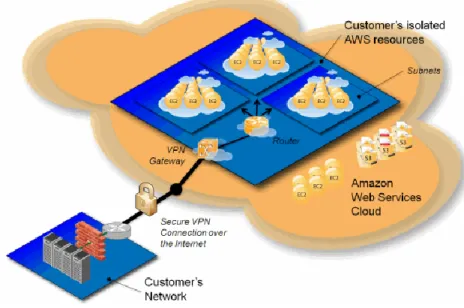
AWS and Azure both have the capability to establish an isolated logical network, referred to within AWS as Virtual Private Cloud (VPC), and Azure Virtual Network (AVN) within Azure.
Figure 1 - AWS VPC Example
Instances/Virtual Machines deployed within a VPC/AVN by default have no access to Public Internet, and utilize a subnet of the Customer’s choice. Typically VPC/AVN’s are used when creating a backbone between Virtual Machines, and also when establishing a dedicated network route from a Customer’s existing on premise network directly into AWS/Azure via AWS Direct Connect or Azure ExpressRoute.
Bridging On-Premise Infrastructure – VPN & DirectConnect/ExpressRoute Customers may find a need to bridge their existing On-Premise infrastructure to their Public Cloud provider, or bridge systems and workloads running between different Cloud providers to ensure a common network layer between compute nodes and storage endpoints.
This is particularly relevant to solutions where you wish to Backup/Archive directly to the Cloud, or DASH Copy existing backup/archive data to Object Storage within a Cloud provider.
To provide this, there are two primary choices available:
VPN Connection – network traffic is routed between network segments over Public
Internet, encapsulated in a secure, encrypted tunnel over the Customer’s existing Internet Connection. As the connection will be shared, bandwidth will be limited and regular data transfer fees apply as per the Customer’s current contract with their ISP.
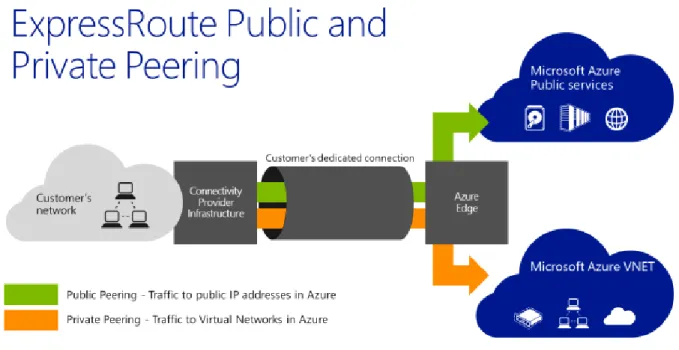
AWS Direct Connect / Azure ExpressRoute – a dedicated network link is provided at the
Customer’s edge network at an existing On-Premise location that provides secure routing into an AWS Virtual Private Cloud / Azure Virtual Network.
Typically, these links are cheaper when compared to a Customer’s regular internet connection, as pricing is charged on a monthly dual-port fee, with all inbound and outbound data transfers included free of charge, with bandwidth from 10Mbit/s to 10Gbit/s.
Figure 3 - An example of Azure ExpressRoute Public and Private Peering
Infrastructure Access
Hypervisor access in Public Cloud
Public Cloud providers do not allow direct access to the underlying hypervisor, instead access to functionality such as VM power on/off, Console access are provided through an REST API.
Amazon VPC Endpoints
Amazon provides VPC Endpoints which enables you to create private connections between a given VPC and another AWS service without having to route via public Internet space. Support for S3 VPC Endpoints was announced May 2015, and while it is only supported within the same region as the VPC, it is highly recommended as it reduces availability risks and bandwidth constraints on the VPC’s link through to public Internet.
An S3 VPC Endpoint must first be defined by creating an Endpoint Policy within the Amazon console, but there is no change to the FQDN hostname used to define the Cloud Library within Commvault. Instead, Amazon will ensure that DNS queries for the hostname will resolve against the S3 VPC Endpoint, instead of the public address, and apply appropriate routing (provided the Endpoint Policy was successfully created).
For more information on VPC Endpoints, please refer to AWS documentation: VPC Endpoints
Data Security
In-flightBy default, all communication with Cloud Libraries utilize HTTPS which ensures that all traffic is encrypted while in-flight between the Media Agent and the Cloud Library end-point, but traffic between Commvault nodes is not encrypted by default. We recommend that any network communications between Commvault modules routing over public Internet space should be encrypted to ensure data security. This can be employed by using standard Commvault firewall configurations (Two-Way & One-Way).
At-rest
Data stored in a public Cloud is usually on shared infrastructure logically segmented to ensure security. Commvault would recommend adding an extra layer of protection by encrypting all data at-rest. Most Cloud providers require that any seeded data be shipped in an encrypted format. HTTPS Proxies
Please take note of any HTTP(S) proxies between Media Agents and endpoints, whether via public Internet or private space, as this may have a performance impact upon any backup/restore
Data Seeding
Data Seeding is moving the initial set of data from its current location to a cloud provider in a method or process that is different from regular or normal operations. For seeding data to an external cloud provider, there are two primary methods:
“Over-the-wire”
Usually this is initially performed in small logical grouping of systems to maximize network utilization in order to more quickly complete the data movement per system. Some organizations will purchase “burst” bandwidth from their network providers for the seeding process to expedite the transfer process.
Major cloud providers offer a direct network connection service option for dedicated network
bandwidth from your site to their cloud such as AWS Direct Connect or Azure ExpressRoute.
Please see the chart below for payload transfer time for various data sizes and speeds.
Data Set Size
Link Size 1 GB 10 GB 100 GB 1 TB 10 TB 100 TB 1 PB 10 PB 10Mbit 1m 40s 2.2 hrs 22.2 hrs 9.2 days 92.6 days - - - 100Mbit 1m 20s 13m 20s 2.2 hrs 22.2 hrs 9.2 days 92.6 days - - 1Gbit 8s 1m 20s 13m 20s 2.2 hrs 22.2 hrs 9.2 days 92.6 days - 10Gbit 0.8s 8s 1m 20s 13m 20s 2.2 hrs 22.2 hrs 9.2 days 92.6 days Drive Shipping
If the data set is too large to copy over the network then drive seeding maybe required. Drive seeding is coping the initial data set to external physical media and then shipping it directly to the external cloud provider for local data ingestion.
Please refer to the Books Online Seeding the Cloud Library procedure for more information:
http://documentation.commvault.com/commvault/v10/article?p=features/cloud_storage/cloud_ library_seeding.htm
In addition to this, please note that each external cloud provider has their own process for drive seeding:
Amazon
AWS Import Services
Azure:
Consumption / Cost
Network EgressMoving data into a cloud provider in most cases is no cost, however moving data outside the cloud provider, virtual machine instance, or cloud provider region usually has a cost associated with it. Restoring data from the cloud provider to an external site or replicating data between provider regions are examples of activities that would be classified as Network Egress and usually have additional charges.
Storage I/O
The input and output operations to storage attached to the virtual machine instance. Cloud storage is usually metered with a fixed allowance included per month and per unit “overage” charges beyond the allowance. Frequent restores, active data, and active databases may go beyond a cloud provider’s Storage I/O monthly allowance, which would result in additional charges.
Data Recall
Low-cost cloud storage solutions may have a cost associated with accessing data or deleting data before an agreed upon time period. Storing infrequently accessed data on a low-cost cloud storage solution may be attractive upfront, however Commvault would recommend modeling realistic data recall scenarios. In some cases, the data recall charges maybe more than the potential cost savings vs. an active cloud storage offering.
As a best practice, Commvault would recommend developing realistic use case scenarios and modeling cost against the identified scenarios to ensure the cloud solution will meet your organization’s SLAs as well as cost objectives.
Please see the links below for both the Amazon and Azure cost calculators: Amazon Cost Calculator | Azure Cost Calculator
Performance / Storage
Multi-Streaming with Object Storage
Object Storage performs best with concurrency, and as such with any Cloud Libraries configured within Commvault, performance will be best attained when configured for multiple readers / streams.
Cloud Connector Best Practices
There are additional Data Path settings and registry keys that can be modified to control the behavior of the Cloud Connector which will have an impact on the overall performance of the solution. For information on these settings/registry keys, please refer to Cloud Connection Performance Tuning within Books Online here:
Cloud Connection Performance Tuning
Compression vs. De-duplication
It is recommended that De-duplication should be used where possible, with the exception of environments where there are significant bandwidth concerns for re-baselining operations, or for Archive only use cases.
While additional compute resources are required to provide the necessary foundation for optimal De-duplication performance, using De-duplication even in a cloud context can still achieve greater than a 10:1 reduction.
Even with sealing of the DDB, reduction can be better than 7:1 reduction, providing significant network savings and reduced backup/replication windows (DASH Copy).
In comparison, Software Compression will achieve 2:1 reduction on average, and will constantly consume the same bandwidth when in-flight between endpoints (no DASH Copy).
Block Storage vs. Object Storage
While Public IaaS environments do allow for block-based storage to be provisioned and leveraged as Disk Libraries, the overall cost of those volumes can quickly exceed that of Object Storage. Based on AWS pricing June 2015, an internal case study showed that Object Storage could store 3x as much data as block-based storage (EBS “General Purpose”) for 33% less cost.
Additionally, with the inclusion of Micro Pruning in v10 SP11 for Object Storage, it is highly recommended that Object Storage be the primary choice for writing data to the Cloud, and other forms of storage by exception.
Micro Pruning in v10 SP11
The new Micro pruning support for Object Storage is effective for new data written into the active store after installing sp11.
For any existing data within the active store, Micro pruning rules still apply until the store has been sealed. But once the active store has been sealed, there will no longer be a need for continued periodic sealing against that store.
Sizing for the object based cloud library should be approximately 120% of the estimated back-end TB.
Micro pruning for Azure page blobs allows micro pruning within the stored files. This allows a one to one consumption size for the size of the cloud library compared to consumption onsite. Should a customer not be using page blob storage they will need to create a new library and re-baseline the library.
Selecting the right Storage Class
Depending on the provider, there may be different tiers of Object Storage available which can significantly drive lower cost for your Cloud Architecture depending upon how you intend to access that data.
These tiers can be broken into three categories:
Standard – this storage class represents the base offering of any Object Storage platform
– inexpensive, instant access to storage on-demand. Offerings in this category include
AWS S3 (Standard), Azure’s Blob storage and Google Cloud Storage – Standard, at an avg. price of $0.03/GB/month (as of October 2015 and depending on geographic region). Typically it is expected that this tier would be used for Backup & Archive workloads in a short-term retention configuration.
Infrequent Access – this is a relatively new offering that addresses what was a gap between
Standard offering and Deep Archive storage tiers, in that it is offered at a lower price point than Standard storage ($0.01 - $0.012/GB/month) but is aimed at scenarios where data is infrequently accessed.
While the storage is always accessible, similar to the Standard offering, the cost model is structured to enforce an infrequent access use case by charging $0.01/GB for any retrieval
Offerings in this category include AWS’s S3 Standard – Infrequent Access tier and Google Nearline storage (also offered via vCloud Air).
Deep Archive – sometimes referred to as “cold storage”, this tier is intended for data that
will probably not be accessed again, but must be retained in the event of compliance, legal action, or another business reason.
The cost of this storage class is the lowest compared to all three offerings – avg. $0.007 to $0.01/GB/month (as of October 2015, depending on geographic region) – but as with the
Infrequent Access class, the Deep Archive class’s cost model is also structured with the expectation that retrievals are infrequent and unusual, and data will be stored for an extended period of time.
Typically providers will charge if data is deleted prior to 30-90 days of an object’s creation, and if more than a set % of your data set per month is retrieved, then additional costs may apply.
It is highly recommended that you review the cost options and considerations of each of these storage classes against the use case for your architecture in order to gain the best value for your cost model.
Infrequent Access storage class support in SP12
Support for the following Infrequent Access storage classes were added in Commvault v10 Service Pack 12:
Amazon S3 Standard – Infrequent Access
Google Nearline Storage (full API support)1
vCloud Air (powered by Google)2
1 Google Nearline Storage support via the Interoperability API was made available in Version 10 Service Pack 11.
SP12 provides enhancements and support for the full Google Cloud Storage API, allowing for the use of Service Accounts, OAuth 2.0 authentication and Project support.
Performing Disaster Recovery to the Cloud
This section will cover the steps required to perform DR into the Amazon and Azure public cloud platforms. We will look at the recovery methods available for both image and agent based protection. This will also cover different recovery scenarios that may be needed to meet short recovery time objectives.
Amazon
Critical Workloads
Continuous Data Replicator (CDR) allows near time continuous data replication for critical workloads. These VMs will need a similarly sized EC2 instance running in AWS to receive any replicated data. In order for CDR to operate, an EC2 instance must be running at all times to receive application changes. Additional information on CDR can be found at the link below.
ContinuousDataReplicator (CDR)
Applications Protected via In-Guest Agent
An agent in guest approach can be used to protect a wide variety of operating systems and applications. These can be captured at the primary site and replicated to the cloud based Media Agent in a de-duplication efficient manner. Once replicated the data can be held and restored in the event of a DR scenario or automatically recovered to existing instances for the more critical workloads.
Virtual Machine Recovery
Amazon allows for the ability to easily import VM image level backups from VMware, Hyper-V and Citrix Xen via the VM import tool. This covers all protected images using the Virtual Server Agent (VSA). Once staged these images can easily be imported into Amazon. Additional information can be found at the link below.
Amazon VM Import
Commvault also offers workflows to automate the import of VM images into the AWS cloud offering. This allows for a seamless and automated VM recovery process. This can run on a scheduled basis for more critical workloads or run on demand in the event of a DR situation.
Azure
Critical Workloads
Continuous Data Replicator (CDR) allows near time continuous data replication for critical workloads. These VMs will need a similarly sized running Azure instance to receive any replicated data. . In order for CDR to operate, an Azure instance must be running at all times to receive application changes. Additional information on CDR can be found at the link below.
ContinuousDataReplicator (CDR)
Applications Protected via In-Guest Agent
An agent in guest approach can be used to protect a wide variety of operating systems and applications. These can be captured at the primary site and replicated to the cloud based Media Agent in a de-duplication efficient manner. Once replicated the data can be held and restored in the event of a DR scenario or automatically recovered to existing instances for the more critical workloads.
Virtual Machine Recovery
Azure allows for the ability to easily perform direct conversion into Azure from VMware and Hyper-V machines protected at the hypervisor level. This covers all protected images using the Hyper-VSA. This allows for seamless direct recovery into the Azure platform. Additional details can be found at the link below.
Azure Conversion
Additionally Azure offers tools to manually import and export VM images into (and out of) the Azure cloud platform. Additional details can be found at the links below.
Virtual Machine Converter
Protecting and Recovering Active Workloads in the Cloud
This section will cover the basics on protecting active workloads running on both the Amazon and Azure public cloud offerings. Included will be the various protection approaches as well as replication and recovery to different geographic regions. We will also touch on cross platform recovery as well as recovery to onsite locations.
Amazon
Continuous Data Replicator (CDR)
CDR allows near time continuous data replication for critical workloads. These VMs will need a similarly sized EC2 instance running in AWS to receive any replicated data. Additional information on CDR can be found at the link below.
ContinuousDataReplicator (CDR) Agent-In-Guest
An agent in guest approach can be used to protect a wide variety of operating systems and applications. These can be captured on the production workload and protected to the Media Agent residing in AWS. These can also be replicated to a secondary Media Agent residing in a different geographic region. Once replicated the data can be held and restored in the event of a DR scenario or automatically recovered to existing instances for the more critical workloads.
EBS Snapshots
Currently the provisioning / management portal offers the ability to manually create EBS snapshots. These can be used to perform point in time protection operations of secondary drives as well as the ability to mount these to the source or secondary systems.
Commvault also offers the ability to automatically call for the creation of EBS snapshots via our integrated workflows. This includes aging as well as the ability to age snaps and mount to a secondary host for longer term retention.
Please contact products at [email protected] for additional information.
Amazon VM Export Tool
The Amazon VM import / export tool allows workloads running in AWS to be exported in a variety of standardized formats. This includes VMware, Hyper-V and Citrix Xen. This allows for running workloads to be recovered into VMware, Hyper-V and Citrix Xen setups.
Azure
Continuous Data Replicator (CDR)
CDR allows near time continuous data replication for critical workloads. These VMs will need a similarly sized running Azure instance to receive any replicated data. Additional information on CDR can be found at the link below.
ContinuousDataReplicator (CDR) Agent-In-Guest
An agent in guest approach can be used to protect a wide variety of operating systems and applications. These can be captured on the production workload and protected to the Media Agent residing in Azure. These can also be replicated to a secondary Media Agent residing in a different geographic region. Once replicated the data can be held and restored in the event of a DR scenario or automatically recovered to existing instances for the more critical workloads.
Azure Snapshots
Azure snapshots allow for a crash consistent point in time copy of an Azure disk. Additional details can be found at the link below.
Blob Snapshot Creation Machine Export from Azure
Azure offers the ability to export running machines in vhd format. These allow for import into the most commonly used hypervisors.
Deployment
Remote Access / Bring Your Own Software
As with all IaaS offerings, remote access to Virtual Machine instances can be achieved with your favorite protocol / software (RDP for Windows, SSH for Linux instances) and Commvault module deployment can be achieved with the current procedures listed in Books Online.
Installation Basics
The following links cover the steps when installing the CommServe in the cloud. This is only needed when the primary CommServe will be running on the hosted cloud VM or used for DR recovery.
Installation Overview -
http://documentation.commvault.com/commvault/v10/article?p=deployment/com mon_install/install_overview.htm
Installing the CommServe -
http://documentation.commvault.com/commvault/v10/article?p=deployment/install /commserve.htm
Installing the Media Agent (Windows) -
http://documentation.commvault.com/commvault/v10/article?p=deployment/install /ma.htm
Installing the Media Agent (Linux) -
http://documentation.commvault.com/commvault/v10/article?p=deployment/install /ma_unix.htm
CommServe Disaster Recovery Solution Comparison
The following link covers CommServe DR Solution comparisons for building a standby DR CommServe in the Cloud, or simply restoring on-demand (DR Backup restore):
CommServe Disaster Recovery
Azure Marketplace / Bring Your Own License
The Azure Marketplace has a CommServe v10 Express instance as a template ready for deployment from within the Azure Cloud. Customers will need to bring a pre-prepared license. For more information, please refer to the Marketplace link:
Cloud Library Configuration
This section covers the steps needed to configure cloud storage as a primary or secondary storage target. Please keep in mind that use cases outside of archive will require Commvault infrastructure in the cloud to recover any protected data.
For most backup use cases (except for very small environments limited to 100 GB in payload size), cloud as a direct storage target is not recommended. For performance and responsiveness, a primary copy should be stored on an on-site disk library and a secondary copy should be hosted on the cloud storage. The secondary copy should be setup as an encrypted network optimized DASH copy to the cloud.
The link below lists all of the supported direct cloud storage targets. Supported Cloud Storage
The link below covers cloud storage target setup and management. Cloud Storage - Overview
Details on performance tuning are covered below. Cloud Connector Performance Tuning
Additional Resources
Videos
Backup and Archive to the Cloud with Microsoft Azure and Commvault https://www.youtube.com/watch?v=ygtDuvvAl6M
Recorded on 12 March 2015, Michael Porfirio, Director of Systems Engineering ANZ from Commvault discusses backing up and archiving to Microsoft Azure with Commvault. He covers file sync, file share, endpoint protection, retaining on premise copies, automated provisioning and recovery and reference copy.
2 Clicks to the Cloud with AWS and Commvault https://www.youtube.com/watch?v=2IcygSNhzY0
Focuses on creating an S3 container and configuring as a Cloud Library within Commvault v10
2 Clicks to the Cloud with Azure and Commvault https://www.youtube.com/watch?v=8jQwFbosdcc