e-Meeting Solution for Higher Education on the WebELS Platform
Arjulie John BERENA, Haruki UENO, Zheng HE, Pao SRIPRASERTSUK
National Institute of Informatics
2-1-2 Hitotsubashi, Chiyoda-ku, 101-8430 Tokyo, Japan
and
Sila CHUNWIJITRA
The Graduate University for Advanced Studies 2-1-2 Hitotsubashi, Chiyoda-ku, 101-8430 Tokyo, Japan
ABSTRACT
With the advancements of information technology and the informatization of society, there is a paradigm shift of teaching methodologies in higher education, where a virtual collaborative learning system is being sought for not just as an extension of traditional classroom-based methodology, but also to meet the social demands for a flexible and internationalized educational system. To achieve an effective virtual collaborative learning system, features like online presentation, online annotation, chat messaging and video conference system are required, and the system must support the concept of “anytime and anywhere” system. This paper introduces the e-Meeting system built on the Web-based e-Learning System (WebELS) platform designed for higher education in science and engineering. The system supports easy content authoring, online slide presentation, online annotation, chat messaging and video conferencing. These features effectively demonstrate the usefulness with higher performance of the system in supporting collaborative learning for higher education in domestic and international organizations and universities.
Keywords: e-Learning, e-Meeting, online presentation, video
conference, virtual collaborative learning
1. INTRODUCTION
Advancements of technology and the informatization of society are factors that paved the way for shifting the teaching methodologies in higher educational system from the traditional classroom-based method to the use of information and communications technology. In recent years, Internet-based teaching and learning technologies have been widely available enabling e-learning to become a major form of educational methodology addressing time-limitation and location-limitation between teacher and students [1]. e-Learning infrastructure can be easily carried out because of the advancement in internetworking technologies, multimedia information processing technologies, and software technologies at lower cost and higher quality in a global scale [2].
Unlike e-Learning in the middle school and undergraduate programs where course management and automated student assessment are typical features, the activities in the higher education, particularly in the graduate school are characterized as self-learning, group meetings, and research presentations. In
most cases, there is a need to collaborate with the experts of the particular research field in the academe and industry. These characteristics of higher education based on the information technology perspective have been analyzed in previous studies [3-6].
In carring out the demands of higher education in view of information technology, an e-Meeting system is strongly requested rather than a typical learning management system (LMS) [7,8]. An effective e-Meeting system requires primary features like online slide presentation, online annotation, chat messaging and video conferencing. Although there are a lot of similar systems, but it is very rare to find an all-in-one system that really answer the need to support e-Meeting for higher education.
In this paper, we discuss the design and implementation of the e-Meeting system built on the Web-based e-Learning System (WebELS) platform [9]. The system features online slide presentation, online annotation, video conferencing, and chat messaging system, which are required features for a virtual collaborative learning system. Online presentation is based on slide synchronization between the presenter and the listeners. It is implemented by utilizing a shared virtual presentation board (VPB) stored on the server, which is updated by the presenter for every slide events, and polled by the listeners periodically for synchronization [10]. Synchronization in our context refers to real-time mirroring of slide presentation events that include controls for changing the slides back and forth, vertical and horizontal scrolling, panning, zooming, cursor positioning, annotation, and even controlling the playback of video embedded on the slide between the presenter and listeners. e-Meeting is made possible then by combining the online slide presentation and video conferencing system to create a virtual classroom, where meeting participants convene via the Internet. Video conferencing system is based on server-client architecture, which is in contrast with the peer-to-peer architecture utilized by a number of similar systems. Finally, we present the practical application and evaluation of e-Meeting in its successful performance in domestic and international collaboration between academic institutes and organizations.
2. REVIEW OF RELATED TECHNOLOGIES
With the fast-paced development of Internet application technologies, various web-based conferencing tools become
widely available. We describe some popular related technology on online presentation, video conference, and web-based conference systems. We also discuss the advantages and drawbacks for each in view of e-Meeting application for higher education.
Online presentations systems widely available nowadays come from a variety of underlying technologies, such as screen sharing and document sharing. Screen sharing allows one to transmit the contents of his computer desktop to one or more remotely connected network users. Some screen sharing systems allow remote control which shares the ability to control the keyboard and mouse to other users. Some systems that use screen sharing are GoToMeeting [11], Real VNC [12], Skype [13], WebEx [14], to name a few. The advantage of screen-sharing technique is that presenter can show various applications on his desktop and be seen by other participants. In view of e-Meeting however, presenter have to be careful that sensitive information is not displayed as it can be visible to other meeting participants. Another drawback of screen-sharing technology is the reduced graphic quality that small text or objects cannot be clearly seen. Screen sharing technique works well in broadband, but may not operate well in narrowband as it utilizes greater bandwidth for streaming of encoded pixel data of screen image. Bandwidth demand gets very high if there is a lot of pixel change at the same time, such as when scrolling a window or viewing full-screen video. Another major drawback of screen sharing is that it requires advanced network address translation (NAT), firewall and router configuration such as port forwarding in order for the connection to go through [15].
Document sharing tools are sometimes referred to as online presentation tool because it is possible to share presentation files online. Some document sharing tools allow one to create a PowerPoint presentation online or upload an existing PowerPoint file onto the server. Other users can then view and edit the shared presentation [16,17], while others allow anyone to view only but does not allow editing [18]. Some systems support various file formats such as the Google Docs [16], but others only support PowerPoint [17-19].
To realize an e-Meeting, some screen sharing and document sharing systems have an integrated support for video conference or Voice over Internet Protocol (VoIP) system. But others do not have and users have to use another platform for video conferencing or teleconferencing.
3. WebELS MEETING SYSTEM
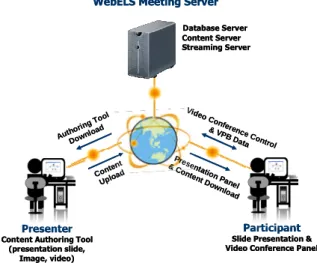
The overview of the WebELS Meeting system is shown in Fig. 1. There are three servers in the server side, i.e., database server, content server and streaming server. Database and content server are used for content and user data management, while streaming server is used for real-time audio-video communication.
There are two major operations available for the user of the system, i.e., content authoring and joining a meeting. Content authoring is usually done by meeting presenter or lecturer. Content authoring tool downloaded from the server is an easy-to-use Java-based content authoring tool. Content authoring using this tool can achieve three operations – (1) creating new content, (2) editing content, and (3) importing content from other servers. Files in the form of slide presentations, word processor documents, portable document format (PDF) and
images can be used as raw material for the WebELS-based content. Files are automatically converted to a series of slides locally and compressed prior to uploading to the server. However, if file conversion is not available locally, files are converted at the server. Video files can also be embedded onto a slide which is possible to playback in synchronous manner when viewing the content.
Joining a meeting is another major user operation but it follows only after creating content [5]. Assuming that content has already been made and stored in the server, joining a meeting requires the user to download the presentation panel and the compressed content. The client user stores the downloaded content onto the temporary folder, unzip the content package, and then load the slide images onto the presentation panel. The system prompts the user for username input, and when done, displays the first slide image on the presentation panel. Online presentation has two user modes, i.e., the presenter mode and the listener mode. In presenter mode, the user has over-all control of the slide, such as slide changing, cursor positioning, panning, zooming and annotation functions. Users in listener mode can only monitor who have joined the presentation, but does not have the right to control the slides. The listener’s presentation panel serves as a passive listener where it displays what is on the presenter’s presentation panel. This slide presentation synchronization is implemented using a virtual presentation board (VPB) concept. VPB data that is stored on the server is updated by the presenter every slide events, and polled by the listener periodically to achieve synchronization. Synchronization in our context refers to real-time mirroring of slide presentation. Switching of presenter’s right among meeting participants is permitted in order to attain a collaborative approach.
The video conference system is based on client-server architecture, in contrast with the peer-to-peer architecture utilized by a number of similar systems. With client-server architecture, more than two users can join the video meeting at the same time. The video meeting panel is designed to be independent from the presentation panel, thereby participants logged-in on the video meeting can still open a different presentation content, while keeping the video meeting connection. There can be only one meeting administrator at one time. Administrator can assign presenter, mute all listeners, kick out a user, and manage the viewing focus to the presenter.
Figure 1: WebELS Meeting System Diagram
WebELS Meeting Server Database Server Content Server Streaming Server
Presenter Content Authoring Tool
(presentation slide, Image, video)
Participant Slide Presentation & Video Conference Panel
Autho ring T ool Down load Conte nt Uploa d Vide o Confere nce C ontrol & VP B Data Pres entation Panel & C ontent D ownload WebELS Meeting Server
Database Server Content Server Streaming Server
Presenter Content Authoring Tool
(presentation slide, Image, video)
Participant Slide Presentation & Video Conference Panel
Autho ring T ool Down load Conte nt Uploa d Vide o Confere nce C ontrol & VP B Data Pres entation Panel & C ontent D ownload
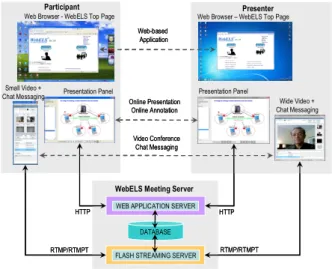
Figure 2 depicts WebELS Meeting as a virtual collaborative learning system. The fundamental requirements for e-Meeting include online presentation, online annotation, video conference and chat messaging, which are all available in the system. With these features, users in remote location, i.e., presenter and meeting participants, share the same virtual room over the Internet anytime and anywhere. Moreover, WebELS Meeting system is a web-based application, thus there is no need to download software for installation. The user computer however must have Java Runtime Environment (JRE) and Flash Player installed as an Internet browser plug-in. A web-camera is also required as well as the headset.
Figure 2: WebELS Meeting as a Virtual Collaborative Learning System
4. SYSTEM FEATURES
The following sub-sections describe the major features of WebELS Meeting as a virtual collaborative learning system for higher education.
Figure 3: Content Authoring Tool Interface
Content Authoring
WebELS content authoring tool is an easy-to-use Java-based content editor shown in Fig. 3. Novice and non-IT users can create their own presentation content very easily as a series of slide images converted from various documents, such as Microsoft Office (*.doc, *.docx. *.ppt, *.pptx, *.rtf), OpenOffice (*.odt, *.odp, *.ods), PDF, and images (*.jpg, *.png,
*.tif). Video (*.mpg, *.mov, *.avi) can also be embedded on the content with various template designs. Content presentation title, content view and edit passwords, and title of each slide can be inputted in the editor.
To create a WebELS-based content, all necessary documents will be compressed first as a package, and then the package will be uploaded to the server system through the Internet. In the server, the package will be decompressed, and the server-side program will choose the proper conversion tools (e.g., Ghostscript, OpenOffice) for file document to PDF to image conversion. All different types of documents are converted into images, except for the embedded video. All newly created images will be compressed again to a package and sent back to client. After receiving the package, the client uncompress the package and display the first image on the presentation panel. A copy of the content is stored in the server.
Online Presentation
The online presentation panel shown in Fig. 4 is divided into four sub-panels, namely (1) Content Information and Slide List, (2) Presentation Display, (3) Viewing Controls, and (4) Collapsible Annotation Toolbar. Content information and slide list shows the content title and the slide navigator for quick slide browsing. Presentation display panel serves as the graphical screen of the online slide presentation. Viewing controls contain control buttons for slide changing, scrolling, panning, zooming, and presentation mode selection buttons. Annotation Toolbar is hidden by default, but is displayed when annotation function is activated.
Online presentation features synchronized slide control, i.e., every event on presenter’s display panel is replicated on the listeners’ display panel in almost real-time. These events include the following:
• shifting slides back and forth using buttons for next, back, move to first slide, and move to last slide,
• cursor display function as a pointer for helping an easy presentation (Fig. 5a),
• zooming function, such as zoom-in, zoom-out and fit window (Fig. 5c),
• scrolling function, such as vertical and horizontal scrolling,
• slide panning function which is done by mouse clicking any point on the slide, hold, and dragging the mouse.
Figure 4: Online Presentation Panel
1 2 4 3 1 2 4 3 1 2 4 3 Web-based Application
WEB APPLICATION SERVER
FLASH STREAMING SERVER DATABASE WebELS Meeting Server
Participant Presenter Online Presentation Online Annotation Video Conference Chat Messaging HTTP HTTP RTMP/RTMPT RTMP/RTMPT
Presentation Panel Presentation Panel
Wide Video + Chat Messaging Small Video +
Chat Messaging
Web Browser - WebELS Top Page Web Browser – WebELS Top Page Web-based
Application
WEB APPLICATION SERVER
FLASH STREAMING SERVER DATABASE WebELS Meeting Server
Participant Presenter Online Presentation Online Annotation Video Conference Chat Messaging HTTP HTTP RTMP/RTMPT RTMP/RTMPT
Presentation Panel Presentation Panel
Wide Video + Chat Messaging Small Video +
Chat Messaging
Figure 5: (a) Cursor synchronization function, (b) Online annotation function, (c) Zooming function (Content courtesy of NIPS, Japan)
Figure 6: (a) Small Video Meeting Panel, (b) Wide Video Meeting panel
Online Annotation
During presentation, online cursor helps the listeners to follow what the presenter is discussing. However, there would be a necessity at times to overwrite figures, draw objects or write mathematical equations to further elaborate what is being presented. Writing annotation on the presentation display panel is simply done like a freehand drawing. It is done by pressing the left-hand mouse, and holding it steadily while dragging the thin crosshair cursor to form the desired object. An example of online annotation is shown in Fig. 5b.
Video Conferencing
Video conference system provides audio-video communication among the users in a shared virtual room. With this system, online collaborative work can take place because users can discuss in a face-to-face like environment. In the system, small video meeting panel and wide video meeting panel are available as shown in Fig. 6a and 6b, respectively. Small video meeting panel is useful for individual user, while wide video meeting panel is useful for group audiences using one computer
connected to a wide-screen projector or wide-screen monitor, e.g., inside a classroom or in a meeting room. There can be only one meeting administrator among the participants who has the right to manage the online meeting by assigning a presenter, muting all participants except the presenter, kick-out participant, and assigning viewing focus to the presenter. Wide video meeting panel can also be switched to full-screen mode. The video conference system also features auto-reconnection function, which is very useful whenever the network have intermittent connection. Auto-reconnection function is very important during meeting especially when the on-going presentation cannot be interrupted. Moreover, video meeting and online presentation panels in the system are designed to be independent with each other, so that multiple presentation contents can be used while keeping the video meeting connection.
Chat Messaging
Another useful tool for a collaborative system is chat messaging. Any user in the virtual room can send a message to the server, and this message is shared among the users. There are many instances that chat messaging is very important in an online meeting. For example, before the online meeting begins, some users may have trouble setting up their own system successfully. In this case, they can send a message to the virtual room users or the presenter. During online meeting, users can also send message to the presenter which may be in a form of a question. Chat messaging system is integrated to both the small and wide video meeting panels.
Content and Group Management
Currently, a new version of WebELS Meeting for Business application was designed to support business meeting situations in industries and organizations. An administrative tool is added to provide privacy and security for users and contents. It has user and group management functions, content access limitation control, and other administrative features [21].
5.SYSTEM IMPLEMENTATION AND EVALUATION
Figure 7 shows the system diagram of WebELS Meeting System. HTTP protocol is used for the synchronization of slide presentation and RTMP/RTMPT protocol (Real Time Messaging Protocol / Real Time Messaging Protocol Tunneled) for audio-video communication.
Online Presentation Synchronization
Online slide presentation synchronization is implemented using the concept of virtual presentation board (VPB). The concept is to make copy of what is displayed on the presenter’s presentation viewer, send this copy to the server, where every user can retrieve and use to reproduce on their presentation viewer. As shown in Fig. 7, the presenter is the source of VPB data, wherein every slide event in its display panel, a new update of VPB data is sent to the server. Slide event objects include slide number, cursor position, slide zoom information, scrollbar position, video playback information, and annotation information. For the listeners to mirror the presenter’s display panel in a synchronized fashion, the client system checks the VPB data by polling the server and retrieves the VPB data file
Attendee Presenter Presenter Attendee Zoom In Fit Window (a) (b) (c) Attendee Presenter Presenter Attendee Zoom In Fit Window Attendee Presenter Presenter Attendee Zoom In Fit Window Attendee Presenter Attendee Presenter Presenter Attendee Presenter Attendee Zoom In
Fit Window Zoom In
Fit Window (a) (b) (c) (a) (b) (a) (b)
every one second. It should be noted that the server stores the presentation panel applet, the presentation content, and the VPB data. When a client joins a meeting, it starts by automatically downloading the presentation panel and the content in compressed format. At the client computer, it is uncompressed at the temporary folder, and the viewer retrieves the VPB data from the server, and loads the slide image accordingly. VPB data structure consists of static and dynamic data structures. Static data structure is for slide and cursor representation object, while dynamic data structure is for annotation data.
Figure 7: WebELS Meeting System Diagram
Video conference system
Also shown in Fig. 7, the video conference system uses RTMP/RTMPT protocol for audio-video communication. In the system, it uses RTMP as the default protocol. RTMP is a protocol used for streaming audio, video and data over the Internet, between a Flash player and a streaming server. However, the system will switch automatically to RTMP Tunneled (RTMPT) or HTTP tunneling when the video communication cannot transverse through firewall due to security issues of certain network location. RTMPT helps facilitate the use of RTMP in scenarios where RTMP is not possible to use, such as when the user is behind a firewall that blocks non-HTTP outbound traffic. The reason that we don’t use RTMPT from the beginning of the network connection is because the speed of communication via RTMPT is slower than RTMP. Hence, we want to keep the quality of real-time communication as high as possible.
The communication control between the server and the client is also managed by the communication manager that implements the shared object. Shared object in video conference helps facilitate the basic operations, such as turning on and off of the camera, microphone, and admin functions, like assigning a presenter and muting all listeners. Chat messages are also distributed to meeting participants by means of shared object.
System Evaluation
It should be noted that in cursor-based presentation mode, only the slide presentation data field of the VPB data structure contain values, while the annotation data field is empty. When
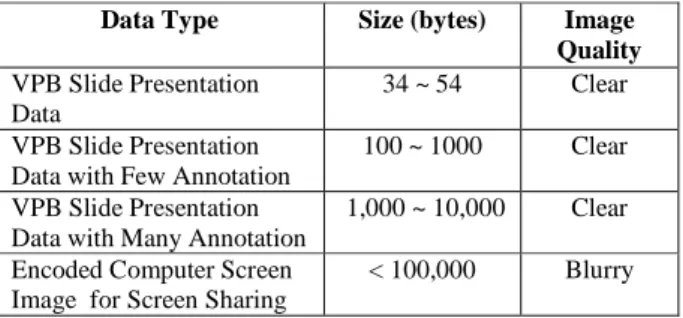
the presenter uses the pen-based presentation mode, and writes on the presentation display panel, the annotation data field increases in size. Nevertheless, this size does not consume much of the network bandwidth. Table 1 shows the online presentation data type sizes and image quality. The data shows that using VPB, the amount of data transmitted between the server and the client is much smaller than the encoded computer screen image used in screen sharing. With the slide presentation data, the VPB data contains a minimum of 34 bytes to a maximum or 54 bytes. With few annotation data, it may ranges from 100 bytes to 1000 bytes. With annotations all over the slide, it may amount to less than 10 Kbytes. In a narrowband Internet environment, slide synchronization based on VPB can work well in almost real-time.
With screen sharing technique, suppose an 800×600 true color screen image has a size of 1.44 Mbytes and 85 fps will produce more than 100 Mbytes data. Data compression is required in order to transmit this image in real-time. Sophisticated data compression algorithms may be able to produce encoded file size less than 100 Kbytes [22]. With this data size, it is still required to use broadband Internet for better quality.
Furthermore, the image quality for slide-based synchronization technology is better than the screen sharing technology for reasons that the images are located in client’s local computer.
Table 1. Online Presentation Data Sizes and Image Quality
Data Type Size (bytes) Image
Quality
VPB Slide Presentation Data
34 ~ 54 Clear
VPB Slide Presentation Data with Few Annotation
100 ~ 1000 Clear
VPB Slide Presentation Data with Many Annotation
1,000 ~ 10,000 Clear
Encoded Computer Screen Image for Screen Sharing
< 100,000 Blurry
6. PRACTICAL USAGE AND PERFORMANCE
WebELS Meeting has been used by a number of domestic and international organizations and universities for distance exchange lectures and meetings for e-Meeting purposes. Recent distance lecture was conducted between the National Institute and Informatics (Japan) and the Tsinghua University (China). The exchange lecture was successful using the online slide presentation and the video meeting functions.
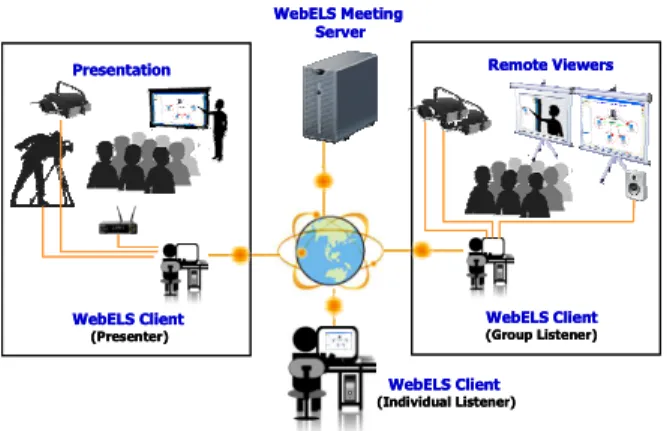
Moreover, WebELS Meeting has been used to distribute the presentation and live video for the 1st Asia-Arab Sustainable Energy Forum held in Nagoya, Japan [23]. Fig. 8 shows the system interconnection setup where there were individual and group remote viewers of the on-going conference.
Because of the multi-location access and no firewall and proxy setting requirements, WebELS is considered to be an effective collaboration tool for higher education in international cooperation between academic institutions and industries.
FLASH STREAMING SERVER
Java Classes Communication Manager• Shared Objects
WEB APPLICATION SERVER
Java Classes WebELS Client (Presenter) Slide Online Presentation • Viewer Applet • Presentation Content • Source VPB Data Video Conference • Source Shared Objects Database HTTP RTMP, RTMPT
WebELS Meeting System
File & Content Manager • Viewer Applet • Presentation Content • VPB Data Slide Online Presentation • Viewer Applet • Presentation Content • Local VPB Data Video Conference • Local Shared Objects Slide Online Presentation • Viewer Applet • Presentation Content • Local VPB Data Video Conference • Local Shared Objects RTMP, RTMPT HTTP
WebELS Client WebELS Client
FLASH STREAMING SERVER
Java Classes Communication Manager• Shared Objects
WEB APPLICATION SERVER
Java Classes WebELS Client (Presenter) Slide Online Presentation • Viewer Applet • Presentation Content • Source VPB Data Video Conference • Source Shared Objects Slide Online Presentation • Viewer Applet • Presentation Content • Source VPB Data Video Conference • Source Shared Objects Database HTTP HTTP RTMP, RTMPTRTMP, RTMPT
WebELS Meeting System
File & Content Manager • Viewer Applet • Presentation Content • VPB Data Slide Online Presentation • Viewer Applet • Presentation Content • Local VPB Data Video Conference • Local Shared Objects Slide Online Presentation • Viewer Applet • Presentation Content • Local VPB Data Video Conference • Local Shared Objects Slide Online Presentation • Viewer Applet • Presentation Content • Local VPB Data Video Conference • Local Shared Objects Slide Online Presentation • Viewer Applet • Presentation Content • Local VPB Data Video Conference • Local Shared Objects RTMP, RTMPT RTMP, RTMPT HTTP HTTP
Figure 8. e-Meeting System Interconnection Diagram
7. CONCLUSION
This paper presented the overview of WebELS Meeting System as an e-Meeting solution for higher education in science and engineering. The system combines the online slide presentation and the video conferencing function that creates a so-called virtual room, where meeting participants convene via the Internet. The online slide presentation implements the VPB concept wherein synchronization of slide presentation is achieved. Synchronization in our context refers to real-time mirroring of slide presentation between the presenter and listeners. With VPB concept, online presentation can work well with clear image display in narrowband Internet environment as compared to screen sharing technique because VPB data is considerably minimal. Moreover, the video conferencing system provides face-to-face environment between the presenter and listeners. Since the video meeting system is available in small and wide panel, various e-Meeting setup can be made, e.g., individual or group meeting. Finally, the usefulness and performance of the system have been proven by practical usage in various domestic and international organizations and universities.
8. ACKNOWLEDGMENT
The authors would like to express sincere thanks to all persons who supported the WebELS project of NII Japan, especially to Dr. Vuthichai Ampornarambeth for contributions in designing and implementing the WebELS system in the initial stage. The project is funded by Science Research Foundation of Japan, The Telecommunications Advancement Foundation, Amada Foundation for Metal Work Technology, Japan Science and Technology (JST) and The Graduate University of Advanced Study (SOKENDAI). We express sincere thanks to Ohmsha for a collaborative development, and to the e-Learning Project of UNESCO Jakarta Office and the Sahara Solar Breeder (SSB) Project for collaborations using WebELS.
9. REFERENCES
[1] H. Ueno, “Internet-Based Distance Learning for Lifelong Engineering Education - A Personal View and Issues”,
Journal of Information and Systems in Education,
Vol.1, No.1, 2002, pp. 45-52.
[2] K. Blinco, J. Mason, N. McLean, and S. Wilson, “Trends
and Issues in E-Learning Infrastructure Development”,
DEST (Australia) and JISC-CETIS (UK), 2004.
[3] V. Ampornarambeth, T. Zhang, A. Hadiana, N. Shimamoto, and H. Ueno, “A Web-Based e-Learning Platform for Postgraduate Education”, Proceedings of the Fifth IASTED International Conference on Web-Based
Education, 2006, pp.388-393.
[4] H. Ueno, “Role of e-Learning in Engineering Education - Background and Outline of WebELS”, Proceedings of the
International Workshop on Engineering Education,
2008.
[5] H. Ueno, Z. He, and J. Yue, “WebELS: A Content-Centered E-Learning Platform for Postgraduate Education in Engineering”, Human-Computer Interaction, Part
IV, Lecture Notes in Computer Science, Volume 5613,
2009, pp. 246-255.
[6] A.J. Berena, P. Sriprasertsuk, Z. He, and H. Ueno, “An Open Source Integrated e-Learning/e-Communication Platform for Postgraduate Education and Corporate Cyber Meeting”, IEICE Technical Report, ET 109(193), 2009, pp.33-37.
[7] Moodle, http://moodle.org. (last retrieved September
2011)
[8] Joomla LMS, http://www.joomlalms.com (last retrieved
September 2011)
[9] WebELS Main Server, http://webels.ex.nii.ac.jp/
[10]A.J. Berena, Z. He, P. Sriprasertsuk, S. Chunwijitra, E. Okano, and H. Ueno, “Shared Virtual Presentation Board for e-Communication on the WebELS Platform”, Proceedings of the APSCE 18th International Conference on Computers in Education, Putrajaya,
Malaysia, 2010, pp. 280-284.
[11]GoToMeeting, http://www.gotomeeting.com (last
retrieved September 2011)
[12]RealVNC, http://www.realvnc.com (last retrieved
September 2011)
[13]Skype, http://skype.org (last retrieved September 2011)
[14]WebEx, http://webex.com (last retrieved September 2011)
[15]Virtual Network Computing (VNC),
http://en.wikipedia.org/wiki/Virtual_Network_Computing (last retrieved September 2011)
[16]Google Docs, http://docs.google.com (last retrieved
September 2011)
[17]Sliderocket, http://sliderocket.com (last retrieved
September 2011)
[18]AuthorStream, http://www.authorstream.com (last
retrieved September 2011)
[19]280Slides, http://280slides.com (last retrieved September
2011)
[20]He, Z., Yue, J., Ueno, H., “WebELS: A Multimedia E-Learning Platform for Non-broadband Users”, Proceedings of the International Conference on Computer Engineering and Technology 2009, Vol. 1, pp.177-181.
[21]S. Chunwijitra, A.J. Berena, H. Okada, H. Ueno, “Design of Suitable Meeting Management Model for WebELS Meeting to Meet the Business Situations”, The First
International Conference on Advanced Collaborative Networks, Systems and Applications, Luxembourg, June
2011, pp. 62-67.
[22]Lin, T., Hao, P., “Compound Image Compression for Real-Time Computer Screen Image Transmission”, IEEE
Transactions on Image Processing, Vol. 14, No. 8,
August 2005, pp. 993-1005.
[23]Sahara Solar Breeder Foundation,
http://www.ssb-foundation.com (last retrieved September 2011) Remote Viewers WebELS Meeting Server Presentation WebELS Client (Presenter) WebELS Client (Individual Listener) WebELS Client (Group Listener) Remote Viewers WebELS Meeting Server Presentation WebELS Client (Presenter) WebELS Client (Individual Listener) WebELS Client (Group Listener)