Using iTasks
Steffen Michels Radboud University Nijmegen
Abstract. iTasks [11] is a system dealing with workflows. Workflows are used to define relationships between tasks to achieve a certain goal. They could therefore be used to describe the software development pro-cess. HereiTasksis used for modelling a small part of the software devel-opment process which is the task of implementing functions. The result is a web-based simple development environment.
TheiTasks language was very suited for implementing this kind of ap-plication. However it is not possible influence the layout or implement features such as syntax highlighting and to create an application which is as user-friendly as commonly used development environments.
1
Introduction
iTasks [11] is a system dealing withworkflows which are used to define relation-ships between tasks to achieve a certain goal. They define which tasks depend on each other, in which order they have to be performed and who has to do them. There are several standard patterns (identified by van der Aalst et al. [16]) which are useful for defining workflows. For example tasks can have to be executed in sequence or parallel.
Unlike most commercial workflow systemsiTasks uses a set of combinators, implemented in the functional programming languageClean[3], to specify work-flows. The set of combinators can be considered as a language for describing workflows embedded in Clean which gives the advantage that it is possible to use the power of the language for the workflow specifications. So for instance it is possible to define high-order or recursive tasks. Also it is possible to formally define a semantics for the combinators and verify it [7].
Another advantage ofiTasks is that it makes it possible to create interactive web applications. For this theiData Toolkit [10], which makes use of thegeneric programming facilities ofClean [2] to automatically generate web-interfaces for editing data-values of any type, is used
This paper describes a case study whereiTasksis used to model a small part of the software development process. There are many different models for this process, but they have one thing in common. That is that they describe different subtasks and the relationship between them. Examples for this are that first all
requirements have to be reviewed before it is continued with the design phase, that first all unit tests have to succeed before an integration test is started or that all classes have to be documented after they have been implemented.
Obviously it is very difficult to manage the process and make sure that all requirements given by the used paradigm are fulfilled. Another issue is to co-ordinate the work of different people working together and assign subtasks to them. Using a process description based on workflows makes it possible to de-scribe the requirements given by the used software development paradigm and build a system which enforces them. So it becomes impossible that one require-ment is not reviewed or a function is forgotten to be tested. Also it is easy to enforce certain constraints, for example that there should be a unit test for certain kinds of units before they are implemented or extended as required for
test-driven development. Also tasks can be assigned to users such that it is clear who is responsible for which subtasks. Of course, tasks cannot only be assigned to human users but also to computers, which for example can do type checking or perform unit tests. Another nice thing is that it is possible to get an overview which work has been done and what still has to be done at the moment.
In this research I focus on a small part of the entire process which is imple-menting functions and testing. The idea here is that workflows can be used to specify dependencies between functions of the program. For instance a function may use several functions which are not implemented at the moment which can lead to the task to implement them. So actually the result would be a develop-ment environdevelop-ment with a little bit more structure. The programming language in which functions are implemented isEsther Script. For testingGast is used.
Developing such a kind of application leads to the idea that in factiTasks
can be used as a as a more general I/O paradigm. Workflows could give a more intuitive way of programming applications with graphical user interfaces than existing solutions.
So this research tries to answer the question if the software developing process can be described using workflows. Also it is a test if the iTasks language is suitable for this kind of problems. The goal is to get a working implementation of a web-application supporting a small part of the process. Also it is evaluated how the resulting application compares with existing commercial development environments and how usefuliTasks is for building such applications.
Related work is the field ofComputer-Assisted Software Engineering (CASE)
which means applying a set of tools to improve the software development pro-cess. Examples would be UML-tools supporting the design phase. Fuggetta [4] divided these tools into different categories. They are either limited to only spe-cific tasks within the process (Tools,Workbenches) or combine a number of tools to support large parts of the process (Environments). In contrast the idea of this research is to model the entire process using the same formalism and to get one application instead of a collection of tools. Another term related to this research is Computer Supported Cooperative Work (CSCW), introduced by Greif and Cashman [5]. This is a highly multidisciplinary field trying to understand how computers can be used to improve the collaboration of humans. Workflow
sys-tems are examples of CSCW-tools. They coordinate the work of people working on different places at different times. Finally there is some old work about pro-gram synthesizers[14,15,13] which define the process of implementing programs in a very strict way, such that the programmer cannot enter free text but has to follow the syntactical structure of the programming-language to implement a program. In practise it is very difficult to use because it restricts the programmer too much.
In the rest of this article first in Section 2 the technologies used for this research are briefly described. Then in Section 3 some general remarks about modelling the software development process are made and the process which is modelled later is defined. A synchronous implementation approach has been made first. It is described in Section 4. The actual asynchronous implementation is described in Section 5. In Section 6 the resulting application and the suitability ofiTasksare evaluated . Finally conclusions are drawn and some ideas for future work are given in Section 7.
2
Esther Script, iTasks & Gast
This section will give a short introduction to the technologies used in the paper.
2.1 Esther Script
Esther Script is an experimental functional script language described by Arjen van Weelden in his PHD-thesis [17]. Its syntax is a subset of Clean’s syntax and it offers the following things: function application, lambda abstraction, recursive let, pattern matching and a restricted form of overloading. If a new function is defined it is type-checked and the overloading is resolved. The type of the function is automatically derived. It can then be written to disk and later be read and used by anyCleanprogram. Any expression is first type-checked before it is evaluated.
The implementation makes use ofClean’s dynamics[1,9] which makes it pos-sible to store any function in a type-save way and is also used to realise the eval-uation. Also it is easy to add existing function written inClean to the scripting language by converting them into dynamics.
The language is chosen for this project because an implementation inClean
already exists. Also it is a very simple but powerful language which is well suited for this kind of prototype.
2.2 iTasks
TheiTasksframework uses a set of basic tasks and combinators to specify work-flows. In the following a simple example is used to show the basic concepts.
First a data-type representing a function, which has a name and can either be implemented or not, is defined. In the case it is implemented a string containing the definition can be stored. For this research a similar data-structure is used to storeEsther Script definitions.
:: Function={name :: String, state :: FunctionState } :: FunctionState=NotImplemented | Implemented String A simple task to let the user enter such a function is: enterFunc :: Task Function
enterFunc=enterInformation "enter function:"
The basic taskenterInformation lets the user input any value. The type of the value can be derived from the type of the function. Automatically a user interface is generated where the user can insert a name and choose whether the function is implemented. Also if the function is implemented the user can enter a definition.
This function can be combined with other tasks like in this example: example :: Task Void
example= enterFunc
>>=λfunc. showMessageAbout "you entered:" func
Here first the user has to enter the function. This task is combined with the next one using the sequence combinator (>>=). After the user entered the infor-mation, the result is given to the lambda expressions in the last line which uses showMessageAboutto print out this information.
There are more basic tasks like making a choice between a number of values (enterChoice) and also more combinators, like a choice between two tasks (-||-). Also there are tasks for storing information in a database. What makes those tasks very powerful is the fact that all kinds of computation, like parsing source code, can be added at any place. For instance in the prototype implemented for this research, Clean dynamic files containing the compiled Esther Script code are generated.
2.3 Gast
Gast [6] is a test system, written in Clean, which uses properties in first order logic to generate test cases. For example a simple property like commutativity (∀xy.x+y = y+x) can be tested by Gast. This can be tested for arbitrary types for which addition and equality is defined by just changing the type of the property. Gast uses generic techniques to generate a number of inputs for the function and checks if the property holds for the generated test cases. If the input domain is relatively small it is possible to generate all possible inputs and to proof the property by exhaustive testing.Gast also comes with the possibility to use existential quantifiers, implications and equivalence.
In this researchGast is integrated intoEsther Script to make it possible for the users to test the functions they defined.
3
Modelling the Software Engineering Process
First some remarks about modelling the software engineering process are made. Then the process modelled in this research is defined.
3.1 Freedom vs Structure
When modelling a process there is always the risk that too much structure is put on it. In a paper about the relationship between order and chaos in the software development process Nogueira et al. [8] state that there is no variability if there is an absolute structure. So no change can happen and there is no creativity. On the other hand with too less structure it can become impossible to collaborate and to get coherent results.
So there always has to be a balance between structure and freedom. A work-flow description should not try to model everything including all communication, but should be used to keep track of the result in a structured way. So a system like program synthesizers or a system which forces the programmer to implement one certain function at a given moment will restrict the programmer’s freedom too much. There should be room for choosing to implement a particular function, to add another one and to simply play around with the program. Still a system can enforce the programmer to eventually implement and test all functions.
Also the process description itself is not static. First of all there is no single good process for developing software. Actually for each project the process has to be chosen and adapted in such a form that it fits the project. So a work-flow description should be flexible enough to make this possible. But even with carefully designed workflows it can happen that in reality something unexpected happens and that the workflow has to be changed. There is ongoing research about how to change a runningiTasks workflow [12].
3.2 A Simple Process for Implementing Programs
Implementing software is only one building block of the all process models. In some models, like the waterfall model, it is one phase but in agile models it is one phase of each iteration. The goal here was not to define a process which can be used in practise, but to start with a simple process which shows some of the basic concepts of implementing software. Nevertheless it could be used as a basis for modelling a more realistic process.
In the following the process modelled in this research is described. The only role in the process are programmers. The granularity of updates are single func-tions: The system tells which function to change or implement, but the imple-mentation itself is done by entering free text. There are a number of different tasks:
– add function: The programmer can add a function with arbitrary name (of course it should not be used yet) which is not used inside an existing function at the moment.
– implement functions: The programmer can choose to implement functions which are used but not implemented yet and on which nobody else is already working.
– remove function: The programmer can remove any function which is not currently modified by another person.
– modify function: The programmer can change an existing implemented function if it is not modified by another programmer at the moment.
– show program state: The programmer gets an overview about all func-tions. A list of both implemented and also used but unimplemented functions are given. For implemented functions the name, the type and possible error messages are given. Also for each function the information who is working on it is given.
– debug console: The programmer can insert an arbitraryEsther Script ex-pression which is then evaluated. If there is no error its value and type is given.
Obviously the process is not suited for developing a complex product, but still it has enough functionality to develop working programs. Of course, there has to be additional communication between programmers. For instance they have to agree on who implements which functionality. This is not modelled by the process, but still the process described above could help to keep the results in a consist form.
4
A synchronous Implementation Approach
One of the powerful features ofiTasks is that the programmer only has to spec-ify the flow of information and does not have to deal with how intermediate results are stored and retrieved. Also all concurrency problems are solved by the framework. So it would be nice if the whole process could be described by only one workflow which generates the finished program as a result. But in practise this is very difficult to achieve.
4.1 Restriction of Existing Parallel Combinators
The existing combinator for parallel task composition provided byiTasksturned out to be not powerful enough to deal with even a very simple situation. The problem is that once parallel tasks are started there is no possibility to inter-change information between them any more.
There is a simple example where this is a problem. Assume there are tasks for defining functions. After a function is defined a new task is started for each function which was used but has not been implemented yet. Assume that tasks to define functions f and g are started in parallel and both will use function honce they are defined. After the task for implementing f finished it can then start a new task to implementh. The problem then is that if the implementation of g finishes after that, this task cannot know that there is already a task for implementinghand so starts a second task for implementing the same function. Another possibility would be that no new tasks are started and it is waited until bothfandgare implemented. Then the results of both tasks can be merged and one task to implementhcan be started. But this has the disadvantage that no-one can start implementinghbefore both tasks are finished.
4.2 The Todo-list Combinator
To solve this problem I propose a new kind of combinator, called theTodo-list combinator. It has the following type:
todoList :: (a b→ (b, [Task a])) b [Task a] →Task b | iTask a & iTask b
The third parameter is a list of tasks which are executed in parallel. In our case it would be tasks producing new function definitions. Then as second parameter a state of typebis given to the combinator. A value of the same type is returned if all tasks are finished. In our case this is the state of the entire program. A function given as first parameter is used to update the value of type b. So in our case all function definitions are added to the state of the program. But the function also produces a second value of type[Task a]which is a list of new tasks. Those tasks are dynamically added to the list of parallel tasks.
For the example given above this means that as soon as the task for imple-mentingf is finished the function adds the definition off to the program and also adds function h to the program and marks it as not implemented. Addi-tionally a new task for implementinghis added to the list of tasks. When then the task implementing g also finished and the result is evaluated h is already included in the program and therefore no new task for implementinghis added.
4.3 Remaining Problems
Although I was able to implement the new combinator and use it to solve the simple problem discussed above, it would be nearly infeasible to extend the idea of doing everything in a synchronous way. Especially task to show the current state of all functions would be very difficult to realize because there is no central database were all functions are stored, but everything is implicitly stored in the state of a single workflow. Consequently there are dependencies between all different kinds of tasks. From my point of view, while theoretically possible, a perfectly synchronous process description would be difficult to create, to understand and to extend. Because of this I continued with an asynchronous approach were everything is stored in a central database.
5
The Asynchronous Implementation
Because of the problems with the synchronous approach the prototype was im-plemented using an asynchronous approach which makes it possible to describe all different kinds of operations as separate workflows. This comes with the cost that storage of data and concurrency problems are not fully solved by the frame-work any more.
5.1 Overview
The idea of an asynchronous approach is that there are a number of different workflows for different tasks. For instance there is a workflow for adding functions
or for viewing the state of the program. The different workflows are described later.
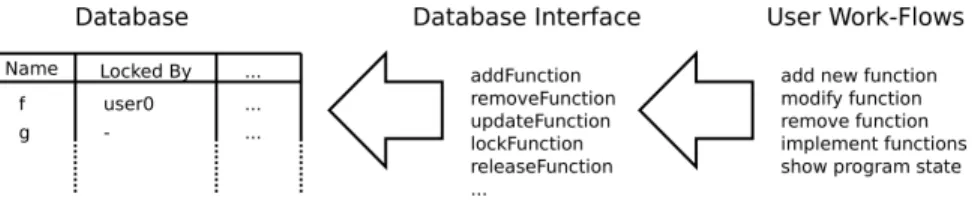
There is a database representing the state of the program which is the state of all implemented and used functions. Each workflow manipulates the database, which gives this approach a more imperative taste. As shown in Figure 1 the system is composed out of different layers. There is a central database keeping the state of the program and an interface used to manipulate it. Finally there are workflows dealing directly with user input. Nearly all functions are implemented as tasks which makes it possible to easily compose them and to use library tasks for instance for storing data.
Fig. 1: The Asynchronous Approach
All applications generated with iTasks are multi-user applications. Even a single user can start many instances of the same workflow at the same time. Because of this using a central database gives a lot of problems with concurrency. It is undesirable that two programmer modify the same function at the same time or a programmer is working on a function which is removed by another one in the meantime. Those issues cannot be solved by the framework any more. To solve this I added facilities to lock functions to the database’s interface. For each function it is stored in the database whether and by whom it is locked at the moment. A sequence of tasks without user interaction is an atomic operation in theiTasks-framework, which makes it easy to implement the locking mechanism.
5.2 Esther Helper Tasks
Some tasks are defined to deal with Esther Script programs. There are tasks for interpreting Esther expressions, to write a new function to disk, to remove it again and to check if a function is already build in Esther. Also there are some operations on the syntax tree such as getting a function’s name or getting all free variables in a function definition. The functions dealing with the syntax tree are not implemented as tasks because they require no I/O and it is more convenient to implement them in a functional style.
5.3 The Database
The database is implemented using the storage functionality of theiTaskslibrary. The program is just a list of functions and the following data-type is used for representing them:
:: Func=Func !(DBRef Func) String Lock FunctionState :: Lock:==Maybe ProcessId
:: FunctionState=NotImpl Int | Impl FunctionDef :: FunctionDef={usedFuncs :: [String]
, def :: String , error :: Maybe String}
Each Funcfirst has a special identifier generated by the library. Then it has a name which is also unique and is used to identify a function in most cases because it is more convenient. The next argument is of typeLock which is the process identifier of a process locking the function or nothing if it is not locked. The last field gives the function state which can be eitherNotImplorImpl. In the first case the function is not defined and has a reference counter indicating by how many other functions this function is used. If there is no function left using an unimplemented function it does not have to be implemented any more and can be remove from the database. If the function is implemented there is a record giving the definition of the function simply as source, a list of used functions identified by their names and maybe an error message if there is for example a type error in this function.
The workflows dealing with user input never directly access the database. There is an interface for manipulating it. The most important operations are: :: DefineFuncRes=DFError String | DFSuccess
addFuncT :: String →Task DefineFuncRes
updateFuncT :: String String→Task DefineFuncRes deleteFuncT :: String→Task Void
Of course there are tasks for adding, updating and deleting functions. Functions are identified by their name here and the new definition is just given as string containing the source. The first two tasks can fail, if for instance there is a parse error or a function with the same name already exists. So they can report success or give an error message. Type errors are not reported here, because the type cannot be derived if unimplemented functions are used and if there is a type error the problem can also be in another function. Deleting a function always succeeds. If the function does not exist nothing happens. The implementation of those task is not trivial. Source code has to be parsed, the used functions have to be determined and their reference counts have to be updated. Also types have to be inferred if possible and code for all functions has to be generated and stored on disk.
Their are also operations for locking a function such that nobody else is allowed to change it:
:: LockRes=LockSuccess | LockedBy ProcessId | FuncRemoved lockFuncT :: String→Task LockRes
unlockFuncT :: String→Task Void
If one tries to get a lock it can succeed or the function is already locked or is not existing any more. The task for locking functions is an atomic operation which is ensured byiTasks.
Also there are some tasks for getting a list of (un)implemented functions, the source of a certain function or the state of the entire program.
5.4 Helper Tasks
Some helper tasks are needed for the user interface.
Cancelling For creating a cancel button this simple task is used: Cancel=enterChoice "or cancel.." ["Cancel"] >>| return Void
The button is created by letting the user choose between one alternative which is the string"Cancel". If the button is pressed the task is finished. This tasks can be combined with any other task with the-||-combinator.
Source Code Input Entering source code is more complex than just entering free text. If the source is submitted it first has to be syntax checked. If an error occurs an error message has to be shown. In this case the input field should preserve it’s value, because it is inconvenient to enter the entire source again because of a syntax error. A generic workflow for entering code is given here: repeatSrcInputT :: String Note (String→Task DefineFuncRes) →Task Void repeatSrcInputT msg (Note src) dbFuncT=
updateInformation msg (Note src) >>=λ(Note src). dbFuncT src
>>=λres. if (dfSuccess res) (return Void)
(repeatSrcInputT (dfGetError res) (Note src) dbFuncT) First a message is shown and the source given as second argument is updated by the user. The typeNoteis just a string which is edited by a multi-line field instead of a normal one. Then a given function is called with the source as argument. The function processes the source and return either that everything was fine or gives an error message. In the first case the workflow finishes. In the second case the workflow is used recursively to show the error message and to update the current value of the input field.
Selecting Functions There is a task for selecting an implemented function which is not locked at the moment:
selFuncT :: (String→Task Void) →Task Void
If a function is chosen it is first locked such that no other user can change or remove it. Then a task given as first argument is invoked with the function’s name as argument. After it has done its work the function is unlocked again. Additional complexity is added by the fact that it can happen that between the generation of the list and the user event choosing one of the functions, this function can be locked or removed. This has to be checked and an error message has to be given in this case.
5.5 Main workflows
Finally the main workflows which can be carried out by the user are described.
Adding Functions UsingrepeatSrcInputTit is very easy to define the workflow for adding new functions by starting with an empty string as source and giving the database taskaddFuncTas argument. At each moment it is possible to cancel the task:
implNewFunctionT :: Task Void implNewFunctionT=
repeatSrcInputT "definition of new function:" (Note "") addFuncT -||- Cancel
Modifying Functions The workflow for modifying functions looks like this: modifyFuncT :: Task Void
modifyFuncT=selFuncT (λname→ getSource name
>>=λsrc. repeatSrcInputT ("new definition:") src (updateFuncT name)
-||-Cancel )
First selFuncTis used to select and lock a function. Then the current source is retrieved as start value forrepeatSrcInputT. It is important that the cancel task is combined withrepeatSrcInputTand not withselFuncT. Otherwise the function would not be unlocked if the user cancels the task.
Removing Functions The workflow for removing functions is very similar to the one for modifying them:
removeFuncT :: Task Void removeFuncT=selFuncT (λname→
requestConfirmation ("Do you really want to remove ’"+++name+++"’?") >>=λrem. if rem
(deleteFuncT name) (return Void) )
Again firstselFuncTis used to select a function. If the user confirms the operation the function is deleted.
Implementing Unimplemented Functions First a number of unimplemented functions are chosen which is similar to the selection of one function with the exception that the basic task for multiple-choice is used (enterMultipleChoice). For each chosen function a process is spawned by this subtask:
assignToMe name=getCurrentUser
>>=λuser. spawnProcess user.userId True (implFuncT name <<@ label) where
label="implement function ’"+++name+++"’"
The taskspawnProcessis defined in the iTasks library. It assigns a new workflow to a user and continues after this. This construction allows to add several parallel workflows for implementing different functions. The taskimplFuncTis similar to the task for defining new functions with the exception that it has to lock and unlock the function such that nobody else implements the same one.
Showing the Program State It is very important to have an overview which functions are already implemented and which still have to be. With iTasks it would be possible to simply view the content of the database with one line of code by retrieving the entire database and usingshowMessageAboutto show it to the user. The disadvantage of this is that the database contains things which are not interesting for the user, for example internal identifiers of the functions. Also the user does not want to see by which process a function is locked, but the name of the processes’ owner.
This is solved by defining a second data-structure which includes only the information which is interested for the user. Also the names of constructors are chosen in such a way that they are readable for the user, they contain no abbreviations. If a user requests to see the current state of the program the content of the database is first converted into a value of this type. Also other computations such as retrieving the type is done during this conversion. The result is then shown to the user.
Debug Console The purpose of the debug console is to provide the programmer with the ability to play around with the program in it’s current state. It is possible to enter any expression which is then evaluated using the currently implemented functions. The implementation of the console is not complex, the main work is done by the helper task for interpretingEsther expressions.
5.6 Testing
For testing the test systemGast is used, which uses properties to automatically generate tests. The way properties are managed is very simplistic. There is no obligation to add properties, the programmers can freely choose to add as much or less properties they want. The goal here was to show that it is possible to integrate a test system into the implementation in a straightforward way.
Properties A very simple system is implemented to handle properties. They can be added or removed. Each property consists of an expression which can be tested by Gast. Technically this means that they have a type for which an instance of the class Testable exists. A property not necessarily describes only
the behaviour of one function but can also express a relationship between a number of functions. When properties are added to the system, they are only checked for syntax errors. It is for example allowed to use undefined functions in properties. This makes it possible to add properties about functions which are not defined yet.
Perform Tests A programmer can perform the tests at any point in time. All properties are checked using the current state of the program. The result of all tests are divided into categories. Properties can pass all test or even be proven for a restricted input domain where exhaustive testing is possible. Test fail if a counterexample is found. There are also two other categories if for example there was no value found making an existential quantifier true but not all possible values were tested or for the case that all test values were rejected. Finally there can be test which could not be executed because of errors.
Integration of Gast Esther Scriptmakes it relatively easy to integrate existing functions written inClean. However there are some problems when integrating
Gast. The overloading mechanism ofEsther Scriptseems not to be able to handle the following instance of the classTestable:
instanceTestable (a→b) | Testable b & TestArg a
This makes functions which an arbitrary number of arguments testable. The problem here is that a part of the instance’s type depends on the same class. However it is possible to add an instance for any concrete type. For example it is possible to add instances for functions handling integers and retuning a boolean up to an arbitrary number of arguments. So it is possible to add a huge number of instances such that most practical properties are covered. Another workaround was needed for converting a dynamic generated byEsther Script into a testable value, because unpacking of overloaded functions is not implemented in Clean
yet.
A last problem is that the interface provided byGast is not very convenient for classifying the results. The result is a string containing the result which has to be analysed in order to get the kind of the result.
6
Evaluation
The evaluation goes in two steps. First the functionality and usability of the prototype is evaluated. Then it is evaluated how suited theiTaskslanguage was for implementing it.
6.1 The Prototype
The prototype has all of the intended functionality. It would be possible to develop any kind of program one wants with this development environment.
This shows that iTasks in principle is powerful enough to describe this kind of application. It would also be possible to extend the prototype with more functionality like dealing which larger parts of the software development process or to use a more realistic language.
The problem of the prototype is that it is not very user-friendly. For example when entering a function one would to have a larger text area. Of course, also things like syntax highlighting and code completion would be nice. It is not very convenient that each time a function is changed the task is closed. One would like to have the choice between only saving the change and closing the task. Also the view on the state of the program is not very user-friendly and would become unusable for larger programs. There should be the possibility to order and filter the list of functions in an interactive way. It would be nice if one could start implementing a function just by clicking on it in this view.
6.2 Suitability of iTasks
The most complex part of the application was actually the backend dealing with storing the program’s state. It was not just storing some values but the database structure with locks and reference counts has to be kept in a consistent state. Actually the iTasks language was very suited for defining those kind of I/O operations. Checking and changing a database is a sequential process which can conveniently be encoded by sequencing tasks. Also the storage capabilities of the library were easy to use. A nice thing is that in situations were it is easier to program in a functional style, like going through a syntax tree and collecting free variables, this is still possible.
The tasks dealing with user interaction can easily be defined once the database interface is implemented. It is very intuitive to define the interaction with the user as a sequence of tasks. AlsoiTasksmakes it possible to define high-order task which were used to input source code and to select a function in this prototype. This makes it possible to easily reuse functionality which is useful for different situations. Repetition is defined using recursion which is not a problem for a functional programmer but might be difficult to read for other programmers.
The real problems ofiTasksare that it is impossible to create a user-friendly interface if the application is not just about filling in forms. Now if there is more than one possibility what should be done with the input, first the user would have to press the okay-button and then get a choice what to do. Things like a simple save-button which should not change the interface but just process the contents of the input-field cannot be described at the moment. For example an enterInformation task with more than one button would already help in many situations.
Also it is very inconvenient to view data. For this a data-type has to be constructed which contains all information the user needs. Using a record it can be influenced which labels the data gets. The problem is that it is impossible to influence the layout of the view or to insert some kind of interactivity, for example buttons.
7
Conclusions & Future Work
I usediTasksto describe a small part of the software development process which was a simple process for implementing functions. The resulting prototype has enough functionality to make it possible to implement any kind of program. Also it was possible to integrate the testing-systemGast for testing the implemented functions. This shows that iTasks is powerful enough to describe this kind of processes. Although the process is very simple and might be not very usable for a realistic scenario it shows some basic concepts and could serve as a basis for a more complex process.
The iTasks language was very suited for implementing this kind of appli-cation. Describing database manipulations and user interaction as sequence of tasks is very intuitive. Also the possibility to use high-order tasks makes it pos-sible to define generic tasks which can be used at several places.
Compared to existing development environments the usability of the applica-tion is bad. The layout is not suited for implementing funcapplica-tions and there are no features such as syntax highlighting and code completion. The problem here is that theiTasks language cannot be used to change the layout or to manipulate the user interface in such a way that it would be possible to implement a better user interface.
The first direction for future work is to investigate how iTasks has to be extended in order to make it powerful enough to develop user interfaces com-parable to interfaces created by other techniques which means using iTasks as general I/O paradigm. IdeallyiTasksshould give the same flexibility as if writing a program with a normal library for creating user interfaces, likeExtJS, without loosing the power of creating reasonable user interfaces for any given data-type automatically.
Another direction for more research is to extend the case study and to model larger parts of the software development process. The final goal would be to model the entire process from the first requirements to the acceptance test or even the support. Having the whole process in one single system has the ad-vantage that relationships between all phases of the project can be defined and enforced. A model for the entire process has to be flexible enogh to cover sev-eral paradigm and programming languages, because there is no perfect fixed model but for each project the model is adjusted. Also it would be interesting to verify properties of the model. A semantics for iTasks has been defined and general properties were tested usingGast [7]. This semantics could also be used to specify properties about a process modelled in the language ofiTasks. Finally a finished system has to show that it is usable for a real-world situation. So it has to be used for a real project and it has to be evaluated if it actually improves the process or not, also in comparison to existing other solutions.
References
1. Mart´ın Abadi, Luca Cardelli, Benjamin C. Pierce, and Didier R´emy. Dynamic typ-ing in polymorphic languages. Journal of Functional Programming, 5(1):111–130,
January 1995. Also appeared as SRC Research Report 120. Preliminary version appeared in the Proceedings of the ACM SigPlan Workshop on ML and its Appli-cations, June 1992.
2. Artem Alimarine. Generic Functional Programming - Conceptual Design, Imple-mentation and Applications. PhD thesis, Radboud University Nijmegen, 2005. 3. T. Brus, M.C.J.D. van Eekelen, M. van Leer, M.J. Plasmeijer, and H.P. Barendregt.
CLEAN - A Language for Functional Graph Rewriting. In Proc. of Conference on Functional Programming Languages and Computer Architecture (FPCA ’87), volume 274 ofLNCS, pages 364–384, Portland, Oregon, USA, 1987. Springer. 4. Alfonso Fuggetta. A classification of CASE technology. Computer, 26(12):25–38,
December 1993.
5. Jonathan Grudin. Computer-supported cooperative work: history and focus. Com-puter, 27(5):19–26, May 1994.
6. Pieter Koopman, Artem Alimarine, Jan Tretmans, and Rinus Plasmeijer. Gast: Generic automated software testing. InThe 14th International Workshop on the Implementation of Functional Languages, IFL02, Selected Papers, volume 2670 of LNCS, pages 84–100. Springer, 2002.
7. Pieter Koopman, Rinus Plasmeijer, and Peter Achten. An executable and testable semantics for itasks. InScholz, S.-B. (ed.), IFL’08 : Proceedings of the 20th In-ternational Symposium on the Implementation and Application of Functional Lan-guages, pages 53–64. Hertfordshire, UK : University of Hertfordshire, September 2008.
8. J. Nogueira, C. Jones, and Luqi. Surfing the edge of chaos: Applications to software engineering. InCommand and Control Research and Technology Symposium, June 2000.
9. R. Plasmeijer and M. van Eekelen. Clean language report (version 2.1). http://clean.cs.ru.nl/download/Clean20/doc/CleanLangRep.2.1.pdf, November 2002.
10. Rinus Plasmeijer and Peter Achten. idata for the world wide web - programming interconnected web forms. In In Proceedings Eighth International Symposium on Functional and Logic Programming (FLOPS 2006), volume 3945 of LNCS, pages 24–26. Springer Verlag, 2006.
11. Rinus Plasmeijer, Peter Achten, and Pieter Koopman. An Introduction to iTasks: Defining Interactive Work Flows for the Web. InCentral European Functional Pro-gramming School, Revised Selected Lectures, CEFP 2007, volume 5161 ofLNCS, pages 1–40, Cluj-Napoca, Romania, June 23-30 2007. Springer.
12. Rinus Plasmeijer, Peter Achten, Pieter Koopman, Bas Lijnse, Thomas van Noort, and john van Groningen. iTasks for a change: Enabling run-time change in an embedded workflow language. Submission for POPL 2010.
13. Thomas Reps and Tim Teitelbaum. The synthesizer generator. SIGPLAN Not., 19(5):42–48, 1984.
14. Tim Teitelbaum and Thomas Reps. The cornell program synthesizer: a syntax-directed programming environment. Commun. ACM, 24(9):563–573, 1981. 15. Tim Teitelbaum, Thomas Reps, and Susan Horwitz. The why and wherefore of
the cornell program synthesizer. SIGPLAN Not., 16(6):8–16, 1981.
16. W. M. P. Van Der Aalst, A. H. M. Ter Hofstede, B. Kiepuszewski, and A. P. Barros. Workflow patterns. Distrib. Parallel Databases, 14(1):5–51, 2003.
17. Arjen van Weelden. Putting Types To Good Use. PhD thesis, Radboud University Nijmegen, October 2007.