© 2005 IEEE. Personal use of this material is permitted. However, permission to reprint/republish this material for advertising or promotional purposes or for creating new collective works for resale or redistribution to servers or lists, or to reuse any copyrighted component of this work in other works must be obtained from the IEEE.
For more information, please see www.ieee.org/portal/pages/about/documentation/copyright/polilink.html. MOBILE AND UBIQUITOUS SYSTEMS
www.computer.org/pervasive
Wizard of Oz Support throughout an Iterative
Design Process
Steven Dow, Blair MacIntyre, Jaemin Lee, Christopher Oezbek,
Jay David Bolter, and Maribeth Gandy
Vol. 4, No. 4
October–December 2005
This material is presented to ensure timely dissemination of scholarly and technical
work. Copyright and all rights therein are retained by authors or by other copyright
holders. All persons copying this information are expected to adhere to the terms and
constraints invoked by each author's copyright. In most cases, these works may not be
reposted without the explicit permission of the copyright holder.
R A P I D P R O T O T Y P I N G
Wizard of Oz Support
throughout an Iterative
Design Process
T
he Wizard of Oz prototyping approach, widely used in human-computer interaction research, is particularly useful in exploring user interfaces for pervasive, ubiquitous, or mixed-reality systems that combine complex sensing and intelligent control logic. The vast design space for such nontraditional interfaces provides many possibilities for user interaction through one or more modalities and often requires challenging hardware and software imple-mentations. The WOz method helps designers avoid getting locked into a particular design or working under an incorrect set of assumptions about user preferences, because it lets them explore and eval-uate designs before investing the considerable development time needed to build a complete prototype.As with other throwaway tools, most WOz interfaces aren’t conceived to evolve with the sys-tem. So, designers tend to use WOz studies once (or perhaps twice) during a system’s evolution, in sharp contrast to other evaluation methods that might be used repeatedly as the system evolves. This is unfortunate, as WOz studies can help designers evaluate partially complete systems and advance the underlying technology’s design.
One reason for the method’s limited use is the effort required to engineer a successful WOz interface and integrate it with an incomplete
sys-tem. To address this problem, we built explicit WOz support into the Designer’s Augmented Reality Toolkit,1a design environment for
aug-mented and mixed-reality systems. Because designers using DART will find it easier to create and reuse WOz interfaces throughout the design cycle, they’ll be more likely to use this evaluation method.
Based on our work and our survey of the liter-ature (see the sidebar), we believe opportunities exist to better exploit the WOz strategy. This arti-cle expands on our initial work2by introducing
a preliminary framework for wizard roles, pro-viding more detail about wizard tool support in DART, and supporting post-WOz data analysis. If WOz tools become a fluid component of a nat-ural design process, wizards can take on various roles with differing levels of responsibility for facilitating interaction between computing sys-tems and users.
WOz roles in iterative design
Interactive system design typically involves an iterative process of brainstorming, prototyping, development, user testing, and evaluation. This isn’t a clear-cut process; it often iterates through many cycles before reaching a final system. Fig-ure 1 illustrates how we can use WOz through-out the design process, as a system evolves. In practice, the development cycle is much more complicated, including the likelihood that the vision for the system will change at various points, altering the technology development curve.
A case study of a location-aware audio experience using the authors’
DART design environment shows how the Wizard of Oz prototyping
method can work throughout an iterative design process.
Steven Dow, Blair MacIntyre, Jaemin Lee, Christopher Oezbek, Jay David Bolter, and
Maribeth Gandy
In WOz studies, a wizard operator
generally plays some role in a work-in-progress computer system—he or she might simulate sensor data, contextual information, or system intelligence. We use the complementary word puppetto refer to the mocked-up user experience that the wizard controls through the wiz-ard interface. During a WOz-based eval-uation, the wizard essentially becomes a crutch for simulating the envisioned interface and interactions before the sys-tem works entirely. As technology devel-opment progresses, the gap filled by the wizard shrinks.
Traditionally, a wizard operator plays one of two roles. A controllerfully sim-ulates an unbuilt system component (perhaps a sensor or system intelligence), whereas a supervisoroversees a work-ing system and, if necessary, overrides decisions that the system or user makes. The blue and red dots in figure 1 repre-sent examples of previous work with the WOz method.
A less common role, that of modera-tor, lies between the controller and supervisor roles. When a technology or system component is working but is still not trusted, instead of hooking it into the system, you can take on the moderator role to observe this component’s output and then send that output as input to the rest of the system. However, because the moderator can override the system com-ponent or sensor before the output reaches the rest of the system, a moder-ated evaluation can still give you the
envisioned user experience. This lets you obtain useful evaluation feedback while collecting a rich set of metadata for eval-uating the development of the system component or sensor in question (assum-ing the system logs the evaluation ses-sion, and the wizard operator implicitly tags the log when he or she either fol-lows the action the component suggests or overrides it). By using the moderator role to ensure that the user receives the envisioned experience, you can perform a much more realistic evaluation despite the underlying system behaving unex-pectedly (perhaps behaving erratically or completely failing). By analyzing what was happening when the wizard diverged from system decisions, the eval-uation might also uncover false design assumptions. Conducting WOz studies at intermediate stages of system devel-opment helps refine the user interaction while informing the technology devel-opment, especially if you collect user
interaction and wizard operator input data during the moderated experience.
Although we’d like to claim that the wizard’s role evolves naturally from con-troller to moderator to supervisor with a progressively diminishing cognitive load, the design process isn’t this straightforward. Nor do these descrip-tions represent an exhaustive list of spe-cific roles; rather, we intend them to reveal the spectrum of possibilities for WOz prototyping.
WOz support tools in DART
We built DART for prototyping a wide range of applications in aug-mented reality, mixed reality, and ubiq-uitous computing. Our goal was to make it easier for designers to integrate live video, tracking technology, and other sensor data within new media applications. One key decision was to integrate these emerging technologies into an established and familiar
com-OCTOBER–DECEMBER 2005 PERVASIVEcomputing 19
State of technology Final system Current implementation Time Initial prototype WOz WOz WOz WOz simulate undeveloped technology
(examples indicated as red dots) or near the end of design, when the wizard can supervise a full implementation or simulate a small piece of the technology (blue dots). We can also use WOz simulation in the middle ground as a means for transitioning to a final design.
Our goal was to make it easier for designers to
integrate live video, tracking technology, and
other sensor data within new media applications.
mercial media design environment, Macromedia Director.
DART comprises
• a Director extension called the DART Xtra, written in C++, to handle low-level interaction with sensors, track-ers, and cameras; and
• behaviors, written in Director’s cus-tom scripting language Lingo, for manipulating common high-level design features.
DART behaviors are abstractions of sys-tem entities that can be configured using simple parameter windows or cus-tomized by modifying the Lingo code
directly. We seek to support learnability through these accessible high-level behaviors that help familiarize designers with the environment and its constraints, and we hope to sustain learning by let-ting designers peel away layers of abstraction and work directly with code and raw data. At its core, DART imbues the philosophy of rapid prototyping and design iteration by enabling designers to flexibly coevolve application logic and media content.
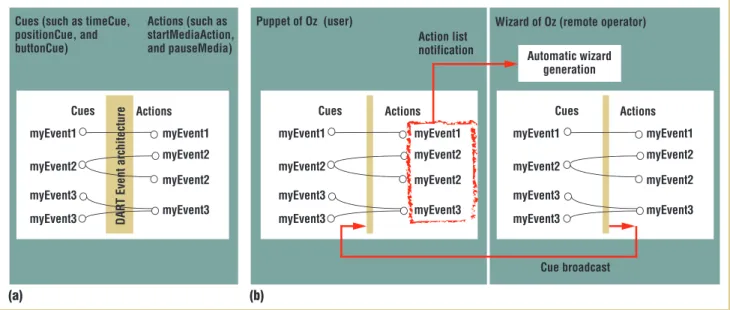
Event architecture and networking DART uses a simple event broad-cast/subscription model (we use the abstractions of cues and actions) to
com-municate between behaviors. A cue fires when changes happen in the system: a high-level user interaction (for example, a position cue—“user near site A”) or a change in internal state (for example, a time cue—“2 minutes elapsed”). DART executes an action in response to a par-ticular cue being fired, typically changing media content or the application state. The system labels cues and actions using unique event names such as myEvent1; the designer can set up cues to respond to sensor values (for example, when the GPS device returns a value within some range) and link them to output actions (for example, playing sound file A). An action must subscribe to a cue, using the
R A P I D P R O T O T Y P I N G
W
Oz techniques have been used in various ways, depending on the technologies available and the project’s specific goals. Its most common role in human-computer interface develop-ment places responsibility on the wizard to fully control a missing piece of the technology infrastructure (from simulating the entire system to simulating one sensor). Used early in design as a light-weight prototyping method, the WOz method presents users with rough sketches of interface ideas, even when it’s unclear what the underlying technology should be. In their study, Scott Hudson and his colleagues wanted to understand users’ willingness to be interrupted in an office environment.1Their WOz study helpedthem identify appropriate sensors for the space. Stephen Voida and his colleagues used WOz to study basic interaction techniques for a projector/camera-based augmented-reality environment.2
They wanted to understand user behavior and preferred modes of interaction unconstrained by technology-imposed limitations, such as special gloves or highly constrained movements to aid a computer vision subsystem.
Further in the design process, after identifying appropriate tech-nologies, you still might find them too difficult to implement, especially for testing speculative user interface issues. In the tool Topiary, the wizard plays the role of a location sensor (for example, a GPS) during the design of location-based applications.3In Kent
Lyons’ evaluation of dual-purpose speech, the WOz method enabled him to explore a larger portion of the design space by analyzing unrestricted speech input for novices.4Quan Tran and
his colleagues used a wizard to simulate vision technology during the development of the Cook’s Collage, a memory aid for elders in a kitchen environment.5Using WOz, prototypes such as this can
mature into sophisticated applications that help researchers test
interaction theories without spending time over-engineering a complex underlying system that might not be needed in the final product.
Even in finished applications where the system does most of the work, a wizard can play a variety of roles. In Alice’s Adventures in New Media, a wizard operator simulates a gesture recognizer as input to a sophisticated, agent-based narrative engine as part of an augmented-reality experience.6
All these examples position the wizard as a controller, whether it’s early or late in the design process. In the mixed-reality perfor-mance Desert Rain, the wizard plays the supervisor role, helping participants through the experience on a case-by-case basis.7
Wiz-ards can also play a dedicated role, add intelligence beyond the current possibilities of computing, or simply monitor an
experience to help when problems arise, much like an amusement park ride operator.
Other authors have pointed out general considerations for WOz studies. An early article by Nils Dahlback and his colleagues re-vealed a need for careful design of WOz simulations in natural-lan-guage dialogue systems (although their observations are generally applicable); researchers must pay attention to nonsimulated parts of the system, the constraints of the user task, and guidelines for the wizard.8As Lennart Molin indicates, user awareness of correct
and incorrect wizard behavior can taint an evaluation and compro-mise the results.9Reflecting on their use of the WOz method, David
Maulsby and his colleagues state that a designer benefits greatly by becoming the wizard operator and that formal models for the sys-tem’s behavior are necessary for keeping the simulation honest.10
In the Suede system for prototyping and evaluating speech user interfaces, Scott Klemmer and his colleagues reveal the need for
cue’s event name to complete the broad-cast/subscription connection. Multiple cues might trigger one action, or multi-ple actions might subscribe to one cue (see figure 2a). This loose coupling facil-itates rapid prototyping; for example, you can replace an action that’s initially triggered using a keyboard cue with an external device button cue or a more sophisticated cue. Our earlier work details DART’s networking and distrib-uted shared memory system.1
WOz prototyping tools
The WOz tools in DART leverage the event broadcast/subscription architec-ture. To enable WOz communication,
the designer adds the “Puppet of Oz” behavior to the DART application on the machine that is delivering the user experience and adds the “Wizard of Oz” behavior with the puppet machine’s IP address to the DART application on a remote wizard machine. The two high-level behaviors establish the networking connection and enable the wizard machine to trigger any actions currently available in the user application by sim-ply firing actions locally using the same cue names. The WOz tools employ two forms of communication: cue broadcast (from wizard to puppet) and action list notification (from puppet to wizard) (see figure 2b). By using common naming
conventions, the designer can trigger cues locally or through a remote wizard. Leveraging the continuous notification of available actions on the puppet, DART can automatically generate a WOz inter-face consisting of GUI buttons that cor-respond to the list of possible actions on the puppet. DART maintains an action subscription list on the puppet during run-time, forwarding subscription list changes to the wizard (events can be added and removed at runtime). The wizard gener-ates a generic button interface (using a simple layout algorithm) and labels each button with the unique event name. As the puppet application runs, the wizard automatically refreshes the
correspond-OCTOBER–DECEMBER 2005 PERVASIVEcomputing 21
careful and appropriate experimental design in WOz simulations. We should plan WOz user studies to answer existing design ques-tions, and the wizard’s role in the experimental design should be well defined and consistent.
Several research projects emphasize WOz simulation in develop-ment environdevelop-ments, but generally limit the design space to one interface domain (such as speech recognition in the Suede tool or location simulation in Topiary3,10). The Neimo project developed a
WOz testing environment for studying multimodal systems where one or more wizard operators can supplement missing system func-tions.12Our work on DART focuses on the rapid prototyping of
more general applications in mixed-reality and ubiquitous comput-ing.13While DART isn’t appropriate for all pervasive computing
sys-tems, it illustrates how a judicious choice of programming model can enable WOz tools to be integrated into a general-purpose design environment.
REFERENCES
1. S. Hudson et al., “Predicting Human Interruptibility with Sensors: A Wiz-ard of Oz Feasibility Study,” Proc. SIGCHIConf. Human Factors in
Comput-ing Systems(CHI 03), ACM Press, 2003, pp. 257–264.
2. S. Voida et al., “A Study on the Manipulation of 2D Objects in a Projec-tor/Camera-Based Augmented Reality Environment,” Proc. SIGCHIConf. Human Factors in Computing Systems(CHI 05), ACM Press, 2005, pp. 611–620.
of Technology, 2005.
5. Q. Tran and E. Mynatt, What Was I Cooking? Towards Deja Vu Displays of Everyday Memory, tech. report GIT-GVU-TR-03-33, Georgia Inst. Tech-nology, 2003.
6. B. MacIntyre et al., “Augmented Reality as a New Media Experience,”
Proc. Int’l Symp. Augmented Reality(ISAR 01), IEEE CS Press, 2001, pp. 197–206.
7. B. Koleva et al., “Orchestrating a Mixed Reality Performance,” Proc. SIGCHIConf. Human Factors in Computing Systems (CHI 01), ACM Press,
2001, pp. 38–45.
8. N. Dahlback, A. Jonsson, and A. Lars, “Wizard of Oz Studies: Why and How,” Proc. Int’l Workshop Intelligent User Interfaces(IUI 93), ACM Press, 1993, pp. 193–200.
9. L. Molin, “Wizard of Oz Prototyping for Cooperative Interaction Design of Graphical User Interfaces,” Proc. SIGCHINordic Conf. Human-Computer Interaction (NordiCHI 04), ACM Press, 2004, pp. 425–428.
10. D. Maulsby, S. Greenberg, and R. Mander, “Prototyping an Intelligent Agent through Wizard of Oz,” Proc. ACM SIGCHIConf. Human Factors in
Computing Systems(CHI 93), ACM Press, 1993, pp. 277–284. 11. S. Klemmer et al., “Suede: A Wizard of Oz Prototyping Tool for Speech
User Interfaces,” Proc. ACM Symp. User Interface Software and Technol-ogy(UIST 00), ACM Press, 2000, pp. 1–10.
12. S. Balbo, J. Coutaz, and D. Salber, “Towards Automatic Evaluation of Multimodal User Interfaces,” Proc. Int’l Workshop Intelligent User Inter-faces (IUI 93), ACM Press, 1993, pp. 201–208.
13. B. MacIntyre et al., “DART: A Toolkit for Rapid Design Exploration of Augmented Reality Experiences,” Proc. ACM Symp. User Interface Soft-ware and Technology(UIST 04), ACM Press, 2004, pp. 197–206.
ing set of buttons. By supporting auto-matic wizard generation in a high-level behavior (WizardButtonAuto), we aim to lower the barrier for using WOz pro-totyping as an evaluation strategy.
You can also customize the wizard interface to control the puppet using built-in Director widgets and DART behaviors. For example, you can create a custom button in Director and then place a WizardButton behavior on top of the graphical element (one parame-ter of the behavior is a specific action name to launch on the puppet). Or, you can place an overhead map image in the application and attach a MapTracking behavior that generates synthetic GPS reports, which appear to the puppet application to be real GPS reports. You can program your own behaviors in Lingo, taking advantage of the net-working infrastructure and DART architecture to tailor the wizard inter-face. The wizard can send cues locally to subscribers or broadcast them only to the puppet.
One strategy we’ve used is to integrate part of the puppet user interface into the wizard interface so that the wizard oper-ator will experience the same application
state as the user. In The Voices of Oak-land project, described later, we use this strategy to let the wizard listen to the same audio segments as the user, fol-lowing along with the user and deciding what content to display. Because you develop both interfaces in DART, and because DART uses a model of inde-pendent actors communicating via events, you can easily port any code developed on either the wizard or the puppet interface to the other.
Visualization tools
DART supports the ability to capture data from video cameras, trackers, analogs, buttons, as well as wizard input for later analysis and playback. DART stores the time-synchronized data in Director casts (collections of Lingo scripts, text files, and other media in Director), which can be imported later into any DART application. Using inte-grated playback facilities in DART, you can replay the sensor data as it happened during the experiment. The application logic responds to replayed data just as it would to live data, so in playback mode, you’ll perceive exactly what the user per-ceived during the experience.
Replaying an experience is one visual-ization strategy; DART also includes tools for visualizing data textually and graph-ically. Observers simply show a text print-out of the data based on current time. DataGraphs behaviors format the replay data into a graphical image. These high-level behaviors require you to specify cer-tain parameters, such as the specific replay data set and the graph boundaries (such as axis assignment, maximum values, and size of data points). You can attach mul-tiple DataGraphs behaviors to the same image so that you can visualize multiple data streams on one graph. DART’s visu-alization tools can show both static, cumulative data as well as dynamic data values at any particular time on the abstract clock. The abstract clock can be controlled independently from Director’s clock by DART’s TimeSlider behavior or using custom widgets. For the Voices of Oakland experience, we visualized each participant’s GPS data on the same image to get an overview of user movement (described in more detail later).
Although you can move the numbers collected from WOz experiments to Matlab, Excel, or another common graphing tool, integrating these facilities
R A P I D P R O T O T Y P I N G
Puppet of Oz (user) Wizard of Oz (remote operator)
Cues Actions Cues Actions
myEvent1 myEvent3 myEvent2 myEvent3 myEvent1 myEvent2 myEvent2 myEvent3 myEvent1 myEvent2 myEvent2 myEvent3 myEvent1 myEvent3 myEvent2 myEvent3 Cue broadcast Action list notification Cues (such as timeCue,
positionCue, and buttonCue) (b) (a) Cues Actions myEvent1 myEvent3 myEvent2 myEvent3 myEvent1 myEvent2 myEvent2 myEvent3 Actions (such as startMediaAction, and pauseMedia) Automatic wizard generation DAR T Event architecture
Figure 2. (a) A standard event-based architecture in DART. (b) Integration of WOz tools into the event-based model. Cues fired on the wizard machine are broadcast locally and to the puppet. The puppet machine notifies the wizard about available actions at runtime to automatically generate a basic button UI on the wizard interface.
in the DART environment has certain benefits. One advantage is the ability to visualize live data in parallel with previ-ously collected data, enabling real-time analysis of user performance. Embedded visualization takes advantage of DART’s abstract clock controls. DART replays data on an abstract clock that you can pause, unpause, set to a particular time, rewind, fast-forward, and so on. By sup-porting lightweight visualization tools within the design environment, you can perform new sorts of analysis while maintaining consistency with the rest of the design environment.
Case study: A mixed-reality
experience in the Oakland
Cemetery
A case study of the Voices of Oakland project, an audio location-based experi-ence in Atlanta’s historic Oakland Ceme-tery, illustrates the value of flexible wiz-ard prototyping and analysis tools. Visitors wander through the space and hear an unfolding drama about Atlanta’s history through its inhabitants’ voices (see figure 3). We describe our design considerations, including issues of story style (dramatic vs. commentary), story arc (linear vs. nonlinear), agency (user vs. system control), medium (visual vs. nonvisual media), and technology (for instance, location tracking) elsewhere.3
As we described earlier, a wizard can have three roles or levels of responsibil-ity during a design process. In our first iteration of the Voices of Oakland expe-rience, the wizard fully controlled the audio segments the participant heard. In the second iteration, we included but-tons for the participant to select content. We routed button presses to a graphical display in the wizard interface, but the moderator wizard still had to choose the appropriate audio segments on the basis of this feedback. In the third iteration, we handed over full responsibility to the
system for presenting audio based on location and user button interaction, with the wizard supervising the experi-ence. The DART WOz tools facilitated easy transition between each change in the wizard interface.
First design iteration: Wizard as controller
In the first generation of the Voices of Oakland project, the wizard operator was integral for simulating several par-ticipants’ experience. We started with rough audio content and a vague idea of where and when we wanted those sto-ries to be presented as the user moved through the space. To facilitate the con-troller wizard role, we developed two modes of interaction:
• a map-based interface, where the wiz-ard tracks the user’s position and trig-gers content when the user moves near a red content zone (see figure 4a, left); and
• a button-based interface, where each button triggers a specific audio seg-ment to play (figure 4a, right). The map-based interface took several days to create because we had to con-figure the map image to correspond with the correct GPS coordinates and link the audio content to particular locations in the cemetery. We generated the button-based interface quickly using DART’s WizardButtonAuto behavior.
In our pilot study, we evaluated the wizard interface as well as the participant experience. Our evaluation involved two wizards (script writers) and two users. Aside from demonstrating how the ard interface worked, we gave the wiz-ard operators no specific instructions on how to create the visitor’s experience; they could simulate the GPS tracking or directly trigger the media content by pushing buttons. During the study, we found that the wizard operators preferred the buttons rather than the map,
osten-OCTOBER–DECEMBER 2005 PERVASIVEcomputing 23
In our first iteration of the Voices of Oakland
experience, the wizard fully controlled the audio
sibly because it put them closer to the content and enabled them to create a more compelling visitor experience. (However, because the location-based implementation was fairly crude at this point, this observation should be taken with a grain of salt.) The tour participants provided feedback about the type of con-tent and length of audio segments, and we incorporated many ideas into the next iteration.
Second design iteration: Wizard as moderator
After the initial pilot testing, we made
several changes to the experience and the wizard’s role. We divided the script into short audio dialogues and organized them into categories—life stories, history, and architecture. To simulate user control, we gave the user a handheld controller with buttons corresponding to the content cat-egories. The visitor could listen to short audio stories within a category and then dig deeper, or choose a different category while at any particular grave site.
The new wizard interface (figure 4b) incorporated Director’s built-in GUI wid-gets and a set of buttons (near the bot-tom of 4b) for guiding the visitor if the
primary instructions were inadequate. We chose to route the user’s button inter-action through the wizard interface and situate the wizard as a moderator. We had questions about the users’ expecta-tions about the interaction, and we wanted to control for interface issues such as multiple button pressing while providing an engaging experience. The moderator could see the button interac-tion in the wizard interface (and the user’s position in the physical space) and determine the appropriate content. Although it took longer to create this cus-tom wizard interface, the DART WOz tools enabled us to easily coevolve the wizard application to match the new user interaction and to support the moderator wizard role.
During an outdoor Fall festival in the cemetery, we informally tested the expe-rience with about 15 members of the pub-lic. For the most part, our four different wizard operators simply relayed user but-ton presses, indicating that butbut-tons were sufficient for controlling the audio con-tent at each grave. We didn’t record raw GPS data or try to visualize the results, in part because we weren’t doing a formal evaluation—although we realized later that it would have been useful.
Third design iteration: Wizard as supervisor
For the third version of the Voices of Oakland, we allowed participant inter-action with the button device to directly affect content changes. The wizard inter-face remained the same (figure 4b), but the wizard’s role shifted to supervisor.
R A P I D P R O T O T Y P I N G
Figure 4. (a) Wizard interface used for the first design iteration. The controller wizard could simulate user position on a map (left) or trigger audio content directly using buttons (right). (b) Wizard interface used in iterations 2 and 3. The wizard observes the user’s button interaction in the six circles in the upper left and activates audio content using buttons (story segments on the right, navigational segments at the bottom).
(a)
OCTOBER–DECEMBER 2005 PERVASIVEcomputing 25
The wizard could observe the user’s but-ton presses and override the user’s con-tent choices, if necessary. The wizard still communicated with the system when a participant was in range of a particular grave and controlled the ancillary navi-gational content as needed.
We used DART’s capture facilities to record all the sensor data (GPS, head rotation, and button presses) and wiz-ard actions during a formal user evalu-ation. Even though we weren’t using the GPS and head rotation data in the appli-cation, we collected the data to help us close the gap between the wizard-simu-lated experience and a working applica-tion. Using DART’s replay and visual-ization tools, we created interactive graphs to help analyze the WOz study (see figure 5).
The DART visualization tools are an initial attempt at supporting WOz study analysis. Figure 5 shows multiple par-ticipants’ GPS data above a satellite image of the cemetery. For each partici-pant, we could print the head rotation values and graph the button interaction over time. We included the TimeSlider in our visualization so that we could scrub the time values and see dynamic updates in the graphs. Our visualization helped us understand how GPS and head rotation data might be useful in our sys-tem design. (While a graphical view of the rotation values might have been use-ful, we opted for a simpler textual rep-resentation until we clearly needed the graphical view.) More details about the study results are available elsewhere.3
During future WOz evaluations, we also
plan to explore visualizing prior partic-ipant data during the study of live par-ticipants for real-time predictive feed-back on user behavior.
E
xplicit support for the WOz simulation method is certainly important in pervasive comput-ing prototypcomput-ing environments. By providing easy-to-use high-level tools for wizard interface creation and data visualization, we hope to lower the bar-rier for designers and researchers to explore a variety of potential uses of WOz simulation throughout the design cycle. We also hope this leads to a more comprehensive framework of possible wizard roles.We learned many lessons during our experimentation with WOz simulation in the Oakland project. Clearly, the nature of the application will dictate what facilities are needed. The ability to easily try different WOz approaches was useful, given the design space we were exploring. If we were doing visual aug-mented reality or spatialized audio where accurate location was integral, the map-based wizard interface might have been more useful, but we might not have had as many other useful options for wizard controls.
Automatic wizard interface generation appears to be most useful for early
design exploration. We used the auto-matically generated interface during our early informal studies but not during our formal WOz studies, because cus-tomized WOz features were more use-ful. The embedded visualization tools are well suited for intermediate stages of design and novel wizard roles, where we can learn a lot about users’ preferred interactions and the technology’s limi-tations. The rapid-prototyping philoso-phy of DART and our WOz tools encourages designers to explore various roles with different degrees of responsi-bility throughout a design process.
Over the past decade, researchers have raised many significant considera-tions that designers must be conscious of when designing WOz experiments. In particular, they should design the wiz-ard interface with the wizwiz-ard operators’ perceptual, cognitive, and motor skills in mind, just as with any user interface. When there’s less demand on the wiz-ard, the wizard can pay more attention to the user and the environment, per-form necessary activities more easily, and contribute observations to the eval-uation of the experience. For the WOz method to be effective, designers must be able to bridge the gap between the wizard’s role and actual system imple-mentation. We believe that integrating WOz prototyping tools into the pro-gramming environment is vital to sup-porting this transition.
showing the users’ position at a particular time; (b) textual representations of GPS location and head rotation data; (c) graph of button interaction over time; (d) TimeSlider for controlling DART’s abstract time.
REFERENCES
1. B. MacIntyre et al., “DART: A Toolkit for Rapid Design Exploration of Augmented Reality Experiences,” Proc. ACM Symp. User Interface Software and Technology
(UIST 04), ACM Press, 2004, pp. 197–206.
2. S. Dow et al., “Wizard of Oz Interfaces for Mixed Reality Applications,” Extended Abstracts SIGCHIConf. Human Factors in Computing Systems (CHI 05), ACM Press, 2005, pp. 1339–1343.
3. S. Dow et al., “Exploring Spatial Narratives and Mixed Reality Experiences in Oakland Cemetery,” Proc. ACM SIGCHI Conf. Advances in Computer Entertainment
(ACE 05), ACM Press, 2005, pp. 51–60.
For more information on this or any other comput-ing topic, please visit our Digital Library at www. computer.org/publications/dlib.
R A P I D P R O T O T Y P I N G
the
AUTHORS
Steven Dowis a PhD student in human-centered computing in the College of Com-puting at the Georgia Institute of Technology. His research interests include design tools, human-computer interaction, ubiquitous computing, mixed reality, and expe-rience design. He received his MS in human-computer interaction from the Georgia Institute of Technology. Contact him at the College of Computing, GVU Center, Georgia Inst. of Technology, Atlanta, GA 30332-0280; [email protected].
Blair MacIntyreis an assistant professor in the Georgia Institute of Technology’s Col-lege of Computing and the Graphics, Visualization, and Usability Center. His research interests include understanding how to create highly interactive augmented-reality environments, especially those that use personal displays to augment a user’s percep-tion of his or her environment. He received his PhD in computer science from Colum-bia University. Contact him at the College of Computing, GVU Center, Georgia Inst. Technology, Atlanta, GA 30332-0280; [email protected].
Jaemin Leeis a freelance usability specialist. Her research interests include HCI, ubiquitous computing, and context-aware computing. She received her MS in human-computer interaction from the Georgia Institute of Technology. Contact her at 1550 Iron Point Rd., Apt. 221, Folsom, CA 95630; [email protected].
Christopher Oezbekis a PhD student in software engineering at the Free University Berlin. His research interests include documentation processes, API usability and dis-covery, and the open source development process. He received his MS in comput-ing from the Georgia Institute of Technology. Contact him at the Workcomput-ing Group Software Eng., Free Univ. Berlin, Takustr. 9, D-14195 Berlin, Germany; oezbek@inf. fu-berlin.de.
Jay David Bolteris the Wesley Chair of New Media at the Georgia Institute of Tech-nology. Along with the Augmented Environments Lab at Georgia Tech, he is helping to build augmented-reality systems to stage dramatic experiences for entertainment and education. He also wrote several books on hypertext, media theory, and digital design. He received his PhD in classics from the University of Toronto. Contact him at the School of Literature, Communication, and Culture, Georgia Inst. Technology, Atlanta, GA 30332-0165; [email protected].
Maribeth Gandyis a research scientist with the Interactive Media Technology Cen-ter at the Georgia Institute of Technology and a doctoral student there with a focus on augmented reality and HCI. Her other research interests include mobile, wearable, and ubiquitous computing; universal design; and computer audio. She received her MS in computer science from the Georgia Institute of Technology. Con-tact her at the Interactive Media Technology Center, Georgia Inst. of Technology, Atlanta, GA 30332-0280; [email protected].
Ensure that your networks operate safely and provide critical services even in the face of attacks. Develop lasting security solutions, with this peer-reviewed publication. Top security professionals in the field share information you can rely on:
• Wireless Security • Securing the Enterprise • Designing for Security
Infrastructure Security • Privacy Issues • Legal Issues • Cybercrime
• Digital Rights Management • Intellectual Property
Protection and Piracy • The Security Profession • Education
Order your subscription today. www.computer.org/security/