MX-C381/C311
MX-C380/C310
Digital Full Colour Multifunctional System
M
M
X
X
-
-
C
C
3
3
8
8
1
1
/
/
C
C
3
3
1
1
1
1
/
/
M
M
X
X
-
-
C
C
3
3
8
8
0
0
/
/
C
C
3
3
1
1
0
0
S
S
a
a
l
l
e
e
s
s
G
G
u
u
i
i
d
d
e
e
Introduction
Sharp’s new MX-C381/C311 & MX-C380/C310 A4 network colour MFPs use the same smart features and high performance technology that’s built into our award-winning A3 MFPs, packed into a unique space-saving design. These new A4 MFPs are ideal for small/medium offices & workgroups to large offices & workgroups and have been designed with efficiency in mind.
The footprint of the MX-C381/C311 & MX-C380/C310 is the smallest in this class. The large 8.5” colour LCD touch panel on the MX-C381/C311 with handy thumbnail preview makes operating the MFPs easy, especially in IT-orientated workflow intensive environments. Whereas the MX-C380/C310 with their 4.3” colour LCD display provide easy navigation for non-workflow applications.
The remote access interface is ideal for remote administration and helpdesk support. Maintenance is very easy too, for example, each unit such as toner cartridge can be easily changed based on the CRU (Customer Replaceable Units) concept.
No compromise has been made on quality either – true 1200 x 1200 dpi printing matched with specially formulated new toner and developer ensure clear high quality images, at print speeds of 38ppm and 31ppm respectively. They also support latest Sharp OSA 3.0, which makes it easier for users to customise their MFP and integrate it into their office workflow.
In summary, the MX-C381/C311 & MX-C380/C310 are set to bring the A4 space to a new level and become the centre of activity in every office.
M
M
X
X
-
-
C
C
3
3
8
8
1
1
/
/
C
C
3
3
1
1
1
1
/
/
M
M
X
X
-
-
C
C
3
3
8
8
0
0
/
/
C
C
3
3
1
1
0
0
S
S
a
a
l
l
e
e
s
s
G
G
u
u
i
i
d
d
e
e
Contents
INTRODUCTION
... 2
MARKET ANALYSIS... 5
• Market overview – the A4 MFP Market... 5
• The Colour A4 Market... 6
• Colour A4 Market – Speed breakdown... 7
• The Future... 8
PRODUCT POSITIONING
... 9
• Product Range Positioning... 9
• Recommended MCV ... 10
• Overview of Product features... 11
• The Models Explained... 12
SALES APPROACH
... 13
• Target Environments ... 13 • Why a Sharp A4 MFP?... 18 • Key Points... 19 • Footprint... 19 • CRU Concept ... 20 • Flexibility ... 21 • Finisher ... 22• Business Card Scanning... 23
• External Design ... 24 • Image Quality... 25 • Usability ... 28 • Productivity ... 31 • Connectivity... 32 • Save Money ... 35 • Security... 37 • Office Integration ... 39 • Environment... 41
M
M
X
X
-
-
C
C
3
3
8
8
1
1
/
/
C
C
3
3
1
1
1
1
/
/
M
M
X
X
-
-
C
C
3
3
8
8
0
0
/
/
C
C
3
3
1
1
0
0
S
S
a
a
l
l
e
e
s
s
G
G
u
u
i
i
d
d
e
e
COMPETITIVE COMPARISON... 42
Sharp MX-C381/C311 & MX-C380/C310 Vs HP CLJ CM3530 MFP ... 43
Sharp MX-C381/C311 & MX-C380/C310 Vs HP CLJ CM4730 MFP ... 44
• Sharp MX-C381/C311 & MX-C380/C310 Vs Lexmark X782e ... 45
• Sharp MX-C381/C311 & MX-C380/C310 Vs Konica Minolta Magicolor 4690MFP... 46
• Sharp MX-C381/C311 & MX-C380/C310 Vs Oki C5550 MFP... 47
• Sharp MX-C381/C311 & MX-C380/C310 Vs Samsung CLX-8380ND... 48
• Sharp MX-C381/C311 & MX-C380/C310 Vs Xerox Phaser 8860MFP... 49
FEATURES LIST
... 50
• General Setting Functions... 50
• General Connectivity ... 51
• Copy Functions ... 51
• Printer Functions ... 53
• Image Send Functions (General)... 55
• Image Send Functions (Scan/i-Fax) ... 56
• Image Send Functions (Fax)... 57
• Document Filing ... 58
• Applications ... 58
• Security Functions ... 59
SPECIFICATIONS... 60
• Basic Specifications... 60
• Peripheral Devices specifications ... 62
• Figure of Dimensions... 66
M
M
X
X
-
-
C
C
3
3
8
8
1
1
/
/
C
C
3
3
1
1
1
1
/
/
M
M
X
X
-
-
C
C
3
3
8
8
0
0
/
/
C
C
3
3
1
1
0
0
S
S
a
a
l
l
e
e
s
s
G
G
u
u
i
i
d
d
e
e
Market Analysis
Market overview – the A4 MFP Market
The A4 market, in terms of unit sales, is a much bigger market than the A3 equivalent.
Since the A4 market is set to grow by 35% CAGR between 2004 H1 and 2008 H2, it is clear that there is plenty of demand for A4 products.
However, the majority of sales of A4 products are for slower, desktop models, often black and white – the kind of machine you can buy in any IT retailer.
In other words, the A4 colour business MFP market is still very much in its infancy, with small black-and-white units dominating sales.
A4 vs A3 Market, All speeds
0 200000 400000 600000 800000 1000000 1200000 2004 1H 2004 2H 2005 1H 2005 2H 2006 1H 2006 2H 2007 1H 2007 2H 2008 1H 2008 2H (Est) A4 A3 A 4 MF P Mark et B/W V s Colour, 2008 H1 22% 78% B/W Col A4 B/W MFP Unit Sales 68% 27% 2% 3% 1-20ppm 21-30ppm 31-40ppm 41+ppm
M
M
X
X
-
-
C
C
3
3
8
8
1
1
/
/
C
C
3
3
1
1
1
1
/
/
M
M
X
X
-
-
C
C
3
3
8
8
0
0
/
/
C
C
3
3
1
1
0
0
S
S
a
a
l
l
e
e
s
s
G
G
u
u
i
i
d
d
e
e
The Colour A4 Market
Whilst it may be a relatively small market at the moment, the colour A4 MFP market is still an important market – and it is only going to become more important.
It is no secret that the colour MFP market has proved to be very successful in recent years. The implementation of the B2C or ‘Colour Capable’ strategy coupled with ever decreasing prices has helped to bring colour output to many more office settings than was previously possible.
This trend is likely to continue, with the colour MFP market (including both A3 and A4 based machines) increasing by 65% CAGR since 2005 H1.
This is not the whole story though.
A 65% CAGR is undoubtedly an impressive performance – but what is really driving it? The continuing trend for introducing colour output to offices is helping, but that is not the only reason.
The introduction of lower priced A4 devices to the market is really driving the rapid increase in unit sales. A3 colour MFP sales increased at 41% since 2005 H1. A4 units showed a 110% increase during the same period.
Colour MFP Market - A3 Vs A4 -50,000 100,000 150,000 200,000 250,000 300,000 2005 1H 2005 2H 2006 1H 2006 2H 2007 1H 2007 2H 2008 1H 2008 2H (Est) A4 A3
M
M
X
X
-
-
C
C
3
3
8
8
1
1
/
/
C
C
3
3
1
1
1
1
/
/
M
M
X
X
-
-
C
C
3
3
8
8
0
0
/
/
C
C
3
3
1
1
0
0
S
S
a
a
l
l
e
e
s
s
G
G
u
u
i
i
d
d
e
e
1- 20ppm A 4 MF P by Brand (2008 H1) 0% 10% 20% 30% 40% 50% 60% 70% 80% 90% 100% 1-20ppm Others DELL XEROX LEXMARK OKI BROTHER SAMSUNG HP 21+ ppm A 4 MF P by Brand (2008 H1) 0% 20% 40% 60% 80% 100% 21+ppm Others LEXMARK XEROX RICOH HPColour A4 Market – Speed breakdown
As soon as you look at the figures for the colour A4 MFP market, it becomes clear that the lower-end devices dominate.
Clearly, the 1-10ppm segment is dominant, with an estimated 60% of the market projected for 2008 H2. However, this segment is easily the most mature, it is dominated by traditional printer vendors whose route to market is via retailers and distributors, and the machines are usually 4-pass. In short, these are SOHO models, and as such really aren’t competitors for the MX-C381/C311 & MX-C380/C310. This becomes obvious when you look at the breakdown of manufacturers in the 1-20ppm and 21+ppm segments.
The 21+ppm A4 MFP market is clearly in its infancy, and is projected to account for only 6.5% of the overall market for A4 MFPs (2008 H2, Infosource). However, the price difference compared to A3 machines, coupled with the fact that the vast majority of output is on A4 paper means that the future of this segment is bright, since it offers compelling business reasons for deploying the smaller cheaper machine, often in tandem with larger A3 machines. The upturn in sales of 21+ppm machines suggests that the market for faster A4 MFPs is set to grow rapidly, despite its small current market size. There is clearly a market for faster machines than the 1-10ppm segment offers, with the 11-20ppm segment enjoying rapid growth in recent months, and the 21+ppm segment also growing.
The relative lack of competitors in the 21+ ppm segment combined with the low (but growing) sales numbers shows this is a market in its infancy. It is impossible to know exactly how long it will be until this market starts growing,
A4 MFP Ma rke t (Unit Sales )
-20,000 40,000 60,000 80,000 100,000 120,000 140,000 160,000 180,000 2005 1H 2005 2H 2006 1H 2006 2H 2007 1H 2007 2H 2008 1H 2008 2H (Est) 1-10ppm 11-20ppm 21+ppm
M
M
X
X
-
-
C
C
3
3
8
8
1
1
/
/
C
C
3
3
1
1
1
1
/
/
M
M
X
X
-
-
C
C
3
3
8
8
0
0
/
/
C
C
3
3
1
1
0
0
S
S
a
a
l
l
e
e
s
s
G
G
u
u
i
i
d
d
e
e
The Future
The number of units currently being sold in the 21+ppm A4 colour MFP market is very small. However, it is universally expected that the market will grow, and grow rapidly.
IDC predict a CAGR of 47% (2007 to 2012) for the 21+ppm A4 MFP market. This includes 47% for the 21-30ppm segment, and 126% for the 31-44ppm segment.
In other words, with the MX-C381/C311 & MX-C380/C310, Sharp is entering the market at the right time. 21-44PPM A4 Colour MFP Unit Sales 2007-2012
0 10,000 20,000 30,000 40,000 50,000 60,000 70,000 80,000 2007 2008 2009 2010 2011 2012 21-30ppm 31-44ppm
M
M
X
X
-
-
C
C
3
3
8
8
1
1
/
/
C
C
3
3
1
1
1
1
/
/
M
M
X
X
-
-
C
C
3
3
8
8
0
0
/
/
C
C
3
3
1
1
0
0
S
S
a
a
l
l
e
e
s
s
G
G
u
u
i
i
d
d
e
e
Product Positioning
Product Range Positioning
Speed and performance
MX-M850 MX-M950
MX-M1100
Pay for Print/CRD Office Walk-up More than 100 users
Small Office Small Workgroup 2-5 Users Medium Workgroup 5-20 users Large Workgroup 20-50 users Home Office AR-M256 AR-M316 AR-M165/ AR-M207 AR-M200/AR-M201 MX-M450 MX-M550 MX-M620 MX-M700 MX-M350 A3 Colour output MX-7001N MX-6201N MX-5500N MX-4100N MX-4101N MX-5000N MX-5001N MX-2600N MX-3100N A3 Monochrome output MX-C380 MX-C381 MX-C310 MX-C311 A4 Colour output MX-2300N
M
M
X
X
-
-
C
C
3
3
8
8
1
1
/
/
C
C
3
3
1
1
1
1
/
/
M
M
X
X
-
-
C
C
3
3
8
8
0
0
/
/
C
C
3
3
1
1
0
0
S
S
a
a
l
l
e
e
s
s
G
G
u
u
i
i
d
d
e
e
Recommended MCV
Optimum Volume Speed Model From To LifeBlack & White: 38ppm
Colour: 38ppm MX-C380/ C381 5k 8k 300K or 5 years Black & White: 31ppm
Colour: 31ppm MX-C310/ C311 5k 8k 300K or 5 years
Optimum Monthly Volume
The recommended volume at which the copier/printer will maintain an optimum performance level on an on-going basis.
Machine Life
The Machine Life represents the product design life for a machine that has used genuine Sharp supplies and has been serviced at the preventative maintenance schedule by fully experienced technicians. It is intended for planning purposes only due to the influence on the life of the product by external sources such as environment, customer handling, copy/print media used and geographical location.
M
M
X
X
-
-
C
C
3
3
8
8
1
1
/
/
C
C
3
3
1
1
1
1
/
/
M
M
X
X
-
-
C
C
3
3
8
8
0
0
/
/
C
C
3
3
1
1
0
0
S
S
a
a
l
l
e
e
s
s
G
G
u
u
i
i
d
d
e
e
Overview of Product features
•80GB HDD
• MX-C381/C311: All data (Copy, Print, Scan) can be stored.
• MX-C380/C310: Only Print data can be stored •File server capabilities •Customisable with private folders (C381/C311) •PIN protection available •Easy to Re-copy/ Re-print/ Re-send C CoolloouurrDDooccuummeennttFFiilliinngg •Document management software – Sharpdesk (1 License Std)
•Network Scanner tool (Std)
•PC-Fax driver
•Printer Status monitor (Std)
•Printer Administration Utility (Std)
•Sharp Open Systems Architecture 3.0 (Opt)
E
EffffiicciieennttUUttiilliittiieessSSooffttwwaarree
•250 sheets tray
•Inner Finisher with staple and off-set stacking (Opt.) V VaarriioouussFFiinniisshhiinngg •Super G3 Fax*2 •Internet-Fax (Direct SMTP support) •PostScript PDL (Std for MX-C381/C311) •XPS expansion kit •Additional Sharpdesk license
•Barcode font kit
E
Exxppaannddaabbiilliittyy**11 ••Vertical path structure Full grip paper feeding
•Remote diagnosis (E-mail)
H
HiigghhRReelliiaabbiilliittyy
•New Toner Technology •1200dpi printing •Clear and stable reproduction
•Non-oil glossy finishing •Auto Colour mode
•Colour adjustment capability (Auto colour calibration, profiles)
H
HiigghhIImmaaggeeQQuuaalliittyy
•Compact Design
•8.5” colour LCD touch screen with thumbnail images and fully Sharp OSA customizable
(C381/C311)
•4.3” colour LCD screen (C380/310)
•Consistent GUI •Web page access and control
•Preview/ Thumbnails
(Fax receive, Document Filing) (C380/C310: Preview only) •Remote operation panel •CRU concept
E
EaassyyttooUUssee SSeeccuurreeDDaattaaHHaannddlliinngg
•Network Firewall (IP/Mac Filtering
•Encrypted network packet (SSL and IP sec) •Network Authentication (log-in)
•Encrypted PDF support •Data Encryption & Erasing (overwriting) •Common Criteria Data Security Kit
(available at a later date.) •IEEE802.1X Support 1 •BW print speed: 38/31ppm •CL print speed: 38/31ppm •Scanning at up to 33opm (colour and mono: 200 dpi)
•BW FCOT: 8.0sec •CL FCOT: 8.9sec Warm-up time: 90sec •Multi-function ready (Copy, Print, Scan) •Multi-job control
•Gigabit Ethernet •Business Card Scanning by RSPF (Available at a later date) H HiigghhPPrroodduuccttiivviittyy P PaappeerrHHaannddlliinngg
•Short paper path with tandem technology •1 x 500 sheets cassette (Std)
•100 sheets bypass (Std) •Max. 2,100 sheets •Drawers can use 105gsm paper
•Bypass can use 209gsm paper
•Duplex can use 105gsm paper
•Stack-less Duplex (Std) •50 sheets Document feeder (Std)
•Space saving design •Energy saving mode (Pre-heat, Auto shut-off) •Conforms to RoHS, WEEE directive
•Awards (Nordic swan)
E
M
M
X
X
-
-
C
C
3
3
8
8
1
1
/
/
C
C
3
3
1
1
1
1
/
/
M
M
X
X
-
-
C
C
3
3
8
8
0
0
/
/
C
C
3
3
1
1
0
0
S
S
a
a
l
l
e
e
s
s
G
G
u
u
i
i
d
d
e
e
The Models Explained
MX-C381/MX-C311 MX-C380/MX-C310 Control Panel
The MX-C381/C311 boasts a larger control panel (8.5” WVGA), making it more suitable for touch-intensive applications, such as OSA programs
The MX-C380/C310 control panel is a smaller, 4.3” QVGA panel without touch-screen capabilities
Home button
The MX-C381/C311 includes a hardware ‘home’ button, which takes the user to a home screen customisable to their own preferences
No home button, but there is a customisable button which allows easy access to preferred functionality Thumbnail viewing is possible No thumbnail viewing is available, although document
preview of received faxes is possible Document Filing
Capacity (disk size): Main folder: 38GB Quick file: 12GB Capacity (pages):
Main & custom: 5,500 pages or 3,000 files Quick file: 1,700 pages or 1,000 files Custom folders: 1000 folders
Capacity (disk size): Main folder: 38GB Quick file: No Capacity (pages):
Main: 5,500 pages or 3,000 files Quick file: No
Custom folders: No Document Filing – data saving for each function (main folder)
All data (Copy, Scan, Print) are stored Only Print data is stored General
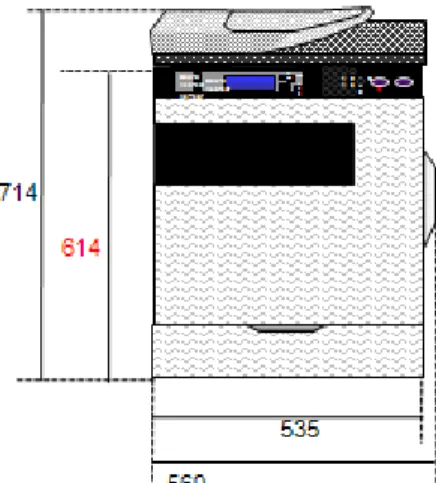
Proof copy function: Yes PostScript 3 printing: Standard Data Security Kit: MX-FRX12 / 12U Dimensions in mm (WxD): 560 x 493
Proof copy function: No PostScript 3 printing: Optional Data Security Kit: MX-FRX13 / 13U Dimensions in mm (WxD): 560 x 438
M
M
X
X
-
-
C
C
3
3
8
8
1
1
/
/
C
C
3
3
1
1
1
1
/
/
M
M
X
X
-
-
C
C
3
3
8
8
0
0
/
/
C
C
3
3
1
1
0
0
S
S
a
a
l
l
e
e
s
s
G
G
u
u
i
i
d
d
e
e
Sales Approach
Target Environments
The MX-C381/C311 & MX-C380/C310 are designed to offer as much flexibility as possible, combining the best elements of the larger colour MFPs with their own unique features. There are several distinct potential customers for these devices.
1. Mixed Deployments
It is becoming more and more common that potential customers require a mixture of A3 and A4 MFPs in their offices, or sometimes even A4-only. This may be a result of office layout, varied user requirement or simple budgetary pressure. Until now, Sharp has been unable to compete in these tenders due to the lack of an A4 machine in our range.
The MX-C381/C311 & MX-C380/C310 allows Sharp to compete in these tenders, and offers many advantages compared to our competitors, thanks to the fact that the MX-C381/C311 & MX-C380/C310 are based on the same technology as our A3 equivalent machines.
By offering a mixture of MX-C381/C311 & MX-C380/C310 together with Sharp’s A3 machines, you can create the ideal solution for any office.
Instead of being limited to offering four A3 machines in this office, we can now offer a combination of machines, with A4 MFPs placed in more central and therefore more convenient locations for many workers. Compared to the costs of installing more A3 models, you can save money too!
The MX-C381/C311 &
MX-C380/C310 can be integrated seamlessly into an environment that also uses Sharp’s A3 colour MFPs, and offers many advantages over solutions that may involve machines from multiple vendors.
A mixed deployment involving MX-C381/C311 & MX-C380/C310 machines and our latest A3 MFPs means:
• A solution that can be tailored to fit any office design, user need and budget.
• Integrated solutions – Sharp’s solution will work across the fleet. Scanning functionality (such as Sharp OSA applications) can be placed next to the desk, eliminating the need for separate scanning hardware. • Consistent image quality - The MX-C381/C311 & MX-C380/C310 are based on the same technology as our A3 machines, meaning image quality will be more consistent than competitor offering where either multiple manufacturers are offered, or when A4 and A3 machines from the same vendors are offered,
M
M
X
X
-
-
C
C
3
3
8
8
1
1
/
/
C
C
3
3
1
1
1
1
/
/
M
M
X
X
-
-
C
C
3
3
8
8
0
0
/
/
C
C
3
3
1
1
0
0
S
S
a
a
l
l
e
e
s
s
G
G
u
u
i
i
d
d
e
e
Archive / FTP server
most of our A3 devices, maintaining consistency.
•
Sharp OSA – now your Sharp OSA solutions can be installed across an entire fleet deployment, including A4 machines.•
MFP Fleet Management – Multiple Sharp MFPs can be managed remotely and efficiently using our PAU (Printer Administration Utility) software.2.
Desktop / Inkjet replacements & scanner replacements
As an office develops, its document needs also develop, but adding devices on a piecemeal basis as and when required can be both expensive and time consuming.
For example, if a company initially decided to centralise its output onto a small number of high speed mono A3 devices, but then it became clear that a certain employee needed to be able to output colour, there is a good chance they would simply go out and buy a small printer. The output of that printer will not be easy to control, and running costs may not be easily discernable. It is very easy to end up with multiple, separate devices, with little or no idea of their costs, resulting in a scenario where you have several small desktop printers, all of different brands, and with little or no control over the printing costs of those printers.
It is only natural that some people will need small printers near their desks, but by replacing these with MX-C381/C311 & MX-C380/C310, you have all the benefits of a mixed deployment, plus the additional functions of an MFP next to their desks.
Not only that, but more and more companies are using scanning to improve their workflow (for example, some companies scan all received mail for electronic distribution and archiving). Instead of having separate scanning and printing hardware, installing the MX-C381/C311 or MX-C380/C310 MFPs means you can have an integrated document solution next to your desk.
By consolidating that colour output and scanning onto a small number of MX-C381/C311 & MX-C380/C310, you create a much better document environment by:
• Making the costs of colour output visible, and therefore manageable.
• Ensure your integrated scanning solutions are well placed near their users’ desks.
All of the circled printers and scanners could be replaced with a small number of MX-C381/C311 or MX-C380/C310s
M
M
X
X
-
-
C
C
3
3
8
8
1
1
/
/
C
C
3
3
1
1
1
1
/
/
M
M
X
X
-
-
C
C
3
3
8
8
0
0
/
/
C
C
3
3
1
1
0
0
S
S
a
a
l
l
e
e
s
s
G
G
u
u
i
i
d
d
e
e
However, over time, the lower cost per copy combined with lower maintenance costs and the other advantages outlined above mean that the long-term costs of the MX-C381/C311 or MX-C380/C310 will usually actually be lower in comparison.
Cost trend comparison over long term
0 500 1000 1500 2000 2500 3000 3500 1 2 3 4 5 6 T ime Co st Smaller printers/copiers MX-C381/380/311/310
M
M
X
X
-
-
C
C
3
3
8
8
1
1
/
/
C
C
3
3
1
1
1
1
/
/
M
M
X
X
-
-
C
C
3
3
8
8
0
0
/
/
C
C
3
3
1
1
0
0
S
S
a
a
l
l
e
e
s
s
G
G
u
u
i
i
d
d
e
e
3. Introduction to colour
The benefits of the MX-C381/C311 & MX-C380/C310 are not restricted to large or medium sized companies – there is also a strong case for smaller businesses as well.
Many smaller offices just don’t need to be able to output A3 sheets, or maybe can’t afford the costs and physical space associated with an A3 device, but do need to be able to produce colour documents. Often this can lead to multiple different devices being used, including:
• A mono laser printer • A separate fax machine
• An inkjet printer (thanks to the perception that colour laser products are too expensive) • A stand-alone scanner
This kind of environment, with several different models, often from several different manufacturers, is inefficient and often does not adequately cover the office’s document needs. It also restricts the availability of colour output, meaning that not everyone in the company can enjoy the benefits. Replacing all of these devices with a single MX-C381/C311 or MX-C380/C310 means you can save money and become more efficient in several ways, whatever your document requirements.
The MX-C381/C311 & MX-C380/C310 can be configured to suit any office’s document requirements.
Paper handling, finishing, security and network applications (such as Sharp OSA, Sharpdesk etc) can all be modified, making the MX-C381/C311 & MX-C380/C310 the most flexible devices in their class. No other models offers this kind of flexibility in such a small footprint, and offering such fast speeds – for copying, printing and scanning.
• The MX-C381/C311 & MX-C380/C310’s speed, small footprint and modular design mean they can be tailored to fit any office’s document requirements.
• By consolidating up to 4 devices into a single unit, you can save space. • A single unit is likely to consume less power than 4 separate units.
• A single set of consumables is needed, instead of potentially 4 different sets, saving space and making it easier to manage costs.
• An MX-C381/C311 & MX-C380/C310 is likely to be able to print, copy and even scan at a faster rate than cheaper single-use devices, saving time.
• Smaller, stand-alone products are unlikely to have the ability to produce finished documents, or have document filing functionality.
• If floor space is at a premium, the MX-C381/C311 & MX-C380/C310 are already the smallest in their class, and can even be configured to sit on a desk.
M
M
X
X
-
-
C
C
3
3
8
8
1
1
/
/
C
C
3
3
1
1
1
1
/
/
M
M
X
X
-
-
C
C
3
3
8
8
0
0
/
/
C
C
3
3
1
1
0
0
S
S
a
a
l
l
e
e
s
s
G
G
u
u
i
i
d
d
e
e
• The modular design of the MX-C381/C311 & MX-C380/C310 means that you can configure it to fityour needs – unlike its competitors (of a similar speed range), you can even place it on a desk if floor space is at a premium.
• Not only will the MX-C381/C311 & MX-C380/C310 output documents quickly, it will also scan documents quickly as well – particularly useful in environments where many paper documents are electronically archived.
5. Enhanced Office Integration through Sharp OSA
As office IT infrastructure has become more complex, the need to more tightly integrate the different technologies into complete workflow solutions has become more and more acute. After all, the more efficient the workflow, the more productive the office can be.
However, since every office will have different requirements, a flexible solution that can be tailored to suit any office is needed
Using Sharp’s unique Open Systems Architecture (OSA), it is possible to create an application from scratch to integrate your entire Sharp MFP fleet into any office.
Alternatively, thanks to Sharp’s Partner Program there are several industry-leading packages that can work with Sharp OSA – so whether you want your own solution for your own office environment, or you want a leading package ‘off-the-shelf’, Sharp OSA can be used to tailor the MFP to any office.
• A fully customizable User Interface (UI) means that a Sharp OSA application can make full use of the colour touch-screen control panel.
• Code description is based on standard HTML – a UI can be created with general coding skills
• Standard expansion technologies can be easily supported (such as Ajax, CSS & Flash), making development quick and easy.
• An existing Partner program, with many large developers already working with Sharp OSA means that the right integrated solution could already be available.
• Almost all of your Sharp MFPs can be connected to a Sharp OSA application – so you have use a single application throughout your office.
• Sharp OSA is network server based – so any application can be integrated throughout the office quickly and easily, and any application updated can be performed centrally too!
M
M
X
X
-
-
C
C
3
3
8
8
1
1
/
/
C
C
3
3
1
1
1
1
/
/
M
M
X
X
-
-
C
C
3
3
8
8
0
0
/
/
C
C
3
3
1
1
0
0
S
S
a
a
l
l
e
e
s
s
G
G
u
u
i
i
d
d
e
e
Why a Sharp A4 MFP?
So why buy a Sharp MFP? By combining Sharp A3 and A4 MFPs, you are combining the best of both worlds.
• A common architecture means that the MX-C381/C311 & MX-C380/C310 can be fully integrated with A3 devices. For example:
1. Outer styling is the same as other Sharp devices, maintaining consistency.
2. A consistent user interface means that once you have learnt to use an A3 machine, you have effectively learnt to use the MX-C381/C311 & MX-C380/C310 too. Since this applies to the LCD panel, print drivers and web pages, only one training session is required to learn about several models, saving time and money.
3. Sharp OSA applications can be deployed across the entire range, making them accessible in any environment from central printing rooms to desk-side MFPs.
4. For security conscious environments, deploying an entirely Sharp-based fleet means a consistent level of security throughout the fleet. For example, Copy Control only works on Sharp devices, therefore if you have a copy-capable machine from a different vendor it can be bypassed quite easily. Sharp’s Data Security Kit is available for both A4 and A3 models.
5. Environment compatibility. If one Sharp colour MFP can work with relatively unusual systems (such as SAP, AS400 for example) you can be confident that others will too, since many are based on the same technology.
6. Image Quality. Since the MX-C381/C311 & MX-C380/C310 is based on the same technology as Sharp’s A3 colour MFPs, image quality will be much more consistent across the range compared to deployments consisting of devices from multiple manufacturers and technologies.
7. Easy to manage and control costs. By using devices from a single vendor, you can use a single management application to maintain and control the entire fleet – not so easy when using devices from multiple manufacturers.
8. TCO. Consistent and easy-to-use UI’s, fewer consumable types to store and manage, smaller
+ =
A flexible and efficient document solution that can be highly integrated and tailored to give the best possible results for any office.M
M
X
X
-
-
C
C
3
3
8
8
1
1
/
/
C
C
3
3
1
1
1
1
/
/
M
M
X
X
-
-
C
C
3
3
8
8
0
0
/
/
C
C
3
3
1
1
0
0
S
S
a
a
l
l
e
e
s
s
G
G
u
u
i
i
d
d
e
e
Key Points
FootprintThe MX-C381/C311 & MX-C380/C310 may be based on the same engine as larger machines, but they have also been designed to take up as little space as possible. In fact, the footprint of the MX-C381/C311 & MX-C380/C310 is one of the smallest in its class:
This is especially impressive when you consider its output speed, especially in colour. Not only do the MX-C381/C311 & MX-C380/C310 produce colour documents as quickly as any competitor, they also have one of the smallest footprints.
Put simply, the MX-C381/C311 & MX-C380/C310 have the best speed to footprint ratio in its class, with the few smaller machines also being much slower in terms of colour output.
Manufacturer / Model Speed Mono Colour Speed Width (mm) Depth (mm) Mm2 Compared to Sharp Sharp MX-C311/C310 31 31 560 438 245,280 Sharp MX-C381/C380 38 38 560 438 245,280 HP CLJ CM4730mfp 30 30 788 639 503,532 205.3% Lexmark X782e 38 33 679 584 395,536 161.3% Samsung CLX-8380ND 38 38 607 574 348,418 142% [cm2] Brother MFC9440 Canon 8180c Dell 3115cn EPSON CX11 HP CM1015 HP LJ2820 HP LJ 4730 KoniM 2490 Lexmark X500n Lexmark X782e OKI C5510n Samsung CLX3160 Ricoh SP C210 Xerox 6110MFP Xerox 6115MFP MX-C311/C310 MX-C381/C380 1,500 2,000 2,500 3,000 3,500 4,000 4,500 5,000 5,500 0 10 20 30 40 50 [Colour Speed]
M
M
X
X
-
-
C
C
3
3
8
8
1
1
/
/
C
C
3
3
1
1
1
1
/
/
M
M
X
X
-
-
C
C
3
3
8
8
0
0
/
/
C
C
3
3
1
1
0
0
S
S
a
a
l
l
e
e
s
s
G
G
u
u
i
i
d
d
e
e
CRU Concept
CRU = Customer Replaceable Units
The CRU concept is a new one to this type of machine. Usually, in order to service the machine (or do anything more than change toner cartridges) a certain amount of technical knowledge is required, not to mention time any skill required to disassemble the machine to access the required parts, change those parts, and re-assemble the MFP (ensuring all parts are back where they should be, and there aren’t any bits ‘left over’).
However, the MX-C381/C311 & MX-C380/C310 are different. By making it as quick and easy as possible to maintain the machine, cost are reduced (in terms of man-hours), and down-time is minimised.
Improvements include the fact you no longer need a screwdriver for most maintenance, and developer is no longer supplied in powder form – it is now a cartridge (making it cleaner and quicker to replace).
Fuser unit Drum & Developer unit
M
M
X
X
-
-
C
C
3
3
8
8
1
1
/
/
C
C
3
3
1
1
1
1
/
/
M
M
X
X
-
-
C
C
3
3
8
8
0
0
/
/
C
C
3
3
1
1
0
0
S
S
a
a
l
l
e
e
s
s
G
G
u
u
i
i
d
d
e
e
Flexibility
The MX-C381/C311 & MX-C380/C310 are unusually flexible in terms of installation placement.
Given its small footprint, it is possible to install the MX-C381/C311 & MX-C380/C310 in the smallest of floor spaces. But it can also be installed in the smallest of offices, which don’t have enough floor space to put an MFP.
The MX-C381/C311 & MX-C380/C310 are based on a modular design, which means that they can be configured to best suit your office needs. This means that, in offices with no floor space the MFP can be placed on a normal desk, whereas many competitors are designed to be floor standing.
Those competing devices that are designed to be desk-based do not have some of the more advanced features of the MX-C381/C311 & MX-C380/C310, such as finishing options.
C Caabbiinneettffoorr44ddrraawweerrss 5 50000sshheeeettssPPaappeerrDDrraawweerr B BaasseeUUnniitt C Caabbiinneettffoorr11ddrraawweerr HP CLJ CM4730mfp
Std configuration Std configuration Lexmark X782e Pictured with Optional paper drawer. Samsung CLX-8380ND It is possible to install the Samsung
on a desk, but its height, even without optional paper cassettes
makes it impractical. Floor-standing only
C
M
M
X
X
-
-
C
C
3
3
8
8
1
1
/
/
C
C
3
3
1
1
1
1
/
/
M
M
X
X
-
-
C
C
3
3
8
8
0
0
/
/
C
C
3
3
1
1
0
0
S
S
a
a
l
l
e
e
s
s
G
G
u
u
i
i
d
d
e
e
Finisher
A finisher is an excellent way to improve office efficiency. By automatically stapling documents produced by your MFP, you save time and money compared to manually finishing these documents offline after they have been printed. Even off-setting each copy of a document saves time, by making it quick and easy to separate copies after they have been removed from the MFP.
The MX-C381/C311 & MX-C380/C310 can be fitted with an inner finisher (MX-FN12), which makes it possible to staple and offset documents they produce. Combined with the duplex unit (standard), this makes the MX-C381/C311 & MX-C380/C310 capable of producing and finishing the majority of office documents quickly and easily.
In this class, not all machines even have finishing options:
Manufacturer / Model Finisher Opt Staple Sheets Hole-punch
Sharp Yes 30 No
HP CLJ CM4730 Yes 30 No
Lexmark X782e No No No
Samsung CLX-8380ND Yes 50 No
Not only does the MX-C381/C311 & MX-C380/C310 have one of the best finishing units, unlike most of the other units installing the finisher does not massively affect the footprint of the machine. In fact, adding the finisher adds only 130mm to the width of the machine, meaning that even with the finisher installed, the MX-C381/C311 & MX-C380/C310 take up less space than its competitors WITHOUT their finishers installed.
M
M
X
X
-
-
C
C
3
3
8
8
1
1
/
/
C
C
3
3
1
1
1
1
/
/
M
M
X
X
-
-
C
C
3
3
8
8
0
0
/
/
C
C
3
3
1
1
0
0
S
S
a
a
l
l
e
e
s
s
G
G
u
u
i
i
d
d
e
e
Business Card Scanning
The practice of scanning business cards in order to electronically store and database them is becoming more and more common. An optional feature of the MX-C381/C311 & MX-C380/C310 is the ability to scan several business cards at once, and send them to dedicated software for storage.
By adding the MX-BTX1, you can scan business cards with dimensions of 89-91mm x 51-55mm, making it quick and easy to scan all of the business cards you have accumulated.
With the Business card option installed, you simply feed the cards through the document feeder, and they are collected on the other side of the machine.
This scanner can also be used to create multiple paper copies of business cards.
Note: Available at a later date
Copy Image
Send Document
Filing
Normal layout Card Size Scan Card layout
S H ARP S tr ee t na m e A re a na m e C ount y me @ sha rp .e u P os tC od e T el: 12345 SHARP Street name Area name County [email protected] PostCode Tel: 12345 SHARP Street name Area name County [email protected] PostCode Tel: 12345 SHARP Street name Area name County [email protected] PostCode Tel: 12345 SHARP Street name Area name County [email protected] PostCode Tel: 12345 SHARP Street name Area name County [email protected] PostCode Tel: 12345 SHARP Street name Area name County [email protected] PostCode Tel: 12345 SHARP Street name Area name County [email protected] PostCode Tel: 12345 SHARP Street name Area name County [email protected] PostCode Tel: 12345 SHARP Street name Area name County [email protected] PostCode Tel: 12345
M
M
X
X
-
-
C
C
3
3
8
8
1
1
/
/
C
C
3
3
1
1
1
1
/
/
M
M
X
X
-
-
C
C
3
3
8
8
0
0
/
/
C
C
3
3
1
1
0
0
S
S
a
a
l
l
e
e
s
s
G
G
u
u
i
i
d
d
e
e
External Design
With its smart grey and black highlighting and ‘grained’ texture, the MX-C381/C311 & MX-C380/C310 have been designed to fit into the most modern and stylish of offices. Not only that, but since the latest A3 colour MFPs from Sharp boast the same stylish exterior, using both machines in a mixed deployment does not mean they will look out of place.
Control panel
The control panel of the MX-C381 & MX-C311 is virtually identical to its larger A3 equivalent machine, meaning that once you can use one machine, you can use them all.
M
M
X
X
-
-
C
C
3
3
8
8
1
1
/
/
C
C
3
3
1
1
1
1
/
/
M
M
X
X
-
-
C
C
3
3
8
8
0
0
/
/
C
C
3
3
1
1
0
0
S
S
a
a
l
l
e
e
s
s
G
G
u
u
i
i
d
d
e
e
Image Quality
The ability to print and copy in colour is fast becoming ubiquitous in the modern office. Not only that, but as colour MFPs are used more and more to create highly important documents in the office, demand for higher quality colour output has never been higher.
Some manufacturers are no longer differentiating between ‘Colour Capable’ and ‘Full Colour’ machines, as they believe their machines offer good enough quality for the most demanding users.
The MX-C381/C311 & MX-C380/C310 offer excellent image quality. High Resolution Printing
The more dots an MFP can lay down per inch (DPI), the more defined & refined the resulting image will be. The more refined the image, the more impressive the final document will look.
The MX-C381/C311 & MX-C380/C310 can print in true 1200x1200dpi. Images are clearer, with the contents easier and clearer to view.
But it’s not only photos and images that benefit from higher resolution printing. Fine lines and characters are also reproduced more clearly in higher resolution, resulting in better defined characters on the page, meaning a higher quality and therefore a more impressive document.
600 x 600 dpi 1200 x 1200 dpi
M
M
X
X
-
-
C
C
3
3
8
8
1
1
/
/
C
C
3
3
1
1
1
1
/
/
M
M
X
X
-
-
C
C
3
3
8
8
0
0
/
/
C
C
3
3
1
1
0
0
S
S
a
a
l
l
e
e
s
s
G
G
u
u
i
i
d
d
e
e
High Grade Toner
The toner particles used in the MX-C381/C311 & MX-C380/C310 have been refined compared to that of the past MX series such as MX-2300/2700. They are smaller, more uniform in terms of size & shape and can be distributed more evenly on the paper.
As a result, dots, fine lines & characters are better reproduced, and texture is less granulated.
New Developer
A developer also helps improve the image quality through smoother distribution of the toner on the paper.
Note: This developer is same as the developer for MX-6201N/ MX-7001N.
Conventional Developer New Developed Developer
Colours are smoother and more consistent
M
M
X
X
-
-
C
C
3
3
8
8
1
1
/
/
C
C
3
3
1
1
1
1
/
/
M
M
X
X
-
-
C
C
3
3
8
8
0
0
/
/
C
C
3
3
1
1
0
0
S
S
a
a
l
l
e
e
s
s
G
G
u
u
i
i
d
d
e
e
Suppressed Background
If your original document has a light (or off-white) background, it is possible to automatically create not only copies but also scans with whiter, brighter backgrounds with the background suppress function.
Using this function on photographs or newspapers, the MX-C381/C311 & MX-C380/C310 can also create almost same colour image as the original one.
Scan to Print
A Print Processing mode for scanning images is a new feature of the MX-C381/C311 & MX-C380/C310. When using this mode, users can obtain a print image that is extremely close in colour to the original image.
Note the improved accuracy of the image tones compared to the original, despite the improved background colour. Original MX-C380/C381/ MX-C310/C311 ≈ Colour ≈ MFP Original Scan to Print Scan MFP Print
M
M
X
X
-
-
C
C
3
3
8
8
1
1
/
/
C
C
3
3
1
1
1
1
/
/
M
M
X
X
-
-
C
C
3
3
8
8
0
0
/
/
C
C
3
3
1
1
0
0
S
S
a
a
l
l
e
e
s
s
G
G
u
u
i
i
d
d
e
e
Usability
Generally, the more complicated and technologically capable a device is, the more complicated it is to use. The ramifications of this for the MFP market include:
• User frustration • Training
• Users not understanding the capabilities of the MFP, therefore not getting the best out of it • Lost clicks
The MX-C381 & MX-C311 include a fully customisable 8.5” colour LCD touch panel.
• Access to all functions is clear and easy • Current job settings are visible at all times • Access to the job change menus is clearly marked
• Current job and device status means it is easy to both manage and administer the MFP
Whilst the operation of the MX-C381 & MX-C311 has been based on previous models as far as possible (if you can use one Sharp device, you can use these) there have been some updates designed to make them as easy as possible to use.
Easy to choose function
Current job
Job / device status makes administration easy
M
M
X
X
-
-
C
C
3
3
8
8
1
1
/
/
C
C
3
3
1
1
1
1
/
/
M
M
X
X
-
-
C
C
3
3
8
8
0
0
/
/
C
C
3
3
1
1
0
0
S
S
a
a
l
l
e
e
s
s
G
G
u
u
i
i
d
d
e
e
Image Preview (Document Filing)
Managing the data stored using the Document Filing function on the MX-C381/C311 & MX-C380/C310 has also become much easier.
• The first page of the stored file is saved as a thumbnail
• Those thumbnails can be checked on the LCD panel and/or web page by the user (In the case of MX-C380/C310, users can view thumbnails on the web page only.)
• It is easy to browse a folder, and choose the required file based on its contents, not just the file name
• Waste print-outs are reduced, saving money & the environment
Remote Front Panel
The control panel for most MFPs is fixed, making it difficult for some people to use the MFP.
To combat this, Sharp has developed the Remote Front Panel which shows the full operation panel on a PC as is on the MFP, making it easy to control remotely. Through Remote Access Interface, service helpdesk or disabled user can connect with the MFP.
Remarks: It is necessary to install the remote software to users’ PC. (Recommended VNC Software: RealVNC, TinyVNC, PAU Ver5)
Other uses include:
• Training – the user panel can be shown to a whole room using a projector, so there is no need for all of the trainees to group around the front of the MFP.
M
M
X
X
-
-
C
C
3
3
8
8
1
1
/
/
C
C
3
3
1
1
1
1
/
/
M
M
X
X
-
-
C
C
3
3
8
8
0
0
/
/
C
C
3
3
1
1
0
0
S
S
a
a
l
l
e
e
s
s
G
G
u
u
i
i
d
d
e
e
Common Drivers*
Sharp uses a standardised and simple driver design, which means that • If you can use one Sharp printer, you can use any other Sharp printers
• Only one driver disk is needed to install drivers for any of our colour range (MX-2300N to MX-7001N inclusive), making drivers easy to manage
* The available features and/or optional configuration differ depending on machine. Therefore, perfect compatibility is not given.
M
M
X
X
-
-
C
C
3
3
8
8
1
1
/
/
C
C
3
3
1
1
1
1
/
/
M
M
X
X
-
-
C
C
3
3
8
8
0
0
/
/
C
C
3
3
1
1
0
0
S
S
a
a
l
l
e
e
s
s
G
G
u
u
i
i
d
d
e
e
Productivity
Not only are the MX-C381/C311 & MX-C380/C310 incredibly easy to use, they are also very efficient – helping you to achieve the best productivity possible from your MFP.
• Fast scanning speed
The MX-C381/C311 and MX-C380/C310 can scan at speeds of up to 33opm (200dpi) in both colour and mono.
No more waiting next to the machine for your originals to complete scanning! • Fast output speed
The output speed of the MFP is amongst the best in class, meaning that every job you need the MX-C381/C311 & MX-C380/C310 to do, it will be done fast.
Combine this with the fast warm-up time of up to 90 seconds, and fast first copy out times (8.9 sec* colour & 8.0 sec* mono) and you can see that everything has been designed with efficiency in mind.
*Measurement condition
“Original Glass” “Feeding A4R paper from the main unit tray 1” “Auto Colour Selection” “Polygon in rotation”
• Gigabit Ethernet (1000Base-T)
As well as scanning and output speed, the speed of the network connection has also been improved with the addition of Gigabit Ethernet – so your print jobs will reach the MFP faster, and your scan jobs will be sent much more quickly as well.
• Direct SMTP
When using Internet Fax, if both the sending and receiving machines are capable of operating by Direct SMTP, the Fax can be transmitted without going through the mail server. This eliminates a potential bottle neck, and since the Fax is transmitted directly, it takes less time to arrive.
• Fax Inbound routing & preview
When you receive a fax, it can either be printed out immediately, forwarded on to a user, who can decide whether it should be printed at their own PC, or it can be stored on your MFP and previewed on the LCD panel, ensuring that junk faxes are not printed, saving you time and money.
M
M
X
X
-
-
C
C
3
3
8
8
1
1
/
/
C
C
3
3
1
1
1
1
/
/
M
M
X
X
-
-
C
C
3
3
8
8
0
0
/
/
C
C
3
3
1
1
0
0
S
S
a
a
l
l
e
e
s
s
G
G
u
u
i
i
d
d
e
e
Connectivity
There are so many different environments and systems in use in today’s office that an MFP needs to be compatible with as many as possible.
The MX-C381/C311 & MX-C380/C310 have been developed with this in mind.
And not only can our devices work with all these software vendors, the MX-C381/C311 & MX-C380/C310 can communicate with them exceptionally quickly over the latest networking technologies:
• Standard Gigabit Ethernet (1000Base-T)
• IPv6
Sharp is a founder member of the SAP Printer Vendor Program. SAP device types for all of our devices will be created to provide connectivity with SAP. WHQL (Windows Hardware Quality Labs) testing ensures full compatibility with Windows systems.
Sharp is a Citrix Technology Partner, giving us access to testing resources, technical support and other Citrix development tools.
Compatibility with the CUPS (Common Unix Printing System) ensures you can use your MFP with both Unix and Linux.
M
M
X
X
-
-
C
C
3
3
8
8
1
1
/
/
C
C
3
3
1
1
1
1
/
/
M
M
X
X
-
-
C
C
3
3
8
8
0
0
/
/
C
C
3
3
1
1
0
0
S
S
a
a
l
l
e
e
s
s
G
G
u
u
i
i
d
d
e
e
Microsoft XPS
The MX-C381/C311 & MX-C380/C310 are compatible with the latest formats, including Microsoft XPS. What is XPS?
XPS (XML Paper Specification) is a new file format from Microsoft intended for published documents, where once published, the document cannot be changed. It is similar in function to Adobe PDF.
XPS is important because compatibility is built into Vista, the latest version of Windows, (separate downloads are available for previous versions) therefore it will be usable for a lot of people in the near future.
Benefits over PDF file format
• All fonts are embedded in the document
• Colour handling has been improved, with support for systems such as ICC profiling
• Support for a wider gamut of colours
• Compatibility with Microsoft’s DRM software (RMS / Rights Management Software), which in turn is supported by Microsoft SharePoint.
Printing XPS files
It is possible to print XPS files using PCL drivers, but it is not ideal. When printing via PCL, the data is effectively converted into a Bitmap, which affects gradation and transparency settings within the data.
File Formats
The MX-C381/C311 & MX-C380/C310 are compatible with a wide variety of document file formats: Direct Print Scan
Microsoft XPS Opt*
D
D
**D
Encrypted PDF
D
**D
JPEG
D
D
TIFF
D
D
*MX-PUX1 expansion kit and MX-SMX3 (expansion memory board) are required. ** MX-PKX5 is required for MX-C380/C310.
M
M
X
X
-
-
C
C
3
3
8
8
1
1
/
/
C
C
3
3
1
1
1
1
/
/
M
M
X
X
-
-
C
C
3
3
8
8
0
0
/
/
C
C
3
3
1
1
0
0
S
S
a
a
l
l
e
e
s
s
G
G
u
u
i
i
d
d
e
e
PAU 5 (soon-to-be-released)
Sharp Printer Administration Utility (PAU) 5 is the latest version of Sharp’s own web-based administration utility. It will allow administrators to manage their fleet of MFPs quickly and easily, without having to physically visit the MFP. PAU 5 introduces several new features over PAU 4, including:
• Firmware download
• Remote Operation panel
• Click Count Export (CSV)
• Device Cloning
• Service Reports
Other improvements include:
• New user interface
• Tree navigation structure
• Local Authentication database
• Three user types (Service, Advanced, General), with varying permissions
M
M
X
X
-
-
C
C
3
3
8
8
1
1
/
/
C
C
3
3
1
1
1
1
/
/
M
M
X
X
-
-
C
C
3
3
8
8
0
0
/
/
C
C
3
3
1
1
0
0
S
S
a
a
l
l
e
e
s
s
G
G
u
u
i
i
d
d
e
e
Save Money
All companies are interested in ways to save money – so how can the MX-C381/C311 & MX-C380/C310 help? Duplex Printing
The MX-C381/C311 & MX-C380/C310 come with duplex as standard.
By printing and copying as many documents as possible on both sides of the paper, your paper purchasing costs could be halved.
Fax Management
With the advanced Fax management functions of the MX-C381/C311 & MX-C380/C310, you need never print a fax again, whether receiving or sending.
Inbound routing - Incoming faxes are sent via email to a specified recipient or sent as tiff data to servers/PCs, so only required faxes need be printed, and junk faxes are not printed.
PC-Fax - Fax electronic documents direct from your PC – no need to print them first.
Fax Thumbnail* and preview function also enables incoming faxes to be previewed prior to printing.
Of course, if you do need to print out a fax, you can always print it duplex!
* Thumbnail only available on MX-C381/C311 Save Electricity, Save the Environment
The MX-C381/C311 & MX-C380/C310 can be set to go into power save mode after a set period of inactivity. In addition to this, there is a power-save button which, when pressed, forces the MFP into power save mode immediately.
Power save mode
M
M
X
X
-
-
C
C
3
3
8
8
1
1
/
/
C
C
3
3
1
1
1
1
/
/
M
M
X
X
-
-
C
C
3
3
8
8
0
0
/
/
C
C
3
3
1
1
0
0
S
S
a
a
l
l
e
e
s
s
G
G
u
u
i
i
d
d
e
e
Control Colour Costs
The benefits of using colour in your business documents is well known, but some companies have not introduced colour MFPs to their offices due to a risk of increased costs as a result of increased colour output.
The simple answer to this is to restrict which users can produce colour documents.
Each user can have different levels of access to the MFP. By using this feature, you can set it up so that anyone can produce black and white output, but only registered users with colour access can log onto the MFP and produce colour documents.
A maximum of 1,000 accounts can be registered. Power On
Automatic login by the fixed user (A) registered in advance.
Basic Screen
B/W copy can be used at this time. Pressing the Color button causes an error.
To perform colour copy, press the
“*(logout)” key. Login by a user that can perform colour copy (B).
No
Ready
Ready Ready
Press the “*(logout)” key to return.
M
M
X
X
-
-
C
C
3
3
8
8
1
1
/
/
C
C
3
3
1
1
1
1
/
/
M
M
X
X
-
-
C
C
3
3
8
8
0
0
/
/
C
C
3
3
1
1
0
0
S
S
a
a
l
l
e
e
s
s
G
G
u
u
i
i
d
d
e
e
Security
Most IT departments are aware of the security issues of their networks, and take appropriate measures to protect data stored on their systems.
But how many are aware of the dangers posed by an MFP?
Most MFPs fitted with a hard drive can automatically store copies of any jobs it processes on its hard drive, whether they be print, copy, scan or fax jobs and they can stay on the MFP’s HDD for years.
How many sensitive and confidential documents pass through your MFP?
• Financial data
• Business documentation
• Tenders
• Product specifications
• Employment data
• The list is endless
The MX-C381/C311 & MX-C380/C310 employ Sharp’s unsurpassed expertise in security to ensure your data remains safe – whoever has access to your MFP:
• Secure data during communications with the MFP
– HTTPS / SSL / IPsec network data encryption
– IP / MAC address filtering
• Secure data stored on the MFP
– Encrypt data during processing
– Overwrite data on HDD once processing is complete
– Encrypt the HDD
– Automatically delete files after a set period
• Secure data once it leaves the MFP
– PIN printing
– Document control
– Encrypted PDF support
Many of these features are unique in the A4-class of machines.
Now imagine this data was
unsecured.
M
M
X
X
-
-
C
C
3
3
8
8
1
1
/
/
C
C
3
3
1
1
1
1
/
/
M
M
X
X
-
-
C
C
3
3
8
8
0
0
/
/
C
C
3
3
1
1
0
0
S
S
a
a
l
l
e
e
s
s
G
G
u
u
i
i
d
d
e
e
Security feature: IEEE802.1X
IEEE802.1X is a LAN standard established by the IEEE 802 committee. It is a technology used to authenticate hardware connected to the network, therefore its main function is to prevent unauthorised machines from gaining access to your network.
The MX-C381/C311 & MX-C380/C310 support IEEE802.1X, maintaining the high level of security your network requires. There are broadly three techniques for preventing
? ?//%%&& $ $**##$$ ? ?//%%&&$$**##$$~~**$$ SSL / IPsec encryption protects communication over the network.
IP & MAC address filtering restricts access to the MFP over the network. Data on the HDD (and being processed) can be encrypted.* Once processed, data can be overwritten with random data.*
PIN Printing means that no printouts are left lying on the MFP, as the user must enter a PIN before the document is printed.
Document Control means that any document output with DC patterns cannot then be printed or scanned by another Sharp MFP with DC
installed.* * Optional Data Security Kit required
Scanned documents can be scanned in Encrypted PDF
format, meaning a password must be entered before the document can be opened.
Input to the MFP On the MFP Output by the MFP
?
Files stored on the HDD can be automatically deleted on a regular basisM
M
X
X
-
-
C
C
3
3
8
8
1
1
/
/
C
C
3
3
1
1
1
1
/
/
M
M
X
X
-
-
C
C
3
3
8
8
0
0
/
/
C
C
3
3
1
1
0
0
S
S
a
a
l
l
e
e
s
s
G
G
u
u
i
i
d
d
e
e
Office Integration
The trend towards office automation is clear. Customers want to make their offices as efficient as possible, including their document output infrastructure.
There is a demand for document solutions that can be integrated with either new or existing solutions, for archiving, document workflow, accounting or scanning.
Sharp Open Systems Architecture is perfect for the job!
Sharp OSA makes it possible for third-party software developers to create custom applications that link the MFP to software programs on a server or PC, giving you the ability to create your own solutions specific to your own needs.
The MX-C381/C311 & MX-C380/C310 are compatible with the latest version of Sharp OSA (3.0), which makes it even easier to customise your MFP and integrate it into your office workflow. Plus, by including Sharp OSA on both A3 and A4 devices, it is possible to use Sharp OSA applications across your fleet, even in mixed deployments. Among Sharp OSA 3.0’s highlights are:
• A fully customisable User Interface (UI)
• Code description is based on standard HTML – a UI can be created with general coding skills
• Standard expansion technologies can be easily supported (such as Ajax, CSS & Flash)
• An existing Partner program, with many large developers already working with Sharp OSA means that the right integrated solution