Software Engineering Project Courses with Industrial Clients
1 Bernd Bruegge, Technische Universit ¨at M ¨unchenStephan Krusche, Technische Universit ¨at M ¨unchen Lukas Alperowitz, Technische Universit ¨at M ¨unchen
There is an acknowledged need for teaching realistic software development in project courses. The design space for such courses is wide, ranging from single semester to two semesters courses, from single client to multi-customer courses, from local to globally distributed courses, and from toy projects to projects with real clients. The challenge for a non-trivial project course is how to make the project complex enough to enrich the students’ software engineering experience, yet realistic enough to have a teaching environment that does not unduly burden students or the instructor. We describe a methodology for project courses that is realizable for instructors, improves the students’ skills and leads to viable results for industry partners.
In particular recent advances in release management and collaboration workflows reduce the effort of students and instructors during delivery and increase the quality of the deliverables. To enable release and feedback management, we introduce Rugby, an agile process model based on Scrum that allows reacting to changing requirements. To improve early communication, we use Tornado, a scenario-based design ap-proach that emphasizes the use of informal models for the interaction between clients and students. The combination of Rugby and Tornado allows students to deal with changing requirements, to produce multiple releases and to obtain client feedback throughout the entire duration of the course.
We describe our experience with more than 300 students working in 40 projects with external clients over the duration of four years. In the latest instance of our course, the students have produced more than 7000 builds with 600 releases for eleven clients. In an evaluation of the courses, we found that the introduction of Rugby and Tornado significantly increased the students’ technical skills, in particular with respect to software engineering, usability engineering and configuration management as well as their non-technical skills such as communication with the client, team work, presentation and demo management. Finally we discuss how other instructors can adapt the course concept.
Categories and Subject Descriptors: K.6.3 [Management Of Computing And Information Systems]: Software Management—Software development, Software process; D.2.9 [Software Engineering]: Manage-ment—Life cycle, Programming teams, Software configuration management, Software process models General Terms: Management
Additional Key Words and Phrases: Agile Methods, Release Management, Continuous Delivery, Continu-ous Integration, Version Control System, Feedback, Executable Prototypes, Communication Models, User Involvement, Scenario-Based Design, Informal Modeling, Scrum, Prototyping, Unified Process
1This paper is based on previously published papers [Bruegge et al. 2012], [Krusche and Alperowitz 2014] and [Krusche et al. 2014b] and on a tutorial [Bruegge et al. 2014] that provides more details about our course.
1. INTRODUCTION
Educating software engineering students for real-world jobs in industry is a challeng-ing task. A fundamental question concerns the mix of theory and practice [Hilburn and Humphrey 2002]. Shortly after the term Software Engineering was coined in 1968, the Curriculum 68 report already mentioned that students gain programming competence by participating in a “true-to-life” programming project [Atchison et al. 1968]. But nothing happened. At least we are not aware of any software engineering project as a result of Curriculum 68. Academia was still dominated by mathematicians who be-lieved that software could be produced by formal reasoning based on mathematics and logic alone. When an early project course was offered at MIT in 1968, project man-agement was considered soft and not scientific [Ross 1989]. Only a few daring souls
ventured into offering and conducting software engineering courses in the 1970s.2
Horning and Wortman introduced the idea of running a software engineering course as game using rotation based on the availability of artifacts among team members [Horning and Wortman 1977]. Freeman also introduced rotation in his early project courses, but instead of rotating after the delivery of an artifact, the teams rotated at phase boundaries. One team had to turn a requirements description into a specifica-tion, another one produced a product based on the specificaspecifica-tion, a third one imple-mented the specification, and rotated to define the acceptance tests [Freeman et al. 1976]. B¨orstler also used rotation in his early courses [B¨orstler 2001]. Tomayko cre-ated a course in 1987 at the University of Wichita and wrote “A first course in software engineering is a daunting experience for both student and teacher. The students must work in cooperation with one another on a project that uses almost all their computer science skills and illustrates the techniques taught in the class portion of the course. Since this is often the most interesting single course they take, students tend to throw themselves into it at the expense of other courses”. [Tomayko 1987, p. 43]
These early project courses had impact on curriculum design. In 2004, an ACM/IEEE joint task force on computing curricula finally recommended to include software engi-neering projects in the undergraduate curriculum. Students can demonstrate “an un-derstanding of and apply current theories, models, and techniques that provide a basis for problem identification and analysis, software design, development, implementa-tion, verificaimplementa-tion, and documentation.” [LeBlanc et al. 2006, p. 15] Many educators teach their project course at the end of the computing curriculum, often referred to as capstone course. The underlying assumption is that students have to use the knowl-edge accumulated throughout their studies to develop a complex system; students can-not be expected to develop large systems without this accumulated knowledge.
A capstone project “offers students the opportunity to tackle a major project and demonstrate their ability to bring together topics from a variety of courses and ap-ply them effectively” [LeBlanc et al. 2006, p. 15]. In 2009, the Curriculum Guidelines for Graduate Degree Programs in Software Engineering (GSwE2009) were published [Pyster 2009]. GSwE2009 expects students to demonstrate their accumulated skills and knowledge in a more significant capstone experience than does SE2004 [LeBlanc et al. 2006]. Graduate capstone courses are generally more demanding compared with the SE2004 undergraduate curriculum. The history of GSwE2009 and the evolution of software engineering education until 2011 is well summarized by [Ardis et al. 2011].
The main goal of any software engineering project course is to have students appre-ciate the complexity of software development and to teach them how to work in a team [Lingard and Barkataki 2011]. However, instructors cannot expect to teach students how to deal with complexity and change if the students have to simultaneously play
the role of the client, the project manager and - at the end of the course - manage the acceptance of the system. Tomayko describes the situation concisely: “Despite the expected positive outcomes, the beginning teacher of this course has a thousand ques-tions and fears: How do you find a reasonable project? Should you use a ‘real’ customer or make something up? How do you organize students into teams? What do they do? How do you keep the class meetings closely related to the project work? How should the project documents look? How do you grade teams? Will you see your spouse and children again before the semester ends?” [Tomayko 1987, p. 1]
Even today there is little agreement as to what a software engineering project course should cover. Most academic programs have at least one such course and a few offer several courses on the subject. Some project courses cover detailed aspects, e.g. pro-gramming, usability and security issues, analysis, architecture, design or work prod-ucts [B¨orstler 2001]. One approach to simplify the project for instructors as well as for students is to work in a problem domain that the students are already familiar with, or one they are motivated to learn more about, e.g., computer game development, or enhancing tools oriented toward program development itself. A problem with this ap-proach is that students often have extensive knowledge of the game or tool interface but are blissfully unaware of what goes into modeling, implementation, testing and delivery. However, Salamah and his colleagues suggest to use the Digital Home Case Study, which provides a set of development artifacts and exercises, as well as guidance for instructors on how to use the case modules [Salamah et al. 2011]. Other univer-sities offer curricula with several software engineering courses. Bernhart provides a good categorization of the different types of project courses [Bernhart et al. 2006].
In 1998, Tomayko wrote: “The most common form of software engineering education, even today, is the one-semester survey course, usually with a toy project built by groups of three students. Even though such courses are now 30 years old, the Software Engi-neering Institute and IEEEs Annual Conference on Software EngiEngi-neering Education and Training still get one or two papers every year from some isolated academics who think that they have innovated the idea of a group project course”. [Tomayko 1998, p. 7]. Bavota et al. describe two courses on Software Engineering and Project Man-agement simultaneously taught in the same semester, thus allowing to build mixed project teams composed of five to eight Bachelor’s students with development roles and one or two Master’s students with management roles [Bavota et al. 2012]. Johns-Boast and Flint run a combined course with two cohorts of students: students learning how to work as team members in their third year and students learning how to work as team leaders in their fourth (final) year [Johns-Boast and Flint 2013]. For two con-secutive semesters, small teams of five or six students, with fourth year team leaders and third year team members work with industry partners to develop solutions to real-world problems. The Embry-Riddle Aeronautical University offers a sequence of project courses: In the first year, the students learn Humphrey’s Personal Software Process (PSP), followed by courses using TSPi, an academic version of the Team Soft-ware Process, in their second and third years [Hilburn and Humphrey 2002].
Judith and her colleagues examine several approaches to deal with situations when real clients are brought into the classroom at various sized institutions in different countries [Judith et al. 2003]. Broman, Sandahl and Baker describe an approach, where the students are organized in simulated companies, each consisting of approx-imately 30 students and employees. The organization of the simulated companies can be a traditional line organization with several departments or an agile organization containing self-organized cross-functional teams [Broman et al. 2012]. A more ambi-tious instance of such a project course is not to simulate the company, but to have the students interact with a real client, i.e. an external client from industry.
Our own software engineering project courses with real clients were influenced by the ideas of James Tomayko, in particular with respect to single-project courses with a real client [Bruegge et al. 1991], [Bruegge 1994]. Since then we have been exper-imenting with many different setups and parameters, replacing structured analysis with object-oriented modeling [Bruegge et al. 1992], introducing iterative and collab-orative design [Bruegge and Coyne 1994], adding technical writers [Bruegge et al. 1995], adding use case modeling [Coyne et al. 1995], introducing rationale manage-ment and issue-based modeling [Dutoit et al. 1995], and venturing into globally dis-tributed projects [Bruegge et al. 2000], but always with one or more real clients.
Getting a real client, especially an external one from industry, is a problem for many instructors. Even today, project courses with simulated clients such as colleagues from the university are not unusual. We strongly believe in real clients in project courses. Some parameters have therefore stayed constant in all our courses throughout the
time. We call them the 6Rs: We always look for a real external clientwho has areal
problemto be solved withreal data. We ask students to work together as areal teamin
areal projectto solve the problem by areal deadline, usually the end of the semester.
Even with these constraints, there is still a wide spectrum of possibilities. Our early courses have dealt mostly with modeling desktop-oriented information systems, where we focused on system modeling, in particular object modeling, functional modeling and dynamic modeling [Bruegge and Dutoit 2009]. The courses we have taught can
be placed into four different categories: Single-Project, Global SE, Multi-Projectand
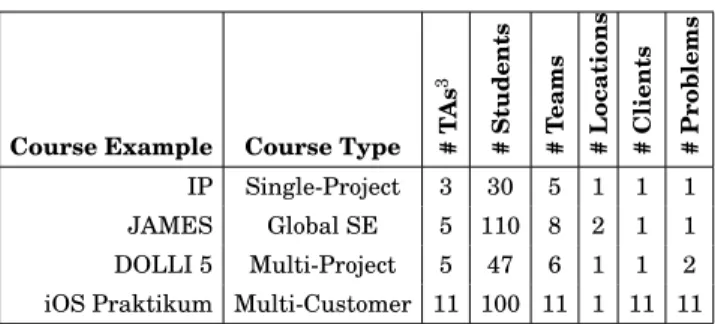
Multi-Customer. Table I shows an example of our courses for each category. With these
course types we cover most of the alternatives proposed by Saiedian [Saiedian 1996]. Table I. Examples of our project courses
Course Example Course Type #T
As 3 # Students # T eams # Locations # Clients # Problems IP Single-Project 3 30 5 1 1 1 JAMES Global SE 5 110 8 2 1 1 DOLLI 5 Multi-Project 5 47 6 1 1 2 iOS Praktikum Multi-Customer 11 100 11 1 11 11
A single-project course has one client stating one problem to be solved by all students working together in teams. The course covers the complete development process from vague requirements to product delivery. In 1991, we taught Interactive Pittsburgh (IP), an object-oriented single-project course with the Pittsburgh City Planning Department and 30 students [Bruegge et al. 1992]. Other single-project courses with real clients are described by [Rosiene and Rosiene 2006] and [Cicirello et al. 2013]. [Wikstrand and B¨orstler 2006] describe the factors that influence how students select their projects.
A global software engineering course consists of one or more clients distributed across multiple locations. From 1997 to 1998, Daimler in Stuttgart and Chrysler in Detroit were our external clients in a project with 110 students working in teams at two universities, Carnegie Mellon University and Technische Universitaet Muenchen [Bruegge et al. 2000]. Experiences with global software engineering courses are also described by [Deiters et al. 2011], [Matthes et al. 2011], [Damian et al. 2012] and [Fil-ipovikj et al. 2013]. A multi-project course has a single client who requests more than
one problem to be solved by the students. Over a period of six years we worked with the Munich Airport as the client in several multi-project courses [Bruegge et al. 2008]. The most ambitious instance is the multi-customer course with multiple external clients from industry, each with a different problem to be solved. We have been teach-ing multi-customer courses since 2008, when we started to offer the iOS Praktikum, a project course where up to 100 students develop mobile applications for real clients. With the emergence of smartphones as a new exciting platform, we focus more and more on the development of mobile interactive systems and cyber-physical systems. This requires additional modeling activities, in particular, we now include user model-ing, user interface modeling and usability testing and stress informal modeling in its various forms based on UML [Bruegge and Dutoit 2009].
The usual reaction of many instructors we have talked to is that multi-customer courses are not possible, especially if they involve real clients. The purpose of this paper is to show that it is indeed possible, in particular with the recent advances in continuous integration and the emergence of release management tools that can be used effectively in the class room. We also demonstrate that project courses do not have to be capstone courses offered as the final culmination in the software engineering curriculum. In fact, our strong belief is that the earlier we can involve students in a software engineering project course, the earlier they appreciate the technical and managerial complexities of a project. We have started to offer our project course to second year students (sophomores) and in some occasions even admit first semester students (freshmen). The challenge is to make such a course still manageable by the instructor and provide a meaningful software engineering education experience.
In this paper we present our teaching methodology for project courses with up to 100 students working on problems formulated by real clients. Section 2 describes Rugby, the ecosystem and agile process model. The “engineering” focus leaves instructors vul-nerable to several traps, in particular if the focus is solely on technology, not addressing the human and social dimensions of software engineering. A major challenge is to rec-oncile the engineering dimension with the human and social dimension [Vliet 2006]. We describe the interplay between students and the environments of our infrastruc-ture, in particular to manage releases and to receive feedback from clients.
Constructing, understanding and using models is an essential element of any soft-ware engineering course. Kuzniarz and B¨orstler provide an overview of the different ways how to introduce modeling and how students can acquire the ability to cre-ate models [Kuzniarz and B¨orstler 2011]. Section 3 presents Tornado, a light-weight scenario-based design approach that starts with informal visionary scenarios formu-lated by the client in the problem statement funneling down to demo scenarios used in the delivery and demonstration of the final system. Before using UML models for analysis and design, we encourage the students to use informal models, in particular when interacting with a client during early requirements engineering activities. Ex-amples of informal models are film trailers to express the basic idea of the project to external stakeholders.
Section 4 describes the impact that our courses had on students. We evaluated four multi-customer courses taught from 2011 to 2014 and found that the participation in our course increased the students technical skills, in particular with respect to model-based software development, usability engineering and configuration management as well as their non-technical skills such as communication with the client, team work, presentation and demo management. In Section 5 we discuss implications for instruc-tors, in particular with respect to scalability and additional overhead. To help other instructors to incorporate our methodology into their courses, we show alternatives how to set up the course environment and discuss their benefits and drawbacks.
2. RUGBY: THE ECO-SYSTEM AND AGILE PROCESS MODEL
Rugby4 is an agile process model which combines elements from Scrum [Schwaber
and Beedle 2002] and the Unified Process [Jacobson et al. 1999] to address the specific needs of university projects where students, taking other courses as well, are basi-cally part-time developers. To deal with part-time developers, one focus of Rugby is structured meeting management using weekly team meetings instead of daily scrum meetings. Rugby is based on the concept of continuous delivery right from the begin-ning to obtain early feedback from the client. It emphasizes executable prototypes to visualize progress and includes review workflows to support knowledge transfers, so that students learn from each other to stick to architectural and coding guidelines.
In this section we discuss the environments of Rugby’s ecosystem5. Figure 1 shows
how the course participants interact with these environments. A developer, in our case a student, interacts with the collaboration, development, integration and delivery en-vironment. A manager, in our case a project leader or a coach, interacts with the man-agement and the collaboration environment. A user, in our case the client, a test user or the end user, interacts with the target, collaboration and delivery environment.
model, implement commit, build give feedback release Integration Environment Version Control Continuous Integration Development Environment IDE Informal Modeling Collaboration Environment Meeting Management Issue Management Delivery Environment Continuous Delivery Feedback Management prioritize
use Target Environment Usage Context Executable Prototype Developer User Manager communicate Management Environment Program Management Course Organization Instructor
Key: Interacts with
Fig. 1. Roles interacting with Rugby’s course environments (adapted from [Bruegge et al. 2012])
Section 2.1 covers the Management Environment, which defines organizational
as-pects like the roles and responsibilities of all stakeholders. It also defines the life cycle
model used in our project courses. The Collaboration Environment, discussed in
Sec-tion 2.2, describes our meeting management workflow and our approach to issue track-ing in agile projects. The instructor sets up these environments before the beginntrack-ing of the course and uses them to communicate with project leaders, coaches and students
throughout the entire course. The Integration Environment described in Section 2.3
defines development specific workflows for version control, continuous integration and code reviews. Workflows which require user interaction, such as the delivery of
prod-uct increments and the collection of feedback, are defined in Section 2.4. TheDelivery
Environmentallows developers to deliver executable prototypes to theTarget
Environ-mentin which context information about the usage can be tracked. The collaboration,
integration and delivery environments include workflows that help the students to work together as a team and to bridge the communication gap between developers
4The term rugby was first used by Takeuchi and Nonaka [Takeuchi and Nonaka 1986].
5Highsmith defines an ecosystem as “a holistic environment” that includes several interwoven components: chaordic perspective, collaborative values and principles, and a barely sufficient methodology [Highsmith 2002]. We describe Rugby as an ecosystem of environments and workflows.
and users. TheDevelopment Environmentcontains the actual development tools and workflows and is not further described in this section.
2.1. Management Environment
The management environment includes the organization, the life cycle model and a description of the responsibilities for each of the stakeholders in the course. Be-fore the course starts the instructor advertises the course, talks to potential clients, brainstorms with them about possible ideas and their involvement. The clients in our courses come from large companies, small companies with only a few employees, and even include startups. Figure 2 illustrates the workflows of the life cycle model allow-ing the students to work in parallel. The average effort of each workflow (Requirements Elicitation, Analysis, Design, etc.) is shown for each phase of the project. Important
milestones are shown as black diamonds such as the Kickoff to present the projects,
the Team Allocation to map the students to a specific client, the Design Review to
present the requirements analysis and system design for the multiple projects and the
Client Acceptance Test (CAT)to present the results at the end of the semester.
Top Level Design Elaboration Problem Statement Inception Analysis Design Implementation Project Management Release Management
Sprint 0 Sprint 1 Sprint n
Test Requirements Elicitation Schedule Design Review R0 R1 Kickoff CAT Team Allocation
…
…
R2 R3 RnEvent Time based release Event based release
Construction Document
Feedback Management
Fig. 2. Rugby’s life cycle model (adapted from [Bruegge et al. 2012])
The first phase can be mapped to the inception phase of the Unified Process and
lasts until the Kickoff. The instructor provides a template for theProblem Statement
to the clients who write at least one visionary scenario (see Section 3). The clients are
also encouraged to specify an initialTop Level Designof the application to be developed
so that the students already know whether it is a reengineering project, a greenfield project or an interface engineering project. The Kickoff is the official start of the course. The clients give short presentation (10 min.) where they try to convince the students of
their project idea. After the kickoff event, the students fill out an online questionnaire where they state their preferences for the presented projects as well as their experi-ences in software development. On the day after the kickoff, we use the results from the questionnaire to assign the students to the teams. This is a semi-automated phase that still requires about half a day. We try to address the preferences of the students. If all students get their first choice, we know that they stay motivated.
However, there are several constraints to produce balanced teams. For example, we try to balance the teams with respect to diversity and gender. On average, about one third of our students have a good background knowledge in software development. Furthermore, about 15% - 20% female students apply to our courses. Overall we have about 50% international students. During the team assignment, we attempt to staff each team with experienced as well as inexperienced students and with a good gender balance. However, often not all these constraints can be applied simultaneously. There have been kickoff events, where one client attracted all the first choice votes. In other cases we had to give students their fifth or sixth choice. In such situations it is impor-tant that the instructor meets face-to-face with the affected students. It usually helps to tell them that their learning experience is independent from a particular project.
After the team assignment, the instructor sets up the team spaces in the collabora-tion and integracollabora-tion environment and provides meeting agenda templates for the first team meetings. The project leaders invite their team members to the first meeting to explain the basic meeting management concepts and discuss the problem statement.
Then, each team starts the first sprint which we have coined Sprint 0. The focus of
Sprint 0 is not on development, but on team building exercises. It can be mapped to the elaboration phase of the Unified Process. For example, we use icebreakers that fo-cus on teamwork, in particular team-based problem solving, and provide a lot of fun. Example of icebreakers are tricks where the students learn how to rip a phone book in half or the marshmallow challenge [Wujec 2010]. In addition, each team has to produce a trailer, a short 60 second movie describing the basic idea or vision of the system to be built. The trailer is marketing oriented and helps to bring the client and the team to-gether. In many cases our clients have used these trailers to market the project within their own organization.
Other team building activities included kart races, paintball games and dinner groups. Such activities help to overcome cultural differences in the team formation phase. Sprint 0 also covers short tutorials about Rugby’s workflows to bring all team members up to a shared knowledge level. Our tutorials are based on experiential learn-ing, to establish a culture of continuous improvement and continuous learning within the course [Kolb 1984]. Another activity in Sprint 0, often in the middle as shown in Figure 2, is the creation of a first release. Because it is early in the project, students only have to build an “empty release” but the students become already familiar with release management techniques, in particular version control, continuous integration and continuous delivery, as well as with feedback management.
After Sprint 0, the teams move on to development sprints which can be mapped to the construction phase of the Unified Process. Each of these sprints usually last
between two and four weeks6, depending on the innovation of the project. With
stu-dents working on different schedules, daily meetings are hard to schedule, therefore the teams conduct weekly meetings (in contrast to Scrum). We consider our students as part-timers, because they are taking other classes and exams throughout the course. Part-time developers are becoming common in agile industry projects [Fowler 2001]. In
6Explorative projects have shorter sprints as requirements change more often and more feedback is re-quired. Projects with mature requirements usually have longer sprints.
addition to the weekly face-to-face meeting, the students can use asynchronous com-munication mechanisms such as chat as well as audio and video conferences.
In the design review event after two thirds of the course, all teams present their understanding of the problem, show the trailer, the requirements and one or two vi-sionary scenarios usually in form of a demo, as well as the status of the project. The demo can still include workarounds and mocks. However, we require from the stu-dents to report which parts of the demo are already implemented, which of them are only unit-tested and which of them are bridged by a “narrator”. The work load in-creases significantly before the design review. The course-wide presentation motivates the students because they have to present their work to all other teams in the presence of all clients. After the presentations, the teams get feedback from their client, as well as from other teams and the instructor.
At the end of the course (after three months) the students present the requirements and the architecture of the system combined with another demo in the course-wide client acceptance test (CAT). The demo is based on the demo scenario, a refined ver-sion of one or more of the viver-sionary scenarios from the problem statement. It should not include workarounds and mocks any more. The CAT is filmed and we also provide a live stream into the internet so parents, friends, and others can watch the event on-line. This also allows clients, who cannot be physically present, to see the presentations from a remote location. The transition phase starts after the client acceptance test and depends on the intentions of the client. Possibilities include a project extension imme-diately afterwards, usually with some of the students of the team and a productization project where the prototype produced by the students is turned into a product. Often the results of the project are used for another project course in the following semester.
Cross-Project Activities Project 2 Project 1 Project n Management Development Release Coordinator Project Leader Customer Release Manager Developer ... ... ... Management Development Project Leader Customer Release Manager Developer ... Management Development Project Leader Customer Release Manager Developer ... Program Managers
Program Management Program
Manager Program Manager Coach Coach Coach Program Managers Code Quality Coordinator Code Quality Manager Code Quality Manager Code Quality Manager
Fig. 3. Rugby’s organization (adapted from [Bruegge et al. 2012])
Figure 3 shows the project-based organization of Rugby. Each development team is shown as vertical column, consisting of up to eight developers, a coach and a project leader. Each team is self-organizing and therefore responsible for all aspects of de-velopment and delivery of their software. The project leader and the coach fulfill a role similar to the Scrum master, but in a master-apprentice relationship. While the project leader is already experienced with project management, the coach is a student who took a project course in a previous year (similar to the organization described
by [Johns-Boast and Flint 2013]). This ensures the coach is familiar with the infras-tructure and the organizational aspects of our ecosystem. One task of the coach is to organize the first team meeting and to ensure that the team organizes all following team meetings in a structured way. In the first team meeting, the coach takes the role of the primary facilitator and introduces the other two important roles in a meet-ing, the minute taker and the timekeeper [Bruegge and Dutoit 2009]. In the following meetings, we require that these roles are rotated between the students in each team, so that everybody learns how to delegate and how to fulfill responsibilities. B¨orstler also used rotation in his early courses, but in a different way [B¨orstler 2001].
During the project, the coaches learn essential management skills by observing the behavior and actions taken by the project leader. Another task of the coach is the com-munication of problems to the project leader and to the program management (see Figure 3). The client has a similar role as the product owner. If the client is not avail-able due to time reasons or a large physical distance, the project leader takes the role of a proxy client [Bruegge and Dutoit 2009]. Several multiple cross-project teams are set up to bring software engineering expertise into the development teams (they are represented as horizontal rows in Figure 3). The release management team consists of one student from each development team. It is responsible for release and feedback management issues with respect to version control, continuous integration and contin-uous delivery. Depending on the project, we also set up cross-project teams to address architecture issues and ensure code quality. Membership in the cross-project teams is voluntary, because it requires the members to be part of two teams, their develop-ment team and the cross-project team. Usually we ask the most ambitious students to participate in one of these cross-project teams. The cross-project teams meet regularly to build up and share their knowledge and understanding of tools and workflows. In addition, they often help to resolve conflicts among teams.
Disagreements within team members are taught to be normal, especially during sys-tem design, when architectural alternatives are discussed and need to be reviewed. We teach the students that they provide valuable opportunities to develop better team-work skills and better end products [Johnson et al. 1991]. To help students handle disagreements and tensions in a productive manner, we provide them with syntactical phrases they can use to keep a meeting on time, voice objections constructively, express preferences for certain proposals and reinforce listening skills. Most of the examples are taken from Doyle’s book [Doyle and Straus 1976]. We teach them about the Har-ward conflict resolution model to resolve conflicts by depersonalization [Fisher et al. 2011]. Actual examples from the team meetings that caused tension (e.g. a domineer-ing personality, a slacker, cultural differences in communication style, heated discus-sions about alternative proposals) are used by the instructor to demonstrate, which techniques the students could have used to get consensus and arrive at a resolution. This is usually done during the meeting critique at the end of each weekly meeting. 2.2. Collaboration Environment
The collaboration environment support synchronous as well as asynchronous commu-nication, in particular it includes meeting management and issue management. We use a defined structure for meeting agendas and protocols, adapted from [Bruegge and Dutoit 2009]. The main purpose of our meetings is to have everyone taking away action items and meeting minutes. Meeting skills are required for all software engineers in order to meet efficiently and to avoid information loss. However, meeting procedures and meeting skills are usually not included in standard software engineering curric-ula. How to make meetings work [Doyle and Straus 1976] and Mining Group Gold [Kayser 1990] (from which we derived the agenda and protocol templates) describe many useful procedures and heuristics for conducting efficient meetings.
We use a defined structure for meeting agendas and protocols, adapted from [Bruegge and Dutoit 2009]. During the weekly face-to-face meetings the students com-municate their status, identify impediments and conflicts. Conflicts and open issues are resolved in the discussion part of the meeting, leading to action items where the students promise to finish identified tasks until the next meeting. In addition to the planned weekly meeting with a fixed time slot, the teams also agree on working meet-ings where they solve tasks in smaller groups. To further synchronize their work, they use chat rooms and mailing lists as well as tools like Skype to setup virtual meetings. To allow students to structure their work we use an agile issue tracker where they can store product backlog items as well as other tasks. In Scrum, task management is usually done on a physical taskboard, e.g. a whiteboard, because developers work full-time in the same room. In Rugby we use a digital taskboard that is integrated into the issue tracker to synchronize the communication between developers and man-agers and to allow everyone to know who is currently working on which task. The issue tracker supports sprint planning and task estimation. During spring planning, devel-oper assume the responsibility for a specific sprint backlog item, e.g. a user story, and assign it to themselves. Then they create sub-tasks that involve other developers of the teams in the realization of the backlog item. With the help of the digital taskboard, the coach and the project leader can check that each developer has enough tasks to work on in order to balance the task allocation in the team; often the more motivated students assign themselves too many tasks.
During development sprints, project leader and coach track the progress with dig-ital burn down charts. For task estimation we teach the students techniques such as planning poker [Haugen 2006] or the team estimation game [Johnson 2012]. Because planning can take a lot of time, we limit the time for planning, especially in the initial sprints, when the students are not yet experienced with these techniques. Our meet-ing templates provide the capability for linkmeet-ing issues from the issue tracker directly into our knowledge management system, so that tasks and promises from the current meeting can be tracked and included in the agenda for the next meeting.
2.3. Integration Environment
The integration environment consists of a version control system and a build system supporting continuous integration. Our branching model is based on [Driessen 2010], but we use a simplified version, shown in Figure 4, to not overly burden the students who have usually not used git in a large team before our course. Students can share the same codebase, but can separate their work into branches to avoid too many merges. They use feature branches for their actual development work, a development branch for the integration of the feature branches and a master branch for time-based releases to the client (e.g. at the end of the sprint).
If a sprint backlog item involves the implementation of a feature, the students create a new feature branch from the development branch. Then they realize the sub-tasks of the backlog item and commit their changes to this feature branch. Other team mem-bers may have finished their work and already integrated their changes back into the development branch. The students can retrieve these changes and update their feature branch. When the new feature branch is finished, the students request a merge into the development branch to integrate their changes. This merge request, also called
pull request, is supported by several development platforms such as GitHub [GitHub
2015] and Atlassian Stash [Stash 2015]. Pull requests are an important social aspect of coding, because they improve the transparency and collaboration. This has been shown by Dabbish and her colleagues in projects involving open-source software repositories [Dabbish et al. 2012].
Release Manager Developer Sprint Planning Review Code Quality Manager Create Branch Merge Branch Release Merge Branch Update Branch Development Branch Master Branch Feature Branches Pull Request Commits Key
Fig. 4. Rugby’s branching model using pull requests (adapted from [Driessen 2010])
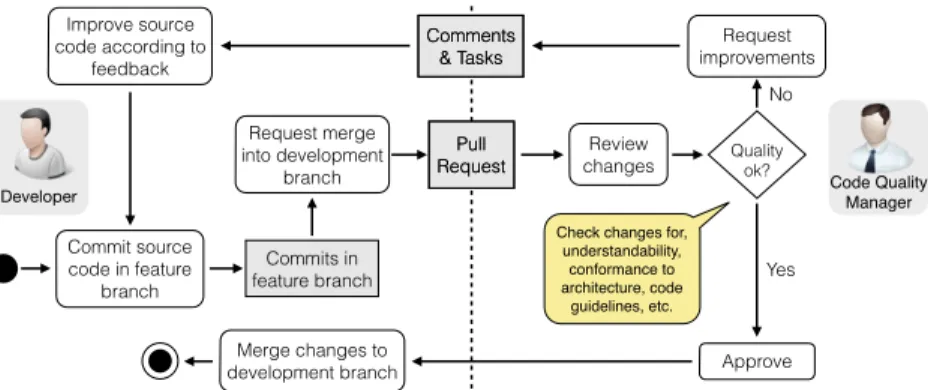
Pull requests allow the instructor to introduce a dedicated code review workflow shown in Figure 5. This workflow prevents poor code quality or poor architecture de-cisions in the development branch because an experienced member of the code quality team reviews the request before executing the merge. During the review, the code qual-ity manager checks the conformance to the overall architectural style, design guide-lines, coding guideguide-lines, and also checks whether the changes are reasonable. Any problems or misunderstandings are formulated as comments directly attached to the changes. The student who had requested the merge, has to read these comments and improve the code in another commit. New commits automatically update the pull re-quest. When all comments are addressed, and no new comments are produced by the code quality manager, the merge request is finally approved.
Commit source code in feature branch Request merge into development branch Review changes Approve Request improvements Merge changes to development branch Commits in feature branch Comments & Tasks Improve source code according to feedback Yes No Quality ok?
Developer Code Quality Manager
Check changes for, understandability, conformance to architecture, code guidelines, etc. Pull Request Pull Request Comments & Tasks
Fig. 5. Rugby’s code review workflow
2.4. Delivery Environment
The delivery environment contains the build and delivery infrastructure to deploy the software into the target environment and provides the capability to gather client and end user feedback in various ways. Using the workflows provided in the integration and the delivery environment the students are able to deliver an application to the client with only a few interactions. The feedback tracker automatically collects feed-back of the client within the delivered application and crash reports. The collected data is then synchronized with the issue tracker in the collaboration environment, creating a feedback backlog that is accessible by the whole developer team.
Rugby’s release management workflow is based on the deployment process described
by Humble [Humble and Farley 2010]. A build is calledreleasablewhen it successfully
went through all testing stages. A releasable build can be deployed to the target envi-ronment of the client with just a few interactions. Continuous delivery bridges not only the gap between developers and operations as described in [Humble 2011] and [Hum-ble and Molesky 2011], but also the gap between developers and users. It ena[Hum-bles the idea of continuous user involvement proposed by [Maalej et al. 2009] and [Pagano and Bruegge 2013] and fits nicely into the ideas behind the agile manifesto where working software and client collaboration are more important than comprehensive documenta-tion and contract negotiadocumenta-tion. [Beck et al. 2001]
The Issue Tracker in the collaboration environment manages the product
back-log. The Version Control Server in the integration environment provides support for
branches and stores source code and configuration data. To check out, build, test and
package the application there is a centralContinuous Integration Serverin the
inte-gration environment. TheDelivery Serverdelivers the build to the target environment
and provides an easy to use solution for team members to make a release available, for clients to install the release in the target environment, and for users to provide feedback for this specific release.
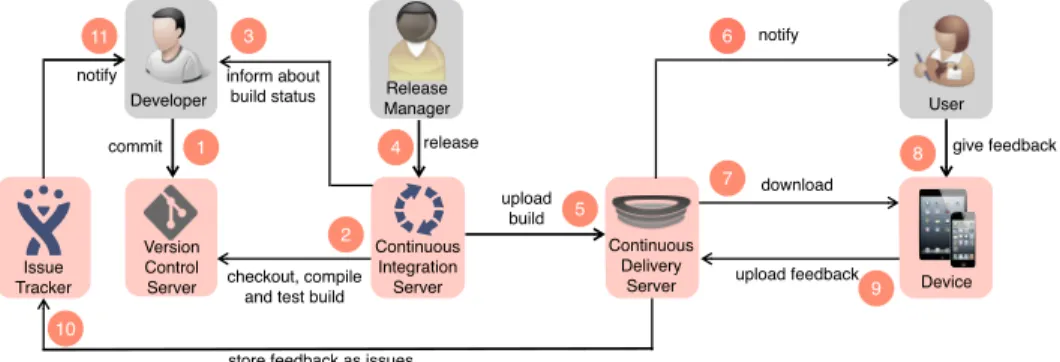
Figure 6 shows Rugby’s release management workflow. The workflow starts each
time aDeveloperpushes source code to theVersion Control Server(labeled 1 in Figure
6). This leads to a new build on theContinuous Integration Server(2). TheDeveloperis
then notified about the build status, e.g. via email or chat (3). If the build was
success-ful and after it passed all test stages, theRelease Managercan release the build on the
Continuous Integration Server(4). This uploads the build to theContinuous Delivery
Server (5) which then notifies theUser about the availability of the new release (6).
TheUserdownloads the release (7) onto theDevice. User feedback within the
applica-tion is uploaded in a structured way (8), collected by the Continuous Delivery Server
(9) and forwarded to theIssue Tracker(10) which notifies theDeveloper(11).
Version Control Server Developer 1 notify upload! build 5 download 6 Issue Tracker notify
store feedback as issues 10 release 4 Release Manager checkout, compile! and test build
2 upload feedback give feedback 9 Continuous Integration Server Continuous Delivery Server 7 Device 8 User inform about! build status commit 3 11
Fig. 6. Rugby’s release management workflow (adapted from [Krusche and Alperowitz 2014])
The described workflow is easy to use by our students, because branches are auto-matically built and (regression) tested. Continuous delivery combined with the branch-ing model shown in Figure 4 helps the students to automatically check if a new feature passes all tests and whether they can deliver it as executable prototype to the user. In addition, the workflow allows them to use executable prototypes as communication basis between developers and users throughout the whole project course. The Rugby process model allows the students to create releases from any branch. Especially in
projects where user interface modeling is an important aspect of the project, the stu-dents can discuss difficult UI design issues with the client by sending an executable prototype that can be executed by the client on the target platform. Similar to Scrum, Rugby expects each team to deliver at least one release at the end of each sprint. How-ever, Rugby allows the teams to release their applications also during the sprints, that is, whenever they need to obtain feedback or when a client requests it.
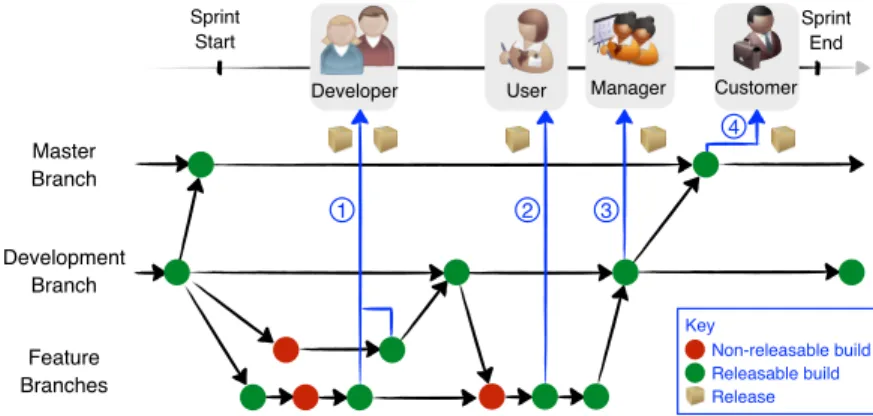
Figure 7 illustrates four different types of release situations supported by Rugby. Students can use a feature branch release in a meeting to demonstrate the develop-ment status to their team members (labeled 1 in fig 7). This improves the quality of the communication in the team meetings, in particular, it often shortens the time required to explain specific implementation details. Students can also use feature branch re-leases to perform usability tests with users (2). Rere-leases from the development branch are good candidates in status meetings (3), in particular management meetings, when all project leaders meet with the instructor and report about the status of their team.
Sprint End Master Branch Feature Branches Development Branch Sprint Start
Developer User Manager Customer
4 3 2 1 Non-releasable build Releasable build Release Key
Fig. 7. Examples for Rugby’s event-based delivery (adapted from [Krusche et al. 2014b])
The team can automatically produce time-based releases from the master branch (4), similar to Scrum’s product increments at the end of a sprint used in sprint review meetings. For each of these release situations, a developer or manager can select a successfully tested, i.e. releasable, build and deliver it to his own device for demon-stration. The ability to use branches increases the flexibility of our students because they now have the possibility to create internal releases to test the software on their own devices and external releases just for specific features. Additionally, the instruc-tor can use the same automatic release process to discuss progress and current issues with the project leaders. This saves a lot of time and provides many opportunities that have not been available for instructors in earlier project courses.
In addition to branching, Rugby also supports a semi-automated feedback manage-ment workflow that allows developers to obtain feedback early and continuously [Kr-usche and Bruegge 2014]. Figure 8 shows different usage scenarios to deal with user
feedback7. The students can categorize each feedback according to its type and handle
the feedback in different workflows: feature requests in the analysis workflow, design requests in the design workflow and bug reports in the implementation workflow. For example, during Sprint 0 the client receives the empty release, labeled R0 in Figure 8. This ensures early in the project that the release management workflow functions
7Issues in the backlog have multiple sources, in particular requirements elicited early in the development process. Figure 8 focuses only on user feedback and how it is processed in Rugby.
properly. The empty release contains a feedback button that allows the user to send an empty feedback, labeled F0, within the application back to the developers.
Developer User Feedback Management Feedback Provision Development Issue Tracker R1 R2 F1 F2 F3
F1: Feature F2: Bug F3: Design Change Release Feedback R0 F0 Key
X
X
Fig. 8. Rugby’s feedback management workflow (adapted from [Krusche et al. 2014b])
The release R1 in Figure 8 leads to two feedback items F1 and F2. In our example, F1 is a feature request and the team decides to put this feature request into the product backlog for one of the following sprints. F2 is a bug report and the developers decide to fix this bug in the current sprint, so they put it on the sprint backlog, correct the bug, commit their changes and release R2 that includes the bugfix. If the release happens during the sprint and not at the end, we call it an event-based release in Rugby. R2 includes release notes about the resolved bug, so the user can directly see what the team was able to resolve. While using this release R2, the user detects a usability issue in the user interface of the application and produces another feedback request. This is categorized by the students as a design request. The team decides to put it on the product backlog to review it with the client at the next sprint planning meeting. 3. TORNADO: FROM VISIONARY TO DEMO SCENARIOS
Tornado is a light-weight scenario-based design approach that emphasizes the use of informal models for the interaction between clients and students. Examples of in-formal models are video-based requirements visualizations and film trailers for ex-pressing the main idea of the project and communicating it to stakeholders outside of the project. Tornado focuses on innovation projects where problem statements are for-mulated as visionary scenarios and where requirements and technologies can change during the project. In innovative projects, clients typically want developers to explore multiple ideas before they decide how their vague requirements should be realized. The Tornado process starts with visionary scenarios funneling down to demo scenarios with the help of screenplays and software theater scripts and relies on the early and regular delivery of prototypes. Whenever an executable prototype is ready for release, it can be delivered to the client using the continuous delivery workflow described in Rugby. In this section we explain how the Tornado Model helps to create executable prototypes to gather feedback from the client. We also explain how prototypes and feedback help to transition a visionary scenario into a demo scenario.
3.1. Scenario based design
Scenario-based design [Carroll 1995] is our preferred way of modeling requirements. At the beginning of the course, the clients present their visionary scenarios to the
system and is used both as a point in the modeling space by developers when they re-fine their ideas of the future system and as a communication medium to elicit require-ments. Visionary scenarios transport the main ideas for the system to be developed. Depending on the type of project, they can lead to a couple of requirements elicitation sessions with the client in a greenfield or interface project or an inventory analysis in the case of a re-engineering project. They usually include aspects that cannot be demonstrated. A demo scenario is the part of a visionary scenario that can be demon-strated with an executable prototype of the system. The students produce their first prototypes, usually a user interface mockup as well as a cinema style trailer, in which the mockup is used to communicate their understanding of the scenarios to the client. Prototypes and trailers are presented during the weekly face-to-face team meeting if the client is co-located, or sent to the client using the release management workflow.
Release Feedback
V i s i o n a r y scenario
Demo scenario KeyFig. 9. Tornado model: wide in analysis, narrow in implementation (adapted from [Bruegge et al. 2012])
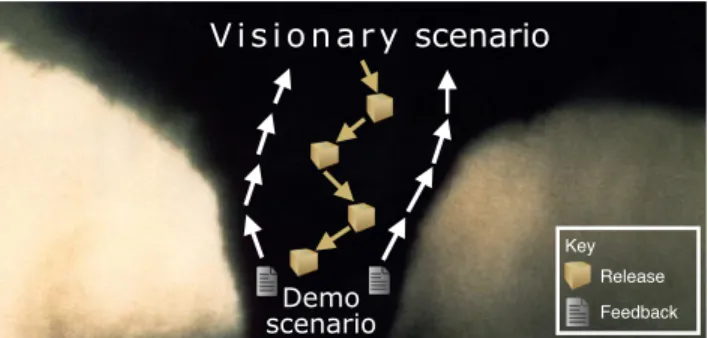
We use the tornado metaphor to explain our students the transition from a visionary to a demo scenario (see Figure 9). A tornado is wide in the clouds, but only a part of it funnels down and hits the ground at its touchpoint. The demo scenario is the touchpoint demonstrating the most important requirements of the system. A tornado
also contains air streams going upwards. We use theseupdraftsas a metaphor for the
feedback collected from the client after the team demonstrated a touchpoint in form of an executable prototype. Based on the updraft the students refine their scenarios in the following iterations.
Our approach to scenario based design emphasizes informal modeling techniques right from the beginning of the project. Informal models are the nightmare of any software engineer who insists on completeness, consistency and realizability: Infor-mal models can be incomplete, they can be ambiguous, they can even be unrealizable. Many instructors focus on the quality of the specification, but consistent and unam-biguous models are hard to achieve, especially when the client does not yet completely know the requirements, which is usually the case in the problems we select for our course projects. Another problem of specification models is that they lead to analysis paralysis [Brown et al. 1998] if the developers try to formalize all the requirements at the beginning of the project. We emphasize the use of informal models with a focus on
communication with clients. We call our informal models therefore also
communica-tion models. We assume that our clients are not trained in formal modeling, so using
a modeling language such as UML or SysML as a communication mechanism is not appropriate. The main purpose of a communication model is to enable and improve the exchange of complex concepts between all stakeholders of the project. Small errors in models are allowed, we do not correct them right away, because students need to change them anyway.
Informal modeling is a creative process (e.g. during brainstorming) that helps to overcome the gap between different mental models. Developers understand concepts of a system differently than users. This has been well described by Norman and Draper [Norman and Draper 1986]. Developers implement the requirements in the system model which focuses on the functionality, the structure and the behavior of the sys-tem. The interface model describes how the system is presented to other developers in terms of APIs, and to the user in terms of the user interface. The goal of the interface model is to hide complex details of the system model. The user interface is influenced by the design model which reflects the developer’s understanding of the users, in par-ticular how they interact with the system. The user model describes the user’s under-standing how the system should work, which can be quite different from the design model. The purpose of informal modeling is to quickly get a common understanding of the system by closing the gap between the design model and the user model. We teach different techniques that help to reduce this gap. While we prefer UML for creating the system model, we use other techniques to create the interface model. In our course we teach the following informal models to the students: Napkin designs, whiteboard or paper sketches, low fidelity user interfaces, storyboards, narrative texts, cinema style Trailers and user stories.
While we use informal models throughout the course, we emphasize them particu-larly in the first phase of the project. In Sprint 0 (see Section 2.1) each team creates a trailer. Trailers are used extensively in the movie industry to advertise the launch of a movie or important events. A trailer is usually released long in advance of the film. Similarly we ask the students to produce a short trailer (45-60 seconds) to advertise their upcoming system. The students can choose among two types of trailers: A product trailer which focuses on the emotional message of the new system, or a scenario trailer which visualizes the event flow of one ore more of the visionary scenarios from the problem statement. A trailer is a great team-building exercise, it bonds the individual members of the team, creates a team spirit and leads to a first common understanding of the requirements.
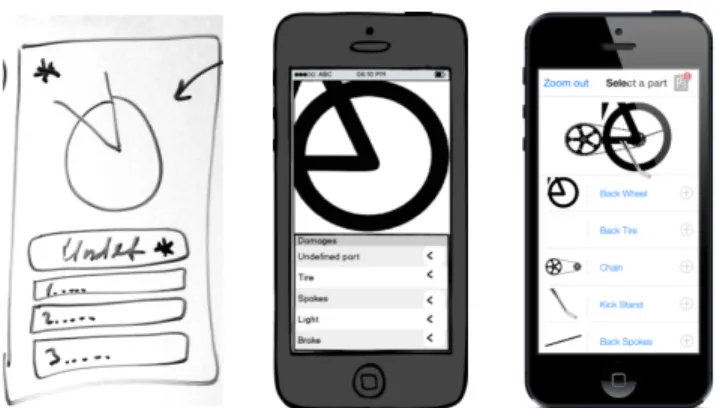
To get an early grasp of the user model, we ask our students to focus in particu-lar on low-fidelity prototypes. Low fidelity prototypes focus on getting user feedback about the user interface as early as possible in the design process. Researchers (e.g. [Rudd et al. 1996] and [Mayhew 1999]) have shown that unpolished user interfaces receive more feedback than polished ones. They are cheap to produce, easy to change and allow the rapid production of alternatives enabling the client to explore possible design alternatives and possibly reformulating the initial requirements. We encourage our students to deliver executable prototypes with low-fidelity user interfaces to end users so they can perform usability tests [Nielsen 1994] early in the design process. The low-fidelity prototypes are usually clickable PDF files that can be used directly on the mobile device. Gradually, after the client agrees with the user interface, the stu-dents switch to high-fidelity user interfaces. An example of the transition from rough sketches over low-fidelity prototypes to applications with high-fidelity user interfaces is shown in Figure 10. [Dzvonyar et al. 2014]
We encourage the students to produce low-fidelity system models to communicate with their fellow developers. They e.g. sketch UML models on a whiteboard or on pa-per, instead of using a CASE tool. Requiring a CASE tool encourages the students to spend hours in the cosmetic details of a model which is most probably going to change anyway. Using informal models they might even be able to include the client to receive feedback on the model. We believe that multiple iterations of informal models lead to faster results because less time is spent on cosmetic engineering, changes are easier to make and the informality helps in understanding and communicating the system structure.
Fig. 10. Evolution of the user interface, from rough sketch (left) to low-fidelity prototype (middle) to final application (right) [Dzvonyar et al. 2014]
3.2. Agile Demo Management
After introducing the idea of informal models, in particular trailers and low-fidelity prototypes in the first two weeks of the course, we proceed to teach the students the basics of release management. We ask the students to create a first release and send it to the client. The release is called “Hello Dolly” in reference to the “Hello World” program, which many programming courses require students to write as their first exercise. The students create this release on the basis of the initial subsystem decom-position, labeled R0 in Figure 2. Each subsystem has a class with an initialization method and each subsystem provides a fac¸ade to this method. After all initialization methods have been called, a song from the Hello Dolly musical is played. R0 introduces the students to the release management workflow and helps them to become familiar with the usage of the release management workflows. After R0 is delivered, the team is able to release a new prototype whenever they want with only a few interactions with the delivery environment.
The teams now start with regular sprints. With the help of the client, the students decompose the visionary scenarios into manageable backlog items and create the ini-tial product backlog, which is prioritized by the client. In the first sprint planning meeting they select a subset from the product backlog items based on the client’s prior-ities. Because Rugby supports event-based releases the student can produce releases - using the release process they learned in the beginning - at any time during the sprint. Event-based releases help the team to demonstrate the current realization of a requirement and to obtain feedback whether the team is on the right track. The team does not have to wait until the end of a sprint. This saves time and increases the quality of the product increment delivered at the end of the sprint.
The teams perform sprint reviews and planning meetings as in Scrum. At the end of each sprint, the students meet with the client for the sprint review meeting to refine the visionary scenarios, to collect additional feedback, to update the product backlog and proceed with a sprint planning meeting for the next sprint. As we introduce the concept of continuous delivery right at the beginning of the course, the students get used to the pattern of keeping the application releasable all the time [Humble and Farley 2010]. This facilitates the regular delivery of prototypes to the clients. Two major milestones are the design review and the client acceptance test. For these two events all the project teams as well as the clients are required to be physically present. Every student must be involved in at least one presentation, either at the design re-view or client acceptance test. We perform dry runs with the students of each team to review their presentations. After the dry run, each team receives detailed feedback
and we also give them the film of the dry run, so that they can actually see how they behaved in their presentation and improve upon it. We found that these dry runs keep the presentation quality high and improve the soft skills of the students.
In the design review, the students present the status of their analysis, usually in terms of the user interface and an initial object model, the proposed software architec-ture and an executable prototype which demonstrates parts of the visionary scenarios. The desired outcome is to obtain feedback from the client with respect to user interface and system design. The demos are orchestrated as a sequence of unit and integration tests, with workarounds and mock objects. An example would be the demonstration of a push notification system for a mobile application, where the notifications are not sent by the real back-end system, but a mock version of the back-end or even by a student sitting in the audience. One of the team members acts as a narrator, describing the event flow of the scenario, which is acted out by other members of the team.
In the client acceptance test, the students demonstrate the requirements of the
sys-tem with one or more demo scenarios8. Each demo scenario in the final presentation
is the result of an iteratively refined visionary scenario. Figure 11 shows an example for the presentation of a demo scenario. We call this software theater, because it uses techniques borrowed from theater and film. The students have to prepare a Hollywood style script that describes the event flow of the demo, the cast (the participating ac-tors), and the props needed for the demo. A demo lasts about 5 minutes and focuses on the core functionalities of the application while using an executable for the demonstra-tion. Especially the preparation of the screenplay for the demo motivates the students to revisit the features implemented in the last months and present them with a user perspective.
iOS Praktikum - CAT - 19.07.2012
Fig. 11. Software theater examples from 2012 and 2013
Shortly before the design review and the client acceptance test, our students be-come extremely ambitious, implementing additional features, producing a multitude of releases. In the past, this created a conflict of interest between adding additional functionality late in the project and the stability of the selected demo scenarios. With our release management workflow, we are now able to allow late additions, we actually encourage them, because each release is saved, including release notes and feedback. If the new and more ambitious release is stable and closer to the visionary scenarios, it can be selected for the presentation. If the new release fails, the earlier releases are still available in the continuous delivery server and can easily be selected instead.
8We show the client acceptance via live stream on the internet. Typical viewers are friends and parents from the students as well as future clients. In the past we had up to 500 external viewers watching the live stream of our client acceptance test. Videos from the last four courses can be found on [Krusche et al. 2011], [Krusche et al. 2012], [Krusche et al. 2013] and [Krusche et al. 2014a].
4. EVALUATION
In this section we describe three formative assessments of our multi-customer course over the last four years, two evaluations and one quasi experiment. The number of participants in our multi-customer project courses is shown in Table II.
Table II. Participants in our multi-customer project courses
Year # Projects # Students # Project Leaders
2011 8 54 8
2012 11 80 11
2013 10 90 10
2014 11 90 11
After each course we conducted informal retrospectives with coaches and project leaders to improve the course for the next instantiation. We describe the design of the three assessments, show the most important findings and discuss threats to validity. 4.1. Study Design
In 2012 we introduced the first version of the release management workflow (see Fig-ure 6). In the 2013 course, we taught an improved version of the release and feedback management workflows and evaluated their use with an online questionnaire where we invited 90 students and received 41 responses. We also introduced the first version of the branching model in 2013. In the 2014 course, we introduced an improved version of the branching model (see Figure 4) and a code review workflow (see Figure 5). We evaluated both using another online questionnaire where we invited 90 students and received 81 responses.
In addition we investigated whether our course improved the students’ technical and soft skills. We performed a quasi experiment to analyze the introduction of re-lease management in 2013 and the introduction of code review workflows in 2014 as
interventions. We used a five point Likert scale with the answers strongly disagree,
disagree,neutral,agree,strongly agreeto measure either negative, neutral or positive
responses. We invited 301 students to participate in an online questionnaire. The over-all response rate was 59% (2011: 33%, 2012: 56%, 2013: 57%, 2014: 71%). We combined the responses of the results into a three point Likert scale with positive responses
(strongly agreeandagree), neutral and negative ones (strongly disagreeanddisagree)
to minimize positive and negative outliers. Table III provides an overview about the three assessments, their main focus and their response rates.
Table III. Overview about the formative assessments
# Evaluated
Course(s) Main focus # Invites # Responses
Response Rate
1 2013 Release Management
Feedback Management 90 41 46 %
2 2014 Branching Model
Code Review Workflow 90 81 90 %
3 2011 - 2014 Improvement of technical
4.2. Findings
In the first evaluation (2013) we investigated whether students benefit from the re-lease management workflow using version control, continuous integration and con-tinuous delivery. In the second evaluation (2014) we analyzed the branching model and the code review workflow. In the following we provide a condensed version of the findings of these evaluations. More details about the first evaluation can be found in [Krusche and Alperowitz 2014].
The responses show that more than half of the students performed these activities on a daily base, with version control being the most frequent activity. Figure 12 shows that 57% see benefits in version control activities, 61 % in continuous integration and 46 % in continuous delivery. Figure 13 shows that most participants would definitely or very likely use the branching model (83%), the code review workflow (70%), continuous integration (63%) and continuous delivery (63%) in future projects.
Do you see benefits when using these workflows?
0% 20% 40% 60% 80% 100% 46% 61% 57% 33% 26% 24% 21% 13% 19% no uncertain yes Continuous Integration Continuous Delivery Version Control
Fig. 12. Evaluation of benefits
Would you use these workflows in a future project?
0% 20% 40% 60% 80%
100% No Maybe Likely Very Likely Definitely
56% 22% 17% 43% 27% 19% 10% 1% 22% 15% 46% 41% 17% 20% 27% 7% 7% 2% Branching Model Continuous Integration Continuous Delivery Code Review Workflow
Fig. 13. Evaluation of usage in future project
Figure 14 shows that the branching model allowed the students to work with multi-ple persons on the same codebase and to map backlog items (e.g. user stories, scenarios or features) to branches in the version control system. The branching model also helped 41% of the students to develop multiple prototypes for a feature. Figure 15 shows that 59% of the students believe that the release management workflow leads to more re-leases, 37% think it leads to more feedback and 44% believe it leads to better feedback when compared to a project without a dedicated release management workflow.
The Branching Model …
0% 20% 40% 60% 80% 100% no uncertain yes
… allows to develop with multiple persons on the
same codebase … helps to map backlog items to branches … helps to develop multiple prototypes for a feature 98% 85% 41% 27% 32% 10% 5% 1% 1%
Fig. 14. Evaluation of branching model
The Release Management workflow leads to …
0% 20% 40% 60% 80% 100% 44% 37% 59% 32% 39% 27% 24% 24% 15% no uncertain yes … more releases … more feedback … better feedback
Fig. 15. Evaluation of release management
To measure the effectiveness of continuous delivery and feedback in Rugby, we intro-duced a set of performance indicators. In particular we defined the following metrics: number of branches and commits in the version control system, number of overall
builds and successful builds in the continuous integration system as well as number of delivered builds, downloads and feedback reports in the continuous delivery system. Table IV shows the average numbers per team for these indicators. The number of branches increased by 1200% in 2013 when we introduced the branching model. Si-multaneously the students were able to increase the number of builds by 479% while increasing the number of commits only by 15%. The success rate of builds increased from 74% in 2012 to 94% in 2013. Both happened because the students used contin-uous integration from the beginning so they received feedback immediately when the build failed and could fix the problem so that the next build succeeded again.
Not all commits led to a build, because we used git as version control system, where it happens that students have multiple commits on their local machine that are not yet synchronized with the remote repository. When they pushed their changes (includ-ing multiple commits) to the remote repository, the continuous integration server only built once, using the latest version including all commits. The number of builds re-leased to the delivery server increased by 227%. On average, developers, managers, users and clients downloaded the releases 49 times in 2012 and the teams received about 15 feedback reports via the integrated feedback mechanism in their applica-tions. These measurements support the answers shown in Figure 15.
In 2014 we had a stronger focus on the right use of the branching model, which is the basis of the code review workflow shown in Figure 5. To keep the code reviews short, we asked the students to divide their requirements into small backlog items, that they could develop in only a few days on a feature branch. Thus the amount of branches increased by 110%. We also asked them to commit early and often to allow a fine granular control about their changes, so that they e.g. can revert errors more easily. Therefore the number of commits increased by 26% leading to more builds with a success rate of 93%, a comparable number to 2013. The number of builds released into the delivery server increased by 30 %, the number of downloads by 8 % and the number of feedback reports via the integrated feedback mechanism by 96%.
Table IV. Measurements of the workflow usage per team from 2012 to 2014
Version Control Continuous Integration Continuous Delivery # Branches # Commits # Builds
Created # Builds Successful # Builds Delivered # Builds Downloaded # Feedback Reports 2012 2 500 75,5 56,3 14,8 n/a n/a 2013 26 575,4 439,6 413,9 49 126 13,9 Increase from 2012 to 2013 + 1200% + 15% + 479% + 639% + 227% n/a n/a 2014 54,5 727,3 636,4 590,9 63,6 136,4 27,3 Increase from 2013 to 2014 + 110% + 26% + 45% + 43% + 30% + 8% + 96%
In the quasi experiment we investigated whether the participants improved their technical skills and their soft skills as a result of taking our course. We looked at four
categoriessoftware engineering,usability engineering,configuration managementand
non-technical skills. First we asked the students about their skill improvements in
software engineering with respect to requirements elicitation, system design, model-ing and programmmodel-ing. On average, 79% have improved their requirements engineermodel-ing skills (2011: 78%, 2012: 80%, 2013: 75%, 2014: 81%) and 72% improved their system design skills (2011: 83%, 2012: 78%, 2013: 63%, 2014: 72%). The number of students who improved their modeling skills decreased by 25% between 2011 and 2012 (see

![Fig. 2. Rugby’s life cycle model (adapted from [Bruegge et al. 2012])](https://thumb-us.123doks.com/thumbv2/123dok_us/9583513.2444292/7.918.251.666.427.829/fig-rugby-life-cycle-model-adapted-from-bruegge.webp)
![Fig. 3. Rugby’s organization (adapted from [Bruegge et al. 2012])](https://thumb-us.123doks.com/thumbv2/123dok_us/9583513.2444292/9.918.285.635.554.831/fig-rugby-s-organization-adapted-bruegge-et-al.webp)
![Fig. 8. Rugby’s feedback management workflow (adapted from [Krusche et al. 2014b])](https://thumb-us.123doks.com/thumbv2/123dok_us/9583513.2444292/15.918.219.697.201.396/fig-rugby-feedback-management-workflow-adapted-from-krusche.webp)