BRUECK
TANNER
If Python 2.1 can do it, you can do it too . . .
Packed with crystal-clear explanations, hands-on examples, and a complete language reference, this
authoritative guide gives you all the tools you need for rapid application development with Python 2.1.
From variables, expressions, and other basics to XML, multimedia, and multithreading, Python pros
Dave Brueck and Stephen Tanner show you step by step how to master Python components, put them
together, and create full-featured applications — in practically no time!
Inside, you’ll find complete
coverage of Python 2.1
•
Get up to speed on basics with a quick one-hour tutorial
•
Work with Python data types, expressions, and
object-oriented features
•
Take advantage of Python operating system services
and database features
•
Create Web-savvy applications that can handle
Internet data and parse XML
•
Build graphical applications using Tkinter and wxPython
•
Process sound and image files
•
Harness multithreading, encryption, tokenizing, and other
advanced techniques
•
Use Python tools to create number-crunching routines
and internationalized applications
•
Distribute Python applications and modules on a
Windows or UNIX system
Shelving Category:
ProgrammingReader Level:
Beginning to Advanced
ISBN 0-7645-4807-7
$39.99
USA$59.99
Canada£29.99
UKPy
th
on
2.
1
Py
th
on
2.
1
Master
all major
Python components
and see how they
work together
Leverage
Python
standard libraries
for rapid application
development
Harness
XML,
Unicode, and other
cutting-edge
technologies
P
ython 2.1
Dave Brueck and Stephen Tanner
,!7IA7G4-feiahj!:p;N;t;T;t
Includes a complete
language reference
INCLUDES A
COMPLETE
PYTHON
LANGUAGE
REFERENCE
w w w . h u n g r y m i n d s . c o m
100%
O N E H U N D R E D P E R C E N T C O M P R E H E N S I V E A U T H O R I T A T I V E W H A T Y O U N E E D O N E H U N D R E D P E R C E N TUse scales and listboxes to design a color scheme
P
ython 2.1
*85555-AHCEJh
100%
C O M P R E H E N S I V EPython 2.1 Bible
Dave Brueck and Stephen Tanner
Hungry Minds, Inc.
Python 2.1 Bible
Published by
Hungry Minds, Inc.
909 Third Avenue New York, NY 10022
www.hungryminds.com
Copyright © 2001 Hungry Minds, Inc. All rights reserved. No part of this book, including interior design, cover design, and icons, may be reproduced or transmitted in any form, by any means (electronic, photocopying, recording, or otherwise) without the prior written permission of the publisher.
Library of Congress Catalog Card No.: 2001090703 ISBN: 0-7645-4807-7
Printed in the United States of America 10 9 8 7 6 5 4 3 2 1
1B/RS/QW/QR/IN
Distributed in the United States by Hungry Minds, Inc. Distributed by CDG Books Canada Inc. for Canada; by Transworld Publishers Limited in the United Kingdom; by IDG Norge Books for Norway; by IDG Sweden Books for Sweden; by IDG Books Australia Publishing Corporation Pty. Ltd. for Australia and New Zealand; by TransQuest Publishers Pte Ltd. for Singapore, Malaysia, Thailand, Indonesia, and Hong Kong; by Gotop Information Inc. for Taiwan; by ICG Muse, Inc. for Japan; by Intersoft for South Africa; by Eyrolles for France; by International Thomson Publishing for Germany, Austria, and Switzerland; by Distribuidora Cuspide for Argentina; by LR
International for Brazil; by Galileo Libros for Chile; by Ediciones ZETA S.C.R. Ltda. for Peru; by WS
Computer Publishing Corporation, Inc. for the Philippines; by Contemporanea de Ediciones for Venezuela; by Express Computer Distributors for the Caribbean and West Indies; by Micronesia Media Distributor, Inc. for Micronesia; by Chips
Computadoras S.A. de C.V. for Mexico; by Editorial Norma de Panama S.A. for Panama; by American Bookshops for Finland.
For general information on Hungry Minds’ products and services please contact our Customer Care Department within the U.S. at 800-762-2974, outside the U.S. at 317-572-3993 or fax 317-572-4002.
For sales inquiries and reseller information, including discounts, premium and bulk quantity sales, and foreign-language translations, please contact our Customer Care Department at 800-434-3422, fax 317-572-4002 or write to Hungry Minds, Inc., Attn: Customer Care Department, 10475 Crosspoint Boulevard, Indianapolis, IN 46256.
For information on licensing foreign or domestic rights, please contact our Sub-Rights Customer Care Department at 212-884-5000.
For information on using Hungry Minds’ products and services in the classroom or for ordering examination copies, please contact our Educational Sales Department at 800-434-2086 or fax 317-572-4005. For press review copies, author interviews, or other publicity information, please contact our Public Relations Department at 317-572-3168 or fax 317-572-4168.
For authorization to photocopy items for corporate, personal, or educational use, please contact Copyright Clearance Center, 222 Rosewood Drive, Danvers, MA 01923, or fax 978-750-4470.
LIMIT OF LIABILITY/DISCLAIMER OF WARRANTY: THE PUBLISHER AND AUTHOR HAVE USED THEIR BEST EFFORTS IN PREPARING THIS BOOK. THE PUBLISHER AND AUTHOR MAKE NO REPRESENTATIONS OR WARRANTIES WITH RESPECT TO THE ACCURACY OR COMPLETENESS OF THE CONTENTS OF THIS BOOK AND SPECIFICALLY DISCLAIM ANY IMPLIED WARRANTIES OF MERCHANTABILITY OR FITNESS FOR A PARTICULAR PURPOSE. THERE ARE NO WARRANTIES WHICH EXTEND BEYOND THE DESCRIPTIONS CONTAINED IN THIS PARAGRAPH. NO WARRANTY MAY BE CREATED OR EXTENDED BY SALES REPRESENTATIVES OR WRITTEN SALES MATERIALS. THE ACCURACY AND COMPLETENESS OF THE INFORMATION PROVIDED HEREIN AND THE OPINIONS STATED HEREIN ARE NOT GUARANTEED OR WARRANTED TO PRODUCE ANY PARTICULAR RESULTS, AND THE ADVICE AND STRATEGIES CONTAINED HEREIN MAY NOT BE SUITABLE FOR EVERY INDIVIDUAL. NEITHER THE PUBLISHER NOR AUTHOR SHALL BE LIABLE FOR ANY LOSS OF PROFIT OR ANY OTHER COMMERCIAL DAMAGES, INCLUDING BUT NOT LIMITED TO SPECIAL, INCIDENTAL, CONSEQUENTIAL, OR OTHER DAMAGES.
Trademarks:All trademarks are the property of their respective owners. Hungry Minds, Inc., is not associated with any product or vendor mentioned in this book.
Credits
Acquisitions Editor Debra Williams Cauley
Project Editor Barbra Guerra
Technical Editor Joseph Traub
Copy Editors Lisa Blake Luann Rouff
Editorial Manager Colleen Totz
Project Coordinator Regina Snyder
Graphics and Production Specialists Brian Torwelle
Quality Control Technicians
Laura Albert, Carl Pierce, Nancy Price, Charles Spencer
Book Designer Drew R. Moore
Proofreading and Indexing TECHBOOKS Production Services
About the Authors
Dave Brueckis a professional software developer who loves to use Python when-ever possible. His current projects include developing networked games, develop-ing Python interfaces to his stockbroker’s C SDK, and plottdevelop-ing to overturn various world governments. Previously Dave was a contributing author to 3D Studio Max R3 Bibleby Kelly Murdock, published by Hungry Minds (formerly IDG Books
Worldwide).
Stephen Tanneris currently using Python to build a black-box software testing frame-work. His side projects include Python tools to perform probabilistic derivatives-trading analysis, and to download mass quantities of .mp3s.
To Jennie, Rachael, and Jacob — thanks for being patient. To Pokey the Penguin — NOW who is going to the restaurant? To the weeds in my unfinished back yard — playtime is over.
— Dave
Preface
P
ython is an object-oriented, interpreted programming language useful for a wide range of tasks, from small scripts to entire applications. It is freely avail-able in binary or source code form and can be used royalty-free on all major plat-forms including Windows, Macintosh, Linux, FreeBSD, and Solaris.Compared with most programming languages, Python is very easy to learn and is considered by many to be the language of choice for beginning programmers. Instead of outgrowing the language, however, experienced developers enjoy lower maintenance costs without missing out on any features found in other major lan-guages such as C++, Java, or Perl.
Python is well known for its usefulness as a rapid application development tool, and we often hear of Python projects that finish in hours or days instead of the weeks or months that would have been required with traditional programming lan-guages. It boasts a rich, full-featured set of standard libraries as well as the ability to interface with libraries in other languages like C++.
Despite being incredibly powerful and enabling very rapid application develop-ment, the real reason we love to use Python is that it’s just plain fun. Python is like a lever — with it, you can do some pretty heavy lifting with very little effort. It frees you from lots of annoying, mundane work, and before long you begin to wonder how you endured your pre-Python days.
About This Book
Although Python is a great first programming language, in this book we do assume that you already have some programming experience.
The first section of the book introduces you to Python and tells you everything you need to know to get started. If you’re new to Python, then that section is definitely the place to start; otherwise, it serves as a useful language reference with many examples.
x
Python 2.1 BibleAll the examples in the book work and are things you can try on your own. Where possible, the chapters also build complete applications that have useful and inter-esting purposes. We’ve gone to great lengths to explain not only howto use each module or feature but also whysuch a feature is useful.
What You Need
Besides the book, all you need is a properly installed copy of Python. Appendix A lists some Python resources available online, but a good place to start is
www.python.org; it has prebuilt versions of Python for all major platforms as well as the Python source code itself. Once you’ve downloaded Python you’ll be under-way in a matter of minutes.
If you’re a user of Microsoft Windows, you can download an excellent distribution of Python from www.activestate.com. ActiveState provides a single download that includes Python, a free development environment and debugger, and Win32 extensions.
PythonWare (www.pythonware.com) also offers a distribution of Python that comes bundled with popular third-party Python modules. PythonWare’s version peacefully coexists with older versions of Python, and the small distribution size makes for a quick download.
No matter which site you choose, Python is free, so go download it and get started.
How the Book Is Organized
We’ve tried to organize the book so that related topics are close together. If you find the topic of one chapter particularly interesting, chances are that the chapters before and after it will pique your interest too.
Part I: The Python Language
The first chapter in this section is a crash course in Python programming. If you have many programming languages under your belt or just want to whet your appetite, try out the examples in that chapter to get a feel for Python’s syntax and powerful features.
Part II: Files, Data Storage, and
Operating System Services
This part covers Python’s powerful string and regular expression handling features and shows you how to access files and directories. In this section we also cover how Python enables you to easily write objects to disk or send them across net-work connections, and how to access relational databases from your programs.
Part III: Networking and the Internet
Python is an ideal tool for XML processing, CGI scripting, and many other network-ing tasks. This part guides you through Internet programmnetwork-ing with Python, whether you need to send e-mail, run a Web site, or just amass the world’s largest .mp3 collection.
Part IV: User Interfaces and Multimedia
This part covers Tkinter and wxPython, two excellent tools for building a GUI in Python. In this part, we also cover Python’s text interface tools, including support for Curses. This section also delves into Python’s support for graphics and sound.
Part V: Advanced Python Programming
This part answers the questions that come up in larger projects: How do I create multithreaded Python applications? How can I optimize my code, or glue it to C libraries? How can I make my program behave correctly in other countries? We also cover Python’s support for number crunching and security.
Part VI: Deploying Python Applications
This part covers what you need to know to deploy your Python programs quickly and painlessly. Python’s distribution utilities are great for bundling and distributing applications on many platforms.
Part VII: Platform-Specific Support
xii
Python 2.1 BibleAppendixes
Appendix A is a guide to online Python resources. Appendix B introduces you to IDLE and PythonWin — two great IDEs for developing Python programs. It also explains how to make Emacs handle Python code.
Conventions Used in This Book
Source code, function definitions, and interactive sessions appear in monospaced font. Comments appear in bold monospaced fontpreceded by a hash mark for easy reading. For example, this quick interpreter session checks the version of the Python interpreter. The >>>at the start of a line is the Python interpreter prompt and the text after the prompt is what you would type:
>>> import sys # This is a comment.
>>> print sys.version
2.0 (#8, Oct 16 2000, 17:27:58) [MSC 32 bit (Intel)]
References to variables in function definitions appear in italics. For example, the function random.choice(seq)chooses a random element from the sequence seq and returns it.
We divided up the writing of this book’s chapters between ourselves. So, through-out the book’s body, we use “I” (not “we”) to relate our individual opinions and experiences.
What the Icons Mean
Throughout the book, we’ve used icons in the left margin to call your attention to points that are particularly important.
This icon indicates that the material discussed is new to Python 2.0 or Python 2.1.
The Note icons tell you that something is important — perhaps a concept that may help you master the task at hand or something fundamental for understanding subsequent material.
Tip icons indicate a more efficient way of doing something or a technique that may not be obvious.
Caution icons mean that the operation we’re describing can cause problems if you’re not careful.
We use the Cross-Reference icon to refer you to other sections or chapters that have more to say on a subject.
Visit Us!
We’ve set up a Web site for the book at www.pythonapocrypha.com. On the site you’ll find additional information, links to Python Web sites, and all the code sam-ples from the book (so you can be lazy and not type them in). The Web site also has a section where you can give feedback on the book, and we post answers to com-mon questions.
Have fun and enjoy the book!
Acknowledgments
A
lthough this book represents many hours of work on our part, there are many others without whom we would have failed.First and foremost is Guido van Rossum, Python’s creator and Benevolent Dictator for Life. We’re glad he created such a cool language and that many others have joined him along the way.
Contents at a Glance
Preface . . . ix
Acknowledgments . . . xiv
Part I: The Python Language . . . 1
Chapter 1: Python in an Hour . . . 3
Chapter 2: Identifiers, Variables, and Numeric Types . . . 19
Chapter 3: Expressions and Strings . . . 29
Chapter 4: Advanced Data Types . . . 49
Chapter 5: Control Flow . . . 73
Chapter 6: Program Organization . . . 87
Chapter 7: Object-Oriented Python . . . 99
Chapter 8: Input and Output . . . 119
Part II: Files, Data Storage, and Operating System Services . . . 131
Chapter 9: Processing Strings and Regular Expressions . . . 133
Chapter 10: Working with Files and Directories . . . 155
Chapter 11: Using Other Operating System Services . . . 179
Chapter 12: Storing Data and Objects . . . 195
Chapter 13: Accessing Date and Time . . . 219
Chapter 14: Using Databases . . . 229
Part III: Networking and the Internet . . . 245
Chapter 15: Networking . . . 247
Chapter 16: Speaking Internet Protocols . . . 275
Chapter 17: Handling Internet Data . . . 303
Chapter 18: Parsing XML and Other Markup Languages . . . 325
Part IV: User Interfaces and Multimedia . . . 345
Chapter 19: Tinkering with Tkinter . . . 347
Chapter 20: Using Advanced Tkinter Widgets . . . 371
Chapter 21: Building User Interfaces with wxPython . . . 391
Chapter 22: Using Curses . . . 415
Chapter 23: Building Simple Command Interpreters . . . 433
Part V: Advanced Python Programming . . . 465
Chapter 25: Processing Images . . . 467
Chapter 26: Multithreading . . . 481
Chapter 27: Debugging, Profiling, and Optimization . . . 497
Chapter 28: Security and Encryption . . . 515
Chapter 29: Writing Extension Modules . . . 527
Chapter 30: Embedding the Python Interpreter . . . 553
Chapter 31: Number Crunching . . . 581
Chapter 32: Using NumPy . . . 589
Chapter 33: Parsing and Interpreting Python Code . . . 605
Part VI: Deploying Python Applications . . . 617
Chapter 34: Creating Worldwide Applications . . . 619
Chapter 35: Customizing Import Behavior . . . 629
Chapter 36: Distributing Modules and Applications . . . 643
Part VII: Platform-Specific Support . . . 659
Chapter 37: Windows . . . 661
Chapter 38: UNIX-Compatible Modules . . . 671
Appendix A: Online Resources . . . 685
Appendix B: Python Development Environments . . . 689
Contents
Preface . . . ix
Acknowledgments . . . xiv
Part I: The Python Language
1
Chapter 1: Python in an Hour . . . 3
Jumping In: Starting the Python Interpreter . . . 3
Experimenting with Variables and Expressions . . . 4
Pocket calculator . . . 4
Variables . . . 5
Defining a Function . . . 5
Running a Python Program . . . 6
Looping and Control . . . 6
Integer division . . . 7
Looping . . . 8
Branching with if-statements . . . 8
Breaking and continuing . . . 8
Lists and Tuples . . . 9
Tuples . . . 9
Slicing and dicing . . . 9
Dictionaries . . . 10
Reading and Writing Files . . . 11
Sample Program: Word Frequencies . . . 11
Loading and Using Modules . . . 14
Creating a Class . . . 14
Some quick object jargon . . . 14
Object orientation, Python style . . . 15
Keep off the grass — Accessing class members . . . 15
Example: the point class . . . 15
Recommended Reading . . . 17
Chapter 2: Identifiers, Variables, and Numeric Types . . . 19
Identifiers and Operators . . . 19
Reserved words . . . 20
Operators . . . 20
Numeric Types . . . 21
Integers . . . 21
Long integers . . . 21
xviii
Python 2.1 BibleImaginary numbers . . . 22
Manipulating numeric types . . . 23
Assigning Values to Variables . . . 26
Simple assignment statements . . . 26
Multiple assignment . . . 27
Augmented assignment . . . 27
Chapter 3: Expressions and Strings . . . 29
Expressions . . . 29
Comparing numeric types . . . 29
Compound expressions . . . 31
Complex expressions . . . 32
Operator precedence . . . 33
Strings . . . 34
String literals . . . 35
Manipulating strings . . . 37
Comparing strings . . . 42
Unicode string literals . . . 43
Converting Between Simple Types . . . 43
Converting to numerical types . . . 44
Converting to strings . . . 45
Chapter 4: Advanced Data Types . . . 49
Grouping Data with Sequences . . . 49
Creating lists . . . 50
Creating tuples . . . 52
Working with Sequences . . . 52
Joining and repeating with arithmetic operators . . . 52
Comparing and membership testing . . . 53
Accessing parts of sequences . . . 53
Iterating with for...in . . . 55
Using sequence utility functions . . . 55
Using Additional List Object Features . . . 57
Additional operations . . . 57
List object methods . . . 58
Mapping Information with Dictionaries . . . 60
Creating and adding to dictionaries . . . 61
Accessing and updating dictionary mappings . . . 61
Additional dictionary operations . . . 62
Understanding References . . . 63
Object identity . . . 63
Counting references . . . 64
Copying Complex Objects . . . 65
Shallow copies . . . 65
Identifying Data Types . . . 67
Working with Array Objects . . . 68
Creating arrays . . . 68
Converting between types . . . 69
Array methods and operations . . . 71
Chapter 5: Control Flow . . . 73
Making Decisions with If-Statements . . . 73
Using For-Loops . . . 74
Anatomy of a for-loop . . . 74
Looping example: encoding strings . . . 75
Ranges and xranges . . . 76
Breaking, continuing, and else-clauses . . . 77
Changing horses in midstream . . . 78
Using While-Loops . . . 79
Throwing and Catching Exceptions . . . 79
Passing the buck: propagating exceptions . . . 80
Handling an exception . . . 80
More on exceptions . . . 81
Defining and raising exceptions . . . 82
Cleaning up with finally . . . 82
Debugging with Assertions . . . 83
Assertions in Python . . . 83
Toggling assertions . . . 84
Example: Game of Life . . . 84
Chapter 6: Program Organization . . . 87
Defining Functions . . . 87
Pass by object reference . . . 88
All about parameters . . . 88
Arbitrary arguments . . . 89
Apply: passing arguments from a tuple . . . 90
A bit of functional programming . . . 90
Grouping Code with Modules . . . 91
Laying out a module . . . 91
Taking inventory of a module . . . 92
Importing Modules . . . 92
What else happens upon import? . . . 93
Reimporting modules . . . 93
Exotic imports . . . 94
Locating Modules . . . 94
Python path . . . 94
Compiled files . . . 95
Understanding Scope Rules . . . 95
Is it local or global? . . . 95
Listing namespace contents . . . 96
Grouping Modules into Packages . . . 96
xx
Python 2.1 BibleChapter 7: Object-Oriented Python . . . 99
Overview of Object-Oriented Python . . . 99
Creating Classes and Instance Objects . . . 100
Creating instance objects . . . 101
More on accessing attributes . . . 101
Deriving New Classes from Other Classes . . . 102
Multiple inheritance . . . 103
Creating a custom list class . . . 104
Creating a custom string class . . . 105
Creating a custom dictionary class . . . 106
Hiding Private Data . . . 106
Identifying Class Membership . . . 107
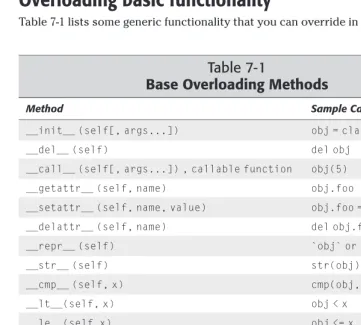
Overloading Standard Behaviors . . . 108
Overloading basic functionality . . . 109
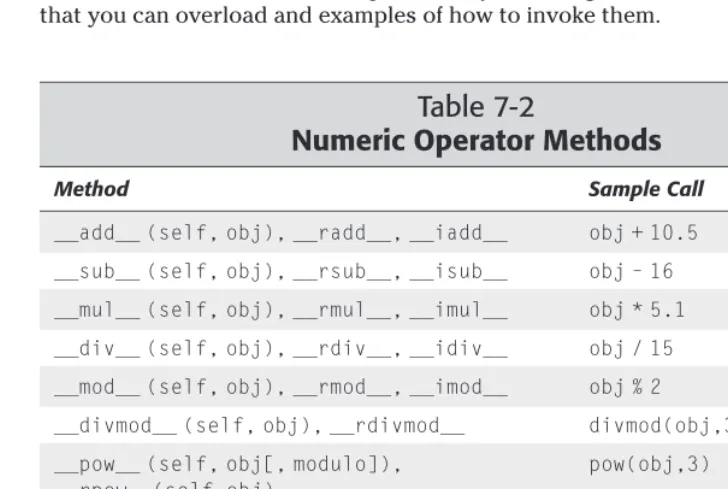
Overloading numeric operators . . . 111
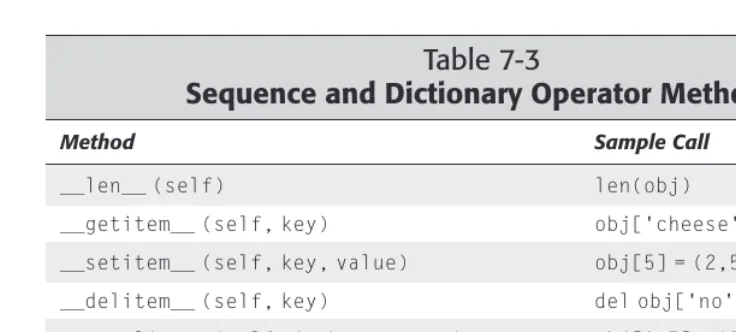
Overloading sequence and dictionary operators . . . 112
Overloading bitwise operators . . . 114
Overloading type conversions . . . 115
Using Weak References . . . 115
Creating weak references . . . 116
Creating proxy objects . . . 117
Chapter 8: Input and Output . . . 119
Printing to the Screen . . . 119
Accessing Keyboard Input . . . 120
raw_input . . . 120
input . . . 121
Opening, Closing, and Positioning Files . . . 121
open . . . 122
File object information . . . 123
close . . . 123
File position . . . 123
Writing Files . . . 124
Reading Files . . . 125
Accessing Standard I/O . . . 126
Using Filelike Objects . . . 127
Part II: Files, Data Storage, and
Operating System Services
131
Chapter 9: Processing Strings and Regular Expressions . . . 133
Using String Objects . . . 133
String formatting methods . . . 134
String case-changing methods . . . 134
String searching methods . . . 135 String manipulation methods . . . 137 Using the String Module . . . 138 Character categories . . . 138 Miscellaneous functions . . . 139 Defining Regular Expressions . . . 140 Regular expression syntax . . . 140 Backslashes and raw strings . . . 142 Character groups and other backslash magic . . . 142 Nongreedy matching . . . 143 Extensions . . . 143 Creating and Using Regular Expression Objects . . . 144 Using regular expression objects . . . 145 Applying regular expressions without compiling . . . 147 Using Match Objects . . . 147 group([groupid,...]) . . . 148 groups([nomatch]) . . . 148 groupdict([nomatch]) . . . 148 start([groupid]), end([groupid]), span([groupid]) . . . 148 re,string,pos,endpos, . . . 149 Treating Strings as Files . . . 149 Encoding Text . . . 151 Using Unicode strings . . . 151 Reading and writing non-ASCII strings . . . 151 Using the Unicode database . . . 153 Formatting Floating Point Numbers . . . 154 fix(number,precision) . . . 154 sci(number,precision) . . . 154
xxii
Python 2.1 BibleCreating Directories and Temporary Files . . . 169 Comparing Files and Directories . . . 171 Working with File Descriptors . . . 173 General file descriptor functions . . . 173 Pipes . . . 174 Other File Processing Techniques . . . 174 Randomly accessing lines in text files . . . 174 Using memory-mapped files . . . 175 Iterating over several files . . . 176
Chapter 11: Using Other Operating System Services . . . 179
Executing Shell Commands and Other Programs . . . 179 Spawning Child Processes . . . 181 popen functions . . . 181 spawn functions . . . 182 fork . . . 183 Process management and termination . . . 183 Handling Process Information . . . 185 Retrieving System Information . . . 187 Managing Configuration Files . . . 188 Understanding Error Names . . . 190 Handling Asynchronous Signals . . . 191Chapter 13: Accessing Date and Time . . . 219
Telling Time in Python . . . 219 Ticks . . . 219 TimeTuple . . . 220 Stopwatch time . . . 220 Converting Between Time Formats . . . 221 Parsing and Printing Dates and Times . . . 222 Fancy formatting . . . 222 Parsing time . . . 223 Localization . . . 223 Accessing the Calendar . . . 224 Printing monthly and yearly calendars . . . 224 Calendar information . . . 225 Leap years . . . 226 Using Time Zones . . . 226 Allowing Two-Digit Years . . . 227Chapter 14: Using Databases . . . 229
Using Disk-Based Dictionaries . . . 229 DBM Example: Tracking Telephone Numbers . . . 231 Advanced Disk-Based Dictionaries . . . 232 dbm . . . 232 gdbm . . . 232 dbhash . . . 233 Using BSD database objects . . . 233 Accessing Relational Databases . . . 234 Connection objects . . . 234 Transactions . . . 234 Cursor objects . . . 235 Example: “Sounds-Like” Queries . . . 235 Examining Relational Metadata . . . 237 Example: Creating Auditing Tables . . . 238 Advanced Features of the DB API . . . 240 Input and output sizes . . . 241 Reusable SQL statements . . . 242 Database library information . . . 242 Error hierarchy . . . 243Part III: Networking and the Internet
245
xxiv
Python 2.1 BibleCommunicating with Low-Level Sockets . . . 250 Creating and destroying sockets . . . 250 Connecting sockets . . . 251 Sending and receiving data . . . 252 Using socket options . . . 253 Converting numbers . . . 256 Example: A Multicast Chat Application . . . 256 Using SocketServers . . . 261 The SocketServer family . . . 261 Request handlers . . . 263 Processing Web Browser Requests . . . 264 BaseHTTPRequestHandler . . . 265 SimpleHTTPRequestHandler . . . 266 CGIHTTPRequestHandler . . . 267 Example: form handler CGI script . . . 267 Handling Multiple Requests Without Threads . . . 269 asyncore . . . 271
Chapter 17: Handling Internet Data . . . 303
Manipulating URLs . . . 303 Formatting Text . . . 304 Formatter interface . . . 304 Writer interface . . . 305 Other module resources . . . 306 Reading Web Spider Robot Files . . . 307 Viewing Files in a Web Browser . . . 308 Dissecting E-Mail Messages . . . 309 Parsing a message . . . 309 Retrieving header values . . . 309 Other members . . . 310 Address lists . . . 310 rfc822 utility functions . . . 311 MIME messages . . . 311 Working with MIME Encoding . . . 312 Encoding and decoding MIME messages . . . 312 Parsing multipart MIME messages . . . 313 Writing out multipart MIME messages . . . 313 Handling document types . . . 316 Encoding and Decoding Message Data . . . 317 Uuencode . . . 317 Base64 . . . 318 Quoted-printable . . . 319 Working with UNIX Mailboxes . . . 320 Working with MH mailboxes . . . 320 Using Web Cookies . . . 321 Cookies . . . 322 Morsels . . . 322 Example: a cookie importer . . . 323xxvi
Python 2.1 BibleParsing XML with SAX . . . 334 Using a ContentHandler . . . 334 Example: blood-type extractor . . . 335 Using parser (XMLReader) objects . . . 336 SAX exceptions . . . 337 Parsing XML with DOM . . . 338 DOM nodes . . . 338 Elements, attributes, and text . . . 338 The document node (DOM) . . . 339 Example: data import and export with DOM . . . 339 Parsing XML with xmllib . . . 341 Elements and attributes . . . 342 XML handlers . . . 343 Other XMLParser members . . . 343
Part IV: User Interfaces and Multimedia
345
Chapter 20: Using Advanced Tkinter Widgets . . . 371
Handling Events . . . 371 Creating event handlers . . . 371 Binding mouse events . . . 372 Binding keyboard events . . . 372 Event objects . . . 373 Example: A Drawing Canvas . . . 373 Advanced Widgets . . . 375 Listbox . . . 375 Scale . . . 376 Scrollbar . . . 376 Example: Color Scheme Customizer . . . 377 Creating Dialogs . . . 381 Supporting Drag-and-Drop Operations . . . 382 Using Cursors . . . 385 Designing New Widgets . . . 387 Further Tkinter Adventures . . . 389 Additional widgets . . . 389 Learning more . . . 389xxviii
Python 2.1 BibleChapter 22: Using Curses . . . 415
A Curses Overview . . . 415 Starting Up and Shutting Down . . . 416 Displaying and Erasing Text . . . 416 Reading from the window (screen-scraping) . . . 417 Erasing . . . 418 Refreshing . . . 418 Boxes and lines . . . 418 The window background . . . 418 Example: masking a box . . . 419 Moving the Cursor . . . 420 Getting User Input . . . 421 Reading keys . . . 422 Other keyboard-related functions . . . 422 Fancy characters . . . 422 Reading mouse input . . . 423 Example: yes, no, or maybe . . . 424 Managing Windows . . . 425 Pads . . . 425 Stacking windows . . . 426 Editing Text . . . 426 Using Color . . . 427 Numbering . . . 427 Setting colors . . . 428 Tweaking the colors . . . 428 Example: A Simple Maze Game . . . 428Chapter 23: Building Simple Command Interpreters . . . 433
Beginning with the End in Mind . . . 433 Understanding the Lepto Language . . . 435 Creating a Lepto Lexical Analyzer . . . 436 The shlex module . . . 436 Putting shlex to work . . . 437 Adding Interactive-Mode Features . . . 440 Using the cmd module . . . 440 Subclassing cmd.Cmd . . . 442 Executing Lepto Commands . . . 445Reading and Writing Audio Files . . . 456 Reading and writing AIFF files with aifc . . . 457 Reading and writing AU files with sunau . . . 458 Reading and writing WAV files with wave . . . 458 Example: Reversing an audio file . . . 458 Reading IFF chunked data . . . 460 Handling Raw Audio Data . . . 461 Examining a fragment . . . 461 Searching and matching . . . 462 Translating between storage formats . . . 462 Manipulating fragments . . . 463
Part V: Advanced Python Programming
465
Chapter 25: Processing Images . . . 467
Image Basics . . . 467 Identifying Image File Types . . . 468 Converting Between Color Systems . . . 469 Color systems . . . 469 Converting from one system to another . . . 470 Handling Raw Image Data . . . 472 Using the Python Imaging Library . . . 472 Retrieving image information . . . 473 Copying and converting images . . . 474 Using PIL with Tkinter . . . 475 Cropping and resizing images . . . 476 Modifying pixel data . . . 476 Other PIL features . . . 480xxx
Python 2.1 BibleChapter 27: Debugging, Profiling, and Optimization . . . 497
Debugging Python Code . . . 497 Starting and stopping the debugger . . . 497 Examining the state of things . . . 498 Setting breakpoints . . . 499 Running . . . 500 Aliases . . . 500 Debugging tips . . . 500 Working with docstrings . . . 501 Automating Tests . . . 502 Synching docstrings with code . . . 502 Unit testing . . . 503 Finding Bottlenecks . . . 505 Profiling code . . . 505 Using Profile objects . . . 506 Calibrating the profiler . . . 507 Customizing statistics . . . 507 Common Optimization Tricks . . . 509 Sorting . . . 509 Looping . . . 510 I/O . . . 510 Strings . . . 511 Threads . . . 511 Taking out the Trash — the Garbage Collector . . . 512 Reference counts and Python code . . . 512 Reference counts and C/C++ code . . . 513Chapter 28: Security and Encryption . . . 515
Checking Passwords . . . 515 Running in a Restricted Environment . . . 516 The rexec sandbox . . . 517 Using a class fortress . . . 520 Creating Message Fingerprints . . . 521 MD5 . . . 522 SHA . . . 522 Other uses . . . 523 Using 1940s-Era Encryption . . . 523Converting C Data to Python . . . 538 Creating simple Python objects . . . 539 Creating complex Python objects . . . 540 Embedding the Interpreter . . . 541 A simple example . . . 541 Shutting down . . . 541 Other setup functions . . . 542 System information functions . . . 542 Running Python Code from C . . . 543 Using Extension Tools . . . 546 SWIG . . . 546 CXX . . . 549 Extension classes . . . 550
xxxii
Python 2.1 BibleHandling Errors and Exceptions . . . 576 Checking for errors . . . 577 Signaling error conditions . . . 577 Creating custom exceptions . . . 578 Raising warnings . . . 578 Managing Memory . . . 579
Chapter 31: Number Crunching . . . 581
Using Math Routines . . . 581 Rounding and fractional parts . . . 581 General math routines . . . 582 Logarithms and exponentiation . . . 582 Trigonometric functions . . . 582 Computing with Complex Numbers . . . 583 Generating Random Numbers . . . 583 Random numbers . . . 583 Example: shuffling a deck . . . 585 Random distributions . . . 585 Example: plotting distributions using Monte Carlo sampling . . . . 586 Using Arbitrary-Precision Numbers . . . 587Chapter 33: Parsing and Interpreting Python Code . . . 605
Examining Tracebacks . . . 605 Printing a traceback — print_exc and friends . . . 605 Extracting and formatting exceptions . . . 606 Example: reporting exceptions in a GUI . . . 607 Eating arbitrary exceptions is bad for you . . . 607 Introspection . . . 608 Review: basic introspection . . . 608 Browsing classes . . . 609 Browsing function information . . . 609 Checking Indentation . . . 611 Tokenizing Python Code . . . 611 Example: Syntax-Highlighting Printer . . . 612 Inspecting Python Parse Trees . . . 613 Creating an AST . . . 613 ASTs and sequences . . . 614 Using ASTs . . . 614 Low-Level Object Creation . . . 614 Disassembling Python Code . . . 615Part VI: Deploying Python Applications
617
Chapter 34: Creating Worldwide Applications . . . 619
Internationalization and Localization . . . 619 Preparing Applications for Multiple Languages . . . 620 An NLS example . . . 620 What it all means . . . 623 Formatting Locale-Specific Output . . . 624 Changing the locale . . . 624 Locale-specific formatting . . . 625 Properties of locales . . . 626xxxiv
Python 2.1 BibleChapter 36: Distributing Modules and Applications . . . 643
Understanding distutils . . . 643 Creating a simple distribution . . . 644 Installing the simple distribution . . . 645 Other distutils Features . . . 647 Distributing packages . . . 647 Including other files . . . 648 Customizing setup . . . 650 Distributing Extension Modules . . . 650 Creating Source and Binary Distributions . . . 651 Source distributions . . . 652 Binary distributions . . . 653 Installers . . . 653 Building Standalone Executables . . . 655 py2exe . . . 655 Freeze . . . 656 Other tools . . . 657Part VII: Platform-Specific Support
659
Chapter 37: Windows . . . 661
Using win32all . . . 661 Data types . . . 661 Error handling . . . 662 Finding what you need . . . 662 Example: Using Some Windows APIs . . . 662 Accessing the Windows Registry . . . 664 Accessing the registry with win32all . . . 664 Example: setting the Internet Explorer home page . . . 666 Creating, deleting, and navigating keys . . . 666 Example: recursive deletion of a key . . . 667 Other registry functions . . . 668 Accessing the registry with _winreg . . . 668 Using msvcrt Goodies . . . 669 Console I/O . . . 669 Other functions . . . 670Retrieving File System and Resource Information . . . 677 File system information . . . 678 Resource usage . . . 678 Resource limits . . . 679 Controlling File Descriptors . . . 680 Handling Terminals and Pseudo-Terminals . . . 681 Interfacing with Sun’s NIS “Yellow Pages” . . . 682
Appendix A: Online Resources . . . 685
Appendix B: Python Development Environments . . . 689
The Python
Language
✦ ✦ ✦ ✦Chapter 1 Python in an Hour
Chapter 2
Identifiers, Variables, and Numeric Types
Chapter 3 Expressions and Strings
Chapter 4 Advanced Data Types
Chapter 5 Control Flow
Chapter 6 Program Organization
Chapter 7 Object-Oriented Python
Chapter 8 Input and Output
✦ ✦ ✦ ✦
I
Python in
an Hour
P
ython is a rich and powerful language, but also one that is easy to learn. This chapter gives an overview of Python’s syntax, its useful data-types, and its unique features.As you read, please fire up the Python interpreter, and try out some of the examples. Feel free to experiment, tinker, and wander away from the rest of the tour group. Everything in this chapter is repeated, in greater detail, in later chapters, so don’t worry too much about absorbing everything at once. Try some things out, get your feet wet, and have fun!
Jumping In: Starting the
Python Interpreter
The first thing to do, if you haven’t already, is to install Python. You can download Python from www.python.org. As of this writing, the latest versions of Python are 2.0 (stable) and 2.1 (still in beta).
You can start the Python interpreter from the command line. Change to the directory where the interpreter lives, or add the directory to your path. Then type:
python
On UNIX, Python typically lives in /usr/local/bin; on Windows, Python probably lives in c:\python20.
On Windows, you can also bring the interpreter up from Start➪Programs ➪Python 2.0 ➪Python (command line).
1
1
C H A P T E R
✦ ✦ ✦ ✦
In This Chapter
Jumping in: Starting the Python interpreter
Experimenting with variables and expressions
Defining a function
Running a Python program
Looping and control
Lists and tuples
Dictionaries
Reading and writing files
Loading and using modules
Creating a class
4
Part I ✦ The Python LanguageOnce you start the interpreter, Python displays something like this:
Python 2.0 (#8, Oct 16 2000, 17:27:58) [MSC 32 bit (Intel)] on win32 Type “copyright”, “credits” or “license” for more information. >>>
The interpreter displays the >>>prompt to show that it’s ready for you to type in some Python. And so, in the grand tradition of programming books everywhere, we proceed to the “Hello world” example:
>>> print “Hello world!” Hello world!
To exit the interpreter, type the end-of-file character (Ctrl-Z on Windows, or Ctrl-D on Linux) and press Enter.
You may prefer to interact with the interpreter in IDLE, the standard Python IDE. IDLE features syntax coloring, a class browser, and other handy features. See Appendix B for tips on starting and using IDLE.
Experimenting with Variables
and Expressions
Python’s syntax for variables and expressions is close to what you would see in C or Java, so you can skim this section if it starts looking familiar. However, you should take note of Python’s loose typing (see below).
Pocket calculator
Python understands the standard arithmetic operators, including +, -, / (division), and * (multiplication). The Python interpreter makes a handy calculator:
>>> 8/2 4
>>> 5+4*6 29
Note that the second example evaluates 29 (and not 54); the interpreter multiplies 4 by 6 before adding 5. Python uses operator precedence rules to decide what to do first. You can control order explicitly by using parentheses:
>>> (5+4)*6 54
In practice, it’s often easiest to use parentheses (even when they aren’t required) to make code more readable.
Variables
You can use variables to hold values over time. For example, this code computes how long it takes to watch every episode of Monty Python’s Flying Circus(including the two German episodes of Monty Python’s Fliegende Zirkus):
>>> NumberOfEpisodes=47 >>> EpisodeLength=0.5
>>> PythonMarathonLength=(NumberOfEpisodes*EpisodeLength) >>> PythonMarathonLength
23.5
A variable is always a reference to a value. Variables do not have types, but objects do. (Python is loosely typed;the same variable may refer to an integer value in the morning and a string value in the afternoon.)
Python does not require variable declarations. However, you cannot access a variable until you have assigned it a value. If you try to access an undefined vari-able, the interpreter will complain (the wording of the error may be different in your version of Python):
>>> print Scrumptious
Traceback (most recent call last): File “<stdin>”, line 1, in ?
NameError: There is no variable named ‘Scrumptious’
This example raised an exception. In Python, most errors are represented by excep-tion objects that the surrounding code can handle. Chapter 5 describes Python’s exception-handling abilities.
Python is case-sensitive. This means that names that are capitalized differently refer to different variables:
>>> FavoriteColor=”blue” >>> favoritecolor=”yellow”
>>> print FavoriteColor,favoritecolor blue yellow
Defining a Function
Assume you and some friends go out to dinner and decide to split the bill evenly. How much should each person pay? Here is a function that calculates each person’s share:
>>> def SplitBill(Bill,NumberOfPeople):
... # The hash character (#) starts a comment. Python
... # ignores everything from # to the end of the line.
... TotalWithTip = Bill * (1.15) # Add a 15% tip.
6
Part I ✦ The Python Language... return (TotalWithTip / NumberOfPeople) ...
>>> SplitBill(23.35,3) 8.9508333333333336
The statement def FunctionName (parameter,...):starts a function definition. I indented the following four lines to indicate that they are a control block— a
sequence of statements grouped by a common level of indentation. Together, they make up the body of the function definition.
Python statements with the same level of indentation are grouped together. In this example, Python knows the function definition ends when it sees a non-indented line. Grouping statements by indentation-level is common practice in most pro-gramming languages; in Python it is actually part of the syntax. Normally, one indentation level equals four spaces, and eight spaces equals one tab.
Running a Python Program
A text file consisting of Python code is called a program,or a script,or a module. There is little distinction between the three terms — generally a script is smaller than a program, and a file designed to be imported (rather than executed directly) is called a module. Normally, you name Python code files with a .pyextension.
To run a program named spam.py, type the following at a command prompt:
python spam.py
In Windows, you can run a program by double-clicking it. (If the file association for the .pyextension is not set up at installation time, you can configure it by right-clicking the script, choosing “Open With...” and then choosing python.exe.)
In UNIX, you can run a script directly by using the “pound-bang hack.” Add this line at the top of the Python script (replacing the path with the path to envif it’s differ-ent on your system):
#!/usr/bin/python
Then make the file executable (by running chmod +x <filename>), and you can run it directly.
Looping and Control
Listing 1-1:
PrimeFinder.py
print 1
# Loop over the numbers from 2 to 499:
for PrimeTest in range(2,500):
# Assume PrimeTest prime until proven otherwise:
IsPrime = 1 # 0 is false, nonzero is true
# Loop over the numbers from 2 to (PrimeTest-1):
for TestFactor in range(2,PrimeTest):
# a % b equals the remainder of a/b:
if (PrimeTest % TestFactor == 0):
# PrimeTest divides TestFactor (remainder is 0).
IsPrime=0
break # Jump out of the innermost for-loop.
if (IsPrime): print PrimeTest
Integer division
The modulo operator, %, returns the remainder when the first number is divided by the second. (For instance, 8 % 5 is equal to 3.) If PrimeTestis zero modulo
TestFactor, then this remainder is zero, so TestFactoris one of PrimeTest’s divisors.
In Python, dividing one integer by another returns another integer — the quotient, rounded down:
>>> 8/3 # I want an integer, not the “right answer.”
2
So, here is a sneaky replacement to line 7 of PrimeFinder.py. If TestFactordoes not divide PrimeTestevenly, then the quotient is rounded off, and so the compari-son will fail:
if ((PrimeTest/TestFactor)*TestFactor == PrimeTest)
Python uses the floatclass for floating-point (decimal) numbers. The float func-tion transforms a value into a float:
>>> 8.0/3.0
2.6666666666666665
>>> float(8)/float(3) # Give me the “real” quotient.
8
Part I ✦ The Python LanguageLooping
The forstatement sets up a loop — a block of code that is executed many times. The function range(startnum,endnum)provides a list of integers starting with startnumand ending just before endnum.
In the example, PrimeTesttakes on each value in the range in order, and the outer loop executes once for each value of PrimeTest. The inner loop iterates over the “possible factors” of PrimeTest, starting at 2 and continuing until (PrimeTest-1).
Branching with if-statements
The statement if expression:begins a control block that executes only if expressionis true. You can enclose the expression in parentheses. As far as Python is concerned, the number 0 is false, and any other number is true.
Note that in a condition, we use the == operator to test for equality. The = operator is used only for assignments, and assignments are forbidden within a condition. (Here Python differs from C/C++, which allows assignments inside an if-condition, even though they are usually a horrible mistake.)
In an ifstatement, an else-clause executes when the condition is not true. For example:
if (MyNumber % 2 == 0): print “MyNumber is even!” else:
print “MyNumber is odd!”
Breaking and continuing
The breakstatement jumps out of a loop. It exits the innermost loop in the current context. In Listing 1-1, the breakstatement exits the inner TestFactorloop, and continues on line 11. The continuestatement jumps to the next iteration of a loop.
Loops can also be set up using the whilestatement. The syntax while (expres-sion)sets up a control block that executes as long as expressionis true. For example:
# print out powers of 2 less than 2000 X=2
Lists and Tuples
A listis an ordered collection of zero or more elements. An element of a list can be any sort of object. You can write lists as a comma-separated collection of values enclosed in square brackets. For example:
FibonacciList=[1,1,2,3,5,8]
FishList=[1,2,”Fish”] # Lists can contain various types.
AnotherList=[1,2,FishList] # Lists can include other lists.
YetAnotherList=[1,2,3,] # Trailing commas are ok.
RevengeOfTheList=[] # The empty list
Tuples
A tuple is similar to a list. The difference is that a tuple is immutable — it cannot be modified. You enclose tuples in parentheses instead of brackets. For example:
FirstTuple=(“spam”,”spam”,”bacon”,”spam”) SecondTuple=() # The empty tuple
LonelyTuple=(5,) # Trailing comma is *required*, since (5) is # just a number-in-parens, not a tuple.
Slicing and dicing
Lists are ordered, so each list element has an index. You can access an element with the syntax listname[index]. Note that index numbering begins with zero:
>>> FoodList=[“Spam”,”Egg”,”Sausage”] >>> FoodList[0]
‘Spam’
>>> FoodList[2] ‘Sausage’
>>> FoodList[2]=”Spam” # Modifying list elements in place
>>> FoodList
[‘Spam’, ‘Egg’, ‘Spam’]
Sometimes it’s easier to count from the end of the list backwards. You can access the last item of a list with listname[-1], the second-to-last item with listname[-2], and so on.
You can access a sublist of a list via the syntax listname[start:end]. The sublist contains the original list elements, starting with index start, up to (but not includ-ing) index end. Both startand endare optional; omitting them makes Python go all the way to the beginning (or end) of the list. For example:
>>>WordList=[“And”,”now”,”for”,”something”,”completely”, “different”]
>>> WordList[0:2] # From index 0 to 2 (not including 2)
10
Part I ✦ The Python Language>>> WordList[2:5]
[‘for’, ‘something’, ‘completely’] >>> WordList[:-1] # All except the last
[‘And’, ‘now’, ‘for’, ‘something’, ‘completely’]
Substrings
Lists, tuples, and strings are all sequence types.Sequence types all support indexed access. So, taking a substring in Python is easy:
>>> Word=”pig”
>>> PigLatinWord=Word[1:]+Word[0]+”ay” >>> PigLatinWord
‘igpay’
Immutable types
Tuples and strings are immutable types. Modifying them in place is not allowed:
FirstTuple[0]=”Egg” # Object does not support item assignment.
You can switch between tuples and lists using the tupleand listfunctions. So, although you cannot edit a tuple directly, you can create a new-and-improved tuple:
>>> FoodTuple=(“Spam”,”Egg”,”Sausage”) >>> FoodList=list(FoodTuple)
>>> FoodList
[‘Spam’, ‘Egg’, ‘Sausage’] >>> FoodList[2]=”Spam”
>>> NewFoodTuple=tuple(FoodList) >>> NewFoodTuple
(‘Spam’, ‘Egg’, ‘Spam’)
Dictionaries
A dictionaryis a Python object that cross-references keys to values. A keyis an immutable object, such as a string. A valuecan be any object. A dictionary has a canonical string representation: a comma-separated list of key-value pairs, enclosed in curly braces: {key:value, key:value}. For example:
>>> PhoneDict={“bob”:”555-1212”,”fred”:”555-3345”} >>> EmptyDict={} # Initialize a new dictionary.
>>> PhoneDict[“bob”] # Find bob’s phone number.
‘555-1212’
>>> PhoneDict[“cindy”]=”867-5309” # Add an entry.
>>> print “Phone list:”,PhoneDict
Looking up a value raises an exception if the dictionary holds no value for the key. The function dictionary.get(key,defaultValue)performs a “safe get”; it looks up the value corresponding to key, but if there is no such entry, returns
defaultValue.
>>> PhoneDict[“luke”] # May raise an exception.
Traceback (most recent call last): File “<stdin>”, line 1, in ? KeyError: luke
>>> PhoneDict.get(“joe”,”unknown”) ‘unknown’
Often a good default value is the built-in value None. The value Nonerepresents nothing (it is a little Zen-like). The value Noneis similar to NULLin C (or nullin Java). It evaluates to false.
>>> DialAJoe=PhoneDict.get(“joe”,None) >>> print DialAJoe
None
Reading and Writing Files
To create a file object, use the function open(filename,mode). The mode
argument is a string explaining what you intend to do with the file — typical values are “w” to write and “r” to read. Once you have a file object, you can read( ) from it or write( ) to it, then close( ) it. This example creates a simple file on disk:
>>> fred = open(“hello”,”w”) >>> fred.write(“Hello world!”) >>> fred.close()
>>> barney = open(“hello”,”r”) >>> FileText = barney.read() >>> barney.close()
>>> print FileText Hello world!
Sample Program: Word Frequencies
Different authors use different words. Patterns of word use form a kind of “author fingerprint” that is sometimes used as a test of a document’s authenticity.
12
Part I ✦ The Python LanguageListing 1-2:
WordCount.py
# Import the string module, so we can call Python’s standard # string-related functions.
import string
def CountWords(Text):
“Count how many times each word occurs in Text.” # A string immediately after a def statement is a # “docstring” - a comment intended for documentation.
WordCount={}
# We will build up (and return) a dictionary whose keys # are the words, and whose values are the corresponding # number of occurrences.
CurrentWord=””
# To make the job cleaner, add a period at the end of the # text; that way, we are guaranteed to be finished with # the current word when we run out of letters:
Text=Text+”.”
# We assume that ‘ and - don’t break words, but any other # nonalphabetic character does. This assumption isn’t # entirely accurate, but it’s close enough for us.
# string.letters is a string of all alphabetic characters.
PiecesOfWords = string.letters + “‘-”
# Iterate over each character in the text. The # function len () returns the length of a sequence, # such as a string:
for CharacterIndex in range(0,len(Text)): CurrentCharacter=Text[CharacterIndex]
# The find() method of a string finds
# the starting index of the first occurrence of a # substring within a string, or returns –1
# if it doesn’t find the substring. The next
# line of code tests to see whether CurrentCharacter # is part of a word:
if (PiecesOfWords.find(CurrentCharacter)!=-1):
# Append this letter to the current word.
CurrentWord=CurrentWord+CurrentCharacter else:
# This character is not a letter.
if (CurrentWord!=””):
# We just finished off a word.
# Convert to lowercase, so “The” and “the” # fall in the same bucket.
CurrentWord = string.lower(CurrentWord)
# Now increment this word’s count.
# Start a new word.
CurrentWord=”” return (WordCount)
if (__name__==”__main__”):
# Read the text from the file song.txt.
TextFile=open(“poem.txt”,”r”) Text=TextFile.read()
TextFile.close()
# Count the words in the text.
WordCount=CountWords(Text)
# Alphabetize the word list, and print them all out.
SortedWords=WordCount.keys() SortedWords.sort()
for Word in SortedWords: print Word,WordCount[Word]
Listing 1-3:
poem.txt
Shall I compare thee to a summer’s day? Thou art more lovely and more temperate: Rough winds do shake the darling buds of May, And summer’s lease hath all too short a date: Sometime too hot the eye of heaven shines And often is his gold complexion dimmed; And every fair from fair sometimes declines, By chance or nature’s changing course untrimmed; But thy eternal summer shall not fade,
Nor lose possession of that fair thou ow’st: Nor shall Death brag thou wander’st in his shade, When in eternal lines to time thou grow’st: So long as men can breathe, or eyes can see, So long lives this, and this gives life to thee.
Listing 1-4:
WordCount output
all 1 and 5 art 1 as 1 brag 1
[. . .omitted for brevity. . .] too 2
14
Part I ✦ The Python LanguageLoading and Using Modules
Python comes with a collection of libraries to do all manner of useful things. To use the functions, classes, and variables in another Python module, you must first import that module with the statement import modulename. (Note: No parenthe-ses.) After importing a module, you can access any of its members using the syntax moduleName.itemName. For instance, this line (from the preceding example) calls the function lowerin the module stringto convert a string to lowercase.
CurrentWord = string.lower(CurrentWord)
When you import a module, any code at module level (that is, code that isn’t part of a function or class definition) executes. To set aside code to execute only when someone runs your script from the command line, you can enclose it in an if (__name__==”__main__”)block, as in Listing 1-2 above.
As an alternative to “import foo,” you can use the syntax from foo import itemNameto import a function or variable all the way into the current namespace. For example, after you include the line from math import sqrtin a Python script, you can call the square-root function sqrtdirectly, instead of calling math.sqrt. You can even bring in everything from a module with from foo import *. However, although this technique does save typing, it can become confusing — especially if you import functions with the same name from several different modules!
Python does not enforce “privacy” in modules; you can call any of a module’s functions. It is generally a good idea to be polite and only call those you are sup-posed to.
Creating a Class
Python is an object-oriented language. In fact, every piece of Python data is an object. Working with objects in Python is easy, as you will soon see.
Some quick object jargon
A classis a mechanism for tying together data and behavior. An instanceof a partic-ular class is called an object. Class instances have certain methods(functions) and attributes(data values). In Python, all data items behave like objects, even though a few base types (like integers) are not actual instances of a class.
You can derive a class from a parent class; this relationship is called inheritance. Instances of the child (derived) class have the same attributes and methods of the parent class. The child class may add new methods and attributes, and override methods of the parent. A class may be derived from more than one parent class; this relationship is called multiple inheritance.
Object-oriented programming (OOP) is a mindset that may take some getting used to. When inheritance becomes natural, and you start talking about your data in anthropomorphic terms, you will know that your journey to the OO side is com-plete. See the References section for some resources that explain object-oriented programming in detail.
Object orientation, Python style
You define a new class with the syntax class ClassName. The control block following the class statement is the class declaration; it generally consists of sev-eral method definitions. You define a child class (using inheritance) via the syntax class ClassName(ParentClass).
You create an object via the syntax NewObject = ClassName(). When you create an object, Python calls its constructor, if any. In Python, a constructor is a member function with the name __init__. A constructor may require extra parameters to create an object. If so, you provide them when creating the object: NewObject = ClassName(param1,param2,...).
Every object method takes, as its first parameter, the argument self, which is a reference to the object. (Python selfis similar to thisin C++/Java, but selfis always explicit.)
You do not explicitly declare attributes in Python. An object’s attributes are not part of the local namespace — in other words, to access an object’s attribute fooin one of its methods, you must type self.foo.
Keep off the grass — Accessing class members
Attributes and methods are all “public” — they are visible and available outside the object. However, to preserve encapsulation, many classes have some attributes or methods you should not access directly. The motivation for this is that an object should be something of a “black box” — code outside the object should only care whatit does, not howit does it. This helps keep code easy-to-maintain, especially in big programs.
Example: the point class
16
Part I ✦ The Python LanguageListing 1-5:
Point.py
import math
# The next statement starts our class declaration; the
# function declarations inside the indented control block are # the class’s methods.
class Point:
# The method __init__ is the class’s constructor. It # executes when you create an instance of the class. # When __init__ takes extra parameters (as it does here), # you must supply parameter values in order to create an # instance of the class. Writing an __init__ method is # optional.
def __init__(self,X,Y):
# X and Y are the attributes of this class. You do not # have to declare attributes. I like to initialize # all my attributes in the constructor, to ensure that # the attributes will be available when I need them.
self.X=X self.Y=Y
def DistanceToPoint(self, OtherPoint):
“Returns the distance from this point to another” SumOfSquares = ((self.X-OtherPoint.X)**2) +\ ((self.Y-OtherPoint.Y)**2)
return math.sqrt(SumOfSquares)
def IsInsideCircle(self, Center, Radius):
“””Return 1 if this point is inside the circle, 0 otherwise”””
if (self.DistanceToPoint(Center)<Radius): return 1
else:
return 0
# This code tests the point class.
PointA=Point(3,5) # Create a point with coordinates (3,5) PointB=Point(-4,-4)
# How far is it from point A to point B?
print “A to B:”,PointA.DistanceToPoint(PointB)
# What if I go backwards?
print “B to A:”,PointB.DistanceToPoint(PointA)
# Who lives inside the circle of radius 5 centered at (3,3)?
CircleCenter=Point(3,3)
Recommended Reading
If you are new to computer programming, you may find this tutorial useful: http://www.honors.montana.edu/~jjc/easytut/easytut/.
To learn all about the language on one (large!) page, see the Python Quick Reference at http://starship.python.net/quick-ref1_52.html.
If you like to learn by tinkering with finished programs, you can download a wide variety of source code at the Vaults of Parnassus: http://www.vex.net/ parnassus/.
Summary
This wraps up our quick tour of Python. We hope you enjoyed the trip. You now know most of Python’s notable features. In this chapter, you:
✦Ran the Python interpreter for easy interaction. ✦Grouped statements by indentation level. ✦Wrote functions to count words in a body of text. ✦Created a handy Point class.
The next chapter digs a little deeper and introduces all of Python’s standard types and operators.
Identifiers,
Variables, and
Numeric Types
O
ne of the simplest forms of data on which your pro-grams operate is numbers. This chapter introduces the numeric data types in Python, such as integers and floating point numbers, and shows you how to use them together in simple operations like assignment to variables.As with Chapter 1, you’ll find it helpful to have a Python inter-preter up and running as you read this and the following chap-ters. Playing around with the examples in each section will pique your curiosity and help keep Python’s features firmly rooted in your brain.
Identifiers and Operators
Variable names and other identifiers in Python are similar to those in many other languages: they start with a letter (A–Z or a–z) or an underscore (“_”) and are followed by any number of letters, numbers, and underscores. Their length is limited only by your eagerness to type, and they are case-sensitive (that is, spamand Spamare different identifiers). Regardless of length, choose identifiers that are meaningful. (Having said that, I’ll break that rule for the sake of conciseness in many of the examples in this chapter.)
The following are some examples of valid and invalid identifiers:
wordCount y_axis errorField2 _logFile
_2 # Technically valid, but not a good idea
2
2
C H A P T E R
✦ ✦ ✦ ✦
In This Chapter Identifiers and operators
Numeric types
Assigning values to variables
20
Part I ✦ The Python Language7Index # Invalid, starts with a number
won’t_work # Invalid due to apostrophe character
Python considers these forms to have special meaning:
_name— Not imported by “from x import *” (see Chapter 6)
__name__— System name (see Chapter 6)
__name— Private class member (see Chapter 7)
When you’re running the Python interpreter in interactive mode, a single underscore character (_) is a special identifier that holds the result of the last expression evalu-ated. This is especially handy when you’re using Python as a desktop calculator:
>>> “Hello” ‘Hello’ >>> _ ‘Hello’ >>> 5 + 2 7
>>> _ * 2 14
>>> _ + 5 19
>>>
Reserved words
Although it would make for some interesting source code, you can’t use the follow-ing words as identifiers because they are reserved words in the Python language:
and del for is raise assert elif from lambda return break else global not try class except if or while continue exec import pass def finally in print
Operators
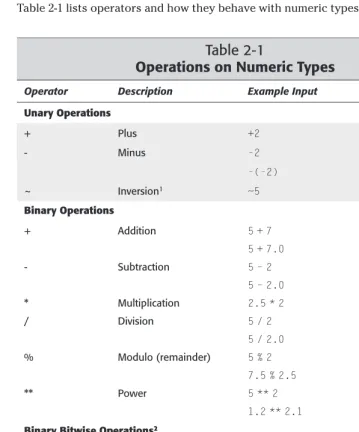
Python has the following operators, each of which we’ll discuss in context with the applicable data types they operate on:
- != % & * ** / ^ | ~ + < << <= <> == > >= >>
Numeric Types
Python has four built-in numeric data types: integers, long integers, floating point numbers, and imaginary numbers.
Integers
Integers are whole numbers in the range of -2147483648 to 2147483647 (that is, they are signed, 32-bit numbers).
For convenience, the sys module has a maxintmember that holds the maxi-mum positive value of an integer variable:
>>> import sys >>> sys.maxint 2147483647
In addition to writing integers in the default decimal (base 10) notation, you can also write integer literals in hexadecimal (base 16) and octal (base 8) notation by preceding the number with a 0xor 0, respectively:
>>> 300 # 300 in decimal
300
>>> 0x12c # 300 in hex
300
>>> 0454 # 300 in octal
300
Keep in mind that for decimal numbers, valid digits are 0 through 9. For hexa-decimal, it’s 0 through 9 and A through F, and for octal it’s 0 through 7. If you’re not familiar with hexadecimal and octal numbering systems, or if you are but they don’t thrill you, just nod your head and keep moving.
Long integers
Long integers are similar to integers, except that the maximum and minimum val-ues of long integers are restricted only by how much memory you have (yes, you really can have long integers with thousands of digits). To differentiate between the two types of integers, you ap