Trinetra – The Security Robot
Mrs. G. Rajitha1, Ms. N. Swathi Menon2, Mr. J. Surya Manideep3, Mr. D. Nikhil4, Ms. P. Srilatha5
1, 2, 3
Department of Electrical and Electronics Engineering, ACE Engineering College, Hyderabad, India
4, 5
Student, EEE Department, ACE Engineering College, Ghatkesar, India.
Abstract: The project instigates a service robot which performs the monotonous task of greeting people graciously by a sweet recorded message and hand gesture, it is used for monitoring data of visitors in any organization for security purpose. Arduino UNO is a kind of tool based on a simple microcontroller board used to control and sense the physical world than a desktop computer. An US-module (HC-SR04 ultrasonic trans receiver module) is used which can identify people in its vicinity and a dc motor is handed-on for hand moment. OV7670 camera module is cast-off for capturing images of the person and storing it for security purpose. An ISD1820 and APR33A3 voice recorder and playback module is cast-off for giving the direction according to the input given by the person. Hence this project can be owned at places like colleges, offices, or any organisations where the people need certain information.
Keywords: Arduino UNO, HC-SR04 US Module, DC Motor, OV7670 camera module, ISD1820 and APR33A3 voice recorder and playback module.
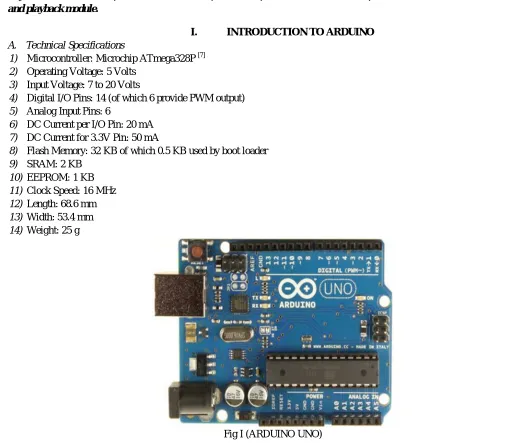
I. INTRODUCTION TO ARDUINO
A. Technical Specifications
1) Microcontroller: Microchip ATmega328P [7]
2) Operating Voltage: 5 Volts
3) Input Voltage: 7 to 20 Volts
4) Digital I/O Pins: 14 (of which 6 provide PWM output)
5) Analog Input Pins: 6
6) DC Current per I/O Pin: 20 mA
7) DC Current for 3.3V Pin: 50 mA
8) Flash Memory: 32 KB of which 0.5 KB used by boot loader
9) SRAM: 2 KB
10) EEPROM: 1 KB
11) Clock Speed: 16 MHz
12) Length: 68.6 mm
13) Width: 53.4 mm
14) Weight: 25 g
[image:1.612.33.544.286.729.2]II. INTERFACING MOTOR WITH ARDUINO:
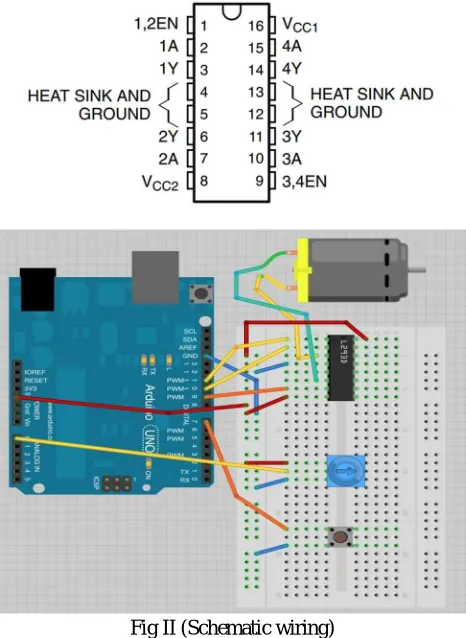
To interface motor with Arduino we are using H-driver L293D. The voltage range of this IC is from 4.5V to 36V. Motor is interfaced with Arduino for hand gesture.
A. Pin Description
Fig II (Schematic wiring)
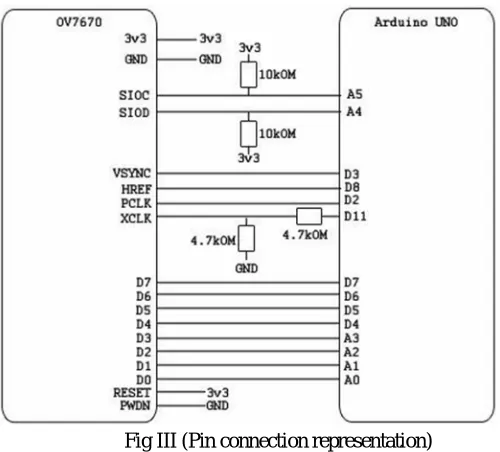
III. INTERFACING OV7670 CAMERA MODULE WITH ARDUINO
A. Specifications
1) It is used for embedded applications
2) It is suitable for low voltage applications
3) Pixel capacity of this camera module is 0.3MP
[image:2.612.190.423.143.462.2]Fig III (Pin connection representation)
IV. INTERFACING ISD1820 VOICE RECORDING AND PLAYBACK MODULE WITH ARDUINO
Using this voice module multiple messages can be recorder and play-backed. The maximum duration for recording is 20seconds. Depending on the resistor values recording duration varies.
Fig IV (Voice recording wiring)
V. ALGORITHM
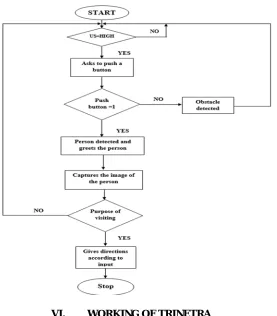
1) Step1: Start the process.
2) Step 2: If US module = HIGH, robot asks to push the button Else go to Step1
3) Step3: If push button =1, person is detected and robot greets the person with a hand movement. Else obstacle is detected and robot waits for 2mins and goes to Step1
4) Step4: Robot captures the image of person & stores it.
5) Step5: Robot asks for purpose of visiting. If push button is pressed, robot gives directions according to the input. Else go to Step1
[image:3.612.167.417.75.301.2] [image:3.612.190.420.353.595.2]VI. WORKING OF TRINETRA
[image:4.612.184.461.78.394.2]VII. TESTING AND DEBUGGING
A. Steps To Install Arduino Ide Software 1) Choose your Operating System
a) Windows
b) Mac OS X
c) Linux
2) Install Arduino* (Windows*)
a) If you haven't already, install 7-Zip*, a free archive utility that can be downloaded at: www.7zip.org.
b) Download the Arduino IDE from the Arduino Software page. Be sure to download the version for your operating system.
c) Navigate to the folder where you downloaded the Arduino IDE .zip file.
d) Right-click on the .zip file, point to 7-Zip, and select Extract to "Arduino-…"
e) Open the extracted folder. You can move this folder to a different location, if desired. A common place is to create a C:\Arduino folder. For this example, we will stick with the Downloads folder where it was extracted.
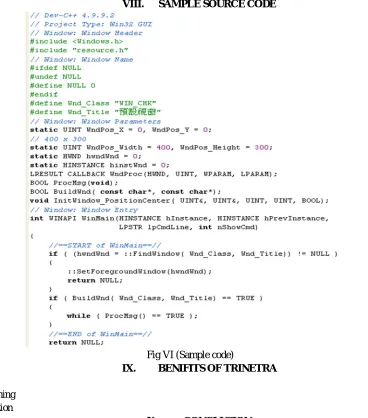
VIII. SAMPLE SOURCE CODE
Fig VI (Sample code)
IX. BENIFITS OF TRINETRA
A. Low cost
B. Smart functioning
C. Ease of operation
X. CONCLUSION
[image:5.612.116.484.261.679.2]REFERENCES
[1] https://en.wikipedia.org/wiki/Robotics
[2] http://exceedrobotics.com/about-us/why-robotics/
[3] https://www.designboom.com/technology/top-10-robots-artificial-intelligence-12-14-2017/ [4] https://en.wikipedia.org/wiki/Arduino_Uno
[5] https://components101.com/ultrasonic-sensor-working-pinout-datasheet [6] https://wiki.eprolabs.com/index.php?title=OV7670_Camera_Module
[7] http://www.ijiere.com/FinalPaper/FinalPaperASSISTANCE%20SYSTEM%20FOR%20PARALYZED%20PEOPLE%20USING%20EYEBALL%20TRACKI
NG170854.pdf
[8] https://www.elecfreaks.com/wiki/index.php?title=Voice_Record_Module_-_ISD1820 [9] http://wiki.sunfounder.cc/index.php?title=L293D_Motor_Driver_Shield
BIBLOGRAPHY
1) Mrs. G. Rajitha, Assistant Professor EEE Department ACE Engineering College, India. She was born in the year 1987, having
+2 years of experience as AST. Professor in ACE Engineering College and having 3 years of Industrial experience as a PLC programmer & Trainer, received “MONDIALOGO ENGINEERING BRONZE INTERNATIONAL AWARD 2008/09* from an initiative by DAIMLER & UNESCO selected among 932 Project ideas submitted during the award ceremony held in Stuttgart, GERMANY on 9 November 2009. She did her B. TECH EEE and M. TECH Power electronics from JNTUH affiliated college. Her areas of interest are Control systems, Power electronics and PLC & SCADA systems.
2) Ms. N. Swathi Menon, Student, EEE Department, ACE Engineering College, Ghatkesar, India.
3) Mr. J. Surya Manideep, Student, EEE Department, ACE Engineering College, Ghatkesar, India.
4) Mr. D. Nikhil, Student, EEE Department, ACE Engineering College, Ghatkesar, India.