
Creating Space for Facilitated Music Performance
Gesture Controlled Sound for Users with Complex Disabilities
Amy Dickens
Mixed Reality Laboratory Nottingham
Chris Greenhalgh
Mixed Reality Laboratory Nottingham
Boriana Koleva
Mixed Reality Laboratory Nottingham
ABSTRACT
Musical interactions have the potential to increase emotional well-being, self-confidence and self-motivation. However, the ability to actively participate in creative activities involv-ing music performance has so far been difficult for users with complex disabilities.
This paper discusses placing a technology probe, using gesture based musical controls, in an existing music technol-ogy project for users with complex disabilities (conditions which affect both cognitive and motor abilities of an individ-ual). The focus is on understanding the needs of this user group in a participatory design approach for creative music technologies that allow for tailored accessibility.
Outcomes from this research show that many multi-level social interactions surrounding the technology, users, audi-ence, and any third party facilitators exist in the context of ‘facilitated performance’. Results suggest that including facil-itators in the design of Digital Musical Instruments (DMIs) could allow for improved accessibility for users with complex disabilities.
CCS CONCEPTS
•Human-centered computing→User studies;User cen-tered design; •Social and professional topics→People with disabilities;
KEYWORDS
Embodied Interaction, Facilitated Performance, Gesture Sens-ing, Human Computer Interaction.
Permission to make digital or hard copies of all or part of this work for personal or classroom use is granted without fee provided that copies are not made or distributed for profit or commercial advantage and that copies bear this notice and the full citation on the first page. Copyrights for components of this work owned by others than the author(s) must be honored. Abstracting with credit is permitted. To copy otherwise, or republish, to post on servers or to redistribute to lists, requires prior specific permission and/or a fee. Request permissions from [email protected]. AM ’17, August 23–26, 2017, London, United Kingdom
© 2017 Copyright held by the owner/author(s). Publication rights licensed to Association for Computing Machinery.
ACM ISBN 978-1-4503-5373-1/17/08...$15.00 https://doi.org/10.1145/3123514.3123518
ACM Reference Format:
Amy Dickens, Chris Greenhalgh, and Boriana Koleva. 2017. Creat-ing Space for Facilitated Music Performance. InProceedings of AM ’17, London, United Kingdom, August 23–26, 2017,8 pages.
https://doi.org/10.1145/3123514.3123518
1 INTRODUCTION
Readily available motion sensing technologies allow the con-trol of digital elements through interactions that use em-bodied movement in the real world [3, 15]. In recent years, attention has been drawn to using body motion to interact with Digital Musical Instruments (DMIs) within research communities such as NIME (New Interfaces for Musical Ex-pression) [7].
Developments in this area could provide opportunities to benefit movements towards accessible and adaptive systems, and provide a platform for supporting universal access to DMIs.
The focus of this paper is on research involvement in a music technology project, in which users with complex disabilities (conditions which affect both cognitive and motor abilities of an individual) use technology to assist them in music performance. The term ‘facilitated performance’ is used throughout to describe a situation in which a performer with disabilities is supported by another party in the act of musical performance.
The role of the facilitator is of high interest; particularly how their involvement may impact the direction and creative choices of the project such as the choice of technology and method for interaction. Questions pertaining to the role of the facilitator in supporting interactions with music technol-ogy in the performance setting will be discussed. A special focus will be placed on the facilitator’s inclusion in the design of future HCI tools for this setting.
Outcomes of this research add to existing knowledge re-garding the difficulties for users with complex disabilities when using technology in creative music activities [5, 6].
2 RELATED WORK
These include complications with real time processing (in terms of continuous analysis and discrete event handling) [4], issues with triggering discrete sounds with precision [3], as well as a differentiation between actual and desired states of interaction [1]. The general accessibility of such controls is also difficult to discern, as prior research in this field has mostly focused on the highly skilled electronic musician creating custom gestural interfaces for their own personal/professional use [5].
In rehabilitation, DMIs and computer applications have been recognized as technologies that can help achieve in-creased motivation and active participation for users with complex conditions affecting their mobility [2, 17]. Enabling performance with music specifically has proven to be an area that provides strong potential to motivate those with complex disabilities. Gilberston and Aldridge highlight that
“through performing, patients would not only move away from isolation but towards a more active and creative self.”[8]
Gesture controls have been the preferred and most success-ful method of interaction for users with complex disabilities to date in fields such as music therapy. In 2008 the ‘Sound-beam’ (a device that triggers music based on breaking a beam of light with movements) was the single most used electronic music technology device in music therapy [11]. Despite this, access to musical activity for users with complex disabilities is still low when compared to the general population [14].
The complexity and diversity of individual requirements makes establishing a universal piece of technology for dis-abled users very difficult in terms of Human Computer In-teraction (HCI) [4] [5]. Thus, disabled users who cannot already play adapted versions of existing instruments are often limited to "accesible" interfaces such as the Soundbeam [5].
3 APPROACH
Partnership with the Community
In order to better understand the challenges of using gesture controls in facilitated performance, a research partnership was formed with a local music technology project. In the project, young people with complex disabilities were en-gaging with technology to create music and perform using DMIs. The technology in use before research intervention were primarily iPads and touch-based MIDI control surfaces. A technology probe was designed to be used in this project which enabled the use of gesture as a method for controlling DMIs. This was used for discovering whether a gesture con-troller would provide an easier approach to interaction for the participants.
Design Workshop
At the start, a design workshop was held to identify poten-tial application areas for gesture sensing technologies. This workshop was attended by researchers and a number of stakeholders from the project.
During the workshop, the researchers and stakeholders were asked to review potential applications of gesture sens-ing for the control of DMIs. Questions were posed to the attendees regarding a number of design considerations for a conceptual gesture control. The responses to these ques-tions informed some of the design choices for the technology probe used in the study.
Project Structure
The research project started in February 2016, when the ini-tial sessions were held with the young people in the commu-nity. These were followed by three performances in February, May, and July 2016, with rehearsals scheduled between each of these to re-engage the participants with the technology and adapt the performance piece.
The goal of these sessions was to create a piece of music to be performed as part of the BBC Ten Pieces initiative, a national project designed to engage young people with classical music. Groups across the country were invited to create their own versions of the songs provided on the BBC Ten Pieces website and record their performances of these.
The sessions were held over five days, each session lasted five hours and followed the structure outlined below:
Day 1: Introduction to facilitators, explanation of the project
to participants, listen to the BBC ten pieces music for inspi-ration and discuss with participants.
Day 2: Technology introduction session, discussion of
poten-tial piece, experimenting with sounds and selecting sounds for piece, creation of visuals, recording chords and found sound.
Day 3: Establishing elements of the piece, gesture control
introduced as a part of the piece, testing out interfaces with students to select roles.
Day 4: Putting together full piece, creating solo parts for
participants during the performance.
Day 5: Completion of the arrangement and pairing with
Participants
The participants in this project were young people (aged 19 and under) with complex conditions, such as Cerebral Palsy, Schizencephaly, Muscular Atrophy, and Muscular Dystrophy. These conditions cause ranging levels of cognitive, physical, and sensory impairment. This results in a participant group with a mixed range of abilities and preferences with regards to the method and means of interacting with technology. For example, some participants had difficulties interacting with touch screen interfaces due to a lack of control over their arm and hand movements, where as other participants struggled more with large movements and preferred a touch screen interface that required smaller hand movements.
Some of the participants had previously taken part in the project once before. For other participants this was their first interaction with a project of this nature.
4 METHODS
Due the study taking place within a school classroom en-vironment, research methods were chosen based on their suitability for research of activities in a real world setting.
Similar to many research projects that engage with the public in museum experiences [10], the research described focuses on a user-centred design process. This allows for easy creation of prototype interactions and enabling iterative changes of a prototype based on user feedback.
Participatory design, as outlined by Schuman & Namioka [18], is extremely relevant to this study. As the project al-lows for the users to play a critical role in the design process and the evaluation of the technology. Along with using par-ticipatory design methods, it was deemed appropriate for this project to take the approach of introducing a technol-ogy probe to test the application of gesture controls in this context. The methodology around technology probes advise that ‘technology probes’ should be simple, flexible and adapt-able technologies that focus on understanding the needs and desires of users in a real-world setting [9].
A sensor control was designed and implemented in this study to investigate the potential social, engineering and design goals of gesture controlled technologies for this user group in the context of facilitated performance.
5 DATA COLLECTION & ETHICS
Data from the project sessions was captured through pho-tographs, documented field notes, naturalistic semi-structured interviews, and audio/video recordings. The data collected documented interactions with the gesture control technology probe, MIDI controllers and applications on iPads.
In total 12 videos were captured, transcribed, and analysed; along with 2 interviews with supporting staff members of the project. The data was analysed based on O’Modhrain’s
Framework for the evaluation of DMIs [16]. Using this, the data was searched for references to playability, enjoyment, robustness, in addition to accessibility and social interactions around the use of the technology.
[image:3.612.322.545.211.358.2]Ethics for this project were considered by a research ethics committee. The research activities outlined in this paper were approved and consent was obtained from all participants and their guardians.
Figure 1: The Leap Motion tracks hand gestures in a three-dimensional range [12]
6 THE TECHNOLOGY PROBE Designing the Technology Probe
The technology probe was based on the concept of a gesture controller for DMIs, which was established in the design workshop. It was designed to be as simple as possible in order to allow for adaptations to be made ‘in the wild’.
Feedback during the workshop raised concerns over the interface with which the participants would interact. It was felt that a translation of the field of view of the sensor would be helpful and that visual feedback would be extremely im-portant to both performers and facilitators.
The attendees also presented opinions on the simplicity of gestures to be used for control, emphasising the importance of repetition, and that the speed at which a movement is performed should correlate with the audio output.
Hardware
LEAP MOTION SENSOR
AUDIO INPUT (mic/line in)
LEAP MOTION BUILT IN PROCESSING
LEAP MOTION SETTINGS
OSCMOTION (Background app.)
MAXMSP
(Leap Max Patch) MIDI CONTROL DATA
AUDIO OUTPUT (Int./Ext. Speakers)
[image:4.612.123.495.95.300.2]LEAP MOTION DATA PROCESSING OSC data values sent via local UDP port
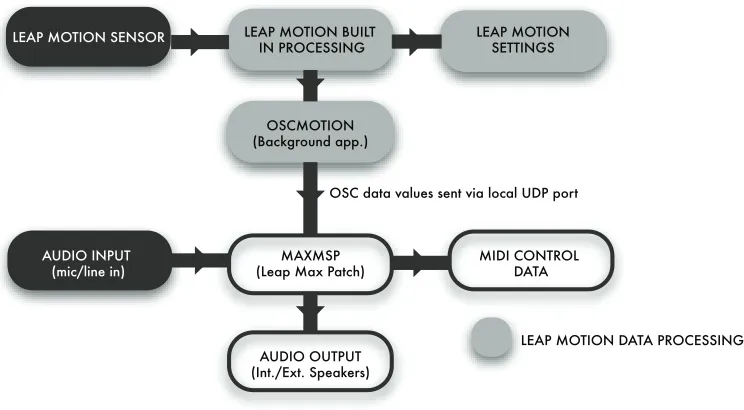
Figure 2: The software involved in the technology probe was a mixture of existing developer tools for the Leap motion and a patch created in MaxMSP
The hardware set up for the project included a Macbook Pro to interpret the data from the Leap Motion, and an audio interface (Focusrite Saffire Pro 40) for the input and output of audio. This was removed towards the end of the project in favour of wireless data transfer through MIDI and Open Sound Control (OSC) messaging. This change to data transfer method occurred during the final performances due to the difficulties faced in using ’hard-wired’ interfaces in an on-stage performance environment.
Software
The software involved in the technology probe was a mixture of existing developer tools for the Leap Motion (an applica-tion called OSCMoapplica-tion) and a ‘patch’ created in MaxMSP (an IDE for music systems that uses the visual programming language known as Max). This software was chosen for the built in capability to interact with Ableton Live, the Digi-tal Audio Workstation (DAW) software that was known to be used within the project. An overview of the technology probe system can be seen in Figure 2.
7 INTERACTIONS WITH THE TECHNOLOGY PROBE
This section discusses the interactions with the technology probe. Observations identified four types of user in the con-text of facilitated performance. The performer (primary user), the facilitator/musical expert/support worker (secondary user), the conductor/ensemble (tertiary user) and the au-dience (spectator). Communications between these users
during the performances displayed that there are two itera-tive feedback cycles in interactions with a DMI within this context.
Figure 3: Observations identified four types of user
[image:4.612.326.538.406.617.2]Part of the facilitator role was to be unseen by the audience. This was achieved through various off-stage placements of equipment. This creates an interesting dynamic for DMI design and, as such, the research discussed focuses on this interaction cycle between the performer and facilitator.
In the development of the technology probe, a number of potential challenges had been presented in the design workshop regarding movements in space for this user group. These were seen as key points for observations within the sessions in order to understand if the concerns of the stakeholders and researchers were matched in the real world applications of DMI technologies. These are considered in turn.
Iconic versus echoic feedback
In the workshop there were concerns over making the field of view of the sensor visible to performers, especially due to the lack of tactile feedback in gesture controls. This was also a concern for facilitators, as it could be difficult to understand when a user is interacting with the sensor.
It was decided to make the Graphical User Interface (GUI) of the OSCMotion application available to the users during the sessions. The GUI displayed a representation of the user’s hand movements via coloured dots on a depth grid, see Figure 4. This was available for users to see on a laptop screen when interacting with the gesture control.
The lack of a visual representation of the interaction area did provide some challenges. Some users would be unsure of whether their movements were being ‘seen’ by the sensor; however this was resolved through the use of the OSCMotion GUI. A more comprehensive interface, potentially even a mirror of the real world interaction, would be preferable in future iterations where visual feedback is required.
Subsequently, during an interview with academic staff, it was noted that the need for visual feedback would depend on the individual. It was also commented that the current technology used (iPads and MIDI controllers) that offered a GUI, did not resolve the issues of providing clear visual feedback for this participant group:
“on the iPads, unless they are looking at it constantly and it goes like blue or red for a second, it’s not very easy for them to see.”
Speed of Movement
[image:5.612.322.556.96.226.2]The frequency at which something occurs is an integral ele-ment of musical performance. However, including a feature of real-time responsiveness for users with complex disabili-ties poses a number of potential challenges. Some stakehold-ers commented that a large amount of refined control could be frustrating, especially in conditions where spasms have the potential to occur.
Figure 4: The GUI displayed a representation of the user’s hand movements via coloured dots on a depth grid [13]
It was established in the project sessions and interviews with facilitators that there is a need for a sensor device to be able to interpret many different styles of movement and react accordingly. This is something that does not necessarily correlate with expectations for the speed of movements to always have a direct influence upon the output. Instead, it looks toward tailoring devices to suit the ability of an individ-ual, as outlined by one stakeholder in the design workshop:
“they can’t necessarily control the movements, so it’s having something that would react to that [recognise this] and not just any movement [...] You know, because they do have a lot of involuntary movement.”
Adapting the technology probe to each user was achieved through the use of a scaling mechanism that took the min-imum and maxmin-imum inputs of the users movement and mapped this to a relative numerical range for the output. This created a control mechanism with a sensitivity that was dependent on the range of movement of the user.
The incoming data from the participant’s movements would be monitored, and the scaling element of the gesture control would be adjusted accordingly.
Repetition of Gestures & Accuracy
The ability to repeat gestures and accurately execute certain movements was another consideration, due to variations in their individual levels of control over their own actions.
During the design workshop it was stated by the project stakeholders that it was important that any new technology focuses on simplifying interactions in order to support easier interactions for this user group. This discussion highlighted the value of tailoring interactions to suit the users ability:
is and tailoring it around that to make it work for them and the piece of work that they are trying to create. That is the key thing I think, if we were able to do that, it would be great.”
This need for simple control mechanisms was acknowledged in the design of the technology probe, and an approach was taken that allowed participants to control the audio output through the vertical movement of their hand.
Challenges were still evident for some users in terms of continuous controlled movement in this direction. For some this could be easily remedied by changing the plain of move-ment to be the ‘x’ co-ordinate or horizontal plain as their range of movement allowed for more fluid movements when moving their arm horizontally as opposed to vertically.
A more viable and versatile solution would be for a de-vice to support a more dynamic range of movement and be adaptable to the movements of each user. It was evident from observing this user group that there is no universal solution for creating more accessible interactions.
8 FACILITATING CREATIVE INTERACTIONS
This section discusses the processes involved in facilitating creative interactions, providing observations of facilitating activities that take place in this context, and how these may influence the design of technology.
ACTIVITIES OF FACILITATION
Facilitation can take many forms, from physical support of the participant to coaching, demonstrating and vocal prompts that assist with the interaction. The data provided many examples of how the role of a facilitator may change throughout supporting interactions.
Prompting
Prompting is used as a tool to encourage participants to play and structure performances, and facilitators must carefully plan the ways in which to prompt performers. An example of this was the use of coloured cards with section numbers to inform performers of the current section of the piece and then pointing at each performer to prompt them when it was their time to play.
Demonstration
Demonstrative behaviour is also used repeatedly by the facil-itators throughout interactions to reinforce understanding and provide reminders. Field notes from the study included many examples of the facilitators taking on this demonstra-tive behaviour in facilitating the creademonstra-tive activities. During introductions of a new tool or device facilitators rely heavily on demonstrations to explain concepts and interactions.
Assisting
[image:6.612.318.559.220.354.2]The assisting role of the facilitator was most pertinent when participants were using iPads. These required a lot of sup-port in setting up the positioning of the iPad on equipment stands so that they were in a suitable position for the users to interact with the touch screen area. During interactions the equipment stands often had stability problems, requiring the facilitator to regularly intervene and adjust the equipment.
Figure 5: Holding equipment in place was often seen in the project sessions
Holding equipment in place was often seen in the project sessions (as can be seen in Figure 5). For rehearsals and per-formances, greater effort was made to ensure the equipment was positioned correctly for each participant. Facilitators made a conscious effort to repeat these checks to ensure the participants were comfortable with their setup.
PARTICIPANT BEHAVIOUR IN FACILITATED PERFORMANCE
Due to the nature of their complex disabilities the partici-pants within this study were familiar with the presence of facilitators and facilitated interactions.
Confusion
In observing the participants interactions with the various technologies, it was seen that confusion was sometimes dis-played by the participants.
In some cases the result of confusion over when or how to interact with the technology would lead to disengagement. This was displayed by participants through drifting gaze, lack of response and on occasion yawning.
Occasionally confusion could be clarified by answering participant’s questions, though sometimes they appeared reluctant to ask questions, perhaps due to self-consciousness.
Self-correction
The video data showed examples of self-correction in the performers’ interactions. This demonstrated that, in some cases, participants were aware of how to correct their own errors and did not require facilitation at that point.
Mistakes that were seen to be corrected by the participant often occurred due to constraints of the technology inter-face. For example the iPad apps lacked an ability to respond to multiple touches for some of the instruments, and this meant participants who were unable to interact with the touchscreen using only one finger-point had to adjust and modify the way in which their hand touched the screen.
9 DISCUSSION
The data from this study highlights the importance of the facilitator in adapting and supporting the use of technol-ogy in this context. Observations suggest the involvement of facilitators in engaging participants with technology as paramount to the success of the interaction.
Interviews with teaching staff showed the importance of facilitation for this user group. It was recognised that the facilitator could identify and support the creative needs of the performer by tailoring the technology to suit their ability:
“I think what you [referring to the facilitators as a group] gave one student in our class with the touch, I think that was very clever and I think that was perfect for them.”
Consequently this draws attention to a need for considera-tion of facilitators in the design space of DMIs for users with complex disability.
GESTURE CONTROL TECHNOLOGY & USERS WITH COMPLEX DISABILITIES
The project revealed some important considerations about the use of gesture controls for users with complex disabilities.
Recognition of a User with Complex Disabilities in Computer Models
There were challenges with recognition of some user’s hands and limbs due to the sensor tracking finger tips, which were not visible in users with closed hand syndrome. This resulted in some participants being unable to interact with the tech-nology probe. Updating the techtech-nology would be required to improve the recognition of gestures for this user group, which would subsequently increase the impact and usability of gesture sensing for the control of DMIs.
Visual Feedback in Embodied Interactions
It was interesting to see that the lack of visual feedback was not necessarily an issue for the gesture control. As noted by the teaching staff in section 7, the contrasting visual feedback provided on the iPad applications was too minimal to have impact. This would suggest visual feedback in general is not an essential requirement for users to be able to understand and interact with a piece of technology, so long as another form of feedback is present (audio, tactile).
Tailoring Technologies to a User’s Ability
Tailoring DMIs could lower the barriers that disabled users currently face in playing musical instruments [5]. Facilita-tors once more proved to be crucial agents in this process, through their ability to suggest adaptations to the current technology to suit the individual user.
This allowed for a bespoke customisation process in which the performer and facilitator worked together to create a suitable interaction. Ideally, the facilitator would understand both the capabilities of the technology and those of the per-former, which allows them to suggest options for the user to try out during the tailoring process.
Continued improvements in interactive machine learning could provide more agency for the performer in the adap-tation process of gesture based DMIs [6]. This area of tech-nology is still developing and should not be a replacement for the role that the facilitator plays in a music performance context for users with complex disabilities.
Considering this, there is a need for designers of digital music performance technologies to consider the facilitator when designing interactions, as both a secondary user and an additional stakeholder of the technology.
Understanding the Design Space of ‘Facilitated Performance’
The ideal facilitator would possess knowledge of both the technology and the capabilities of the user. In the context of facilitated musical performance, they may have knowledge of some or all of the following areas: abilities of users with complex disabilities; music technology (hardware/software); music theory; digital technologies; physical technology (i.e. iPad devices) and performative experiences.
In terms of design, the varied knowledge which a facilita-tor could possess produces a wide scope for the needs and requirements of facilitators as a user group. Interfaces for the facilitator should focus on providing a simplified baseline level that can then be built on to expand the interface for those with greater technical knowledge.
was extremely collaborative and facilitators shared informa-tion to assist one another in supporting the performances.
A recommendation to designers, researchers and builders of DMIs in this context would be to include facilitators from all backgrounds in their activities. This would be important to also gauge whether any new designs for interactions would be understood by all of the potential facilitators.
10 CONCLUSIONS
Social relationships played an extremely important role in this project. Most notably the relationship between the facili-tator and performer was significant in supporting successful interactions with the technology available. Context-specific understanding of the user’s needs and the available technol-ogy helps the facilitator to provide options that are more suited to a specific user.
The project demonstrated that there is a need to consider the operational constructs of facilitated musical performance in both the design and production of digital musical instru-ments (DMIs) for users with complex disabilities. Further-more, ther is a need to recognise the role the facilitator plays (as a secondary user) in supporting the access to digital tech-nology and in adapting or ‘tailoring’ this to suit a user’s ability.
The next step in this research is to develop a framework outlining the stakeholders and goals of facilitated musical performance that will give guidance to designers and re-searchers. These guidelines would guide the development of interactions with technology for this setting, be this through using embodied interaction and gesture controls or other-wise.
Additional qualitative data will be gathered from each of the four groups of stakeholders identified in this project to inform the iterative development of this framework.
REFERENCES
[1] Atau Tanaka Baptiste Caramiaux, Marco Donnarumma. 2015. Under-standing Gesture Expressivity through Muscle Sensing.ACM Trans-actions on Computer-Human Interaction21, 6 (January 2015), 1–26. https://doi.org/10.1145/2687922
[2] B. J. Crowe and R. Rio. 2004. Implications of technology in music therapy practice and research for music therapy education: A review of literature.Journal of Music Therapy41, 4 (February 2004), 282–320. https://doi.org/10.1093/jmt/41.4.282
[3] Luke Dahl. 2015. Studying the Timing of Discrete Musical Air Gestures. Computer Music Journal39, 2 (May 2015), 47–66. https://doi.org/10. 1162/comj_a_00298
[4] Eamon Doherty, Gilbert Cockton, Chris Bloor, and Dennis Benigno. 2001. Improving the performance of the cyberlink mental interface with âĂIJyes / no programâĂİ. InProceedings of the SIGCHI conference on Human factors in computing systems - CHI ’01. ACM, 69–76. [5] Rebecca Fiebrink, Mick Grierson, and Simon Katan. 2015. Using
in-teractive machine learning to support interface development through workshops with disabled people. InProceedings of the 33rd Annual
ACM Conference on Human Factors in Computing Systems - CHI ’15. ACM, 251–254.
[6] Rebecca Fiebrink and Hugo Scurto. 2016. GRAB-AND-PLAY MAP-PING: CREATIVE MACHINE LEARNING APPROACHES FOR MUSI-CAL INCLUSION AND EXPLORATION. InProceedings of the Interna-tional Computer Music Conference. Utrecht, Netherlands 12-16 September 2016. ICMA - International Computer Music Association, 251–254. [7] Steering Committee for NIME. [n. d.]. New Interfaces for Musical
Expression. http://www.nime.org/. ([n. d.]). Accessed April, 2016. [8] Simon Gilbertson and David Aldridge. 2008.Music therapy and
trau-matic brain injury: A light on a dark night. Jessica Kingsley Publishers, Philadelphia.
[9] Hilary Hutchinson, Wendy Mackay, Bosse Westerlund, Benjamin B Bederson, Allison Druin, Catherine Plaisant, Michel Beaudouin-Lafon, Stephane Conversy, Helen Evans, and Heiko et al. Hansen. 2003. Tech-nology Probes: Inspiring Design for and with Families. InProceedings of the SIGCHI Conference on Human Factors in Computing Systems -CHI ’03. ACM, 17–24.
[10] Boriana Koleva, Stefan Rennick-Egglestone, Holger SchnÃďdelbach, Kevin Glover, Chris Greenhalgh, Tom Rodden, and Martin DadeRobert-son. [n. d.]. Supporting the creation of hybrid museum experiencesâĂİ. InProceedings of the SIGCHI Conference on Human Factors in Computing Systems, PAGES =.
[11] Wendy L. Magee and Karen Burland. 2008. An exploratory study of the use of electronic music technologies in clinical music therapy. Nordic Journal of Music Therapy17, 2 (June 2008), 121–141. https: //doi.org/10.1080/08098130809478204
[12] Leap Motion. [n. d.]. Leap Motion Developer Information. https: //developer.leapmotion.com/. ([n. d.]). Accessed December, 2015. [13] Leap Motion. [n. d.]. OSCMotion Application. https://apps.leapmotion.
com/apps/osc-motion/osx/. ([n. d.]). Accessed February, 2016. [14] Drake Music. [n. d.]. Drake Music Charity. http://www.drakemusic.
org/about-us/. ([n. d.]). Accessed June, 2016.
[15] Susanne MÃďkelÃď. 2014. Three Viewpoints on Designing Bodily Interaction for Serious Applications. InNordiCHI’14 workshop Human-technology choreographies: re-thinking body, movement and space in interaction design. ACM, 1–4.
[16] Sile O’Modhrain. 2011. A framework for the evaluation of digital musical instruments. Computer Music Journal39, 1 (Spring 2011), 28–42. https://doi.org/10.1162/comj_a_00038
[17] J. F. Reilly. 1997. LIGHTNING strikes: A Correlational study of the Gesturo-musical responses of in-patients with acute manic or De-pressive Symptomatology using the LIGHTNING module. Journal of Music Therapy34, 4 (December 1997), 260–276. https://doi.org/10. 1080/08098130809478204
![Figure 1: The Leap Motion tracks hand gestures in a three-dimensional range [12]](https://thumb-us.123doks.com/thumbv2/123dok_us/8568624.367802/3.612.322.545.211.358/figure-leap-motion-tracks-hand-gestures-dimensional-range.webp)
![Figure 4: The GUI displayed a representation of the user’shand movements via coloured dots on a depth grid [13]](https://thumb-us.123doks.com/thumbv2/123dok_us/8568624.367802/5.612.322.556.96.226/figure-gui-displayed-representation-shand-movements-coloured-depth.webp)

