$3.00
December-January 1985
No.
21
TABLE OF CONTENTS
Analog to Digital Interface... 4
Communication Between High .. Level and
Asse~blyLanguage ... 10
Pascal Procedures ... 14
Installing Turbo Pascal ... 16
Xerox 820 Column ... 20
C'ing Clearly ... 24
Low Intensity BB I Video ... 26
Slicer Column ... 31
Saving Money on Quad Density Disks ... 34
Three Keyboard Translators ... 36
Kaypro Column ... 40
KAMAS, An Outline Processor ... 47
FOR TI-Iwords ... . . . .. 48
SBASIC Column ... 52
Cooling a Hot Computer ... 55
No Fault Power ... 61
On Your Own: Turbo Pascal, the Early Days ... 63
ti
w
::Jo
w
a:
z
o
>
Q.o
o
w
w
a:
IL>=
I-Z~
a:
a:
~
~
c
w
!::
:E ::l
~
c
o
en
a:
::J
o
IL
o
rn
:Ea:
w
I-w
~
I-o
l-t>
w
..,
III ::Jrn
w
c
~
:E
rn
w
..J~
rn
..J ..J~
"THE ORIGINAL BIG BOARD"
OEM - INDUSTRIAL - BUSINESS - SCIENTIFIC
SINGLE BOARD COMPUTER KIT!
Z-80 CPU! 64K RAM!
(DO NOT CONFUSE WITH ANY OF OUR FLATTERING IMITATORS!)
THE BIG BOARD PROJECT: With thousands sold worldwide and over two years of field experience, the Big Board may just be one of the most reliable single board computers available today. This is the same design that was licensed by Xerox Corp. as the basis for their 820 computer.
(64K KIT BASIC I/O)
The Big Board gives you the right mix of most needed computing features all on one board. The Big Board was designed from scratch to run the latest version of CP/M·. Just imagine all the off-the-shelf software that can be run on the Big Board without any modifications needed.
SIZE: 8'12 x 13'/. IN. SAME AS AN 8 IN. DRIVE. REQUIRES: +5V @ 3 AMPS + - 12V @.5 AMPS. FULLY SOCKETED! FEATURES: (Remember, all this on one board!)
64K RAM
Uses Industry standard 4116 RAM's. AII64K Is available to the user, our VIDEO and EPROM sections do not make holes In system RAM. Also, very special care was taken In the RAM array PC layout to eliminate potential noise and glitches.
Z-80 CPU
Running at 2.5 MHZ. Handles all 4116 RAM refresh and supports Mode 2 INTERUPTS. Fully buffered and runs 8080 software.
SERIAL I/O (OPTIONAL)
Full 2 channels using the Z80 SIO andtheSMC 8116 Baud Rate Generator. FULL RS232! For synchronous or asynchronous communication. In synchronous mode, the clocks can be transmitted or received by a modem. Both channels can be set up for either data-communication or data-terminals. Supports mode 21nl Price for all parts and connectors: $39.95
BASIC I/O
Consists of separate parallel port (Z80 PIO) for use wlth.an ASCII encoded keyboard for Input. Output would be on the 80 x 24 Video Display.
BLANK PC BOARD - $89.95
The blank Big Board PC Board comes complete with full documentation (including schematics), the character ROM, the PFM 3.3 MONITOR ROM, and a diskette with the source of our BIOS, BOOT, and PFM 3.3 MONITOR.
24 x 80 CHARACTER VIDEO
With a crisp, flicker-free display that looks extremely sharp even on small monitors. Hardware scroll and full cursor control. Composite video or split video and sync. Character set Is supplied on a 2716 style ROM, making customized fonts easy. Sync pulses can be any desired length or polarity. Video may be Inverted or true. 5 x 7 Matrix - Upper & Lower Case.
FLOPPY DISC CONTROLLER
Uses WD1771 controller chip with a TTL Data Separator for enhanced reliability. IBM 3740 compatible. Supports up to four 8 Inch disc drives. Directly compatible with standard Shugart drives such as the SA800 or SA801. Drives can be configured for remote AC off-on. Runs CP/M" 2.2.
TWO PORT PARALLEL I/O (OPTIONAL)
I
Uses Z-80 PIO. Full 16 bits, fully buffered, bl-dlrectlonal. Uses selectable hand shake polarity. Set of all parts and connectors for parallel I/O: $19.95REAL TIME CLOCK (OPTIONAL)
Uses Z-80 CTC. Can be configured as a Counter on Real Time Clock. Set of all parts: $9.95
CP/M* 2.2 FOR BIG BOARD
The popular CP/M' D.O.S. to run on Big Board is available for $139.00. DOUBLE DENSITY ADAPTER BOARD - $149.95 (A&T~ Requires no cuts or MODS to an existing Big Board. Gives up to 670K storage on a Single sided 8 In. diskette. With software to patch your CP/M" 2.2. PFM 3.3 2K SYSTEM MONITOR
The real power of the Big Board lies In Its PFM 3.3 on board monitor. PFM commands Include: Dump Memory, Boot CP/M", Copy, Examine, Fill Memory, Test Memory, Go To, Read and Write I/O Ports, Disc Read (Drive, Track, Sector), and Search PFM occupies one of the four 2716 EPROM locations provided. Z-80 Is a Trademark of Zilog.
Digital Research Computers
(OF TEXAS)P.O. BOX 461565 • GARLAND, TEXAS 75046 • (214) 225-2309.
TERMS: Shipments will be made approximately 3 to 6 weeks after we receive your order. VISA, MC, cash accepted. We will accept COD's (for the Big Board only) with a $75 deposit. Balance UPS COD. Add $4.00 shipping.
USA AND CANADA ONLY
MICRO CORNUCOPIA
P.O. Box 223
Bend, Oregon 97709
503-382-8048
Editor & Publisher David J. Thompson
Operations Manager Myron Pogue
Assistant Editor Rebecca Ozrelic
Graphic Design Barbara Smiley
Technical Department Dana Cotant Eric Roby Tony Ozrelic Laine Stump
Advertising Director Alice Holbrow
Staff Assistants Dorcas Dsenis
Cary Gatton
Tracey Braas Carla Miller
Secretary Christina Donaldson
MICRO CORNUCOPIA is the systems jour-nal supporting systems programming lan-guages and builders of single board and 5-100 systems.
MICRO CORNUCOPIA is published six times a year by Micro Cornucopia Inc. P.O. Box 223, Bend, Oregon 97709.
SUBSCRIPTION RATES:
1 yr. (bulk rate) $16.00
1 yr. (first class) $22.00 1 yr. (Canada & Mexico) $22.00 1 yr. (other foreign) $30.00 Make all orders payable in U.S. funds on a U.S. bank, please.
ADVERTISING RATES: Available on request (call Alice Holbrow).
CHANGE OF ADDRESS: Please send you old label and new address.
SOFTWARE, HARDWARE, AND BOOK VENDORS: We would very much like to re-view your software, Single Board, and 5-100 products. Send materials to the Review De-partment, Micro Cornucopia.
CP/M is a trademark of Digital Research, Inc. Copyright © 1984 by Micro Cornucopia
All rights reserved
IICIO CDIRVCDrll
December-January 1985
I See
Spots
Putting Ink On Paper
Those of you who have been with Mi-cro C over the years and those of you who have waded through most of the back issues have followed the growth of Micro C from a 16-page light-weight to this 70+ page catalog. (At least they feel like catalogs when we're hauling more than 3,000 pounds of them to the post office.)
Well, we're still going and growing thanks to a strong core of contributors and a very responsive group of Kaypro owners who are just as excited about the technical details of their system as us "old" timers. Well, as you will see, there will soon be another new group of Micro C subscribers. Many of these, however, are already "old" hands.
Microsystems
Microsystems magazine, begun in 1979 by Sol Libes, has had the same kind of supportive readership that we have had. Originally the magazine was called 5-100
Microsystems and it helped guide the 5-100 system through its infancy and to-ward its current maturity. In the process, 5-100 Microsystems attracted a loyal fol-lowing of very technical people.
As the computer market moved away from the 100 bus, Sol dropped the 5-100 prefix and began shifting the empha-sis from hardware to operating systems (CP/M 80, CP/M 86, MSDOS, and UN-IX) and systems software. He was hop-ing to expand the audience (there are on-ly a limited number of realon-ly technical folks) and remain viable in this rapidly
No.21
changing marketplace.
During this period along came Ziff-Davis, a giant publisher looking for ways to make inroads into the burgeoning computer market. Microsystems seemed just the ticket, and Sol, well, he was much more interested in writing and teaching than in publishing, anyway, so he sold the magazine. (We magazine types don't need offspring; we have our publications which are just as ornery and spiteful and fun as kids ever dreamed of being.)
Ziff-Davis installed some new (expen-sive) talent and made Microsystems a real high-class operation complete with salesmen, bingo cards, and special sub-scription deals. Its goal was a total circu-lation of 100,000 (newsstands and sub-scribers).
It turns out that per-copy printing costs drop dramatically when you run 100,000 copies. At that number, a four-color, 120-page magazine costs about 60 cents per copy. That's less than it costs us per copy to print a 72-page black and white Micro C.
Anyway, Microsystems' circulation peaked at about 50,000 (which may be two copies for every 5-100 system in the country), so the December issue will be the last. (Sol was devastated when they told him.)
The Wall Street Journal just reported that Ziff-Davis has put 25 of its business and consumer magazines up for sale-including: Car and Driver, Popular Pho-tography, Travel Weekly and Stereo Re-view. The article indicated that Ziff was not selling any of its computer maga-zines (what's left of them).
So Ziff-Davis appears to be putting its corporate house in order and in the proc-ess the computer community is losing an institution. I'm very sorry to see it go. But:
New Columns In Micro C
Just when you thought that Micro C was already chock-full of columns (nuts), we announce two new ones. Sol Libes has agreed to do a column for us. He will be writing about public domain software, and he should certainly know
D_ear Editor,
We want to thank you for the mention in Issue 20, "On Your Own." We're sorry you don't approve of the name of our company (BEE. MaR Enterprises). Our name is our names: Linda Bee and Gary Morris, and fortunately we didn't shell out $40,000 to name our company BEE.MOR. We have been marketing pe-ripheral products and systems for Kay-pros, and operate a disk drive service center. Fortunately, our business is MaR, not less, than last year because we ship a good product.
We are avid readers of Micro C and ap-preciate the wealth of knowledge you provide.
Linda Bee Gary Morris
BEE.MOR Enterprises 22182nd Ave. E. Sumner WA 98390
Editor's note:
Thanks for the letter, Linda and Gary. The response to that "On Your Own" column was immediate and very interesting. Some people loved it, some had mixed feelings, and others thought I was off base (I won't repeat how far off).
Picking on someone's business name is about as bad as picking on his personal name (perhaps worse since he didn't have any choice over his own name).
Before I wrote the column, I told the outfit that distributes Dulmonts what I thought about the name (to their face). The distributor indicated that it too had tried to get the name changed but that the Dulmont company in-sisted: "That's always been our name, we're successful, and we're not going to change it!!!!!!!!!!" The Dulmont company was defi-nitely not interested in a new name.
The Integrand folks responded immediate-ly with a beautifulimmediate-ly written repimmediate-ly. Their name was derived from the mathematical term "integration," and at the time, they thought it was appropriate for a small cabinet company (and from what I've heard they are not all that small any longer). And, to answer Integrand's question, "If you make pianos like you make your cabinets, yes , I'd definitely be interested in a piano."
Jim Tanner also called to say that according to his recollection, the name "Big Board" was his idea. One afternoon while going over prices for producing the Big Board circuit
2
LITTIRS
board someone commented that the run would be expensive because it was such a "big board." No too long afterwards he was tuned to the stock market report while driving home. They announced the number of shares traded on the "Big Board" and bingo.
Dear Editor,
I have enjoyed your magazine very much and I have found the articles to be very informative. I own a KayPro 10 and I would love to see more on what makes it tick and how to improve upon it.
I work for a KayPro dealer and I have had fun speeding up the II's and the 4's to run at 5mhz.
By the way, I have found that with a standard II or 4, I could only go up to 2400 baud when using MODEM7 be-tween a slow Kaypro and a different brand 4 MHz machine. After speeding up the Kaypro, 9600 baud was no prob-lem.
And now I have the same problem with my 10. I can only go up to 2400 baud before I start getting errors. I wrote a let-ter to KayPro about this and they called me back to get further information, but as of yet there has been no solution.
There is so much out there in the way of add-on's for the II and 4 but nothing for the 10. I would like to ask everybody out there if they have heard of any way to do the following.
1. Add a clock (with software) onto a 10. 2. How about a 6mhz upgrade? (I have the Z80-B's)
3. Adding an 8088 board and MSDOS andCP/M86.
4. RAM disk (might use 8088 board memory).
5. ZCPR type modifications to CCP. 6. Add an 8" drive. This I would like a lot. I already have UNIFORM for my 5"; with an 8" I wouldn't have to use MO-DEM7 to transfer my programs. 7. A 30011200 modem card.
8. Screen dump routine, one that could dump the graphics as well would be nice. (I have Prowriter 8510).
9. I have just read the article on how to turn your KayPro II or 4 into an 8. How about this mod for the 10?
I want the world, but why not? David R. Meyers
6390 Rancho Mission Rd. #208 San Diego, CA 92108
Dear Editor,
Back in August I sent a check for $20 for your new Kaypro 4-84 schematics. My check hasn't been cashed yet, so I'm not angry, but I sure would like to have those schematics. Did the check get washed down the river when you were shooting the rapids? Just write a note on some toilet paper and let me know. Chuck Weingart
2152 W. Iowa Chicago IL 60622
Staff reply:
You're right. It did get washed down the river but we finally fished it out. We decided to wait until it dried out before we sent it, though, so that's why it took so long. As for toilet paper, we ran out last week.
Actually, we finally got the darn things finished and shipped, so if you haven't re-ceived yours by now, please let us know.
Editor's note (to the staff):
A shortage of toilet paper could be disas-trous (not even the software press releases work very well for this purpose).
Dear Editor,
I could not let J. Wytsma's comments in Micro C issue 19 about the dearth of BBII articles go without rebuttal. One of things I" enjoy most about Micro C is its informal approach coupled with varied information. I also enjoy the occasional minor errors. The whole format of Micro C makes it more personal and, for me, more readable than many of the "big-gies" I no longer subscribe to. While Wytsma's point is well taken, I don't know how Micro C will continue to offer so much information on so many sub-jects for so little without changing a lot. It's a rotten shame that progress is a real-ity rather than just a theory.
Dick Schaffer 5138 W. Olive Ave. Glendale AZ 85302
Editor's note:
Thanks, Dick. I have really been strug-gling with idea of Micro C and change and
it's been one of the most difficult parts of being editor. Other publications are facing the same changes and it doesn't look like very many have found any real direction. Some are just floundering better than others.
Dear Editor,
I see all of the interesting things that some people are doing with the Big Boards and start getting the urge to try some of them.
Would it be possible to get one of the Big Boards, and by using your improved PROM, generate a system that would use the Kaypro software and read the same disks in the same format?
The Big Boards might have the advan-tage that I would be able to have more II
o
and the possibility of having an 8" disk to access some of the CP/M software.Some time ago I put together a SWTP 6800 system and have had some limited experience in assembly language pro-gramming. I do not have much spare time and am somewhat afraid that I might be getting into a lot more than I can cope with.
Can the disk controller on the Digital Research Computers be changed to one that will controlS" floppies?
Would the BB II be a better choice as an answer to this problem?
Albert P. Van der Klott Wahl-Henius Institute, Inc. 4206 N. Broadway
Chicago 1160613
Editor's note:
We're working on that Kaypro/BB modifi-cation but it could be as much as six months down the road. Even then, you will need to perform some non-trivial details to use the software.
To date we haven't completed the modifica-tion that would allow the DRC controller to run 5" but SWP has a package. However this package will only allow you to run 8" or 5", not both.
The BB II will run both 5" and 8" with Andy Bakker's software but lack of support and documentation (as well as installed base) for that system make it a difficult project for all but heavy-weight engineering types.
Dear Editor,
I received my blank PCB for the BB I about a year ago along with a sample page from Micro C. So I sent for a sub-scription and have enjoyed every issue. After admiring my blank board for a couple of weeks, I finally started solder-ing sockets.
LITTIRS
I could only go for about 2 hours at a sitting before those neat rows of pins turned into a sea of waving spears. But I finally got them all in.
The caps and resistors were added; the connectors, crystals, etc., were soldered in; and then the long careful job of insert-ing the IC's was done. I went over the board with a magnifying glass a million times it seems and everything looked good.
I built a box, a 24-volt power supply, bought a Shugart from Cascade and a solid state switch from Phenix, wired it all together, flipped the switch on, hit re-turn on the keyboard, opened my eyes, and beheld a glorious spectacle of every character in the English and Greek char-acter alphabets flashing on and off.
Going over the board I found 4 IC's with bent out pins and the display changed to alternate zero's and colons. So I got out my stack of Micro C's and found a good article which discussed a similar problem.
Trying everything the article suggest-ed made things no better or worse, so I began to substitute IC's and found a flaky 74LS123.
The monitor went blank when I turned it on and PFM signed on, my wife thought I had been electrocuted from all the jumping and hollering that went on. To make a long letter longer, I'd like to say it's all been fun and to thank you for a good magazine and thanks to the many suppliers that advertise in it. They have all been prompt and their products ex-cellent.
I have three Kaypro II's at work and have ordered disks and ROM's for them from Micro C. Being at a government agency, I have been amazed at the speed in which you have delivered the items. I hope you have received payment at least in a reasonable time. Many companies will not accept a government purchase order at all.
Now stop laughing and get my sub-scription renewed.
Stuart Eason 3 Cotswold Rd. Benton AR 72015
Editor's note:
The tears weren't from laughing, they really weren't!
Dear Editor,
Your magazine is full of ecstatic re-ports from people who apply power to their BB II and two seconds later hear the bleep which means all is okay.
Let the record show it is not always so fast. I first applied power to my BB II on 19 Dec., 1983, but the "two seconds" ended 24 Feb.,1984.
Only a fraction of those "two seconds" were used fixing solid errors; solder is quicker that the eye.
One short took a bit longer. It meas-ured 0 ohms pin to pin on the IC's, but disappeared as soon as I turned the board over to check it. It came back again only under power. Eventually, this problem just went away.
But the real hassle was a poor IC sock-et contact. Evidently the pressure of ohm meter probe was enough to make it look good on the static test, but it wasn't mak-ing contact otherwise. I found that one only after borrowing a logic analyzer.
Before I could make any sense of that, however, I had to find someone to list out the EPROM and disassemble some of it by hand. Thus I got by with a lot of help from my friends, but the ecstatic items in Micro C were no help at all.
Couldn't you have a department "What to do while waiting for the bleep"? Among other things you could print listings of EPROM's.
Now I start scraping up money for a keyboard and disk drives. But looking ahead, I see things I don't understand.
CAL TEX sent me a disk which I hope I can still find, but I didn't (yet) buy CP/M. Are the User Disks which you sell "stand alone," or do they assume CP/M? If the latter, is there no way to proceed without spending $1S0? I mean legally, of course.
R.W. Hartung 408 Orchard
East Lansing MI 48823
Editor's note:
All of our disks assume CP /M. I mean, ei-ther we have·to spend the $150 or you have the spend the $150. At $12 to $15 per disk,
it
wouldn't make much sense for us to spend
$150 each to put CP/M on them.
Analog To Digital Interface
By
Don Fletcher
I
developed an incubator data acquisi-tion system this summer using my Big Board as a bed for testing different ana-log to digital convertors (ADCs). I'm the designer, technician, assembler, janitor, and everything else for a hatchery equip-ment company (called Egg-tronics, of course). (Editor's note: probably owned by a very gentle holding company.)I hate to waste any effort, so I've taken the results of my design research and written this article. I've tried to include enough information on analog to digital conversion so you can come up with something which will work with your own system.
The circuit and driver provided should work on either the Big Board or the Xerox 820-1, since development work in our shop was done on both computers. (A slight change would, no doubt, make this work on a Kaypro or any other sys-tem with similar port hardware.)
Background
Analog to digital conversion, as the name suggests, is a process of convert-ing analog signals (from detectors or oth-er instruments) into the digital1s and Os that computers can understand.
Some examples of things you could monitor include: voltage, current, heat, humidity, light, sound, velocity, force, etc. Since ADCs can only convert an electrical signal into its digital equiva-lent, all inputs must first be converted in-to voltages.
Conversion Speed: The time required to convert an analog input to a digital number. Faster is better but more expen-sive.
Resolution: The number of binary states an analog voltage range can be re-duced to. For example, if an 8 bit ADC is used, there are 256 different binary num-bers that it can output (00 to FF Hex). If the desired input range is 0 to 2.55 volts the voltage per step would be 2.55V/255 steps (zero doesn't count here), or 0.01 volt per step. The more bits you have, the smaller the steps will be.
Accuracy: A measure of how closely the calculated binary output of the ADC matches the voltage input. Usually measured as .
+
1- some fraction of the least significant bit (LSB). '4
SACs And DSICs
There are two major families of ADCs-the successive approximation convertor (SAC) and the dual slope inte-gration convertor (DSIC), each suited to different applications. When speed is important, the choice is the SAC, which can complete a conversion in 100 micro-seconds. In contrast, the DSIC requires 100 milli-seconds, which is 1000 times longer. The SAC is sensitive to noise, re-quiring good bypassing and board lay-out. In contrast, the DSIC is virtually im-mune to noise. If you need a lot of steps (increased resolution) the DSIC is best because it can give you up to 41/2 digits (19999 steps) resolution. The SAC is lim-ited to 12 bits (4096 steps). Both types of convertors are in the same price range.
I used the ADC0804 SAC from Nation-al Semiconductor. It has a conversion time of 100 micro-seconds and 8-bit (256 step) resolution.
ADCs differ in the available accuracy and cost; the higher the accuracy, the higher the cost. The ADC0804 has an ac-curacy of
+
1-1 LSB. There are 10 and 12 bit convertors available that are pin for pin compatible with the ADC0804 (the extra bits are handled in software), but they are expensive and hard to get at this time. [image:6.613.230.575.503.748.2]If you would rather use an integrator ADC, Intersil has several types available
Figure 1 - Display Routine In BASIC
Rt 1 Box 216 Pleasant Hill MO 64080 816-869-3472
(best buy is the 12 bit ICL7109). Intersil data books and parts are available from JAMECO and several other suppliers. A good second choice is the Motorola MCl4433 31/2 digit ADC.
Theory Of Operation
ICI-CA4051: Eight channel analog MUX used for input scaling. (See Figure 2.) An analog voltage is supplied to the negative input (Vin-) of the ADC. PIO A bits 3-5 determine which input (0-7) on IC1 is passed through to Vin-. The 1K scaling resistors should be as close to the saine value as possible. Use either a re-sistor pack, or 1
%
parts.This circuit increases the resolution of the ADC, providing 256 steps for each of the 8 voltage ranges. This yields the equivalent of an ll-bit ADC. If you don't need this much resolution, leave this cir-cuit off and connect the negative input of the ADC (pin 7) to ground or whatever minimum voltage you require.
Since under worst case conditions, 8 conversions must be made to develop the ll-bit binary output, the conversion time required will increase to 800 micro-seconds. If this is too slow, use an ADC with increased resolution.
IC2-CA4051: Eight channel analog MUX used to provide 8 analog input channels to the ADC. Each channel is se-lected the same way that reference
volt-05 REM INIT-SETS UP THE PORTS INPT-INPUTS DATA 10 INIT=&HFA80
20 INPT=&HFAAB
25 REM FIRST SET UP PORTS, RESET CHANNEL COUNTER 30 CALL INIT
40 CHAN%=O 50 A%=CHAN%
55 REM GET DATA FOR CHANNEL NUMBER A% 60 CALL INPT(A%)
65 REM PRINT IT WITH SEPERATION SPACES 70 PRINT A%;" ";
75 REM DO IT AGAIN WITH THE NEXT CHANNEL 80 CHAN%=CHAN%+1
85 REM UNTIL THE 8TH, THEN GO TO NEXT LINE 90 IF CHAN%=8 THEN GOTO 200
100 GOTO 50 200 PRINT 205 z=o
206 REM DELAY, WAIT FOR A WHILE 210 FOR 1=1 TO 300
220 Z=Z+1 230 NEXT I 240 GOTO 30 250 END
ages are passed through ICI. If you only need a single channel, leave out IC2.
Each input channel is tied high through a pull up resistor for noise re-duction. Be sure to include these since CMOS ICs get strange when their inputs float.
IC3-LM336-(2.5V): This is a precision voltage reference, so don't use a Zener diode, a resistive voltage divider, two chipmunks in series or any other substi-tute. The accuracy of this reference de-termines the accuracy of the whole cir-cuit.
IC4-ADCOB04: An 8 bit ADC. The an-alog inputs are provided by ICI and IC2 as described above. The binary outputs are connected to PIO Port B. The start conversion (WR-, pin 3) input is con-nected to Port A bit 6. The conversion starts on the rising edge of this input.
Since the ADC is isolated from the mi-cro processor by the PIO, the read and chip select inputs (pins 2 and 1) are grounded. This means that data is im-mediately available at the end of the con-version cycle.
The end of conversion is signaled by a negative transition of INTR-. This line is connected to the B Strobe input, which triggers a processor interrupt. The INTR output is reset after a read. (A read oc-curs automatically at the end of each conversion cycle since the read input is grounded.)
Rl and Cl determine the clock fre-quency. Analog and digital grounds (pins 8 and 10) are connected to a com-mon point.
Vref/2, developed from IC3, deter-mines the voltage range of the ADC. This voltage should be adjusted to one hqIf of the required voltage span.
Keep the analog inputs as far away from the digital outputs as possible. Connect the ADC bypass capacitor as close to the chip as possible. The ADC0804 is accurate only to the LSB so this bit may twitch randomly.
The resistor and ca-pacitor on the input line are there to reduce noise. Additional noise reduction is possible by increasing the value of either part. If the parts get too large, it will take too long to charge or discharge the capacitor and you will lose information.
If you are sampling each input as
rap-36K
I C 3 10K (I 0 TU R N ) lM336
(2.SV)
+5V
PIOAS > - - - '
PIO A4 > - - - ' ~CONV PIO A3 >-_ _ _ _ _ .-1 ~ STARTS
PIOA6>---~---_ _ _ ~
9 20
Vee ClKR 19
ClK 4 IN
IC4
PIO ADC
B2>---~ ~804
BSTB>---~---~~
SENSOR -:-1
t
r:- 6 VIN+ CONV ~ L...-..J~ AFTER16 FINISHED DATA IS READ
4 7
0--______ 2=-1 6 I C 2 10K
~_...;5~ 5 VOuTF3---NlI'--_---'
o---~I 4
0--_"";""'"12 CA·
15 3 4~51
0---~2 14 I
8
7
I
.~0IuF*
CONNECT 2.4K PUll-UPS TO ALL 8 INPUTSI·IUF
10K
150 pf
I
idly as possible, leave the values as they are. If you are sampling each channel at a slower rate, try increasing either R or C if you have a noise problem.
uring temperature, two sensor choices are:
Connect input sensors with either shielded or twisted pair wire. If the sen-sor is high impedance, additional input filtering may be required. Sometimes this problem can be reduced by the choice of sensors. For example, if
meas-1) A thermistor (high impedance) 2) An LM335 (low impedance)
The proper choice is the LM335.
ANALOG TO DIGITAL INTERFACE (continued)
Software
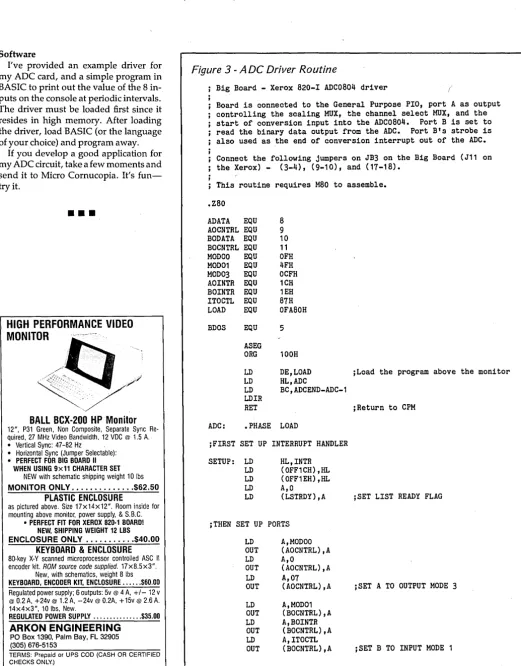
I've provided an example driver for my ADC card, and a simple program in BASIC to print out the value of the 8 in-puts on the console at periodic intervals. The driver must be loaded first since it resides in high memory. After loading the driver, load BASIC (or the language of your choice) and program away.
If you develop a good application for my ADC circuit, take a few moments and send it to Micro Cornucopia. It's
fun-try
it.•••
HIGH PERFORMANCE VIDEO
MONITOR
~t:t/
/ / /BALL BeX-2DD HP
Monitor
12", P31 Green, Non Composite, Separate Sync Re-quired, 27 MHz Video Bandwidth, 12 VDC @ 1.5 A. • Vertical Sync: 47-82 Hz
• Horizontal Sync (Jumper Selectable): • PERFECT FOR BIG BOARD II
WHEN USING 9x11 CHARACTER SET NEW with schematic shipping weight 10 Ibs
MONITOR ONLy .•.••....•.... $62.50
PLASTIC ENCLOSURE
as pictured above. Size 17x14x12". Room inside for mounting above monitor, power supply, & S.B.C.
• PERFECT FIT FOR XEROX 820-1 BOARD! NEW, SHIPPING WEIGHT 12 LBS
ENCLOSURE ONLY ....••....• $40.00
KEYBOARD & ENCLOSURE
80-key
x-v
scanned microprocessor controlled ASC II encoder kit. ROM source code supplied. 17x8.5x3".New, with schematics, weight 8 Ibs KEYBOARD, ENCODER KIT, ENCLOSURE ... $60.00 Regulated power supply; 6 outputs: 5v @ 4 A, +/- 12 v @ 0.2 A, +24v @ 1.2 A, -24v @ 0.2A, +15v @ 2.6 A. 14x4x3", 10 Ibs, New.
REGULATED POWER SUPPLY ... $35.00
ARKON ENGINEERING
PO Box 1390, Palm Bay, FL 32905 (305) 676-5153
TERMS: Prepaid or UPS COD (CASH OR CERTIFIED CHECKS ONLY.)
[image:8.617.50.572.72.738.2]6
Figure
3 -
A DC Driver Routine
Big Board - Xerox 820-1 ADC0804 driver ('
Board is connected to the General Purpose PIO, port A as output controlling the scaling MUX, the channel select MUX, and the start of conversion input into the ADC0804. Port B is set to read the binary data output from the ADC. Port B's strobe is also used as the end of conversion interrupt out of the ADC.
Connect the following jumpers on JB3 on the Big Board (J11 on , the Xerox) - (3-4), (9-10), and (17-18).
This routine requires M80 to assemble.
.Z80
ADATA EQU AOCNTRL EQU BODATA EQU BOCNTRL EQU MODOO EQU MOD01 EQU MOD03 EQU AOINTR EQU BOINTR EQU ITOCTL EQU LOAD EQU
BDOS EQU
ASEG ORG
LD LD LD LDIR RET
8 9 10 11 OFH 4FH OCFH 1CH 1EH 87H OFA80H
5
100H
DE,LOAD HL,ADC
BC,ADCEND-ADC-1
ADC: .PHASE LOAD
jFIRST SET UP INTERRUPT HANDLER
SETUP: LD LD LD LD LD
HL,INTR (OFF1CH),HL (OFF1EH),HL A,O
(LSTRDY) ,A
jTHEN SET UP PORTS
LD A,MODOO OUT (AOCNTRL),A LD A,O
OUT (AOCNTRL),A LD A,07 OUT (AOCNTRL),A
LD A,MOD01 OUT (BOCNTRL),A LD A,BOINTR OUT (BOCNTRL),A LD A,ITOCTL OUT (BOCNTRL),A
jLoad the program above the monitor
jReturn to CPM
;SET LIST READY FLAG
jSET A TO OUTPUT MODE 3
jSET B TO INPUT MODE 1
LD A,40H
OUT (ADATA) ,A jSET STROBE HIGH
RET
SUBROUTINE TO INPUT DATA FROM ADC, CHANNEL NUMBER IS POINTED TO BY HL. NUMBER IS RETURNED TO MEMORY POINTED TO BY HL AND HL+1 (MSB IN HL+ 1)
ADCIN: LD A, (HL) jGET CHANNEL NUMBER
PUSH HL jSAVE POINTER FOR LATER STORAGE
AND 07H
LD B,A
ADCIN3: OUT (ADATA),A jOUTPUT CHANNEL NUMBER, STROBE LOW
OR 40H
OUT (ADATA),A jSTROBE HIGH
CALL ADCIN1
CP OFFH
JP NZ,ADCIN2
LD A,B
ADD A,OBH jTRY NEXT SCALE
LD B,A
AND 3BH
JP Z,ADCIN2 jCHECK FOR OUT OF RANGE
LD A,B
JP ADCIN3
ADCIN2: POP HL jRECOVER POINTER
LD (HL) ,A jSTORE LSB
LD A,B
RRA RRA RRA
AND 07H jRECOVER MSB
INC HL
LD (HL) ,A jSTORE MSB
RET
ADCIN1: LD A, (LSTRDY)
OR A
JP Z,ADCIN1 jWAIT FOR INTERRUPT
LD A,O
LD (LSTRDY) ,A jRESET READY FLAG
IN A, (BODATA) jGET DATA
RET
jINTERRUPT HANDLER-SETS READY FLAG
INTR: LD A,OFFH
LD (LSTRDY),A
EI RET I
JDATA STORAGE
LSTRDY: DB 0
.DEPHASE
ADCEND: END
End of Listing
EZPROMMER
EPROM PROGRAMMER
FOR THE BIG BOARD
AND XEROX 820
FEATURES:
• Supports 2716, 2732, 2732A,
2764, 27128, 27256
• Easily installed with only two
connections
• No external supply needed, all
power derived from +5 Volts
• All power controlled by
software
• Extensive MENU driven
soft-ware to Read, Program, Save,
Load, Verify CRC check,
Dump, Erase check complete
with source code
• Over one year of troublefree
use.
EZPROMMER
A&TwlHarness, Disk .... $125
Kit with Disk ... $90
APL
CHARACTER GENERATOR
FOR XEROX 820-ll
Upgrade kit allows the 820-II to
display all the standard
charac-ters and attributes while
permit-ting the display of all APL
char-acters. Kit includes ROM and
software.
APL UPGRADE KIT ... $49.95
NY RES. ADD LOCAL TAX. POSTAGE AND HANDLING $2.00 VISA, MC, CHECK or COD
716-377 -0369
r
JOPTRONICS
TECHNOLOGY
IJ
Colonial Data
58-80-
II
The "Better Board" Gets BETTER!
For the past 4 years, Colonial Data has been supplying thousands of its original SB80 "Better Board" computers to the O.E.M. market. Now, the "Better Board" is even BETIER with the introduction of the SB80-1I. More Standard Features at a NEW LOWER PRICE!
• 4MHz ZSOA CPU WITH NO WAIT STATES
Enhanced BIOS uses mode 2 interrupts.
• 64K MEMORY STANDARD (EXPAND TO 128K)
Parity checked RAM utilizes 4164 Up to 8K of EPROM (4K is standard)
Accepts Pin-compatible EPROMS from 2716 thru 2764
• NUMEROUS FLOPPY DISK STORAGE OPTIONS
Uses the advanced NEC765A controller chip Supports 8" and 5%" drives simultaneously Automatic Density Selection (Single/Double/Quad)
• 4 SERIAL I/O PORTS (2 STANDARD)
Software selectable baud rates to 19,200
Uses Z80 SIO/O and SMC 8116 baud rate generator.
SBSO-II SYSTEM OPTIONS:
PRICE
ADDITIONAL 2 SERIAL PORT (INSTALLED) $ 60.00ADDITIONAL 64K MEMORY (INSTALLED) $ 60.00
SASI INTERFACE OPTION (INSTALLED) $ 35.00
XEBEC HARD DISK CONTROLLER $290.00
CP/M 2.2 OPERATING SYS W/MANUAL $ 75.00
Standard Features Include:
• 4M Hz Z80A Processor
• 64K Memory (Expands to 128K)
• Supports 8" and S1/4" drives simultaneously • Auto Density Selection (single/double/quad) • 2 Serial Ports/1 Centronics Parallel Port
SIZE: 1 2" x 13"
POWER: +12V, -12V, +SV
WARRANTY: 90 days Parts and Labor
• ZSOA PIO PARALLEL PRINTER INTERFACE
Centronics compatible printer interface is Standard!
• SASI HARD DISK INTERFACE CIRCUITRY
ON-BOARD!
SASI interface provides access to hard disk. Compatible with XEBEC and other controllers. Just populate with TIL and add connector.
• 4 CHANNEL COUNTER TIMER-STANDARD!
Allows custom software applications. User accessible 125Hz interrupt. Provides system date/time clock.
4th Channel used for the NEC 765 interrupt.
• CP/M 2.2 BIOS ENHANCEMENTS
Allows flexible device assignments, baud rate selection,auto-matic density detection, a system date and time clock and hard
disk support.
• OPTIONAL CP/M 3.0 (CP/M PLUS)
Extensive disk buffering speeds system throughout.
Z80'· - ZILOG CP/M'· - DIGITAL RESEARCH (Calif.)
CP/M 3.0 OPERATING SYS W/MANUAL $275.00
II
, . . . . - - - II Colonial Data Services Corp.
HOW TO ORDER:
8
Call or Write Colonial Data-Orders paid with bank
card or cashier's check are shipped within 3 working
lffiJ
days. Allow 3 weeks for Personal Checks.Shipping: Add $5.00 for UPS Shipping (Brown) Within the United States.
j_
VISA'W]
80 Pickett District Road,
New Milford, Conn. 06776
Telephone (203)
355·3178
FULL 90 DAY PARTS & LABOR WARRANTY
Dimensions 13'/l"W x 53fs"H x 17" D
MODEL
IIA-2/380K DSDD DRIVES$ 895.00
MODEL lIB -
2/780K DSQD DRIVES$ 995.00
MODEL lIe
-10 Meg H/Disk w/380K Floppy$1895.00
MODEL lID -
10 Meg H/Disk w/780K Floppy$1995.00
*
SBSO-II
(Board Only) Wired and TestedSBSO-II SYSTEM OPTIONS
All Models:
Additional 2 Serial Ports (installed) Additional 64K Memory (installed) CP/M 2.2 Operating System w/Manual CP/M 3.0 Operating System w/Manual
Models IIA and lIB only
SASI Interface Option (installed) XEBEC Hard Disk Controller
Colonial Data
$ 298.00
PRICE
$ 60.00 $ 60.00 $ 75.00 $275.00
$ 35.00 $290.00
Cabinet Kits
(Build Your Own Systems!)MODELCKPI
Metal Cabinet will accept Single Boards up to 12"x16" complete with fan, RFI filter with power switch, front panel and mounting for two 5%" half-height floppies. Pre-punched
for 4 DB25 and 1-50 pin. In-
$225.00
eludes 60 watt power supply with ±12V, + 5V.
MODELCKP2
Same as Model CKP1, but in-cludes 90 Watt Power Supply to
power half-height Winchester
$425 00
5%" hard disk and single 5%" • half-height floppy.
MODELCKX
11-:1
Colonial Data
S8-80-11
PICK YOUR SYSTEM!
CHOOSE YOUR
OPTIONS!
The Original "Better Board" SB80 from
Coloni~1
Data has just gotten BETTER YET!
More on-board features like SASI interface
circuitry,4 Channel CounterTimer, Memory
Expansion to 128K and MORE! All made to
run the most popular programs under the
CP/M Operating System.
zao'· -
ZILOGCP/M'· - DIGITAL RESEARCH (Calif.)
Shugart
5%" Disk Drives
MODEL 455
DSDD Floppy $195.00
Over 380K Capacity 2 For $370.00
MODEL 465
DSQD Floppy Over 780K Capacity
$225.00
2 For $430.00
Cabinet only with fan, RFI filter,
$139.00
power switch, pre punched con-nector holes. No Power Supply.
·---1 ••
HOW TO ORDER:
III
Colonial Data Services Corp.
Call or Write Colonial Data-Orders paid with bank
80
Pickett District Road,
card or cashier's check are shipped within 3 workingIAIJ]
New Milford, Conn. 06776
days. Allow 3 weeks for Personal Checks.Communication Between High-Level
And Assembly Language
By
Christian Phaneuf
How many times have you wished you could write complex assembly lan-guage programs as easily as you write programs in C, Pascal, or PLII. After all, you need the control or speed of assem-bly language, but writing floating point (or even fixed point) routines in assem-bly language is a royal pain.
Perhaps, instead, you should be writ-ing in a high level language and then, where necessary, calling assembly lan-guage subroutines.
This article includes two simple PLlI-80 programs, each with an assembly lan-guage subroutine. Both programs pass an ASCII character (*) to a subroutine which outputs the character to the con-sole using CP/M's CONOUT function. The subroutine then reads a character from the console (using CP/M's CONIN) and passes it back to the main program.
High Level Languages Differ
Though there are differences at the de-tail level, the principles discussed here apply to most high level languages that let you include low-level routines.
However, no matter which compiler you use, the variables will always be passed through either the stack, the reg-isters, the memory, or a combination of these. Therefore, the concepts illustrat-ed in the PLlI-80 programs that follow can be adapted to any high level lan-guage compiler capable of generating re-locatable code.
Passing Data Back And Forth
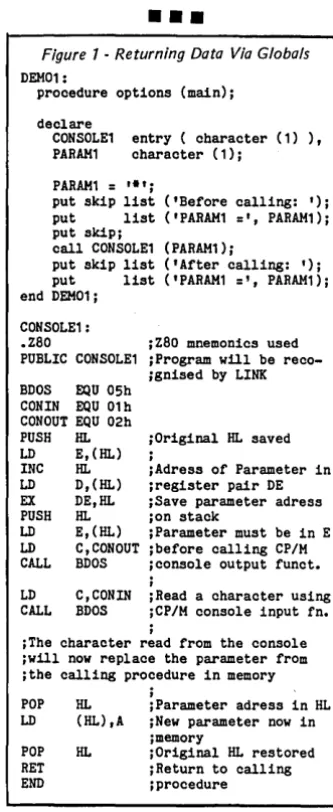
In the first program (Figure 1), DEM01 illustrates one way that parame-ters can be passed from the main pro-gram to the called routine. It also shows the implicit "returning" of values from the subroutine to the calling program.
Note that the assembly subroutine (CONSOLE1) is declared with entry and character(l). This tells the compiler that whenever the subroutine is called, a sin-gle ASCII parameter of length '1' will be passed to the called program. If several different parameters were to be passed, the type of each would be listed sepa-rately in the declaration of the proce-dure. For example:
dcl entry (c~ar(3),fix~d (1S), ~ •• ),
1st par 2nd par etc •••
The instruction "call CONSOLE1 (PARAM1);" tells the compiler that the variable PARAM1 is the actual parame-ter that will be passed. PARAM1 must be of the same data type (character(l» as that declared in the entry procedure. Thus, an ASCII string of length 1 (the '*' remember) will be passed to CON-SOLE1.
PL/I Details
PLlI-80 passes parameters to a sub-routine by leaving the address of a point-er in registpoint-er pair HL. The pointpoint-er con-tains the real address of the first parameter. If several parameters are passed, they must occupy successive memory locations.
The number of parameters and length of each parameter must be determined implicitly by agreement between the calling program and the called subrou-tine. Sound complicated? Well, if you can understand the man who saw the man who saw the bear, you should have no problem with this.
Returning Data To PLII
[image:12.617.405.572.340.747.2]Since the locations of the passed varia-bles are known, CONSOLE1 can alter the contents of these locations, thereby returning data to the calling program. Figure 1 demonstrates this.
CONSOLE1 first prints the
'*',
then CONIN is used to read a character from the console. Finally, the subroutine plac-es the new character into the memory lo-cation called PARAM1 (by PLlI) and re-turns control to the calling program. Figure 3 shows the results of running DEMOl.An alternate method, used to return data to the calling program, is very use-ful for simple routines when there is no entry variable or when you don't want the subroutine tampering with the main program's data.
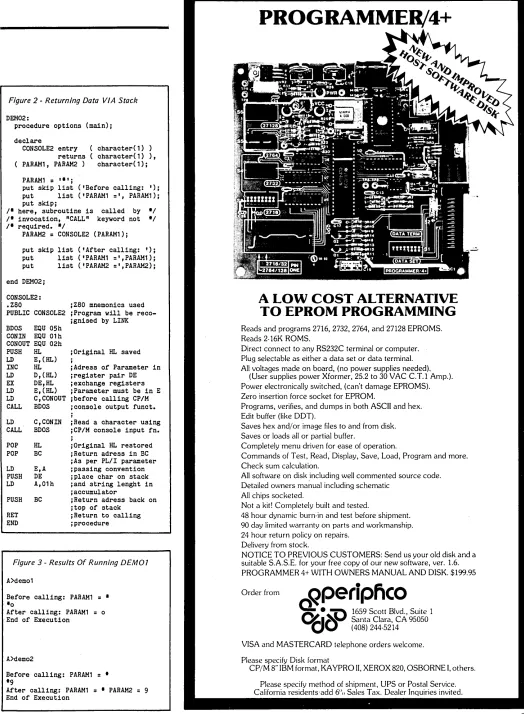
As shown in Figure 2, assembly lan-guage subroutine CONSOLE2 is de-clared with both entryO and returnO at-tributes. This double declaration tells the compiler that instead of the general pa-rameter passing protocol used in DEM01, the alternate method will be used. Here, PLlI-80 stipulates that the subroutine must place data on top of the stack and the length of the data must be
P.O. Box 1107 972 Guillaume Boisset Cap-Rouge Quebec Canada GIY 3E4
left in the accumulator before control is returned to the calling program. Note in the execution of DEM02 that the varia-ble P ARAM1 has not been altered by CONSOLE2.
The type of data to be returned will de-termine which method you use. For in-stance, fixed binary numbers with preci-sion 1-7 are returned in the accumulator, while precision 8-15 are returned in HL. Bit string data is returned the same way but fixed decimal data is returned on the stack as a 16-decimal digit value in nine's complement form (8 bytes are used).
No matter which method you use, pa-rameter passing can be an easy way to have the advantages of high-level guage productivity and low-level lan-guage control and speed in the same program.
•
••
Figure 1 -Returning Data Via Globals DEM01:
procedure options (main);
declare
CONSOLE1 entry ( cbaracter (1) ), PARAM1 cbaracter (1);
PARAM1
= '.';
put skip list ('Before calling: ')i put list ('PARAM1
=',
PARAM1)i put skiPicall CONSOLE1 (PARAM1);
put skip list ('After calling: '); put list ('PARAM1
=',
PARAM1)i end DEM01iCONSOLE1 :
.zao iZaO mnemonics used PUBLIC CONSOLE1 ;Program will be
reco-BDOS EQU OSb CONIN EQU 01 b CONOUT EQU 02h
;gnised by LINK
PUSH HL ;Original HL saved LD E, (HL) ,
INC HL iAdress of Parameter in LD D,(HL) ;register pair DE EX DE,HL iSave parameter adress PUSH HL ion stack
LD E,(HL) ;Parameter must be in E LD C,CONOUT ibefore calling CP/M CALL BDOS ;console output funct.
i
LD C,CONIN iRead a character using CALL BDOS iCP/M console input fn.
;
iThe cbaracter read from the console ;will now replace the parameter from itbe calling procedure in memory
i
POP HL iParameter adress in HL LD (HL),A ;New parameter now in
imemory
POP HL iOriginal HL restored RET iReturn to calling END i procedure
Figure 2 -Returning Data VIA Stack
DEM02:
procedure options (main)j declare
CONSOLE2 entry returns PARAH1, PARAM2 )
character(l) ) character(l) ), character(l)j PARAH1 = '-'j
put skip list ('Before calling: ')j put list ('PARAH1 =', PARAH1)j put skipj
/- here, subroutine is called by -/ /- invocation, "CALL" keyword not -/ /- required. -/
PARAM2 = CONSOLE2 (PARAH1)j put skip list ('After calling: ')j put list ('PARAH1 =',PARAH1)j put list ('PARAM2 =',PARAM2)j end DEM02j
CONSOLE2:
.zao jZaO mnemonics used PUBLIC CONSOLE2 jProgram will be reco-BDOS EQU 05h
CONIN EQU 01 h CONOUT EQU 02h PUSH HL LD E,(HL)
INC HL LD D, (HL)
EX DE,HL LD E, (HL)
LD C,CONOUT CALL BDOS LD C,CONIN CALL BDOS POP HL POP BC LD E,A PUSH DE LD A,Olh PUSH BC RET END
jgnised by LINK
jOriginal HL saved j
jAdress of Parameter in jregister pair DE jexchange registers jParameter must be in E jbefore calling CP/M jconsole output funct. j
jRead a character using jCP/M console input fn. j
jOriginal HL restored jReturn adress in BC jAs per PL/I parameter ipassing convention jplace char on stack jand string lenght in jaccumulator
jReturn adress back on jtop of stack
jReturn to calling jprocedure
Figure 3 -Results Of Running DEM07
A>demo1
Before calling: PARAH1 = --0
After calling: PARAH1 = 0 End of Execution
A>dem02
Before calling: PARAH1 =
--9
After calling: PARAH1 = - PARAM2 9 End of Execution
PROGRAMMER/4+
A LOW COST ALTERNATIVE
TO EPROM PROGRAMMING
Reads and programs 2716, 2732, 2764, and 27128 EPROMS. Reads 2·16K ROMS.
Direct connect to any RS232C terminal or computer. Plug selectable as either a data set or data terminal. All voltages made on board, (no power supplies needed).
(User supplies power Xformer, 25.2 to 30 VAC C.T.1 Amp.). Power electronically switched, (can't damage EPROMS). Zero insertion force socket for EPROM.
Programs, verifies, and dumps in both ASCII and hex. Edit buffer (like DDT).
Saves hex and/or image files to and from disk. Saves or loads all or partial buffer.
Completely menu driven for ease of operation.
Commands of Test, Read, Display, Save, Load, Program and more. Check sum calculation.
All software on disk including well commented source code. Detailed owners manual including schematic
All chips socketed.
Not a kit! Completely built and tested.
48 hour dynamic burn·in and test before shipment. 90 day limited warranty on parts and workmanship. 24 hour return policy on repairs.
Delivery from stock.
NOTICE TO PREVIOUS CUSTOMERS: Send us your old disk and a suitable S.A.S.E. for your free copy of our new software, ver. 1.6. PROGRAMMER 4+ WITH OWNERS MANUAL AND DISK. $199.95 Order from
Rperipfico
~i .~~
1659 Scott Blvd., Suite 1~I ~V Santa Clara, CA 95050
V
(408) 244·5214 VISA and MASTERCARD telephone orders welcome. Please specify Disk format12
BORLAND
ONLY$99
9S
INTERNATIONAL
GIFI'PACK
A SAVINGS OF $301
What a gift for you and your friends! The extraordinary TURBO PASCAL compiler. together with the exciting new TURBO TOOLBOX and new TURBO TUTOR. All 3 manuals with disks for $99.95.
TURBO PASCAL Version 2.0 (reg. $49.95). The now classic program development environment still includes the FREE MICROCALC SPREAD SHEET. Commented source code on disk
• Optional 8087 support available for a small additional charge
NEWf TURBO TOOLBOX (reg. $49.95). A set of three funda-mental utilities that work in conjunction with TURBO PASCAL. Includes:
• TURBO-ISAM FILES USING B + TREES. Commented source code on disk
• QUIKSORT ON DISK. Commented source code on disk • GINST (General Installation Program)
Provides those programs written in TURBO PASCAL with a terminal installation module just like TURBO'S!
• NOW INCLUDES FREE SAMPLE DATABASE
NEWf TURBO TUTOR (reg. $29.95). Teaches step by, step how to use the TURBO PASCAL development environment-an ideal introduction for basic programmers. Commented source code for all program examples on disk.
30 DAY MONEY BACK GUARANTEE
These offers good through Feb. 1. 1985
For VISA and MASTERCARD order call toll free:
1-(800)-255-8008 1-(800)-742-1133
(Lines open 24 hrs .. 7 days a week)
Dealer and Distributor inquiries welcome (408) 438-8400
CHOOSE ONE (please add $5.00 for handling and shipping U.S. orders) _ _ All Three-Gift Pack $ 99.95 + 5.00 SPECIAL!
_ _ All Three & 8087 139.95 + 5.00 SPECIAL!
_ _ Thrbo Pascal 2.0 49.95 + 5.00 _ _ Thrbo Toolbox 49.95 + 5.00 _ _ Thrbo Thtor 29.95 + 5.00 _ _ Thrbo 8087 89.95 + 5.00
Check _ _ _ Money Order _ _ _ VISA _ _ _ MasterCard _ _ _
Card #: Exp. date: Shipped UPS
My system is: 8 bit _ _ 16 bit _ _
Operating System: CP/M 80 _ _ CP/M 86 _ _ MS DOS _ _ PC DOS
Computer: DIsk Format
Please be sure model number & format are correct NAME: ______________________________ ___
ADDRESS ____________________________ _
CITY/STATE/ZIP: ____________________ _
California reSidents add 6% sales tax. OutSide U.S.A. add $15.00 (if outSide of U.S.A. payment must be by bank draft payable in the U.S. and in U.S. dollars). Sorry. no C.O.D. or Purchase Orders .
• »
BORlAnD
.»
INTERNATIONAL
4113 Scotts Valley Drive Scotts Valley, CA 9S066
TELEX: 172373
THE LITTLE
BOARD®
OEM - INDUSTRIAL - SCIENTIFICSECOND GENERATION SINGLE BOARD COMPUTER KIT!
4 MHZ Z80* CPU!
64K RAM!
DOUBLE DENSITY!
~~/
FREE CP/M* 2.2111 A $139 VALUEI A FREE
5-1/4 IN. CP/M 2.2 DISKETTE IS INCLUDED
WITH EACH KIT.
A. & T. UNITS $319
•
$25 9
~~OMPLETE
KIT)MINI-SIZE: ONLY 5-3/4 x 7-3/4 INCHES
FULLY SOCKETED! PERFECT MATE TO OUR ZRT-80 TERMINAL BOARD. THROUGH SPECIAL ARRANGEMENT WITH AM PRO COMPUTERS, WE ARE PLEASED TO OFFER THEIR LITTLE BOARD® IN KIT FORM.
FEATURES:
4 MHZ
zao
CPU!I
DOUBLE DENSITY (5-1/4 IN.) FLOPPY CONTROLLERI
64K DYNAMIC RAM!I
CENTRONICS STYLE PARALLEL PRINTER PORT USES +5VDC @ .75 A. AND +12VDC @ SOMA.TWO RS232 SERIAL PORTS
I
SAME SIZE AS A MINI FLOPPY 2732 BOOT EPROMD -
-t
I R
h C
t
TERMS: Shipments will be made approximately 3 to 5 weeks after we191
a
esearc
ompu ers
receiveyourorder.VISA,MC, cash accepted.Wewili accept COD's witha(OF TEXAS) $75 deposit. Balance UPS COD. Add $4.00 shipping.
P.O. BOX 461565 • GARLAND, TEXAS 75046 • (214) 225-2309 USA AND CANADA ONLY
LITTLE BOARD® - AMPRO Z80'M - ZILOG CP/M'M DIGITAL RESEARCH (CA.)
Mini Z80B
SERVO 8
HIGH PERFORMANCE
SINGLE BOARD COMPUTER
• 6 MEGAHERTZ Z80B CPU - No Wait States • 5.75" x 8" mounts directly to Minifloppy • 5 Volts only @ 1.4 Amps
• On Board Advanced Floppy Disc Controller Controls, four 5.25" or 31h" & four 8" or 1.6 Megabyte Minifloppy Drives.
• Compatible with Kaypro II Format for Software Exchange
• 2K Eprom Debugger/Monitor - Examine and change Memory I/O Ports, CPU Registers; Set Breakpoint, Control Disk Selection • 64K 150 NS DRAM; Expandable
• SASI Bus Controls 10 Meg Winchester
• Expansion Bus-Z80 Terms Plus Additional Signals
• 2 RS232 Ports - 150 Baud to 153.6K Baud, Software Selectible • Standard Centronics Parallel Port
• Disk I/O Buffers Timed for Flushing with Real Time Clock Clock Counts Available to Programmer
• CP/M V2.2 BIOS Sources Available - $50; includes ROM Bootstrap & Automatic Disk Selection
• In Stock - $495 CP/M add $70 Visa M/C COD • Piggy-Back Expansion Board Available;
128K RAM, Two Serial Ports, Real/Time Clock Calendar with Battery Backup, $384
SERVO COMPUTER CORPORATION 360B N. ELLENSBURG ST. BOX 566
Pascal Procedures
By John P. Jones
By the time you read this, advertise-ments for Borland's Turbo Toolbox should be in the magazines. The package consists of three utilities-an indexed file system, a sort utility, and a general installation program.
GINST.COM generates an installation program and the associated files neces-sary to customize a Turbo Pascal gener-ated COM file to the end user's terminal. Without this utility, applications written in Turbo would either have to be written for each specific terminal or be distribut-ed as source so the user could customize it. The Toolbox licensing agreement per-mits distribution of the generated instal-lation files and even lets you include rel-evant sections of the Turbo Pascal manual with your programs without copyright problems.
The other portions of the package are of more general interest. Both the sort and indexed file routines are distributed as source for $Inclusion in application programs.
Turbosort
The sort utility, which uses the quick-sort algorithm, can be used for most quick- sort-ing applications. Because the routine is written to be general purpose, and sorts are extremely dependent on the struc-ture of the data, the user must write three routines to interface to Turbosort. These are forward declared in th~ sort module and must match these declara-tions.
INP is called once by Turbosort and it must acquire successive data items. INP then calls SORTRELEASE (in the sort module) for each item. OUTP, which is also called only once, must call SORTRE-TURN to retrieve the sorted data items for output. The function SORTEOS is provided to let OUTP know when all rec-ords have been accessed. Since the user writes these routines, the data can be from any source.
Though it's most likely that you'd in-put from a file and outin-put to another file, you might also, for instance, input from the keyboard and output to a file.
The third user-provided routine, which is called repeatedly by turbosort, is the boolean"function LESS. It is in "this routine that you determine sort order (ascending or descending), and whether
14
your program will check single or multi-ple fields. LESS receives two parame-ters, X and Y, which are the addresses of the variables to be compared. The rou-tine must declare two variables of the type being sorted on top of the actual variables in memory by declaring them absolute at locations X and Y.
var variable1 : dat~type absolute X; variable2 : dat~type absolute y;
Turbosort can be used to sort data files that are too large to fit into memory, since it can automatically set up tempo-rary disk files as virtual memory. I tested the sort routines by generating a file of 1000 records, each 82 bytes long, with a 20 character random sort field. I sorted various parts of the file and output the results to the screen. Timing was from the Run command to the time the first sorted record was output to the screen. I used a 4 MHz Big Board with SWP dual density 8" disk controller using 1024 byte sectors.
# Records sorted
100 200 250 300 400 1000
Time min: sec
00:05.6 00: 10.9 00:38.8 02:30.8 03:59.2 20: 13.4
The times are quite respectable until you start using disk space. I did not have any other sorting utility for comparison but the results seem to be reasonable.
The sort is easy to use and flexible enough for any application.
Turbo Access
Turbo Access is the B-tree indexed file handler. It is NOT a database manager like dBase II, but it provides the file inter-face to allow you to write your own data-base handler. Using Turbo Access is not a trivial task since you need to under-stand B-tree structured indexes. The manual contains enough information about B-trees for the intermediate or ad-vanced programmer.
Turbo Access uses separate index and data files. The data file is a standard se-quential file, with the first record re-served for Turbo Access use. The index
6245 Columbia Ave. St. Louis MO 63130 314-645-1596
file(s) contains the B-tree structure along with pointers to records in the data file. Index and data files are updated by inde-pendent routines within the Turbo Ac-cess system. This makes the system flexi-ble but you have to make sure that all the relevant files get updated as the data files are changed. Basically, however, the Turbo Access routines can maintain a da-ta file and the index file or files associated
with it.
First, a record is added to the data file. Then the index file is updated based on the contents of the key. Although the key does not need to be part of the data record, it is a lot easier to reconstruct a trashed index if it is.
Updates and deletions are performed in the opposite sequence. You access the index in order to locate the record. Then you can retrieve the data. It is never nec-essary to access the data file more than once to get a record. And depending on the memory available and the applica-tion, you might not have to access at all when you are searching the index.
I did not construct a large test database for performance testing but did set up a program for maintaining a club's mem-bership records. I had been maintaining those records using the key-index
facili-~es of JRT Pascal V 3.0. The Turbo Access system is slightly slower than the JRT system but significantly more flexible. Turbo Access allows for duplicate keys and multiple-index files.
This way, you can construct "a very complex database. For instance, a maga-zine article database could be cross refer-enced using indexes for subject, author, source language, processor, and the like. The example program BTREE is, by it-self, worth the price of the package. If you are at all familiar with program-ming, I highly recommend that you take a close look at the source for this pro-gram.
The program is well written and you can learn a lot about Pascal program-ming by spending some time analyzing the techniques the Turbo folks used. I was able to set up the club database by making minor modifications to this pro-gram. (And it only took one evening.)
In a future column I'll spend some time on pointers, linked lists, and trees. After that we can take a closer look at
how Turbo Access works.
The Toolbox manual is of the same high quality as the Turbo Pascal manual. You get all the information you need to effectively use the utilities.
Turbo Toolbox is available from Borland International, 4113 Scotts Valley Dr., Scotts Valley, CA 95066. It is $49.94. Turbo Tips
Input filters are used to insure that in-put data falls within a specific range. The example program, included with Turbo Toolbox, uses a particularly good meth-od to filter character input from the con-sole. (See Figure 1.)
By defining a set type that includes the ASCII character set, it is then possible to pass a subset as a procedure or function parameter. So you can define exactly the range of values that can be returned by the procedure or function.
It is this type of capability which gives Pascal much of its power.
Soap Box
If you are familiar with Jerry Pournelle's column in Byte, you know his opinions about software prices and piracy. I agree with most of what he says, and would like to add a few thoughts.
In order to be successful, a software house has to have at least four factors working in its favor. First, there must be a large market. This means that the
Figure 1 - Pascal Input Data Test Function
tl'pe
charset
=
set of char;product must have general appeal and run on a lot of machines. Next, the prod-uct has to be good. Poorly written, "bug-gy" software has little chance for suc-cess.
Third, the program has to be marketed at a reasonable price. The best word processor ever written for microcomput-ers would sell poorly at $1000 a shot. What is a reasonable price? That, of course, depends on the product. Any software of direct utility in a business ap-plication will command a higher price than something like a game since the business can expect to profit from using the product.
Finally, the software publisher has to be able to fill orders There are many cases in this young industry of companies with good products that have failed be-cause they have been unable to keep up with demand.
As the number of small computers ex-pands, the price of software should con-tinue to fall. However, the software pub-lisher can still expect to make a reasonable profit.
Borland International may be the first company to fit all of the above criteria. Their products are all well written, rea-sonably priced, promptly shipped and run on a broad base of computers. I ex-_ pect Borland to be around for some time with a growing line of products.
Regarding piracy, quality software of-fered at a reasonable price should be
function get_Char (allowed charset) char; var
ch : char; begin
repeat
read (kbd, ch); { input from kbd needs no <CR> }
until ch in allowed; get_Char := ch; end;
select := get_Char ( ['N', 'Y', 'n', 'yl] );
purchased, not stolen. Only through sales of its products can a company be successful, and every company that fails is a loss to us all. I won't strain my own credibility by telling you that I've never gotten an unauthorized copy of a pro-gram. On the other hand, anything I've looked at and have felt was necessary or useful, I've purchased. The copy of dBase II someone gave me has not been used since I tried it out. For what I'm do-ing, I can't justify the price.
For those of you on a tight budget, there are megabytes of public domain software available for minimal copying fees. Much of it is poor, but there are a lot of excellent programs available, some better than the equivalent commercial product.
•••
XEROX 820 USERS
NEED MORE I/O??
2 PIO'S 1 SIO
SASI INTERFACE SOUND GENERATOR
REAL TIME CLOCK USES THE NATIONAL 58167
REAL TIME CLOCK
TI 76496 COMPLEX SOUND GENERATOR
BARE BOARD $54.95
++++++++++++++++
COMPOSIT VIDEO INTERFACE BARE BOARD $19.95
WE ACCEPT
CHECK MONEY ORDER MASTER CHARGE VISA
GRO TECHNIQUES
PO BOX 6383 BRIDGEPORT CT 06606
[image:17.615.44.424.530.738.2]Installing Turbo Pascal
By
Laine Stump
Turbo Pascal is one of the most inno-vative packages to hit the market in a long time. With its built-in, full-screen editor and the ability to automatically find runtime errors in the source, you can have debugging sessions that rival the speed of an interpretive language like MBASIC (yuck!).
And, because it compiles to machine code, you can have execution speed that is as fast as C or any other 'systems' lan-guage and nearly as fast as the same pro-gram written in assembly language. However, the full potential of TURBO can only be realized if you use the inter-nal editor for your debugging.
Terminal Condition
Before using the TURBO editor, it is necessary to configure it for your termi-nal. This is trivial if your terminal is in the list given in TINST's (S) option; as a matter of fact, almost anybody reading this can choose' ADM3A' and the editor will work.
However, if you want it to work as effi-ciently as possible, you should create your own definition. This is done by se-lecting the CREATE NEW DEFINITION option and answering approximately 20 questions about your terminal. This is covered in appendix K; I will briefly go over what is given there adding more de-tail on the subtle (but important!) points that aren't explained well enough in the manual.
The Inquisition
There are three types of questions asked by TINST. The simplest asks for a
YIN response; just type a 'Y' for yes or 'N' for no and DO NOT follow it with a CR> carriage return. The second type of question asks for a single number. You can enter this number either as decimal by just typing the number, or as hexade-cimal by preceding the number with '$.' When entering a number, you can edit your entry with the (BS) or (DEL) key. To end entry of the number, type (CR).
The third type of question asks for a command string to perform some func-tion such as clearing the screen. TINST is more convenient than many other instal-lation programs because you can enter the command string directly rather than having to enter a list of decimal or hex-adecimal numbers.
16
If a command sequence is '(ESC)=,' you can type the escape key followed by the '=' key and a (CR) carriage return (ODh) to indicate the end of the se-quence. Any control characters typed this way are echoed as 'ctrl-cc' with the exception of (BS)-(ctrl-H), (DEL)-(7Fh), (CR)-(ctrl-M), and
(ESC)-(ctrl-0,
which are echoed as shown here. All other characters are echoed normally.One of the most difficult things, about entering command strings is that there is no such thing as backspace-once a key has been hit there is no return. If you for-get and type a (BS) or (DEL) it will be taken as part of the co