Yu-Hsuan Chang. A Study of Document Sharing and Managing Behaviors in Cloud Storage. A Master’s Paper for the M.S. in I.S. degree. May, 2013. 51 pages. Advisor: Robert Capra
The study focuses on how people use their cloud storage and manage their personal
information. Since many cloud storage services allow users to share documents, this
study also examines how people manage documents when working collaboratively.
There are many cloud storage providers in the market, but this study focuses on two
specific systems – Dropbox and Google Drive.
The research was conducted by interviews and the results show that with the differently
designed interfaces and functions of cloud storage, people developed diverse ways to use
them. Participants stored different types of files and practiced different management
strategies because of different purposes and reasons. Aspects of the system and user
interface also impacted how users managed files. When working on collaborative and
shared documents, participants reported tending to not manage files because they prefer
following others’ decisions or due to a lack of motivation to manage them.
Headings:
Cloud Storage
Personal Information Management
A STUDY OF DOCUMENT SHARING AND MANAGING BEHAVIORS IN CLOUD
STORAGE
by
Yu-Hsuan Chang
A Master’s paper submitted to the faculty
of the School of Information and Library Science
of the University of North Carolina at Chapel Hill
in partial fulfillment of the requirements
for the degree of Master of Science in
Information Science.
Chapel Hill, North Carolina
April 2013
Approved by
_______________________________________
Table of Contents
INTRODUCTION 2
LITERATURE REVIEW 4
METHODOLOGY 8
RESULTS 14
DISCUSSION 30
CONCLUSION 36
BIBLIOGRAPHY 38
APPENDIX A: INTERVIEW QUESTIONNAIRE 40
APPENDIX B: SUBJECT RECRUITMENT LETTER 44
APPENDIX C: INFORMATION CONSENT FORM 45
Introduction
The recent development of cloud storage gives a new option for people to manage and share files. Even though different cloud storage options provide different features, they still have similar functions to fulfill users’ needs. First of all, users have an alternative to back up their information and documents. People upload and create files online, arranging them in their preferred cloud storage. Particularly, backup copies become more portable and convenient to users when the storage is accessible on the Internet. Furthermore, users can reach their information in cloud storage via a variety of devices. Many cloud storage systems support synchronization features to help keep information mirrored across the user’s different devices.
However, cloud storage represents an extra storage space for users in addition to the local storage of their devices, and it also means that people may face a management problem when they start storing files in cloud storage. When an individual wants to organize files, he or she will develop a personal management strategy for cloud storage, but the user has to
compromise with cloud storage’s functions and interface design at the same time. In addition, cloud storage often incorporate sharing and co-editing features because of their strong
integration with the Internet. Hence, people may use cloud storage as a channel to transfer files and collaborate with others.
How do users utilize cloud storage for their files and personal information management? Do they have a preference to store any specific types of documents and information? What characteristics may influence users’ decisions and behavior?
How do users manage their files in cloud storage? What features of cloud storage may influence users’ managing policy? Does the managing policy of cloud storage differ from these participants’ original strategies for local hard drives? What is the difference?
Literature Review
To investigate the research questions, we first need to review some elements and concepts involved in this topic.
Managing Personal Information
In 1983, Malone published a paper about how people arranged their files, piles and folders in their office (Malone, 1983). This research described that some people tended to arrange most files to keep their office neat and information organized; however, other people’s office spaces were not as neatly organized. Malone observed two major units of organization: files and piles. A “file” represented a format of organized information collection, and a “pile” meant a comparatively loose structure for information. The paper also indicated that the job role had an influence on people’s behavior in managing their work information.
Later, Nardi, Anderson and Erickson (1994) conducted an interview study to survey Macintosh users’ behaviors when they managed their electronic files. In this paper, the researchers stated those interviewees may not file in same ways but they did have similar
for physical items to electronic files and modified the naming and tagging conventions to match personal needs and to cooperate with others. In the two studies, Barreau and Nardi both found that people did have preference to organize their files according to the information attributes and the usage of documents, and the content of documents may play a role to impact how they would be classified. However, the results also showed that different devices may lead people to have different methods and policies for file management (Barreau and Nardi, 1995).
Boardman and Sasse (2004) conducted a long-term observation of a group of users who used various tools to manage their personal information. The research targets included files, emails and bookmarks. By classifying the subjects’ behaviors, they identified different strategies developed by users for these tools and types of information. Their research indicated that users who adopted many tools may have multiple strategies to manage their files, and although tools might influence people’s behaviors, the content and purpose of information might be the most influential factor to determine how users employed tools for personal information management.
Furthermore, Henderson (2011) investigated this issue and found that users’ had issues with managing duplicate files even in 2011. In her research, it was mentioned that the reason people had file duplication was because they owned multiple devices to reach and process documents, and two main types of duplication were redundant files with the exact same content and different or continuous-updated versions. The study results indicated that people indeed needed help to manage files, because they often created duplicate documents inadvertently. Personal information systems in future should be considered that add features and mechanisms to help users, perhaps by supporting document versioning.
Spreading and Sharing Personal Information
scattered in different places, with many different versions. How to handle this complexity is an emerging issue both in personal information management (PIM) and related technology design.
Dearman and Pierce (2008) interviewed participants who worked on and processed their information with many devices, and they determined their devices and analyzed the purposes of their documents by the device type and context of use. They found several factors that influenced interviewees to arrange their devices and create their managing policies. For example, mobile devices satisfied users in portability and flexibility. In addition to job content, work environment and timing made some users have to set separate devices in different locations such as home and office. At the same time, the design of the system and interface may
influence users’ different preferences and choices when managing and sharing files. The authors concluded that portability strengthened users’ control and integration for their
information and that because the opportunities for information exchange were rising, related new tools and services are becoming prevalent.
Dearman and Pierce’s (2008) research suggested out that file synchronization would be important in future technical developments because of users’ needs for file integration and information sharing among individuals and groups. Since the human factor was getting involved more and more in system design, they suggested that we should consider and focus on users, instead of devices, because it is humans who create and then adopt the devices.
felt frustrated when they recognized and managed shared files. Therefore, how to deal with shared and non-shared items on the same platform has become a rising topic, and it deeply impacts technology development and interface design in personal information management.
Cloud Storage for Personal Information Management
Recently, cloud storage has become popular because its features allow users to not only preserve files but also to interact with others. Pham (2010) believed that the “cloud” as a new technology required a unique model to support users, and the key characteristic for user interface design should be a good mechanism for items to be organized and shared.
Furthermore, Marshall and Tang (2012) discussed how people employed tools and services for synchronizing and sharing, and how they realized their interaction with the cloud. They found that people used synchronization tools for transferring files between devices or people. In addition, file activeness was strengthened because people could reach documents online, so it allowed people to share files in cloud-based format. Some cloud services also supports collaborative work, which can help people cooperate more flexibly.
Methodology
Goals of the Study
The primary goals of this study were to understand:
1. How users use their cloud storage, and what purposes and goals they have for it. 2. What types of information users would like to store in cloud storage and what factors
influence their decisions.
3. How users manage their files in cloud storage, and what strategies and factors influence their management behaviors.
4. Whom do users share files with in cloud storage and what factors influence sharing behavior.
Dropbox and Google Drive
Currently, there are many cloud storage products on the market for users to choose from. I decided to focus on two different models of cloud storage to compare. The following paragraphs will introduce the two systems: Dropbox and Google Drive.
1. Dropbox
Dropbox, which started its business in 2008, provides cloud storage and file
2. Google Drive
Google Drive was released in 2012 by Google to enable users to store files online, synchronize files and edit content collaboratively. Individuals may use Google Drive after they create a Google account. Google drive is also the platform of Google Docs, which is a service with diverse online co-editing functions, including documents, spreadsheets and slides. Google Docs was released in 2006. Since it was developed as an online service, Google Drive allows users share files and publish the content on the Internet.
Procedures
1. Recruit participants who use both Dropbox and Google Drive.
Since Dropbox and Google Drive had been chosen as study targets, research participants were narrowed down from general cloud storage users to the people who used both Dropbox and Google Drive. In this study, there were nine interviewees recruited as a suitable sample group from current graduate students at the University of North Carolina at Chapel Hill.
2. Examine the numbers of files and folders in participants’ Dropbox and Google
Drive.
Before the interview, the investigator contacted each volunteer confirming the meeting schedule and reminding them to bring a personal device for the interview. In the beginning of interview, all participants were asked to log into their Dropbox and Google Drive so that they could calculate the number of files and folders, including all items, shared items and owner-created items. This also allowed the investigator to observe the distribution of files and folders in these two cloud storage systems. By this means, the investigator could have a more complete view about how subjects used their cloud storage, and the collected data could be compared with the interview notes.
After counting the numbers of files and folders, the participants were interviewed by the investigator to understand their interactive behaviors with their cloud storage. In these semi-structured interviews, participants were given a copy of the semi-structured interview questions to help facilitate answering the questions. Since they were still logged in to the cloud storage services, participants could also demonstrate their practices and use of the services in response to questions.
Each interview lasted about 30 to 45 minutes, and interviewees could ask questions to clarify any potential confusion. Hand-written notes and audio records were taken by the primary investigator. The audio records were not transcribed comprehensively because there were designed to be a complement to hand-written notes. The records will be discarded after finishing the research.
Questionnaire Design
This interview questionnaire (see Appendix A) contained five parts as follows:
Part 1: Quantitative Survey of Cloud Storage Use
This part of the questions collected quantitative data from interviewees’ cloud storage. After the investigator’s demonstration of file calculation method, participants would practice the counting procedure by themselves.
Part 2: Survey of Cloud Storage Use
The second part of the questionnaire was for examining how users take advantage of their cloud storage. It also was designed to ask participants about their personal information managing behaviors using cloud storage. By means of observation and conversation, the investigator could make comparisons between not only local hard drive storage and cloud storage but also interviewees’ self-reports and the researchers’ records.
This section helped the researcher to discover what kinds of files and information users tended to store in cloud storage and what factors would influence users’ behaviors.
Part 4: Survey of File Management in Cloud Storage
In this part of the questions, the main goal was to survey users’ strategies in file management for their cloud storage and to ask them to describe their methods, such as tagging and naming schemes, so the collected data would show users’ preferences and conventions.
Part 5: Survey of Shared Items
Unlike traditional file storage, cloud storage is able to interact with other users easily by online sharing and collaborating. So, the researcher was interested to see how users interacted with others to manage information stored in cloud storage and what kinds of factors influenced the use of these functions. Furthermore, how users managed collaborative items was of interest as well.
Interview Process
Participants were recruited by email lists to SILS master’s students and other UNC student groups, such as the UNC Taiwanese Student Association (UNCTSA) and the mail list of SILS Chinese students. Before emailing the subject recruitment letter (see Appendix B), the investigator composed the content, including the topic and procedure, to inform people who are interested in the task. Once receiving replies from people who were interested in this topic, the investigator arranged a workable time both to conduct the interview with the participant as well as to remind them to bring his or her personal device for demonstrating their cloud storage.
When the interview started, the investigator began the audio recording and proceeded with the interview by following the interview questionnaire. All participants had copies of the questionnaire so they could easily follow the process and interact with the investigator according the question sheet.
First of all, the interviewer demonstrated how to count the numbers of specific items in cloud storage, and then the participants would follow the instruction sheet (see Appendix D) to do the counting method to get the required numbers for the interview.
Then, the investigator would continue the interview by asking questions. If the interviewee had any confusion about the questions, he or she could stop and ask for clarification, and the investigator would explain to make sure the participant understood what kind of question he or she was going to answer.
Analysis
1. Quantitative Analysis
The first section of the questionnaire had helped the investigator collect several numbers to show the subjects’ features in using cloud storage and to process the numbers by descriptive statistics. The result would be helpful to present the participants’
background and usage of Dropbox and Google Drive among the group of selected subjects.
2. Qualitative Analysis
For the questions in part 2 and part 3, the results of survey were expected to show how people use their cloud storage and what types of information people tended to store in Dropbox and Google Drive. In addition, by the notes made during and after the
interviews, some quotations were selected as suitable examples to report.
comparison would present the similarity and difference among the three situations. For the questions of part 5, the survey would show how people handled their shared and collaborative items in cloud storage. The two cloud storage systems provided different models for document sharing functions, so the results may be helpful for understanding the benefits of different designs and how different factors affected use.
Limitation
Results
Overview
In this research, there were a total of nine participants recruited and gender and degree are distributed nearly evenly. Their majors were distributed amongst different subjects. Among all nine participants, the distribution of gender was pretty even and there were five Ph.D students and four Master’s students composing the research sample. Also, participants came from 7 different departments in UNC.
In the first part of the interview questionnaire, the researcher asked participants to count the numbers of files and folders, and Table 1 displays the collected results. Both
Dropbox and Google Drive provided a desktop version for their users to use, but users may have had preference for either the online version or the desktop version, so I standardized that all counts were based on the online interface and only considered the top level of the whole cloud storage. Thus, all the counts reported in Table 1 represent the number of items at the top level of the storage for each system.
On the other hand, participants could calculate files and folders in Google Drive by filter function. The search bar in Google Drive allowed users to filter items in different attributes, so people could easily narrow down their search results. We applied this function to collect items for counting, and the attributes we used were “all files”, “folders” and “not shared”. The former two labels could tell files and folders, and “not shared” would help to sort out shared items from all items. After the filtered results were presented, users could selected all
displayed items and click the “download” button, and a pop-out window would show the number of selected items.
Among the nine participants, some were heavy users, i.e., participant #5 and
participant #8 (see Table 1), and others may use cloud storage less because they seemed to have relatively fewer files in cloud storage (at the top level).
Part
ici
pa
nt
:
1. How many files/folders are in your Dropbox/Google Drive? (at the top level)
2. How many shared files/folders are in your Dropbox/Google Drive? (at the top level)
Files Folders Shared Files Shared Folders
Dropbox Google
Drive Dropbox
Drive Dropbox
Drive Dropbox
Google Drive
#1 1 35 4 0 0 10 4 0
#2 8 24 13 5 0 20 2 0
#3 2 138 3 17 0 138 1 12
#4 1 7 4 0 0 6 2 0
#5 1 501 8 69 0 454 1 53
#6 1 37 11 0 0 21 7 0
#7 0 39 6 0 0 35 3 0
#8 10 435 16 15 0 434 0 11
#9 31 23 9 2 0 18 2 2
AVG 6.11 137.67 8.22 12.00 0.00 126.22 2.44 8.67 Table 1: Total items and shared items in participants’ cloud storage
Dropbox interface could only display the numbers of files and folders for top-level and online Google Drive interface presented files and folders and it was hard to tell their levels. So, the data in Table 1 does not present the total number of shared files. However, even though the data do not reflect the whole picture of files and folders in participants’ cloud storage, the calculation in Table 2 does appear that Google Drive was used more for sharing than Dropbox.
Shared % Dropbox Google Drive
Files 0 % 91.68 %
Folders 29.68 % 72.25 %
Table 2: The percentage of shared items in Dropbox and Google Drive
General Cloud Storage Use
1. Use of cloud storage
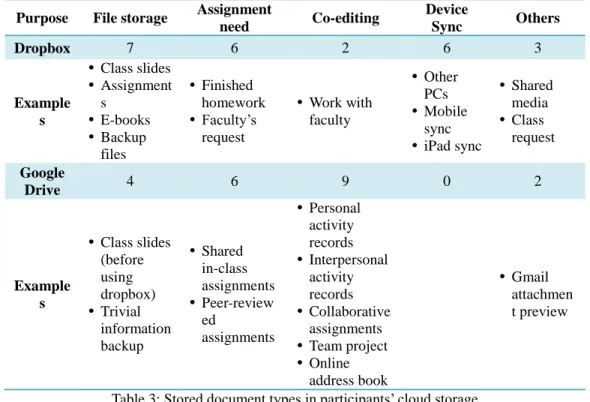
First of all, I investigated the primary purposes of using cloud storage. Participants were asked to describe how and why they used each cloud storage system. For Dropbox, the main purpose reported was to store files, and usually those stored files were lecture slides, finished assignments and backup files with multiple formats. Participant #2 remarked that:
“I used to save my PowerPoint files in Google Drive, but since I found Dropbox can preserve them with original formats completely, I changed my method.”
The recruited participants were students and six pointed out they had to use Dropbox because of class needs and lecturers’ requests. In addition, device synchronization was one of the primary goals of using Dropbox. For those participants who agreed with this option, two or even more computers supported their study, work and life so it was necessary to make sure that they could reach files they wanted on any PC and other devices. For example, participant #5 said that:
“I took pictures by my iPhone and the Dropbox app can upload and backup right away, so I can check them via my iPhone and any other devices.”
3). All nine participants stated that they had chances to interact with others via Google Drive. Some of them pointed out they had to collaborate with team members for work and assignments, and others mentioned that they may keep records on Google Drive because people contacted each other by Google’s “Gmail” and Google chat, so Google Drive could be supportive. In addition, six interviewees said that they used Google Drive for homework, especially for cooperative work, because it was a convenient way to open it online with some specific people, such as teammates and class peers.
Purpose File storage Assignment
need Co-editing
Device
Sync Others
Dropbox 7 6 2 6 3
Example s
Class slides
Assignment s E-books Backup files Finished homework Faculty’s request
Work with faculty
Other PCs
Mobile sync
iPad sync
Shared media
Class request
Drive 4 6 9 0 2
Example s
Class slides (before using dropbox) Trivial information backup Shared in-class assignments Peer-review ed assignments Personal activity records Interpersonal activity records Collaborative assignments
Team project
Online address book
Gmail attachmen t preview
Table 3: Stored document types in participants’ cloud storage
2. Influences in personal information managing behaviors by using cloud storage
Furthermore, participant #5 described that Google Drive functions as a regular work platform for his study and work. Also, some participants believed that “Gmail” was common and popular so that asking co-workers use Google Drive could be effort-saving for a team project.
However, only four people said that Dropbox influenced their personal information behaviors. The main factors mentioned were the synchronization and sharing functions of Dropbox. Participant #2 and #9 described that they could upload files for later use even by different devices but they didn’t do so before they used Dropbox. Nevertheless, five
participants thought they still kept their original personal information behaviors. Some of them indicated that they were not active users of cloud storage so they didn’t alter how they store information too much; on the contrary, others said that they used Dropbox desktop version, which integrates with the hierarchical file system of the PC and Mac operating system very well, so they were felt that they didn’t have to change their behavior to use it. These comments are summarized in Table 5.
Does using cloud storage influence your personal information behavior?
Dropbox YES 4
NO 5
Google Drive YES 9
NO 0
Table 4: Participant’s answers for whether cloud storage influences their behaviors
Factors of how cloud storage influences users’ personal information management
Dropbox
Synchronizing files for later use
Storage could be shared
Compared with Google Drive, Dropbox is able to preserve more document formats and original file formatting
Compared with Google Drive, the interface of Dropbox looks more like general operation system.
Google Drive
Able to work with peers at same time and different places.
Better co-editing functions
High popularity of use
Simulation of regular working platform
Survey of Attributes of Stored File in Cloud Storage
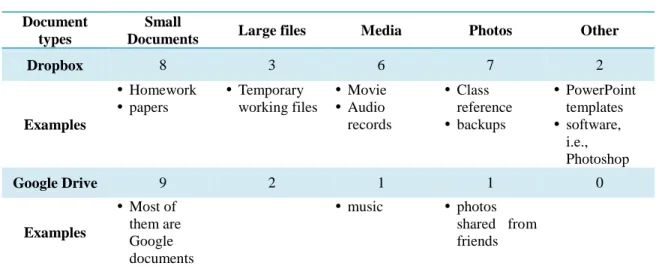
In order to analyze the attributes of files and information, participants were asked to examine their files and discuss the types of documents and information (questionnaire part 3, question 1).
1. Document types
Document types
Small
Documents Large files Media Photos Other
Dropbox 8 3 6 7 2
Examples Homework papers Temporary working files Movie Audio records Class reference backups PowerPoint templates software, i.e., Photoshop
Google Drive 9 2 1 1 0
Examples
Most of them are Google documents
music photos shared from friends
Table 6: The result of stored document type survey
This purpose of this section of the study is to understand what users tend to store in their cloud storage and the results are shown in Table 6. For both Dropbox and Google Drive, participants were apt to preserve a lot of small documents. However, people stored more PDF documents and general office files, such as Word and Excel, in their Dropbox, because Dropbox was more compatible for all types of formats. On the other hand, since Google Drive can create Google documents for users to edit, most of stored small documents were Google documents, such as “Google doc” and “Google spreadsheet.”
Yet, the survey indicated that those participants tended to not store files with other types in Google Drive. When asked the reasons, participants presented their doubts. For example, Participant #9 worried that:
Media files might be too big for Google Drive, I think. So, I probably don’t want to store those files in my Google Drive. They may crash it.
2. Information types
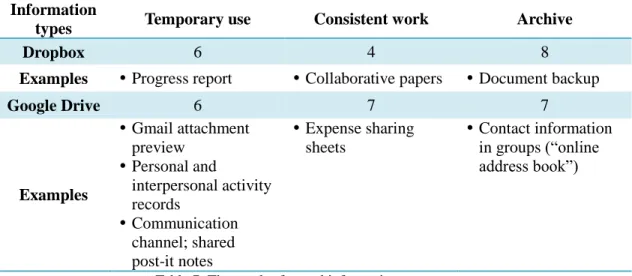
Participants were asked about the types of information they stored in terms of temporary-use items, consistent-work items, and archived items (questionnaire part 3, question 1). These results are summarized in Table 7.
Information
types Temporary use Consistent work Archive
Dropbox 6 4 8
Examples Progress report Collaborative papers Document backup
Google Drive 6 7 7
Examples
Gmail attachment preview
Personal and
interpersonal activity records
Communication channel; shared post-it notes
Expense sharing sheets
Contact information in groups (“online address book”)
Table 7: The result of stored information type survey
Surprisingly, participants’ answers were distributed across all kinds of information, which means interviewees in this recruited group may use their cloud storage in multiple ways. For Dropbox, eight participants said they stored archived information but they also put some temporary files in their Dropbox. For example, participant #6 mentioned that she had some progress reports for her work stored in her Dropbox folder, due to the files’ special format.
with those friends by this way, and he had a Google spreadsheet to record shared expense for his phone bill. Participant #4 showed his past trip schedule, which was shared with his travel mates; moreover, participant #9 opened an untitled file during the interview, saying that:
See? This is my ‘chat record’ with my classmate after class for preparing the next in-class presentation! We did chatting online in Google docs, so we can talk and record at the same time!
After identifying types of documents and information in cloud storage, participants explained the factors influencing their methods and decision to store files. Many interviewees believed that Dropbox had larger space to store their online backup and that the system accepted saving diverse formats and types of files. Therefore, they considered Dropbox as an extension of their local hard drives and preferred to store multiple files in Dropbox.
In contrast, some participants were concerned that Google Drive did not provide them with enough space. Participant #2 and #9 indicated that they did not know how to check the quota of their Google Drive, and that was the reason that they tried not to upload too many files in it. Besides, several participants thought that Google Drive’s interface was not very
convenient and easy-to understand, so that they lacked motivation to practice any other unfamiliar functions like creating folders and tagging. Some people stated that although the Google Drive interface was not so user-friendly, they would still use it because it seemed to be a trend in communication and a common tool among peers, so Google Drive has become the first choice for them to cooperate with others. These comments are summarized in Table 8.
Dropbox
Larger space; online backup
Easy to upload files; faster to upload Able to store diverse formats and files Better user interface
Extension of PC’s hard drive
Google Drive
Space issue: not sure about the space volume; believe that Google Drive has less space
Lack of experiences about interacting with the interface; believing that Google drive’s UI was not user-friendly
A common tool among peers: keep using it to stay on the same page with others
Collaborative works
Table 8: The comments of using cloud storage from participants
Therefore, in the end of this section, participants did a self-evaluation about their activeness when they used Dropbox and Google Drive (questionnaire part 3, question 2). More people believed they actively used Dropbox because they stored files by their willingness, and on the contrary, many interviewees thought that they used Google Drive passively because they had to collaborate with others in working (see Table 9). One participant even said that:
“I was ‘forced’ to use it in the beginning, though I accepted it later.”
Users’ subjective feeling when using Cloud storage
Dropbox Active user 6
Passive user 3
Google Drive Active user 3
Passive user 6
Table 9: Participants’ attitude in cloud storage using
Cloud Storage Management
1. Difference between Dropbox and Google Drive
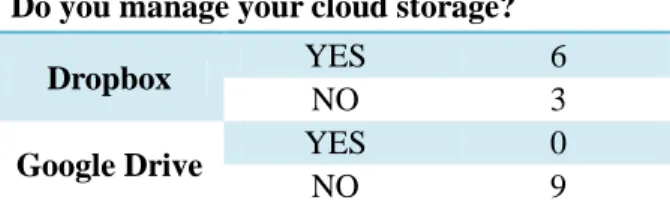
Do you manage your cloud storage?
Dropbox YES 6
NO 3
Google Drive YES 0
NO 9
Table 10: Survey of participants’ managing convention
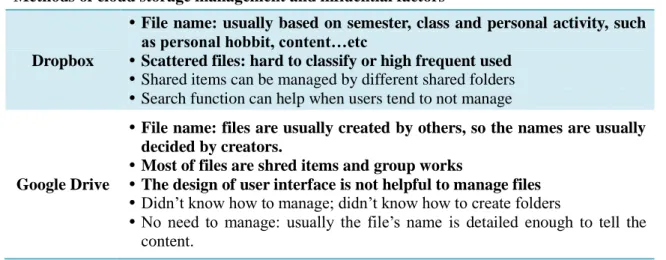
(questionnaire part 4, question 1). Participants usually named files and folders by content. For example, the names of classwork and homework were based on lecture title, course number and semester, so they managed them with folders structured by a similar naming system. In addition, some people classified all files into suitable folders, but others may keep some scattered files out of any existing folders. Most people who didn’t classify files completely said that those files were hard to sort. Yet, participant #2 had different explanation: she would like to keep files with higher use-frequency in the top level so that she would not have to click folders to reach them.
Different from Dropbox’s situation, all nine participants declared they didn’t manage Google Drive (see Table 10). Most of them thought since they were the receivers who got files from others, and since files are “owned” by others, they thought they didn’t have the right to manage them. In addition, many interviewees complained that the interface of Google Drive was not helpful for management and three of them said that they even had no idea how to create folders to organize files. Participant #5 explained how he didn’t manage his Google Drive: because Google Drive listed all files by updated time and the layout was designed for browsing, it was unnecessary to sort items since he could find earlier files by searching. These comments are summarized in Table 11.
Methods of cloud storage management and influential factors
Dropbox
File name: usually based on semester, class and personal activity, such as personal hobbit, content…etc
Scattered files: hard to classify or high frequent used
Shared items can be managed by different shared folders
Search function can help when users tend to not manage
Google Drive
File name: files are usually created by others, so the names are usually decided by creators.
Most of files are shred items and group works
The design of user interface is not helpful to manage files Didn’t know how to manage; didn’t know how to create folders
No need to manage: usually the file’s name is detailed enough to tell the content.
After describing the difference of management between Dropbox and Google Drive, participants were requested to compare and explain how they managed local hard drive and cloud storage (questionnaire part 4, question 2). All interviewees pointed out that they were sure that their management of Google Drive differed from how they organized their local hard drive; on the contrary, the ways they managed Dropbox were usually similar to their original and general methods for hard drive organization, except two participants. The results are presented in Table 12.
Is the way you manage your cloud storages similar to your local hard drive?
Dropbox YES 7
NO 2
Google Drive YES 0
NO 9
Table 12: The comparison result of management method similarity between local drive and two selected cloud storage
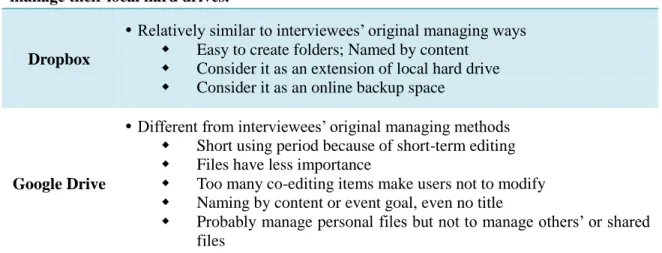
At the same time, participants explained the reasons why they managed (or did not manage) files in cloud storage, and their reasons are concluded in Table 13. In cases of Dropbox, participants stated that the design supported their original naming and filing policies, and the interface could display folders’ structure in the same way their PCs and Macs did, so they thought that they had no issue with using familiar structures. Moreover, participant #2, #8 and #9 said that they considered it as an extended space of their own local drives.
Reasons why users believe that how they manage cloud storage is like (or unlike) how they manage their local hard drives.
Dropbox
Relatively similar to interviewees’ original managing ways
Easy to create folders; Named by content
Consider it as an extension of local hard drive
Consider it as an online backup space
Google Drive
Different from interviewees’ original managing methods
Short using period because of short-term editing
Files have less importance
Too many co-editing items make users not to modify
Naming by content or event goal, even no title
Probably manage personal files but not to manage others’ or shared files
Table 13: The influential factors of cloud storage managing when comparing with managing personal local hard drive
Therefore, when asked the frequency of managing cloud storage(questionnaire part 4, question 3), more participants answered that they may never manage their Google Drive, but more people handled files and folders in Dropbox regularly in different frequency (see Figure 1).
Figure 1: Frequency of cloud storage management
Cloud Storage Sharing Behavior and Collaborative Work Management
Since cloud storage allows users share information, it is important to know with whom 0
2
3
2 2
0
1 1
0
7
Daily Weekly Monthly More than one month Never
ti
m
e
s
Frequnecy of cloud storage
management
users are willing to share information and receive their files via cloud storage, and what kinds of information are highly shared in this sort of behavior and process. The questions (questionnaire part 5, question 1 and 2) on this topic were divided into two parts as “shared with” and “received from”, and participants were asked to describe whom they shared with or received from and explain what files they exchanged.
1. Dropbox vs. Google Drive
Figure 2: ‘Sharing with’ and ‘receiving from’ across different cloud storage services and different personal relationships
The chart in Figure 2 is for comparing Dropbox and Google Drive in sharing issues, and the numbers in Figure 2 are numbers of participants who indicated each type of people they shared with or received from. Although all types of relationships had sharing and or receiving of files via cloud storage, peers (friends and classmates) were most prevalent in both Dropbox and Google Drive. Among the participants in this study, they had more sharing/receiving with family and co-workers in Dropbox, but Google Drive was used more frequently among
participants’ friends and classmates. In addition, many participants considered that they were the people who received files from others, instead of being the one who actively shared
4 5 4 3 1 3 5
3 3
2 1
4
5
1 1
1
8
6
2
1
Family Friends Classmates Co-workers Others
Per
son
s
Comparison of Dropbox and Google Drive
in
active sharing and passive receiving behaviors
information.
2. Active sharing vs. Passive receiving
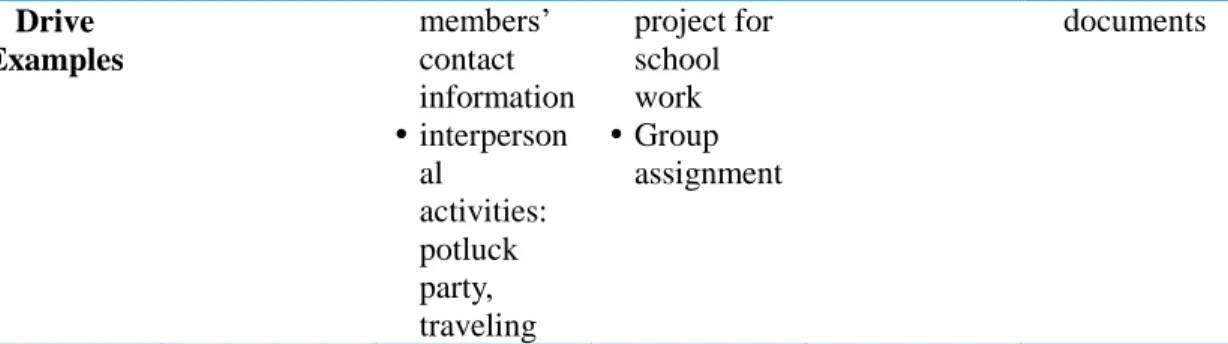
When participants described who they shared files to or received files from, they also explained what kinds of information they exchanged. According the following tables (see Table 14 and 15), people shared diverse files via Dropbox to multiple people, but in the case of Google Drive, users tended to only share small documents among friends and classmates with different purposes.
During the interviews, some participants indicated that they were subjectively aware that using Dropbox might be more formal when they exchanged information with those who had higher status and value, such as faculty and clients.
On the other hand, because Google drive is connected with personal “Gmail” (Google email service) instead of personal devices, it seems more suitable to share and even publish personal works via Google Drive on the Internet. For instance, participant #7 stated that sometimes he may share his works by Google Drive. He thought Google Drive was a good way to reduce risk and interruption from the web, because Google Drive only linked to his Gmail account, instead of his personal devices and local hard drive. He also received shared files from other “netizens”.
Active
sharing Family Friends Classmates Co-workers Others Dropbox
Examples
Video
Music Photos
School work Co-edited papers documents for clients Google Drive Examples Travel information and schedule Team project for class
Table 14: The examples of active sharing
(Passive?)
receiving Family Friends Classmates Co-workers Others
Dropbox Examples Video Music Photos Music School work Co-edited papers References from faculty
Drive Examples
members’ contact information
interperson al
activities: potluck party, traveling
project for school work
Group assignment
documents
Table 15: The examples of passive receiving
3. Collaborative work
In addition to sharing files, people may use cloud storage to collaborate. In order to know whether collaborative documents were managed as general files, participants answered how they worked with others in cloud storage and how they managed these items (questionnaire part 5, question 3).
All nine participants had co-edited items in Google Drive, and all of them explicitly indicated that they did not manage them. Compared with the uniformity of Google Drive, only four participants worked collaboratively via Dropbox, and only one person would like to manage cooperative files (see Table 16).
Although people tended not to manage cooperative documents both in Dropbox and Google Drive, the reasons and influencing factors were different (see Table 17). One reason was that people preferred following others’ decision and behavior due to personal laziness. Participant #1 remarked that, “I am just too lazy to manage. I don’t think it’s necessary.”
Besides, particularly for Dropbox users, they were concerned that if they made any change, it may impact the structure and file position so other users might lose track of those shared and collaborative documents.
1. Do you have any
collaborative work in your cloud storage?
2. Do you manage your collaborative work in your cloud storage?
Dropbox YES 4 YES 1
NO 5 NO 3
Google Drive YES 9 YES 0
NO 0 NO 9
Table 16: the survey of collaborative work and its management
Reasons and factors which influenced users’ management for collaborative works
Dropbox
Didn’t want to manage files and folders shared with others
Prefer to follow others’ action; coordinate with others
Concern that others may lose files if he or she did any change
Google Drive
Without ownership of files and folders; coordinate with others Files have low importance; unnecessary to manage
Consider “I” am a passive user; prefer not to manage actively.
Feel it’s hard to manage files
The interface is equipped with search function; “why manage?”
Discussion
Background
In the first section of the interview, participants provided information about the
numbers of files and folders in top-level of their Dropbox and Google Drive. Due to the system limitations I could only count items in the top layer, and it was hard to investigate the depth of folders and volume of files. Therefore, it is difficult to completely describe participants’ degree of use and sharing in each system quantitatively. However, by using the counts provided and interviewees’ responses, we can find several interesting examples from the group of participants. For example, participants #5 and #8 claimed that they believed they are “heavy users”, and participant #1 and #4 said that they thought they should be light users because they had less activities in cloud storage. Their qualitative answers relatively corresponded with the quantitative results of item counting in the top level of their cloud storage.
General Cloud Storage Use
The aim of this section of the interview was to investigate interviewees’ cloud storage use and the factors influencing their behaviors and decisions. According to the previous results, it is known that the methods which users employed in Dropbox and Google Drive were different. Participant #5 clearly pointed out that Dropbox and Google Drive were functionally
was the design of system.
In order to fully install Dropbox, users must download the client software, so users would create a synchronized folder on their personal device(s) As a result, most users were trained to interact with Dropbox via the folder. Particularly, the system design makes the synchronized folder simulate other local folders, according the device’s operating system. Therefore, users could save efforts from learning to interact with a new interface. It was the main reason why some participants could consider Dropbox as an extension of their local hard drive.
However, Google Drive is connected with a Google account, so the user must log in first for any later use. Many users adopted this interface when they started taking advantage of Google Docs, so they have adopted the online work, instead of the later released desktop version. From 2006 to 2012, people have developed a variety ways to use Google Docs and Google Drive, and this may have contributed to the diversity of use between Dropbox and Google Drive.
Survey of Attributes of Stored Files in Cloud Storage
1. Document Type
could observe that some participants only stored Google Docs in Google Drive. Consequently, the system design and perceived function constraints may not just impact the types of documents directly but also influence users’ behaviors and decision about use for their work division indirectly.
2. Information Type
Although it was surprising to find that all types of information were stored in both cloud storages, there are still some interesting results worth discussing. After analyzing the cases provided by all nine participants, two main reasons help explain users’ PIM behaviors. The first reason was people’s various methods of using cloud storage. Because of users’ creativity and innovation, cloud storage was not just a service and space to store something. For example, participant #9 described how she used Google Drive to communicate with her classmate and accomplish their collaborative assignment at the same time. On the other hand, several participants mentioned that they might create files for temporary use in the beginning but later preserve them for the future.
Therefore, it seemed that online storage made files extend their duration because any information could be useful and helpful in the future and the cost for users to preserve them was too low to be considered, so keeping everything in their storage might not be a bad thing.
The other reason was laziness and unawareness. Some participants simply stated that they were too lazy to manage files, and others said that they did not notice that their cloud storage required some management.
Cloud Storage Management
1. Comparison between Dropbox and Google Drive
answered that they tended not to manage files in Google Drive. By analyzing their reasons, there were some primary factors influencing their behaviors.
First of all, the interface design seemed to play a role in this management issue. The interface design led users to interact with Dropbox as they used their folders in personal devices, so users could adopt it very soon. In addition, the folder simulation allowed users keep
applying their original strategies to manage all items, including naming schemas and folder structures.
On the contrary, users may interact with Google Drive via the online interface more, so the different interface design and way to display file structure influenced user to develop other policies to handle items. Moreover, users may quit organizing files before they find a better method of sorting and then get used to this situation later.
The other possible reason was the diversity of files in Dropbox. Because users stored more diverse document formats in Dropbox, users may think it was necessary to organize these files.
2. Comparison between local drive and cloud storage
This section also looks into the difference between users’ management in local hard drive and cloud storage. Participants described how they manage their local storage, comparing to their methods of managing cloud storage, and I found that more people agreed that the ways they managed their hard drives in personal devices was more similar with how they managed Dropbox, instead of Google Drive.
The study results indicated that users had less adoption issues in Dropbox, and Dropbox was considered as a personal devices’ extended storage, so users may claim that they had more control and ownership in Dropbox. In contrast, more participants believed that they were the receivers who get shared files from others in Google Drive, so these people tended to not modify any files due to a lack of feeling of file ownership.
their attitude in using cloud storage: more people considered themselves as active Dropbox users; on the other hand, many people believed they were passive Google Drive users because many of them stated that they felt like there were pressures to use Google Drive when they worked with others.
Cloud Storage Sharing Behavior and Collaborative Work Management
1.
File exchange
It was very interesting to have a cross comparison between the user’s behavior and different cloud storage systems, and the result also corresponded with the other analysis in previous sections. The complementary attribute between the two cloud storage products was one of the good examples. In this study, compared with Google Drive, less people used Dropbox for collaborative work. For those who didn’t employ Dropbox to cooperate, one of main reasons was information security and ownership. These people believed that Dropbox was part of their hard drive instead of an independent area, so a collaborative work made them feel that personal space had been involved or even interrupted by external objects.
For those who were willing to share and work with others via Dropbox, less
constraints helped. These people claimed that they thought Dropbox could support various file types and hold original format better for them to store documents comprehensively. Therefore, some users chose using Dropbox for format preservation when they worked with supervisors. Participant #6 mentioned that she had to use Dropbox to collaborate with her advisor and peers because Google Drive did not support her documents’ format. Here is what she said,
“I use LaTex to edit my paper and collaborate with others. I don’t think Google Drive can present or even preserve .tex files, so I still choose Dropbox. My teammates do so (using Dropbox to share and cooperate), too.”
2.
Collaborative work
Dropbox or Google Drive. The investigator has found that the primary reasons were laziness and lack of motivation to manage co-editing work.
In addition, users stated that they did not organize collaborative documents both in Dropbox and Google Drive, but they had different reasons to explain their behavior. In Dropbox, users worried more about the mess structure and the potential impact to the others if they made any modification. However, people described that passive attitude and lack of ownership was the main reason that they didn’t change anything on co-edited documents in Google Drive. As a result, it seemed that when people used Dropbox, they might be
Conclusion
According to above analysis, users’ behaviors and decision-making appear to be influenced by the system design and participants’ past experiences. Using a new technology requires time and effort to adopt, so generally people preferred to interact with something familiar for shortening the adoption period.
1. The impact from system and interface design in cloud storage
In this study, Dropbox and Google Drive played very different roles with different interfaces to interact with users, even though both of them offered cloud storage. The high familiarity of the interface leads the participants to explore functions of Dropbox, but Google Drive’s interface relatively contained more uncertainty.
For example, when people got used to using Dropbox, they became concerned with the available quota and how to manage the space. On the other hand, there were still some
participants in our research said that they had no idea about how to check the volume of Google Drive and how to create folders to manage files.
Also, when Dropbox launched their service, the install procedure asked users to create a synchronized folder by client software; however, Google Drive developed their desktop version and released it in 2012, but many users may have been accustomed to employing the online interface and developed a customized personal policy to deal with file storage in Google Drive.
and usability were important to impact how people take advantage of the tools and services.
2. The impact from collaborating with others in cloud storage
One of the characteristics of cloud storage is that it enables users to share files and cooperate with others. In the past, people probably used email to exchange co-edited documents. In order to clarify every editor’s part and version, people could attach a short fragment of information as a notice, such as adding initials and time in the document’s name, and each editor had equal status to be responsible for this work.
However, online co-editing allows users to modify quickly, and since changes happen so fast, it impacts users’ “feelings” regarding these documents and their partners. For instance, some participants in the study responded that they felt like they lost document ownership and so they preferred not to change anything. The other typical idea was that “if the others feel fine. Why change? ”
From the above cases, it appears that people may have changed their approaches when they took advantage of cloud storage to work together. Moreover, the result may lead to a new form of collaboration, which further influences group activity in information management.
3. Interface vs. interaction: which one might be stronger to influence users most?
Bibliography
Barreau, D. K. (1995). Context as a factor in personal information management systems. Journal
of the American Society for Information Science, 46(5), 327–339.
Barreau, D., & Nardi, B. A. (1995). Finding and reminding: file organization from the desktop.
ACM SigChi Bulletin, 27(3), 39-43.
Bergman, O., Whittaker, S., Sanderson, M., Nachmias, R., & Ramamoorthy, A. (2012). How do we find personal files?: the effect of OS, presentation & depth on file navigation. In Proceedings of the 2012 ACM annual conference on Human Factors in Computing Systems
ACM Press, 2977-2980.
Boardman, R., and Sasse, M. A. (2004). Stuff goes into the computer and doesn't come out: a cross-tool study of personal information management. In Proceedings of the SIGCHI
conference on Human factors in computing systems ACM Press, 583-590
Cervone, H. F. (2010). An overview of virtual and cloud computing. OCLC Systems & Services, 26(3), 162-165.
Dearman, D. & Pierce, J. (2008). It’s on my other computer! Computing with multiple devices.
In Proceedings of the SIGCHI Conference on Human Factors in Computing Systems (CHI
2008), ACM Press, 767-776.
Dourish, P., & Bellotti, V. (1992). Awareness and coordination in shared workspaces. In
Proceedings of the 1992 ACM conference on Computer-supported cooperative work (CSCW,
1992). ACM Press, 107-114.
48(1), 1-10.
Jones, W., Phuwanartnurak, A. J., Gill, R., & Bruce, H. (2005). Don't take my folders away!: organizing personal information to get ghings done. In CHI'05 extended abstracts on
Human factors in computing systems. ACM Press, 1505-1508.
Ma, S., & Wiedenbeck, S. (2009, April). File management with hierarchical folders and tags. In
CHI'09 Extended Abstracts on Human Factors in Computing Systems. ACM Press,.
3745-3750.
Malone, T.W. (1983). How do people organize their desks: implications for the design of office information systems. ACM Transactions on Office Information Systems, 1(1), 99-112. Marshall, C. & Tang, J.C. (2012). That syncing feeling: early user experiences with the cloud. In
Proceedings of the Designing Interactive Systems Conference (DIS2012), ACM Press,
544-553.
Nardi, B., Anderson, K., & Erickson, T. (1995). Filing and finding computer files.Proceedings of the East-West HCI, Moscow, Russia.
Pham, H. (2010). User interface models for the cloud. In Adjunct proceedings of the 23nd annual
ACM symposium on User interface software and technology. ACM Press, 359-362.
Whalen, T., Toms, E. G., & Blustein, J. (2008). Information displays for managing shared files.
In Proceedings of the 2nd ACM Symposium on Computer Human Interaction for
Management of Information Technology. ACM Press, 5.
Ying, Z., & Yong, S. (2009). Cloud storage management technology. In Information and
Appendix A: interview questionnaire
This guide will be used for the interview. Both the interviewer and the interviewee will have a copy to refer to during the interview.
Questionnaire for interview
Part 1: Quantitative Survey of Cloud Storage Use
1. How many files are in your Dropbox/Google drive? How many folders are in your
Dropbox/Google drive? Please see the instruction sheet for guidance about how to find
these numbers.
files folders
Dropbox
Google drive
2. How many shared files are in your Dropbox/Google drive? How many shared folders
are in your Dropbox/Google drive?
Shared files Shared folders
Dropbox
Google drive
3. How many files are owned by you?
Owned files
Dropbox
Google drive
4. How many levels deep is your deepest folder in Dropbox/Google drive?
#
Dropbox
Google drive
5. How many files are in the largest folders in your Dropbox/Google drive?
#
Dropbox
Part 2: Survey of Cloud Storage Use
1. How do you use Dropbox /Google Drive? Please describe your use of Dropbox and
Google drive separately.
Purpose File storage
Assignment
need Co-editing Device Sync Other
Dropbox Google
drive
2. Do you think using Dropbox /Google drive influences your PIM behaviors? What is the
difference after you started using use Dropbox /Google drive?
Dropbox
Google drive
3. Please find the five files that you used most recently in your Dropbox/Google drive, and
please explain their purposes.
1 2 3 4 5
Dropbox Google
drive
4. Please find the five files that you used the longest time ago in your Dropbox /Google
drive, and please explain their purposes.
1 2 3 4 5
Dropbox Google
drive
Part 3: Survey of File attributes in Cloud Storage
1. What types of information do you store in your Dropbox /Google drive?
Document types
small
documents large files media photos Other
Dropbox
Information types temporary-used consistent-working archived
Dropbox
Google drive
2. What influences your decision whether to store information in your Dropbox /Google
drive?
Dropbox
Google drive
Part 4: Survey of File Management in Cloud Storage
1. How do you manage files in your Dropbox /Google drive? Do you have any strategies
for managing them? Include information about any naming convention, organizational
scheme, tagging, etc.
Dropbox
Google drive
2. Do you use the same management strategies for Dropbox/ Google drive, and your local
hard disk, or do you manage them differently? Please explain.
Dropbox
Google drive
3. How often do you spend time organizing your files and folders?
Times
Daily Weekly Monthly
More than one
month Never
Dropbox Google
Part 5: Survey of Shared Items
1. Do you share files in your Dropbox /Google drive? Why do you share them? Whom
do you share with?
Shared to family friends classmates Co-workers Others
Dropbox Google
drive
2. Have you received shared items from others? Are they files or folders? Why do those
people share? Who are they?
Shared
from family friends classmates Co-workers Others
Dropbox Google
drive
3. Do you have any collaborative files in your Dropbox/Google drive? If yes, how do you
manage them? Do you change your management strategies because they are shared? If
yes, how does it differ from your original strategies for your personal files?
Dropbox
Google drive
Part 6: Demographic questions:
1. Your gender. (Male/Female)
2. Your academic background and level. (Major; Undergraduate/Master/Ph.D.)
Major
Degree undergraduate master Ph.D
Appendix B: subject recruitment letter
Subject: Participants needed for an interview study about use of Google Drive and Dropbox
Hello students –
This is SILS master's student, Yu-Hsuan Chang. I am conducting a research study entitled “A Behavioral Study of Sharing and Managing Behaviors in Cloud Storage: Google Drive and Dropbox”, for which I am inviting you to participate in an interview.
My research asks about how users use their cloud storage to manage and share their personal information. I am asking you to help me investigate these questions by participating in my interview and answering few research questions.
In order to participate, you should have used BOTH Dropbox and Google Drive over the past six months. During the interview, you will need to show the experimenter your Dropbox and Google Drive on your own laptop computer or other devices. The interview will also be audio recorded. The interview location would be in SILS library or Davis library. Your participation has no effect on class standing, grades, or relationship with UNC faculty.
Please respond by email ([email protected]) if you are interested in participating in this study. The interview will last about 30-45 minutes, and the available times are:
Session A: Monday, 12:00pm-5:00pm Session B: Wednesday: 12:00pm-5:00pm Session C: Tuesday 9:30am-5:00pm Session D: Thursday: 9:30am-5:00pm
Thank you for your help!
-- Yu-Hsuan Chang
Appendix C: information consent form
University of North Carolina at Chapel Hill Consent to Participate in a Research Study Adult Participants
Consent Form Version Date: 2013.02.01 IRB Study # 13-1107
Title of Study: A Behavioral Study of Sharing and Managing Behaviors in Cloud Storage: Google Drive and Dropbox
Principal Investigator: Yu-Hsuan Chang
Principal Investigator Department: School of Information and Library Science Principal Investigator Phone number: 919-360-7272
Principal Investigator Email Address: [email protected] Faculty Advisor: Robert Capra
Faculty Advisor Contact Information:
UNC-Chapel Hill Phone number: 919-962-8366 Study Contact Email Address: [email protected] Study Contact telephone number: 919-962-9978
_________________________________________________________________
What are some general things you should know about research studies? You are being asked to take part in a research study. To join the study is voluntary.
You may refuse to join, or you may withdraw your consent to be in the study, for any reason, without penalty.
Research studies are designed to obtain new knowledge. This new information may help people in the future. You may not receive any direct benefit from being in the research study. There also may be risks to being in research studies.
Details about this study are discussed below. It is important that you understand this information so that you can make an informed choice about being in this research study.
You will be given a copy of this consent form. You should ask the researchers named above, or staff members who may assist them, any questions you have about this study at any time.
What is the purpose of this study?
The purpose of this study is to observe cloud storage users’ information behaviors in personal file management. Also, this study will examine how specific features of cloud storage tools influence users behaviors.
Are there any reasons you should not be in this study? You should not be in this study if:
You are younger than 18 years old.
You are not a student at UNC Chapel Hill.