12.
Payroll Processing (Process 9)
Payroll Processing is the administering of the Payroll through to disbursement once it has been input and checked. This process also involves the termination of employee records from the Talent2 system, reconciliations, deduction loading, overpayment management and creation of joint clinical invoices for reimbursement.
12.1
Process Overview
Process start The pay has been checked by the payroll input team
Process end All payrolls are processed and all reconciliations are complete. Frequency Payrolls are run fortnightly and monthly; changes are made daily Positions
involved
Payroll Processing Team Senior Payroll Administrators Payroll Input Administrators HR Systems Team
Financial Accountant (Financial Services Division) Cashiers (Financial Services Division)
Key tasks 1. Process the payroll to disbursement 2. Maintain and administer deductions 3. Initiate recovery of overpayments 4. Process some terminations
5. Administer superannuation
6. Disburse payments to third parties (IRD, Unions etc)
Service levels There are no service levels specified and no measurements in place to determine compliance with expected outcomes
Performance There are no KPIs so no conclusions can be drawn on performance
12.1.1
Sub Processes
Process Code Sub Process
PP01 IR File Monthly
The production and submission of the electronic IR File to IRD PP02(i) Terminations – Timesheet
Terminating staff who are timesheet based PP02(ii) Terminations – Salaried
Terminating staff who are receive a salary PP03(i) Deductions – (non IRD)
Reconciliation of members’ deductions and preparing payment PP03(ii) Deductions - IRD
Reconciliation of PAYE and other deductions made through the tax system and preparing payment for disbursement via Cashiers
PP04 Overpayments
Process Code Sub Process PP05 Superannuation – New Member
Entering a new member into NZUSS PP08 Joint Clinicals – Reimbursement Process
Invoicing DHBs for the Hospital component of Joint Clinical salaries
PP09 Advance Pay
When a monthly person resigns prior to the end of the month, an advance pay is required
PP10 GL Changes
Updating an employee record to reflect a change in account code for charging purposes
PP11 Union Membership
Loading and checking Union deductions against the employee record PP12(i) Investigation/Enquiry for Payroll Processing – Running of Pay
Investigation process that takes place when an error is identified during the running of a pay
PP12(ii) Investigation/Enquiry for Payroll Processing – Meeting Debrief of issues arising from payrun
PP13 Main Payrun – Pre Processing
Preparing for the processing of the payroll PP14 Main Payrun – Processing
Processing the payroll PP15 Payroll Disbursement
Creation of bank file from Talent2
PP16 Payroll Sign-off, Senior Payroll Administrator
Checking and signing off the main payroll for delivery to Financial Services Division
PP17 FSD Sign-off
The payroll is checked and signed off by Senior staff of the Financial Services Division
PP18 Reconciliation Process Post sign-off pay processing
PP19 Manual Pay Check – Senior Payroll Administrator
A final review of non system generated pay details (post disbursement) PP20 Termination Checking
Checking the final payment for terminated staff is correct, prior to disbursement PP22 End of Period Processing
Preparing for the next payrun
PP23 Senior Payroll Administrator Error Investigation Investigation process for when an error is identified PP24 Deduction checking
The check undertaken by the Payroll Processing Team Leader once the deduction has been loaded
PP25 Cashiers Disbursement
The process undertaken by the Cashiers to send the bank file to the bank PP26 Resignations
12.1.2
Methodology
Workshops were held with Payroll Processing and HR Systems staff to identify and complete the “as is” processes. The findings from these workshops were supplemented with information gathered from a facilitated discussion held with key Financial Services Division staff who participate in and undertake the process boundary of this process. In addition, a one-on-one meeting was held with the Senior Payroll Administrator to review and confirm the Superannuation charts.
The PP13, PP14, PP15 and PP18 processes were mapped by the HR Systems Team in consultation with the Payroll Processing Team leader prior to the launch of the Smart Start Project. These charts were reviewed through the workshops by the Payroll Processing team. These process charts are driven by the Talent2 system setup.
12.2
Key Findings
This section outlines the results of our analysis. Where the analysis is specific to a particular flowchart it is indicated by a reference to the flowchart in the section heading. On occasions there are issues with documents supporting the process and if they are not specific to a particular flowchart, these have been documented separately and include a reference to the document in the section heading. There are also a number of issues which have been identified during the course of our investigations which are more general in nature.
12.2.1
IR File (PP01)
Earnings and Tax information is submitted once a month to the IRD via a system referred to as IR File. An ASCII text file is created by Talent2 and uploaded via a secure website to IRD. Prior to this, two reports are produced from Talent2; the first is the IR12 Remittance Report and the second is the Employers Remittance Reconciliation.
The Senior Payroll Administrator undertakes a check of the reports and ensures that the totals of these two reports match. An error report, called “Group Certificate Printing Exceptions” is then generated from the Talent2 system. The reports are regenerated and the final balances between the IR12 and Employer’s Remittances are checked again.
Presently this process is undertaken entirely by the Senior Payroll Administrator, but two other staff have been trained in the process and do have online access to upload the electronic file to IRD. Having only one staff member undertaking this process completely is an area of risk which should be addressed.
No. Quick Win
Q12.2.1 Ensure that more than one staff member is involved in undertaking this process on a regular basis
12.2.2
Termination process (PP02)
When an employee ceases employment with the University of Otago, they are terminated in Talent2. This process pays out outstanding leave entitlements etc and ensures that they are not paid in subsequent pay runs. The termination process is undertaken in two areas of Payroll; Fixed term expiry terminations are processed by the Payroll Input Team, while resignations, redundancies, dismissals and retirements are processed by Payroll Processing. The expiry of a fixed term contract would occur
outside of the scope of this Project, and hence this process has not been mapped. However, there are some comments on it in the Out of Scope section of the report.
The latter are generally completed by the Payroll Processing Administrator and checked by the Payroll Processing Team Leader. Once signed off as correct by the Team Leader, the offline entry is completed in Talent2. At the same time the termination paperwork is forwarded to a specific Senior Payroll Administrator for a “big picture” check.
Exactly what is covered in this “big picture” check is generally unspecified. There is no written list of things covered in the “big picture” check, rather it is based on past experience and knowledge. Two things which were mentioned were items that were identified as contractor payments which should be paid through accounts rather than Talent2 and also unspecified tax related issues. The Project Team was unable to gather any information on the number of errors identified through this “big picture” check and so therefore are unable to comment on the effectiveness of it, other than to say the Project Team is aware of one issue identified through this. However, the timing of this “big picture” check is suspect as the outcome has no bearing on the processing of the payroll. If errors are not identified until after the payroll is complete, there is no opportunity to change or to correct.
No. Recommendation
R12.2.2 All terminations should be completed in one area, and it makes sense that it should be undertaken by Payroll Input
12.2.2.1 Manual completion of a Termination Form (DOC 152)
A paper form is completed for each termination by the Payroll Processing Administrator. The first part of the form is completed by transcribing information from the Talent2 screens to the hardcopy form, which has the potential for error. Manual calculations are then undertaken to determine the various amounts for payment which are then also written on the Termination form. The completed form is then used as a data entry form and the Payroll Processing Administrator updates Talent2 from it. The form is then used by the Payroll Processing Team Leader to check against Talent2 to ensure that the data has been entered correctly. Subsequent to this, the Senior Payroll Administrator also uses this for the “big picture” check.
Note the Termination Calculator functionality within Talent2 has been partially implemented subsequent to our review and hence the process may have changed.
No. Quick Win
Q12.2.2.1 If the termination form is still required with the Termination Calculator, then produce it electronically from Talent2 rather than manually filling it out by hand
No. Recommendation
R12.2.2.1 Investigate ways to automatically complete the termination of staff in the system and complete the implementation of the Termination Calculator
12.2.3
Deductions (PP03)
Many staff have automatic deductions made from their pay for various reasons i.e. Union Fees, Superannuation etc. These deductions are currently loaded and checked by the Payroll Processing Team. Periodically the monies deducted from employee’s pay is remitted to the organisation concerned, usually with some information outlining how the payment is made up (e.g. a breakdown of who made what payment for superannuation). At the time of the workshops, these payments were made by means of hardcopy vouchers faxed to Cashiers whom then arrange payment to the various outside organisations. This process has changed with the implementation of Finance One, but those changes have not been mapped.
No. Recommendation
R12.2.3 Payroll Processing should not do any data entry, they should simply be processing the payroll once it is entered and preparing the payments
12.2.4
Deductions checking (PP24)
Once deductions have been loaded into Talent2, they are checked by the Payroll Processing Team Leader. Once checked, copies of the source documents are taken and collated with all other source documents for the main payrun non update check. Original source documents are filed in the payroll processing office.
No. Recommendation R12.2.4 &
R12.2.6A
Individual repositories of employee data should be merged to be held in one central place
12.2.5
Overpayments (PP04)
Financial Services have developed a process for the handling of overpayments, that Payroll Processing follows. Both groups believe this process is working well. Payroll Processing will enter overpayment information into a shared spreadsheet which Financial Services has access to. Financial Services use the information from this spreadsheet to raise invoices for any overpayments that have been outstanding over one month. Financial Services audit this data.
There was some debate within Payroll Processing on whose responsibility it was to follow up on the overpayment once the debt collectors were involved. Payroll Processing believe that at that point, the recovery of the overpayment is out of their hands, although they believe that Financial Services still see this as being the responsibility of Payroll Processing.
12.2.6
Superannuation – new member (PP05)
The Senior Payroll Administrator is continually receiving enquiries from staff about joining a superannuation scheme. The first step is to determine if the person enquiring is eligible and if so, appropriate information on joining is sent. If they are not eligible, they are advised by phone, e-mail or letter.
All completed superannuation documentation received is entered into Talent2 by the Senior Payroll Administrator. Once the entry in Talent2 has been undertaken the application information is completed and forwarded to the organisation concerned, where they register the request and return a superannuation welcome pack. This is received by the Senior Payroll Administrator, who then redirects it to the employee.
After the data has been loaded into Talent2, it may also be loaded into Decfin (the previous Payroll system). Talent2 has no history function (a summary of what you have contributed and what your employer has also contributed to date) so if the employee existed on Decfin prior to the University implementing Talent2, the superannuation information is loaded into Decfin as well. The data is loaded into Decfin with the hope that one day Talent2 might have history functionality and the data could be uploaded.
The Senior Payroll Administrator produces a letter to be sent to the cost centre manager advising them that the staff member has joined a superannuation scheme and that deductions are going to be made from a specific account. They are advised the rate of subsidy but not given any dollar figure. A copy of this letter is then added to the hardcopy personal file that the Senior Payroll Administrator administers for each superannuation member (which is created the moment they join a scheme). This file is kept separate from the central Human Resources personnel filing system.
Until recently, there was little backup for the Senior Payroll Administrator, and although changes have started to be made to reduce this risk, it is still an issue which should be reviewed.
No. Quick Win
Q12.2.6A Approach superannuation organisations and enquire as to whether they can send the superannuation information direct to new members, rather than to the Senior Payroll Administrator who then has to forward it on
Q12.2.6B Identify whether or not the letter to cost centre managers is required and if not, stop producing it
No. Recommendation R12.2.4 &
R12.2.6A
Individual repositories of employee data should be merged to be held in one central place
R12.2.6B Review why summary superannuation information is needed to be held by Human Resources when it is available to the staff member concerned
R12.2.6C Alternate staff to be involved in superannuation administration
12.2.7
GL changes (PP10)
When an employee is paid, a charge is made to several accounts in the employee’s department. Payroll receives frequent requests to make changes to these accounts and simple changes (i.e. change account A to account B for this employee) are made by Payroll Administrators as they are received.
Many requests (often related to research accounts) are much more complicated than the example above. Requests such as “charge to account A for June, account B for July, and then in August reverse out the charges from May onwards and charge it all to account C” are common. In such cases, a specific Senior Payroll Administrator makes the changes. These requests often require extra work such as annual leave accrual journals, and it can be a time consuming task.
The Project Team was unable to ascertain whether this is a Payroll Processing function or whether it should lie within the Financial Services Division.
University of Otago, Christchurch staff highlighted an issue with this current process. Many of the Departmental Administrators will approach Payroll direct to change account codes for their staff. The Dean’s Personal Assistant at the University of Otago, Christchurch highlighted her concern over this process when it relates to bulk grant funded account codes. Any debits to these accounts need to follow the additional divisional approval levels that are currently in place due to their current financial situation. When department staff go direct to Payroll to change account codes, these further approvals do not happen. It was also noted that the department staff doing this were not aware that further approval was required.
No. Quick Win
Q12.2.7 University of Otago, Christchurch to advise on appropriate process to undertake these account code changes
12.2.8
Signoff of Payroll
12.2.8.1 Payroll signoff – Senior Payroll Administrator (PP16)
As the Payroll Manager role is currently vacant, the Senior Payroll Administrator signs off the payroll documentation for each pay prior to the payroll being disbursed to Cashiers (Financial Services Division). This signoff incorporates a number of checks:
1. Ensuring that all variations on the exceptions report are accounted for with notations. During this check, the Senior Payroll Administrator may ask for further clarification on the notations 2. A check that the total pay run figures match the disbursement figures
3. A check that the figures on the reports match what is manually recorded in the payroll folder 4. A check over the pay run documentation, looking for “big picture” issues such as items that
should not be paid through the payroll or obvious issues.
Once the Senior Payroll Administrator is happy with the completeness of the documentation, they sign off all the reports as correct and advise the Payroll Processing team leader this is complete. The Payroll Processing Team Leader then takes the payroll down to registry for the Financial Accountant, (Financial Services Division) to sign off. The Payroll Processing Team Leader also delivers the bank file to the Cashiers (Financial Services Division) for disbursement.
A recent change subsequent to the workshops is that two other senior staff in the Payroll Team are now also timetabled to sign off on the pay run.
12.2.8.2 Financial Services signoff (PP17)
Once the Financial Accountant receives the payroll for sign-off, they undertake very similar checks to the Senior Payroll Administrator. These checks include:
1. A check that all the variations have been accounted for and the source documents clearly explain the variation
2. A check that the report figures match the disbursement figures
3. A check that the payroll has been signed off by a Senior Payroll member.
The payroll is normally signed off by the Financial Accountant. If for some reason they are not available, there are two other staff within Financial Services who can sign off the payroll, being the Budget Accountant and Project Accountant. Both of these staff admitted that they do not undertake the process frequently enough and are often not familiar with the payroll documents or the process for signing it off.
The Budget Accountant and Project Accountant both felt that the exceptions report was not clear, and they do not have access to Talent2 to check that staff are actually terminated in the system in the same way that the Financial Accountant does. They both suggested that an information sheet for checking the payroll would be useful along with a coversheet with the exceptions report explaining what it means and what to look for.
Now that Payroll are located off University campus, it was noted that it does take slightly longer to take the payroll documentation to Financial Services Division for signoff. It is generally a 25 minute round trip in travel time. This does not take into account the time waiting whilst it is signed off. If there are a number of manual pays during a week, the Payroll Processing Team Leader can be back and forth from registry regularly during the week.
There is no evidence that the final check by Financial Services is providing any additional value to the process. While the Financial Accountant is extremely thorough and probing in the questions and verification that he requires, Payroll Processing was not aware of any instances where acceptable answers have not been provided or of situations where the pay has not actually been signed off.
No. Recommendation R12.2.8.2
Financial Services do not sign off the payroll. If this recommendation is not accepted, then provide instruction and training for those staff that don’t undertake this frequently
12.2.9
Manual Pay check (PP19)
Manual payments are generally completed by the Payroll Processing Administrator and checked by the Payroll Processing Team Leader. Once the Payroll Processing Team Leader has signed off the manual pay the offline payment is processed. At the same time the manual pay documentation is forwarded to the Senior Payroll Administrator for a further check. In some occasions errors have been identified in this check, but it has been too late to change as the payment has been disbursed to the Cashiers for payment.
No. Recommendation
R12.2.9
Redesign the checking process so that if the checkers identify errors, there is actually time for them to be fixed prior to disbursement. The current checking process seems to rely upon the quantity of checks rather than the quality. The redesigned process (to be done in conjunction with a redesign of the entry process) should focus on quality data entry and relevant, pertinent, verifiable checks as close to source as possible.
12.2.9.1 Manual Payments
Manual payments are payments that are made to staff outside of a normal pay run. These typically result from terminations between pay periods, and on occasions the Human Resources Director or Divisional HR Managers may arrange settlements or agree to an immediate payment outside of a pay
run. Departments will occasionally miss payroll deadlines and timesheets etc will arrive at payroll late. If possible, they will be processed, but if they miss the pay run, a manual pay should not be agreed to except in exceptional circumstances. The decision in such cases is made by a senior member of the Payroll team or the HR Projects Manager.
Payroll staff noted that the number of manual pays being processed had increased. This increase was also noted by the Financial Accountant who questioned the validity of the manual pays and Payroll’s process for approving these. There are currently no guidelines available to departments and Payroll staff outlining what scenarios would be acceptable for a manual payment and in what instances the payment will have to wait until the next available pay run. It would appear that the perception in Payroll Input is that if a manual payment is already being made on a particular day, then it is acceptable to prepare other manual pays to go through as well. These payments may not have normally gone through as a normal pay, however the general belief is that if one is being run then it is no trouble to add another payment in.
Payroll Processing’s preference is to not action manual payments often as they have to be entered in Talent2 as an offline entry. This means that the details of the pay are not available for reporting on in the future as they are outside of a pay run.
No. Recommendation
R12.2.9.1 Establish guidelines indicating when it is appropriate for a manual payment to be made. These guidelines should be distributed to appropriate University staff.
12.2.10
College Payroll
Financial Services staff enquired about the college Intech payroll and whether staff who are still paid through that will be moved to Talent2. The data from Intech is not produced in a standard input format for the financial systems and has to be manually input by spreadsheet. Bank accounts are also often invalid which creates problems in making the payment. This pay system is still being used to make payment to Assistant Teachers with the College.
The decision has been made to pay these staff through Talent2, but it will involve lengthy data entry and setup of codes etc in Talent2. Initial planning has started.
No. Recommendation
12.3
Statistical Analysis
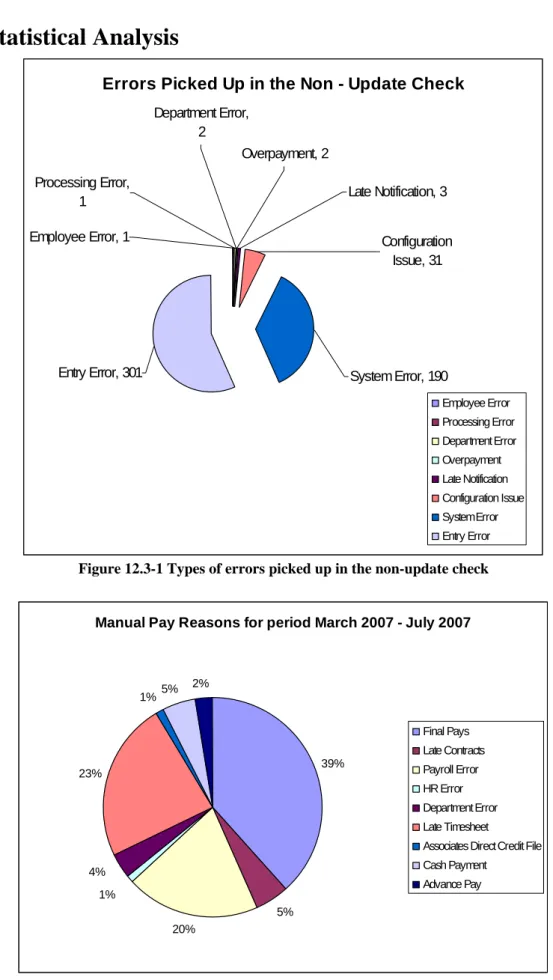
Errors Picked Up in the Non - Update Check
Employee Error, 1 Processing Error, 1 Overpayment, 2 Late Notification, 3 Configuration Issue, 31 Department Error, 2
Entry Error, 301 System Error, 190
Employee Error Processing Error Department Error Overpayment Late Notification Configuration Issue System Error Entry Error
Figure 12.3-1 Types of errors picked up in the non-update check
Manual Pay Reasons for period March 2007 - July 2007
39% 5% 20% 1% 4% 23% 1%5% 2% Final Pays Late Contracts Payroll Error HR Error Department Error Late Timesheet
Associates Direct Credit File Cash Payment
Advance Pay
There is no formal process in place to collect and collate statistics for manual pay reasons. The data shown in Figure 11.2-2 has been collated from informal notes made by the Payroll Processing Team Leader over the period noted above. There were a total of 81 manual pays during this period.
12.4
Process Enquiries
Enquiries received in Payroll Processing include:
• Enquiries from within the University and external to the University regarding deductions from employees e.g. PSA, AUS, Southern Cross
• Enquiries in relation to making errors or omissions
• Enquiries relating to final pays in terms of confirming that all annual leave has been booked • Departments setting up/changing account codes to charge salaries to
• Overpayment queries • What will my first pay be? • How do I join the NZUSS? • Am I being taxed correctly?
• The department may ring to query what account code the employee is being paid from • How do I reclaim reimbursements?
• How do I get access to the Staff Web Kiosk?
12.5
Documentation that supports this process
The Payroll Processing process is supported by several documents (forms, memos etc). Several of these have already been mentioned in the section above as there are issues with them. This section is intended as a reference and contains a comprehensive list of all documents associated with the Payroll Processing process.
Note that the Project Team undertook some investigation outside of the workshops and identified a number of forms (included in this table) that are associated with this process, but were not mentioned at the workshops.
Code Title Description
DOC 152 Offline Termination Form A paper form that is completed by the Payroll Processing Administrator for each termination. The form details information transcribed from Talent2 and is used as a checklist for signing off the final pays DOC 153 NZUSS New Member Key
Steps
This is a one page document that outlines the key steps involved in subscribing a new member to the NZUSS once the application has been received. This includes the steps involved with loading the new member into Talent2, preparing the notification to the budget cost centre holder, sending the forms on to Mercer etc DOC 154 NZUSS Application for
membership form
This form is completed by University staff wanting to join the NZUSS. It is then sent to Human Resources for processing, who then forward the form on to Mercers
Code Title Description
DOC 155 “NZUSS Coversheet” A one page coversheet that is manually completed detailing key information of the new member to the NZUSS. This coversheet is attached to the application form along with the notification to the budget cost centre holder and placed in the tray for payroll checking.
This same coversheet is used when members change their membership details. In these cases, the data detailed on the sheet include the date the change is to take effect from and the new increase/decrease of salary dollars/percentage contribution
DOC 156 “Superannuation Budget Information” notification
This notification is prepared by a specific Senior Payroll Administrator and forwarded to the new NZUSS member’s cost centre head. The notification advises that the person has joined the NZUSS and includes the employee’s details, the date they joined the scheme, the subsidy of salary and current account code
DOC 157 NZUSS Change of Member details Key Steps
This is a one page document that outlines the key steps involved in changing an existing NZUSS member’s details within Talent2. This includes the steps involved in completing the change in member details form, changing the data held within Talent2, sending the forms to Mercer etc
DOC 158 NZUSS Change of Member Details form
This form is completed by University staff wanting to change their NZUSS membership details. It is then sent to Human Resources for processing, who then forward the form on to Mercers
DOC 159 NZUSS Receive Termination Advice Form Key Steps
This is a two page document that outlines the key steps involved in terminating a member’s subscription to NZUSS
DOC 160 NZUSS Termination Advice This form is completed by University staff who wish to cease their membership to NZUSS. It is then sent to Human Resources for processing, who then forward the form on to Mercers.
DOC 161 Tax Calculation A spreadsheet that is used to calculate the tax outside of Talent2
DOC 162 End of Month Reconciliation procedures
Procedures referred to when reconciling payroll control accounts at the end of each month