Mobile Maker
Software Requirements Specification
Version: 1.1
Prepared by: Daniel Retta <[email protected]>
David Carlson <[email protected]>
Marco Sedano <[email protected]>
Nicholas Marks <[email protected]>
Andres Riofrio <[email protected]>
Group name: Warp 5
Instructor: Chandra Krintz
Course: CS 189A, Capstone Project
Lab Section: Wednesday 6pm
Teaching Assistant: Geoffrey Douglas
Date: 3/4/14
Table of Contents
Table of Contents Revisions 1 Introduction 1.1 Document Purpose 1.2 Product Scope 1.3 Intended Audience and Document Overview 1.4 Definitions, Acronyms and Abbreviations 1.5 Document Conventions 1.6 References and Acknowledgments 2 Overall Description 2.1 Product Perspective 2.2 Product Functionality 2.3 Users and Characteristics 2.4 Operating Environment 2.5 Design and Implementation Constraints 2.5.1 Technologies 2.5.2 Other Constraints 2.6 User Documentation 2.7 Assumptions and Dependencies 3 Specific Requirements 3.1 External Interface Requirements 3.1.1 User Interfaces 3.1.1.1 Command Line Interface 3.1.1.2 Graphical User Interface 3.1.2 Hardware Interfaces 3.1.3 Software Interfaces 3.1.4 Communications Interfaces 3.2 Functional Requirements 3.2.1 Database 3.2.2 Interface 3.2.3 User Stories As a Warp 9 developer: As a Magento user: As a novice Magento developer: 3.3 Behaviour Requirements 3.3.1 Use Case View 4 Other Nonfunctional Requirements 4.1 Performance Requirements 4.2 Safety and Security Requirements 4.3 Software Quality Attributes4.3.1 Availability 4.3.2 Dependability 4.3.3 Usability 4.3.4 Flexibility Appendix A Group Log
Revisions
Version
Primary Author(s)
Description of Version
Date Completed
1.0 Nicholas Marks Daniel Retta Marco Sedano David Carlson Andres Riofrio
Initial version. 02/10/14
1.1 Andres Riofrio Daniel Retta Marco Sedano
Revision in accordance with the first version of the Design Document. Added emails to front page. Update the CLI mockup. Update the priorities of user stories.
1 Introduction
Mobile Maker is a tool that allows anyone who has a Magento web store to quickly create a functional, beautiful mobile store and customize it until it's just right. Our first goal is to create a tool that Magento experts like Warp 9 can use. We may later extend it as a selfcontained product that store owners can use.
1.1 Document Purpose
This document specifies the software requirements of our “Mobile Maker”. We cover the whole product in this document and include details such as the product scope, intended audience, product functionality, and use cases. This will serve as a tool to unify and communicate product goals and functionality between Warp 5 and Warp 9 developers.
1.2 Product Scope
Currently, most Magento web stores are unresponsive, meaning that they do not resize to fit into the smaller form factors of phones and tablets. Every store manager must contact Warp 9 and feed every detail to them about how they want their Magento website to look, which can be overbearing for the developers. By creating a mobile website template application, store managers will be able to customize their own store and change it any time at their discretion. Our first goal is to automate many of the repetitive tasks Warp 9 developers encounter when first designing a mobile website for a Magento user. In the end, we wish to have a simple mobile website template generator which would greatly speed up the process Warp 9 developers face when creating a mobile website for a client. Ultimately, we wish to make the template easily customizable by the client.
1.3 Intended Audience and Document Overview
This document is designed to provide detailed information about the Mobile Maker for the CS189 faculty, our Warp 9 sponsors, and anyone interested in learning more about our tool. The
remainder of this section provides key information for navigation and comprehension of this document. The second section will give a complete overview of our tool’s functionality and implementation. The third section will provide a more indepth, comprehensive description of the exact specifications required for each of the application’s components; each component and its interface will be broken down separately, with their functional and behavioral requirements explained.
1.4 Definitions, Acronyms and Abbreviations
● AWS Amazon Web Services ● CLI Command Line Interface ● CS Computer Science ● DBMS Database Management System ● GUI Graphical User Interface ● IEEE Institute of Electrical and Electronics Engineers ● JS JavaScript ● Magento An ecommerce open source web platform ● MS MicroSoft ● PHP PHP (Personal Homepage) Hypertext Preprocessor ● phpMyAdmin A PHP tool for SQL database management ● SQL Structured Query Language ● SRS Software Requirements Specification ● UI User Interface
1.5 Document Conventions
This document uses Arial font for all text excluding the headers, which are Trebuchet MS. Excluding the front page, the body uses size 11 font, the subheaders use size 13 font, the footers use size 11 font, and the headers use size 16 font. The front page title uses size 21 font, and the front page notes uses size 13 font. The headers and subheaders are bolded, and the front page notes are italicized. The front page notes also use dark gray 2 as its text color, the rest of document uses black. The entire document uses 1″ margins.
1.6 References and Acknowledgments
● Apache: http://httpd.apache.org/ ● Creately: http://creately.com/
● Duda Mobile: http://www.dudamobile.com/ ● Magento: http://magento.com/
● Magento Extension Developers Guide:
http://info.magento.com/rs/magentocommerce/images/MagentoExtensionDevelopers Guidev1.0.pdf
● Magento User/Design Guides:
http://www.magentocommerce.com/resources/magentouserguide ● MAMP: http://www.mamp.info/en/index.html
● MySQL: http://www.mysql.com/ ● PHP: http://php.net/
● phpMyAdmin: http://www.phpmyadmin.net/ ● WAMP: http://www.wampserver.com/en/ ● Warp 9: http://www.warp9inc.com/
2 Overall Description
2.1 Product Perspective
Mobile Maker is an extension to Magento, the online eCommerce platform. We will be creating this extension from scratch. However, it will be interacting in accordance to websites already managed by the Magento platform. With Mobile Maker, clients who already have a Magento eCommerce website will be able to easily create a theme for mobile platforms. It will have a frontend and a backend. The user will interact with the frontend when creating a theme, and the Warp 9/ Warp 5 developers will ensure that the backend data interacts correctly. The backend will be a mySQL database, typically hosted on the cloud through AWS.
Figure 1: Operating Environment
2.2 Product Functionality
● Allows users to quickly create a mobile webstore connected to Magento. ● Allows users to quickly customize mobile webstore by layout, color, etc.
○ Change multiple pages color schemes quickly.
○ Move widgets around on the page for most efficient placement. ● Connect mobile webstore to Magento backend.
2.3 Users and Characteristics
1. The main users for phase one of our project are the Warp 9 developers. These will be software engineers with a CS background in web and/or mobile development, and full access to internal servers. This is the core product that will help automate the essential and redundant setup processes required for generating a magentobased, mobile ecommerce website.
2. The second phase of our project will be a webbased application that provides an intuitive UI for the generation of either a bare bones template or fully functioning mobile site that is easily integrated with the Magento Enterprise tool.
3. Based on the depth of completion of phase two, our user base will expand to all ecommerce software developers that use the Magento tools, and possibly even those with little to no programming experience!
2.4 Operating Environment
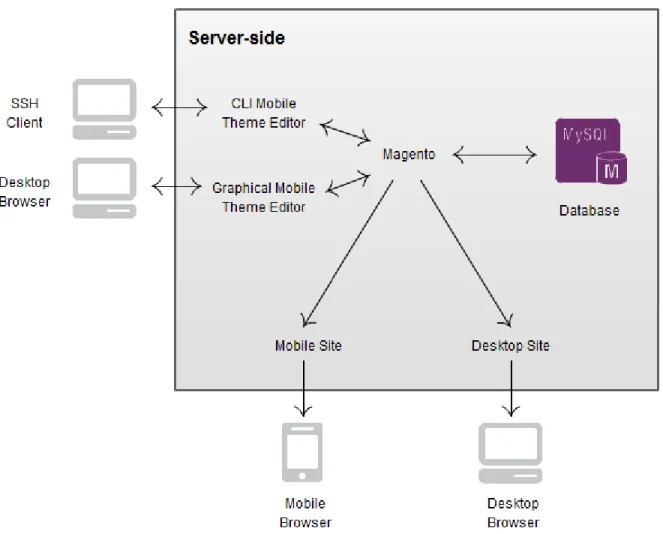
The software will be designed to run in most environments where Magento can run. Specifically, it must be able to run on machines with a web server (usually Apache) and PHP 5.2.13 or newer, running Windows, Linux, or another POSIX operating system. It must not conflict with other Magento extensions. It must interface with the Magento API (and through it, with the underlying database). The mobile template must be compatible with major mobile web browsers. The desktop editor will provide a web interface compatible with major desktop web browsers.
Figure 2: Major components, subsystem connections, and external interface.
2.5 Design and Implementation Constraints
2.5.1 Technologies
● Our program must interact with the Magento backend. We will use PHP and JavaScript to interact between user and Magento.
● We will also use MySQL as the database Magento interacts with. ● AWS servers will be used for development.
2.5.2 Other Constraints
● Our software will be installed into an existing Magento installation. ● Software must be secure. See section 4.2 for more details.
● Clients must be currently using Magento. ● Clients looking for a custom mobile store.
2.6 User Documentation
A completed product would be a web application similar to Duda Mobile’s draganddrop
interface. It would be easy to use and mostly intuitive. However, no application can be completely intuitive. To remedy this, we will make an introduction video to describe the purpose and major features of our software. In addition, we will implement a tutorial into the software for firsttime users. We will also write short articles explaining how to do common tasks with screenshots.
2.7 Assumptions and Dependencies
● We assume the user will have a basic understanding of Mobile technologies and interfaces
● We assume the user will have a Magento website
● We assume the user does not have any additional API’s that will hinder the automation and creation of the website template
● We depend on Magento+PHP+HTML+Javascript operating correctly together ● We depend on Warp 9 servers to be operating correctly at all times
3 Specific Requirements
3.1 External Interface Requirements
3.1.1 User Interfaces
3.1.1.1 Command Line Interface
$ php mobilize.php Mobilize version 1.0 Usage:
[options] command [arguments] Options:
--help -h Display this help message. --quiet -q Do not output any message.
--verbose -v|vv|vvv Increase the verbosity of messages: 1 for normal output, 2 for more verbose output and 3 for debug
--version -V Display this application version. --ansi Force ANSI output.
--no-ansi Disable ANSI output.
--no-interaction -n Do not ask any interactive question. Available commands:
help Display this message list Lists commands
init Add a mobile site and enable it for mobile devices destroy Disable and remove the mobile site
enable Enable the mobile site by adding detection code to the htaccess file
disable Disable the mobile site by removing detection code from the htaccess file
theme-settings Opens the settings.less file
3.1.1.2 Graphical User Interface
What follows is a description of an early concept of what the GUI would look like.
Figure 3: DudaMobile is an example of a mobile website editor with live preview and draganddrop functionality.
The app will allow the user to customize their mobile site, while seeing a live preview on the side of the window. In the navigation, they will be able to select the template to edit (e.g. master template, item view, category view, etc.). On the left pane, they will be able to edit settings related to the template (e.g. which template to inherit from, what the page title will be, etc.), and there will be a list of widgets to insert on the right. On the right pane, a live preview of the site will appear. The user will be able drag and drop widgets between the left pane and the right pane, and to reorder widgets in the right pane via drag and drop. Clicking on a widget on the right will open a settings dialog that will allow the user to customize the widget.
3.1.2 Hardware Interfaces
The program will communicate with the hard drive (the filesystem and database) via the appropriate PHP and Magento APIs. The command line interface will allow the user to
communicate with the program using the keyboard and a terminal display, while the graphical user interface will allow the user to communicate with the program using a keyboard, a mouse, and a graphical display.
Magento utilizes MySQL to store and manage data efficiently. The DBMS will make sure to store data correctly on the hard drive to ensure the definition, creation, querying, update, and
administration of data.
3.1.3 Software Interfaces
● SQL ServerThe SQL server will be the centralized area for data storage. Our Magento module will be stored inside the Magento file system on the server, and will make calls to the database that Magento is linked to.
● PHPmyAdmin
PHPmyAdmin will be the software that the developer uses to directly modify contents of the SQL database. Although our Magento plugin will make direct queries to the
database, if the developer needs to manually modify the tables or table elements they will use PHPmyAdmin as a UI for the SQL database.
● Magento
Magento is the platform that the users will interface with. This is the toolkit that we will be developing our plugin for, and is used to manage the web content with little to no
technical experience.
● Mobile Web Browsers
Our template will need to work properly on major mobile web browsers.
● Desktop Web Browsers
Our template editor will need to work properly on major desktop web browsers.
3.1.4 Communications Interfaces
The user will be able to access our Magento Extension through HTTP/HTTPS and a web browser. The extension allows the user to edit the mobile template. The extension will interface with Magento to access and modify the database.
3.2 Functional Requirements
3.2.1 Database
● The database must be able to store and retrieve all possible options of the various design modules (menus, font, etc.) used for the template
● The database has to store the values of each mobile webstore's saved design, including all of their details used in the design
3.2.2 Interface
● Users must be able to select between a variety of color, formats, models, and styles for each component for their mobile webstore
● Users must be able to preview their webstore after selecting a certain number (actual number TBD) of options for their mobile webstore.
3.2.3 User Stories
Priority Key: [1] Essential, [2] Important, [3] Good to Have As a Warp 9 developer:
● [1] I want to connect frameworks together so that I can link websites to Magento Estore’s. ● [1] I want a PHP script that adds a design change, store view (mobile), and modifies the .htaccess file in order to set up the mobile view. ● [2] I want to customize the colors of a web store store in order to satisfy my clients. ● [3] I want to be able to choose between at least 3 different options for the main navigation menu in order to give my clients options. ● [3] I want to be able to reorder page components in order to satisfy my clients. ● [3] I want to be able to save themes and webpage templates. ● [3] I want to be able to edit multiple themes at once. ● [3] I want to take my desktop website and create a similar mobile website with minimal modifications and similar theme.
As a Magento user:
● [2] I want to automatically add a store view, a design change, and modify the htaccess file in order to quickly get a mobile site up. ● [3] I want to easily generate custom Magento mobile themes. ● [3] I want my mobile site layout customization to be quick and painless. ● [3] I want to be able to resize the buttons, text boxes, widgets, etc... with finger pinches. ● [3] I want to change multiple pages color schemes at the same time ● [3] I want to change one page’s color scheme at a time. ● [3] Move widgets around the website for most efficient placement. ● [3] I want to be able to move components like buttons, menus, etc around to have a better look and feel. ● [3] I want the ability to change the colors on the current page only, as well as all pages linked to this one as if to change the whole websites scheme so that I can group or separate.
As a novice Magento developer:
● [1] I want to be able to run Mobile Maker and exit it successfully, because I am unsure how to debug it or Magento myself.
● [2] I want an intuitive and easy to use UI with minimal code, because I do not have much programming experience.
3.3 Behaviour Requirements
3.3.1 Use Case View
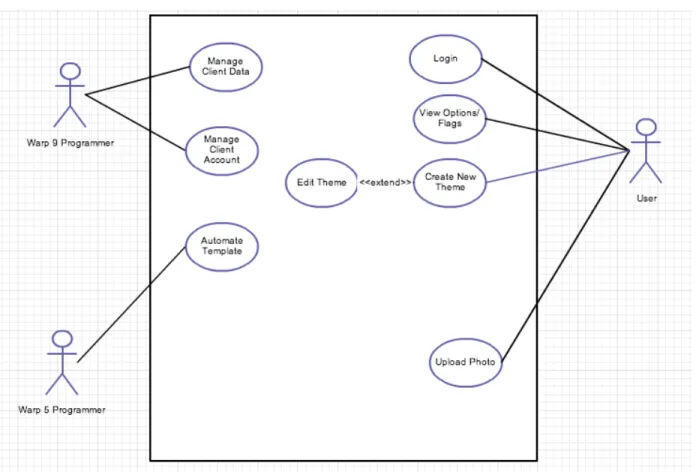
Figure 4: System Use Case Diagram
4 Other Non-functional Requirements
4.1 Performance Requirements
1. Theme updates will be viewable within 30 seconds.
2. Editor drag and drop functionality will have a refresh rate of 20 frames/sec. 3. Navigation bar response should take less than 1 second.
4. Account modifications should take less than 5 seconds.
5. All Magento related information will be updated within Magento system in less than 5 seconds.
● If we develop a product that we sell, it should have a form of Digital Rights Management (DRM) to prevent users from copying the product’s code to unauthorized Magento installations.
● Our product should not introduce security vulnerabilities into the user’s Magento web store or system.
○ For example, since we are using SQL we should prevent SQL injections. ● All user data stored by our centralized servers will be backed up.
4.3 Software Quality Attributes
4.3.1 Availability
● If the DRM depends on a serverside component that we manage, it should be highly available. Alternatively (or additionally), if the server is unreachable the software should work (however, this makes the DRM vulnerable to Airplane Mode attacks).
4.3.2 Dependability
● The application should not fail under normal circumstances, and when it does fail, it should leave the system in a sane state and report the error to the user using clear and concise language.
○ We will use automated testing to achieve this. ● The application should not behave stochastically.
○ We will use automated testing to achieve this.
4.3.3 Usability
● The theme addition process will take no more than 5 steps.
● If we do a command line interface, the commands should be straightforward. ● If we do a graphical user interface, the UI will be intuitive and easy to pick up. ● Code will not be written by the user; it will be automatically generated.
● The theme installation process will be greatly simplified, prompting users for basic information in one centralized interface, and then distributing this information to the various parts of the system.
● The user will not have to navigate to additional web pages or programs, our product will be directly integrated to the magento dashboard.
4.3.4 Flexibility
● The application should work on a wide variety of server configurations.
● Our plugin will be capable of integrating with multiple configurations of Magento, providing a robust and userfriendly experience.
Appendix A - Group Log
Scrum Journal available here:https://docs.google.com/document/d/1NGFzY2jLnkiInNGcBzWzZZ68qXPZU9FShkRpFRMESuM /edit#heading=h.lhj5q58sa788
Our Scrum structure consists of nightly google hangouts for about 15 mins to discuss what each of us has done today and what we will do tomorrow. Once per week we have a longer meeting where we go over important google docs and make large edits together on documents like the vision/SRS. We also assign different sections/tasks to work on individually during this time.
We meet at Warp 9 headquarters every Friday at 11am. Their address is: 1933 Cliff Drive, Suite 11