Contents
Section 1: Features and Product Description 1.1 Features
1.2 Product Description Section 2: U.L. Requirements Section 3: Specifications Section 4: Mounting Section 5: Wiring
5.1 Wire Harness Configuration
5.2 Wiring the 232e Keypad to a Maglock (Fail-Safe) 5.3 Wiring the 232e Keypad to an Electric Strike
(Fail-Secure)
5.4 Shunting a Normally Closed Zone
5.5 Wiring Remote Trigger as Request to Exit (REX) Button and Door Contacts
5.6 Installing the Plug-On Relay Board
5.7 Wiring the Standalone Access Control Relays Section 6: Testing the Keypad
Section 7: Programming
7.1 Programming Main Relay Time 7.2 Programming Users
7.3 Programming Keypad Options Section 8: Troubleshooting
Section 9: Programming Mode Loopback Section 10: Warranty
1. Features and Product
Description
1.1 Features
• Flush Mount• Indoor and Outdoor Use
• Keypad Programmable
• Self-Contained Single Door Access Control Functionality
• Illuminated Backlit Keys
• Keypress Feedback via Built-In Sounder
• Bi-Color Red/Green LED Indicates Relay Status
• Yellow LED Indicates Program Mode
• 120 Users
• 10 to 30 Volt DC Operation
• 12 to 24 Volt AC Operation
• 2 Amp Main Relay
• Lock Release Output With Timer
• Alarm Zone Shunt Relay
• Propped Door Alarm Relay
• Forced Door Alarm Relay
• Remote Trigger Input (REX)
• 5-Year Warranty
1.2 Product Description
The model 232e Keypad is designed for security and is perfect for self-contained access control applications. It features output relays to release the door lock, to shunt an alarm zone, and to trigger both a propped or forced door alert. Also, the 232e Keypad contains in-puts for door monitor and REX. It allows up to 120 users.
All e style keypads are designed for both indoor and outdoor flush mount applications. The electronics for each e keypad are conformal coated in the manufacturing process in order to provide this level of application flexibility. In addition, each e style keypad uses hard-ened keys to assure long-term, high-quality performance. Each e style keypad contains illuminated clear keys that make operation in low-light situations easy and accurate. Installation is easy. All e style keypads mount to any standard single-gang electrical box or directly to any wall.
2. Specifications
Parameter Range/Description
Voltage 10-30 VDC,
12-24 VAC
Current
75mA@10VDC, 100mA@30VDC, 125mA@12VAC, and 200mA@24VAC
Add 20 mA for each alarm relay
Environment Indoor and Outdoor
Temperature Tolerance -20 °F to 130 °F
Dimensions 4.5" H x 2.75" W x 0.60" D
Main Relay (Form C) Contact Rating: 2A @
30VAC/DC Alarm Relays: Alarm Shunt,
Propped Door, Forced Door Relays (Form C)
Contact Rating: 1A @ 24V AC/DC
Section 3. U.L. Requirements
The 232e keypad is a U.L. Listed access control unit. This section contains information regarding all the requirements necessary to meet U.L. requirements.
This system must be installed in accordance with the National Elec-trical code (NFPA70), local codes, and the authorities having juris-diction. In addition, all wires and cables used must be stranded and shielded U.L. Listed and/or recognized wire.
All interconnecting devices (that is, door contacts, REX, locking de-vices, etc.) must be U.L. Listed. A U.L. Listed access control power limited power supply must be used to power the keypad.
A minimum of three user codes must be programmed into the key-pad for controlling access.
3.1 Tamper Requirements
To meet U.L. requirements, a U.L. Listed tamper switch must be in-stalled in the single gang box used for mounting the keypad. The tamper switch must activate if the keypad is removed from the box and must disconnect power from the lock. The lock must be a fail-secure device, meaning the lock remains locked when power is re-moved. In addition, once the tamper device is activated, it must be configured so that it can only be reset from within the protected area. Only a Sentrol 3012 or Sentrol 3025T tamper switch can be used. The diagrams on the next page show the suggested mount-ing location for each device.
Figure 1 Mounting a Sentrol 3012 Tamper Switch
3. Mounting
The keypad is designed to be flush mounted using a standard single-gang electrical box. In addition, it can be flush mounted directly to the wall surface by cutting a hole in the wall. To properly size the mounting and wire access hole, use the installation template on the last page of this manual and on the unit’s container.
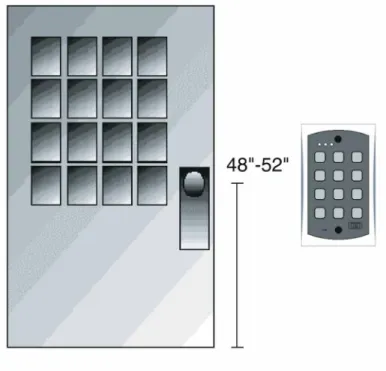
Mounting height can vary depending on requirements. An appropri-ate range is typically between 48 and 52 inches on center off the floor.
For outdoor installations, use a weatherproof backbox and seal the wire entry locations with silicone and provide a drain hole. In addi-tion, use the anti-oxidant grease pack for the wire harness connec-tors.
4. Wiring
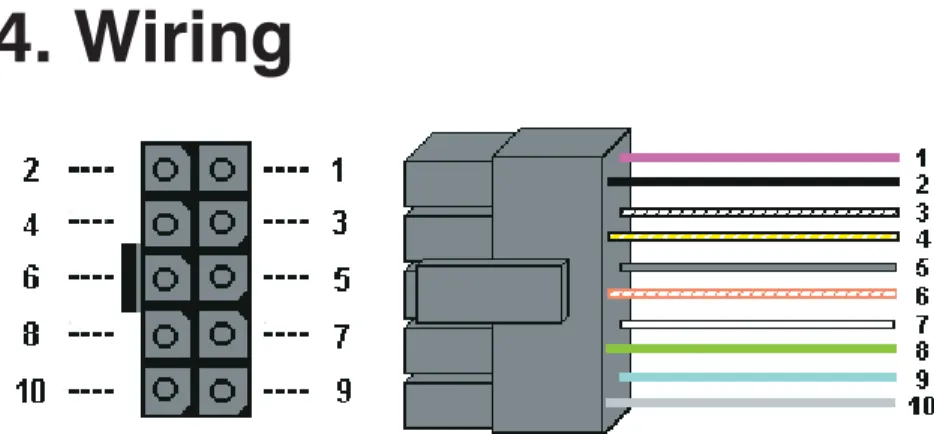
4.1 Wire Harness Configuration
Pin Wire Color Signal Name
1 Red V+
2 Black
V-3 White/Black Not Used
4 White/Yellow Not Used
5 Brown Remote Trigger (REX)
6 White/Orange Loop Common
7 White Door Loop Monitor
8 Green Main Relay - Normally
Open
9 Blue Main Relay - Common
10 Gray Main Relay - Normally
Closed
Figure 4 232e Connector and Wire Harness
NOTE:For Alarm Shunt, Propped Door, and Forced Door wiring, see sections 4.6 and 4.7.
4.2 Wiring the 232e Keypad to a Maglock
(Fail-Safe)
Use the following steps to connect the 232e keypad to a Maglock (Fail-Safe):
1. Connect the red wire (V+) to the blue wire (common), and then connect them to the positive on the power supply. 2. Connect the gray wire (normally closed) to the positive on
the maglock.
3. Connect the black wire (V-) to the negative on the Maglock, and then connect them to the negative on the power supply.
4.3 Wiring the 232e Keypad to an Electric
Strike (Fail-Secure)
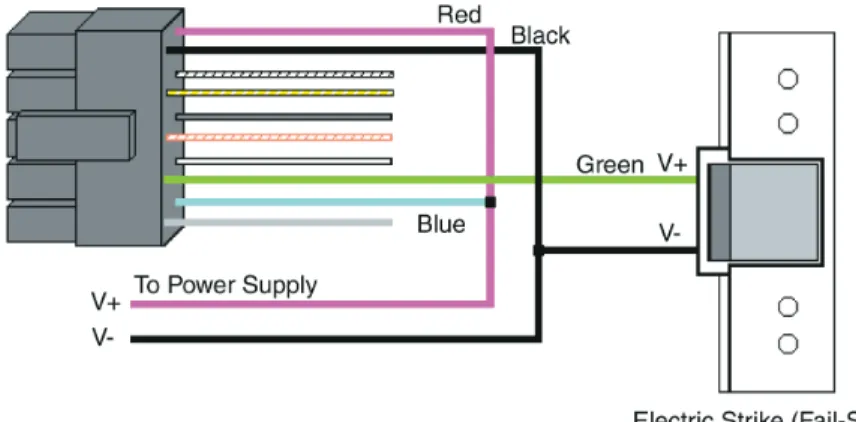
Use the following steps to connect the 232e keypad to an electric strike (fail-secure) (see Figure 6 for reference):
1. Connect the red wire (V+) to the blue wire (common), and then connect them to the positive on the power supply. 2. Connect the green wire (normally open) to the positive on
the strike.
3. Connect the black wire (V-) to the negative on the strike, and then connect them to the negative on the power supply.
4.4 Shunting a Normally Closed Zone
Use the following steps to employ the 232e keypad to shunt a nor-mally closed zone:
1. Connect the blue wire (common) to the common connection on the door position switch.
2. Connect the green wire (normally open) to the normally closed connection on the door position switch.
Figure 6 Wiring 232e Keypad to Electric Strike
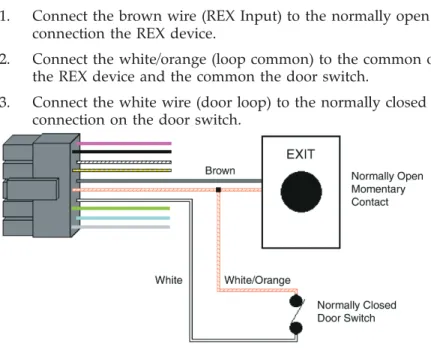
4.5 Wiring Remote Trigger as Request to Exit
(REX) Button and Door Contacts
Use the following steps to connect the 232e keypad to a normally open REX device and normally closed door switch:
1. Connect the brown wire (REX Input) to the normally open connection the REX device.
2. Connect the white/orange (loop common) to the common on the REX device and the common the door switch.
3. Connect the white wire (door loop) to the normally closed connection on the door switch.
NOTE: By default, the REX function operates the virtual lock out-put only, but this can be changed using command 49. In addition, the door loop does not need to be closed for the REX function to operate, by default, but setting option 8 to 0 under command 30 programs the REX function to operate only when the door loop is closed. This prevents the REX from re-triggering when the door is open.
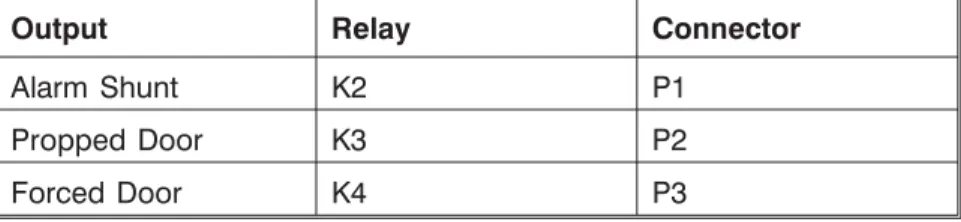
Output Relay Connector
Alarm Shunt K2 P1
Propped Door K3 P2
Forced Door K4 P3
Use the wire harnesses supplied with the relay board to connect to the relays. The wire colors are shown in the table below.
Wire Color Relay Connection
Green Normally Open
Blue Common
Gray Normally Closed
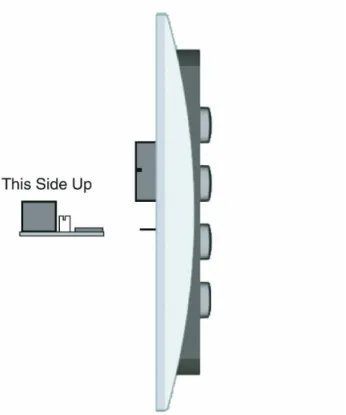
Figure 10 Plugging on Relay Board
To install the relay board, plug the connector onto P3 on the key-pad. The relay must face up towards the keypad wire harness con-nector P2.
NOTE: You MUST wire a normally closed door switch, as shown in Figure 6, for these functions to work properly.
1. (Wiring the alarm shunt) Using P1 (K2), connect the blue wire (common) to common on the door switch. Connect the green wire (normally open) to the normally closed contact on the door switch.
2. (Wiring the propped door alarm) Using P2 (K3), connect the green wire (normally open) to the positive on the alarm device. Connect the blue wire (common) to the positive on the power supply. Connect the negative on the alarm device to the negative on the power supply.
3. (Wiring the forced door alarm) Using P3 (K4), connect the green wire (normally open) to the positive on the alarm device. Connect the blue wire (common) to the positive on the power supply. Connect the negative on the alarm device to the negative on the power supply.
5. Testing the Keypad
After installing the keypad, IEI recommends that you perform the keypad self-test once a year, to ensure that the keypad works prop-erly.
1. To perform the self-test, with the unit powered up, press the following keys on the keypad:
7890#123456*
• If all 12 keypresses are accepted, the keypad enters self-test mode.
• The LEDs alternate green, yellow, and red followed by the sounder beeping three times.
2. Verify that the master code works correctly. (The master code accesses program mode and activates the main relay to verify that the locking device is working.)
6. Programming
To program the 232e keypad, you must first enter program mode by pressing 99 # Master Code *. The default Master Code is 1234.
6.1 Programming Main Relay Time
Command/Action Keys to Enter/Details Command 11,Set Main Relay Time
11 # time # 0 # **
(Time can be from 1-255 seconds.) Command 44.
Set Propped Door Time
44 # time # 0 # **
Options:
time
Propped Door Time - rounded down to nearest 10’s of seconds; entered as 00, 10 through 990, defaults to 30 seconds; entering a time of zero disables the function
Command 45. Set Forced Door Time Options:
time
Forced Door Time - rounded down to nearest 10’s of seconds; entered as 00, 10 through 990, defaults to 10 seconds; entering a time of zero latches the virtual forced door that can be cleared with any valid PIN or by entering program mode
6.2 Programming Users
Command/Action Keys to Enter/Details
Master Code
User #1 is the master code; it can access all commands in program mode. The default code is 1234.
Supervisor Code
User #2, when programmed, is the supervisor code. The supervisor can access program mode, but is limited to adding and deleting users, as well as enabling or disabling users. The supervisor code can not change, delete, or disable the master code or supervisor code itself. Add User user location # code * code *
Add User with Specific Unlock Time
unlock time # user location # code * code * (This command is used to program a user with a specific unlock. This user activates the main relay.)
Add Toggle User 0 # user location # code * code * (This user latches the main relay.) Delete User user location # * *
Command 56.
Enable/Disable User 56 # enable/disable # user location # * *
Options: 1 = Disable
0 = Enable
The master code and supervisor code cannot be disabled.
keypad options
Option Set/Clear
0 - audio keypress feedback 0=disabled, 1=ENABLED
1 - visual keypress feedback 0=disabled, 1=ENABLED
2 - auto-entry enable 0=DISABLED, 1=enabled 3 - error lockout 0=disabled, 1=ENABLED
6 - keypad illumination 0=disabled, 1=ENABLED
7 - keypad dimming 0=disabled, 1=ENABLED
8 - REX operation 0=only when door loop closed
1=always Defaults are in bold.
Auto-entry
When auto-entry is enabled, users with codes the same length as the master code do not have to press the * key after entering their code. If you have a code greater than the master code, you can use Auto-Entry Suspend. Just enter the # key prior to your code followed by the * key. Example:
# 23456 * if the master code is four digits.
Error Lockout
When enabled, the keypad keeps track of the number of consecutive invalid codes entered, including attempts to access program mode. When the threshold is reached, the yellow LED turns on solid and the keypad no longer responds to key presses for the programmed time duration. The count is reset by entering a valid code, including entering program mode. The error lockout threshold and duration is
programmed with command 32.
Keypad Illumination Keypad backlighting can be enabled or disabled.
Keypad Dimming
When enabled, the backlighting illumination level decreases 15 seconds after the last key press. When disabled, the backlighting remains at full illumination at all times.
Command Action Keys to Enter/Details Command 32.
Change Keypad Parameters
32 # parameter # value # * *
Parameter Value
2 - error lockout threshold 1 through 50 (defaults to 3) 3 - error lockout duration 1 through 255 (defaults to 10)
Command 40. Reset defaults only.
40 # 00000 # 00000 # ** (master code, all keypad options and parameters) Command 46. Erase
Users and Reset Default Settings.
7. Troubleshooting
Refer to this section if the 232e keypad is not operating correctly as described in this manual.
Problem Solution
The LEDs are slowly cycling from right to left and backlighting is off.
The 232e keypad is designed to monitor the input voltage and this is an indication of
under-voltage. The under-voltage threshold is set to 8.5VDC, and when the voltage drops below this limit, the low voltage warning starts and backlighting is turned off. To solve, raise the voltage to between 12-24V.
The LEDs are rapidly cycling from left to right and the keypad has lost all operation.
The 232e keypad is designed to monitor the input voltage, and this is an indication of
over-voltage. The over- voltage threshold is set to 36VDC, and when the voltage rises above this limit, the over-voltage warning starts and the keypad loses all operation. To solve, lower the voltage to between 12-24V.
The master code does not work.
Perform the programming mode loopback and reset the master code using the programming command.
No LEDs are lit on the keypad
Power is not reaching the keypad. Using a voltmeter, confirm that there is voltage at the keypad on the red and black wires. If there is no voltage at the keypad, verify that there is voltage at the power supply. If there is no voltage at the power supply, call the manufacturer of the power supply. If there is voltage at the power supply but not at the keypad, verify there is no break in the wires, then check continuity in the whole length of the wire run. To verify that the keypad is working, you can power the keypad with a 12-Volt Battery.
If the 232e Keypad still does not work after troubleshooting, please call IEI’s technical support department at 1-800-343-9502 (outside MA) or 1-800-733-9502 (inside MA). Operating hours are Monday
8. Programming Mode
Loopback
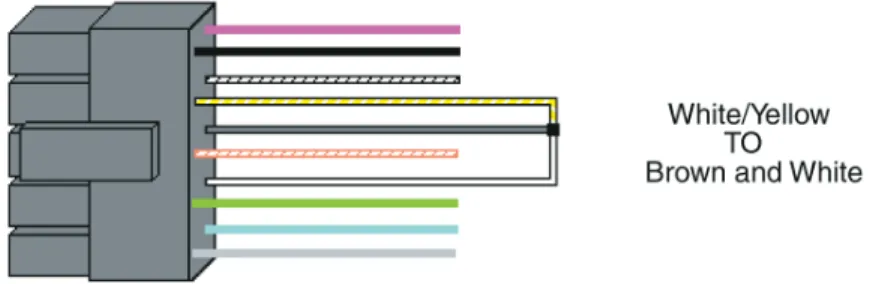
If the master code is either not working or forgotten, power down the system, connect the wire harness as shown in Figure 12 below, and then power the system up again. Next, change your master code and power down the system and restore the wire har-ness to its original configuration and power the system back up.
First, disconnect power from the system. Next, connect the White/Yellow wire to the Brown (REX) and White wire as shown in Figure 12. Finally, power up the keypad again.
9. Warranty
International Electronics Inc. (IEI) warrants its products to be free from defects in material and workmanship when they have been installed in accordance with the manufacturer’s instructions and have not been modified or tampered with. IEI does not assume any responsibility for damage or injury to person or property due to improper care, storage, handling, abuse, misuse, normal wear and tear, or an act of God.
IEI’s sole responsibility is limited to the repair (at IEI’s option) or the replacement of the defective product or part when sent to IEI’s facility (freight and insurance charges prepaid) after obtaining
IEI’s Return Material Authorization.IEI will not be liable to the purchaser or any one else for incidental or consequential damages arising from any defect in, or malfunction of, its products.
Except as stated above, IEI makes no warranties, either expressed or implied, as to any matter whatsoever, including, and without limitation to, the condition of its products, their merchantability, or fitness for any particular purpose.
Warranty Periods Are:
1 Year PowerKey
2 Years Door Gard & Secured Series Products
2 Years LS Series 2 Years Glass Break 5 Years 'e' Series Keypads
All products have date code labeling to determine the warranty period. A 90-day grace period is added to all products to account for shelf life.