Data Structures
UNIT III
Model Question Answer
Q.1. Define Stack? What are the different primitive operations on Stack?
Ans: Stack:
A stack is a linear structure in which items may be added or removed only at one end. Stacks are data structures that allow insertions and deletions operations only at the beginning or the end of the list, not in the middle.A stack
is a last in, first out (LIFO) data structure. Items are removed from a stack in
the reverse order from the way they were inserted.
Examples of such a structure: a stack of dishes, a stack of pennies and a stack of folded towels.
Other names used for stacks are "piles" and "push-down lists. Stack has many important applications in computer science. The notion of recursion is fundamental in computer science. One way of simulating recursion is by means of stack structure. Let we learn the operations which are performed by the Stacks.
Figure 1.12
Array implementation of stacks
To implement a stack, items are inserted and removed at the same
end (called the top)
Efficient array implementation requires that the top of the stack be
towards the center of the array, not fixed at one end
To use an array to implement a stack, you need both the array itself
and an integer
The integer tells you either:
Which location is currently the top of the stack, or
How many elements are in the stack
Operations On Stack:
A stack is a list of elements in which an element may be inserted or deleted only at one end, called the top of the stack. This means, that elements which are inserted last will be removed first. Special terminology is used for two basic operation associated with stacks:
(a) "Push" is the term used to insert an element into a stack.
(b) "Pop" is the term used to delete an element from a stack. Apart from these operations, we could perform these operations on stack:
(i) Create a stack
(ii) Check whether a stack is empty (iii) Check whether a stack is full (iv) Initialize a stack
(v) Read a stack top (vi) Print the entire stack.
Q.2. What are the different stack applications? Explain recursion?
Ans:
Applications of stack:
There are a number of applications of stacks such as;
1) To print characters/string in reverse order.
2) Check the parentheses in the expression.
3) To evaluate the arithmetic expressions such as, infix, prefix and postfix.
Recrusion is explained in Q.6 Answere
Q.3. What are polish notations? Explain them?
Ans:
Polish Notation
In polish notation, the operator symbol is placed between its two operands. For example,
A + B C - D E * F G / H
This is called infix notation. With this notation, we must distinguish between (A + B) * C and A + (B * C)
by using either parentheses or operator-precedence convention such as the usual precedence levels discussed above. Accordingly, the order of the operators and operands in an arithmetic expression does not uniquely determine the order in which the operations are to be performed.
An expression is defined as a number of operands or data items combined using
several operators. There are basically three types of notations for an expression;
1) Infix notation
2) Prefix notation
3)
Postfix notation
Infix notation:
It is most common notation in which, the operator is written or
placed in-between the two operands. For eg. The expression to add two
numbers A and B is written in infix notation as,
A+ B Operands
Operator
In this example, the operator is placed in-between the operands A and B. The
reason why this notation is called infix.
Prefix Notation:
It is also called Polish notation, named after in the honor of
the mathematician Jan Lukasiewicz, refers to the notation in which the operator
is placed before the operand as,
+AB
As the operator ‗+‘ is placed before the operands A and B, this notation is
called prefix (pre means before).
Postfix Notation:
In the postfix notation the operators are written after the
operands, so it is called the postfix notation (post means after), it is also known
as suffix notation or reverse polish notation. The above postfix if written in
postfix notation looks like follows;
AB+
Let we translate, step by step, the following infix expressions into Polish notation using brackets [ ] to indicate a partial translation:
(A + B) * C = [+AB] * C = * +ABC
(A + B) / (C - D) = [+AB] / [-CD] = / +AB – CD
The fundamental property of Polish notation is that the order in which the operations are to be performed is completely determined by the positions of the operators and operands in the expression. There is no need of parentheses when writing expressions in Polish notation. The computer usually evaluates an arithmetic expression written in infix notation in two steps. First, it converts the expression to postfix notation, and then it evaluates the postfix expression.
Q.4. Write an algorithm of conversion from infix to postfix expression?
Ans :
Conversion of Infix Expressions into Postfix Expressions
Let Q be an arithmetic expression written in infix notation. The following algorithm transforms the infix expression Q into its equivalent postfix expression P. The algorithm uses a stack to temporarily hold operators and left parentheses. The postfix expression P will be constructed from left to right using the operands from Q and the operators which are removed from STACK. We begin by pushing a left parenthesis onto STACK and adding a right parenthesis at the end of Q. The algorithm is completed when STACK is empty.
Algorithm : POLISH(Q,P)
Suppose Q is an arithmetic expression written in infix notation. This algorithm finds the equivalent postfix expression P
1. Push "(" onto STACK, and add ")" to the end of Q.
2. Scan Q from left to right and repeat Steps 3 to 6 for each element of Q until the STACK is empty
3. If an operand is encountered, add it to P.
4. If a left parenthesis is encountered, push it onto STACK. 5. If an operator (x) is encountered, then:
a) Repeatedly pop from STACK and add to P each operator (on the top of STACK) which has the same precedence as or higher precedence than (x)
b) Add (x) to STACK. [End of If structure.]
6. If a right parenthesis is encountered, then:
a) Repeatedly pop from STACK and add to P each operator (on top of STACK) until a left parenthesis is encountered. b) Remove the left parenthesis. [Do not add the left
parenthesis to P.] [End of If structure.]
[End of Step 2 loop.] 7. Exit.
Example
Let we see the example. Consider the following arithmetic infix expression Q: A + (B * C - (D / E ↑ F) * G) * H
We transform Q using algorithm 1.4 into its equivalent postfix expression P. First we push "(" onto STACK, and then we add ")" to the end of Q to obtain:
Q: A + ( B * C - ( D / E ↑ F ) * G ) * H )
We may observe that the Figure 1.16 shows the status of STACK and of the string P as each element of Q is scanned.
Symbol Scanned STACK Expression P (1) A ( A (2) + ( + A (3) ( ( + ( A (4) B ( + ( A B (5) * ( + ( * A B (6) C ( + ( * A B C (7) - ( + ( - A B C * (8) ( ( + ( - ( A B C * (9) D ( + ( - ( A B C * D (10) / ( + ( - ( / A B C * D (11) E ( + ( - ( / A B C * D E (12) ↑ ( + ( - ( / ↑ A B C * D E (13) F ( + ( - ( / ↑ A B C * D E F (14) ) ( + ( - A B C * D E F ↑ / (15) * ( + ( - * A B C * D E F ↑ / (16) G ( + ( - * A B C * D E F ↑ / G (17) ) ( + A B C * D E F ↑ / G * -(18) * ( + * A B C * D E F ↑ / G * -(19) H ( + * A B C * D E F ↑ / G * - H (20) ) A B C * D E F ↑ / G * - H * +
Q.5 How the postfix expression can be evaluated? Give an algorithm?
Ans:
Evaluation of a Postfix Expression
Suppose P is an arithmetic expression written in postfix notation. The following algorithm uses a STACK to hold operands, evaluates P
Algorithm This algorithm finds the VALUE of an arithmetic expression P written inpostfix notation.
1. Add a right parenthesis ")"at the end of P. [This acts as a sentinel]. 2. Scan P from left to right and repeat Steps 3 and 4 for each
element of until the sentinel ")" is encountered. 3. If an operand is encountered, put it on STACK. 4. If an operator (x) is encountered, then:
a) Remove the two top elements of STACK, where A is the top element and B is the next-to-top element. b) Evaluate B (x) A.
c) Place the result of (b) back on STACK
[End of If structure.] [End of Step 2 loop.]
5. Set VALUE equal to the top element on STACK. 6. Exit.
Example
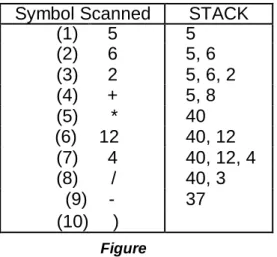
Consider the following arithmetic expression P written in postfix notation: P: 5, 6, 2, +, *, 12, 4, /, -
(Commas are used to separate the elements of P so that 5, 6, 2 is not interpreted as the number 562.) The equivalent infix expression Q follows:
Q: 5 * (6 + 2) - 12 / 4
We evaluate P using algorithm 1.3. First we add a sentinel right parenthesis at the end of P to obtain
P: 5, 6, 2, +, *, 12, 4, /, -, )
(1) (2) (3) (4) (5) (6) (7) (8) (9) (10)
Figure 1.15 shows the contents of STACK as each element of P is scanned. The final number in STACK, 37, which is assigned to VALUE when the sentinel “)” is scanned, is the value of P.
Symbol Scanned STACK
(1) 5 5 (2) 6 5, 6 (3) 2 5, 6, 2 (4) + 5, 8 (5) * 40 (6) 12 40, 12 (7) 4 40, 12, 4 (8) / 40, 3 (9) - 37 (10) ) Figure
Q.6. What do you mean by Recursion? Explain with the example?
Ans :
RECURSION
Recursion is an important concept in computer science. Many algorithms can be best described in terms of recursion. Let we discuss, how recursion may be useful tool in developing algorithms for specific problems. Consider P is a procedure containing either a Call statement to itself or a Call statement to a second procedure that may eventually result in a Call statement back to the original procedure P. Then P is called a recursive procedure. A recursive procedure must have the following two properties:
1) There must be certain criteria, called base criteria, for which the procedure does not call itself.
2) Each time the procedure does call itself (directly or indirectly); it must be closer to the base criteria.
A recursive procedure with these two properties is said to be well-defined. Similarly, a function is said to be recursively defined if the function definition refers to itself.
The following examples should help us to clarify these ideas.
Factorial Function
The product of the positive integers from 1 to n, inclusive, is called "n factorial" and is usually denoted by n!:
n! = 1 . 2 . 3 . . . (n - 2) (n - 1) n It is also defined that 0! = l. Thus we have,
5! = 1 . 2 . 3 . 4 . 5 = 120 and 6! = 1 . 2 . 3 . 4 . 5 . 6 = 720 This is true for every positive integer n; that is, n! = n . (n - 1)! Accordingly, the factorial function may also be defined as follows:
Definition: (Factorial Function)
(a) If n = 0, then n!= 1.
(b) If n > 0, then n! = n . (n-1)!
Example
Let us calculate 4! using the recursive definition. This calculation requires the following nine steps:
(1) 4! = 4 . 3! (2) 3! = 3 . 2! (3) 2! = 2 . 1! (4) 1! = 1. 0! (5) 0! = 1 (6) 1! = 1. 1 = 1 (7) 2! = 2 . 1 = 2 (8) 3! = 3 . 2 = 6 (9) 4! = 4 . 6 = 24
Let we learn the procedure 1.3 that calculate n! This procedure calculates n! and returns the value in the variable FACT.
Procedure 1.3:FACTORIAL (FACT, N)
1. If N = 0 then: Set FACT: =1, and return. 2. Call FACTORIAL (FACT, N-1).
3. Set FACT := N * FACT. 4. Return.
Q.7. What do you mean by Queue? Explain the primitive operations can be
performed on queues?
A queue is a linear structure in which element may be inserted at one end called the
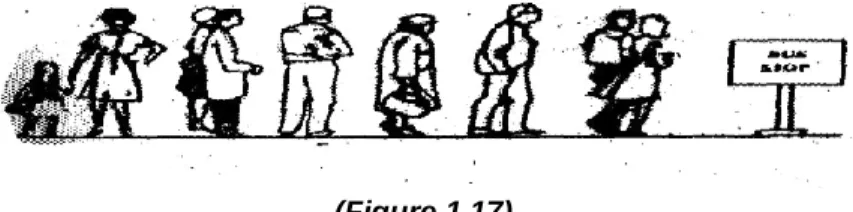
rear, and the deleted at the other end called the front. Figure 1.17 pictures a queue of people waiting at a bus stop. Queues are also called first-in first-out (FIFO) lists. An important example of a queue in computer science occurs in a timesharing system, in which programs with the same priority form a queue while waiting to be executed. Similar to stack operations, operations that are define a queue.
(Figure 1.17)
REPRESENTATION OF QUEUES
Queues may be represented in the computer in various ways, usually by means of one-way lists or linear arrays. Queues will be maintained by a linear array QUEUE and two pointer variables: FRONT, containing the location of the front element of the queue; and REAR, containing the location of the rear element of the queue. The condition FRONT = NULL will indicate that the queue is empty. Figure, indicates the way elements will be deleted from the queue and the way new elements will be added to the queue.
Figure : Array Representation of a Queue
Observe that whenever an element is deleted from the queue, the value of FRONT is increased by 1; this can be implemented by the assignment
FRONT := FRONT + 1
Similarly, whenever an element is added to the queue, the value of REAR is increased by 1; this can be implemented by the assignment
REAR := REAR + 1
Assume QUEUE is circular, that is, that QUEUE[1] comes after QUEUE[N] in the array. With this assumption, we insert ITEM into the queue by assigning ITEM to QUEUE[1]. Specifically, instead of increasing REAR to N+1, we reset REAR=1 and then assign,
QUEUE[REAR]:= ITEM
Similarly, if FRONT=N and an element of QUEUE is deleted, we reset FRONT=1 instead of increasing FRONT to N+1. Suppose that our queue contains only one element, i.e., suppose that
and suppose that the element is deleted. Then we assign FRONT: = NULL and REAR:= NULL to indicate that the queue is empty.
Primitive Operations
The primitive operations can be performed on queues are: 1) Insertion of Element
2) Deletion of an Element.
Q.8. What are the limitations of simple queue? Explain how it can be
solved?
Ans:
Limitations of queue in data structure
A queue is a particular kind of collection in which the entities in the
collection are kept in order and the principal operations on the collection
are the addition of entities to the rear terminal position and removal of
entities from the front terminal position. This makes the queue a
First-In-First-Out (FIFO) data structure. In a FIFO data structure, the first element
added to the queue will be the first one to be removed.
Some Applications:
1) Serving requests of a single shared resource (printer, disk, CPU),
transferring data asynchronously (data not necessarily received at same
rate as sent) between two processes (IO buffers), e.g., pipes, file IO,
sockets.
2) Call center phone systems will use a queue to hold people in line until a
service representative is free.
3) Buffers on MP3 players and portable CD players, iPod playlist. Playlist for
jukebox - add songs to the end, play from the front of the list.
4) When programming a real-time system that can be interrupted (e.g., by a
mouse click or wireless connection), it is necessary to attend to the
interrupts should be handles in the same order they arrive, then a FIFO
queue is the appropriate data structure.
Q.9. What do you mean by Circular queue? What are the different
operations can be performed on Circular Queue?
Ans:
What is Circular Queue?
A circular queue is a particular implementation of a queue, which is an abstract data type that contains a collection of data (like an array) which allows addition of data at the end of the queue and removal of data at the beginning of the queue. Like a linear queue, it is a First-In-First-Out (FIFO) data structure, meaning that the first element added to the queue will be the first one to be removed. A circular queue is bounded, meaning it has a fixed size.
Circular Queue is a linier Data Structure in which elements are arranged such that first
element in the queue follows the last element.
The limitation of simple queue is that even if there is a free memory space available in
the simple queue we can not use that free memory space to insert element. Circular
Queue is designed to overcome the limitation of Simple Queue.
Linear Queues vs Circular Queues
1. Linear queues by theory do not have a specific capacity and new elements can always be added to the queue; queues that have a fixed capacity are called bounded queues. In practical usage queues are bounded.
2. Circular queues have a fixed size, like bounded queues.
3. The end of a linear queue points to NULL indicating the end of the queue, while the end of a circular queue points to the beginning of the queue, thus completing the circle. 4. Linear queues do not allow overwriting of existing data. When the queue is full, new data cannot be inserted until old data is freed. Linear queues must pass both ―Queue
Empty‖ test before dequeue operation and ―Queue Full‖ test before enqueue operation. Circular queues are only required to pass ―Queue Empty‖ test, and depending on the application the ―Queue Full‖ test is optional. When new data is enqueued into a circular queue, the oldest data of the queue is overwritten.
How Circular Queues Work
Circular queues use two pointers, head and tail to indicate the beginning of the queue and the end of the queue. Head pointer points to the location in the queue to be dequeued, and
tail pointer points to the location in the queue to enqueue. With that said, a circular queue is empty/full when head equals tail
Here‘s what happens when a circular queue is full:
Imagine a full circular queue of size 6 containing the following data, where the leftmost element is the oldest data – both head and tail pointers point to the location containing ‘1′:
{1, 2, 3, 4, 5, 6} -> Head: &‘1′, Tail: &‘1′
At this point, the circular is full. If you enqueue the number ‘7′, the result would be: {7, 2, 3, 4, 5, 6} -> Head: &‘2′, Tail: &‘2′
‘1′ is replaced by ‘7′ since ‘1′ is the oldest element. If you enqueue another number, let‘s say ‘8′ into the queue, it becomes:
{7, 8, 3, 4, 5, 6} -> Head: &‘3′, Tail: &‘3′
At this point, if dequeue is executed twice, both ‘3′ and ‘4′ will be removed, resulting in: {7, 8, 0, 0, 5, 6} -> Head: &‘5′, Tail: leftmost &‘0′
Enqueue the number ‘9′ would give: {7, 8, 9, 0, 5, 6} -> Head: &‘5′, Tail: &‘0′
Implementation
Implementation of circular queues is fairly simple. Circularly linked list is a great choice of data structure to implement the queue. Another option is to use an array. The only tricky part is when evaluating ―Queue Full‖ and ―Queue Empty‖ tests because both head
and tail pointers are equal in both cases. There are a number of ways to work around this: 1. Keep track of the number of elements in the queue.
2. Let the queue hold 1 more element than the specified length so that the queue is never full.
3. Instead of having the ‗tail‘ pointer point at the next address to write data at, let it point at the address of the last element.
Below is an implementation of circular queues using the array structure, and having the
tail pointer point at the location of the last element instead.
Q.10. Give an algorithm to insert and element in a circular queue and
delete an element from a circular queue?
Ans:
Operations Performed on Circular Queue
There are two main operations that can be performed on Circular Queue.
Insert Operation
Insert operation is used to insert an element into Circular Queue.
In order to insert an element into Circular Queue first we have to check weather space is available in the Circular Queue or not. If Circular Queue is full then we can not insert an element into Circular Queue. If value of REAR variable is greater then or equal to SIZE – 1 and value of FRONT variable is equal to 0 then we can not insert an element into Circular Queue. This condition is known as ―Overflow‖.
If Queue is not overflow then we have to set the value of REAR variable and then we can insert an element into Circular Queue.
Step 1: If REAR = SIZE-1 then
REAR = 0 Else
REAR=REAR + 1
Step 2: If FRONT = REAR then
Write ("Circular Queue Overflow")
Step 3: CQ[REAR]=X
Step 4: If FRONT = -1 then
FRONT=0
Delete Operation
Delete operation is used to delete an element from Circular Queue.
In order to delete an element from Circular Queue first we have to check weather Circular Queue is empty or not. If Circular Queue is empty then we can not delete an element from Circular Queue. This condition is known as ―Underflow‖.
After deleting an element from Circular Queue we have to set the value of FRONT and REAR variables according to the elements in the Circular Queue.
Step 1: If FRONT = -1 then
Write ("Circular Queue Underflow")
Step 2: Return (CQ [FRONT])
Step 3: If FRONT = REAR then
FRONT=REAR=-1
Step 4: If FRONT = SIZE-1 then
FRONT=0 Else
FRONT=FRONT+1
Q.11. Explain Deque? What are the different types of Dequeue?
2 DEQUES
A deque (pronounced either "deck" or "dequeue") is a linear list in which elements can be added or removed at either end but not in the middle. The term deque refers to the name double-ended queue.
There are two variations of a deque - namely, an
1) Input-restricted deque
2) Output-restricted deque
1) Input Restricted Deque: An input-restricted deque is a deque which allows insertions at only one end of the list but allows deletions at both ends of the list.
2) Output-restricted deque is a deque, which allows deletions at only one end of
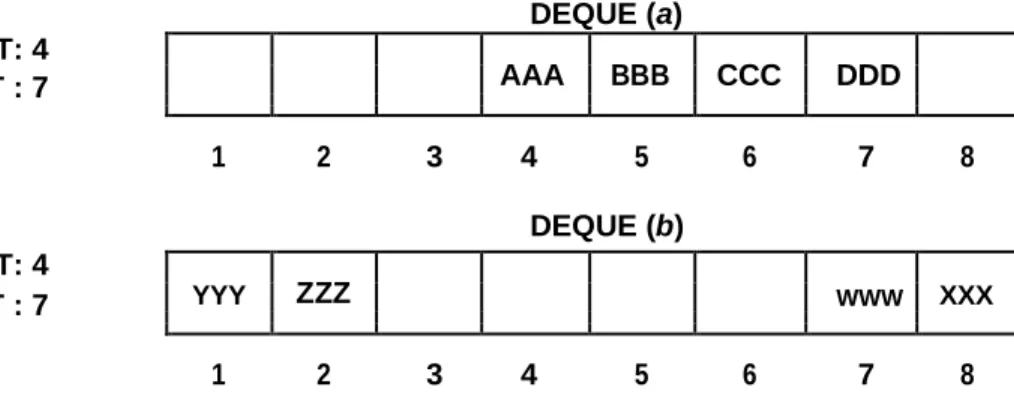
the list buy allows insertions at both ends of the list.
Figure pictures two deques, each with 4 elements maintained in an array with N = 8 memory locations. The condition LEFT = NULL will be used to indicate that a deque is empty. DEQUE (a) LEFT: 4 AAA BBB CCC DDD RIGHT : 7 1 2 3 4 5 6 7 8 DEQUE (b) LEFT: 4 YYY ZZZ WWW XXX RIGHT : 7 1 2 3 4 5 6 7 8
(Figure)
Q.13. What do you mean by priority queue? Explain?
Ans:
PRIORITY QUEUES
A priority queue is a collection of elements such that each element has been assigned a priority and such that the order in which elements are deleted and processed comes from the following rules:
1) An element of higher priority is processed before any element of lower priority.
2) Two elements with the same priority are processed according to the order in which they were added to the queue.
Many application involving queues require priority queues rather than the simple FIFO strategy. For elements of same priority, the FIFO order is used. For example, in a multi-user system, there will be several programs competing for use of the central processor at one time. The programs have a priority value associated to them and are held in a priority queue. The program with the highest priority is given first use of the central processor.
Scheduling of jobs within a time-sharing system is another application of queues. In such system many users may equest processing at a time and computer time divided among these requests. The simlest approach sets up one queue that store all requests for processing. Computer processes the request at the front of the queue and finished it before starting on the next. Same approach is also used when several users want to use the same output device, say a printer.
In a time sharing system, another common approach used is to process a job only for a specified maximum length of time. If the program is fully processed within that time, then the computer goes on to the next process. If the program is not completely processed within the specified time, the intermediate values are stored and the remaining part of the program is put back on the queue. This approach is useful in handling a mix of long and short jobs.
UNIT IV
Linked List
Q.1. What do you mean by Linked List. What are the various operations can
be performed on Linked List.
Ans:
What is Linked List?
Linked list is a collection of Nodes. Each node having two parts. First part represents
value of the node and second part represents an address of the next node. If Next node is not present then it contains NULL value.
Consider Following Presentation of Linked List:
In above presentation FIRST is a pointer which always contains an address of first node in the linked list. If linked list is empty then value of FIRST pointer is NULL.
In Linked List nodes are logically adjacent but physically not adjacent to each other. Because address of first node is 2000, address of second node is 2010 and address of third node is 2002.
Thus in Linked List memory is not allocated sequentially to each node. There are four types of Linked list:
(1) Singly Linked List (2) Doubly Linked List
(3) Singly Circular Linked List (4) Doubly Circular Linked List
Q.2. What are the different types of Linked List available of in data
structure?
Ans:
Types of Linked List
There are four types of linked list:
(1) Singly Linked List
Singly Linked List is a collection of variable number of nodes in which each node
consists of two parts. First part contains a value of the node and second part contains an address of the next node.
Following figure represents a structure of the node.
Consider Following example in which Singly Linked List consist of three nodes. Each node having INFO part and LINK part.
INFO part contains value of the node.
LINK part contains address of the next node in the linked list. If next node is not present then LINK part contains NULL value. Thus LINK part of the last node always contains NULL value to indicate end of the list.
In Singly Linked List we can traverse only in forward direction because LINK part contains address of the next node in the list. It is not possible to traverse in backward direction in Singly Linked List.
Doubly Linked List
Doubly Linked List is a collection of variable number of nodes in which each node
consists of three parts. First part contains an address of previous node, second part contains a value of the node and third part contains an address of the next node. Following figure represents a structure of the node.
Consider Following example in which Doubly Linked List consist of three nodes. Each node having LPTR part, INFO part and RPTR part.
INFO part contains value of the node.
LPTR part contains an address of the previous node in the linked list. If previous node is not present then LPTR part contains NULL value. Thus LPTR part of the first node
always contains NULL value.
RPTR part contains an address of the next node in the linked list. If next node is not present then RPTR part contains NULL value. Thus RPTR part of the last node always contains NULL value to indicate end of the list.
In Doubly Linked List we can traverse in both direction forward direction as well as backward direction because LPTR part contains an address of the previous node in and RPTR part contains an address of the next node the list.
However Doubly Linked List having two pointers it occupies more memory as compared to Singly Linked List.
Singly Circular Linked List
Circular Singly Linked List is a collection of variable number of nodes in which each
node consists of two parts. First part contains a value of the node and second part contains an address of the next node such that LINK part of the last node contains an address of the first node.
Consider Following example in which Circular Singly Linked List consist of three nodes. Each node having INFO part and LINK part.
INFO part contains value of the node.
LINK part contains address of the next node in the linked list. If next node is not present then LINK part contains an address of the first node. Thus LINK part of the last node always contains an address of the first node in the list.
In Circular Singly Linked List each node is accessible from every node in the list. But we have to take necessary care to detect end of the list otherwise processing of Circular Singly Linked List may goes into infinite loop.
Doubly Circular Linked List
Circular Doubly Linked List is a collection of variable number of nodes in which each
node consists of three parts. First part contains an address of previous node, second part contains a value of the node and third part contains an address of the next node such that RPTR part of the last node contains an address of the first node and LPTR part of the first node contains an address of the last node in the list.
Consider Following example in which Circular Doubly Linked List consist of three nodes. Each node having LPTR part, INFO part and RPTR part.
INFO part contains value of the node.
not present then LPTR part contains an address of the last node. Thus LPTR part of the first node always contains an address of the last node in the list.
RPTR part contains an address of the next node in the linked list. If next node is not
present then RPTR part contains an address of the first node. Thus RPTR part of the last node always contains an address of the first node in the list.
In Circular Doubly Linked List each node is accessible from every node in the list. But we have to take necessary care to detect end of the list otherwise processing of Circular Doubly Linked List may goes into infinite loop.
Q.2. Write an algorithm of Inserting an element at following positions:
a) In the beginning
b) In Middle
c) At the end
Q.3. Write an alogorithm of Deleting an element at following positions:
a) In the beginning
b) In Middle
c) At the end
Ans:
Insert New Node at begining of Linked List
In order to insert a new node at the beginning of the list we have to follows the below steps:
(1) First we have to check weather free node is available in the Availability Stack or not. If free node is available then we can allocate memory to new node.
(2) After creating new node we have to check weather linked list is empty or not. We have two possibilities:
(A)Linked List is empty (FIRST=NULL). In this case the newly created node becomes the first node of linked list.
(B)Linked List is not empty (FIRST ≠ NULL). In this case we can insert new node at
the beginning of linked list. Now new node becomes the first node.
Algorithm to Insert New Node at begining of Linked
List
Step 1: If AVAIL=NULL then
Write ―Availability Stack is Empty‖ Else
NEW_NODE=AVAIL AVAIL = AVAIL->LINK
Step 2: If FIRST = NULL then
NEW_NODE -> INFO = X
NEW_NODE -> LINK = NULL FIRST = NEW_NODE
Else
NEW_NODE -> INFO = X NEW_NODE -> LINK = FIRST FIRST = NEW_NODE
Step 3: Exit
Insert New Node Before Given Node in Linked List
In order to insert a new node before a given node in the linked list we have to follows the below steps:
(1) First we have to check weather free node is available in the Availability Stack or not. If free node is available then we can allocate memory to new node.
(2) After creating new node we have to check weather linked list is empty or not. We have two possibilities:
(A) Linked List is empty (FIRST=NULL). Hence list is empty, specified node is not
found in the linked list. In this case we can not insert new node before given node.
(B) Linked List is not empty (FIRST ≠ NULL). In this case we have to traverse from
first node to last node in the list until given node is found. If node is found in the linked list then we can insert new node before that node otherwise we can not insert new node before given node.
Step 1: If AVAIL=NULL then
Write ―Availability Stack is Empty‖
Else
NEW_NODE=AVAIL AVAIL = AVAIL->LINK
Step 2: If FIRST = NULL then
Write ―Specified Node Not Found‖ Else
NEW_NODE -> INFO = VALUE SAVE = FIRST
Repeat while X ≠ SAVE->INFO and SAVE->LINK ≠ NULL PRED = SAVE SAVE = SAVE->LINK If X = SAVE->INFO then PRED->LINK= NEW_NODE NEW_NODE->LINK=SAVE Else
Write ―Specified Node Not Found‖
Step 3: Exit
Insert New Node After Given Node in Linked List
In order to insert a new node after given node in the linked list we have to follows the below steps:
(1) First we have to check weather free node is available in the Availability Stack or not. If free node is available then we can allocate memory to new node.
(2) After creating new node we have to check weather linked list is empty or not. We have two possibilities:
(A)Linked List is empty (FIRST=NULL). Hence list is empty, specified node is not
found in the linked list. In this case we can not insert new node after given node.
(B) Linked List is not empty (FIRST ≠ NULL). In this case we have to traverse from
first node to last node in the list until given node is found. If node is found in the list then we can insert new node after that node otherwise we can not insert new node after given node.
Algorithm to Insert New Node After Given Node
Step 1: If AVAIL=NULL then
Write ―Availability Stack is Empty‖
Else
NEW_NODE=AVAIL AVAIL = AVAIL->LINK
Step 2: If FIRST = NULL then
Write ―Specified Node Not Found‖ Else
NEW_NODE -> INFO = VALUE SAVE = FIRST
Repeat while X ≠ SAVE->INFO and SAVE->LINK ≠ NULL PRED = SAVE SAVE = SAVE->LINK If X = SAVE->INFO then NEW_NODE->LINK= SAVE->LINK SAVE->LINK=NEW_NODE Else
Write ―Specified Node Not Found‖
Step 3: Exit
Insert New Node at end of Linked List
In order to insert a new node at the end of the list we have to follows the below steps:
(1) First we have to check weather free node is available in the Availability Stack or not. If free node is available then we can allocate memory to new node.
(2) After creating new node we have to check weather linked list is empty or not. We have two possibilities:
(A) Linked List is empty (FIRST=NULL). In this case the newly created node becomes
the first node of linked list.
(B) Linked List is not empty (FIRST ≠ NULL). In this case we have to traverse from
first node to last node in the list and insert new node at the end of linked list.
Algorithm to Insert New Node at end of Linked List
Step 1: If AVAIL=NULL then
Write ―Availability Stack is Empty‖
Else
NEW_NODE=AVAIL AVAIL = AVAIL->LINK
Step 2: If FIRST = NULL then
NEW_NODE -> INFO = X
NEW_NODE -> LINK = NULL FIRST = NEW_NODE
Else
NEW_NODE -> INFO = X NEW_NODE -> LINK = NULL SAVE = FIRST
Repeat while SAVE->LINK ≠ NULL SAVE = SAVE->LINK
SAVE->LINK = NEW_NODE
Q.4. Define two way list? What are the importance of headers in it?
Ans:
TWO-WAY LISTS
Let we discuss a two-way list, which can be traversed in two directions, either
1. in the usual forward direction from the beginning of the list to the end, or
2. in the backward direction from the end of the list to the beginning.
Furthermore, given the location LOC of a node N in the list, one now has immediate access to both the next node and the preceding node in the list. This means, in particular, we may able to delete N from the list without traversing any part of the list.
A two-way list is a linear collection of data elements, called nodes, where each node N is divided into three parts:
1. An information field INFO which contains the data of N
2. A pointer field FORW which contains the location of the next node in the list 3. A pointer field BACK which contains the location of the preceding
node in the list
The list also requires two list pointer variables: FIRST, which points to the first node in the list, and LAST, which points to the last node in the list. Figure 1.29 contains a schematic diagram of such a list. Observe that the null pointer appears in the FORW field of the last node in the list and also in the BACK field of the first node in the list.
(Figure : Two way list)
Observe that, using the variable FIRST and the pointer field FORW, we can traverse a two-way list in the forward direction. On the other hand, using the variable LAST and the pointer field BACK, we can also traverse the list in the backward direction.
Suppose LOCA and LOCB are the locations, of nodes A and B in a two-way list respectively. Then the way that the pointers FORW and BACK are defined gives us the following:
Pointer property: FORW[LOCA] = LOCB if and only if BACK[LOCB] = LOCA In other words, the statement that node B follows node A is equivalent to the statement that node A precedes rode B.
Two-Way Header Lists
two-way circular header list as pictured in Figure. The list is circular because the two end nodes point back to the header node. Observe that such a two-way list requires only one list pointer variable START, which points to the header node. This is because the two pointer in the header node point to the two ends of the list.
(Fig. : Two-way circular header list)
Q.5. What do you mean by Circular Linked List? What are the operations can be
performed with circular linked list.
Ans:
Circular Singly Linked List is a collection of variable number of nodes in which each node
consists of two parts. First part contains a value of the node and second part contains an address of the next node such that LINK part of the last node contains an address of the first node. Consider Following example in which Circular Singly Linked List consist of three nodes. Each node having INFO part and LINK part.
INFO part contains value of the node.
LINK part contains address of the next node in the linked list. If next node is not present then LINK part contains an address of the first node. Thus LINK part of the last node always contains an address of the first node in the list.
In Circular Singly Linked List each node is accessible from every node in the list. But we have to take necessary care to detect end of the list otherwise processing of Circular Singly Linked List may goes into infinite loop.
Q.6. Define:
a) Dynamic Storage Management
b) Garbage Collection
Q.8. a) Write an algorithm for deleting a first node from a linked list ?
Ans:
Delete First Node From Linked List
In order to delete first node from linked list we have to consider three possibilities:
(2)There is only one node in the linked list (FIRST->LINK=NULL). In this case we can delete the first node and then linked list becomes empty (FIRST=NULL).
(3) There are more then one nodes in the linked list. In this case we can delete the first node.
After deleting the first node we have to move FIRST pointer to next node so that it can points to the newly first node in the linked list.
Algorithm to Delete First Node From Linked List
Step 1: If FIRST = NULL then
Write ―Linked List is Empty‖
Step 2: If FIRST->LINK = NULL then
Return FIRST->INFO FIRST=NULL Else Return FIRST->INFO FIRST=FIRST->LINK Step 3: Exit
Q.8.b) Write an algorithm for deleting a first node from a linked list ?
Ans:
Delete Last Node From Linked List
In order to delete first node from linked list we have to consider three possibilities:
(1)List is Empty (FIRST = NULL). In this case we can not delete node from linked list.
(2)There is only one node in the linked list (FIRST->LINK=NULL). In this case we can
delete the node and then linked list becomes empty (FIRST=NULL).
(3) There are more then one nodes in the linked list. In this case we have to traverse from first
node to last node and then delete the last node. After deleting the last node we have to set NULL value in the LINK part of the previous node.
Algorithm to Delete Last Node From Linked List
Step 1: If FIRST = NULL then
Write ―Linked List is Empty‖
Step 2: If FIRST->LINK = NULL then
Return FIRST->INFO FIRST=NULL
Else
SAVE=FIRST
Repeat while SAVE->LINK ≠ NULL PRED=SAVE
Return SAVE->INFO PRED->LINK=NULL
Step 3: Exit
Q.9. Write an algorithm to search an element from the linked list?
Ans:
Search Node in Linked List
In order to search particular node in a linked list we have to traverse from first node to last node in a linked list and compare the search value against each node in a linked list. Whenever a node is found we set the flag to indicate successful search.
Algorithm to Search Node in Linked List
Step 1: FLAG = 0
SAVE=FIRST
Step 2: Repeat step 3 while SAVE ≠ NULL
Step 3: If SAVE->INFO = X then
FLAG = 1
SAVE=SAVE->LINK Else
SAVE=SAVE->LINK
Step 4: If FLAG = 1 then
Write ―Search is Successful‖ Else
Write ―Search is not successful‖
UNIT V
1.
What is a tree? What for they are used.How many ways are there use a
tree?
Ans:
Tree
A Tree is defined as a finite set of one or more nodes such that: • There is a special node called root node having no predecessor. • All the nodes in a tree except root node having only one predecessor. • All the nodes in a tree having 0 or more successors.
Consider Following Figure:
Forest
A forest is a collection of two or more disjoint tree.
Consider Following Figure in which a forest is a collection of two disjoint tree.
In a tree number of edges comes in to particular node is called Indegree of that particular node. Root node having indegree always equals to 0 because it is the first node of tree.
In above figure indegree of each node is given below:
Node Indegree A 0 B 1 C 1 D 1 E 1 F 1 G 1
Out Degree
In a tree number of edges comes out from particular node is called Out degree of that particular node. Leaf node having out degree always equals to 0 because it is the last node of tree having no further sub tree.
In above figure out degree of each node is given below:
Node Out degree
A 2 B 2 C 2 D 0 E 0 F 0 G 0
Degree or Total Degree
In a tree the sum of edges comes into particular node and edges comes out from particular node is called degree of that particular node. It means Degree is the sum of in degree and out degree. It is also called total degree of node.
In above figure degree of each node is given below: Node Degree A 2 B 3 C 3 D 1 E 1 F 1 G 1
Root Node
A node having in degree equal to 0 is called Root Node. It is the first node of tree.
Leaf Node
A node having out degree equals to 0 is called Leaf Node. Leaf Node does not have any sub tree.
Path
A sequence of connecting edges from one node to another node is called Path. Consider Following Figure:
In above figure path from Node A to H is given as A->B->D->H In above figure path from Node A to I is given as A->C->G->I
Depth
The length of the path from Root Node to particular Node V is called depth of node V.
In above figure depth of node E is 2 because the Path from Root Node A to Node E is A->B->E. Here the length of the Path is 2 so depth of node E is 2.
Depth of Node H is 3 because the path from Root Node A to Node H is A->B->D->H. Here the Length of the Path is 3 so depth of node H is 3.
Depth of the tree can be defined as the length of the path from Root Node to the deepest node in the tree.
2 a) What do you mean by Binary Tree? Explain?
Ans:
Binary Tree
A Tree in which out degree of each node is less then or equal to 2 but not less then 0 is called
binary tree.
We can also say that a tree in which each node having either 0, 1 or 2 child is called binary tree.
In above figure node A having 2 child, node B having 1 child, node C having 2 child, node D,
F and G having 0 child. So we can say that it is binary tree.
Complete Binary Tree
A Tree in which out degree of each node is exactly equals to 0 or 2 is called Complete Binary
Tree.
We can also say that a tree in which each node having either 0 or 2 child is called Complete
In above figure node A having 2 child, node B having 0 child, node C having 2 child, node F
and G having 0 child. So we can say that it is Complete Binary Tree.
Similar Binary Tree
If two binary trees are similar in structure then they are said to be similar binary trees. Consider following figure:
Copies of Binary Tree
If two binary trees are similar in structure and their corresponding nodes having same value then they are said to be copies of binary trees.
2.
b) Write an algorithm for traversing binary tree?
Ans:
Tree Traversal
Traversal is the method of processing each and every node in the Binary Search Tree
exactly once in a systematic manner.
There are three different types of tree traversal.
(1) Preorder Traversal (2) In order Traversal (3) Post order Traversal
PreOrder Traversal
Steps for Preorder Traversal: (1) Process the root node first.
(2) Traverse the left sub tree in preorder. (3) Traverse the right sub tree in preorder.
InOrder Traversal
Steps for Inorder Traversal:
(1) Traverse the left sub tree in inorder. (2) Process the root node.
(3) Traverse the right sub tree in inorder.
Steps for PostOrder Traversal:
(1) Traverse the left sub tree in Post order. (2) Traverse the right sub tree in Post order. (3) Process the root node.
Now Consider Following Example
PreOrder Traversal : A B D E C F G
InOrder Traversal : D B E A F C G
PostOrder Traversal : D E B F G C A
Q.3. Write an algorithm of traversal of nodes in BST?
Ans:
PreOrder Traversal Algorithm
Step 1: If ROOT = NULL then
Write ―Tree is Empty‖ Else
Write ROOT->INFO
Step 2: If ROOT->LPTR ≠ NULL then
Call PREORDER (ROOT->LPTR)
Step 3: If ROOT->RPTR ≠ NULL then
InOrder Traversal Algorithm
Step 1: If ROOT = NULL then
Write ―Tree is Empty‖
Step 2: If ROOT->LPTR ≠ NULL then
Call INORDER (ROOT->LPTR)
Step 3: Write ROOT->INFO
Step 4: If ROOT->RPTR ≠ NULL then
Call INORDER (ROOT->RPTR)
PostOrder Traversal Algorithm
Step 1: If ROOT = NULL then
Write ―Tree is Empty‖
Step 2: If ROOT->LPTR ≠ NULL then
Call POSTORDER (ROOT->LPTR)
Step 3: If ROOT->RPTR ≠ NULL then
Call POSTORDER (ROOT->RPTR)
Step 4: Write ROOT->INFO
Q.4. Write an algorithm for searching a node in a binary search tree operation?
Search Node From Binary Search Tree
In order to searching a node in binary search tree we have to follows the step given below:
Step 1: First we have to check weather binary search tree is empty or not. If binary search
tree is empty then search is unsuccessful.
Step 2: If binary search tree is not empty then we compare the value of a node to be searched
with root node of binary search tree. If both values are equal then search is successful otherwise we have two possibilities.
(A) If value of the node to be searched is less than the value of root node then we have to search node in left sub tree of root node.
(B) If value of the node to be searched is greater than the value of root node then we have to search node in right sub tree of root node.
Step 2 is repeated recursively until node to be searched is found or all the nodes in a binary
Algorithm to Search Node in Binary Search Tree
Step 1: If ROOT = NULL then
Write ―Tree is Empty. Search Un Successful‖
Step 2: If X=ROOT->INFO then
Write ―Search is Successful‖ Return (ROOT)
Step 3: If X < ROOT->INFO then
Call SEARCH (ROOT->LPTR, X) Else
Call SEARCH (ROOT->RPTR, X)
Q.5 What do you mean by B Tree. What are the different operations can be
performed on B Tree?
Ans:
B-TREE
The B-Tree structure was discovered by R.Bayer and E.McCreight. it is one of the most popular techniques for organizing and index structure. A B-Tree of order m is an m-way search tree with following properties—
1. Each node of the tree, except the root node and leaves, has at least m/2 sub trees and no more than m sub trees.
2. Root of the tree has at least two sub trees unless it is a leaf node. 3. All leaves of the tree are on the same level.
4. The number of keys in each internal node (i.e. non root and non leaf node) is one less than the number of child nodes.
Operations on B-Tree –
1. Inserting a new node 2. Deleting an existing node