3/08 Rev. 4.04-01 EASY PLUG MANUAL All Devices
Bar Code Information
Commonly used bar codes ... 2
Code 2/5 Interleaved ... 2 EAN 8 / EAN 13 ... 2 Code 39 ... 3 Code 93 ... 4 Code 128 ... 4 UPC ... 5 EAN 128 ... 5 Codabar ... 5 MSI ... 6 ITF ... 6 Code 49 ... 6 EAN•UCC RSS family ... 7 RSS-14 ... 8 RSS Limited ... 9 RSS Expanded ... 9 Symbology selection ... 10
EAN•UCC Composite Symbology ... 11
Notes about certain bar code types ... 13
EAN 128 and Code 128 ... 13
Listing of EAN Data designator (DD) num-bers ... 14
Notes about bar code application ... 17
Quiet zones ... 17
Further information sources ... 18
Bibliographical references ... 18
Avery Dennison Barcode University ... 18
3/08 Rev. 4.04-01 EASY PLUG MANUAL Bar Code Information All Devices
2
Commonly used bar codes
The following lists the most essential features of several very commonly used bar codes and the particularities to be observed when printing.
An important criterion for differentiating between bar codes is the width of the elements. The elements – bars and spaces – are either variable or restricted to two values – wide and narrow. In the latter case, the width relationship bet-ween wide and narrow elements is an important characteristic quantity. This width relationship is called a ratio.
Ratio The ratio expresses the relationship in thickness between a narrow and a wide bar or between a narrow and a wide space. A ratio of 1:2 signifies that a wide bar – a wide space – is twice as wide as a narrow bar – a narrow space.
Code 2/5 Interleaved
Each digit is represented by five bars / spaces – two wide ones and three nar-row ones. Digits having an odd position number are represented by bars and those having an even position number by spaces. In this way, two digits can be printed in an interleaved manner (hence the name) – one digit with bars, the other with spaces between the bars.
Characters Numeric (0 to 9)
No. of print places Even-numbered (2, 4, 6, ...)
¯
Bar code counter fields in Jetmark have a maximum length of 14 places.Ratio 1:2 to 1:3
1:2.25 to 1:3 if the narrow element is narrower than 0.5 mm.
¯
If a higher ratio is required, the identically constructed bar code ITF with a ratio of 1:2.5 can be used.Checksum Optionally, calculation can take place in Modulo 10.
Other TTX 300 offline:
Checksum can by switched on or off using the key combination Ctrl+F11. Pressing the F11 key displays whether the check digit is currently switched on/off (checksum enabled/disabled).
EAN 8 / EAN 13
Code of the European Article Numbering (EAN) system. The EAN 8
(8 characters) and its wider variation, the EAN 13 (13 characters), have stan-dardised dimensions.
Characters Numeric (0 to 9)
No. of print places Always 8 (EAN 8) or 13 (EAN 13) places with checksum in the last position.
Ratio none
3/08 Rev. 4.04-01 EASY PLUG MANUAL Bar Code Information All Devices
3
Other
•
EAN codes are assigned by: – In Great Britain:Article Number Association UK Ltd. (ANA UK) 11 Kingsway London WC2B 6AR Tel. 44-71-240-2912 Fax 44-71-240-8149 – In France: GENCOD SARL 13 Boulevard Lefèvre 75015 Paris Tel. 33-1-53-68-05-70 Fax 33-1-45-31-09-50
•
Module width at 100%: 0.33 mm•
Plain-text line (HRI): Instead of the OCR-B character set specified for this, Avery/Novexx uses Times Roman, but only on NISTAN (Non Standard Application) with specification of the bar code size.Code 39
Code 39 was the first alphanumeric code to be developed. Code 39 derives its name from the number of characters it was originally able to encode: 39. Today, the number of characters has been extended to over 43.
Characters Alphanumeric (0 to 9, 26 letters without umlauts, 7 special characters)
No. of print places Bar code count fields in Jetmark have a maximum length of 14 places
Ratio
•
1:2 to 1:3•
1:2.25 to 1:3 if the narrow element is narrower than 0.5 mm.•
TTX x50:YB7 = Ratio 1:2, YB16 = Ratio 1:3, YB19 = 1:2.5
•
TTX 300 Offline (2.04):YB7 = Ratio 1:2, YB16 and YB19 are not available
•
TTX 300 Online (3.02):YB7 = Ratio 1:2, YB16 = Ratio 1:3, YB19 only for the US version of the printer
Checksum No clear ratio because several bar intensities are used.
Other
•
Specification in accordance with EN 8003/08 Rev. 4.04-01 EASY PLUG MANUAL Bar Code Information All Devices
4
Code 93
Code 93 was developed as a completion to Code 39. Each character is re-presented in Code 93 using 9 modules which can be either black or white. Simultaneously, every encoded character consists of three bars and three spaces – Code 93 is thus a (9.3) code, hence the name.
Characters 47 alphanumeric characters (0 to 9, 26 letters without umlauts, 11 special characters)
No. of print places Bar code count fields in Jetmark have a maximum length of 14 places
Ratio No clear ratio because several bar intensities are used.
Checksum is contained in the bar code but is not visible in the plain-text line; checksum cannot be switched off
Code 128
Each character is represented in Code 128 by 11 modules which can either be black or white. Simultaneously, every encoded character consists of three bars and three spaces – Code 128 is thus an (11.3) code.
Characters The complete ASCII character set. Actually, Code 128 only has 106 different (bar) codes. For this reason, as the necessity arises, switching occurs bet-ween three different character sets – Code A, Code B and Code C – for each of which special codes exist.
P Please also read section EAN 128 and Code 128 on page 13.
No. of print places Bar code counter fields in Jetmark have a maximum length of 14 places.
Ratio No clear ratio because several bar thicknesses are used.
Checksum is contained in the bar code but is not visible in the plain-text line; checksum cannot be switched off
Other
•
When running with Easy Plug (#YB13...), the stop character for CR/LF is printed additionally at the end of the bar code. This causes the software to jump to the next input field on scanning in.•
Append the Easy Plug termination command #G to the bar code command in order to suppress CR/LF.•
Switching between subset A, B and C takes place automatically in such a way that the bar code is as short as possible.•
Subset C can only encode numbers and here the number of places must be even. If only numbers are sent and if the number of places is even, Avery/ Novexx printers print in subset C.3/08 Rev. 4.04-01 EASY PLUG MANUAL Bar Code Information All Devices
5
UPC
The Universal Product Code is the US-American counterpart of the European Article Numbering Code (EAN). UPC and EAN are compatible.
In UPC, each character is represented by 7 modules which can be either black or white. Simultaneously, every encoded character consists of two bars and two spaces – UPC is thus a (7.2) code.
Characters Numeric (0 to 9)
No. of print places Bar code counter fields in Jetmark have a maximum length of 14 places.
Ratio No clear ratio because several bar intensities are used.
Checksum Modulo 10, weighting 3/1
EAN 128
Corresponds to Code 128 with double start characters for Code A, B or C.
Characters
•
Alphanumeric, complete ASCII character set (0...,255)•
Can print all characters, even <20H. Required parameter setting: – IFAC > <20H = NO, respectively– SYSTEM PARAMETERS > Character filter = „All characters“
No. of print places Bar code counter fields in Jetmark have a maximum length of 14 places.
Ratio No clear ratio because several bar intensities are used.
Checksum Calculated by Modulo 10, cannot be switched off.
Other
•
Switching between subset A, B and C takes place automatically.•
Function code <FNC1> is also transmitted automatically.•
Consecutive numbers possible.•
EAN codes are assigned by:P Refer to section EAN 8 / EAN 13 on page 2.
P Please read in paragraph EAN 128 and Code 128 on page 13 “ for practical advices on using this bar code type with Easy Plug.
Codabar
Characters Numeric with special characters (0 to 9, -, $, :, /,., +)
Ratio
•
1:2 to 1:3•
Avery/Novexx printers: 1:2Checksum Calculation by Modulo 16
Other
•
Specification: EN 7983/08 Rev. 4.04-01 EASY PLUG MANUAL Bar Code Information All Devices
6
MSI
The modified Plessey Code (pulse-width modulated) from MSI Data Corpo-ration.
Characters Numeric (0 to 9)
No. of print places 14 characters including checksum
Ratio none
Checksum Calculation by Modulo 10
Other Easy Plug: #YB-14
ITF
ITF stands for Interleaved Two Five, ITF thus corresponds with Code 2/5 in-terleaved.
Characters Numeric (0 to 9)
No. of print places Even-numbered (2, 4, 6,...)
Ratio
•
1:2.5 (in accordance with specification), size-dependent.•
An odd-numbered ratio would require the printing of half dots. This is why rounding takes place: 1:2.5 => 1:3In the case of threefold magnification: 3:7.7 => 3:8
Checksum Calculation by Modulo 10 can be switched on/off
Other ITF 8: 8 places ITF 14: 14 places
Code 49
Specification Uniform Symbology Specification Code 49 (ANSI/AIM-BC6-2000)
Characters All ASCII characters (128) .
Codable characters
•
2 rows: 9 alphanumerical or 15 numerical characters•
8 rows: 49 alphanumerical or 81 numerical characters3/08 Rev. 4.04-01 EASY PLUG MANUAL Bar Code Information All Devices
7
EAN•UCC RSS family
The RSS (Reduced Space)-symbology is a new code family of linear symbols for very small components (f.e. health care, electronic and tele communicati-on compcommunicati-onents), which need additicommunicati-onal data for unique identificaticommunicati-on. The RSS family contains following 3 symbologies:
•
RSS-14™•
RSS-Limited®•
RSS-Expanded®They are devided into mutations.
Features of the RSS family
Features of the RSS family:
•
Barcode typeRSS is a consecutive, linear barcode symbology, which can be read in both directions. A quiet zone is not required.
•
Symbol character structureDifferent symbol characters (n,k) are used for each mutation of the RSS fa-mily, Whereas every symbol character consist of n modules within the width with k bars and gaps. Symbol characters can be border characters, search patterns or check characters.
•
Data characterThe data characters don’t comply with the coded data.To increase the coda-bility, several thousand possibilities for data coding are available. They’re ba-sed on mathematical combinations.
•
Concatenation charactersAll RSS symbols contain a concatenation character, which is the first data character coded in a symbol. If the concatenation character is 0, then the RSS symbol is alone. If the concatenation character is 1, then a 2D compo-nent is printed above the RSS symbol.
•
Encrypted character set– RSS-14 versions and RSS Limited: digits 0 to 9. Limitation for RSS Limited: Only 0 or 1 is allowed at the fist position (indicator).
– RSS Expanded: a subset of table 1 international standard ISO\IEC 646 contained characters. Constists of upper and lower case characters, digits and 20 selected special characters, supplemented with the function character FNC1.
•
Maximum numeric data capacity– RSS-14 versions and RSS Limited: 14 digit nummeric identification. – RSS Expanded: 74 nummeric or 41 alphanummeric characters.
•
Data compressionEvery kind of the RSS family (RSS-14, RSS Limited, RSS Expanded use an own optimized compression method. RSS Expanded is additionally optimi-zed for specific data element consequences, which are used very often.
3/08 Rev. 4.04-01 EASY PLUG MANUAL Bar Code Information All Devices
8
RSS-14
RSS-14 supports the complete representation of the 14 digit EAN article number. Every symbol size is maller than the appropriate EAN-13 and UPC-A symbol size and supports a special concatinaten character. There are 4 versions available.
RSS-14, RSS-14 Truncated (height reduced), RSS-14 Stacked (stacked) und RSS-14 Stacked Omnidirectional (direction and position independant readable). All 4 versions encode the data in the same manner, but are ali-gned respectively to special space and read conditions. Each symbol of the RSS-14 family contains 4 data characters and 2 search patterns. The 2 se-arch patterns together encode the calculated modulo 79 check digit. The left and the the right border character of the symbol consist of a small bar and a small gap. RSS-14 needs no quiet zone. Each of the RSS14 symbols can be scanned and decoded in 4 segments, which are adjacent composed again. Thus the omnidirectional scanning is enabled.
RSS-14 The RSS-14 was developed for units, which have to be read in omnidirectio-nal scanning environments. The dimensions are 96X in the width, starting with a 1X wide gap and ending with a 1X wide bar. The height is 33X. X cor-respond to the width of a module.
Fig. 1: Examples of a RSS-14 (left side) and a RSS-14 Stacked (right side).
RSS-14 Truncated
The RSS-14 Truncated is a height reduced version of the RSS-14. The bar-code isn’t omni directional readable. The dimensions are 96X in width and 13X in height. X correspond to the width of a module.
RSS-14 Stacked The RSS-14 Stacked is a height reduced, two rows version of RSS-14, de-veloped for small volume units, which can not be scanned with omni directio-nal scanners. The dimensions are 50X in width and 13X in height, inclusive of a 1X high separation pattern between the both rows. X correspond to the width of a module.
RSS-14 Stacked Omnidirectional
The RSS-14 Stacked Omnidirectional is a two rows version of RSS-14 with a standard size, which was developed to be readable in omni directiona scan-ning environments. The dimensions are 50X in width and 69X in height, inclu-sive of a 3X high separation pattern between the both rows. X correspond to the width of a module.
3/08 Rev. 4.04-01 EASY PLUG MANUAL Bar Code Information All Devices
9
Fig. 2: Example of a RSS-14 Stacked Omnidirectional.
RSS Limited
The RSS Limited was developed for identification of small products. The 14 digit EAN article identification can be coded. The RSS Limited codes the 14 digit EAN identification without the data identifier (DB) “01”. Only a 14 digit EAN with a “0” or a “1” at the first position from left (indicator) can be used. The RSS Limited can’t be used for EAN number structures with an identicator greater than 1, but a code from the RSS 14 has to be used. A RSS Limited symbol contains two data and and one check character, which is calculated with modulo 89. The left and right border character of the symbol consists of a small bar and a small gap. The RSS Limited needs no quiet zone.
The RSS-14 Limited was developed for low quantity units and isn’t readable omni directional.The dimensions are 74X in width and 69X in height, starting with a 1X wide gap and ending with a 1X wide bar, and 10X in height. X cor-respond to the width of a module.
Fig. 3: Example of a RSS Limited.
RSS Expanded
The RSS Expanded family can encode all data elements of the EAN128 data identifier standard.
The RSS Expanded and RSS Expanded Stacked allowes to encode up to 74 numeric or 41 alphanumeric characters. These symbols support a special concatenation character, which indicates that a 2D composite component is present. The RSS Expanded symbols can be read omni directional. The RSS Expanded has 2 mutations: with stacked and not stacked symbols.
RSS Expanded symbols contain a check character and has dependant from symbol length, 3 to 21 data characters and 2 to 11 search patterns. The value of the check character is calculated with a modulo 211 algorithm. The left and the right border character of the symbol consist of a small bar and a small gap. RSS Expanded needs no quiet zone. RSS Expanded symbols can be scanned and decoded in 11 segments, which are adjacent composed again. Thus the omni directional scanning is enabled.
3/08 Rev. 4.04-01 EASY PLUG MANUAL Bar Code Information All Devices
10
RSS Expanded The width of RSS Expanded is variable. The range is from 4 to 22 symbol characters or from 102X to 534X in width and 34X in height. The symbol starts with a 1X wide gap and ends either with a 1X wide bar or a 1X wide gap. X correspond to the width of a module.
Fig. 4: Example of a RSS Expanded.
RSS Expanded Stacked
The RSS Expand Stacked is a multi row stacked version of RSS Expanded. This symbol can be printed in widths from 2 to 20 segments and can have 2 to 11 on top of each over stacked rows. There is a 3X high separation pattern between the rows. RSS Expanded stacked is used, if the symbol range or the print technology isn’t suited for the (one row) RSS Expanded symbology.
Symbology selection
Each application of RSS has to be considered to the world wide valid EAN UCC application guidelines. RSS wasn’t developed to replace other EAN UCC symbologies. Applications which can be satisfying covered with EAN/ UPC or UCC/EAN 128, shouldt be also used with these symbologies for the future. If RSS is used with units, which are read from omni directional slot scanners, RSS-14, RSS-14 Stacked Omnidirectional, RSS Expanded or RSS Expanded Stacked shouldt be used. If only one EAN article number with data identifier DB “01” is encoded, either RSS-14 or RSS-14 Stacked Omni-directional shouldt be used. The decision for one of these symbols depends on the available area. If additional data elements are required or an other data element than the EAN article number with the data identifier DB “01” is used for the primary identification, the RSS Expanded or RSS Expanded Stacked has to be used. The selection of one of these both symbol depends on the print head width and the available area. If RSS shouldt be used on small units, which need no omni directional reading, RSS-14 Stacked, RSS Limited or RSS-14 Truncated are advised. RSS Limited can’t be used to en-code a EAN-14 number structure with an indicator value greater than 1. Otherwise RSS-14 or RSS-14 stacked has to used.
3/08 Rev. 4.04-01 EASY PLUG MANUAL Bar Code Information All Devices
11
EAN•UCC Composite Symbology
The EAN•UCC Composite Symbology merge as well a linear EAN•UCC symbol as a 2 dimensional component. The linear component can be one of the following symbologies.
•
EAN/UPC-Symbology (EAN-13, EAN-8, APC-A, UPC-E)•
Reduced Space Symbology (RSS) family•
UCC/EAN 128The 2D Composite Component (CC) is selected because of the linear com-ponent and the amount of characters which shouldt be encoded.
Follwing mutations exist:
•
CC-A , a variation MicroPDF417 with up to 56 numbers•
CC-B , a MicroPDF417 symbol with new encoding rules and up to 338 numbers•
CC-C , a PDF417 symbol with new encoding rules and up to 2361 numbersLinear component CC-A/CC-B CC-C
UPC-A and EAN13 Yes (4 columns) No
EAN 8 Yes (3 columns) No
UPC-E Yes (2 columns) No
UCC/EAN 128 Yes (4 columns) Yes (variable
width) RSS-14 RSS-14 Truncated Yes (4 columns) No RSS-14 Stacked RSS-14 Stacked Omnidirectional Yes (2 columns) No
RSS Limited Yes (3 columns) No
RSS Expanded Yes (4 columns) No
[Tab. 1] List of all combinations of linear EAN•UCC symbols with a 2D Composite Component. Symbol Characteristic Omnidirection al readable Stacked Additional informations Very small symbol RSS-14 Yes No No No RSS-14 Truncated No No No Yes
RSS-14 Stacked No Yes No Yes
RSS-14 Stacked Yes Yes No No
RSS Limited No No No Yes
RSS Expanded Yes No Yes No
RSS Expanded Stacked
Yes Yes Yes No
[Tab. 2] Features overview of Reduced Space symbol formats with a 2D Composite Component.
3/08 Rev. 4.04-01 EASY PLUG MANUAL Bar Code Information All Devices
12
2D Composite Component
No Yes Yes Yes
Symbol Characteristic Omnidirection al readable Stacked Additional informations Very small symbol
[Tab. 2] Features overview of Reduced Space symbol formats with a 2D Composite Component.
3/08 Rev. 4.04-01 EASY PLUG MANUAL Bar Code Information All Devices
13
Notes about certain bar code types
EAN 128 and Code 128
#YB15 By giving the bar code command #YB15 (= EAN 128), the function code <FNC1> required after the start character is automatically generated and must not be specifically entered.
Every coded data contents must be preceded by its data designator number.
P Refer to in paragraph Listing of EAN Data designator (DD) numbers on page 14 for detailed information.
Data contents of variable length must always be terminated by entering <FNC1> (including the brackets). Exception: the last data contents does not require the termination character.
Example EAN 128 with 3 data designators
#YB15//////010541234567890810659344<FNC1>211678 01 = EAN article number (fixed length)
10 = Charge number (variable length) 21 = Serial number (variable length)
<FNC1>, <FNC4>
are available for specifically defining the bar code scanner.
<FNC2> (Information reference):
<FNC2> temporarily stores the symbol data which contains the <FNC2> cha-racter in the bar code scanner, and transfers it to the next data symbol. This can be used to line up different symbols before they are transferred. <FNC2> can appear at any position in the symbol.
<FNC3> (Initialisation):
The bar code scanner interprets the data of the symbol which contains the <FNC3> character as an instruction for initialising or reinitialising the bar code scanner. The symbol data is not transmitted by the bar code scanner. <FNC3> can appear at any position in the symbol.
Subsets A, B, C The 64-xx bar code library contains four versions of code 128 which differ in the characters they use (refer to the table).
Easy Plug Number
Bar code Subset
15 EAN 128 Changes automatically between the subsets A, B and C in order to achieve a possibly short bar code.
13 Code 128 Changes automatically between the subsets A, B and C in order to achieve a possibly short bar code.
24 Code 128 A Subset A
25 Code 128 B Subset B
26 Code 128 C Subset C
3/08 Rev. 4.04-01 EASY PLUG MANUAL Bar Code Information All Devices
14
¯
Please keep to the following rules, when using EAN 128 / Code 128 with Easy Plug:•
The bar code data has to be terminated with #G.•
When using data designators with a variable field length, the field must be closed by <FNC1>.Exception: The field is placed at the bar code end.
•
Data designator 00 (Serial Shipping Container Code):Always enter all 18 digits including the check digit after this designator. The printer always calculates and replaces the check digit automatically. This enables an automatic numbering of the serial shipping container code. The offset value has to consider all characters placed on the right side of the increment digit position.
Example: #YB15/0B/2/3/10000/1/(00)340123451234587873(10)Charge1#G
•
Data designator 01 (EAN-No.):Always enter all 14 digits including the check digit after this designator. The printer doesn´t check or modify the check digit.
Listing of EAN Data designator (DD) numbers
DD Data content Format*
00 Serial shipping container code n2+n18
01 EAN number n2+n14
02 Reserved for: „EAN-number of goods contained wi-thin another unit“.
n2+n14
10 Lot number / Batch number n2+an..20
11** Manufacturing date (JJMMTT) n2+n6
13** Packing date (JJMMTT) n2+n6
15** „Best before“ date (JJMMTT) n2+n6
17** Expiration date (JJMMTT) n2+n6
20 Product variant n2+n2
21 Serial number n2+an..20
22 Reserved for: „HIBCD-quantity, date, batch and link“.
n2+an..29 23 Reserved for: „Lot Number (transitional use)“ n3+n..19 30 Amount in pieces (trade unit with variable amount) n2+n..8 310*** Netweight, kilogram (trade unit with variable
amount)
n4+n6 311*** Length or 1st dimension (trade unit with variable
amount)
n4+n6 312*** Width, diameter or 2nd dimension, meter (trade unit
with variable amount)
n4+n6 313*** Height or 3rd dimension (trade unit with variable
amount)
n4+n6
3/08 Rev. 4.04-01 EASY PLUG MANUAL Bar Code Information All Devices
15
314*** Area, square meters (trade unit with variable amount)
n4+n6 315*** (Net) volume, liter (trade unit with variable amount) n4+n6 316*** (Net) volume, cubic meter (trade unit with variable
amount)
n4+n6 320*** Reserved for: „Netweight, (engl.) pounds“ n4+n6
330*** Gross weight, kilogram n4+n6
331*** Length or 1st dimension, meter n4+n6
332*** Width, diameter or 2nd dimension, meter n4+n6
333*** Height or 3rd dimension, meter n4+n6
334*** Area, square meter n4+n6
335*** (Gross) volume, liter n4+n6
336*** (Gross) volume, liter n4+n6
340 Reserved for: „Gross weights, (engl.) pounds“ n4+n6
37 Reserved for: „Quantity“ n2+n..8
400 Order number of the consignee n3+an..30
410 n3+n13
411 n3+n13
412 n3+n13
420 n3+an..9
421 n3+n3+an..9
8001 Reel product, -width, length, inner diameter, reel di-rection, splices
n4+n14 8002 Reserved for „Electronic Serial Number for Cellular
Mobile Telephones“
n4+an..30 90 Internal and/or bilateral coordinated applications n2+an..30 91 Internal - raw material, packaging, components n2+an..30 92 Internal - raw material, packaging, components n2+an..30
93 Internal - manufacturer n2+an..30
94 Internal - manufacturer n2+an..30
95 Internal - carrier (consignment note etc.) n2+an..30 96 Internal - carrier (consignment note etc.) n2+an..30 97 Internal - wholesale and retail trade n2+an..30 98 Internal - wholesale and retail trade n2+an..30
99 Bilateral coordinated texts n2+an..30
*. First position = length (no. of characters) of the data designator, following position = data format (Table 3 on page 16).
**. Fill TT with „00“, if only year and month shall be considered.
***.The fourth digit indicates the no. of decimal places. Examples: 3100 = net weight in kg without decimal place. 3102 = net weight in kg with two decimal places.
DD Data content Format*
3/08 Rev. 4.04-01 EASY PLUG MANUAL Bar Code Information All Devices
16
Acceptable data
format a alphabetical character
n numerical character an alphanumerical character
a3 3 alphabetical characters, fixed data field length an3 3 alphanumerical characters, fixed data field length n3 3 numerical characters, fixed data field length a..3 up to 3 aalphabetical characters
n..3 up to 3 numerical characters an..3 up to 3 alphanumerical characters
3/08 Rev. 4.04-01 EASY PLUG MANUAL Bar Code Information All Devices
17
Notes about bar code application
Quiet zones
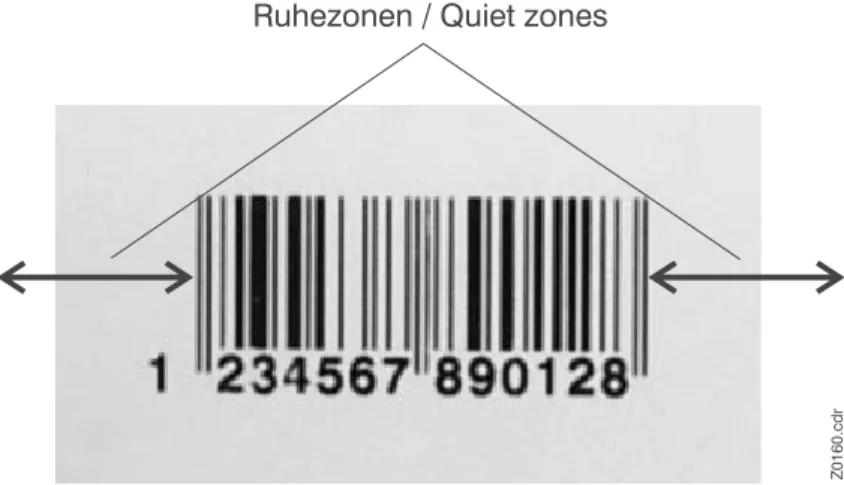
Quiet zones are bright, blank areas on the right and left side of the bar code (in reading direction). They are necessary for error-free reading.
Fig. 5: Quiet zones are important for error-free bar code reading.
Measures The following typical values apply to quiet zones:
•
Scanner with average depth-of-focus:10x the module width of one element, at least 2.5 mm.
•
Scanner with high depth-of-focus:15x the module width of one element, at least 6.5 mm. Ruhezonen / Quiet zones
3/08 Rev. 4.04-01 EASY PLUG MANUAL Bar Code Information All Devices
18
Further information sources
Bibliographical references
P You can find detailed information on bar codes in the following books, among others:
– Palmer, Roger C.: The Bar Code Book, Helmers Publishing Inc., Petersborough, 1989, ISBN 0-1911261-02-8
– Rosenbaum, Oliver: The Bar code Encyclopaedia (“Das Barcode-Lexikon”), bhv Verlags GmbH, Kaarst, 1997, ISBN 3-89360-948-2
Avery Dennison Barcode University
P For detailed Information about bar codes, further bibliographical references and Internet links, refer to the followint Internet page:
3/08 Rev. 4.04-01 EASY PLUG MANUAL Bar Code Information All Devices
19
Index
B Bar13 Bar codeInfo EAN 128 and 12813
C Codabar5 Code 1284 Code 2/5 Interleaved2 Code 393 Code 934 Composite Symbology11 D Data formats16 E EAN2 EAN 1285
EAN Data designator (DD) numbers14 Easy Plug bar code number13
European Article Numbering2
I ITF6 M MSI6 R Ratio2 RSS7 RSS Expand Stacked10 RSS Expanded9 RSS Limited9 RSS-148 RSS-14 Stacked8 RSS-14 Stacked Omnidirectional8 RSS-14 Truncated8 S Subsets,13 U
Universal Product Code5 UPC5