A Scalability Study for WebSphere
®
Application Server and
DB2
®
Universal Database
™
By Yongli An, Tsz Kin Tony Lau, and Peter Shum
DB2 Universal Database Performance & Advanced Technology
IBM Toronto Lab, IBM Canada
i
Abstract
A set of robust benchmark tests, designed to emulate an on- line brokerage firm, were conducted at IBM’s xSeriestm Teraplex Integration Center to measure the scalability characteristics of representative configurations as they grow to service more users and more transactions. Quest Software’s Benchmark Factory was used to simulate volumes of customers accessing trading services via web browsers. This benchmarking effort provides compelling evidence that IBM’s WebSphere and DB2 provide the scalability and integration required to deliver predictable scalability for demanding e-business workloads. The result from the configuration using WebSphere Edge Server’s sticky time highlights the near- linear scalability obtained as the environment scaled up. The result from this configuration shows that as the number of users and WebSphere nodes increased, the overall transactions per second also increased in a near linear fashion to handle 98,040 requests per minute from 12,800 concurrent users with more room to scale to even larger configurations. Test results demonstrated convincingly that WebSphere and DB2 running on IBM Intel-based servers deliver a scalable, cost effective solution with the predictability that is critical to manage growing e-business systems.
ii
Contents
CONTENTS ... II
1. INTRODUCTION...1
1.1 OVERVIEW... 1
1.2 PURPOSE... 1
1.2.1 Problem definition...1
1.2.2 Design statement ...1
1.3 INTENDED AUDIENCE... 1
2. CLUSTERING USING SESSION AFFINITY ...2
3. BENCHMARK CONFIGURATION ...3
3.1 SOFTWARE CONFIGURATION... 3
3.2 HARDWARE CONFIGURATION... 4
3.3 SUMMARY OF HARDWARE AND SOFTWARE SETUP... 5
4. APPLICATION AND TOOLS ...6
4.1 THE WEBSPHERE PERFORMANCE BE NCHMARK SAMPLE: TRADE2 APPLICATION... 6
4.2 BENCHMARK FACTORY... 7
5. MEASUREMENT METHODOLOGIES AND RESULTS ...7
5.1 CLUSTERING USING SESSION AFFINITY WITH ST ICKY TIME... 7
5.2 ANALYSIS... 8
6. CONCLUSION ...11
APPENDIX A – ALTERNATIVE SESSION AFFINITY...12
CLUSTERING USING WEBSPHERE HTTP PLUG-IN SESSION AFFINITY... 12
APPENDIX B - TUNING PARAMETERS ...14
B.1 IBM HTTP SERVER... 14
B.1.1 ThreadsPerChild...14
B.2 WEBSPHERE... 14
B.2.1 JVM heap size...14
B.2.2 Session manager - base memory size ...14
B.2.3 Servlet engine – max connections...14
B.2.4 DataSource - connection pool...14
B.3 DB2 UDB ... 15
B.3.1 Database manager configuration parameters...15
Page 1 of 17
1. Introduction
1.1 Overview
Performance and scalability are essential for your e-business systems. While your business is growing, you need more power on your e-business site to support more customers. This paper documents the technical aspects of a scalability study that demonstrate how IBM’s e-business software, WebSphere and DB2, running on IBM’s Intel-based servers, could provide such an infrastructure. The scalability study uses WebSphere Performance Benchmark Sample (the Trade2 application) with DB2 EE and a cluster of 8 WebSphere nodes (WebSphere Advanced Server 3.5) on Windows 2000 Advanced Server.
1.2 Purpose
1.2.1 Problem definition
Current performance reports on WebSphere Application Server concentrate on the performance characterization of WebSphere in a single-node environment, and performance analysis on scalability is limited to small sandbox environments. Scalability studies on a large enterprise system, which more closely resembles real- world customer situa tions, are significantly lacking.
1.2.2 Design statement
The objectives of the study were:
• Establish proof points for the predictable scalability of IBM’s WebSphere Application Server and DB2 UDB for e-business solutions.
• Demonstrate the viability of IBM’s Intel-based xSeries servers for scalable e-business solutions.
• Demonstrate the robustness, flexibility and versatility of Quest Software’s Benchmark Factory as a tool for measuring and capturing scalability characteristics to be used in capacity planning of web-based transaction environments
In order to achieve the objectives above, we designed and set up WebSphere Application Server in a large multi-node cluster with DB2 so that we could conduct a performance study of the scalability characteristics required of such an e-business infrastructure.
1.3 Intended audience
This paper is intended for any software engineers, performance analysts, application developers, or system administrators who are responsible for or interested in deploying or performance tuning production e-business solutions using IBM WebSphere Advanced
Page 2 of 17
Server with DB2 Universal Database.
2. Clustering using session affinity
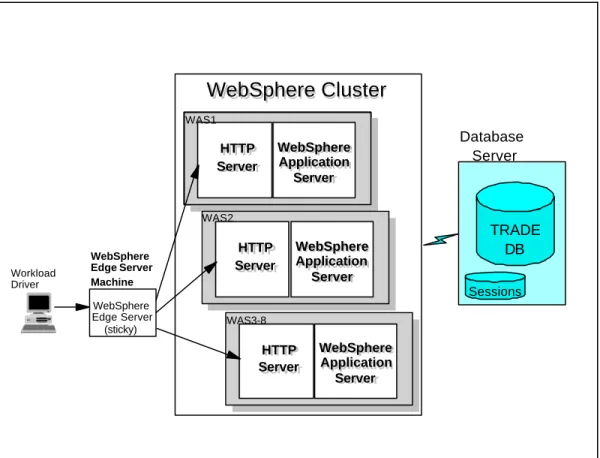
To achieve the goal of this scalability study, WebSphere Advanced Server is installed on multiple machines. The application is cloned among these WebSphere Advanced Servers. In this study, the session affinity feature was enabled by configuring the HTTP port to be sticky. Configuring the HTTP port to be sticky allows subsequent requests of the same client to be directed to the same server. This can be done by setting “port sticky time” to some number of seconds. An alternative topology, clustering using WebSphere HTTP plug- in session affinity on each WebSphere node, is described in Appendix A.
In the “sticky time” clustering topology (see Figure 1), WebSphere Edge Server is running on a single separate machine to provide load balancing across the whole WebSphere cluster (up to 8 WebSphere nodes). The affinity feature is enabled by configuring the HTTP port to be sticky. When this feature is enabled, WebSphere Edge Server will balance the requests based on the IP address of the requests from the outside world. In the benchmark environment, all requests simulated from the workload driver (Benchmark Factory in this study) use the IP address of the physical machine that they run on. The IP-based load balancing requires at least one Benchmark Factory client machine (IP address) per WebSphere server for testing the configuration.
Page 3 of 17 Workload Driver Database Server WebSphere Edge Server (sticky)
WebSphere Cluster
WebSphere Cluster
HTTP HTTP Server Server WebSphere WebSphere Application Application Server Server DENIM CANVAS OSE Remote HTTP HTTP Server Server WebSphere WebSphere Application Application Server Server DENIM OSE Remote HTTP HTTP Server Server WebSphere WebSphere Application Application Server Server DENIM HTTP HTTP Server Server WebSphere WebSphere Application Application Server Server HTTP HTTP Server Server WebSphere WebSphere Application Application Server Server WAS1 WAS2 WAS3-8 WebSphere Edge Server Machine TRADE DB SessionsFigure 1. Clustering using session affinity by setting sticky time in WebSphere edge server
3. Benchmark configuration
To effectively demonstrate the near- linear scalability of the integrated solution, it was necessary to assemble the software environment in a way that accurately reflects a typical scenario deployed by e-business customers. This section explains how the benchmarking software was deployed and how the hardware was assembled.
For more information about how we configured the environment, as well as information about other possible configurations you can use, see our related paper, “WebSphere and DB2 Scalability Study - Installation and Configuration Guide” at the following URL:
www7b.boulder.ibm.com/dmdd/library/techarticle/0202an/0202an2.pdf
3.1 Software configuration
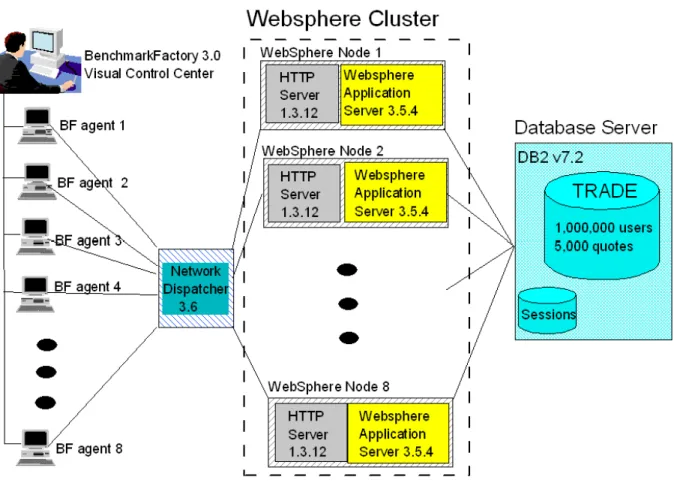
Figure 2 provides an overview of how the software components interacted to form the benchmark environment. Initially, an IBM internal workload generator is used for experiments. In the final performance measurements, Quest’s Benchmark Factory was used to simulate a more realistic workload. For each WebSphere Application Server, Benchmark Factory simulated 1600 users making requests with a think time of 7 seconds per request. IBM WebSphere Edge Server routed the requests to the WebSphere
Application Servers. WebSphere serviced the requests and interacted with the DB2 database that contained data for one million users.
Page 4 of 17
Figure 2. Software configuration
3.2 Hardware configuration
The IBM xSeries Teraplex Integration Center provided the hardware facilities necessary to simulate the complex environment present in e-business environments. Figure 3 depicts the hardware used and how the software was deployed on those systems. The tests utilized 17 of the xSeries Model x370 servers in the Teraplex. To maintain the greatest testing flexibility, the basic configuration was not modified for most of these servers. With the exception of the DB2 server, each machine had 4 Intel Pentium III Xeon 700 MHz CPUs and 4 gigabytes of RAM. The DB2 server was upgraded to 8 CPUs. As will be seen in the final results, most of these machines were quite underutilized. By maintaining a common configuration, the team was able to easily change the function of a particular machine to explore multiple configurations. The WebSphere Edge Server workload was minimal and it was run on one of the Benchmark Factory machines.
Page 5 of 17
Figure 3. Hardware configuration
3.3 Summary of hardware and software setup
The following table (Table 1) provides hardware and software configuration on each of the machines used for this study.
Table 1. Information summary for hardware and software setup
Tier Setup Information
Tier 4: Database Server (1 machine, D1)
Intel Xeon 8X700MHz
Windows 2000 Advanced Server DB2 UDB v7.2 FP 3
Tier 3: WebSphere Application Server, Web Server,
And Trade2 Application (8 machines, WAS1 – WAS8)
Intel Xeon 4X700MHz
Windows 2000 Advanced Server IBM HTTP Server 1.3.12.3 WebSphere Advanced Server 3.5.4 JDK (default )
DB2 UDB v7.2 FP3 (client only)
Tier 2: WebSphere Edge Server (1 machine, ND)
Intel Xeon 4X700MHz
Windows 2000 Advanced Server WebSphere Edge Server 2.0
Tier 1: Workload Driver
(N machines, Client1 – ClientN)
Intel Xeon 4X700MHz
Windows 2000 Advanced Server Workload Generator
Page 6 of 17
4. Application and tools
To demonstrate the predictable scalability that is required to support the dynamic conditions prevalent in e-business, the team chose to implement the Trade2 application from the WebSphere Performance Benchmark Sample. By simulating an online brokerage firm, Trade2 provides an ideal scenario for testing the scalability of both the WebSphere Application Server and the DB2 back end. Quest also provides a module for Benchmark Factory that facilitates the automation of the Trade2 clients.
4.1 The WebSphere performance benchmark sample: Trade2 Application
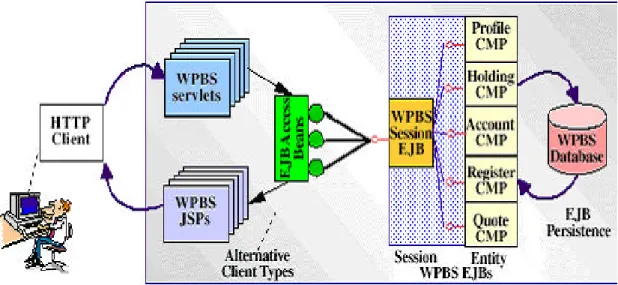
The WebSphere performance benchmark sample, a.k.a. Trade2, was originally built by the WebSphere performance team as a tool for testing the performance of the WebSphere Application Server. Derived from experiences with many customer environments, Trade2 is a collection of Javatm classes, Java Servlets, Java Server Pages and Enterprise Java Beans integrated into a single application. It is designed to emulate an online brokerage firm. Figure 4 shows the system topology in which the Trade2 application runs. Trade2 was developed using the VisualAge for Java and WebSphere Studio tools. Each of the components is written to open Web and Java Enterprise APIs, making the Trade2 application portable across J2EE-compliant application servers.
Figure 4. Trade2 topology
The Trade2 application allows a user, typically using a web browser, to perform the following actions:
• Register to create a user profile, user ID/password and initial account balance.
• Login to validate an already registered user.
• Browse current stock price for a ticker symbol.
• Purchase shares.
• Sell shares from holdings.
• Browse portfolio.
• Logout to terminate the user’s active interval.
Page 7 of 17
Each action is comprised of many primitive operations running within the context of a single HTTP request/response. For any given action there is exactly one transaction comprised of 2-5 remote method calls.
4.2 Benchmark factory
Quest Software’s Benchmark Factory is a load testing, capacity planning and performance tuning tool capable of simulating thousands of users accessing your system. Being a workload generator, it also produces performance reports and statistics for your tests. Its major use in this study is to generate a more realistic workload to drive our system under test.
5. Measurement methodologies and results
To accurately measure scalability, a baseline is first established using Benchmark Factory to determine the maximum number of clients and transactions per second that could be achieved using a single WebSphere Application Server. Based on previous benchmarks and feedback from customer test cases, an average think time of 7 seconds per transaction is used. Given this think time, the single node tests determine that the best throughput is achieved when simulating 1600 users with 400 HTTP threads and 20 database connections. Refer to Appendix B for a complete list of tuning parameters.
The baseline measurements are compared against results at 2, 4, 6, and 8 Websphere nodes. As additional WebSphere nodes are added, the 1600 users per node and 7 second think time are kept constant. This allows accurate measurement of the transactions per second as an indicator of overall system throughput. Along with measuring the transactions per second, CPU utilization on the Websphere nodes and DB2 server is recorded during the tests. The Trade2 application is run in EJB mode on each WebSphere node. The runs are repeated for cluster sizes of 1, 2, 4, 6, and 8 nodes.
The following sections present the performance and scalability results for the measurements.
5.1 Clustering using session affinity with sticky time
In this configuration, a WebSphere Edge Server is load-balancing the traffic generated by the Benchmark Factory to the WebSphere cluster by enabling session affinity function in WebSphere Edge Server. Enable session affinity by setting the sticky time to 7 seconds. This sticky port setting forces all requests from a particular user to the same WebSphere node, where the session information is always available. The result is shown in Table 2 and Figure 5 below.
Page 8 of 17
Table 2. Cluster performance with session affinity by setting sticky time in WebSphere edge server
Nodes 1 2 4 6 8
Requests per second 216 431 859 1275 1634
Avg. WAS % CPU 75% 80% 85% 85% 85%
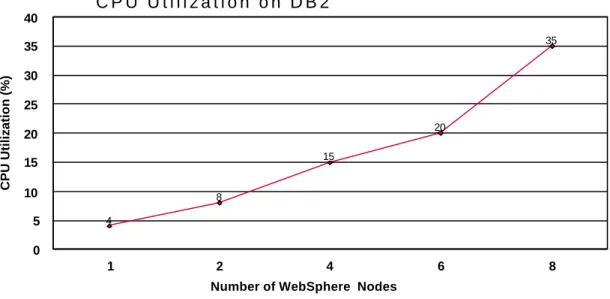
Avg. DB2 % CPU <10% <10% 15% 20% 35%
Scalability 2.00 3.98 5.90 7.56
The result shows that this configuration scales very well, almost linearly, from 2 nodes up to 8 nodes. The scaling factor is 5.90/6 and 7.56/8 for 6- node and 8-node clusters respectively. The following observations strongly suggest good scalability beyond 8 nodes:
• The CPU usage on the WebSphere node is almost steady, around 85%.
• The CPU usage on the DB2 is increasing.
• The degradation from linear scalability to sub- linear scalability is slow.
0 200 400 600 800 1000 1200 1400 1600 1800
1 2 4 6 8
Number of Websphere Nodes
Requests per second
Figure 5. Cluster performance using sticky time session affinity
5.2 Analysis
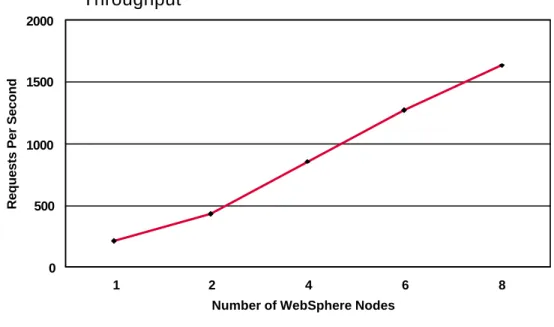
An excellent result is achived by clustering using session affinity by setting sticky time in WebSphere Edge Server. This configuration is capable of processing 98,040 requests per minute (1634 requests/second) using 8 WebSphere Application Server nodes, supporting 12,800 users with 7-second think time. It appears that creating a clustering environment by setting session affinity with sticky time in WebSphere Edge Server provides very good results for both scalability and performance (see Figure 6 and Figure 7). The reason is that, as the session information is already available in the WebSphere session cache, there are fewer database accesses to the session database, which is remote on the DB2 server. Without configuring the system in this manner, the performance may not scale as well as you add nodes to the cluster.
Page 9 of 17
1 2 4 6 8
Number of WebSphere Nodes 0
500 1000 1500 2000
Requests Per Second
Throughput
Figure 6. Cluster performance
1 2 4 6 8
Number of WebSphere Nodes 0
1 2 3 4 5 6 7 8
Scaling Factor
Scalability
Page 10 of 17 75
80
85 85 85
1 2 4 6 8
Number of WebSphere Nodes 60
70 80 90 100
CPU Utilization (%)
C P U U t i l i z a t i o n O n W e b S p h e r e N o d e s
Figure 8. CPU usage on WebSphere nodes
Figure 8 and Figure 9 show the CPU usage on WebSphere nodes and the DB2 node. When enabling session affinity (us ing sticky time), CPU resource is well utilized on WebSphere nodes in a big cluster as the contention on session database is reduced. Although the DB2 server is getting busier and busier while adding more WebSphere nodes, the remaining CPU resource on the DB2 server indicates that we still have room to scale up to more.
4
8
15
20
35
1 2 4 6 8
Number of WebSphere Nodes 0
5 10 15 20 25 30 35 40
CPU Utilization (%)
C P U U t i l i z a t i o n o n D B 2
Figure 9. CPU usage on DB2 node
It is also important to note that even though most of the systems used in the test were configured as 4-CPU servers with 4 gigabytes of memory, this was more a matter of convenience than necessity. The machines that drove Benchmark Factory ran at less than 10% CPU utilization.
Page 11 of 17
Figure shows how DB2 scales to support the increasing workload in this environment. As additional users and transactions were added, DB2 also demonstrated near-linear scalability when using WebSphere Edge Server’s sticky time.
At peak load, the tests showed no significant differences in overall system transactions per second when isolating the session on a separate DB2 server. This provides validation for the decision to use a single database server to support the data needs of the entire e-commerce scenario.
For more information about parameter settings for each part of the system, see Appendix B. Appendix B gives a list of tuning parameters for IBM HTTP Server, WebSphere, and DB2.
6. Conclusion
This benchmarking effort provides compelling evidence that IBM’s WebSphere and DB2 provide the scalability and integration required to deliver predictable scalability for demanding e-business workloads. The result from the configuration using WebSphere Edge Server’s sticky time highlights the near- linear scalability obtained as the environment scaled up. Running against a single WebSphere Application Server the configuration supported 1600 users driving 216 transactions per second. As additional WebSphere nodes were added, the number of users per WebSphere Application Server were scaled linearly to enable accurate comparisons of overall transactions per second. The result from this configuration shows that as the number of users and WebSphere nodes increased, the overall transactions per second also increased in a near linear fashion to handle 98,040 requests per minute from 12,800 concurrent users. Using WebSphere Edge Server provides very good load balancing when using the “sticky time” parameter. Finally, this benchmarking effort proves that building an e-infrastructure doesn’t have to be an exercise filled with uncertainty and doubt. Building on a hardware and software platform that can offer predictable levels of performance today and in the future will help alleviate many problems. The results of this scalability study provide compelling evidence that WebSphere and DB2 on IBM’s Intel-based servers delivers a highly scalable solution for building an infrastructure that will support demanding e-business workloads, with reliable predictability. Benchmark Factory delivers the ability to test a deployment under multiple stress factors to determine exactly what the scalability behavior will be in an e-business application.
Page 12 of 17
Appendix A – Alternative session affinity
Clustering using WebSphere HTTP plug-in session affinity
In this topology (see Figure 10), WebSphere Edge Server is running on a separate machine to provide initial load balancing or dispatching across the whole WebSphere cluster (up to 8 WebSphere nodes). No special settings are used in the Edge Server (sticky time is not set by default). Session affinity is achieved with the WebSphere HTTP plug- in configured for OSE remote. Remote OSE is a capability provided with WebSphere 3.5 Advanced Edition. This load balancing function uses the proprietary Open Servlet Engine (OSE) transport to route requests from the HTTP Server plug- in to application servers on remote machines.
Workload Driver WebSphere Edge Server
WebSphere Cluster
WebSphere Cluster
HTTP HTTP Server Server WebSphere WebSphere Application Application Server Server DENIM CANVAS OSE Remote HTTP HTTP Server Server WebSphere WebSphere Application Application Server Server DENIM OSE Remote HTTP HTTP Server Server WebSphere WebSphere Application Application Server Server DENIM OSE Remote HTTP HTTP Server Server WebSphere WebSphere Application Application Server Server OSE Remote HTTP HTTP Server Server WebSphere WebSphere Application Application Server Server OSE Remote WAS1 WAS2 WAS3-8 Database Server TRADE DB Sessions WebSphere Edge Server MachineFigure 10. Clustering using HTTP plug-in session affinity (OSE remote) on each WebSphere Application Server node
It should be noted that it is possible to remove the HTTP servers from the WebSphere cluster and put an HTTP server in place of the Edge Server. However, it is well known that Edge Server’s packet level routing is more efficient than HTTP routing. Also, the Edge Server provides extra features like dynamic load balancing and high availability support.
Page 13 of 17
In this configuration, a machine running WebSphere Edge Server is used to load-balance the traffic generated by the Benchmark Factory to the WebSphere cluster. However, the session affinity function in WebSphere Edge Server is disabled. The session affinity is working on each WebSphere node by setting up OSE remote in WebSphere HTTP plug-in. In this configuration, a servlet request that arrives at the HTTP server on each WebSphere node may be routed by this HTTP server to any of the other WebSphere nodes. For requests from a particular user, this HTTP plug- in will route all the requests to the same WebSphere node where the session information is available.
Page 14 of 17
Appendix B - Tuning parameters
We used the following tuning parameters.
B.1 IBM HTTP Server
B.1.1 ThreadsPerChild
This parameter sets the number of concurrent threads running at any given time in the HTTP server. This parameter was set to 400, in order to support 1600 HTTP users per WebSphere Application Server node. This parameter must be set appropriately to ensure that the client does not prematurely close the connection to WebSphere.
B.2 WebSphere
B.2.1 JVM heap size
Java -Xmx and -Xms are used to set the maximum and the starting heap size for the JVM in MB. In our case, both of the minimum heap size and maximum heap size were set to 512.
B.2.2 Session manager - base memory size
The base memory size setting specifies the number of sessions cached in memory. In our lab, the base memory size was set to 2500, increased from the default. Increasing the session cache will yield better performance because the application server will make calls to the session DB less frequently and will pull the session information from memory instead. The Java heap size must be tuned in accordance with the increased in-memory sessions because every extra in- memory session will share Java memory of the application server.
Some stress tools do not wait for a whole response to come back before issuing the next request, or some stress tools can be configured to drive concurrent requests for a given session. This will possibly result in concurrent requests to the same session. If one of the requests invalidates the session, there is chance for the other to get illegalstate session exceptions as per Servlet API. Applications must be designed to handle concurrent session access scenarios.
B.2.3 Servlet engine – max connections
The Max Connections parameter on the Servlet Engine specifies the number of connections to use for the communication channel between the Web server and the WebSphere engine. Each connection represents a request for a servlet. In our case, the number of connections was set to 150.
B.2.4 DataSource - connection pool
Connection pooling establishes a pool of connections that user servlets can use. Once a connection is established, it is reused repeatedly so subsequent user requests incur only a fraction of the cost of a connection. In our case, the maximum connection pool size for the Trade Database was set to 20 connections per node x 8 nodes = 160 connections.
Page 15 of 17
B.3 DB2 UDB
Three DB2 databases are used for different purposes.
• Administrative information repository: WAS database
IBM WebSphere Application Server has an administrative server that manages data about application configurations, application servers, and other resources known to the product. The administrative server keeps its data in an administrative database, which can be the same database in which applications keep their data, or a different database. The administrative database allows centralized administration – several administrative servers on various machines can share the data. In this study, a separate database, named WAS, is used for the WebSphere administrative purpose.
• Session information repository: SESSION database
IBM WebSphere Application Server has session support. Sessions can be tracked in memory, or in a database. In this study, a separate database, named SESSION, is used for storing session information.
• Trade2 application database: TRADE database
The TRADE database contains all the simulated trading information. Below is a list of tables contained in the TRADE database.
1. ACCOUNTBEANTBL
Contains customer account information, such as user id and balance. 2. HOLDINGBEANTBL
Contains customer holdings, such as stock symbol, price and quantity. 3. PROFILEBEANTBL
Contains customer details, such as full name, address, email and credit card information.
4. QUOTEBEANTBL
Contains stock information, such as stock symbol, more detailed description and its price.
5. REGISTRYBEANTBL
Contains customer registry information, such as status, password and account id.
6. TRADEKEYSBEANTBL
Contains information used to generate unique primary keys.
In this study, we populated the TRADE database with one million users and five thousands quotes (i.e. stocks).
The sections below list all the DB2 UDB tuning parameters changed for this study.
B.3.1 Database manager configuration parameters
• MAXAGENTS
The MAXAGENTS parameter specifies the maximum number of database manager agents. The value of MAXAGENTS should be larger than or equal to the sum of the values for maximum applications in each database that can be accessed concurrently. In
Page 16 of 17
our case, the MAXAGENTS was set to 500 as a convenient number to support 160 connections.
Page 17 of 17
B.3.2 Database configuration parameters
Trade Session WAS APPLHEAPSZ 256 256 256
LOGBUFSZ 256 256 256
BUFFPAGE 400000 100000 10000
MAXLOCKS 10 10 10
MAXAPPLS 256 256 128
LOGFILSIZ 5000 5000 (default)
The APPLHEAPSZ parameter specifies the number of memory blocks used by UDB to process application requests.
The LOGBUFSZ parameter specifies the size of the log buffer, which holds log records in memory until they are written to disk.
The BUFFPAGE parameter controls the size of buffer pools. If the buffer pools are large enough to keep the required data in memory, less disk activity will occur.
The MAXLOCKS parameter defines a percentage of the lock list held by an application. When the number of locks held by any one application reaches this percentage of the total lock list size, lock escalation will occur for the locks held by that application.
The MAXAPPLS parameter specifies the maximum number of concurrent applications that can be connected to a database.
The LOGFILSIZ parameter defines the size of each log file. The size of these log files limits the number of log records that can be written to them before they become full and a new log file is required.
About the authors
Yongli An, DB2 UDB Performance Engineer, IBM Certified Solutions Expert – DB2 UDB 7.1 Database Administration for UNIX, Windows and OS/2®. Yongli is experienced in TPC-C and WebSphere benchmarking. His current focus is DB2 performance for WebSphere Advanced Server and e-business applications.
Tony Lau is a DB2 Performance Engineer. He earned his Bachelor Degree of Applied Science in computer engineering from the University of Waterloo. His current focus is DB2 performance for WebSphere Advanced Server and e-business applications.
Peter Shum, DB2 e-business Performance Manager. Peter is responsible for DB2 performance for TPC-C, TPC-W, and WebSphere Advanced Server. Prior to doing performance work, he was in DB2 development responsible for the TP Monitor support and the Distribution Relatio nal Database Architecture.
Page 18 of 17
Notices, Trademarks, Service Marks and Disclaimers
This document contains proprietary information of IBM. It is provided under a license agreement and is protected by copyright law. The information contained in this publicatio n does not include any product warranties, and any statements provided in this document should not be interpreted as such.
The following terms are trademarks or registered trademarks of the IBM Corporation in the United States and/or other countries: IBM, DB2, DB2 UDB, DB2 Universal Database, OS/2, WebSphere, xSeries.
Intel and Intel-based trademarks and logos are trademarks or registered trademarks of Intel Corporation.
Windows and Windows-based trademarks and logos are trademarks or registered trademarks of Microsoft Corp.
Unix and Unix-based trademarks and logos are trademarks or registered trademarks of The Open Group.
Java and all Java-based trademarks and logos are trademarks or registered trademarks of Sun Microsystems, Inc. in the United States and other countries.
Other company, product or service names may be the trademarks or service marks of others.
The furnishing of this document does not imply giving license to any IBM patents.
References in this document to IBM products, Programs, or Services do not imply that IBM intends to make these available in all countries in which IBM operates.