Version 1.00
05-03-2002
Table of contents
1. DIFFERENT JAVA TECHNOLOGIES... 3
2. NOKIA 9200 COMMUNICATOR SERIES JAVA IMPLEMENTATION... 3
2.1 NOKIA 9200 SERIES COMMUNICATOR’S MIDP IMPLEMENTATION... 4
3. NOKIA 9210i COMMUNICATOR AND NOKIA 9290 COMMUNICATOR... 4
3.1 NOKIA 9210I COMMUNICATOR... 4
3.2 NOKIA 9290 COMMUNICATOR... 4
4. PERSONALJAVA APPLICATION DEVELOPMENT... 5
4.1 NOKIA 9200 COMMUNICATOR SERIES SDK FOR SYMBIAN PLATFORM... 5
5. NOKIA DEVELOPER’S SUITE FOR PJAE... 5
6. HOW TO DEVELOP JAVA APPLICATION FOR NOKIA 9200 COMMUNICATOR SERIES ... 6
7. FORUM NOKIA DEVELOPER SERVICES... 6
8. LIST OF TERMS AND ABBREVIATIONS ... 7
Disclaimer:
Nokia Corporation disclaims all liability, including liability for infringement of any proprietary rights, relating to the implementation of information presented in this document. Nokia Corporation does not warrant or represent that such use will not infringe such rights.
Nokia Corporation retains the right to make changes to this specification at any time without notice.
License:
A license is hereby granted to download and print a copy of this specification for personal use only. No other license to any other intellectual property rights is granted herein.
1. DIFFERENT JAVA TECHNOLOGIES
The term ‘JavaTM’ applies to two related but distinct concepts: a programming language and a
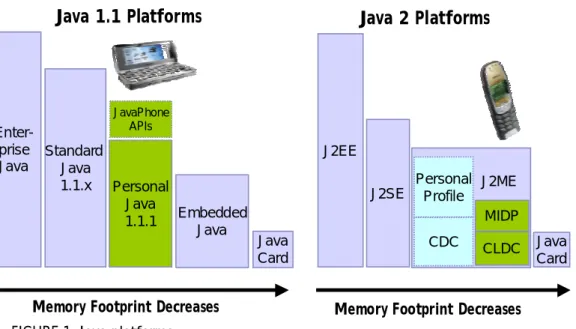
runtime environment in which programs written in the Java language can be executed. Java is available in several different forms and versions. ( Figure 1. below)
FIGURE 1. Java platforms.
The green boxes (Figure 1, above) demonstrate Java platforms currently supported in Nokia devices. The Nokia 9200 Communicator Series supports PersonalJavaTM 1.1.1 with JavaPhoneTM API
support, and the Nokia 6310i supports the J2ME/MIDP platform.
2. NOKIA 9200 COMMUNICATOR SERIES JAVA IMPLEMENTATION
Java implementation in the Nokia 9200 Communicator Series includes the PersonalJava Application Environment v.1.1.1 and JavaPhone 1.0 APIs. The Nokia 9210 Communicator is Nokia’s first Java-capable phone. The new Nokia 9290 and 9210i Communicator versions offer the same Java implementation, allowing the same developer tools to be used.
In writing Java code for the Nokia 9200 Communicator Series, customization is only required for the "look and feel" of the Symbian OS. The implementation for PersonalJava is similar to a standard Java implementation, with additional APIs for the Nokia 9200 UI. For example, there are APIs for handling the Nokia 9200 Communicator Series’ command buttons. Currently, the Nokia 9210 Communicator's web browser does not support applets, however an appletviewer
J2EE J2SE Java Card Java Card Embedded Java Personal Java 1.1.1 Enter-prise Java
Java 1.1 Platforms
Java 2 Platforms
Memory Footprint Decreases Memory Footprint Decreases
Personal Profile CDC MIDP CLDC J2ME Standard Java 1.1.x JavaPhone APIs
• Addressbook API
• Calendar API
• Network Datagram API
• Power Monitor API
• User Profile API
Example applications using JavaPhone APIs are included in the Nokia 9200 Communicator Series SDK for the Symbian Platform.
2.1 Nokia 9200 Series Communicator’s MIDP Implementation
Developers can also download the MIDP Software for Nokia 9210/9290 Communicators from Forum Nokia web site. This software provides an environment for J2ME/MIDP applications, i.e. MIDlets to run. Forum Nokia does not offer technical support for this software, providing it for testing purposes only and on "as is" basis.
3. NOKIA 9210i COMMUNICATOR AND NOKIA 9290 COMMUNICATOR 3.1 Nokia 9210i Communicator
The Nokia 9210i Communicator provides email, Internet, video, Sheet, Word Processor, fax and phone and a big, full color display.
Compared to Nokia 9210 Communicator, the new Nokia 9210i Communicator has a faster
internal memory and improved web-browser supporting JavaScript. It supports video and audio
streaming, allowing video and audio content to play faster and while loading.
Nokia 9210i Communicator offers mobile multimedia including: video and audio streaming, Macromedia Flash support (animation etc) and a full-color screen.
Because the internal memory is faster and larger, usability is improved. And with PersonalJava files now in the faster memory, the Java application loading/starting times are reduced noticeably. For downloading Web pages and receiving email, The Nokia 9210i Communicator works at speed up to 43.2 kbps and offers users a great web browsing experience.
3.2 Nokia 9290 Communicator
The Nokia 9290 Communicator is a fully integrated mobile terminal combining phone, fax, e-mail, calendar and imaging functionality. Internet access is possible via both a WAP (Wireless Application Protocol) and a HTML-based WWW browser supporting frames. Additionally, word processing and spreadsheet applications offering support for many of the most used PC applications--including viewing and editing of Microsoft Word and Excel documents and a PowerPoint viewer--are built in to the Nokia 9290 Communicator. Included SyncML support allows for seamless synchronization of contact, calendar and to-do information across SyncML enabled PC's, PDA's, mobile phones and other devices.
4. PERSONALJAVA APPLICATION DEVELOPMENT
4.1 Nokia 9200 Communicator Series SDK for Symbian Platform
Developers can order the SDK from Forum Nokia web site: www.forum.nokia.com
The SDK includes:
• Emulator
• Documentation, examples and tools for development
• Support for native method development using JNI
The SDK does not include:
• Java compiler (no JDK 1.1.8 included, just JRE 1.2.2!)
• IDE
Free JDK 1.1.8 +pJava compatibility classes are available via download from Sun. Also note, that the Nokia 9200 Communicator Series C++ SDK and MS Visual C++ 6 is needed for JNI development.
Whole application development can be accomplished by using the application development tools included in the SDK-- from writing and testing code, to creating and installing the package. Additionally, Nokia offers more sophisticated tools for this purpose that can be integrated to JBuilder 5 and Sun Forte for Java 3 IDEs.
5. NOKIA DEVELOPER’S SUITE FOR PJAE
Nokia Developer’s Suite (NDS) for PJAE integrates Borland JBuilder 5 and the Nokia 9200 Communicator Series SDK for Symbian OS. It features services and tools designed for mobile application developers to create and install next generation applications to the Nokia 9200 Communicator Series.
time emulation, and final installation of the application to the target device. This free toolkit, “Nokia Developer’s Suite for PJAE,” is available at Forum Nokia web site.
6. HOW TO DEVELOP JAVA APPLICATION FOR NOKIA 9200 COMMUNICATOR SERIES
STEP 1. Order the Nokia 9200 Communicator Series SDK from Forum Nokia web site,
www.forum.nokia.com, and install it.
STEP 2. Download the JDK1.1.8 from Sun’s JavaTM web site http://java.sun.com.
STEP 3. Download IDE like JBuilder5 or Sun’s Forte for Java 3.
STEP 4. Download Nokia Developer’s Suite for PJAE from Forum Nokia web site.
Completing Steps 1-4 provides all the tools necessary for PersonalJava application development. Install the SDK, JDK, Java IDE and the NDS for PJAE. Download detailed documents about writing PersonalJava applications with these tools from Forum Nokia web site.
STEP 5. Write your code.
STEP 6. Configure the emulator settings from the NDS for PJAE menus and run your application in the emulator (see the FIGURE 2.).
STEP 7. Make the needed configurations according to the SDK and Forum Nokia documentation and create an installation package for your application.
STEP 8. Install your application in the target device.
7. FORUM NOKIA DEVELOPER SERVICES
Forum Nokia is dedicated web site to developers. You can find there all the tools and resources needed to develop and market applications using technologies supported by Nokia. Registration is free of charge.
• Download documents, toolkits, SDKs
• Discuss technical issues with other developers and Nokia experts
• Test your application by using Nokia OK program
8. LIST OF TERMS AND ABBREVIATIONS
Term or abbreviation Description
API Application Programming Interface
Applet Applets are Java programs that require a browser or appletviewer to
run. The <applet> tag is embedded in a Web page and names the program to be run.
CDC Connected Device Configuration
CLDC Connected Limited Device Configuration
IDE Integrated Development Environment
J2ME Java 2 Micro Edition
Java The term ‘Java’ applies to two related but distinct concepts: it
describes a programming language and a runtime environment in which programs written in the Java language can be executed.
JNI Java Native Interface
MIDP Mobile Information Device Profile
MMC MultiMediaCard
PersonalJavaTM The PersonalJavaTM addresses the software needs of networked
applications running on personal consumer devices such as set-top boxes and smart phones rather than desktop computers.
PJAE PersonalJava Application Environment